What is PWM, Why is it Important, and Why Did We Add This Test to Our Reviews?
 Published: July 2015
Updated: November 2024
Perhaps you’ve noticed that the LaptopMedia team has started testing every laptop for Pulse-Width Modulation. PWM is used to regulate the brightness of LCD and LED displays. How does that concern us?
The pulsations can be bad for your health and more specifically for the users’ eyesight. They can lead to migraines, headaches, or other forms of discomfort after long-term usage. In many cases, those pulsations have a frequency somewhere around 240Hz. They cause multiple contractions and expansions of the pupils, which bears down negatively on your health. They are especially harmful in models with LED backlight because the colors of the emitted light are not as inert as the colors of the CCFL backlight and so they reach high amplitudes and rapid luminance changes.
Basically, the problem comes from the flickering of the light rather than from the crystals in LCD monitors.
➡️ Top Laptop PWM Ranking (Rated by negative impact on eyesight) ⬅️
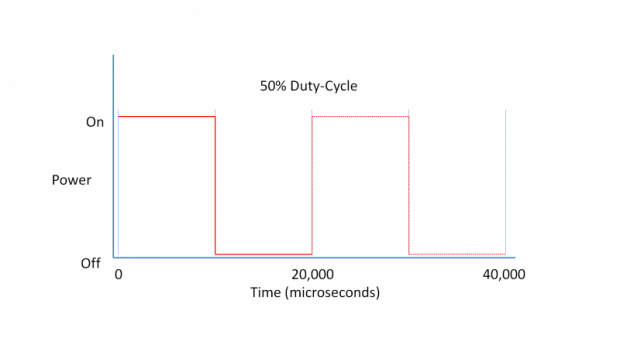
Pulse Width Modulation (PWM) is an easy way to control monitor brightness. When you lower the brightness, the light intensity of the backlight is not lowered, but instead turned off and on by the electronics with a frequency indistinguishable by the human eye. In these light impulses, the light/no-light time ratio varies, while brightness remains unchanged, which is harmful to your eyes.
If there is PWM, it is better to have a high frequency of around 20,000 times per second instead of, say, 200. This is noticeable at different brightness reduction levels for different monitors. It is noticeable to a higher degree in LED than in CCFL backlights due to the former’s lower afterglow and higher nominal diode brightness.
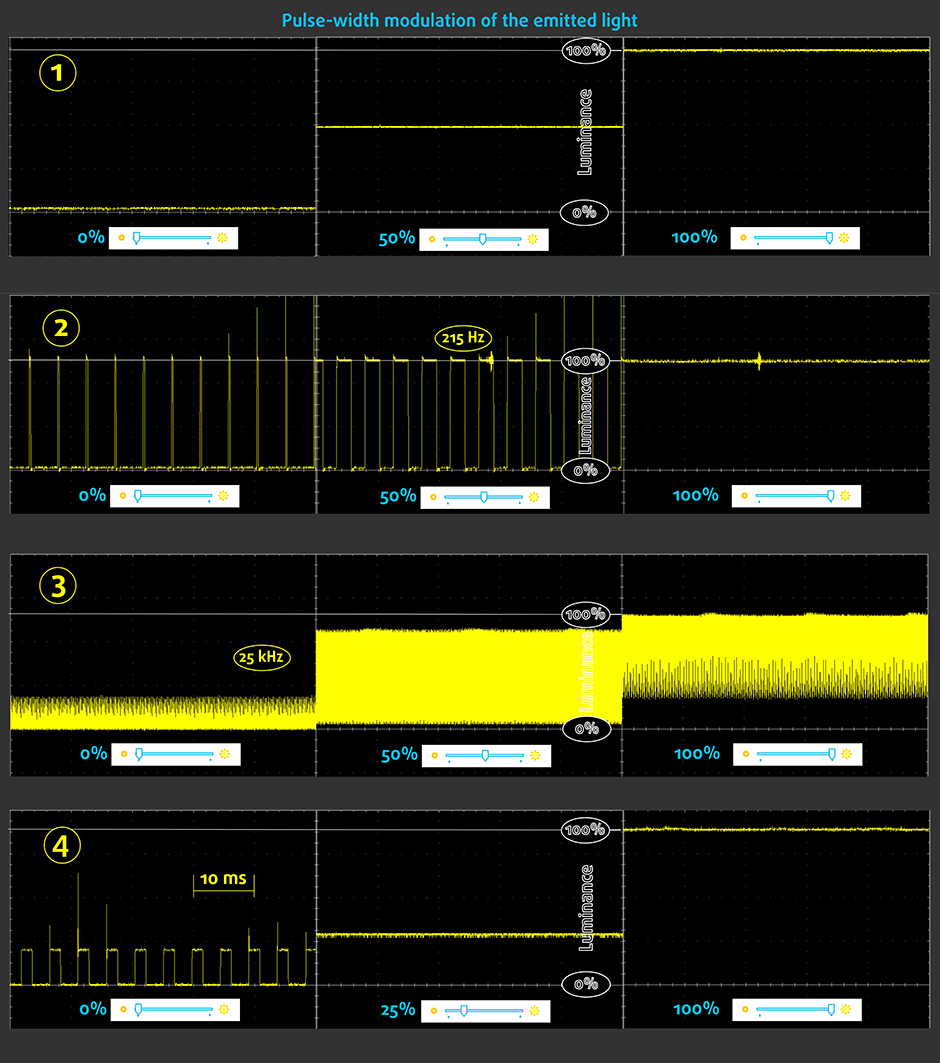
Below are the waveforms of 4 displays.
1️⃣ The first one doesn’t emit pulse-width modulation, which provides the option to work for extended periods of time.
2️⃣ The second is a classic PWM. Its aggressive pulsations at a low frequency put extra pressure on the eyes and brain.
3️⃣ The third also emits PWM, but it has an extremely high frequency, which is considered to be less harmful.
4️⃣ The fourth one doesn’t flicker unless the brightness is <25%, so it is eye-friendly in practically every normal usage mode.
✅ OUR SOLUTION
 To minimize the harmful effects of devices we’ve brought into our homes and can’t part with. While we might not stop using them, our lab has enabled us to deeply investigate and develop a suitable solution for our users.
From now on, every notebook entering LaptopMedia’s lab will receive a custom package of three profiles: “Design and Office”, “Gaming and Movies,” and “Health-Guard.” These profiles will be sold digitally at a nominal price. By purchasing these profiles, users obtain a valuable product and support the growth and expansion of our lab, where we conduct specialized research.
Each profile is tailored for each display model.
For PWM-controlled backlights, the profile lets you dim the brightness, ‘closing’ the pixels through a special PWM-Free slider, avoiding PWM. You can also use this slider to dim your screen further in case the brightness of your display is too high, even when you’ve lowered the Windows slider to the minimum.
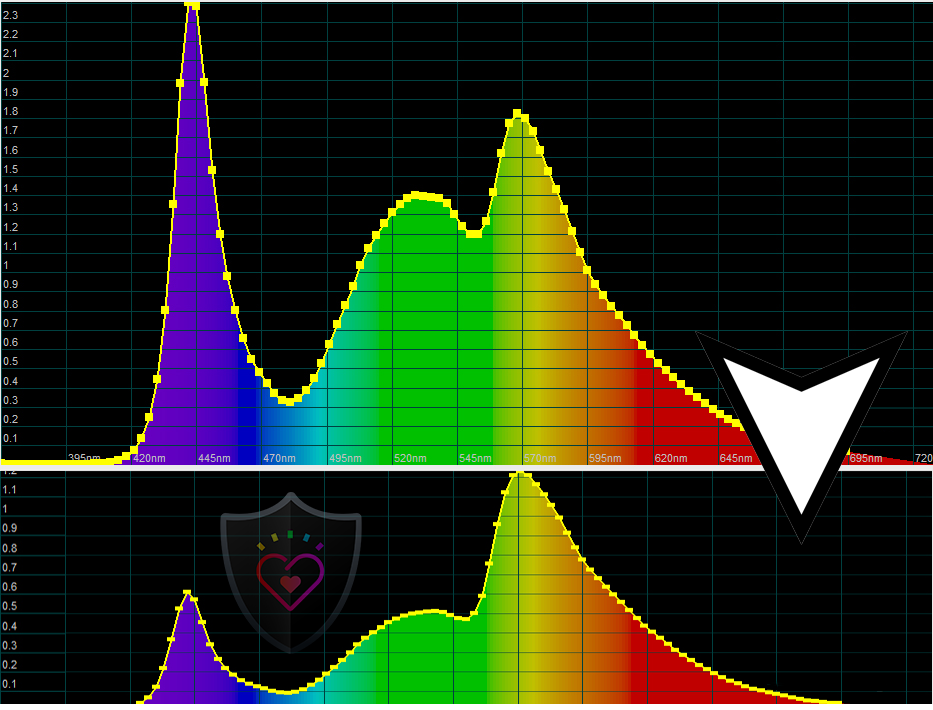
But the “Health-Guard” profile offers more than just reduced brightness. The Health-Guard profile reduces the white temperature to around 5750-6000 K, while maintaining perceptually accurate colors, and adequate contrast.
Color accuracy is a priority – whites stay white, blues stay blue, etc., avoiding eye-straining reddish tints.
All these features distinguish the “Health-Guard” profile from free “color warming” alternatives.
Here is a comparison of two spectral diagrams from a modern notebook display emitting ‘white’ light. The first one is without a profile, while the second represents the “Health-Guard” profile.
How to Buy?
For every laptop that visits our lab, we create display profiles, which can be found in our detailed reviews. We also have a LaptopMedia Profiles Supported Laptops List page, where you can find all the machines for which we have created profiles over the years.
You could also place an order here but don’t forget to tell us an e-mail with your exact panel model. Scroll down to see where to find it.
Oltre a ricevere profili efficienti e salutari, acquistando i prodotti di LaptopMedia sosterrai anche lo sviluppo dei nostri laboratori, dove testiamo i dispositivi per produrre le recensioni più oggettive possibili.

Design e Ufficio
Il profilo Design and Office rende i colori del display il più possibile vicini alla realtà.Ideale non solo per i professionisti ma anche per gli utenti di tutti i giorni, soddisfa gli standard sRGB (punto di bianco D65, gamma sRGB) con un DeltaE minimo per una riproduzione precisa dei colori sul tuo pannello.

Gaming e Film
Hai mai guardato un film in cui, durante le scene buie, non si vede quasi nulla? Molti display non riescono a distinguere correttamente i toni scuri. Il nostro profilo Gaming and Movies migliora le prestazioni in condizioni di scarsa illuminazione, come la tecnologia HDR, utilizzando una curva gamma adattata alla percezione umana — ideale per i giocatori che cercano reazioni più veloci e immagini più nitide.

Health-Guard
Il nostro profilo Health-Guard protegge i tuoi occhi eliminando lo sfarfallio PWM, riducendo affaticamento e stanchezza e minimizzando l'esposizione dannosa alla luce blu che può disturbare sonno e salute. Utilizza un dimming software e una curva gamma adattata alla percezione umana per comfort e sicurezza durante l'uso dello schermo.
Ottieni Tutti i Profili con il 33% di Sconto!

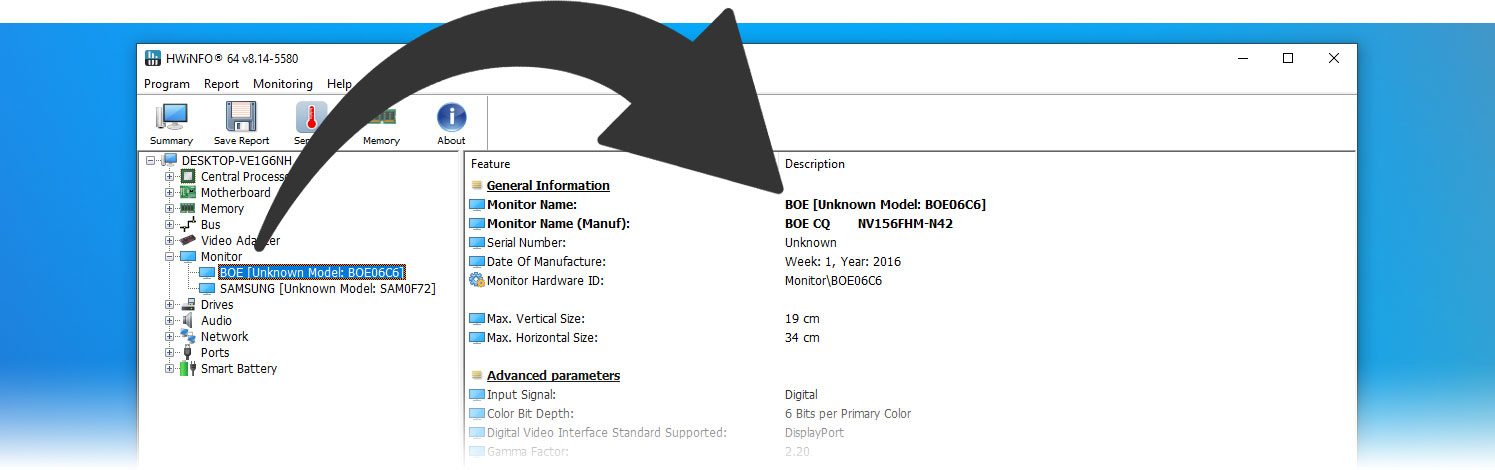
Where to find my exact panel model?
One of the best ways to do that is with an app like HWINFO – it’s free, and its portable version doesn’t need installation:
Installation and Usage
For easy use and switching between profiles, we developed the LM Profiles 3.0 app. Just download it, then drag and drop the profiles onto the application. That’s it!
You can now effortlessly switch between modes and take advantage of the PWM-free brightness slider when the “Health-Guard” profile is activated (to ensure that PWM is eliminated, make sure the Windows brightness slider is set to maximum).
Have Questions?
Feel free to reach out to us through our Contact Us page.
 Author: Simeon NikolovEditor-in-Chief at LaptopMedia.com with 20+ years of experience in testing and analyzing laptops and mobile devices.
 Author: eng. Kroum NikolovHead of Engineering at LaptopMedia.com, inventor and innovator with 40+ years of experience in electronics and high technology.

![[Giugno 2026] Le marche di laptop più vendute su Amazon Global – Il dominio incontrastato di Apple in termini di unità vendute e fatturato](https://laptopmedia.com/wp-content/uploads/2026/07/GLOBAL-Best-Brands-400x225.jpg)
![[Giugno 2026] Amazon Global: i 10 laptop più venduti – Il nuovo MacBook Neo di Apple conquista il primo posto, rivoluzionando il mercato grazie al suo prezzo accessibile](https://laptopmedia.com/wp-content/uploads/2026/07/Best-Selling-Laptops-GLOBAL-Top-10-400x225.jpg)
![[Giugno 2026] Amazon Global: i 10 laptop da gaming più venduti – Il Nitro V 16S AI di Acer domina le vendite, mentre ASUS è in testa per fatturato complessivo](https://laptopmedia.com/wp-content/uploads/2026/07/Best-Selling-Gaming-Laptops-GLOBAL-Top-10-400x225.jpg)
![[Giugno 2026] Classifica globale delle GPU per laptop più vendute su Amazon – La NVIDIA RTX 5060 è la GPU dedicata più venduta](https://laptopmedia.com/wp-content/uploads/2026/07/Best-Selling-GPUs-GLOBAL-Top-10-400x225.jpg)
![[Giugno 2026] Classifica globale delle CPU per laptop più vendute su Amazon: l’Apple M5 domina, mentre l’AMD Ryzen 7 260 conquista una quota significativa nel segmento premium](https://laptopmedia.com/wp-content/uploads/2026/07/Best-Selling-CPUs-GLOBAL-Top-10-400x225.jpg)

[…] As you’ll probably be spending a lot of time on these two machines knowing that they’re PWM-free is good to know. PWM or Flickering is a known way for screens to adjust their brightness, however, it comes at the cost of tiring your eyes and causing headaches. You can learn more about PWM in our dedicated article. […]
Please proceed with caution. I was defrauded by this company on two separate occasions. Fortunately, I received assistance from a recovery service recommended by a trusted friend who had also incurred substantial financial losses from the same scam. After reaching out to the firm, they clearly outlined the required documentation and provided guidance on how to identify fraudulent organizations. By following their instructions, I was able to recover my funds totaling $493,730 within two days. I am extremely relieved and appreciative of the outcome. I had intended to share the company’s website here; however, they chose not to make it… Leggi di più »