Intel Core 5 320 vs Core 7 350 — Is the Upgrade Worth It?
 On paper, the Core 7 350 sounds like a class above the Core 5 320. In reality, the two are close relatives. Both belong to Intel’s new Wildcat Lake family for affordable laptops, and they share the same cores, cache, graphics and power ratings.
We tested both processors in laptops we bought ourselves. So instead of comparing spec sheets, we can show how much faster the Core 7 350 really is, how much of that comes from the processor itself, and what it means in everyday use.
➡️ To the full Top Laptop CPU Ranking ⬅️
Table of Contents
Specs Comparison
| Core 5 320 | Core 7 350 | |
|---|---|---|
| Cores / threads | 2 P-cores + 4 LP E-cores / 6 | 2 P-cores + 4 LP E-cores / 6 |
| P-core max turbo | 4.6 GHz | 4.8 GHz |
| LP E-core max turbo | 3.4 GHz | 3.6 GHz |
| Cache | 6 MB | 6 MB |
| Base / max turbo power | 15 W / 35 W | 15 W / 35 W |
| Graphics | Intel Graphics, 2 Xe3 cores, up to 2.5 GHz | Intel Graphics, 2 Xe3 cores, up to 2.6 GHz |
| NPU | 16 TOPS | 17 TOPS |
| Memory | 1 channel, up to LPDDR5X-7467 or DDR5-6400 | 1 channel, up to LPDDR5X-7467 or DDR5-6400 |
| Manufacturing process | Intel 18A | Intel 18A |
The Core 7 350’s P-cores boost 200 MHz higher (about 4%), its E-cores 200 MHz higher (about 6%), and its integrated GPU 100 MHz higher (4%). That’s the whole difference. The name suggests a bigger step than the silicon does.
Both chips also support only one memory channel. That makes the memory a laptop maker chooses especially important, because the integrated GPU depends on it.
Our benchmark tests
The Core 5 320 went through our lab twice, in the HP OmniBook 3 (16-bu0000) (detailed review) and the HP OmniBook 3 (17-dg0000) (detailed review). We tested the Core 7 350 in the ASUS Vivobook S16 (S5652) (detailed review):
| Test | Core 5 320 (OmniBook 3 16) | Core 5 320 (OmniBook 3 17) | Core 7 350 (Vivobook S16) | Core 7 350 advantage |
|---|---|---|---|---|
| Geekbench 6 Single-Core | 2,467 | 2,527 | 2,588 | +2–5% |
| Geekbench 6 Multi-Core | 7,084 | 7,219 | 8,009 | +11–13% |
| Cinebench 2024 Multi-Core | 381 | 392 | 468 | +19–23% |
| 3DMark Time Spy (Graphics) | 1,376 | 1,386 | 1,506 | +9% |
| 3DMark Wild Life Extreme | 2,556 | 2,584 | 2,767 | +7–8% |
Based on clock speeds alone, you would expect a gap of 4–6%. Single-core performance fits that. The multi-core and graphics results don’t, so something else is at work.
How much of the gap is the processor? Our stress tests show where the rest comes from:
- Short bursts: in the first 10 seconds of full load, both laptops used a similar amount of power, 25 W in the OmniBook 3 17 and 26 W in the Vivobook. At that point, the Core 5 320’s P-cores averaged 4.18 GHz and the Core 7 350’s 4.45 GHz, 6.5% more. This is mostly the processor’s own advantage.
- Long loads: during our 30-minute test, the OmniBook 3 17 settled at 18 W and averaged about 3.5 GHz on its P-cores. The Vivobook S16 kept its CPU at 29 W and about 4.6 GHz. Most of the 19–23% lead in Cinebench comes from this difference in power, not from the processor.
- Graphics: the Core 7 350’s GPU clocks 4% higher, but the memory is different too. Both OmniBooks use a single DDR5-5600 module, while the Vivobook S16 uses faster LPDDR5X-6400. With only one memory channel, that difference shows up in the graphics results.
The same processor can also perform differently in two laptops. The OmniBook 3 17 was 2–3% faster than the OmniBook 3 16 in our CPU tests, although both use the Core 5 320.
In short, the Core 7 350 itself is about 5% faster. Anything beyond that depends on the laptop’s power limits, cooling and memory.
Gaming Tests
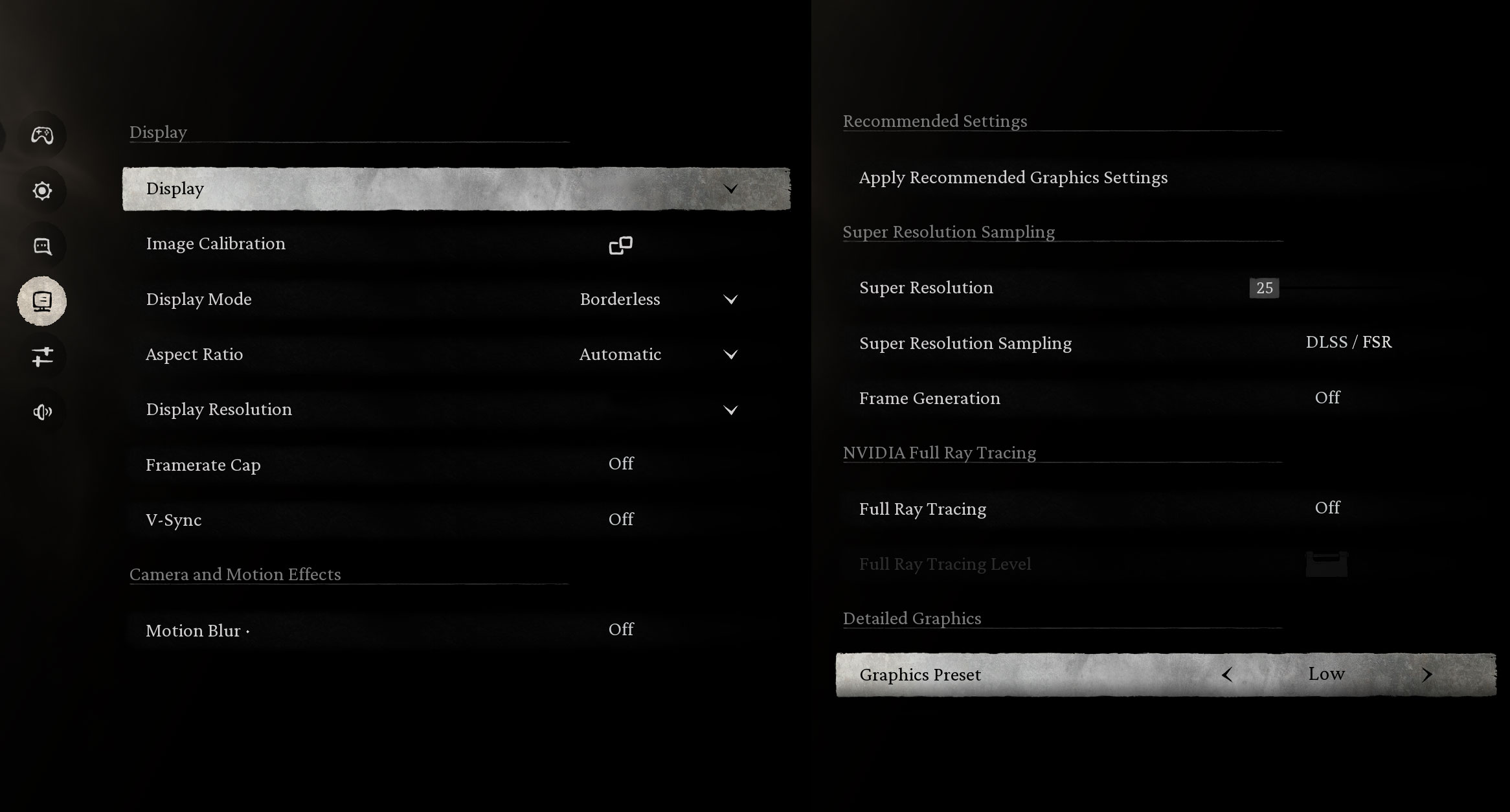
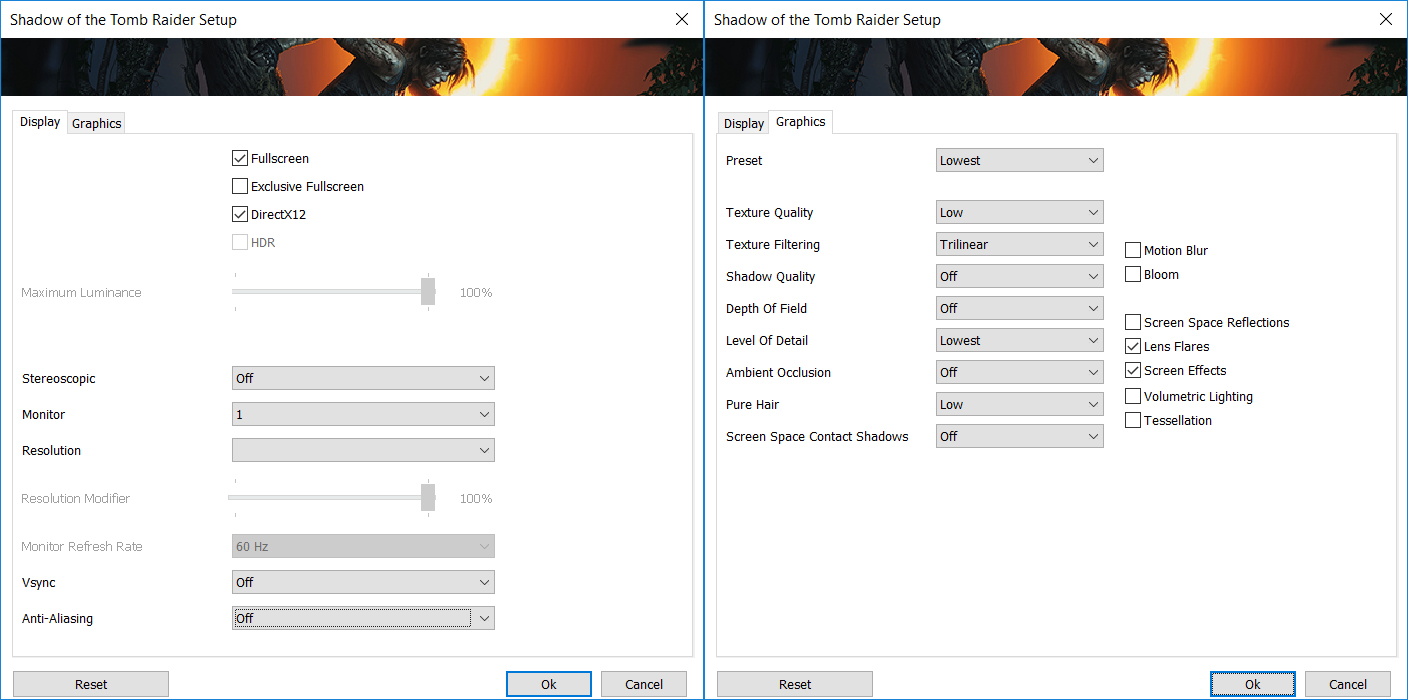
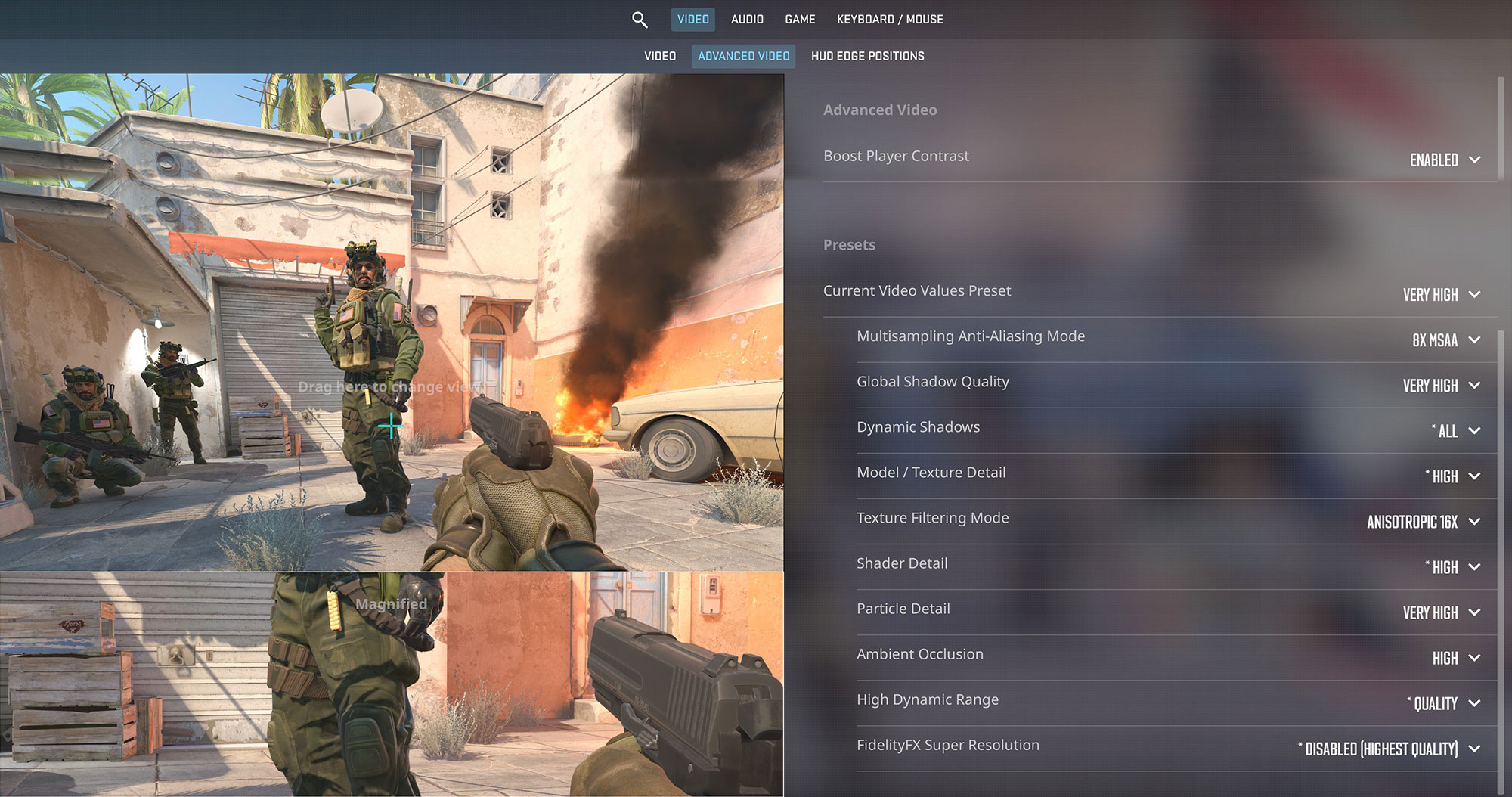
Both processors use the same small Xe3 GPU with 2 Xe-cores, so they are meant for older and lighter games at low settings. We tested one game on both laptops:
| Game and settings | Core 5 320 (OmniBook 3 16) | Core 7 350 (Vivobook S16) |
|---|---|---|
| Black Myth: Wukong, 1200p Low (Check settings) | 23 FPS | 26 FPS |
| Shadow of the Tomb Raider, 1200p Lowest (Check settings) | 35 FPS | – |
| Counter-Strike 2, 1200p Very High (Check settings) | – | 24 FPS |
In Black Myth: Wukong, the Core 7 350 laptop was 3 FPS faster, but neither result is smooth. In practice, both chips handle the same games at the same settings.
What the difference means in real tasks
Here’s how our results translate into everyday use:
- Web browsing, office work, opening apps: these mostly depend on single-core performance, where the gap is 2–5%. You won’t notice it.
- Exporting photos, compressing files, compiling code: in shorter multi-core tasks like these, the Vivobook S16 was 11–13% faster. A 60-second photo export would take about 53–54 seconds, but only part of that gain comes from the processor.
- Long video exports and 3D rendering: here the gap grows to 19–23%, so a 10-minute render would take about 8 minutes. But that is mainly because the Vivobook runs its CPU at 29 W instead of 18 W.
- Light gaming: 7–9% more performance in 3DMark is too little to change what you can play, as our gaming tests show.
- AI features: the NPU is rated at 16 TOPS in the Core 5 320 and 17 TOPS in the Core 7 350. Neither chip qualifies for Copilot+ PC features, which need 40 TOPS.
- Battery life: this depends on the laptop more than on the processor. In our video playback test, the OmniBook 3 16 lasted 13 hours and 23 minutes on a 41 Wh battery, while the Vivobook S16 lasted 10 hours and 2 minutes on a 52.5 Wh battery.
Is the upgrade worth it?
Not on its own. The Core 7 350 isn’t a class above the Core 5 320. It’s the same chip with 4–6% higher clocks, and that is roughly the difference you get from the processor itself.
- Pay extra for the Core 7 350 only if the difference is small, or if that configuration also brings something you need, such as more RAM, a bigger SSD or a better display.
- Look at the laptop first. Power limits, cooling and memory speed changed our results more than the choice between these two processors.
- If you need much more performance, look one class higher. The Ryzen AI 7 350 in the Acer Swift Air 16 (SFA16-61M) (detailed review) was 41% faster than the Core 7 350 in Geekbench 6 Multi-Core and 43% faster in Cinebench 2024. Its name is almost the same, but it’s a very different class of chip.
Laptops with the Core 5 320


Laptops with the Core 7 350


➡️ To the full Top Laptop CPU Ranking ⬅️
 Author: Simeon NikolovEditor-in-Chief at LaptopMedia.com with 20+ years of experience in testing and analyzing laptops and mobile devices.





Given that cooling and power settings can have a bigger impact on performance than the processor model itself, could a well-cooled laptop with a Core 5 320 be faster than one with a Core 7 350? And shouldn’t manufacturers report actual sustained performance over time?
Show original
След като охлаждането и настройките на мощността могат да окажат по-голямо влияние върху производителността от самия модел процесор. Възможно ли е добре охладен лаптоп с Core 5 320 да се окаже по-бърз от лаптоп с Core 7 350? И не трябва ли производителите да посочват реалната продължителна производителност като време ?
Yes, that’s possible, and the comparison shows why. The Core 7 350 itself is about 5% faster. But under a 30-minute load, the OmniBook 3 17 with a Core 5 320 kept the processor at 18 W, while the Vivobook S16 with a Core 7 350 ran it at 29 W. That accounts for most of the 19–23% difference in Cinebench. If a laptop with a Core 5 320 sustains 29 W while another with a Core 7 350 sustains only 18 W, the Core 5 320 will almost certainly be faster in long tasks like rendering and video export. We haven’t tested a laptop like that, so this is an estimate, not a measurement.
You’re right about manufacturers. Intel only sets the limits: 15 W base power and up to 35 W maximum power. The laptop maker decides exactly how much power the processor gets and for how long, but rarely specifies this. That’s why our reviews include a stress test where we measure power draw and clock speeds at the start and after 30 minutes of load.
Show original
Да, възможно е, и сравнението показва защо. Самият Core 7 350 е около 5% по-бърз. При 30-минутно натоварване обаче OmniBook 3 17 с Core 5 320 държеше процесора на 18 W, а Vivobook S16 с Core 7 350 на 29 W. Оттам идва по-голямата част от разликата от 19–23% в Cinebench. Ако лаптоп с Core 5 320 държи 29 W, а друг с Core 7 350 само 18 W, при дълги задачи като рендериране и експорт на видео почти сигурно по-бърз ще е Core 5 320. Такъв лаптоп не сме тествали, така че това е сметка, а не измерване.
За производителите си прав. Intel дава само рамката: 15 W базова и до 35 W максимална мощност. Колко точно ще получи процесорът и за колко време, решава производителят на лаптопа, а той рядко го пише. Затова в ревютата ни има стрес тест, в който мерим мощността и честотите в началото и след 30 минути натоварване.
A very good comparison showing the difference between the two processors, but:
When comparing performance, it’s always good to include the price too. If they cost the same, it’s clear which one is better. Price should always be part of the equation. You could choose a representative country; usually, the price difference is similar.
A 19–23% difference in multicore tests is significant if the price difference is smaller 🙂
It would be good to test the processors in real-world applications, like Photoshop.
It would be nice to see more comparisons between AMD and Intel processors in the low-, mid-, and high-end segments.
Show original
Много хубаво сравнение където се вижда че разликата между двата процесоара, обаче:
Хубаво е да наптравите повече сравнения между AMD и Интел процесори в нисък, среден и висок клас.
Thanks! To address your points:
Price is the deciding factor, so our conclusion is that you should only pay extra for the Core 7 350 if the price difference is small. It’s hard to give an exact figure because the two processors are usually found in different laptops, and the price difference also reflects the display, RAM, and storage. The fairest way to compare them is to look at the same laptop model with both processors. For example, the ASUS Vivobook 15 with 16GB of RAM and 512GB of storage is available with either processor, as is the ThinkPad E16 Gen 4.
A 19–23% difference is significant on its own, but here it’s mostly due to the laptop, not the processor. See my reply to your other comment for more on that.
Cinebench 2024 is a real-world test: it renders a 3D scene using Redshift, Cinema 4D’s rendering engine. Geekbench 6 also includes real-world tasks, such as applying photo filters, blurring backgrounds, compiling code, and opening PDFs.
More comparisons between AMD and Intel across the entry-level, mid-range, and high-end segments—we’ll make a note of that. There’s already one in this article: the Ryzen AI 7 350 in the Acer Swift Air 16 is 41–43% faster than the Core 7 350.
Show original
Благодаря! По точките: