Inside ASUS ROG Strix G531 – disassembly and upgrade options
ROG Strix G531 is one of the latest and most affordable Republic of Gamers device on the market right now. You can get a decent machine with a Core i7-9750H and a GeForce GTX 1650 for under a $1000! We were eager to see what type of cost-cutting has ASUS done in order to keep the price down on this device.
Check out all ASUS ROG Strix G531 prices and configurations in our Specs System or read more in our In-depth Review.
1. Remove the bottom plate
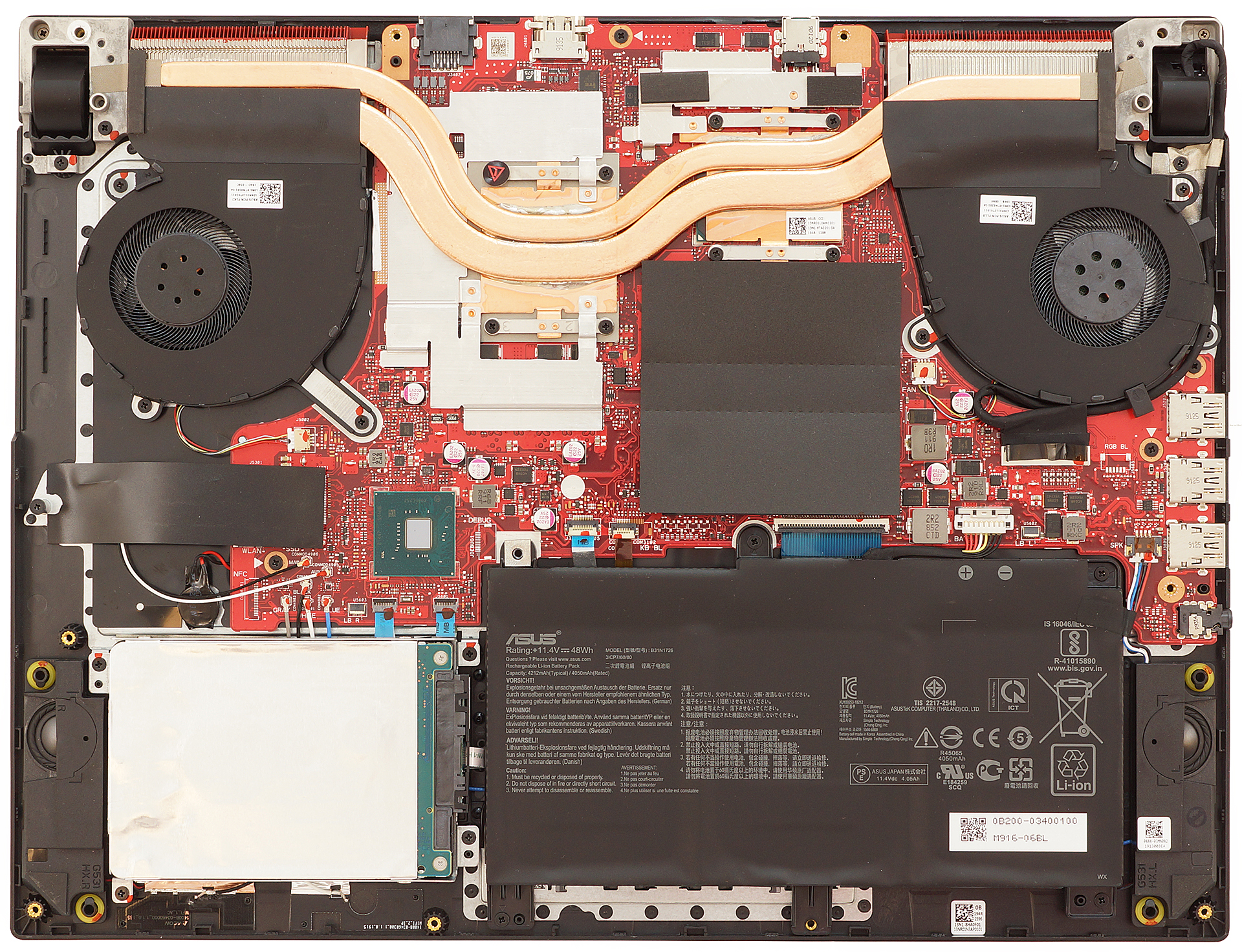
Getting inside this laptop is as simple as a pie. Undo all of the 11 Phillips-head screws that hold the bottom plate in place, and it will pop off by itself. This makes it effortless for you to unclip the rest of the clips with a credit card or plastic pry tool.
2. Battery
Speaking of cost-cutting – the battery department is the first place where you’re going to see it. Our unit was equipped with a 48Wh battery, which was far from enough. However, the laptop comes with a more generous 66Wh one. Keep in mind that before you do any type of upgrades you need to remove the battery connector. If you want to remove the battery itself, there are four screws (Phillips-head) you need to remove prior to taking the battery out.

Helligkeit: 180 Nits; Anzeigemodus: SDR
Zeit bis zur vollständigen Entladung: Höher ist besser

Um reale Bedingungen zu simulieren, haben wir unser eigenes Skript für das automatische Surfen auf über 70 Websites verwendet.
Wir verwenden den integrierten Benchmark von F1 2017 in einer Schleife, um ein reales Spiel zu simulieren.
3. Memory and storage
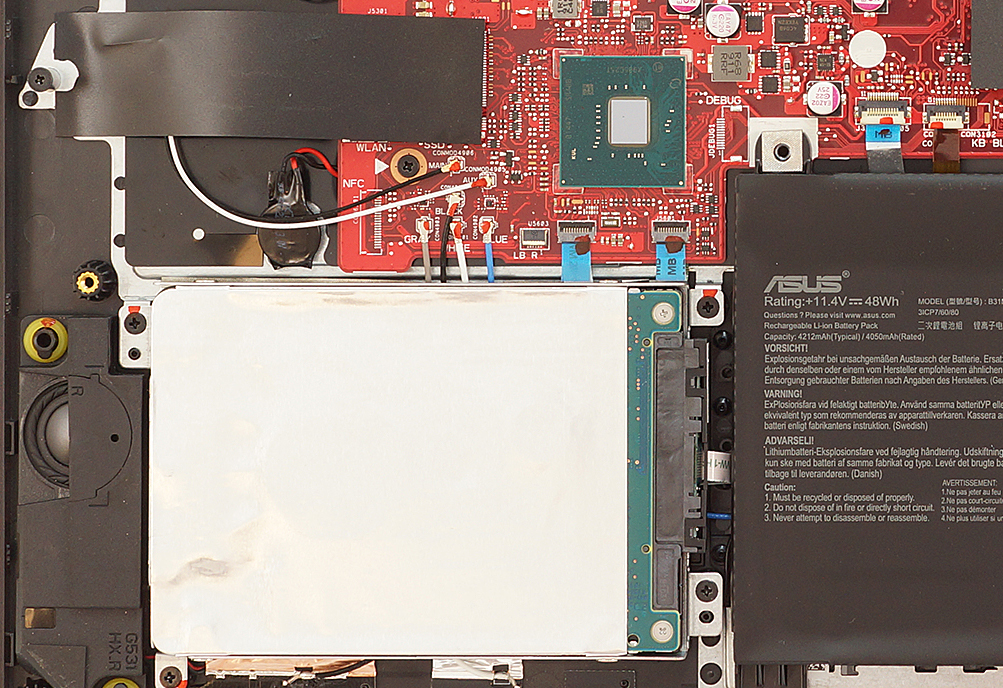
Memory and storage-wise we see a standard set-up – two RAM DIMMs able to take 32GB of DDR4 memory, an M.2 PCIe x4 slot, and a SATA slot. If you opt for no M.2 drive, there is the option for a 1TB SSHD (hybrid) drive.

4. Cooling system
ASUS is very proud with its cooling system on its official web site, however, the design itself is nothing special. It uses two heat pipes to cool off both the CPU and the GPU, by spreading them in different directions. ASUS state that the fans are sucking air not only from the bottom of the laptop but also from the ventilation holes on top of the device. In theory, this should lead to higher airflow, while at the same time, the noise coming from the fans is significantly reduced.

Check out all ASUS ROG Strix G531 prices and configurations in our Specs System or read more in our In-depth Review.
 Author: Alex Iliev

![[Mai 2026] Globale Rangliste der meistverkauften Laptop-GPUs auf Amazon – Apple dominiert mit 45 % Anteil und erobert die ersten drei Plätze; NVIDIAs RTX 5060 führt das Paket der dedizierten GPUs an](https://laptopmedia.com/wp-content/uploads/2026/06/Best-Selling-GPUs-GLOBAL-Top-10-400x225.jpg)
![[Mai 2026] Globale Rangliste der meistverkauften Laptop-CPUs auf Amazon – Apple vernichtet die Konkurrenz mit 45,2% Marktanteil, M5 dominiert](https://laptopmedia.com/wp-content/uploads/2026/06/Best-Selling-CPUs-GLOBAL-Top-10-400x225.jpg)
![[Mai 2026] Amazon Deutschland: Top 7 der meistverkauften Gaming-Notebooks – Lenovo Legion 5i krönt sich zum Champion inmitten harter Konkurrenz im mittleren Preissegment](https://laptopmedia.com/wp-content/uploads/2026/06/Best-Selling-Gaming-Laptops-DE-Top-10-1-400x225.jpg)
![[May 2026] Amazon Italy: Top 10 Best-Selling Laptops – Apple MacBook Neo Reigns Supreme, Premium Models Capture Dominant Revenue Share](https://laptopmedia.com/wp-content/uploads/2026/06/Best-Selling-Laptops-IT-Top-10-400x225.jpg)
![[May 2026] Best-Selling Laptop Brands on Amazon Italy – Apple Dominates Across All Metrics](https://laptopmedia.com/wp-content/uploads/2026/06/IT-Best-Brands-400x225.jpg)

excume i have problem with keyboard g731gu gamer
Will this void the warranty?
no
can i add another ssd and ram to g531t? and also can i upgrade its gpu??
It comes with only one M.2 port and one SATA port. If either is empty, you can add another SSD, or upgrade the HDD to an SSD.
You cannot upgrade the GPU though
hi can i add nvme m.2 ssd in this laptop coz when i do that my system hang on boot screen and even bios option stops working at that time plz help
I also got the same problem with WD 1TB Nvme 579
Is there any solution?
Well i tried to lift the battery cable out the way you show in your video and instead of coming out easily it ripped off. Thanks so much.
lol cope
Hey, I’ve been daily driving an Asus G531GT for a year now, and the battery is really not cutting it when I need to be on the go.
Can I replace the internal 48Wh 11.4V B31N1726 with the 66Wh 15.4V C41N1731? Will it have any real benefit?
Make sure your battery is charging to 100% and not just 60%. Open the MyASUS app and click on blue Battery Health box. The battery can be set up for three charging modes – Full capacity, Balanced, and Maximum lifespan. In Full capacity the battery gets charged 100%. In Balanced mode the battery only gets charged to 80% capacity so it lasts longer. In Maximum lifespan mode the battery only gets charged to 60% but it will last a lot longer that way. I normally keep my G531GT plugged in and charging in Maximum lifespan mode. If I am going… Read more »
i want to install a 4 tb hard drive in my laptop, model no – G513GT – AL030T.
is it possilble?
Can I get new motherboard somewhere.