Acer Predator Triton 500


- Date de publication: 31 Jan 2019
- Intel Core i7-8750H
- NVIDIA GeForce RTX 2080 Max-Q
- 15.6”, Full HD (1920 x 1080), 144 Hz, IPS + G-Sync
- 512GB SSD
- 16GB DDR4, 2666 MHz
- 2.09 kg (4.6 lbs)
Acer Predator Triton 500 (PT515-51 / PT515-52) critique approfondie
As you may know, the Predator gaming family of Acer is pretty well populated. Last year, the Triton series captured the gaming industry with its thin and light design and groundbreaking designs. One of them was the Predator Triton 500 (PT515-51). Ultimately, it was aimed at battling the MSI GS65 [...]
Lire la critique complète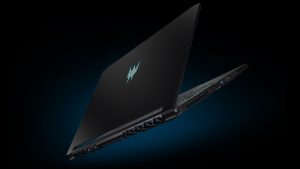

Revue
Acer Predator Triton 500 critique approfondie
As you may know, the Predator gaming family of Acer is pretty well populated. Last year, the Triton series captured the gaming industry with its thin and light design and groundbreaking designs. One of them was the Predator Triton 500 (PT515-51). Ultimately, it was aimed at battling the MSI GS65 Stealth, and to some extent, it was able to do so. However, we have found some annoying disadvantages, including poor gaming comfort, due to high temperatures and noise, as well as difficult upgradability.The next Triton 500 in line is the (PT515-52), and although we would have loved to see an improved design, that houses a better cooling solution, Acer just refreshed the laptop with the 10th Generation Intel Comet Lake-H processors, and some Super graphics cards, maxing out with the GeForce R[...]
Lire la critique complètePour
- Aluminum design and good build quality
- Large arrow keys, per-key RGB backlight
- Thunderbolt certification and two M.2 slots with RAID 0 support
- The display doesn't flicker at any brightness level (AUO B156HAN012.0)
- 300Hz display with quick response times, full sRGB coverage and accurate color representation (AUO B156HAN012.0)
Cons
- Lacks an SD card reader
- Hot and loud during gameplay
- Not very user-friendly in terms of upgradability
- 4 hours of battery life at most
Démontage, maintenance et options de mise à niveau
Disassembling this laptop is definitely easier than it looks, but upgrading it is another matter.Check out all Acer Predator Triton 500 (PT515-52) prices and configurations in our Specs System or read more in our In-Depth review.1. Remove the bottom plate Having such a tight body, means you have to sacrifice something. The biggest sacrifice altogether is the ease of upgrading this laptop. Surely, you can do it, but you have to have some skill and balls to open the Triton 500 up.The first step is basically the same as any other notebook on the market – remove the screws, [...]
Lire la suite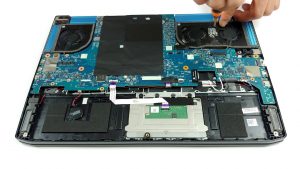
Écran: 15.6-inch, 1920 x 1080, IPS + G-Sync
- Nom
- AUO B156HAN08.2 (AUO82ED)
- Diagonale
- 15.6"
- Densité de pixels
- 141.21 ppi
- Luminosité
- 338 cd/m2
- sRGB
- 96%
- Type de dalle
- IPS
- Résolution
- 1920 x 1080
- Devient "Retina" à partir de
- 24 inches (62 cm)
- Contraste
- 1260:1
- dE Color Checker
- 4.4 1.7

Achetez nos profils pour AUO B156HAN08.2 (AUO82ED)
En plus de recevoir des profils efficaces et respectueux de la santé, en achetant les produits de LaptopMedia, vous soutenez également le développement de nos laboratoires, où nous testons des appareils afin de produire les critiques les plus objectives possibles.

Travail de bureau
Office Work devrait être utilisé principalement par les utilisateurs qui passent la plupart de leur temps à regarder des textes, des tableaux ou simplement à naviguer. Ce profil vise à offrir une meilleure distinction et clarté en maintenant une courbe gamma plate (2.20), une température de couleur native et des couleurs fidèles à la perception.

Design et Gaming
Ce profil s'adresse aux designers qui travaillent avec les couleurs de manière professionnelle, ainsi qu'aux jeux et aux films. Design and Gaming pousse les dalles d'affichage à leurs limites, les rendant aussi précises que possible dans la norme sRGB IEC61966-2-1 pour le Web et la TVHD, au point blanc D65.

Health-Guard
Health-Guard élimine la Modulation de Largeur d'Impulsion (PWM) nocive et réduit la lumière bleue négative qui affecte nos yeux et notre corps. Comme il est adapté à chaque dalle, il parvient à conserver des couleurs fidèles à la perception. Health-Guard simule le papier, ce qui réduit considérablement la pression sur les yeux.





