HP Pavilion 15


- प्रकाशन तिथि: 23 Jun 2023
- Intel Core i7-1355U
- NVIDIA GeForce MX550
- 15.6”, Full HD (1920 x 1080), IPS
- 1000GB SSD
- 24GB DDR4
- 1.70 kg (3.7 lbs)

समीक्षा
HP Pavilion 15 गहन समीक्षा
The HP Pavilion 15 (15-eg3000) is a typical inexpensive daily driver. It offers nothing fancy, you get only the necessary essential extras for normal home or office usage. For starters, the display has a standard aspect ratio of 16:9. Luckily, most panel options are IPS units but there is one TN model in the mix. The latter should be avoided unless you want to buy the most affordable configuration of the series for some reason. By the way, there is a touchscreen variant for those who prefer to use their fingers instead of a mouse.Power-wise, all looks good - six 13th Gen Intel CPUs are available for configuring. Aside from the base Intel Processor U300 which has just one P core and four E cores, the other processors are powerful enough for daily tasks. Still, if you want a bit more sna[...]
पूरी समीक्षा पढ़ें
पक्ष
- Comfortable keyboard for the class with optional backlight
- Good portability
- PWM-free display with comfortable viewing angles (LG Display LGD071D)
- 2x SODIMMs
- The CPU can sustain high clock in short loads and decent frequencies under 100% stress
- The fan is nearly quiet
- Good battery life
विपक्ष
- Low sRGB coverage (LG Display LGD071D)
- Only one M.2 slot
- Spongy chassis
डिसअसेंबली, रखरखाव और अपग्रेड विकल्प
Step 1: Accessing the Internal ComponentsEnsure the HP Pavilion 15 (15-eg3000) is powered off and placed on a soft, clean surface to prevent scratches or damage. Remove the six Phillips-head screws from the bottom of the laptop. This includes two visible screws and four hidden beneath the two long rubber feet, which you will need to carefully unglue to access. Create a gap by lifting the bottom plate near one of the top corners, then use a thin plastic tool to pry the plate off the base.Hint: Proceed with caution when prying to avoid damaging the internal clips or the lap[...]
और पढ़ें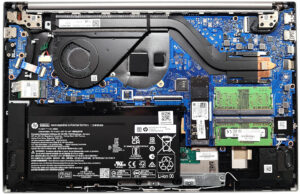
डिस्प्ले: 15.6-inch, 1920 x 1080, IPS
- नाम
- LG Display LGD071D
- विकर्ण
- 15.6"
- पिक्सेल घनत्व
- 141.21 ppi
- चमक
- 282 cd/m2
- sRGB
- 53%
- पैनल प्रकार
- IPS
- रिज़ॉल्यूशन
- 1920 x 1080
- "रेटिना" बन जाता है
- 24 inches (62 cm)
- कंट्रास्ट
- 950:1
- dE Color Checker
- 4.5 4.0

इसके लिए हमारी प्रोफाइल खरीदें LG Display LGD071D
कुशल और स्वास्थ्य के अनुकूल प्रोफाइल प्राप्त करने के अलावा, LaptopMedia के उत्पादों को खरीदकर आप हमारी प्रयोगशालाओं के विकास का भी समर्थन करते हैं, जहाँ हम सबसे वस्तुनिष्ठ समीक्षाएँ प्रस्तुत करने के लिए उपकरणों का परीक्षण करते हैं।

Office Work
Office Work का उपयोग ज्यादातर उन उपयोगकर्ताओं द्वारा किया जाना चाहिए जो अपना अधिकांश समय टेक्स्ट के टुकड़ों, तालिकाओं को देखने या सिर्फ सर्फिंग में बिताते हैं। इस प्रोफ़ाइल का उद्देश्य एक फ्लैट गामा वक्र (2.20), मूल रंग तापमान और अवधारणात्मक रूप से सटीक रंगों को रखकर बेहतर विशिष्टता और स्पष्टता प्रदान करना है।

Design and Gaming
यह प्रोफ़ाइल उन डिजाइनरों के लिए है जो पेशेवर रूप से रंगों के साथ काम करते हैं, और गेम और फिल्मों के लिए भी। Design and Gaming डिस्प्ले पैनल को उनकी सीमा तक ले जाता है, जिससे वे वेब और HDTV के लिए sRGB IEC61966-2-1 मानक में, व्हाइट पॉइंट D65 पर यथासंभव सटीक हो जाते हैं।

Health-Guard
Health-Guard हानिकारक पल्स-विड्थ मॉड्यूलेशन (PWM) को समाप्त करता है और नकारात्मक नीली रोशनी को कम करता है जो हमारी आँखों और शरीर को प्रभावित करती है। चूंकि यह प्रत्येक पैनल के लिए कस्टम अनुरूप है, यह रंगों को अवधारणात्मक रूप से सटीक रखने का प्रबंधन करता है। Health-Guard कागज का अनुकरण करता है जिससे आँखों पर दबाव बहुत कम हो जाता है।