- Data publikacji: 03 Oct 2019
- Intel Core i7-9750H
- NVIDIA GeForce RTX 2060 (Laptop, 80W)
- 17.3”, Full HD (1920 x 1080), 144 Hz, IPS
- 1000GB SSD + 2000GB HDD
- 2x 8GB DDR4, 2666 MHz
- 2.61 kg (5.8 lbs)
Recenzja
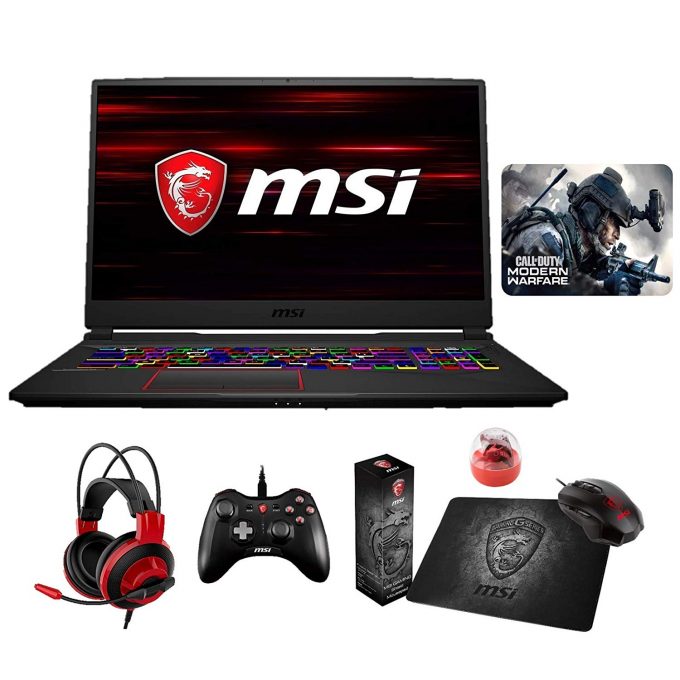
MSI GE75 dogłębna recenzja
As usual, MSI has spent a lot of effort into their new gaming laptop. The GE75 Raider is a direct successor to the GE73 Raider, that we managed to cover last year. If you are not familiar with the device - it was a relatively light and thin 17-inch gaming laptop. Apparently, MSI has continued to work in this direction, making their new hardware both thinner and lighter than before.At the same time, they managed to pair it with beast hardware, maxing out with Intel Core i9-9880H and GeForce RTX 2080. There is also an upgrade to be seen in the display section, where the 120 Hz TN 1080p panel was ditched in favor of a 144 Hz IPS one with the same resolution. There is a lot of competition in this segment, as we are reaching a top-end gaming territory. On the other hand, MSI certainly h[...]
Przeczytaj pełną recenzję
Pros
- A super bright panel that covers 95% of sRGB and produces accurate colors (Innolux N173HCE-G33 (CMN175C))
- Adequate cooling
- Very good keyboard
- Per-key RGB keyboard backlight with a SteelSeries customization
- Doesn't use aggressive PWM to adjust screen brightness (Innolux N173HCE-G33 (CMN175C))
- Dedicated buttons for fan boost and customization
Cons
- Average battery life
- No Thunderbolt support
Wyświetlacz: 17.3-inch, 1920 x 1080, IPS
- Nazwa
- Innolux N173HCE-G33 (CMN175C)
- Przekątna
- 17.3"
- Gęstość pikseli
- 127.34 ppi
- Jasność
- 397 cd/m2
- sRGB
- 95%%
- Typ Panelu
- IPS
- Rozdzielczość
- 1920 x 1080
- Staje się "Retina" od
- 27 inches (69 cm)
- Kontrast
- 760:1
- dE Color Checker
- 2.5 1.3

Kup nasze profile dla Innolux N173HCE-G33 (CMN175C)
Oprócz otrzymywania wydajnych i przyjaznych dla zdrowia profili, kupując produkty LaptopMedia, wspierasz również rozwój naszych laboratoriów, w których testujemy urządzenia w celu tworzenia jak najbardziej obiektywnych recenzji.

Office Work
Office Work powinien być używany głównie przez użytkowników, którzy spędzają większość czasu patrząc na teksty, tabele lub po prostu przeglądając internet. Ten profil ma na celu zapewnienie lepszej wyrazistości i klarowności poprzez utrzymanie płaskiej krzywej gamma (2.20), natywnej temperatury barwowej i percepcyjnie dokładnych kolorów.
Design and Gaming
Ten profil jest przeznaczony dla projektantów, którzy pracują z kolorami zawodowo, a także do gier i filmów. Design and Gaming wykorzystuje panele wyświetlaczy do granic ich możliwości, czyniąc je tak dokładnymi, jak to tylko możliwe w standardzie sRGB IEC61966-2-1 dla stron internetowych i telewizji HD, przy punkcie bieli D65.

Health-Guard
Health-Guard eliminuje szkodliwą modulację szerokości impulsu (PWM) i redukuje negatywne niebieskie światło, które wpływa na nasze oczy i ciało. Ponieważ jest on dostosowany do każdego panelu, udaje mu się utrzymać percepcyjnie dokładne kolory. Health-Guard symuluje papier, dzięki czemu nacisk na oczy jest znacznie zmniejszony.