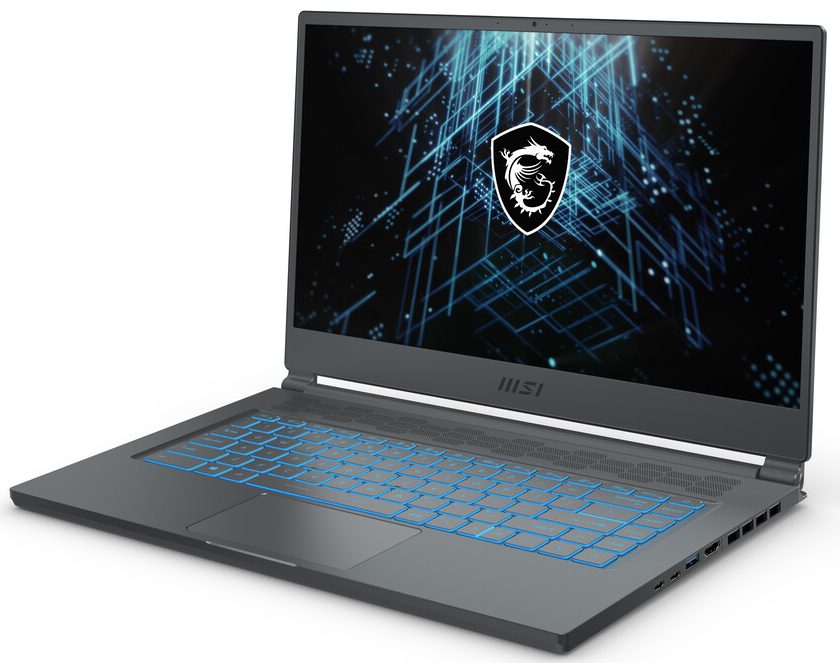
MSI Stealth 15M


- Data publikacji: 07 Sep 2022
- Intel Core i7-11375H
- NVIDIA GeForce RTX 3060 (Laptop, 65W)
- 15.6”, Full HD (1920 x 1080), 144 Hz, IPS
- 8000GB SSD
- 16GB DDR4
- 1.70 kg (3.7 lbs)
MSI Stealth 15M (RTX 30) dogłębna recenzja
The first thought that came to our mind when we first took the MSI Stealth 15M in our hands was "Well, this looks familiar". In fact, its body is suspiciously similar to that of the older GS65 Stealth, but even in case the chassis is reused, the design is definitely changed. With that said, this [...]
Przeczytaj pełną recenzję

Recenzja
MSI Stealth 15M dogłębna recenzja
The first thought that came to our mind when we first took the MSI Stealth 15M in our hands was "Well, this looks familiar". In fact, its body is suspiciously similar to that of the older GS65 Stealth, but even in case the chassis is reused, the design is definitely changed.With that said, this laptop is directly marketed towards gamers and "young professionals", and promotes speed and power. Moreover, according to MSI, this is the thinnest and lightest gaming notebook on the market, but as usual - take this with a pinch of salt.By the way, you should know that the Stealth 15M comes in two varieties, depending on the CPU. The first one is the Stealth 15M (A11Sx), and it has a Tiger Lake-U processor inside, whereas the other - Stealth 15M (A11Ux), is powered by a Tiger Lake H35 dev[...]
Przeczytaj pełną recenzjęPros
- Good amount of power inside a very thin and light notebook
- 3200 MHz memory in dual-channel, one M.2 PCIe x4 slot, Thunderbolt 4 + Wi-Fi 6 support, and a MicroSD card reader
- The display doesn't flicker at any brightness level (BOE NV156FHM-NX4)
- Has a good contrast ratio and comfortable viewing angles (BOE NV156FHM-NX4)
- 144Hz refresh rate paired with relatively good pixel response times (BOE NV156FHM-NX4)
Cons
- The cooling is a bit inefficient (and sounds weird)
- It gets pretty warm on the outside when gaming
- Covers only half of the sRGB color gamut (BOE NV156FHM-NX4)
- Battery life is only average
Demontaż, konserwacja i opcje modernizacji
Although this laptop's disassembly requires a bit more steps, this doesn't mean you can't do it home. Just arm yourself with patience, and make sure you are extra careful with the tiny ribbon cables.Check out all MSI Stealth 15M prices and configurations in our Specs System or read more in our In-Depth review.1. Remove the bottom plate and battery Taking this laptop apart is quite an easy process at first. You need to undo all 13 Phillips-head screws and then work your way around the bottom panel with a plastic tool.2. Battery and storage Unfortunately, your work is not d[...]
Czytaj więcej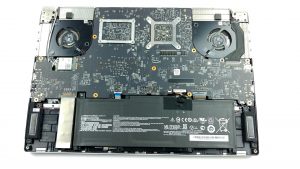
Wyświetlacz: 15.6-inch, 1920 x 1080, IPS
- Nazwa
- BOE NV156FHM-NX4 (BOE0910)
- Przekątna
- 15.6"
- Gęstość pikseli
- 141.21 ppi
- Jasność
- 254 cd/m2
- sRGB
- 51%
- Typ Panelu
- IPS
- Rozdzielczość
- 1920 x 1080
- Staje się "Retina" od
- 24 inches (62 cm)
- Kontrast
- 1130:1
- dE Color Checker
- 4.9 3.8

Kup nasze profile dla BOE NV156FHM-NX4 (BOE0910)
Oprócz otrzymywania wydajnych i przyjaznych dla zdrowia profili, kupując produkty LaptopMedia, wspierasz również rozwój naszych laboratoriów, w których testujemy urządzenia w celu tworzenia jak najbardziej obiektywnych recenzji.

Office Work
Office Work powinien być używany głównie przez użytkowników, którzy spędzają większość czasu patrząc na teksty, tabele lub po prostu przeglądając internet. Ten profil ma na celu zapewnienie lepszej wyrazistości i klarowności poprzez utrzymanie płaskiej krzywej gamma (2.20), natywnej temperatury barwowej i percepcyjnie dokładnych kolorów.

Design and Gaming
Ten profil jest przeznaczony dla projektantów, którzy pracują z kolorami zawodowo, a także do gier i filmów. Design and Gaming wykorzystuje panele wyświetlaczy do granic ich możliwości, czyniąc je tak dokładnymi, jak to tylko możliwe w standardzie sRGB IEC61966-2-1 dla stron internetowych i telewizji HD, przy punkcie bieli D65.

Health-Guard
Health-Guard eliminuje szkodliwą modulację szerokości impulsu (PWM) i redukuje negatywne niebieskie światło, które wpływa na nasze oczy i ciało. Ponieważ jest on dostosowany do każdego panelu, udaje mu się utrzymać percepcyjnie dokładne kolory. Health-Guard symuluje papier, dzięki czemu nacisk na oczy jest znacznie zmniejszony.





