HP Pavilion 15


- Data publicării: 23 Jun 2023
- Intel Core i7-1355U
- NVIDIA GeForce MX550
- 15.6”, Full HD (1920 x 1080), IPS
- 1000GB SSD
- 24GB DDR4
- 1.70 kg (3.7 lbs)
HP Pavilion 15 (15-eg3000) recenzie detaliată
The HP Pavilion 15 (15-eg3000) is a typical inexpensive daily driver. It offers nothing fancy, you get only the necessary essential extras for normal home or office usage. For starters, the display has a standard aspect ratio of 16:9. Luckily, most panel options are IPS units but there is one TN [...]
Citește recenzia completă

Recenzie
HP Pavilion 15 recenzie detaliată
The HP Pavilion 15 (15-eg3000) is a typical inexpensive daily driver. It offers nothing fancy, you get only the necessary essential extras for normal home or office usage. For starters, the display has a standard aspect ratio of 16:9. Luckily, most panel options are IPS units but there is one TN model in the mix. The latter should be avoided unless you want to buy the most affordable configuration of the series for some reason. By the way, there is a touchscreen variant for those who prefer to use their fingers instead of a mouse.Power-wise, all looks good - six 13th Gen Intel CPUs are available for configuring. Aside from the base Intel Processor U300 which has just one P core and four E cores, the other processors are powerful enough for daily tasks. Still, if you want a bit more sna[...]
Citește recenzia completăAvantaje
- Comfortable keyboard for the class with optional backlight
- Good portability
- PWM-free display with comfortable viewing angles (LG Display LGD071D)
- 2x SODIMMs
- The CPU can sustain high clock in short loads and decent frequencies under 100% stress
- The fan is nearly quiet
- Good battery life
Dezavantaje
- Low sRGB coverage (LG Display LGD071D)
- Only one M.2 slot
- Spongy chassis
Opțiuni de dezasamblare, întreținere și upgrade
Step 1: Accessing the Internal ComponentsEnsure the HP Pavilion 15 (15-eg3000) is powered off and placed on a soft, clean surface to prevent scratches or damage. Remove the six Phillips-head screws from the bottom of the laptop. This includes two visible screws and four hidden beneath the two long rubber feet, which you will need to carefully unglue to access. Create a gap by lifting the bottom plate near one of the top corners, then use a thin plastic tool to pry the plate off the base.Hint: Proceed with caution when prying to avoid damaging the internal clips or the lap[...]
Citește mai mult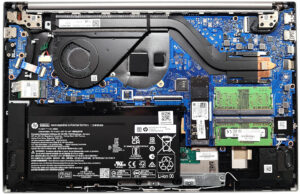
Ecran: 15.6-inch, 1920 x 1080, IPS
- Nume
- LG Display LGD071D
- Diagonală
- 15.6"
- Densitate pixeli
- 141.21 ppi
- Luminozitate
- 282 cd/m2
- sRGB
- 53%
- Tip Panou
- IPS
- Rezoluție
- 1920 x 1080
- Devine "Retina" de la
- 24 inches (62 cm)
- Contrast
- 950:1
- dE Color Checker
- 4.5 4.0

Cumpără profilurile noastre pentru LG Display LGD071D
Pe lângă primirea de profiluri eficiente și prietenoase cu sănătatea, prin cumpărarea produselor LaptopMedia sprijiniți și dezvoltarea laboratoarelor noastre, unde testăm dispozitive pentru a produce cele mai obiective recenzii posibile.

Office Work
Office Work ar trebui folosit în principal de utilizatorii care petrec cea mai mare parte a timpului uitându-se la texte, tabele sau pur și simplu navigând. Acest profil urmărește să ofere o distincție și o claritate mai bună prin menținerea unei curbe gamma plate (2.20), a temperaturii native a culorii și a culorilor perceptiv exacte.

Design and Gaming
Acest profil se adresează designerilor care lucrează profesional cu culorile, precum și pentru jocuri și filme. Design and Gaming duce panourile de afișaj la limitele lor, făcându-le cât mai precise posibil în standardul sRGB IEC61966-2-1 pentru Web și HDTV, la punctul de alb D65.

Health-Guard
Health-Guard elimină modulația dăunătoare a lățimii impulsului (PWM) și reduce lumina albastră negativă care ne afectează ochii și corpul. Deoarece este personalizat pentru fiecare panou, reușește să mențină culorile perceptiv exacte. Health-Guard simulează hârtia, astfel încât presiunea asupra ochilor este redusă considerabil.





