MSI GL65 Leopard 9Sx


- Data publicării: 16 Dec 2019
- Intel Core i7-9750H
- NVIDIA GeForce GTX 1660 Ti (Laptop)
- 15.6”, Full HD (1920 x 1080), 120 Hz, IPS
- 512GB SSD + 2000GB HDD
- 16GB RAM
- 2.30 kg (5.1 lbs)

Recenzie
MSI GL65 Leopard 9Sx recenzie detaliată
With us today, we have the MSI GL65. It is a solution that is somewhat friendly to your budget and offers a good variety of hardware. It all starts with the Core i5-9300 + GTX 1650, and gradually creeps up to the powerhouse of machine we got - a combo between the Core i7-9750H and the GeForce RTX 2060.Of course, this configuration is not a joke, and it needs a beefy cooling solution. By the looks of the device, we would set high expectations, as there are three heat spreaders around the chassis. Moreover, the laptop is neither super thin, or super light, so, there must be a lot going on on the inside.In addition to that, the laptop comes in two display varieties - a 60Hz 1080p panel, as well as a nimble 120Hz 1080p one. Then, there is the Steelseries keyboard, that can be backlit [...]
Citește recenzia completă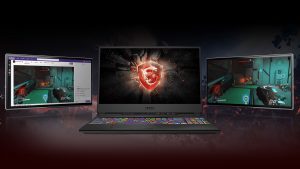
Avantaje
- Exceptional performance
- Great I/O connectivity with an SD card reader
- Optional Per-key RGB backlight
- Lack of PWM (AUO AUOD0ED)
- Capable cooling solution and up to 64GB of DDR4 memory
- Comfortable viewing angles and good contrast ratio
Dezavantaje
- Quite bulky for 2020
- Slow response times, despite the 120Hz refresh rate
- Covers only 51% of sRGB (AUO AUO23ED)
Opțiuni de dezasamblare, întreținere și upgrade
So, the MSI GL65 9SE features quite a potent hardware. In our review, we discovered that its cooling is capable of managing the temperatures inside the chassis, very well, despite being a bit too loud on some occasions. Let's see what exactly can we find on the insides, shall we?Check out all MSI GL65 9SE prices and configurations in our Specs System or read more in our In-Depth review.1. Remove the bottom plate In order to open the get to all of the internals, you need to remove the back panel. It is held in place by 12 Phillips-head screws. After you remove them, you'll need [...]
Citește mai mult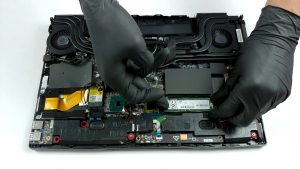
Ecran: 15.6-inch, 1920 x 1080, IPS
- Nume
- AUO B156HAN13.0 (AUOD0ED)
- Diagonală
- 15.6"
- Densitate pixeli
- 141.21 ppi
- Luminozitate
- 300 cd/m2
- sRGB
- 51%
- Tip Panou
- IPS
- Rezoluție
- 1920 x 1080
- Devine "Retina" de la
- 24 inches (62 cm)
- Contrast
- 1500:1
- dE Color Checker
- 4.2 3.8

Cumpără profilurile noastre pentru AUO B156HAN13.0 (AUOD0ED)
Pe lângă primirea de profiluri eficiente și prietenoase cu sănătatea, prin cumpărarea produselor LaptopMedia sprijiniți și dezvoltarea laboratoarelor noastre, unde testăm dispozitive pentru a produce cele mai obiective recenzii posibile.

Office Work
Office Work ar trebui folosit în principal de utilizatorii care petrec cea mai mare parte a timpului uitându-se la texte, tabele sau pur și simplu navigând. Acest profil urmărește să ofere o distincție și o claritate mai bună prin menținerea unei curbe gamma plate (2.20), a temperaturii native a culorii și a culorilor perceptiv exacte.

Design and Gaming
Acest profil se adresează designerilor care lucrează profesional cu culorile, precum și pentru jocuri și filme. Design and Gaming duce panourile de afișaj la limitele lor, făcându-le cât mai precise posibil în standardul sRGB IEC61966-2-1 pentru Web și HDTV, la punctul de alb D65.

Health-Guard
Health-Guard elimină modulația dăunătoare a lățimii impulsului (PWM) și reduce lumina albastră negativă care ne afectează ochii și corpul. Deoarece este personalizat pentru fiecare panou, reușește să mențină culorile perceptiv exacte. Health-Guard simulează hârtia, astfel încât presiunea asupra ochilor este redusă considerabil.