Acer Swift 3 (SF314-52G) display profiles – Quality and Health impact results
 The Acer Swift 3 (SF314-52G) offers a nice Full HD IPS panel with minor drawbacks, however, when combined with our custom profiles, you will be impressed with the improved color accuracy, white balance and gamma. The package contain the usual Office work, Design & Gaming and Health-Guard profiles, each of which will improve the overall image quality in certain aspects. You can read more about them here and how to use them. We also suggest reading our dedicated article regarding blue light emissions and PWM and how our custom Health-Guard profile reduces Blue Light’s impact and eliminates the harmful PWM.
The Acer Swift 3 (SF314-52G) features a Full HD IPS panel with 50% sRGB color gamut coverage, decent contrast ratio (850:1), relatively good maximum brightness (212 cd/m2) and pretty close to the optimal color temperature – 6620K.
Since our profiles are tailored for each individual display model, this article and its respective profile package are meant for the Acer Swift 3 (SF314-52G) with a 14″ panel manufactured by AU Optronics with model number B140HAN02.1 featuring FHD (1920 x 1080) resolution and the notebook can be found at Amazon.com: Acer Swift 3 (SF314-52G).
*Should you have problems with downloading the purchased file, try using a different browser to open the link you’ll receive via e-mail. If the download target is a .php file instead of an archive, change the file extension to .zip or contact us at [email protected].
Naast het ontvangen van efficiënte en gezondheidsvriendelijke profielen, ondersteunt u door het kopen van LaptopMedia's producten ook de ontwikkeling van onze labs, waar we apparaten testen om zo objectief mogelijke reviews te produceren.

Office Work
Office Work is voornamelijk bedoeld voor gebruikers die de meeste tijd besteden aan het bekijken van teksten, tabellen of gewoon surfen. Dit profiel streeft naar een betere onderscheidbaarheid en helderheid door een vlakke gammacurve (2.20), native kleurtemperatuur en perceptueel accurate kleuren te behouden.

Design and Gaming
Dit profiel is bedoeld voor ontwerpers die professioneel met kleuren werken, maar ook voor games en films. Design and Gaming haalt het uiterste uit beeldschermen, waardoor ze zo nauwkeurig mogelijk zijn in de sRGB IEC61966-2-1 norm voor Web en HDTV, met witpunt D65.

Health-Guard
Health-Guard elimineert de schadelijke Pulsbreedtemodulatie (PWM) en vermindert het negatieve Blauwe Licht dat onze ogen en lichaam beïnvloedt. Omdat het op maat gemaakt is voor elk paneel, slaagt het erin de kleuren perceptueel accuraat te houden. Health-Guard simuleert papier zodat de druk op de ogen sterk wordt verminderd.
Krijg alle 3 profielen met 33% korting

Office Work
This profile aims to deliver better distinctness and clarity by keeping a flat gamma curve (2.20), native color temperature and perceptually accurate colors.
Left: No Profile | Drag the slider to see the difference | Right: Office Work Profile
Design and Gaming
Left: No Profile | Drag the slider to see the difference | Right: Design & Gaming Profile


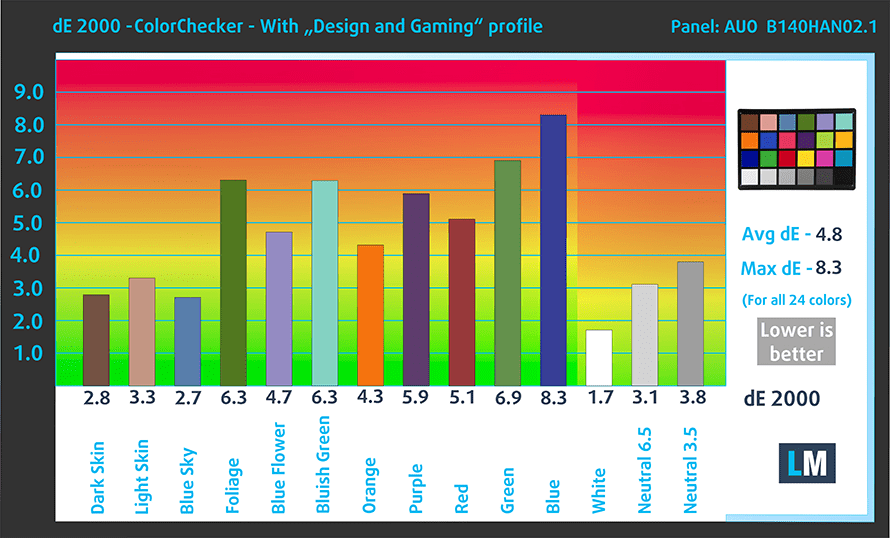
This profile is aimed at designers who work with colors professionally, and for games and movies as well. “Design and Gaming” takes display panels to their limits, making them as accurate as possible in the sRGB IEC61966-2-1 standard for Web and HDTV, at white point D65.
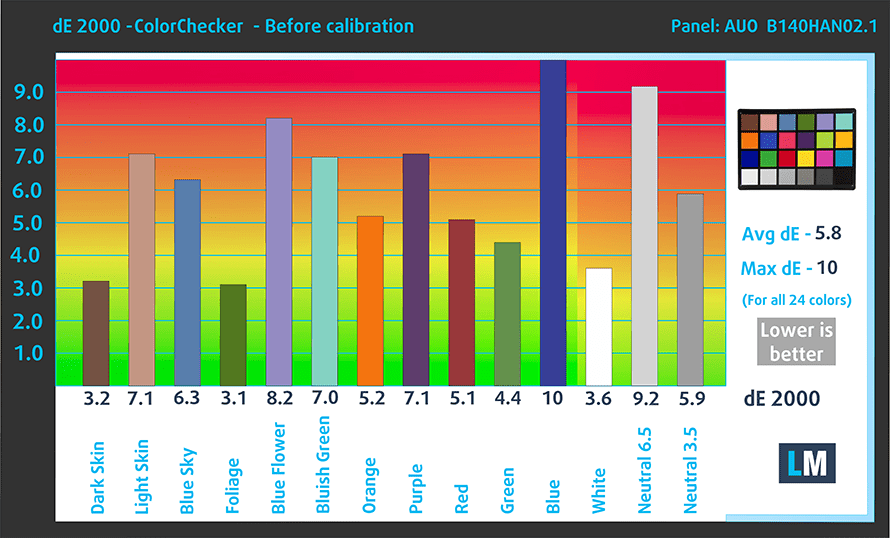
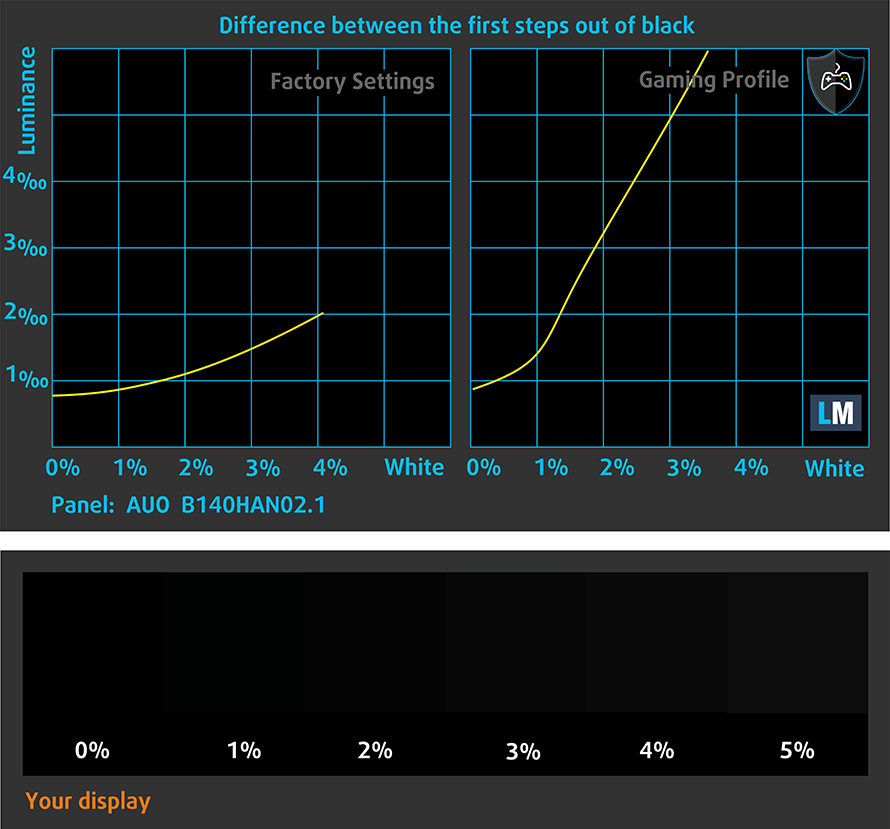
It also regulates the first steps out of black so you can have even faster reflexes when playing in dark virtual environments…or just see everything in the darkest scenes in movies.
Left: No Profile | Drag the slider to see the difference | Right: Design & Gaming Profile


Health-Guard profile
Left: No Profile | Drag the slider to see the difference | Right: Health-Guard Profile


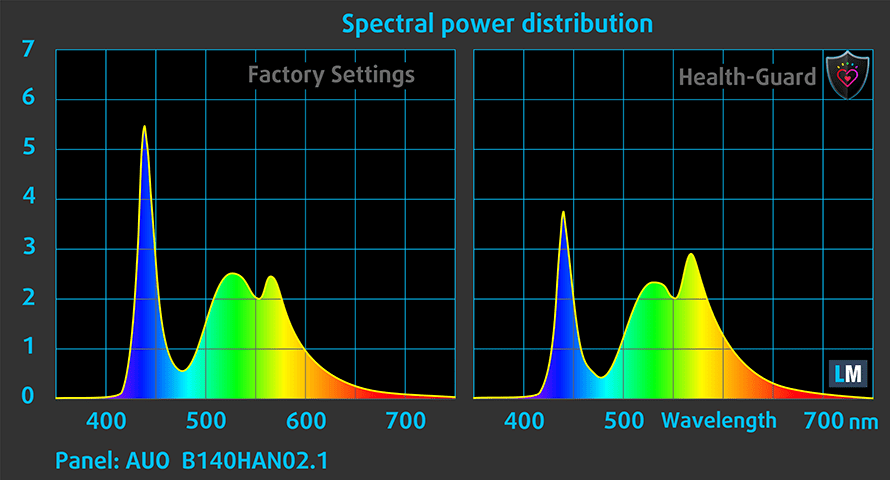
As for the Health-Guard profile, it reduces the blue light impact and eliminates the PWM. But since the display doesn’t use PWM, the profile will come in handy of eliminating blue light emissions.
Pro Tip: As the Health-Guard profile simulates paper and has as accurate as possible colors, it could be a great tool for prepress designers!

Installing and using the profiles
You can find a guide for installing and using the profiles HERE.
You can find the available configurations and their prices HERE.
And here you can find the full review of the Acer Swift 3 (SF314-52G).
Acer Swift 3 (SF314-52G) configurations
 Author: Silvia Genova

![[juni 2026] Bestverkochte laptopmerken op Amazon Global – Apple’s ongeëvenaarde dominantie in aantal verkochte exemplaren en omzet](https://laptopmedia.com/wp-content/uploads/2026/07/GLOBAL-Best-Brands-400x225.jpg)
![[juni 2026] Amazon Global: Top 10 bestverkochte laptops – De nieuwe MacBook Neo van Apple stormt naar de eerste plaats en zet de markt op zijn kop dankzij zijn betaalbaarheid](https://laptopmedia.com/wp-content/uploads/2026/07/Best-Selling-Laptops-GLOBAL-Top-10-400x225.jpg)
![[juni 2026] Amazon Global: Top 10 van best verkochte gaminglaptops – De Nitro V 16S AI van Acer domineert de verkoopcijfers, terwijl ASUS qua totale omzet aan kop gaat](https://laptopmedia.com/wp-content/uploads/2026/07/Best-Selling-Gaming-Laptops-GLOBAL-Top-10-400x225.jpg)
![[juni 2026] Wereldwijde ranglijst van bestverkochte laptop-GPU’s op Amazon – De NVIDIA RTX 5060 is de bestverkochte speciale GPU](https://laptopmedia.com/wp-content/uploads/2026/07/Best-Selling-GPUs-GLOBAL-Top-10-400x225.jpg)
![[juni 2026] Wereldwijde ranglijst van bestverkochte laptop-CPU’s op Amazon – Apple M5 domineert, AMD Ryzen 7 260 verovert een stevig aandeel in het premiumsegment](https://laptopmedia.com/wp-content/uploads/2026/07/Best-Selling-CPUs-GLOBAL-Top-10-400x225.jpg)
