 Who said affordable laptops were boring? The ASUS E410 might be affordable, but it’s far from boring, thanks to its feature set that makes IdeaPads and Aspires to look a bit bland. Yeah, it comes with sacrifices, offering only Celeron and Pentium CPUs, but for the price that it’s charging, you really can’t be asking for more. The laptop is as stylish as a Vivobook and can get around web browsing and taking notes in class, which is perfect for a student that doesn’t want to break the bank. It’s also small and light enough to be carried around without you even noticing it being there.
Today we’re presenting you with LaptopMedia’s top 5 picks about the ASUS E410.
ASUS E410: Full Specs / In-depth Review
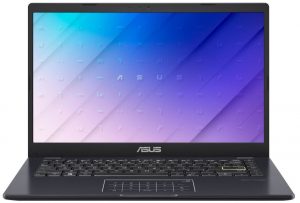
3 reasons to BUY the ASUS E410
1. Design and build quality
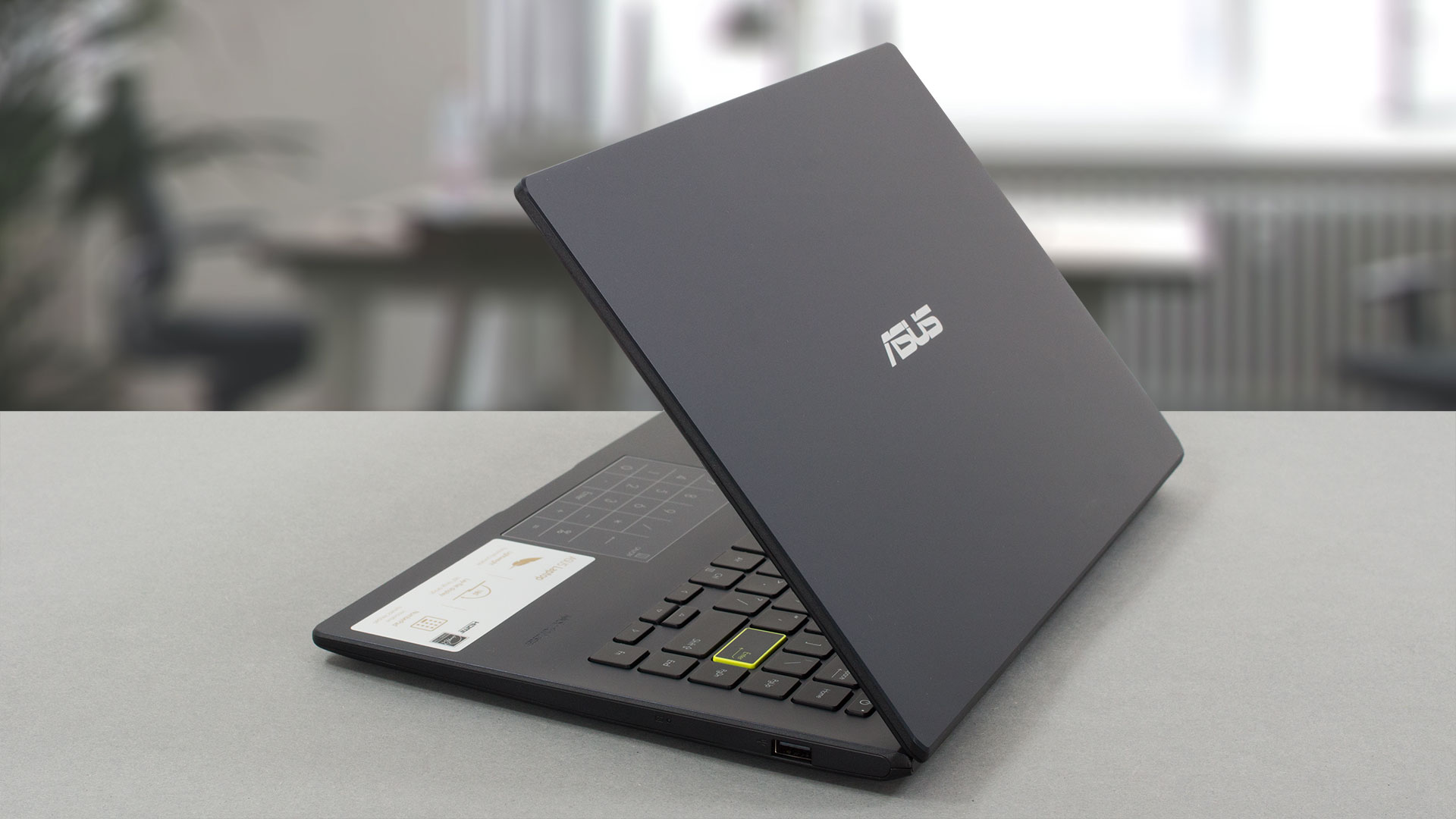
Understandably, the laptop has a plastic chassis that comes in 4 colors in total. There’s Black, Blue, Silver, Pink, and Gold, all of which look very fine. More importantly, it’s very portable, weighing just 1.30 kg and having a profile of 18.4 mm. The build quality isn’t the best, with flex from both the lid and the base, which is somewhat expected at this price point. Still, we believe that there should be some support on the inside.
2. Input devices
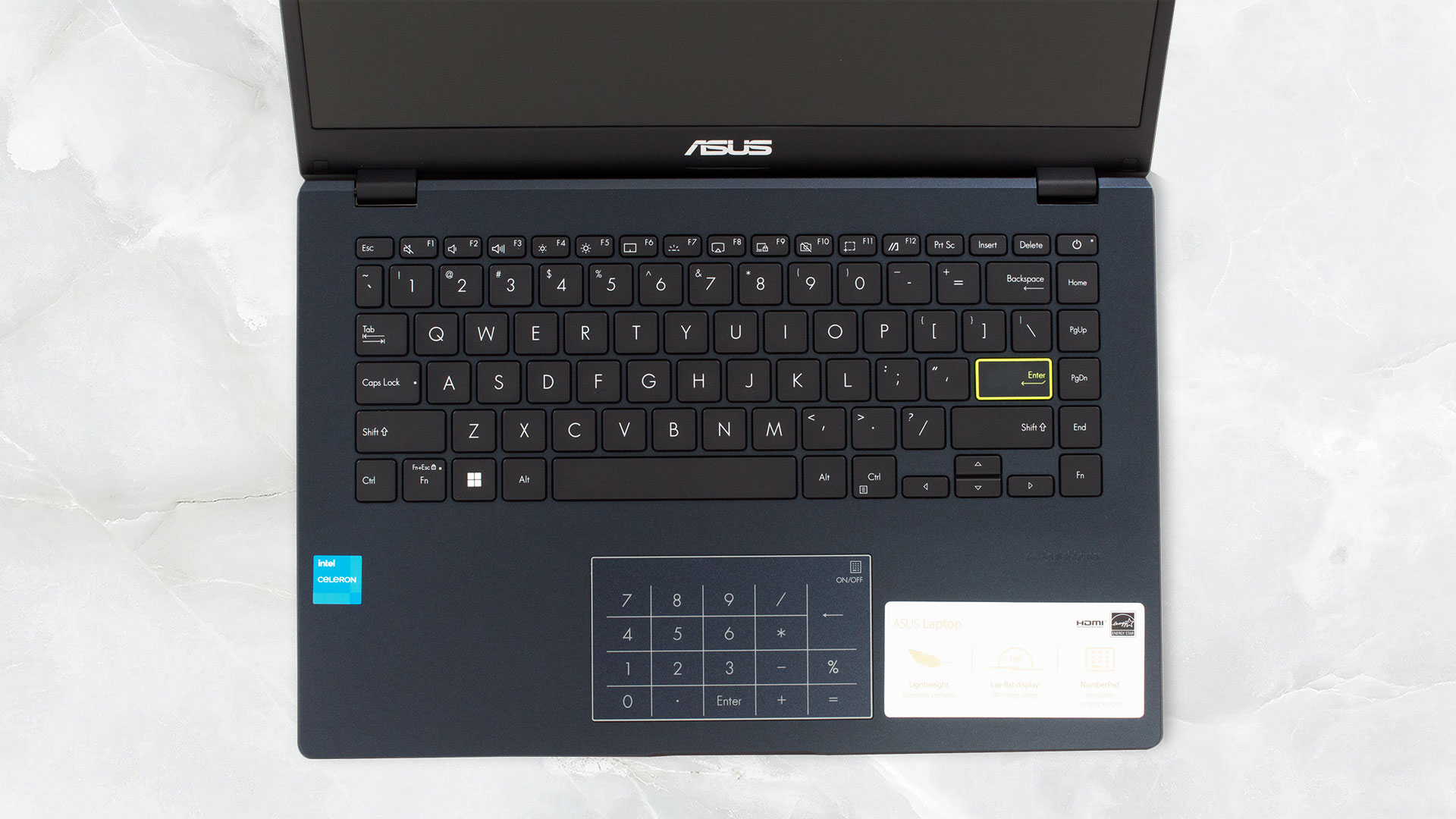
While the lid doesn’t open with one hand, the keyboard, and NumberPad are decent. The keyboard has a white backlight, while the key travel is averagely long and the feedback is somewhat clicky, however, it’s not very even. The touchpad is the star of the show, as its surface is smooth, while the NumberPad functionality is working just as well as it does on Vivobooks and Zenbooks. However, the symbols on the pad are printed, rather than backlit.
3. Battery life
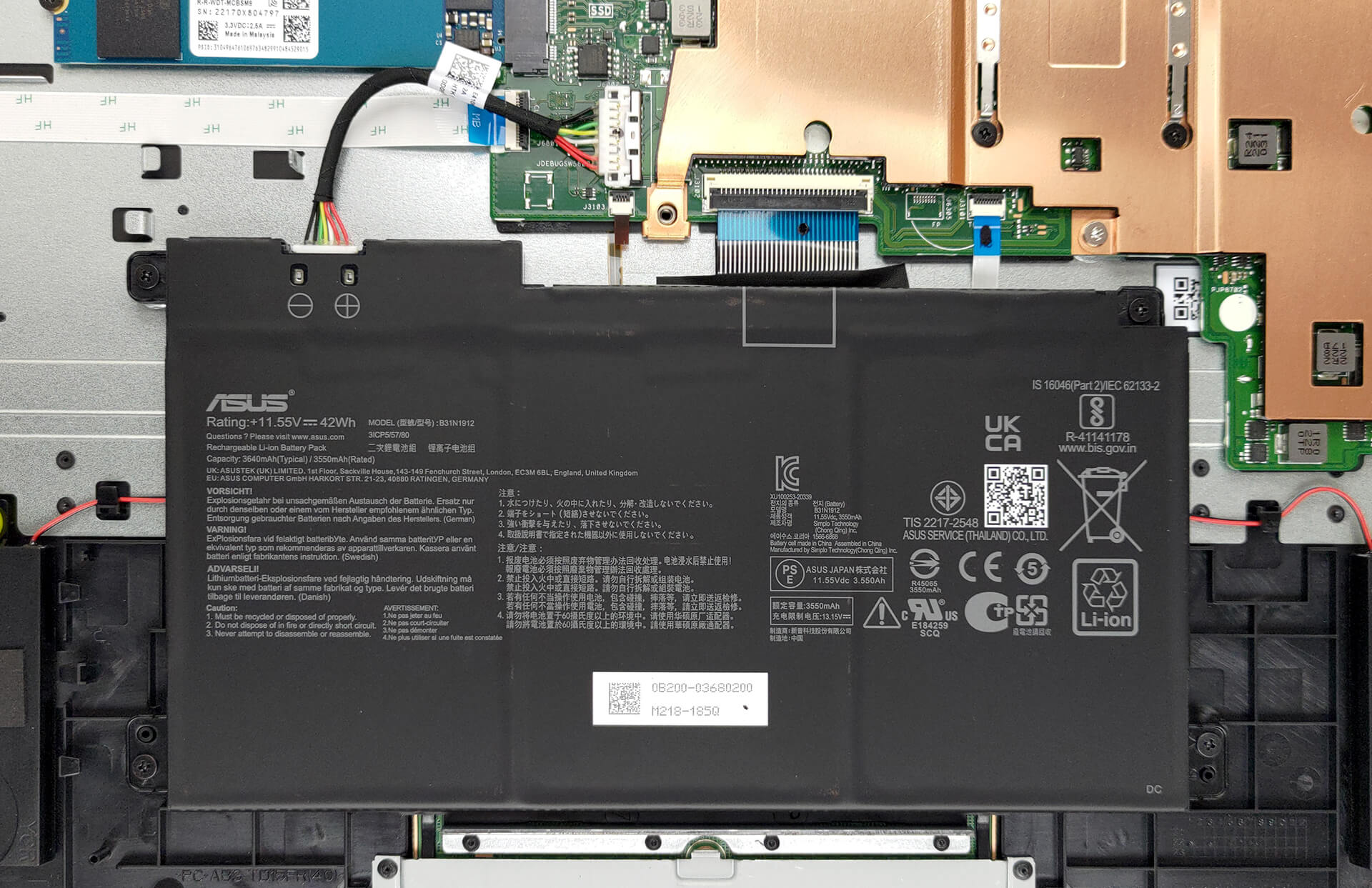
The 42Wh battery pack of the ASUS E410 lasts for 7 hours and 20 minutes of Web browsing, or 5 hours and 55 minutes of video playback. Now, we conduct the battery tests with the Windows Better performance setting turned on, screen brightness adjusted to 120 nits and all other programs turned off except for the one we are testing the notebook with.
2 reasons NOT to buy the ASUS E410
1. Display quality
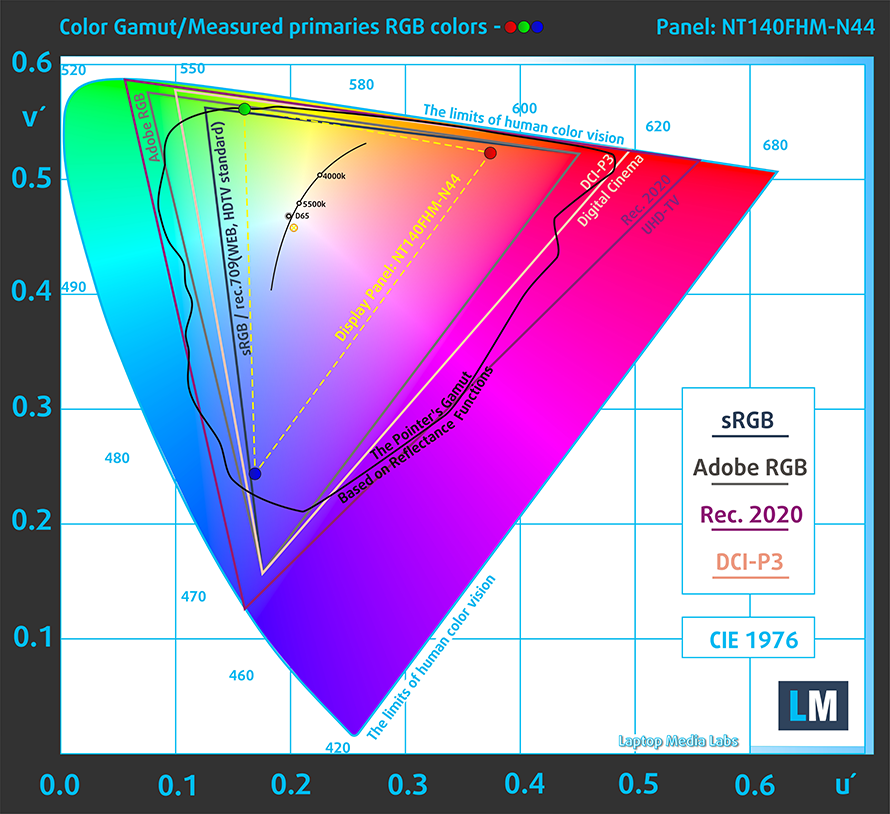
The laptop is offered with three display options: two TN displays, with either an HD or a Full HD resolution. Then we have an IPS panel with a Full HD resolution. We tested the Full HD TN display, which has a peak brightness of 251 nits, as well as poor viewing angles, and a very low contrast ratio of 260:1. It also covers only 53% of the sRGB color gamut.
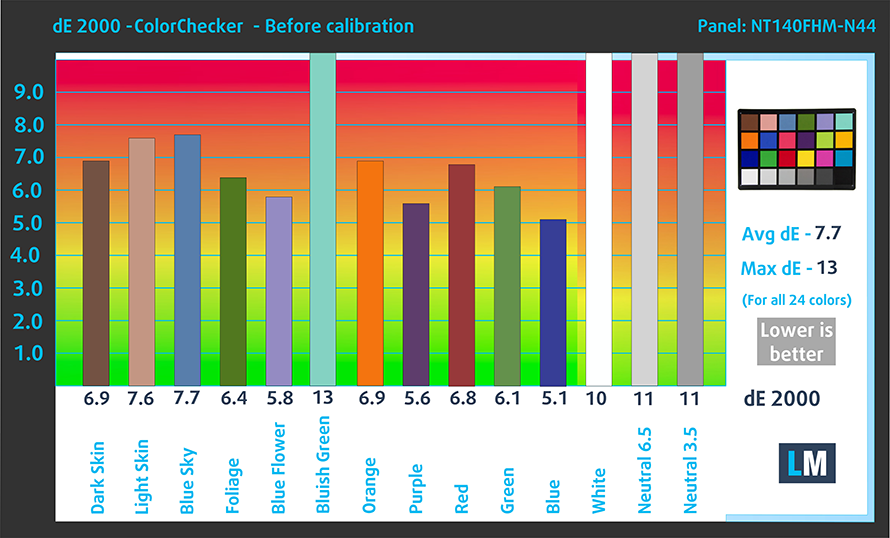
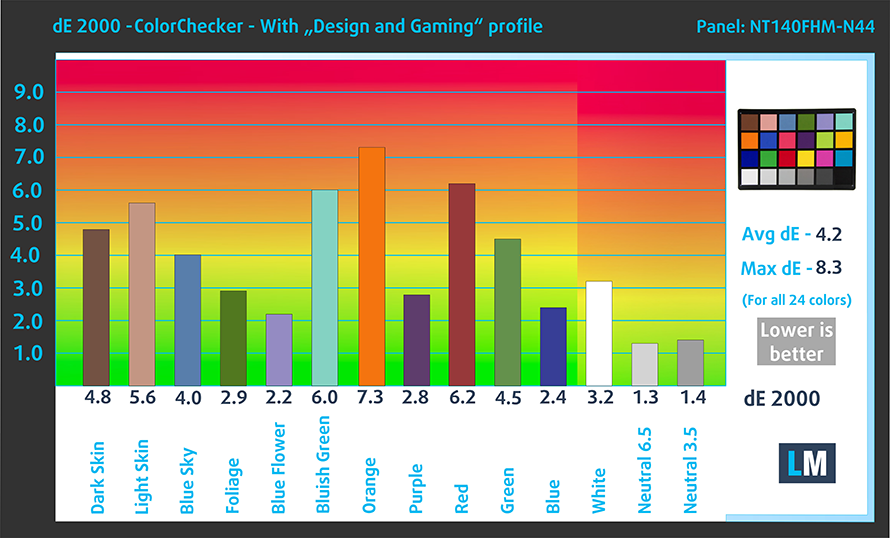
The color accuracy is all over the place, with a dE value of 7.7 with the stock settings, which goes down to 4.2 when we apply our Design and Gaming profile. It’s still far away from being suitable for professional work.
Buy our profiles
Since our profiles are tailored for each individual display model, this article and its respective profile package are meant for ASUS E410 configurations with 14.0″ BOE NT140FHM-N44 (BOE07F6) (1920 x 1080) TN.
*Should you have problems with downloading the purchased file, try using a different browser to open the link you’ll receive via e-mail. If the download target is a .php file instead of an archive, change the file extension to .zip or contact us at [email protected].
Read more about the profiles HERE.
Naast het ontvangen van efficiënte en gezondheidsvriendelijke profielen, ondersteunt u door het kopen van LaptopMedia's producten ook de ontwikkeling van onze labs, waar we apparaten testen om zo objectief mogelijke reviews te produceren.

Office Work
Office Work is voornamelijk bedoeld voor gebruikers die de meeste tijd besteden aan het bekijken van teksten, tabellen of gewoon surfen. Dit profiel streeft naar een betere onderscheidbaarheid en helderheid door een vlakke gammacurve (2.20), native kleurtemperatuur en perceptueel accurate kleuren te behouden.

Design and Gaming
Dit profiel is bedoeld voor ontwerpers die professioneel met kleuren werken, maar ook voor games en films. Design and Gaming haalt het uiterste uit beeldschermen, waardoor ze zo nauwkeurig mogelijk zijn in de sRGB IEC61966-2-1 norm voor Web en HDTV, met witpunt D65.

Health-Guard
Health-Guard elimineert de schadelijke Pulsbreedtemodulatie (PWM) en vermindert het negatieve Blauwe Licht dat onze ogen en lichaam beïnvloedt. Omdat het op maat gemaakt is voor elk paneel, slaagt het erin de kleuren perceptueel accuraat te houden. Health-Guard simuleert papier zodat de druk op de ogen sterk wordt verminderd.
Krijg alle 3 profielen met 33% korting

2. Upgradeability
The laptop comes with up to 8GB of soldered DDR4 memory, while the storage is accessible through one M.2 PCIe x4 slot for Gen 4 SSDs.

Here’s our teardown video, which shows how to access the single SSD slot.
All ASUS E410 configurations:
 Author: Severin Kolakov

![[september 2026] Bestverkochte laptopmerken op Amazon Global – Apple domineert de markt met een omzetaandeel van meer dan 70%](https://laptopmedia.com/wp-content/uploads/2026/10/GLOBAL-Best-Brands-400x225.jpg)
![[september 2026] Amazon Global: Top 10 bestverkochte laptops – Apple’s MacBook Neo staat op nummer 1, terwijl budget- en premiummodellen de markt domineren](https://laptopmedia.com/wp-content/uploads/2026/10/Best-Selling-Laptops-GLOBAL-Top-10-400x225.jpg)
![[september 2026] Amazon Global: Top 10 van best verkochte gaminglaptops – ASUS ROG Strix G16 domineert de markt met een recordaantal verkochte exemplaren](https://laptopmedia.com/wp-content/uploads/2026/10/Best-Selling-Gaming-Laptops-GLOBAL-Top-10-400x225.jpg)
![[september 2026] Wereldwijde ranglijst van bestverkochte laptop-GPU’s op Amazon – De M5-chip van Apple laat NVIDIA ver achter zich in de categorie premium-laptops, maar de RTX 5060 is de enige speciale GPU die de top 10 weet te halen](https://laptopmedia.com/wp-content/uploads/2026/10/Best-Selling-GPUs-GLOBAL-Top-10-400x225.jpg)
![[september 2026] Wereldwijde ranglijst van bestverkochte laptop-CPU’s op Amazon – Apple’s M5 verslaat Intel ruimschoots nu de premiummarkt een eenzijdige strijd is geworden](https://laptopmedia.com/wp-content/uploads/2026/10/Best-Selling-CPUs-GLOBAL-Top-10-400x225.jpg)
