Inside Lenovo Yoga Slim 7i Pro X (14″) – disassembly and upgrade options
Lenovo’s competitor to the MacBook is really solid. And it has one advantage – you can upgrade its storage.
Check out all Lenovo Yoga Slim 7i Pro X (14″) prices and configurations in our Specs System, or read more in our In-Depth review.
1. Remove the bottom plate
There are only 5 Torx-head screws keeping this laptop’s bottom panel in place. We were surprised that there are no hidden ones. After you undo them, pry the panel with a plastic tool, starting from the hinge gaps.

2. Battery
Inside, we find a 70Wh battery pack. It lasts for 9 hours of Web browsing, or 7 hours of video playback. To remove it, you need to unplug the battery connector and undo all 5 Phillips-head screws that keep it attached to the chassis.
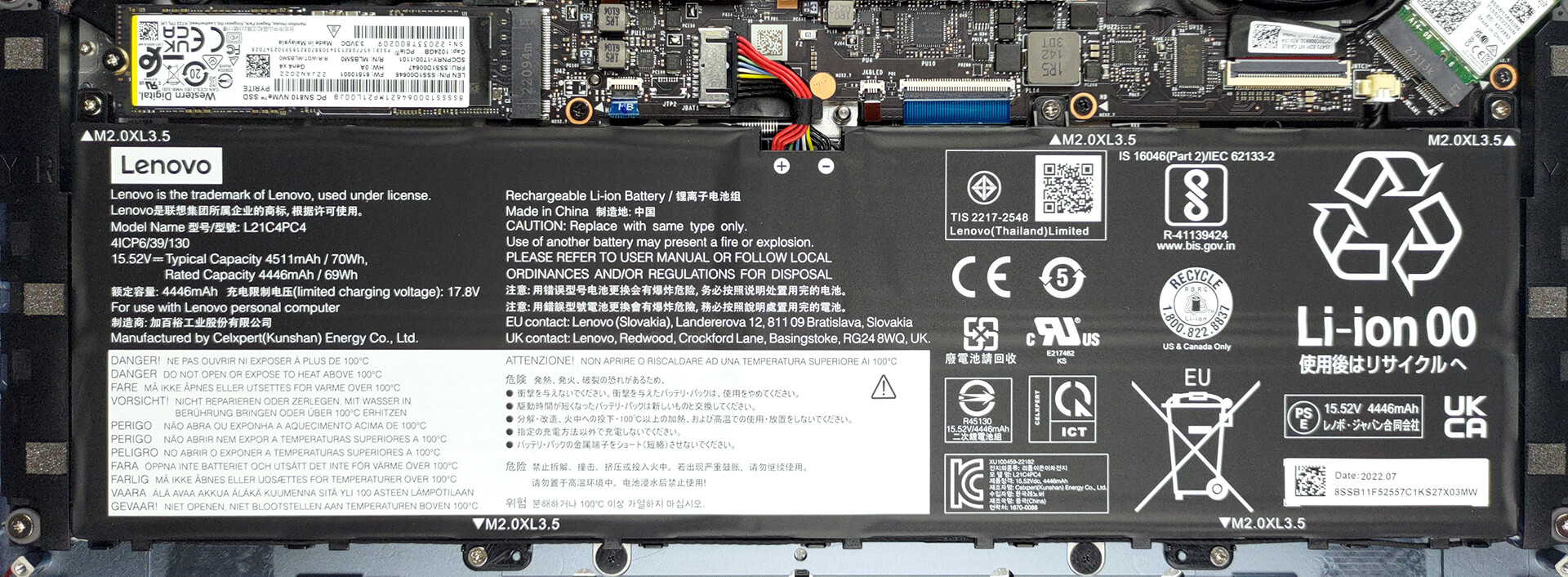
3. Memory and storage
The memory here is soldered to the motherboard. You get configurations of up to 32GB of LPDDR5 RAM, working at 6000MHz. As for the storage, there is one M.2 PCIe x4 slot, which works with Gen 4 SSDs.

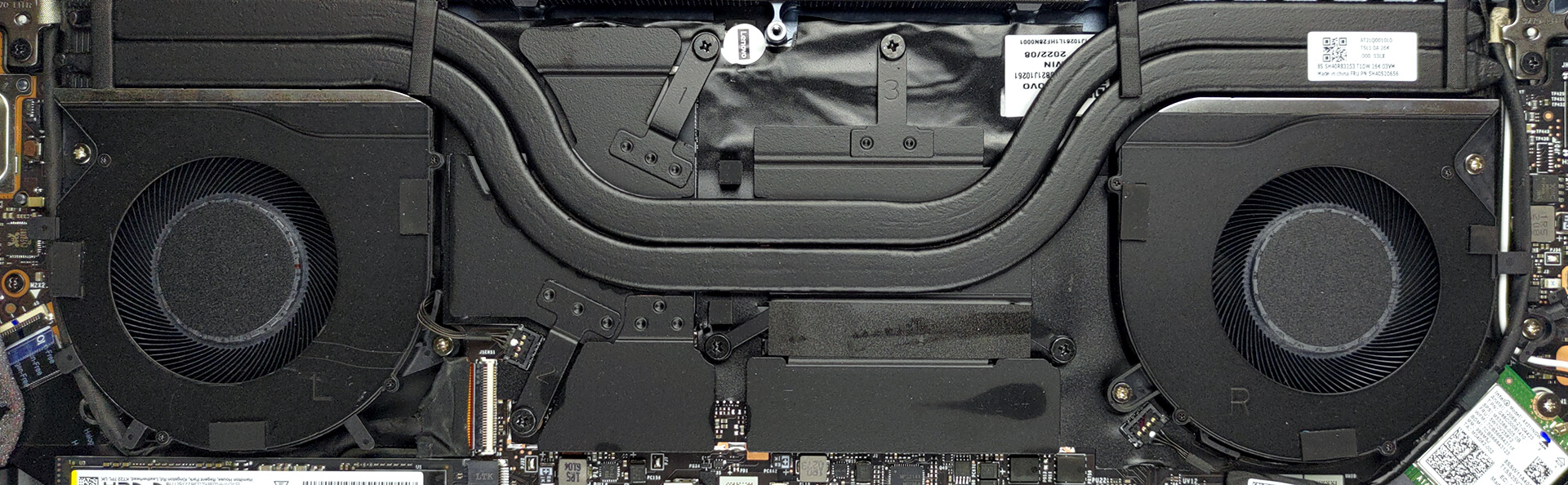
4. Cooling system
Cooling-wise, there are two heat pipes, shared between the CPU and the GPU. In addition, both the graphics memory and the VRMs are equipped with heat spreaders.
Check out all Lenovo Yoga Slim 7i Pro X (14″) prices and configurations in our Specs System, or read more in our In-Depth review.
Lenovo Slim 7 Pro X (14" Intel, 2022) uitgebreide review
Wat we de afgelopen jaren hebben geleerd, is dat mensen houden van notebooks met een kleine vormfactor en een redelijke hoeveelheid vermogen. Met de hulp van NVIDIA's absurd grote verscheidenheid aan energiedoelen voor hun GPU's, zie je laptops zoals de Lenovo Yoga Slim 7i Pro X (14"), die kan worden uitgerust met de RTX 3050 (55W).We waren echter meer verbaasd over de gekozen CPU's. Intel heeft namelijk ongelooflijk krachtige 28W processors met zijn Alder Lake architectuur. Lenovo wilde daar echter niets van weten en koos voor de almachtige Core i5-12500H en Core i7-12700H.Dit beteke[...]
Pros
- Dunne en lichte uitrusting
- Sterk aluminium chassis
- Dekt 84% van het sRGB-kleurengamma en heeft een nauwkeurige kleurweergave met ons Gaming- en webdesignprofiel (BOE NE145F8M-N61 (BOEAA8))
- Hoge resolutie en 16:10 beeldverhouding
- Geen PWM (BOE NE145F8M-N61 (BOEAA8))
- 2x Thunderbolt 4
- Redelijke prestaties voor zijn klasse
- Full HD-webcamera + IR-gezichtsherkenning
- Goede batterijduur
Minpunten
- Gesoldeerd geheugen
- Geen SD-kaartsleuf
- CPU-prestaties worden beperkt door vermogen
 Author: Alex Iliev

![[juni 2026] Bestverkochte laptopmerken op Amazon Global – Apple’s ongeëvenaarde dominantie in aantal verkochte exemplaren en omzet](https://laptopmedia.com/wp-content/uploads/2026/07/GLOBAL-Best-Brands-400x225.jpg)
![[juni 2026] Amazon Global: Top 10 bestverkochte laptops – De nieuwe MacBook Neo van Apple stormt naar de eerste plaats en zet de markt op zijn kop dankzij zijn betaalbaarheid](https://laptopmedia.com/wp-content/uploads/2026/07/Best-Selling-Laptops-GLOBAL-Top-10-400x225.jpg)
![[juni 2026] Amazon Global: Top 10 van best verkochte gaminglaptops – De Nitro V 16S AI van Acer domineert de verkoopcijfers, terwijl ASUS qua totale omzet aan kop gaat](https://laptopmedia.com/wp-content/uploads/2026/07/Best-Selling-Gaming-Laptops-GLOBAL-Top-10-400x225.jpg)
![[juni 2026] Wereldwijde ranglijst van bestverkochte laptop-GPU’s op Amazon – De NVIDIA RTX 5060 is de bestverkochte speciale GPU](https://laptopmedia.com/wp-content/uploads/2026/07/Best-Selling-GPUs-GLOBAL-Top-10-400x225.jpg)
![[juni 2026] Wereldwijde ranglijst van bestverkochte laptop-CPU’s op Amazon – Apple M5 domineert, AMD Ryzen 7 260 verovert een stevig aandeel in het premiumsegment](https://laptopmedia.com/wp-content/uploads/2026/07/Best-Selling-CPUs-GLOBAL-Top-10-400x225.jpg)
