Вътрешност на Acer Aspire V17 Nitro Black Edition (VN7- 791G) – разглобяване, вътрешни снимки и опции за ъпгрейд
Новите серии Aspire V15 и V17 Nitro Black Edition станаха наистина популярни за кратък период от време благодарение на достъпните си цени, компактния дизайн и мощния хардуер. Това е геймърска машина, която е достатъчно портативна, за да я използвате като ежедневен шофьор, но същото не може да се каже за V17 Nitro Black Edition. Това е 17-инчов модел, за който вероятно ще си помислите, че е малко по-различен от 15-инчовия модел и ще се възползвате от по-голямото шаси. За съжаление това не е така. Макар че все още носи предимствата на 15-инчовия модел, в него липсват функциите, които бихте очаквали от голям преносим компютър.
1. Изваждане на клавиатурата
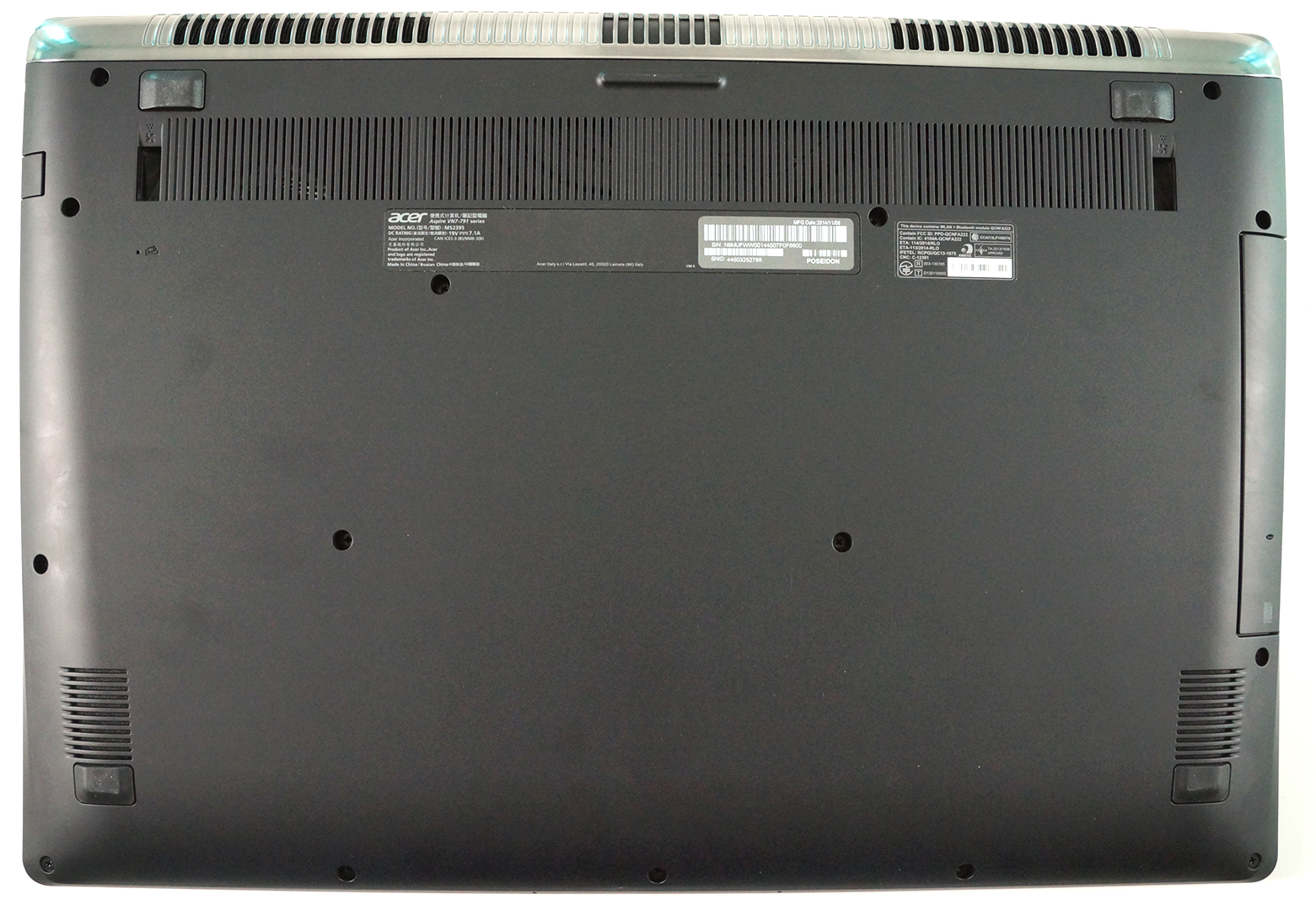
Този модел е абсолютно идентичен с 15-инчовия модел и отварянето му е сравнително лесно. Първо, ще трябва да направите няколко отвинтвания в долната част и след това да се опитате да изкарате клавиатурата с помощта на някакъв пластмасов инструмент. Бъдете внимателни, когато сваляте клавиатурата, тъй като тя е прикрепена към дънната платка с 3 кабела. Това е малко трудно.
2. Опции за надграждане
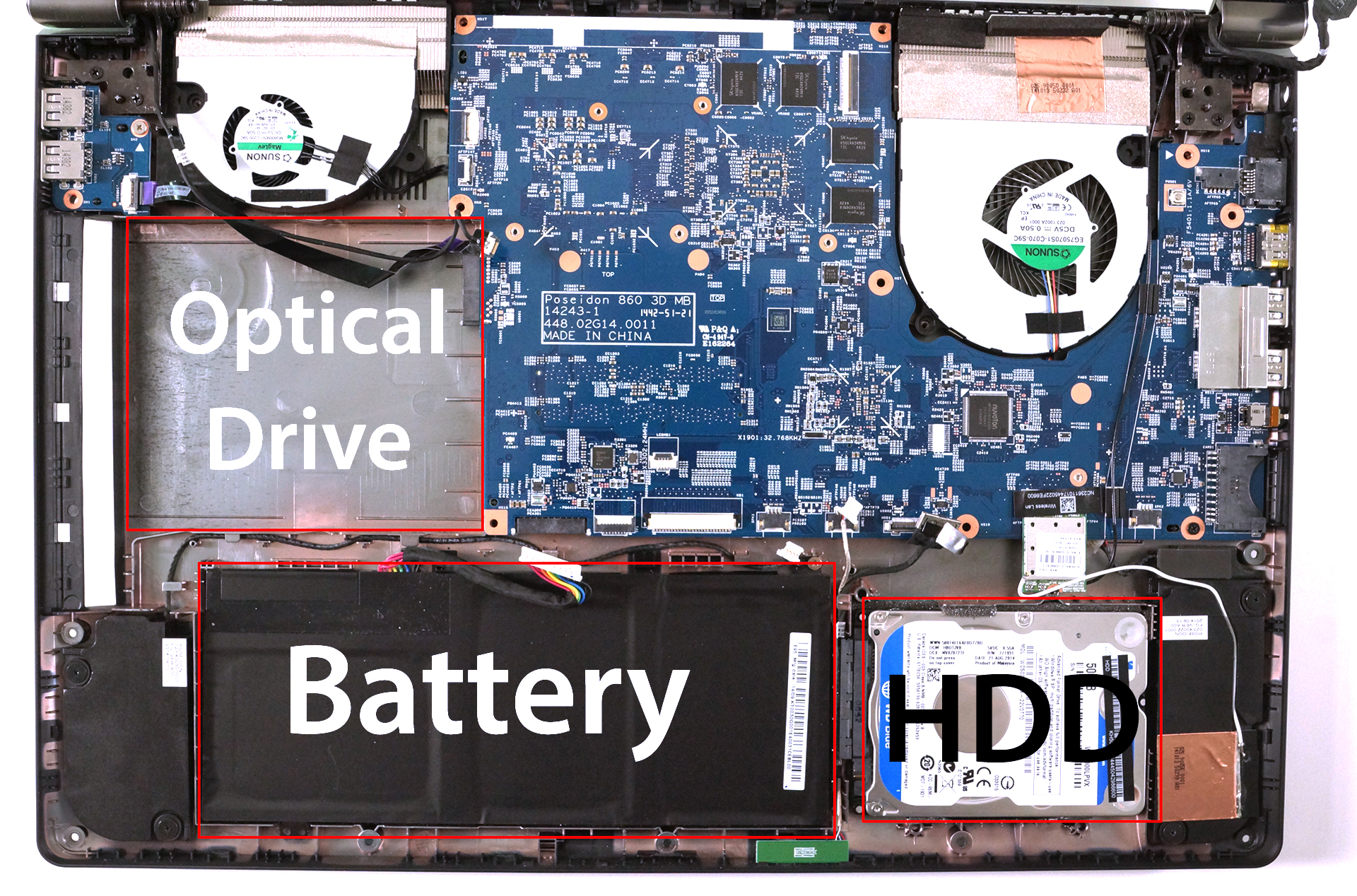
Отстраняването на клавиатурата ще разкрие почти всички вътрешни елементи. Можете лесно да почистите вентилаторите от праха, да смените 2,5-инчовия твърд диск или да го надстроите с SSD. Процесорът и графичният процесор са със същото разположение като при V15 Nitro Black Edition, както и целият останал хардуер. Всъщност това е 15-инчова дънна платка, поместена в по-голямо шаси. Освен това батерията изглежда малко малка – виждали сме ултрабуци с по-големи батерии. Те биха могли да използват малко повече пространство вътре. Ако сте готови да пожертвате оптичното устройство, можете да помислите и за замяната му с допълнително устройство за съхранение като 2,5-инчов твърд диск или SSD. Ако обаче искате да надградите M.2 SATA паметта или RAM чиповете, преминете към следващата стъпка.
3. Изваждане на дънната платка
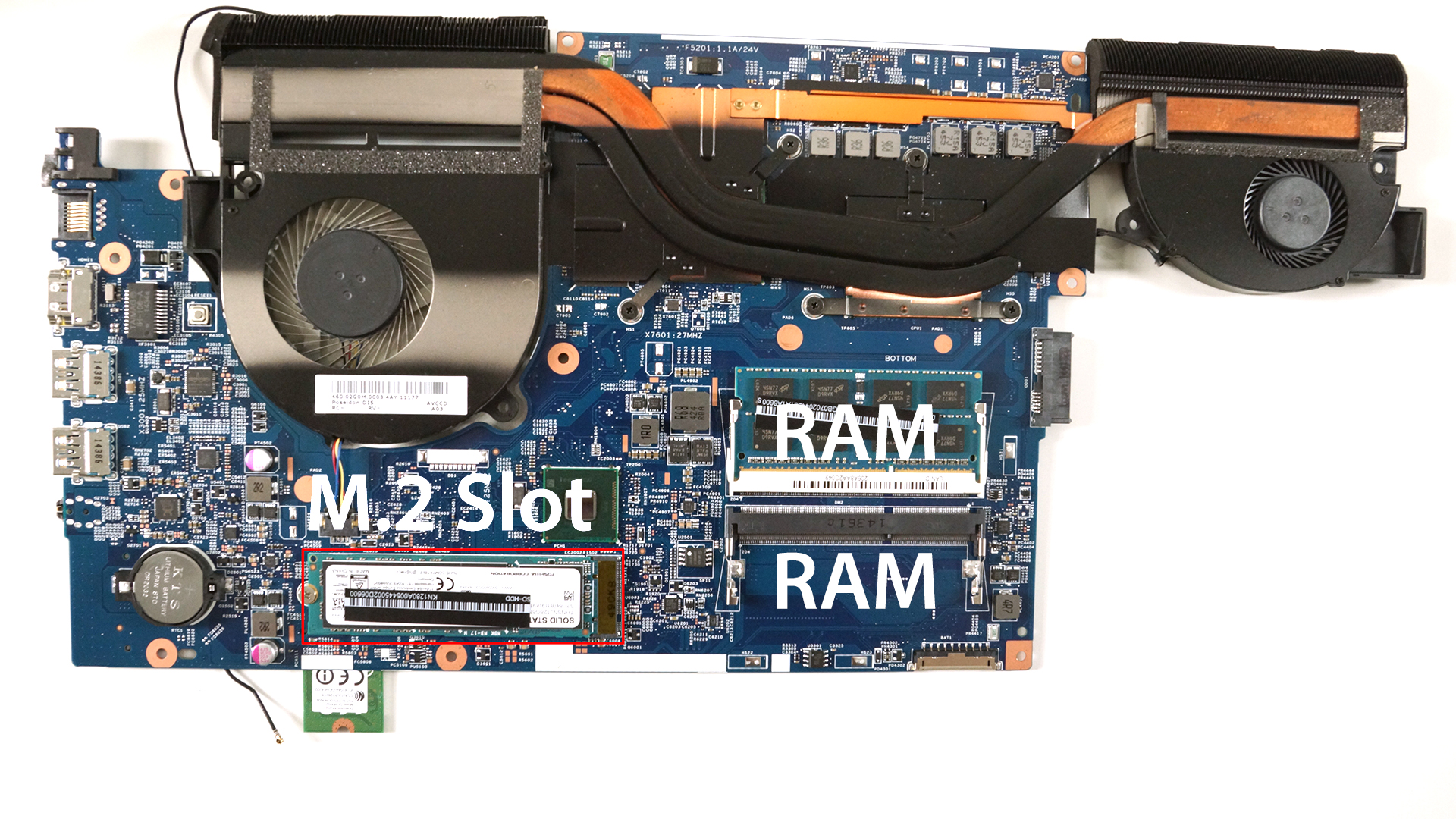
Като отвиете няколко болта, можете да пристъпите към сваляне на дънната платка. Бъдете внимателни с всички прикрепени кабели. В задната част ще намерите M.2 SATA слот за 2280 B&M ключово SSD устройство и в нашия случай той е зает. Там се намират и слотовете за RAM чипове, така че можете да се насочите към още един 8GB чип за общо 16GB оперативна памет.
 Author: Rossen Pandev

![[Август 2026 г.] Amazon Global: Топ 10 на най-продаваните лаптопи – Apple MacBook Neo оглавява класацията, докато бюджетните и среднокласовите лаптопи с Windows се борят за пазарен дял](https://laptopmedia.com/wp-content/uploads/2026/09/Best-Selling-Laptops-GLOBAL-Top-10-400x225.jpg)
![[август 2026 г.] Най-продаваните марки лаптопи в Amazon Global – Apple доминира по приходи, докато HP е лидер по разнообразие на моделите](https://laptopmedia.com/wp-content/uploads/2026/09/GLOBAL-Best-Brands-400x225.jpg)
![[август 2026 г.] Amazon Global: Топ 10 на най-продаваните геймърски лаптопи – HP Victus 15 заема първото място, докато класацията се доминира от достъпни модели](https://laptopmedia.com/wp-content/uploads/2026/09/Best-Selling-Gaming-Laptops-GLOBAL-Top-10-400x225.jpg)
![[August 2026] Best-Selling Laptop Brands on Amazon Japan – Apple Dominates Market Share and Revenue Led by Strong Unit Sales](https://laptopmedia.com/wp-content/uploads/2026/09/CO.JP-Best-Brands-1-400x225.jpg)
![[August 2026] Best-Selling Laptop Brands on Amazon USA – Apple Dominates Market Revenue and Volume Despite Lower Model Diversity](https://laptopmedia.com/wp-content/uploads/2026/09/COM-Best-Brands-1-400x225.jpg)

What M.2 SSD is in there? I am trying to upgrade mine but I need a model number to match if possible.
There’s no need of model number. Just look for 80mm M.2 SATA SSD with B & M type of key.
All those M.2 slots are a bit confusing. I’m wondering, given that VN7-791G has a slot for B & M keyed drives, would it be possible to have an SSD with only an M key like the Samsung SM951? Or the opposite, an SSD with one B key only? Or is it only SSDs with both B and M keys that can go in there?
In any case, thanks for sharing that disassembly.
Only the appropriate key will fit unfortunately.
Hey, but here it says that VN7- 791G Black Edition model has only B key:
http://laptopmedia.com/laptop-m-2-ngff-ssd-compatibility-list/
I am confused 🙁
perfect it worked! thanks! Got a Samsung 850 M.2 drive.
hey , how did u tranfer ur existing data(os) to the new m.2 SSD?? with standard ssd u can put it in an enclosure n connect it as ext harddrive n transfer data.. but with M.2 SSD??
What 8gb ram memory should I get to get total of 16gb?
I have the same question…would any DDR3L SDRAM work?
Hy guys…
I have the same PC and have a suspicious noise coming from the bottom left side (image).
I wonder what’s the black block to the left of the battery.
Thank you 🙂
That’s one of the speakers, the bottom left one (four in total). Try lowering your volume or disabling your sound card to check if the noise goes away. If it does, the speaker probably got damaged.
Thanks for the article Rossen, I bought this exact laptop configured with 2TB HDD and 16 GB ram. What confuses me is that windows 10 task manager shows “Slots used: 2 of 4” under Memory. I haven’t opened it up (yet :P) so want to confirm if it has 2 or 4 ram slots.
Thanks in advance.
If need a screenshot, let me know.
There’s a slight chance that the notebook you have has 4 slots but I really doubt that’s the case. I am pretty sure the tasks manager reads it wrong. Try with Aida64 or CPU-Z.
I have a question I have aspire v17nitro black edition and it comes with 16gb memory ram. Is it possible to upgrade the ram to 32gb and what kind of ram do I need to buy. Thanks
I just got one and did an upgrade to 32GB. You need a DDR4 2133 RAM.
http://amzn.to/2aHLTeS
Everything I’ve ever read says this model can only be upgraded to 16gb. If this is legit you just made me a very happy man.
I upgraded mine to 32gb of ddr4 ram. Windows recognices all 32gb and runs fine.
Duncan, are you positive you upgraded a VN7-791G to 32GB RAM? The VN7-791G uses only DDR3L RAM sticks. DDR4 sticks are not compatible with the 791G memory slots, I tried 2 days ago.
My laptop is the V NITRO 17 Black Edition (VN7-792G) and has been running 32 GB DDR4 RAM for about a year with no issues. I am currently tring to find out if it will support an NVMe SSD on the M.2 slot.
Mars, you most likely upgraded a VN7-792G instead of a VN7-791G. Purchased the DDR4 2133 RAM sticks that you had provided a link to and it does not fit in the 791G memory slots.
Hi, does anyone know the name of the cable to connect the hdd to the motherboard? I can’t eem to find it and need one… 🙁
Where can I buy a motherboard for this computer? Mine is shot. Thanks.
Has anyone tried using 16GB DDR3L sticks which are available on the market now?
is it possible to have both HDD and ssd memory and DVD/RW at the same time?
i mean, without removing HDD memory and DVD/RW?
which one does it support?
PCIe x4 m.2 SSD with M key and AHCI or NVMe protocols
my laptop is : Acer Aspire V17 Nitro Black Edition (VN7-791G-76Z8)
Is it possible do remove the bottom case only, if i want to change the ram memory?
It looks like it in this video?
/Mike
brother can i upgrade Acer Aspire V17 Nitro Black Edition’s ( VN7-791G-76MH) RAM? current ram 16gb and i want to upgrade it to 64gb . is it possible? please inform me.
Hey everyone, i have a VN7-591G-787T and i was wondering if i can upgrade the RAM memory to a kit of 2x8Gb 1866Mhz. Thanks a lot!
Disck SDD?