HP M27 Webcam Monitor – Specs, Pros / Cons: More Than An Office Monitor
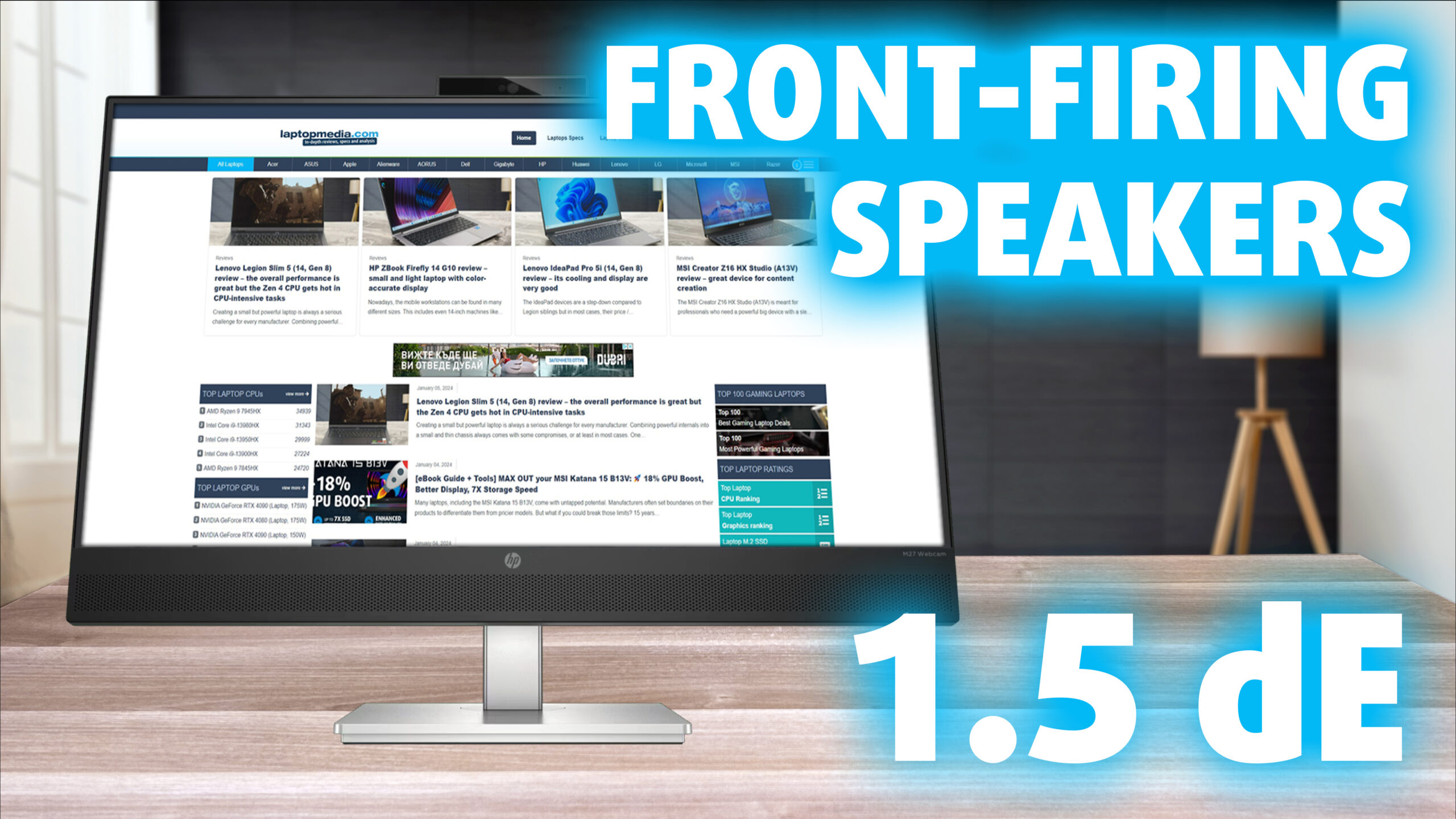 Do we really need another camera in our home or at the office? HP thinks we do, as we’re introduced to the HP M27 Webcam monitor. We’ve seen other manufacturers implement integrated webcams before, and we do understand the more paranoid folks, but nowadays every device records or listens in some way (whether you want it or not) so you can’t escape it.
The HP M27 is more than a recording device, however. It’s a competent office monitor that manages to become pretty accurate and cover a decent spectrum of colors. The former is only possible with our Display Profiles, which have the ability to transform the monitor in more ways than one. It even brings some Gaming DNA, with AMD FreeSync support, and a 75Hz refresh rate, so it’s not just a simple office monitor.
It also brings a good port selection, so it’s capable of being a pretty key component of your setup, with USB ports for peripherals and more.
You can check the current price of the HP M27 Webcam Monitor here: Αγοράστε από το Amazon.com (#CommissionsEarned)
Contents
Specs sheet, What’s in the box?, Drivers, OSD, Design, Connectivity
| Screen size | 27 inch (68.58 cm) |
|---|---|
| Refresh rate | 75Hz |
| Response time | 5ms |
| Panel type | IPS |
| Backlight type | LED |
| Screen finish | Matte |
| Resolution | 1920 x 1080 (FHD) |
| Technologies |
|
| I/O |
|
What’s in the box? Assembly

Drivers and Software
You can find all downloadable files on HP’s Support Portal. There’s additional Software available for download, some of which isn’t monitor-related, like the Cloud Recovery Tool. There’s the HP Display Center, which can give you monitor control through the operating system. It’s available on the Support Portal, as well as the Microsoft App Store.

Design and Connectivity
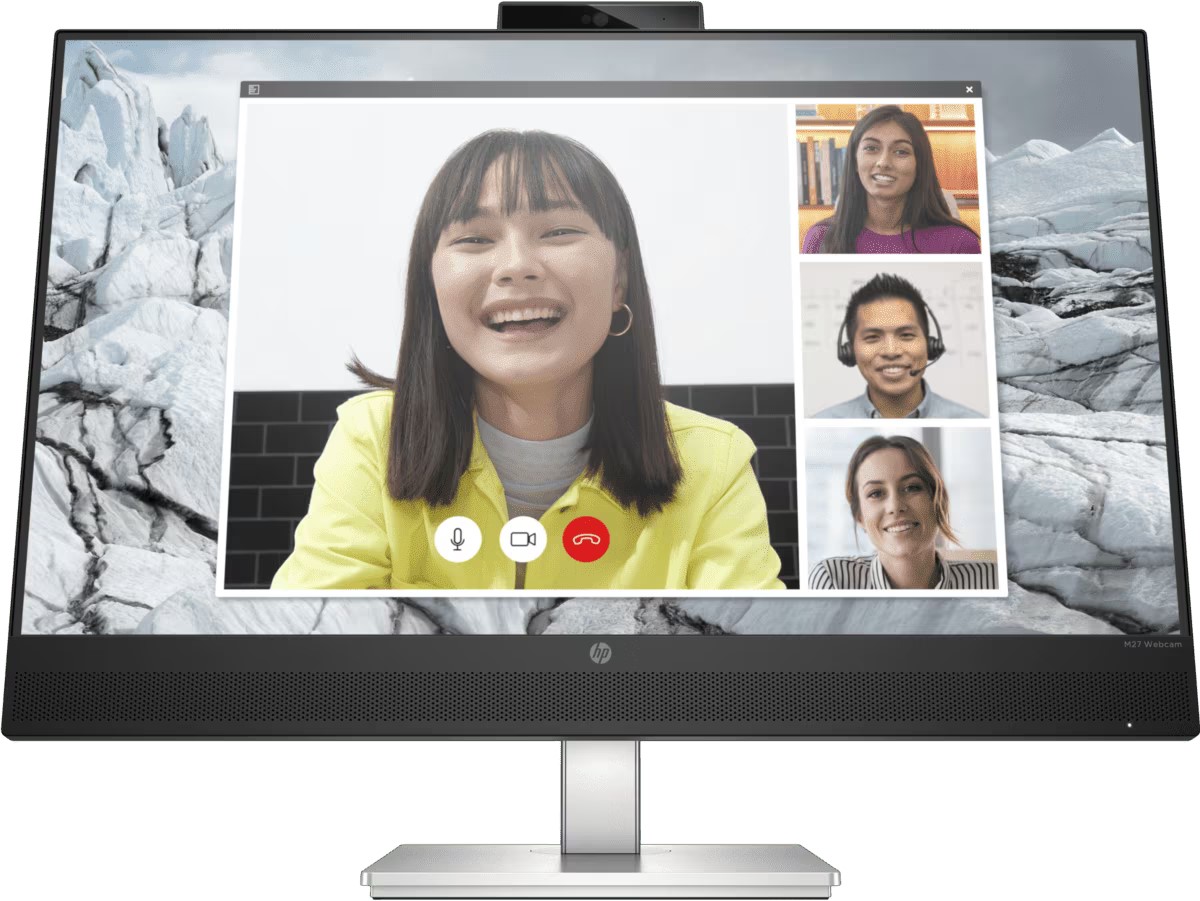
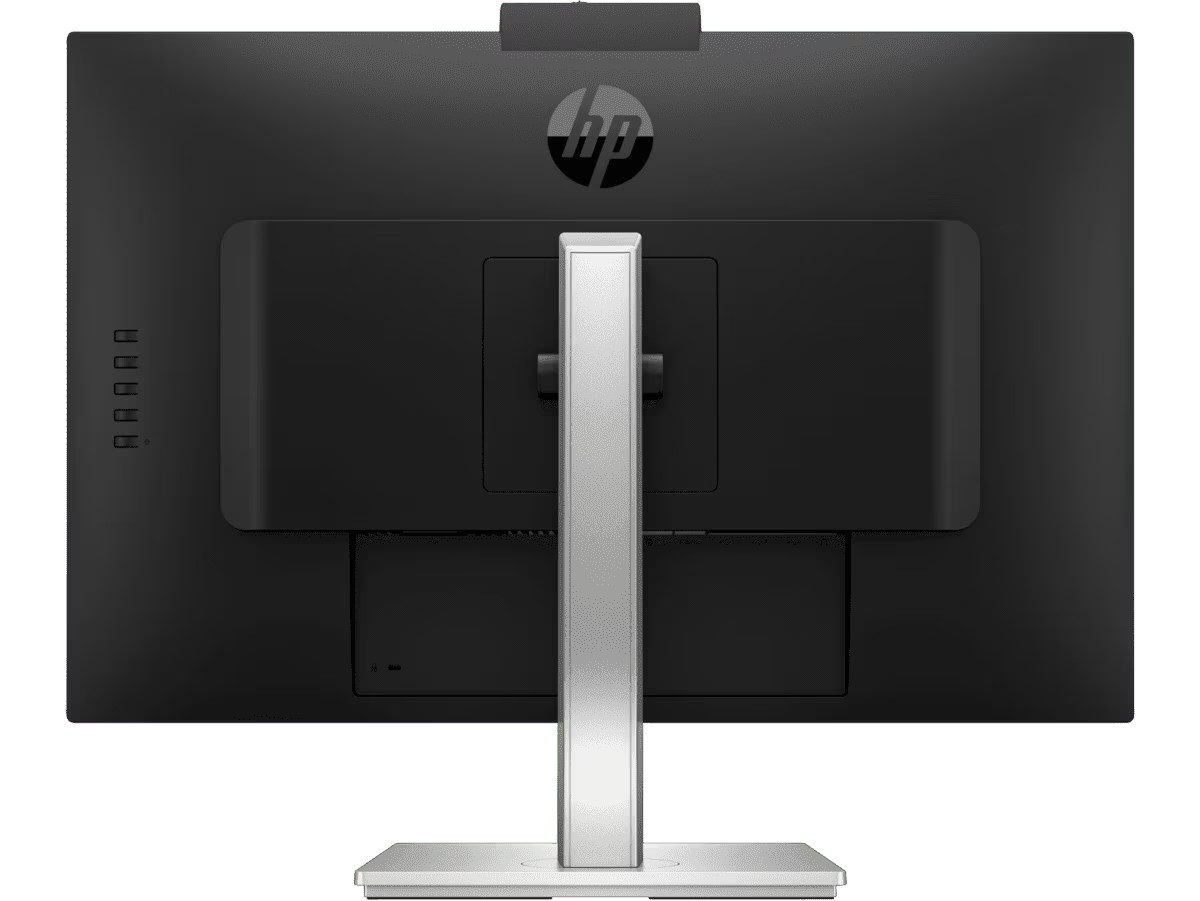
The monitor has a unique design. We’ve got an absolute stunner of a double chin, which houses the speakers. It’s the first time we’re seeing front-facing speakers on a monitor and we’re super happy at the ingenuity that HP is presenting. It will make the 2x 2W speakers provide much more audible and crisp sound, firing directly at you. The rest of the bezels are very thin, while the Black and Silver color scheme goes a long way to give the M27 a sleek and modern look. The silver stand offers decent adjustments, with Tilt and Height. On the back, there are buttons for controlling the OSD menu, as well as the port selection.
It includes one HDMI port, one DisplayPort, a single USB Type-C port, two USB Type-A ports, and an audio jack. This means you can connect some peripherals or even a whole USB hub to the monitor, thus expanding the port selection even further.
Display quality, Buy our profiles, Verdict
The HP M27 Webcam Monitor brings a 27-inch Full HD screen (1920 x 1080p), which calculates to a pixel density of 81.59 PPI, a pitch of 0.3113 x 0.3113 mm, and a Retina distance of 42.14 inches or 107 cm. From this distance, the human eye can’t distinguish individual pixels.
The correlated color temperature on a white screen after a Factory Reset in sRGB mode is 6240 K (Luminance 150 cd/m2 at 20% Brightness). The average gamma value is 2.18.
Color coverage
Here’s an illustration (Fig. 1). The whole “sail-shaped” map below consists of all the colors we can see, while the black crooked line shows all the colors from real-world scenes and nature around us.
Then, we’ve drawn some of the most important and interesting color spaces, compared to the colors the panel of HP M27 Webcam Monitor can show:
Standard/For Web: sRGB – widely used color space for most consumer devices, ideal for Web design and development
For Print: AdobeRGB – used in professional photo editing, graphic design, and print
For Photographers/Video Editors: DCI-P3 – used in high-end film production, post-production, and digital cinema
Premium HDR: Rec.2020 – the widest consumer ITU color standard, covering a massive 75.8% of the visible spectrum, a benchmark for premium HDR content
HP M27 Webcam Monitor: the yellow dashed triangle (– – – – – –) represents the range of colors this monitor can display. In our tests, we calculated the total color coverage of the monitor at 92% of the sRGB color gamut.
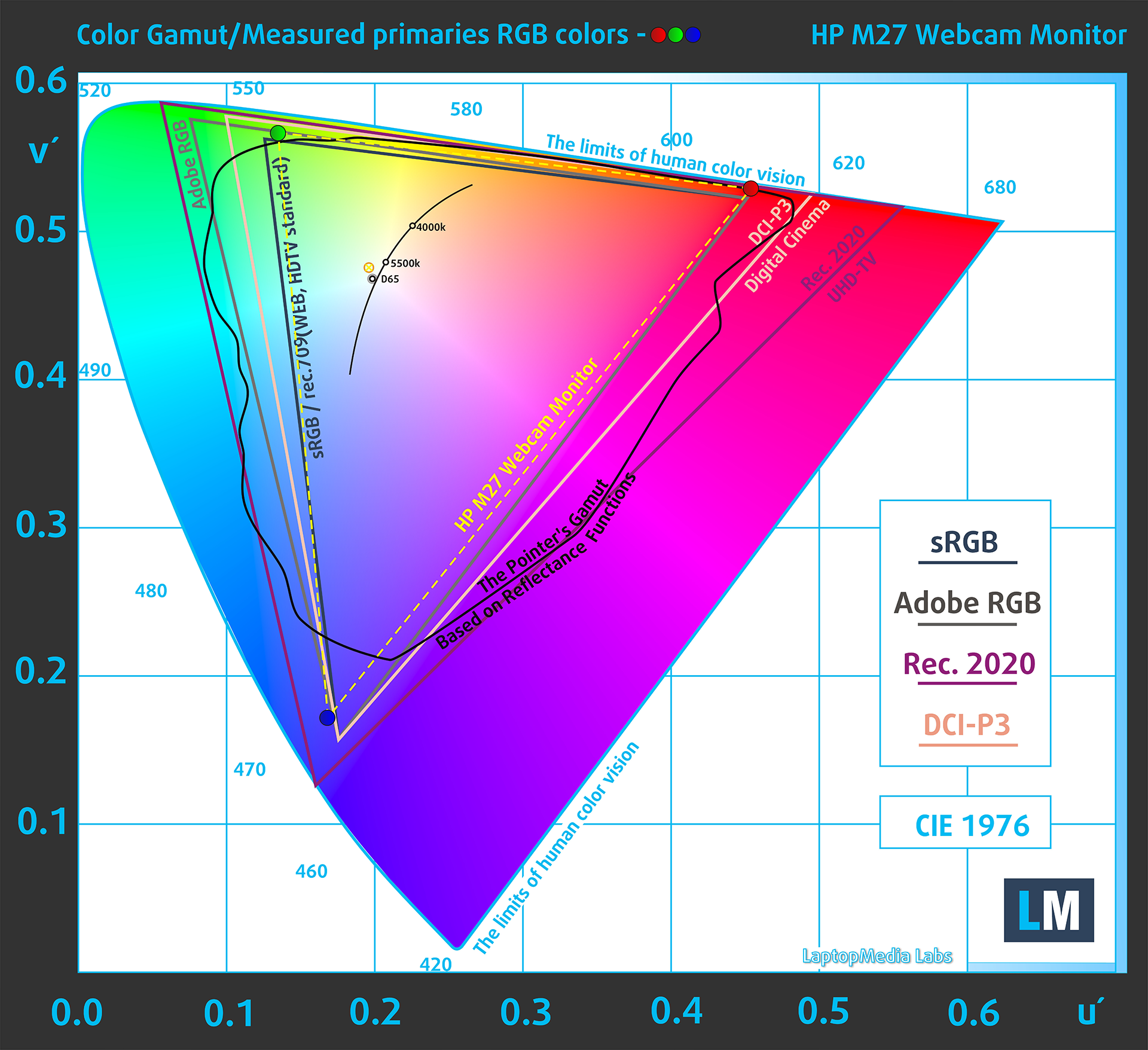
(Fig.1) HP M27 Webcam Monitor covers 92% of the Web colors (sRGB)
This means that if the HP M27 Webcam Monitor tries to show any color outside of its triangle, it will show the closest color to it that’s inside the triangle.
Color accuracy
Now let’s see how big is the difference between the real colors and the one you’ll see on the HP M27 Webcam Monitor. We measure that distance in DeltaE – the bigger the number, the more different they look.
For the next illustration, we’ve chosen 24 common colors like dark and light skin, blue sky, green grass, etc.
Values below 2.0 are considered suitable for color-sensitive work. Before our calibration of the HP M27 Webcam Monitor, the Average color accuracy was 4.2 dE (Fig. 2), and with our Web Design and Office Work profile, it lowered to 1.5 dE (Fig. 3). Thanks to our profile, the monitor became nearly 3X more accurate, with a 2.8X increase, so you’ll be able to do plenty of color-related work on it.
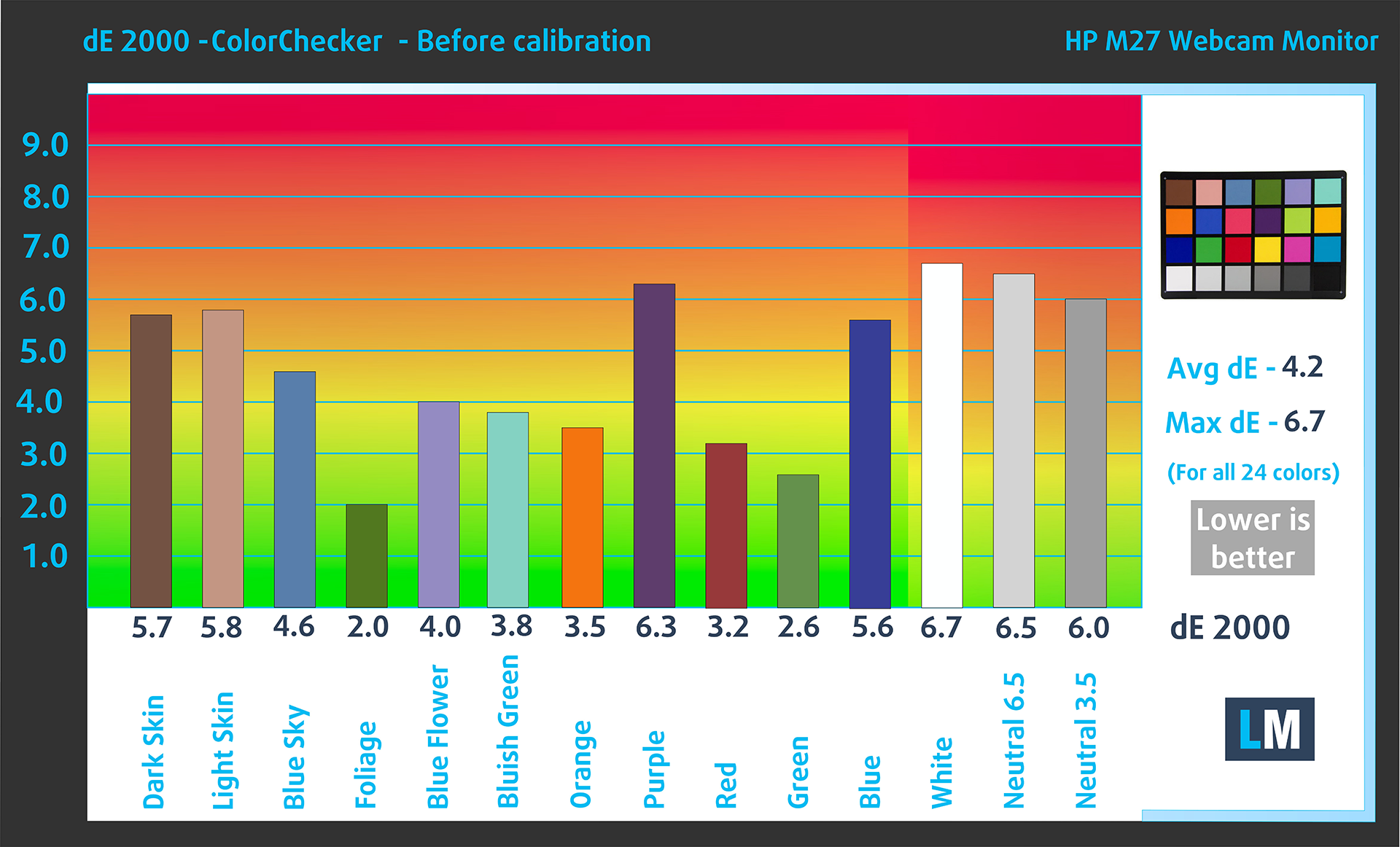 (Fig. 2) HP M27 Webcam Monitor in its factory condition
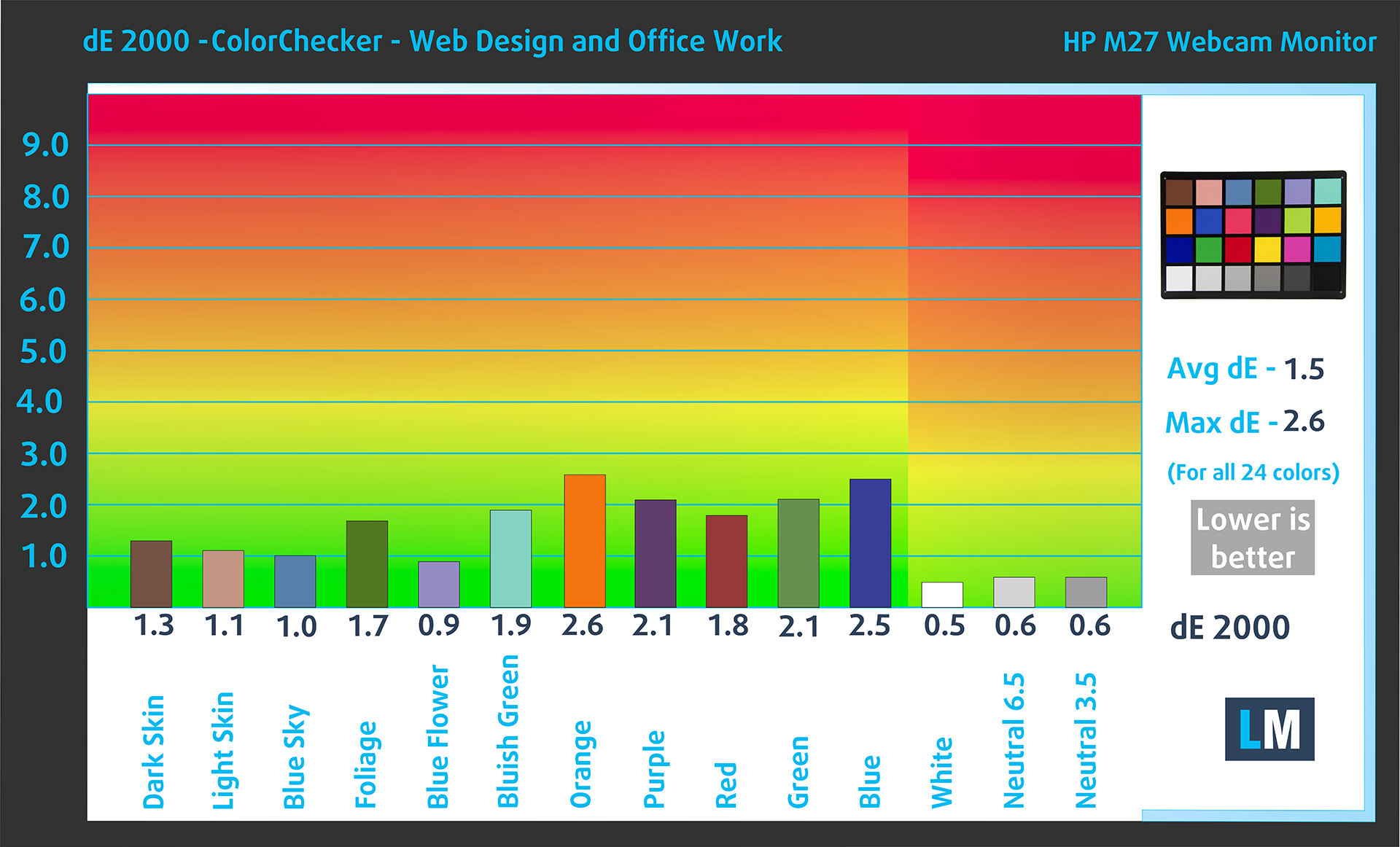 (Fig. 3) HP M27 Webcam Monitor with our display profiles
Comparison in the sRGB color space (primaries and D65 white point specified in ITU-R BT.709, sRGB encoding curve).
Left: No Profile | Drag the slider to see the difference | Right: Design & Gaming Profile


Health-Guard eliminates the harmful Pulse-Width Modulation (PWM) and reduces the negative Blue Light which affects our eyes and body. Since it’s custom-tailored for every panel, it manages to keep the colors perceptually accurate (they may seem strange at first but after a few minutes our brain will start recognizing them as accurate ones – that’s how Health-Guard differs from alternatives like f.lux).
Pro Tip: As the Health-Guard profile simulates paper and has as accurate as possible colors, it could be a great tool for prepress designers!
Left: No Profile | Drag the slider to see the difference | Right: Health-Guard Profile


Gaming and Movies
We also have a third Gaming and Movies profile, which regulates the black colors, making dark areas in games and movies appear more visible, thus giving you a better viewing experience. Shooting at your opponent first can be a make-or-break moment, so make sure you’re best prepared with our profile.
Left: No Profile | Drag the slider to see the difference | Right: Design & Gaming Profile


BUY OUR DISPLAY PROFILES
Since our profiles are tailored for each individual display model, this article and its respective profile package are meant for the HP M27 Webcam Monitor.
*Should you have problems with downloading the purchased file, try using a different browser to open the link you’ll receive via e-mail. If the download target is a .php file instead of an archive, change the file extension to .zip or contact us at [email protected].
Read more about the profiles HERE.
Here’s how to prepare thе monitor for our profiles:
1. Open the OSD menu (On-Screen Display)
2. Reset Settings: Go to Menu ➡️ Management ➡️ Factory Reset, and click ‘Yes’.
3. Set Colors: Go to Menu ➡️ Color ➡️ CustomRGB: Set the colors to R249, G243, B255
4. Brightness: Navigate to Brightness and set it to 80% for optimal viewing.
Εκτός από τη λήψη αποδοτικών και φιλικών προς την υγεία προφίλ, αγοράζοντας τα προϊόντα της LaptopMedia υποστηρίζετε επίσης την ανάπτυξη των εργαστηρίων μας, όπου δοκιμάζουμε συσκευές για να παράγουμε τις πιο αντικειμενικές δυνατές αξιολογήσεις.

Design and Office
Το προφίλ Design and Office κάνει τα χρώματα της οθόνης όσο το δυνατόν πιο κοντά στην πραγματικότητα.Ιδανικό όχι μόνο για επαγγελματίες αλλά και για καθημερινούς χρήστες, πληροί τα πρότυπα sRGB (λευκό σημείο D65, γάμμα sRGB) με ελάχιστο DeltaE για ακριβή αναπαραγωγή χρωμάτων στο πάνελ σας.

Gaming and Movies
Έχετε παρακολουθήσει ποτέ μια ταινία όπου, κατά τη διάρκεια σκοτεινών σκηνών, μετά βίας βλέπετε τίποτα; Πολλές οθόνες αποτυγχάνουν να διακρίνουν σωστά τους σκούρους τόνους. Το προφίλ μας Gaming and Movies ενισχύει την απόδοση σε χαμηλό φωτισμό, όπως η τεχνολογία HDR, χρησιμοποιώντας μια καμπύλη γάμμα προσαρμοσμένη στην ανθρώπινη αντίληψη — ιδανικό για παίκτες που αναζητούν ταχύτερες αντιδράσεις και πιο καθαρά γραφικά.

Health-Guard
Το προφίλ μας Health-Guard προστατεύει τα μάτια σας εξαλείφοντας το τρεμόπαιγμα (PWM), μειώνοντας την καταπόνηση και την κόπωση, και ελαχιστοποιώντας την επιβλαβή έκθεση στο Μπλε Φως που μπορεί να διαταράξει τον ύπνο και την υγεία. Χρησιμοποιεί λογισμικό dimming και μια καμπύλη γάμμα προσαρμοσμένη στην ανθρώπινη αντίληψη για άνεση και ασφάλεια κατά τη χρήση της οθόνης.
Αποκτήστε Όλα Τα Προφίλ Με 33% Έκπτωση!

Verdict
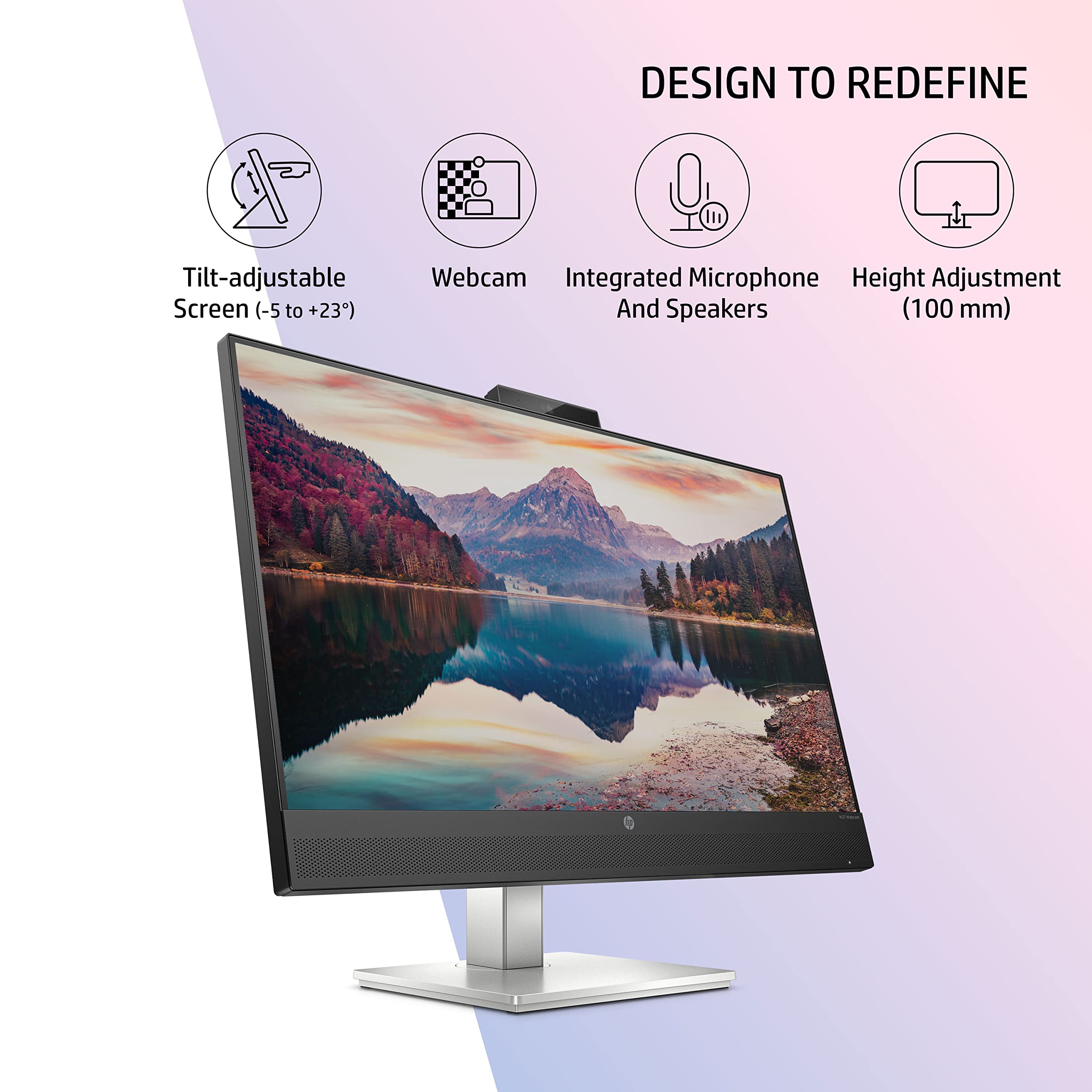 While this is our first introduction to HP monitors, it won’t be the last, as we’re really happy with how good the HP M27 Webcam Monitor is. It looks good and is engineered pretty well (seriously, the speaker placement had our jaws on the floor). The port selection is rich and the only negative we can find is that the stand doesn’t offer as much adjustability as one might want.
In terms of color coverage and accuracy, the M27 brings a modest 92% sRGB coverage, which is still enough for web-based design work. All these colors are also quite accurate once we apply our Web Design and Office Work profile, lowering the dE value from 4.2 to 1.5, which is a 2.8X increase, if we have to be specific.
As for the rest of our profiles, you can get plenty of use from them. The Gaming and Movies profile will make your games and movies look better, as the black stabilization that it provides makes dark scenes more visible. Paired with the 75Hz refresh rate and the AMD FreeSync support, you can do plenty of gaming on this supposed “Office monitor”. Also, if you’ve thought about streaming, the available webcam is decent with a 5MP resolution.
Lastly, the Health-Guard profile minimizes Blue Light emissions and PWM (Flickering), both of which affect your eyes negatively and should be limited.
You can check the current price of the HP M27 Webcam Monitor: Αγοράστε από το Amazon.com (#CommissionsEarned)
Pros
- Well-thought-out design
- 92% sRGB coverage
- 2.8X accuracy increase with our profile (4.2 => 1.5)
- Higher refresh rate
- AMD FreeSync support
Cons
- Stand doesn’t offer much adjustability
 Author: Severin Kolakov

![[Αύγουστος 2026] Παγκόσμια κατάταξη των πιο δημοφιλών GPU για φορητούς υπολογιστές στο Amazon – Η Apple κυριαρχεί, ενώ η RTX 5060 της NVIDIA βρίσκεται στην κορυφή της κατάταξης των ειδικών καρτών](https://laptopmedia.com/wp-content/uploads/2026/09/Best-Selling-GPUs-GLOBAL-Top-10-400x225.jpg)
![[Αύγουστος 2026] Παγκόσμια κατάταξη των πιο δημοφιλών επεξεργαστών φορητών υπολογιστών στο Amazon – Η Apple κυριαρχεί τόσο στην κατηγορία των οικονομικών όσο και στην κατηγορία των premium μοντέλων: Οι A18 Pro και M5 συντρίβουν την Intel και την AMD τον Αύγουστο του 2026](https://laptopmedia.com/wp-content/uploads/2026/09/Best-Selling-CPUs-GLOBAL-Top-10-400x225.jpg)
![[Αύγουστος 2026] Amazon Global: Οι 10 φορητοί υπολογιστές με τις μεγαλύτερες πωλήσεις – Το Apple MacBook Neo κυριαρχεί στις λίστες, ενώ οι οικονομικοί και μεσαίας κατηγορίας φορητοί υπολογιστές με Windows ανταγωνίζονται για τον όγκο πωλήσεων](https://laptopmedia.com/wp-content/uploads/2026/09/Best-Selling-Laptops-GLOBAL-Top-10-400x225.jpg)
![[Αύγουστος 2026] Οι μάρκες φορητών υπολογιστών με τις μεγαλύτερες πωλήσεις στο Amazon Global – Η Apple κυριαρχεί σε έσοδα, ενώ η HP πρωτοστατεί στην ποικιλία μοντέλων](https://laptopmedia.com/wp-content/uploads/2026/09/GLOBAL-Best-Brands-400x225.jpg)
![[Αύγουστος 2026] Amazon Global: Οι 10 πιο δημοφιλείς φορητοί υπολογιστές για παιχνίδια – Ο HP Victus 15 κατακτά την πρώτη θέση, ενώ τα οικονομικά μοντέλα κυριαρχούν στις λίστες](https://laptopmedia.com/wp-content/uploads/2026/09/Best-Selling-Gaming-Laptops-GLOBAL-Top-10-400x225.jpg)
