ASUS TUF Gaming F17 (FX706, 2021) – Top 5 Pros and Cons
 The “facelift” of the F15 is a pretty successful notebook, in our opinion. The laptop gets the same design from last year, with some slight changes, with a new TUF logo, but the build materials and general shape have stayed the same. this ensures a durable device. The big changes are on the inside, using the new (now a year old) Tiger Lake family of CPUs and Ampere graphics.
Today we are presenting you with LaptopMedia’s top 5 picks about the ASUS TUF Gaming F17 (FX706, 2021).
ASUS TUF Gaming F17 (FX706, 2021): Full Specs / In-depth Review


4 reasons to BUY the ASUS TUF Gaming F17 (FX706, 2021)
1. Design and build quality
The laptop really is TUF (excuse the pun), despite its plastic design. This is what happens when you do some real engineering work that focuses on solving a structural problem. What the team over at ASUS decided to do was to implement a honeycomb structure on the inside, to further strengthen the chassis. Around the bottom panel, you can also see some honeycomb vents, to help with the airflow. The design itself is minimal, and while the lid does have the TUF logo and wordmark boldly placed, the overall dark chassis makes for a very incognito device.
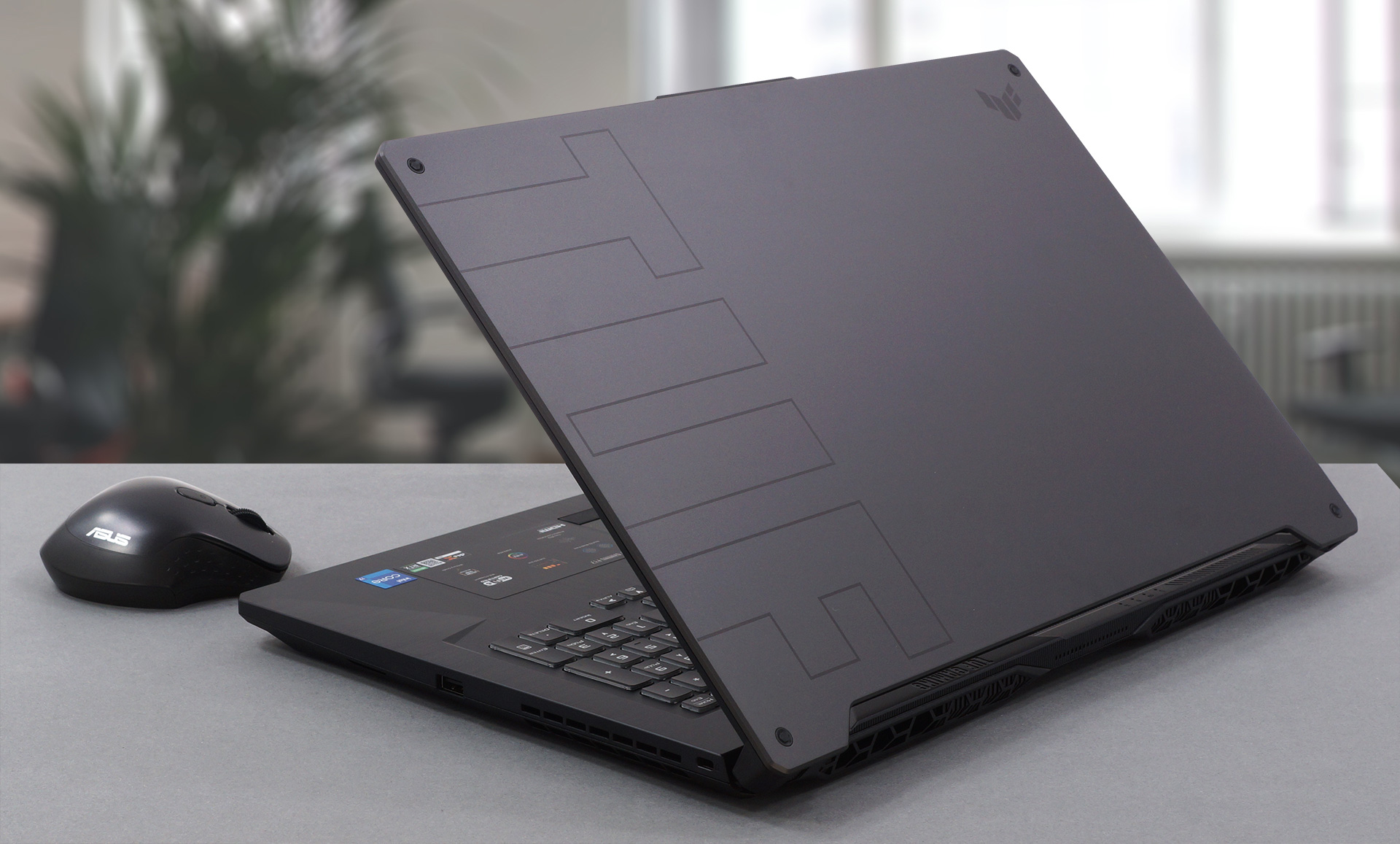
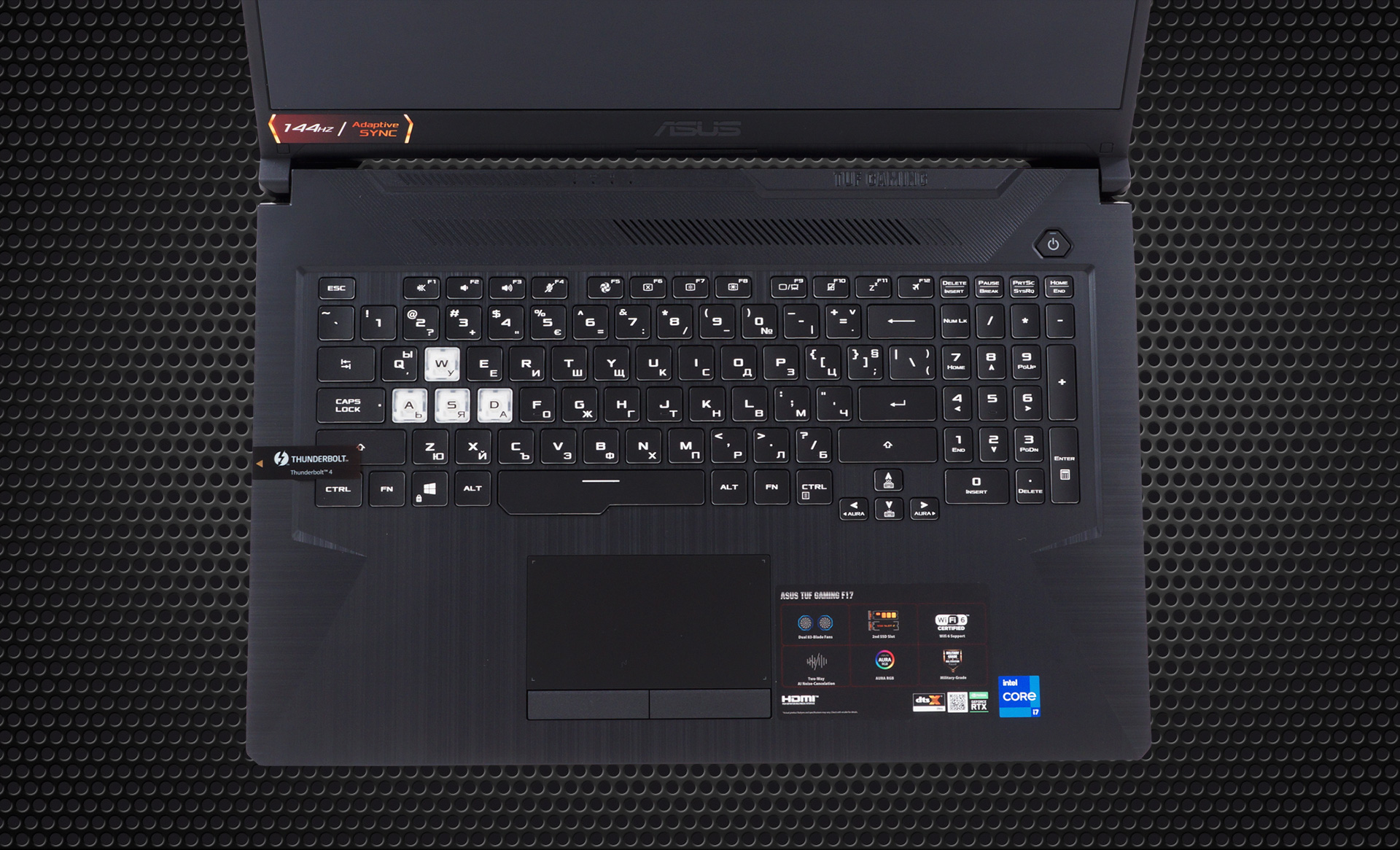
The lid doesn’t open easily with one hand but has thin bezels, both on the sides and on top. However, we do see a protruding notch on the top, which houses the camera. It can also help with gripping the laptop to open it. The base has little to no flex, with the power button sitting on the side. The laptop also has a full keyboard setup with a NumPad and highlighted WASD keys. The unit has long key travel and clicky feedback. The touchpad has a smooth surface and dedicated buttons.
2. Battery life
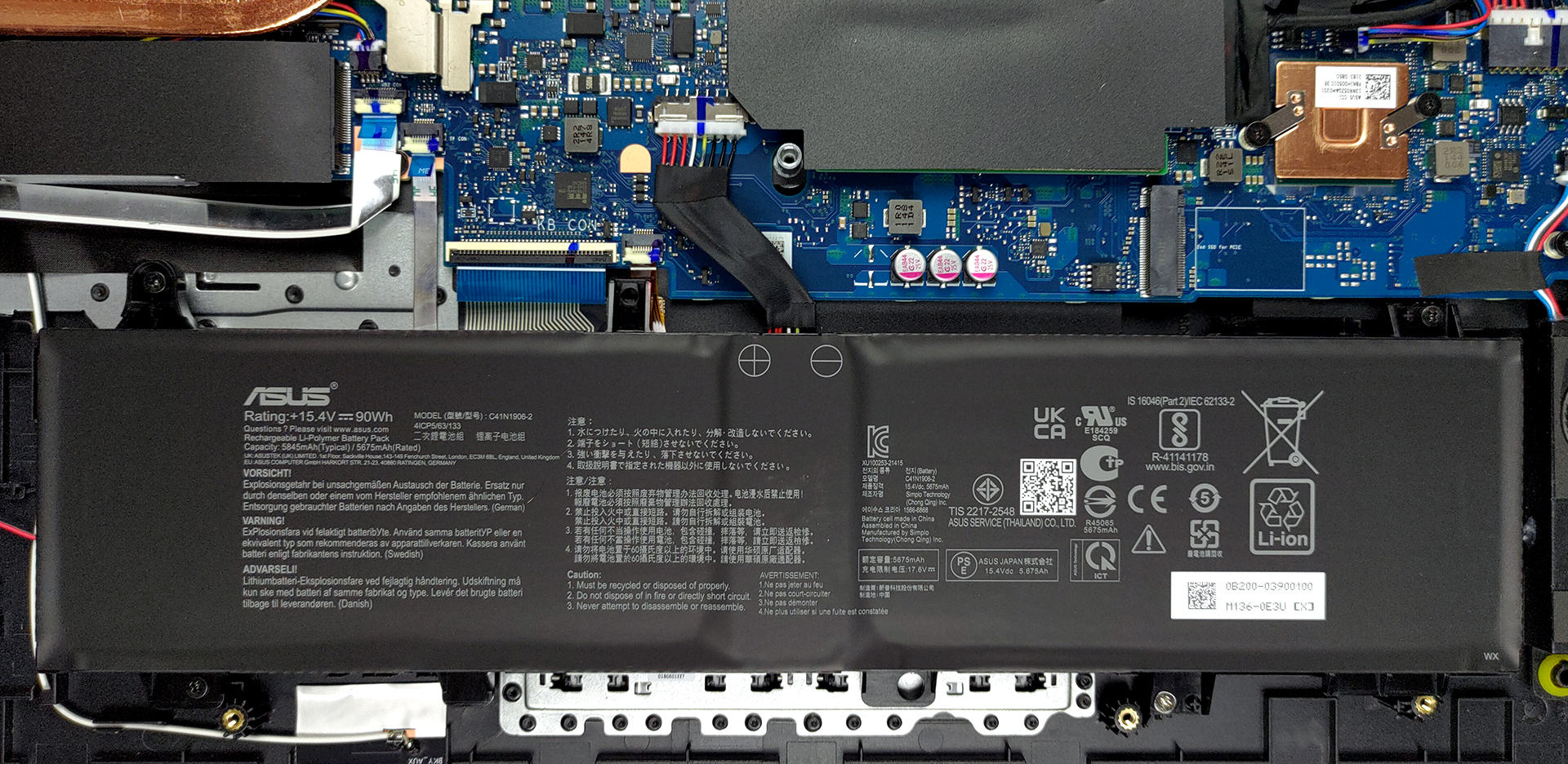
With its 90Wh battery unit, which is as big as it can get, we managed to extract 11 hours and 26 minutes of Web browsing, or 8 hours and 20 minutes of video playback, which is very good considering the power-hungry hardware on the inside. Sadly, Intel chips aren’t exactly known for their efficiency. Now, we conduct the battery tests with Windows Better performance setting turned on, screen brightness adjusted to 120 nits, and all other programs turned off except for the one we are testing the notebook with.
3. Upgradeability
Taking apart the device is relatively easy, with a total of 11 Phillips-head screws. After you remove them, you can see two SODIMM slots, for up to 32GB of dual-channel RAM, along with two M.2 PCIe x4 slots, one of which has support for Gen 4 drives.
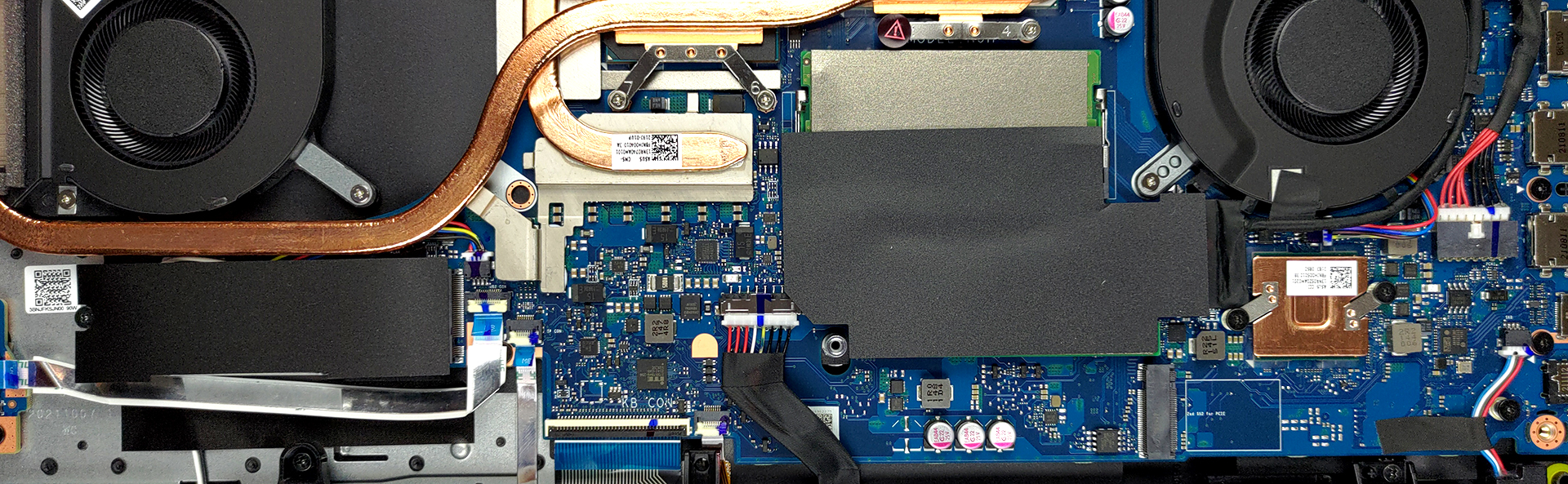
Here is our teardown video, which shows how to access both the RAM and storage on the device.
4. Display quality
While the display that we tested isn’t suitable for professional color-sensitive work, nothing is stopping you from using it strictly as a laptop to learn about Creator programs like Illustrator or Photoshop. Later, once you feel ready to make the jump to a professional device you can do so.
In terms of gaming, however, you have a splendid unit, with comfortable viewing angles, a max brightness of 269 nits in the middle of the screen, 266 nits as an average for the whole area, and a maximum deviation of only 5%. The contrast ratio is quite high – 1400:1. The panel also supports Adaptive-Sync, which matches the display’s refresh rate to the output of the GPU, resulting in no screen tearing. There is no usage of PWM across all brightness levels.
In terms of color coverage, the panel covers about 51% of the sRGB gamut.
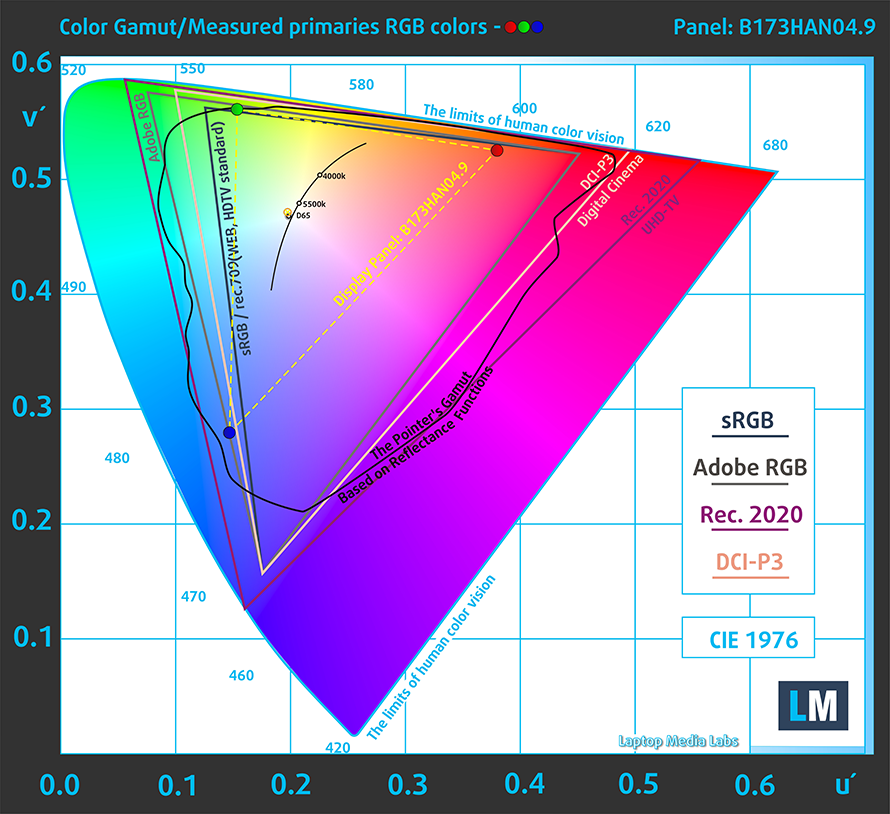
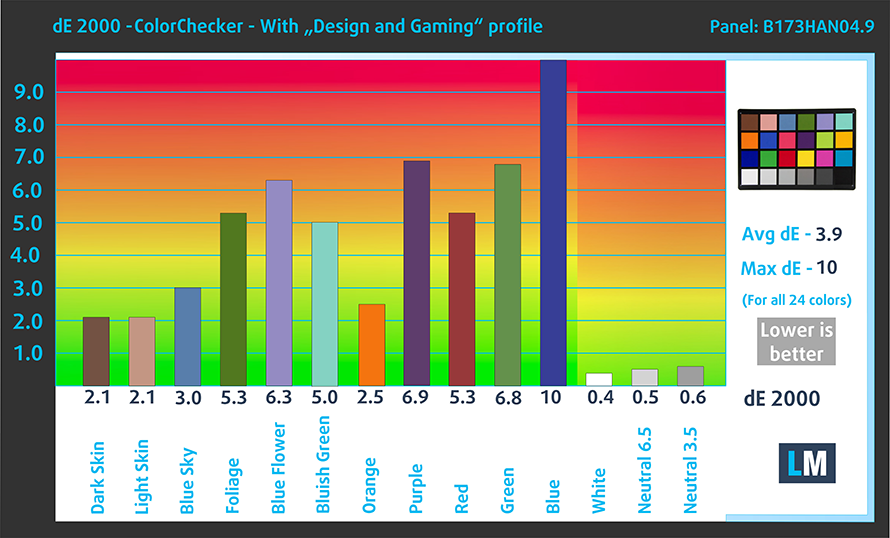
The color accuracy isn’t great, with both the factory settings (left) and our Design and Gaming profile (right) delivering unimpressive results.

Buy our profiles
Since our profiles are tailored for each individual display model, this article and its respective profile package are meant for ASUS TUF Gaming F17 (FX706, 2021) configurations with 17.3″ FHD IPS AUO B173HAN04.9.
*Should you have problems with downloading the purchased file, try using a different browser to open the link you’ll receive via e-mail. If the download target is a .php file instead of an archive, change the file extension to .zip or contact us at [email protected].
Read more about the profiles HERE.
Εκτός από τη λήψη αποδοτικών και φιλικών προς την υγεία προφίλ, αγοράζοντας τα προϊόντα της LaptopMedia υποστηρίζετε επίσης την ανάπτυξη των εργαστηρίων μας, όπου δοκιμάζουμε συσκευές για να παράγουμε τις πιο αντικειμενικές δυνατές αξιολογήσεις.

Office Work
Το Office Work πρέπει να χρησιμοποιείται κυρίως από χρήστες που περνούν τον περισσότερο χρόνο τους κοιτάζοντας κείμενα, πίνακες ή απλώς σερφάροντας. Αυτό το προφίλ στοχεύει στην παροχή καλύτερης ευκρίνειας και σαφήνειας διατηρώντας μια επίπεδη καμπύλη γάμμα (2.20), εγγενή θερμοκρασία χρώματος και αντιληπτικά ακριβή χρώματα.

Design and Gaming
Αυτό το προφίλ απευθύνεται σε σχεδιαστές που εργάζονται επαγγελματικά με χρώματα, καθώς και για παιχνίδια και ταινίες. Το Design and Gaming ωθεί τα πάνελ οθόνης στα όριά τους, καθιστώντας τα όσο το δυνατόν πιο ακριβή στο πρότυπο sRGB IEC61966-2-1 για Web και HDTV, σε λευκό σημείο D65.

Health-Guard
Το Health-Guard εξαλείφει την επιβλαβή διαμόρφωση πλάτους παλμού (PWM) και μειώνει το αρνητικό Μπλε Φως που επηρεάζει τα μάτια και το σώμα μας. Δεδομένου ότι είναι ειδικά προσαρμοσμένο για κάθε πάνελ, καταφέρνει να διατηρεί τα χρώματα αντιληπτικά ακριβή. Το Health-Guard προσομοιώνει το χαρτί, οπότε η πίεση στα μάτια μειώνεται σημαντικά.
Αποκτήστε και τα 3 προφίλ με 33% έκπτωση

1 reason NOT to buy the ASUS TUF Gaming F17 (FX706, 2021)
1. I/O
The I/O coverage is ample on the device, with three USB Type-A 3.2 (Gen. 1) ports, a single Thunderbolt 4 port, an Ethernet connector, an HDMI 2.0b connector, and a 3.5 mm audio jack.


All ASUS TUF Gaming F17 (FX706, 2021) configurations:
 Author: Severin Kolakov

![[Ιούνιος 2026] Οι μάρκες φορητών υπολογιστών με τις μεγαλύτερες πωλήσεις στο Amazon Global – Η ασύγκριτη κυριαρχία της Apple σε αριθμό μονάδων και έσοδα](https://laptopmedia.com/wp-content/uploads/2026/07/GLOBAL-Best-Brands-400x225.jpg)
![[Ιούνιος 2026] Amazon Global: Οι 10 πιο δημοφιλείς φορητοί υπολογιστές – Το νέο MacBook Neo της Apple κατακτά την πρώτη θέση, αναδιαμορφώνοντας την αγορά χάρη στην προσιτή τιμή του](https://laptopmedia.com/wp-content/uploads/2026/07/Best-Selling-Laptops-GLOBAL-Top-10-400x225.jpg)
![[Ιούνιος 2026] Amazon Global: Οι 10 πιο δημοφιλείς φορητοί υπολογιστές για παιχνίδια – Το Nitro V 16S AI της Acer κυριαρχεί στις πωλήσεις, ενώ η ASUS προηγείται σε συνολικά έσοδα](https://laptopmedia.com/wp-content/uploads/2026/07/Best-Selling-Gaming-Laptops-GLOBAL-Top-10-400x225.jpg)
![[Ιούνιος 2026] Παγκόσμια κατάταξη των πιο δημοφιλών GPU για φορητούς υπολογιστές στο Amazon – Η NVIDIA RTX 5060 είναι η πιο δημοφιλής ειδική GPU](https://laptopmedia.com/wp-content/uploads/2026/07/Best-Selling-GPUs-GLOBAL-Top-10-400x225.jpg)
![[Ιούνιος 2026] Παγκόσμια κατάταξη των πιο δημοφιλών επεξεργαστών για φορητούς υπολογιστές στο Amazon – Ο Apple M5 κυριαρχεί, ενώ ο AMD Ryzen 7 260 καταλαμβάνει σημαντικό μερίδιο στην κατηγορία premium](https://laptopmedia.com/wp-content/uploads/2026/07/Best-Selling-CPUs-GLOBAL-Top-10-400x225.jpg)
