ASUS Vivobook S 14 Flip OLED (TN3402) – Top 5 Pros and Cons
 Vivobooks are quietly becoming some of the most popular laptops that ASUS offers. The company pairs great designs with decent hardware and features, all of that for a good price, so it’s no wonder they’re selling a good amount of units.
Today we have a 14-inch convertible from the Vivobook brand, which also comes with really strong hardware from last year’s Ryzen 5000H-series. Choosing these CPUs is quite smart, as you’re getting very similar performance to the new 6000H-series, but you’re also able to lower the overall price of the notebook, as the 5000H-series isn’t in big demand right now. The only thing you’re missing out on is the integrated RDNA 2 graphics, but if you’re not going to play that many games, the older Vega-based units will still be alright.
Today we’re presenting you with LaptopMedia’s top 5 picks about the ASUS Vivobook S 14 Flip OLED (TN3402).
ASUS Vivobook S 14 Flip OLED (TN3402): Full Specs / In-depth Review
4 reasons to BUY the ASUS Vivobook S 14 Flip OLED (TN3402)
1. Design and build quality
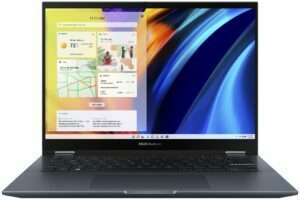
The Vivobook uses aluminum for its lid, while the base is made from plastic. However, the laptop feels quite nice in the hand. There are a lot of small details that overall make the laptop feel interesting. The lid has something like a protruding plaque with the ASUS Vivobook brand. The front of the lid, on the other hand, is protected by glass. This makes it quite durable and resistant to flex. We’d go as far as to say that it’s stronger than the base. That said, the base is still fairly rigid, as even with harsh typing, the keyboard deck doesn’t bend. In terms of dimensions, the Vivobook keeps itself pretty light, despite the 45W processors, weighing only 1.50 kg and having a profile of 18.9 mm.

2. Display quality
The 16:10 14-inch OLED panel is the star of the show here, coming with a 2.8K resolution and a 90Hz refresh rate. An OLED panel ensures excellent visibility in both dark and well-lit environments. The viewing angles are very good, and the display reaches up to 357 nits of brightness. Since OLED panels light up each pixel on its own, black colors are essentially turned off pixels, which results in an infinite contrast ratio. You also get 100% sRGB and DCI-P3 coverage, so you can tackle any type of professional color work.
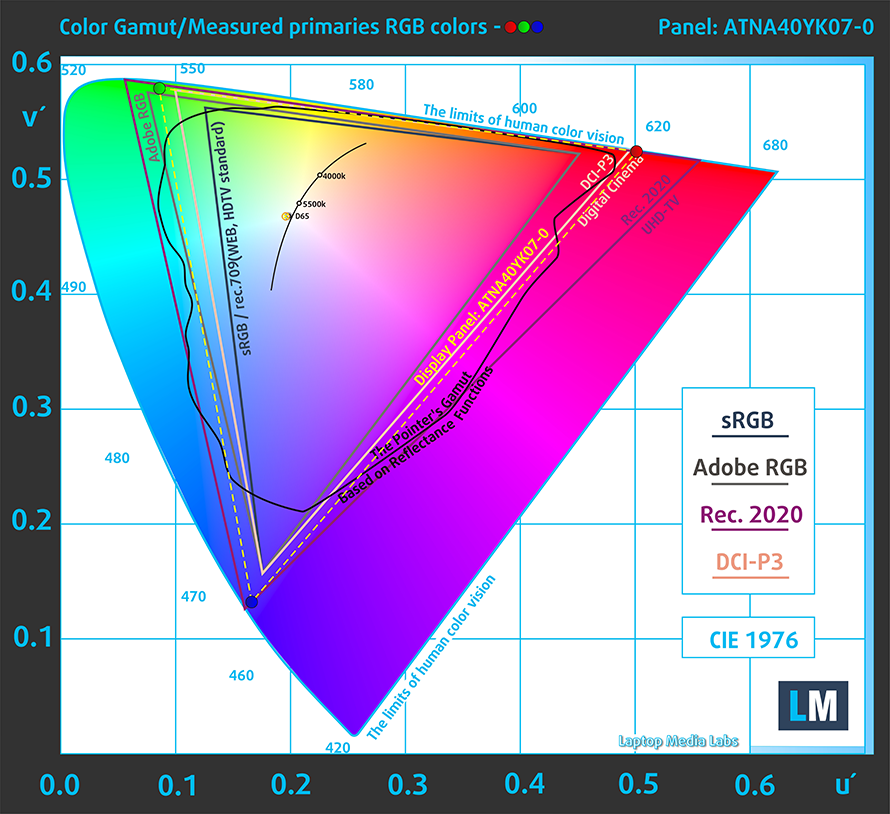
The panel is quite accurate on its own, delivering a dE value of 1.3 in the DCI-P3 gamut and 1.2 in the sRGB gamut. Here are the results of our test.
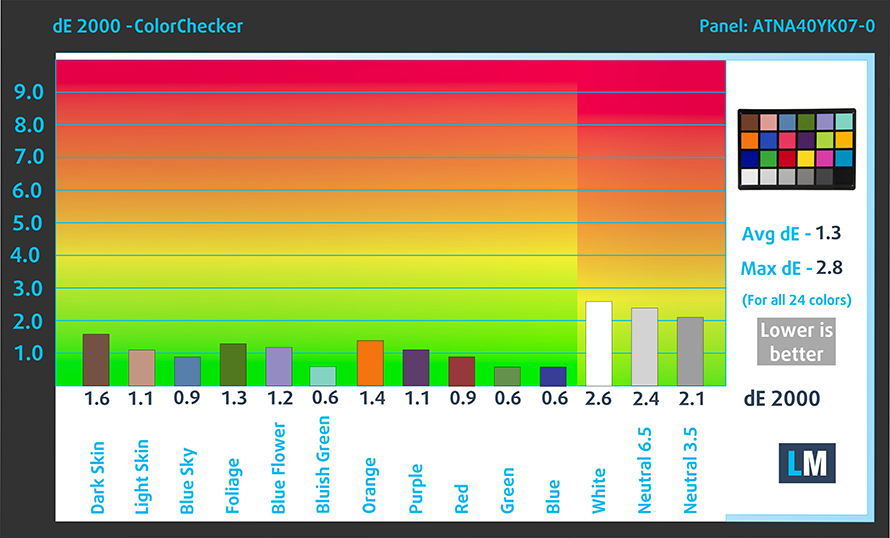 P3-D65 mode
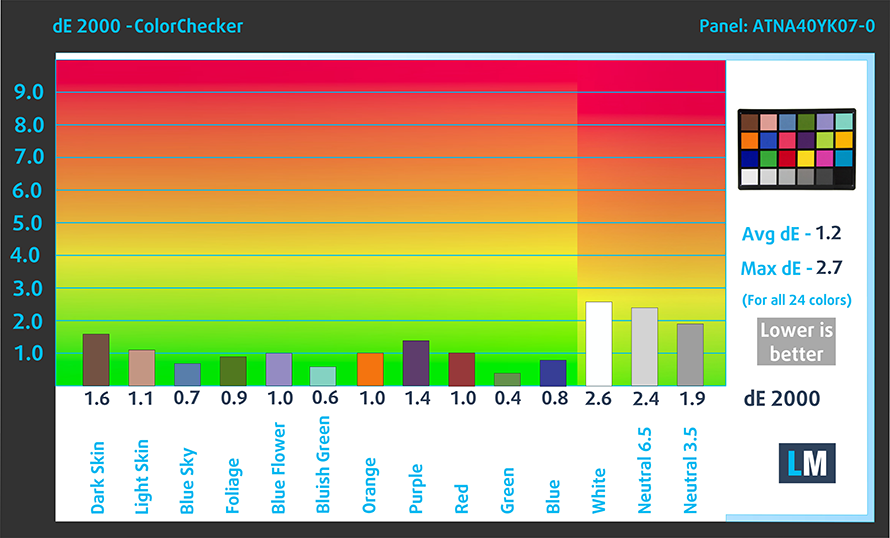 sRGB mode
Buy our profiles
Since our profiles are tailored for each individual display model, this article and its respective profile package are meant for ASUS Vivobook S 14 Flip OLED (TN3402) configurations with a 14.0″ Samsung ATNA40YK07-0 (SDC4171) (2880 x 1800p) OLED panel.
*Should you have problems with downloading the purchased file, try using a different browser to open the link you’ll receive via e-mail. If the download target is a .php file instead of an archive, change the file extension to .zip or contact us at [email protected].
Read more about the profiles HERE.
Εκτός από τη λήψη αποδοτικών και φιλικών προς την υγεία προφίλ, αγοράζοντας τα προϊόντα της LaptopMedia υποστηρίζετε επίσης την ανάπτυξη των εργαστηρίων μας, όπου δοκιμάζουμε συσκευές για να παράγουμε τις πιο αντικειμενικές δυνατές αξιολογήσεις.

Office Work
Το Office Work πρέπει να χρησιμοποιείται κυρίως από χρήστες που περνούν τον περισσότερο χρόνο τους κοιτάζοντας κείμενα, πίνακες ή απλώς σερφάροντας. Αυτό το προφίλ στοχεύει στην παροχή καλύτερης ευκρίνειας και σαφήνειας διατηρώντας μια επίπεδη καμπύλη γάμμα (2.20), εγγενή θερμοκρασία χρώματος και αντιληπτικά ακριβή χρώματα.

Design and Gaming
Αυτό το προφίλ απευθύνεται σε σχεδιαστές που εργάζονται επαγγελματικά με χρώματα, καθώς και για παιχνίδια και ταινίες. Το Design and Gaming ωθεί τα πάνελ οθόνης στα όριά τους, καθιστώντας τα όσο το δυνατόν πιο ακριβή στο πρότυπο sRGB IEC61966-2-1 για Web και HDTV, σε λευκό σημείο D65.

Health-Guard
Το Health-Guard εξαλείφει την επιβλαβή διαμόρφωση πλάτους παλμού (PWM) και μειώνει το αρνητικό Μπλε Φως που επηρεάζει τα μάτια και το σώμα μας. Δεδομένου ότι είναι ειδικά προσαρμοσμένο για κάθε πάνελ, καταφέρνει να διατηρεί τα χρώματα αντιληπτικά ακριβή. Το Health-Guard προσομοιώνει το χαρτί, οπότε η πίεση στα μάτια μειώνεται σημαντικά.
Αποκτήστε και τα 3 προφίλ με 33% έκπτωση

3. Upgradeability
As with most other 14-inch laptops, there’s up to 8GB of soldered DDR4 memory, along with one SODIMM slot. In terms of storage, there’s one M.2 slot for Gen 3 SSDs.
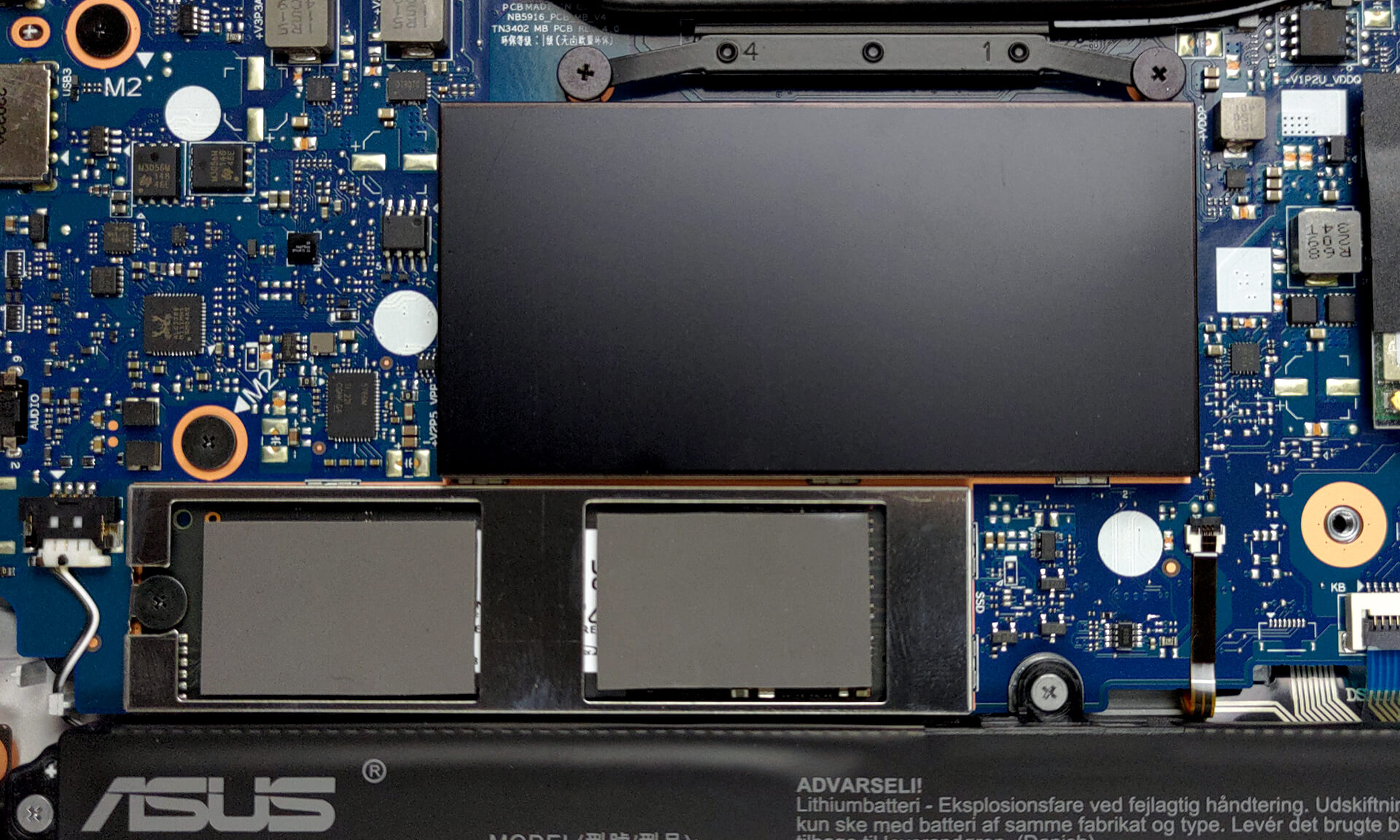
Here is our teardown video, which shows how to upgrade the ASUS Vivobook S 14 Flip OLED.
4. Input devices
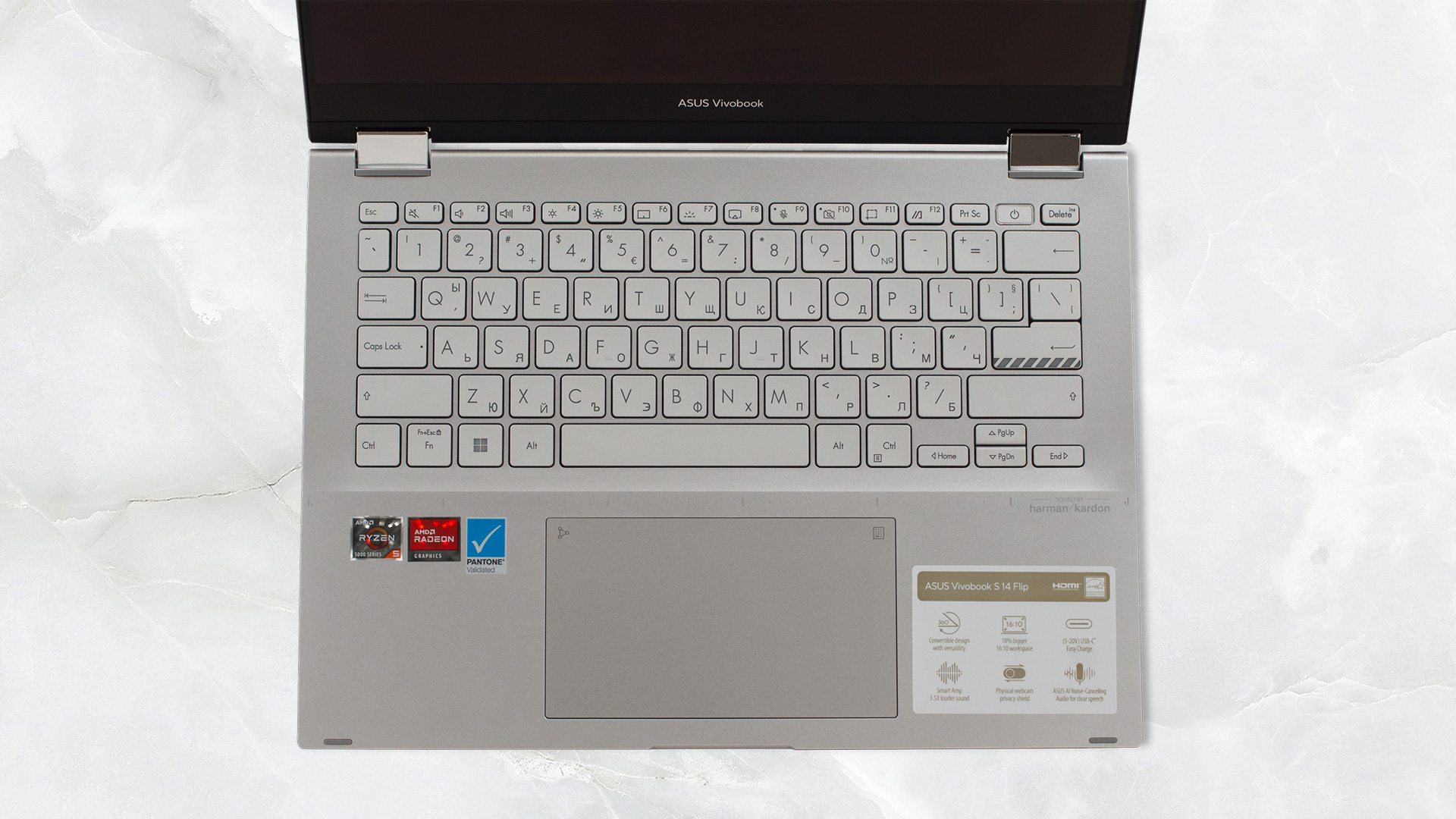
First of all, the lid opens smoothly with one hand, which generally attests to good build quality. Once opened, we’re exposed to the base, and we see the keyboard, with a power button that doubles as a fingerprint reader. The board has good key travel, considering the thin profile, and clicky feedback, so typing is comfortable. The touchpad has symbols in the upper right and left corners. These activate the NumberPad and the Calculator app, respectively. The pad is smooth and responsive, but we’d expect nothing else.
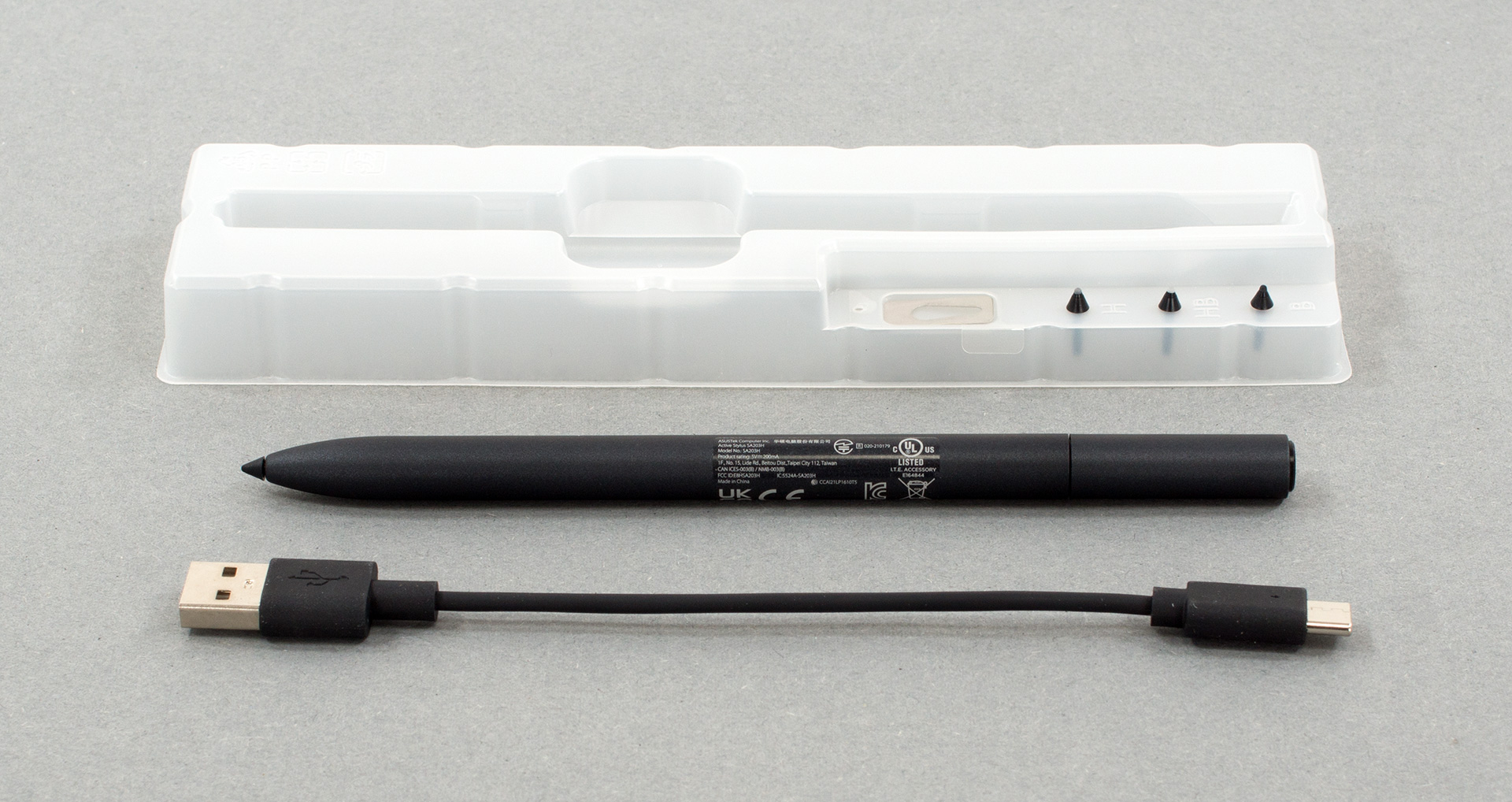
Inside the box, you’ll also find an ASUS pen along with plastic tips and a Type-C to Type-A cable.
1 reason NOT to buy the ASUS Vivobook S 14 Flip OLED (TN3402)
1. I/O
The laptop doesn’t have the best I/O, but it’s still fairly good, as you get two USB Type-A ports. However, one of them runs at 2.0 speeds, so you should leave it for a mouse or other peripheral. There’s also an audio jack, one Type-C 3.2 (Gen. 2) port, and an HDMI 2.0 connector.


All ASUS Vivobook S 14 Flip OLED (TN3402) configurations:
 Author: Severin Kolakov

![[Ιούνιος 2026] Οι μάρκες φορητών υπολογιστών με τις μεγαλύτερες πωλήσεις στο Amazon Global – Η ασύγκριτη κυριαρχία της Apple σε αριθμό μονάδων και έσοδα](https://laptopmedia.com/wp-content/uploads/2026/07/GLOBAL-Best-Brands-400x225.jpg)
![[Ιούνιος 2026] Amazon Global: Οι 10 πιο δημοφιλείς φορητοί υπολογιστές – Το νέο MacBook Neo της Apple κατακτά την πρώτη θέση, αναδιαμορφώνοντας την αγορά χάρη στην προσιτή τιμή του](https://laptopmedia.com/wp-content/uploads/2026/07/Best-Selling-Laptops-GLOBAL-Top-10-400x225.jpg)
![[Ιούνιος 2026] Amazon Global: Οι 10 πιο δημοφιλείς φορητοί υπολογιστές για παιχνίδια – Το Nitro V 16S AI της Acer κυριαρχεί στις πωλήσεις, ενώ η ASUS προηγείται σε συνολικά έσοδα](https://laptopmedia.com/wp-content/uploads/2026/07/Best-Selling-Gaming-Laptops-GLOBAL-Top-10-400x225.jpg)
![[Ιούνιος 2026] Παγκόσμια κατάταξη των πιο δημοφιλών GPU για φορητούς υπολογιστές στο Amazon – Η NVIDIA RTX 5060 είναι η πιο δημοφιλής ειδική GPU](https://laptopmedia.com/wp-content/uploads/2026/07/Best-Selling-GPUs-GLOBAL-Top-10-400x225.jpg)
![[Ιούνιος 2026] Παγκόσμια κατάταξη των πιο δημοφιλών επεξεργαστών για φορητούς υπολογιστές στο Amazon – Ο Apple M5 κυριαρχεί, ενώ ο AMD Ryzen 7 260 καταλαμβάνει σημαντικό μερίδιο στην κατηγορία premium](https://laptopmedia.com/wp-content/uploads/2026/07/Best-Selling-CPUs-GLOBAL-Top-10-400x225.jpg)
