Microsoft Surface Pro 8 – Top 5 Pros and Cons
 Every year we get closer and closer to living in a world where desktop or laptop computers become more and more replaceable. Advancements in microprocessors and technologies have allowed us to have very powerful components fit into tablets and smartphones, thus them being able to handle heavier workloads.
While we’re not there just yet, we can have a glimpse of that with the Microsoft Surface Pro 8, which comes with enough performance to emulate some parts of that experience, with its Tiger Lake U-series processors providing enough power for quick video edits and rendering work.
Today we are presenting you with LaptopMedia’s top 5 picks about the Microsoft Surface Pro 8.
Microsoft Surface Pro 8: Full Specs / In-depth Review
3 reasons to BUY the Microsoft Surface Pro 8
1. Design and build quality
Right from the start, we see improvement in the visual department, which also affects usability. The new notebook has significantly thinner bezels, resulting in a larger working area with a smaller footprint. The sides are rounded towards the display and there are vents around a large part of the perimeter, resulting in good airflow. The device comes with a hybrid aluminum/plastic body since antenna lines can’t travel through metal. Fortunately, the plastic is only used for a small part of the chassis. The design retains the kickstand, which also bears the Microsoft brand. In terms of portability, the device weighs only 0.89 kg and has a profile of 9.3 mm.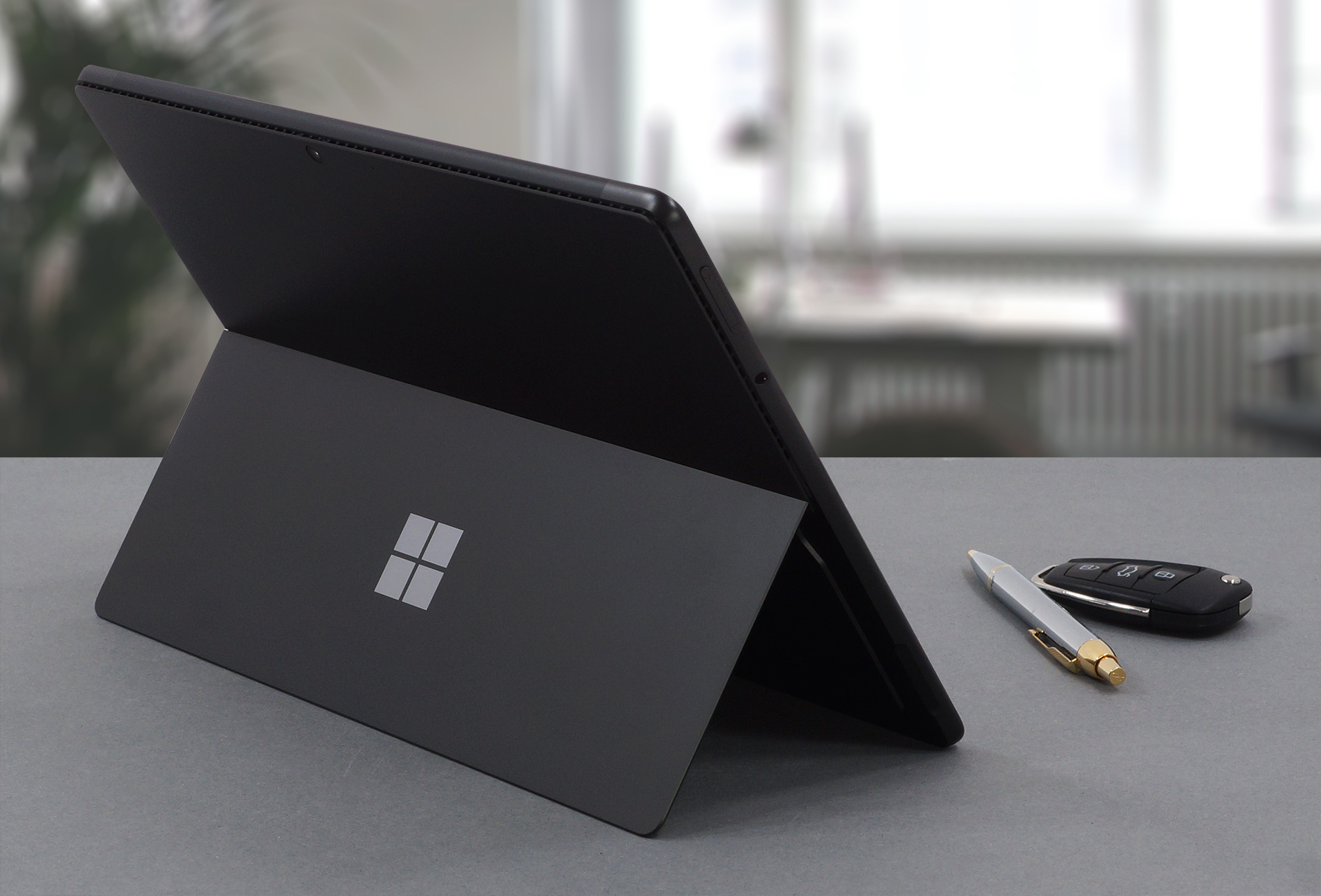
2. Display quality
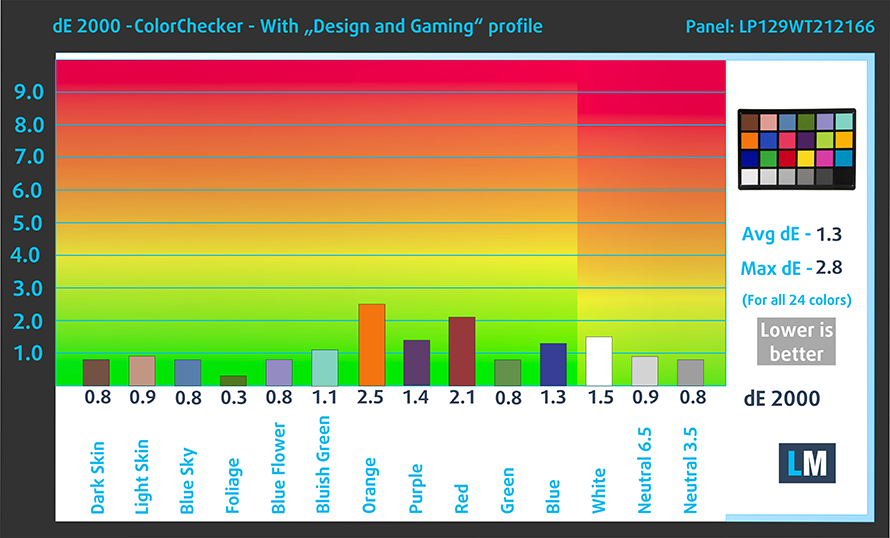
The laptop uses a 12.9-inch IPS Pixelsense display with a resolution of 2880 x 1920. It comes with excellent viewing angles, a max brightness of 464 nits in the middle of the screen and 477 nits as an average for the whole area, with a maximum deviation of 11%. The contrast ratio is also quite high at 1370:1. The panel covers 92% of the sRGB color gamut and reaches very good accuracy with our Design and Gaming profile, delivering a dE value of 1.3.
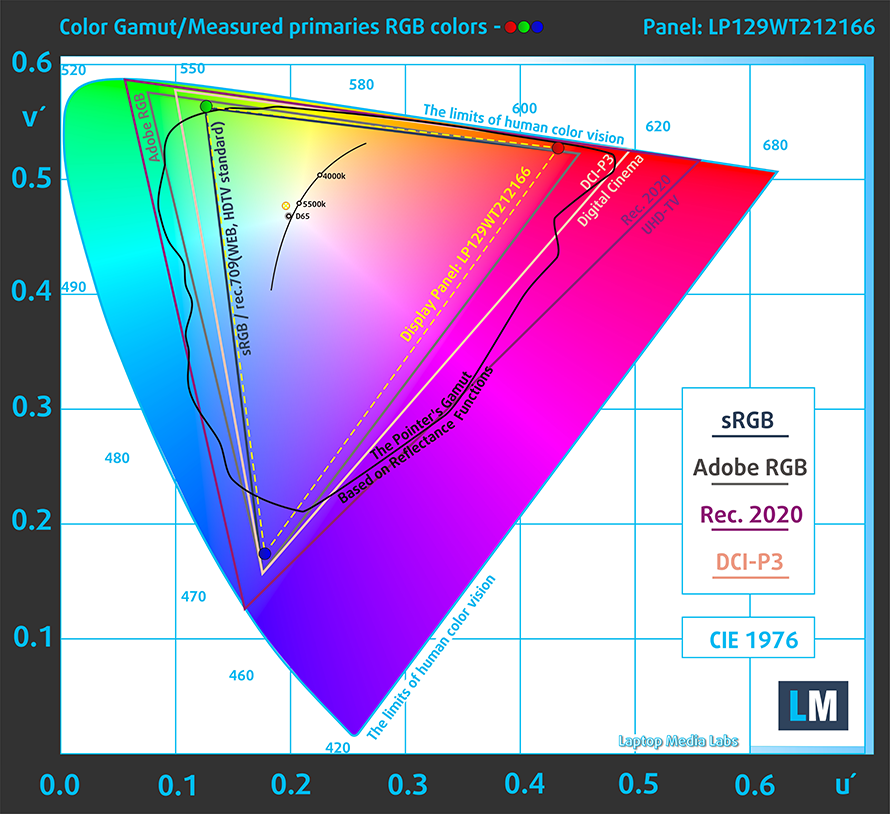
Here are the results of our test with the stock settings (left) and with our profile applied (right).

Buy our profiles
Since our profiles are tailored for each individual display model, this article and its respective profile package are meant for Microsoft Surface Pro 8 configurations with 12.9″ LP129WT212166 (INT3480).
*Should you have problems with downloading the purchased file, try using a different browser to open the link you’ll receive via e-mail. If the download target is a .php file instead of an archive, change the file extension to .zip or contact us at [email protected].
Read more about the profiles HERE.
Εκτός από τη λήψη αποδοτικών και φιλικών προς την υγεία προφίλ, αγοράζοντας τα προϊόντα της LaptopMedia υποστηρίζετε επίσης την ανάπτυξη των εργαστηρίων μας, όπου δοκιμάζουμε συσκευές για να παράγουμε τις πιο αντικειμενικές δυνατές αξιολογήσεις.

Office Work
Το Office Work πρέπει να χρησιμοποιείται κυρίως από χρήστες που περνούν τον περισσότερο χρόνο τους κοιτάζοντας κείμενα, πίνακες ή απλώς σερφάροντας. Αυτό το προφίλ στοχεύει στην παροχή καλύτερης ευκρίνειας και σαφήνειας διατηρώντας μια επίπεδη καμπύλη γάμμα (2.20), εγγενή θερμοκρασία χρώματος και αντιληπτικά ακριβή χρώματα.

Design and Gaming
Αυτό το προφίλ απευθύνεται σε σχεδιαστές που εργάζονται επαγγελματικά με χρώματα, καθώς και για παιχνίδια και ταινίες. Το Design and Gaming ωθεί τα πάνελ οθόνης στα όριά τους, καθιστώντας τα όσο το δυνατόν πιο ακριβή στο πρότυπο sRGB IEC61966-2-1 για Web και HDTV, σε λευκό σημείο D65.

Health-Guard
Το Health-Guard εξαλείφει την επιβλαβή διαμόρφωση πλάτους παλμού (PWM) και μειώνει το αρνητικό Μπλε Φως που επηρεάζει τα μάτια και το σώμα μας. Δεδομένου ότι είναι ειδικά προσαρμοσμένο για κάθε πάνελ, καταφέρνει να διατηρεί τα χρώματα αντιληπτικά ακριβή. Το Health-Guard προσομοιώνει το χαρτί, οπότε η πίεση στα μάτια μειώνεται σημαντικά.
Αποκτήστε και τα 3 προφίλ με 33% έκπτωση

3. Battery life
The device offers a 51.5Wh battery pack, which is a nice number considering the high-resolution display. With that said, our tests showed that the laptop lasts for 8 hours and 49 minutes of Web browsing, or 7 hours and 56 minutes of video playback. This is done with the Windows Better performance setting turned on, screen brightness adjusted to 120 nits and all other programs turned off except for the one we are testing the notebook with.
Φωτεινότητα: 180 nits; Λειτουργία οθόνης: SDR
Χρόνος μέχρι την πλήρη εκφόρτιση: Υψηλότερο είναι καλύτερο
Για την προσομοίωση πραγματικών συνθηκών, χρησιμοποιήσαμε το δικό μας σενάριο για αυτόματη περιήγηση στο διαδίκτυο σε πάνω από 70 ιστότοπους.
2 reasons NOT to buy the Microsoft Surface Pro 8
1. I/O
The I/O comes with two Thunderbolt 4 ports and a 3.5 mm audio jack. There are no expandable storage options.




2. Upgradeability
Since this is a tablet, you can’t disassemble it or upgrade the memory. On the outside, there isn’t a MicroSD card slot, which would have been the minimal effort from Microsoft. However, we have to give it to them for implementing quad-channel LPDDR4x memory.
All Microsoft Surface Pro 8 configurations:
 Author: Severin Kolakov

![[Σεπτέμβριος 2026] Οι μάρκες φορητών υπολογιστών με τις μεγαλύτερες πωλήσεις στο Amazon Global – Η Apple κυριαρχεί στην αγορά με μερίδιο εσόδων άνω του 70%](https://laptopmedia.com/wp-content/uploads/2026/10/GLOBAL-Best-Brands-400x225.jpg)
![[Σεπτέμβριος 2026] Amazon Global: Οι 10 πιο δημοφιλείς φορητοί υπολογιστές – Το MacBook Neo της Apple καταλαμβάνει την πρώτη θέση, ενώ κυριαρχούν οι οικονομικές και οι κορυφαίες συσκευές](https://laptopmedia.com/wp-content/uploads/2026/10/Best-Selling-Laptops-GLOBAL-Top-10-400x225.jpg)
![[Σεπτέμβριος 2026] Amazon Global: Οι 10 πιο δημοφιλείς φορητοί υπολογιστές για παιχνίδια – Ο ASUS ROG Strix G16 κυριαρχεί στην αγορά με πωλήσεις που σπάνε κάθε ρεκόρ](https://laptopmedia.com/wp-content/uploads/2026/10/Best-Selling-Gaming-Laptops-GLOBAL-Top-10-400x225.jpg)
![[Σεπτέμβριος 2026] Παγκόσμια κατάταξη των πιο δημοφιλών GPU για φορητούς υπολογιστές στο Amazon – Το τσιπ M5 της Apple ξεπερνά κατά πολύ την NVIDIA στους φορητούς υπολογιστές υψηλής κατηγορίας, αλλά η RTX 5060 είναι η μόνη ειδική GPU που κατατάσσεται στην πρώτη δεκάδα](https://laptopmedia.com/wp-content/uploads/2026/10/Best-Selling-GPUs-GLOBAL-Top-10-400x225.jpg)
![[Σεπτέμβριος 2026] Παγκόσμια κατάταξη των πιο δημοφιλών επεξεργαστών φορητών υπολογιστών στο Amazon – Ο M5 της Apple συντρίβει την Intel, καθώς η αγορά των προϊόντων υψηλής ποιότητας μετατρέπεται σε μονοπώλιο](https://laptopmedia.com/wp-content/uploads/2026/10/Best-Selling-CPUs-GLOBAL-Top-10-400x225.jpg)
