Top 5 reasons to BUY or NOT to buy the Dell Inspiron 15 3505
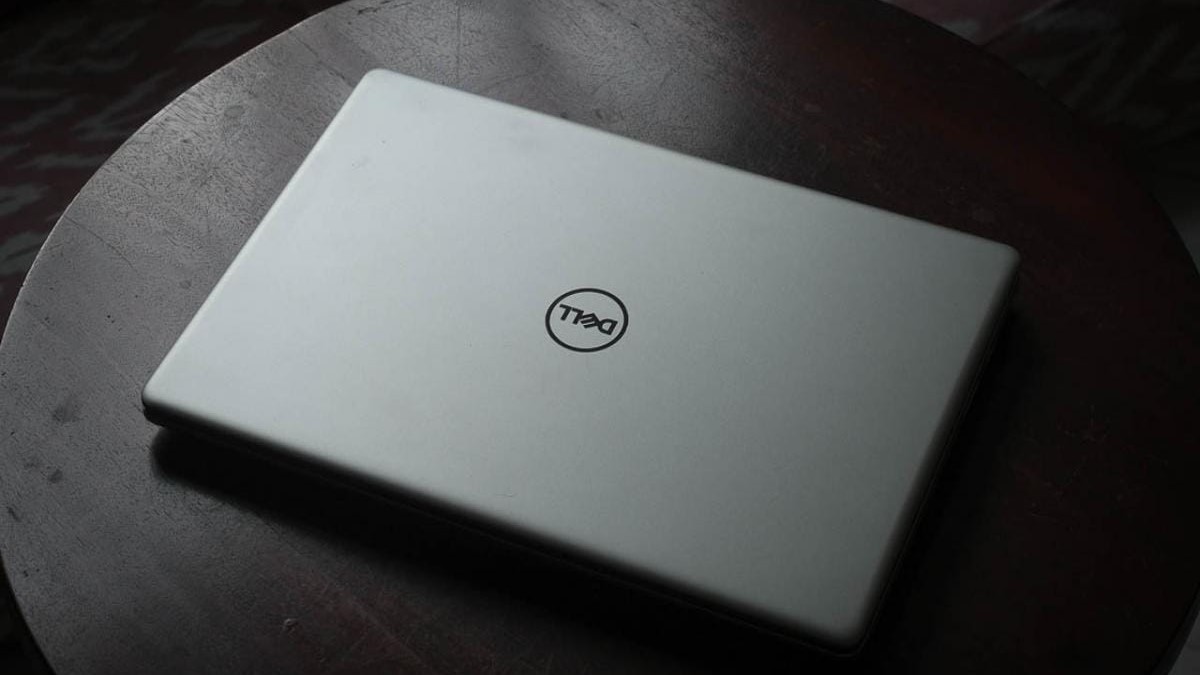 With the laptop market experiencing massive hunger, manufacturers are looking at their past generations, in order to find something usable and affordable, that will satisfy the customers. Dell might have picked the perfect time to release the device that we’re talking about today, with the Inspiron 15 3505 featuring an IPS display with enough power under to hood so that it offers a pleasant experience. As this is an older platform, the design is a proven one, which means minimal investment from Dell, which in turn can actually yield massive results if the laptop actually sells a lot, which it probably will.
Without further ado, here are LaptopMedia’s top 5 picks about the Dell Inspiron 15 3505.
Dell Inspiron 15 3505: Full Specs / In-depth Review
3 reasons to BUY the Dell Inspiron 15 3505
1. Upgradeability
Starting off with a huge W, the upgradability here is simply great. Whatever type of memory/storage you can think of, it probably is upgradeable on the device in question. There are two SODIMM RAM slots, which can fit up to 32GB of DDR4 memory running in dual-channel. As for the storage, there two ways of expanding it. First off, we have an old-school 2.5-inch SATA drive bay, as well as an M.2 PCIe x4 slot.
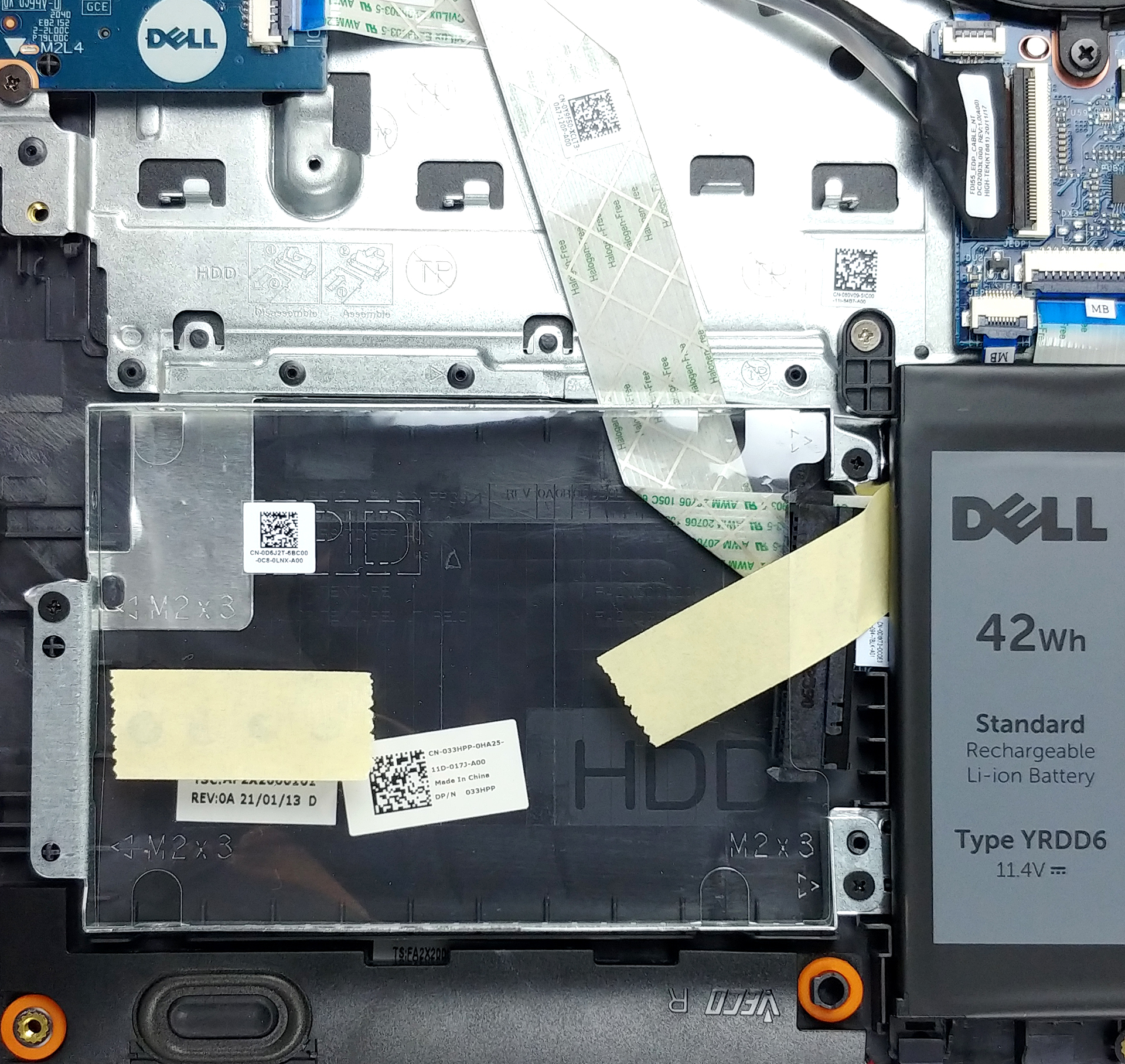

In case you want to upgrade the memory but it’s your first time and you generally don’t know what to do, here is our detailed teardown video, which shows all the necessary steps, in order to safely get access to both the SODIMM and SSD slots.
2. Display
Considering that this is a budget device, it is great to see an IPS panel, where even to this day, some modern notebooks are using TN panels, which for us is inexcusable, unless we’re talking about dirt-cheap devices. The Inspiron 15 3505 has a 15.6-inch Full HD IPS screen with comfortable viewing angles, average maximum brightness, and a quite high contrast ratio of 1070:1. Furthermore, its backlight shows no usage of PWM across any brightness level. The color coverage, however, is quite poor, sitting at just above 50% of the sRGB color gamut.
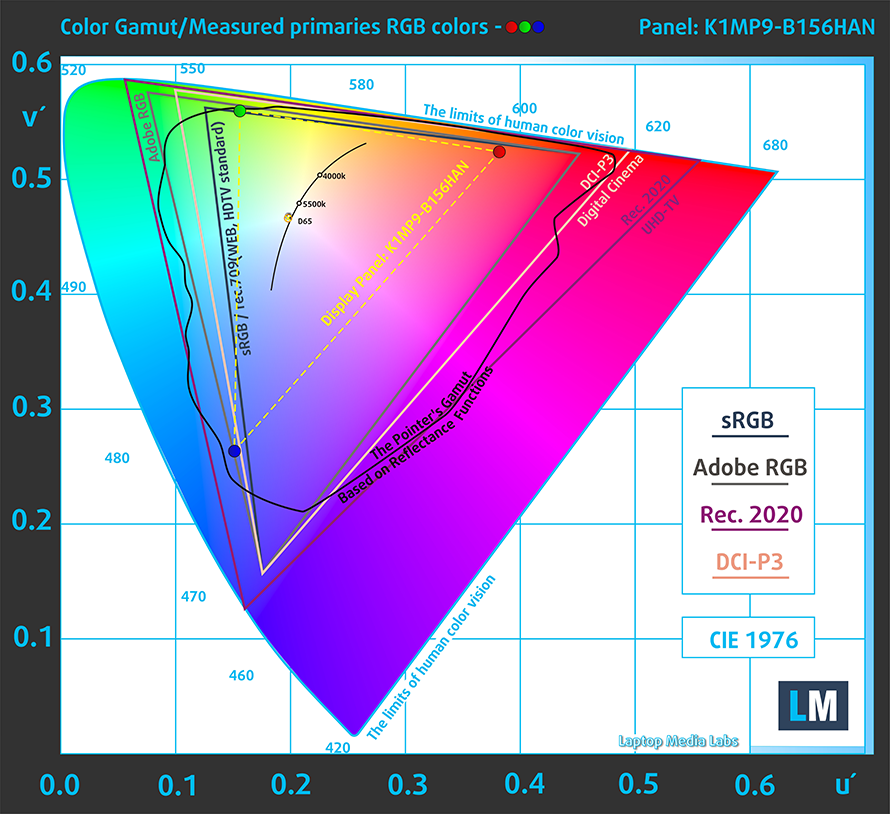
As for the color accuracy, the values that we got, didn’t match the standard but weren’t that bad at the same time. You can see the results of the test with both the factory settings (left) and with our Design and Gaming profile applied (right).
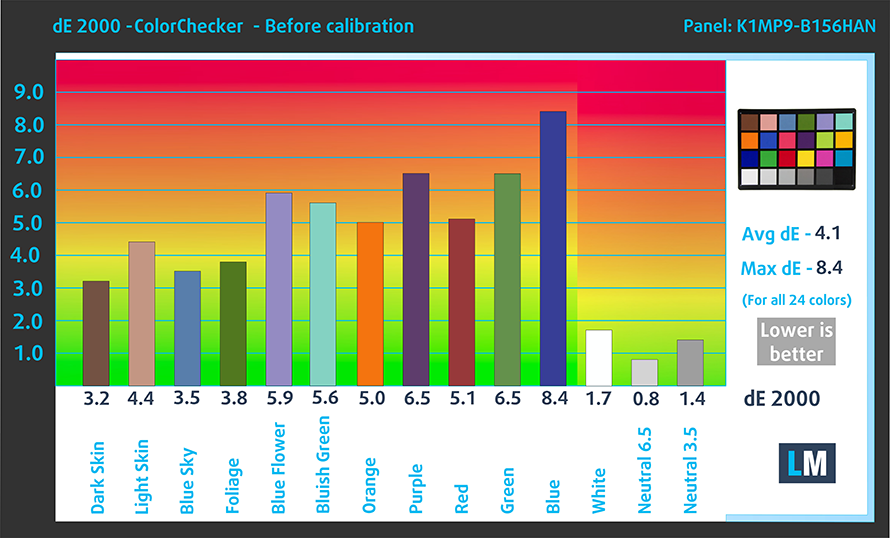
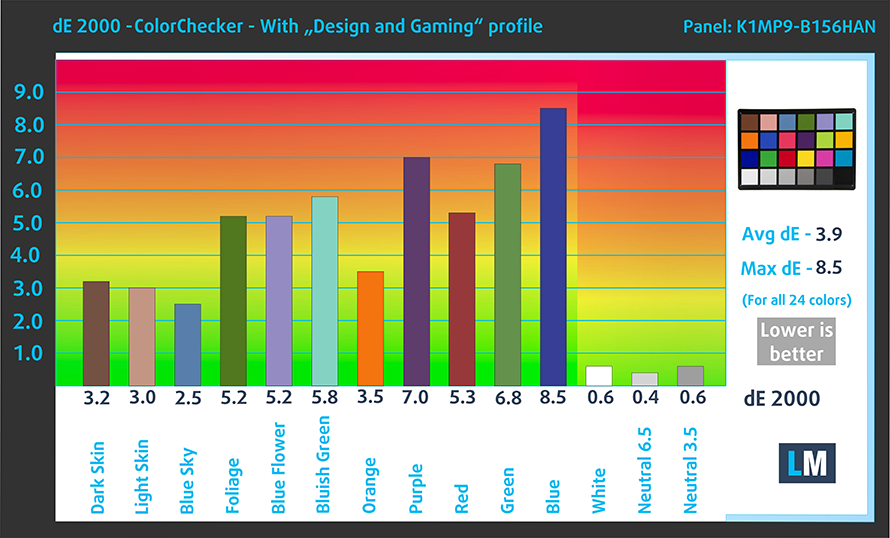
Buy our profiles
Since our profiles are tailored for each individual display model, this article and its respective profile package are meant for Dell Inspiron 15 3505 configurations with 15.6″ FHD IPS AUO K1MP9-B156HAN (AUO23ED).
*Should you have problems with downloading the purchased file, try using a different browser to open the link you’ll receive via e-mail. If the download target is a .php file instead of an archive, change the file extension to .zip or contact us at [email protected].
Read more about the profiles HERE.
Εκτός από τη λήψη αποδοτικών και φιλικών προς την υγεία προφίλ, αγοράζοντας τα προϊόντα της LaptopMedia υποστηρίζετε επίσης την ανάπτυξη των εργαστηρίων μας, όπου δοκιμάζουμε συσκευές για να παράγουμε τις πιο αντικειμενικές δυνατές αξιολογήσεις.

Office Work
Το Office Work πρέπει να χρησιμοποιείται κυρίως από χρήστες που περνούν τον περισσότερο χρόνο τους κοιτάζοντας κείμενα, πίνακες ή απλώς σερφάροντας. Αυτό το προφίλ στοχεύει στην παροχή καλύτερης ευκρίνειας και σαφήνειας διατηρώντας μια επίπεδη καμπύλη γάμμα (2.20), εγγενή θερμοκρασία χρώματος και αντιληπτικά ακριβή χρώματα.

Design and Gaming
Αυτό το προφίλ απευθύνεται σε σχεδιαστές που εργάζονται επαγγελματικά με χρώματα, καθώς και για παιχνίδια και ταινίες. Το Design and Gaming ωθεί τα πάνελ οθόνης στα όριά τους, καθιστώντας τα όσο το δυνατόν πιο ακριβή στο πρότυπο sRGB IEC61966-2-1 για Web και HDTV, σε λευκό σημείο D65.

Health-Guard
Το Health-Guard εξαλείφει την επιβλαβή διαμόρφωση πλάτους παλμού (PWM) και μειώνει το αρνητικό Μπλε Φως που επηρεάζει τα μάτια και το σώμα μας. Δεδομένου ότι είναι ειδικά προσαρμοσμένο για κάθε πάνελ, καταφέρνει να διατηρεί τα χρώματα αντιληπτικά ακριβή. Το Health-Guard προσομοιώνει το χαρτί, οπότε η πίεση στα μάτια μειώνεται σημαντικά.
Αποκτήστε και τα 3 προφίλ με 33% έκπτωση

3. I/O
The I/O is both good and bad. You get a MicroSD card slot, which can be pretty valuable, as well as an HDMI 1.4 connector, an RJ-45 connector, two USB Type-A 3.2 (Gen. 1) ports, and an audio jack, which are placed on the left side. Furthermore, on the opposite side, you get one more USB Type-A 2.0 port and the already mentioned SD card slot. Unfortunately, it lacks a USB Type-C connector, which is “the port of the future” as you know.


2 reasons NOT to buy the Dell Inspiron 15 3505
1. Design and build quality
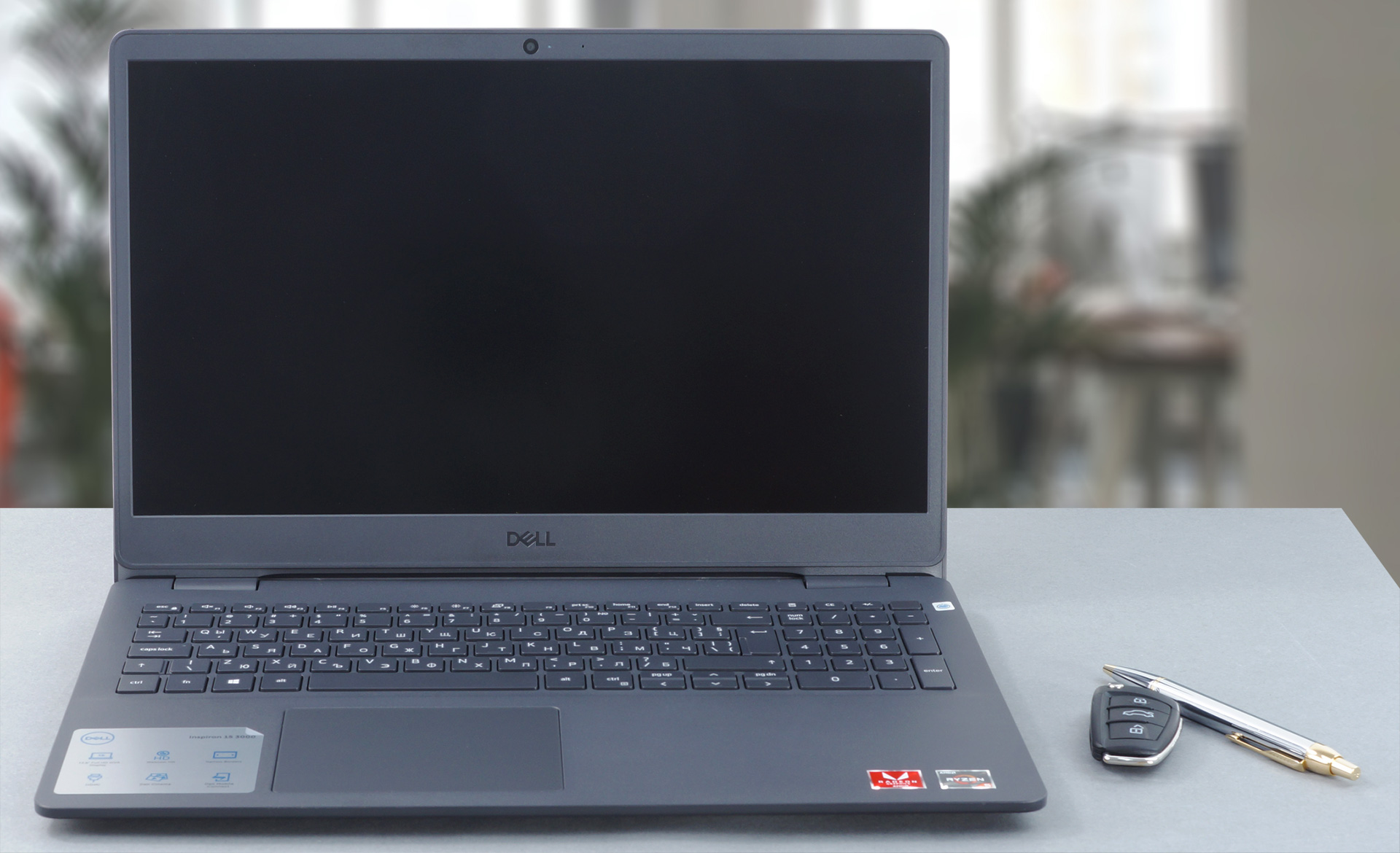
For now, this notebook feels like a solid choice, however, there are some things that could have been better. For example, the build quality and the design in general. The Inspiron 15 3505 has a fully plastic body, which is both cheap and flexes like crazy, with there being significant bends in the base when using the keyboard, which was fine actually, due to its clicky feedback and medium-short key travel. Weighing nearly 2 kilograms and being almost 20 mm thick, it is not the most portable laptop out there, but it is definitely fitter than what the budget market could offer in the past.
2. Performance
Considering the age of this device, there are several options for AMD hardware that you can pick from, which include the Athlon Silver 3050U, Athlon Gold 3150U, Ryzen 3 3250U, Ryzen 5 3450U, Ryzen 5 3500U, and the Ryzen 7 3700U. Our unit had the Ryzen 5 3450U, which honestly performed okay, but nowhere on the level of modern processors. The Ryzen 5 3450U shares a resemblance with the Ryzen 5 3500U and if we have to compare it to the latest available Ryzen CPUs, it is somewhere around the level of the Ryzen 3 4300U.
Here are some CPU and GPU results, when compared to other devices in its class.
CPU benchmarks
Τα αποτελέσματα προέρχονται από τη δοκιμή CPU του Cinebench R23 (όσο υψηλότερη η βαθμολογία, τόσο καλύτερα)
GPU benchmarks
Τα αποτελέσματα προέρχονται από το 3DMark Time Spy (Graphics). Το υψηλότερο είναι καλύτερο.
Τα αποτελέσματα είναι από το benchmark 3DMark Fire Strike (Graphics) (όσο υψηλότερη η βαθμολογία, τόσο καλύτερα)
Τα αποτελέσματα προέρχονται από το benchmark Unigine Superposition (όσο υψηλότερη η βαθμολογία, τόσο καλύτερα)
All Dell Inspiron 15 3505 configurations:
 Author: Severin Kolakov

![[Ιούνιος 2026] Οι μάρκες φορητών υπολογιστών με τις μεγαλύτερες πωλήσεις στο Amazon Global – Η ασύγκριτη κυριαρχία της Apple σε αριθμό μονάδων και έσοδα](https://laptopmedia.com/wp-content/uploads/2026/07/GLOBAL-Best-Brands-400x225.jpg)
![[Ιούνιος 2026] Amazon Global: Οι 10 πιο δημοφιλείς φορητοί υπολογιστές – Το νέο MacBook Neo της Apple κατακτά την πρώτη θέση, αναδιαμορφώνοντας την αγορά χάρη στην προσιτή τιμή του](https://laptopmedia.com/wp-content/uploads/2026/07/Best-Selling-Laptops-GLOBAL-Top-10-400x225.jpg)
![[Ιούνιος 2026] Amazon Global: Οι 10 πιο δημοφιλείς φορητοί υπολογιστές για παιχνίδια – Το Nitro V 16S AI της Acer κυριαρχεί στις πωλήσεις, ενώ η ASUS προηγείται σε συνολικά έσοδα](https://laptopmedia.com/wp-content/uploads/2026/07/Best-Selling-Gaming-Laptops-GLOBAL-Top-10-400x225.jpg)
![[Ιούνιος 2026] Παγκόσμια κατάταξη των πιο δημοφιλών GPU για φορητούς υπολογιστές στο Amazon – Η NVIDIA RTX 5060 είναι η πιο δημοφιλής ειδική GPU](https://laptopmedia.com/wp-content/uploads/2026/07/Best-Selling-GPUs-GLOBAL-Top-10-400x225.jpg)
![[Ιούνιος 2026] Παγκόσμια κατάταξη των πιο δημοφιλών επεξεργαστών για φορητούς υπολογιστές στο Amazon – Ο Apple M5 κυριαρχεί, ενώ ο AMD Ryzen 7 260 καταλαμβάνει σημαντικό μερίδιο στην κατηγορία premium](https://laptopmedia.com/wp-content/uploads/2026/07/Best-Selling-CPUs-GLOBAL-Top-10-400x225.jpg)
