Acer Aspire 5 (A517-58M) review – Budget Beast with Record-Breaking Performance for the Core i7-1355U
Temperatures and comfort, Battery Life
Max CPU load
In this test we use 100% on the CPU cores, monitoring their frequencies and chip temperature. The first column shows a computer’s reaction to a short load (2-10 seconds), the second column simulates a serious task (between 15 and 30 seconds), and the third column is a good indicator of how good the laptop is for long loads such as video rendering.
Average P-core frequency; Average E-core frequency; CPU temp.; Package Power
| Intel Core i7-1355U (15W TDP) | 0:02 – 0:10 sec | 0:15 – 0:30 sec | 10:00 – 15:00 min |
|---|---|---|---|
| Acer Aspire 5 (A517-58M) | 3.91 GHz @ 2.94 GHz @ 73°C @ 50W | 3.45 GHz @ 2.52 GHz @ 76°C @ 37W | 3.09 GHz @ 2.18 GHz @ 68°C @ 28W |
| HP Elite x360 1040 G10 | 3.83 GHz @ 2.95 GHz @ 77°C @ 49W | 3.05 GHz @ 2.30 GHz @ 80°C @ 31W | 2.52 GHz @ 1.91 GHz @ 80°C @ 22W |
| HP Envy x360 15 (15-fe0000) | 3.56 GHz @ 2.61 GHz @ 67°C @ 46W | 3.43 GHz @ 2.57 GHz @ 79°C @ 44W | 2.86 GHz @ 2.13 GHz @ 78°C @ 30W |
| Dell Latitude 15 3540 | 3.28 GHz @ 2.53 GHz @ 88°C @ 37W | 2.77 GHz @ 2.14 GHz @ 90°C @ 27W | 2.37 GHz @ 1.71 GHz @ 69°C @ 20W |
| Lenovo ThinkPad L13 Yoga Gen 4 (Intel) | 3.22 GHz @ 2.43 GHz @ 85°C @ 33W | 3.00 GHz @ 2.26 GHz @ 89°C @ 28W | 2.01 GHz @ 1.46 GHz @ 70°C @ 16W |
| Dell Latitude 14 5440 | 4.03 GHz @ 3.03 GHz @ 71°C @ 50W | 3.91 GHz @ 2.97 GHz @ 93°C @ 47W | 2.65 GHz @ 1.99 GHz @ 70°C @ 22W |
| Dell Latitude 14 7440 | 3.65 GHz @ 2.67 GHz @ 83°C @ 44W | 3.26 GHz @ 2.43 GHz @ 94°C @ 36W | 2.63 GHz @ 1.87 GHz @ 76°C @ 25W |
| Lenovo ThinkPad L14 Gen 4 (Intel) | 3.59 GHz @ 2.66 GHz @ 80°C @ 39W | 3.52 GHz @ 2.68 GHz @ 94°C @ 39W | 2.50 GHz @ 1.84 GHz @ 77°C @ 20W |
| HP Pavilion 15 (15-eg3000) | 3.67 GHz @ 2.80 GHz @ 76°C @ 45W | 2.67 GHz @ 2.06 GHz @ 73°C @ 25W | 2.22 GHz @ 1.73 GHz @ 69°C @ 18W |
| HP ZBook Firefly 14 G10 | 3.83 GHz @ 2.88 GHz @ 74°C @ 49W | 3.74 GHz @ 2.90 GHz @ 86°C @ 49W | 2.69 GHz @ 1.96 GHz @ 75°C @ 23W |
| HP ZBook Firefly 16 G10 | 3.85 GHz @ 2.89 GHz @ 67°C @ 50W | 3.32 GHz @ 2.48 GHz @ 75°C @ 37W | 2.14 GHz @ 1.44 GHz @ 66°C @ 17W |
| HP EliteBook 860 G10 | 3.90 GHz @ 2.95 GHz @ 77°C @ 50W | 3.35 GHz @ 2.12 GHz @ 86°C @ 36W | 2.48 GHz @ 1.77 GHz @ 65°C @ 20W |
| Acer TravelMate P2 (TMP216-51) | 3.90 GHz @ 2.93 GHz @ 89°C @ 55W | 2.73 GHz @ 2.49 GHz @ 86°C @ 37W | 2.93 GHz @ 2.08 GHz @ 77°C @ 28W |
| Acer TravelMate P6 (TMP614-53) | 3.52 GHz @ 2.59 GHz @ 67°C @ 45W | 3.22 GHz @ 2.40 GHz @ 73°C @ 40W | 2.63 GHz @ 1.90 GHz @ 72°C @ 28W |
| Lenovo ThinkPad X13 Gen 4 | 3.76 GHz @ 2.88 GHz @ 85°C @ 50W | 3.46 GHz @ 2.67 GHz @ 97°C @ 44W | 2.02 GHz @ 1.55 GHz @ 69°C @ 18W |
| Lenovo ThinkPad X1 Carbon Gen 11 | 3.66 GHz @ 2.80 GHz @ 94°C @ 49W | 3.23 GHz @ 2.50 GHz @ 97°C @ 38W | 2.00 GHz @ 1.55 GHz @ 72°C @ 19W |
| Lenovo ThinkPad X1 Yoga Gen 8 | 3.67 GHz @ 2.81 GHz @ 82°C @ 49W | 3.32 GHz @ 2.53 GHz @ 94°C @ 39W | 2.17 GHz @ 1.64 GHz @ 76°C @ 20W |
| Lenovo ThinkPad E14 Gen 5 | 3.49 GHz @ 2.65 GHz @ 69°C @ 42W | 3.28 GHz @ 2.46 GHz @ 82°C @ 38W | 2.20 GHz @ 1.62 GHz @ 77°C @ 23W |
| Lenovo ThinkPad L15 Gen 4 (Intel) | 3.34 GHz @ 2.54 GHz @ 86°C @ 39W | 3.16 GHz @ 2.45 GHz @ 93°C @ 35W | 2.38 GHz @ 1.77 GHz @ 77°C @ 20W |
| Lenovo ThinkPad T14s Gen 4 | 3.78 GHz @ 2.93 GHz @ 82°C @ 48W | 3.45 GHz @ 2.71 GHz @ 90°C @ 41W | 2.52 GHz @ 1.87 GHz @ 78°C @ 22W |
| Lenovo ThinkPad T14 Gen 4 | 3.83 GHz @ 2.89 GHz @ 78°C @ 51W | 3.7 GHz @ 2.82 GHz @ 93°C @ 49W | 2.38 GHz @ 1.75 GHz @ 64°C @ 21W |
| Acer Aspire 5 (A514-56M) | 3.82 GHz @ 2.82 GHz @ 64°C @ 55W | 2.18 GHz @ 2.26 GHz @ 65°C @ 37W | 1.43 GHz @ 1.98 GHz @ 60°C @ 28W |
| Dell Vostro 15 3530 | 2.06 GHz @ 2.70 GHz @ 94°C @ 40W | 1.56 GHz @ 2.22 GHz @ 96°C @ 26W | 2.06 GHz @ 2.25 GHz @ 95°C @ 26W |
| Lenovo Yoga Book 9 (13IRU8) | 2.23 GHz @ 2.58 GHz @ 76°C @ 40W | 2.13 GHz @ 2.42 GHz @ 85°C @ 35W | 1.64 GHz @ 2.03 GHz @ 77°C @ 24W |
| ASUS Zenbook S 13 OLED (UX5304) | 3.46 GHz @ 2.47 GHz @ 80°C @ 41W | 3.06 GHz @ 2.24 GHz @ 91°C @ 31W | 2.36 GHz @ 1.68 GHz @ 75°C @ 21W |
The Core i7-1355U can reach some of the highest clocks we’ve seen in short and medium loads among all devices that we have tested with the same chip. However, in longer loads, the 1355U here can sustain 3.09 GHz for the P cores and 2.18 GHz for the E cores which is a true record-breaking result!
Gaming comfort
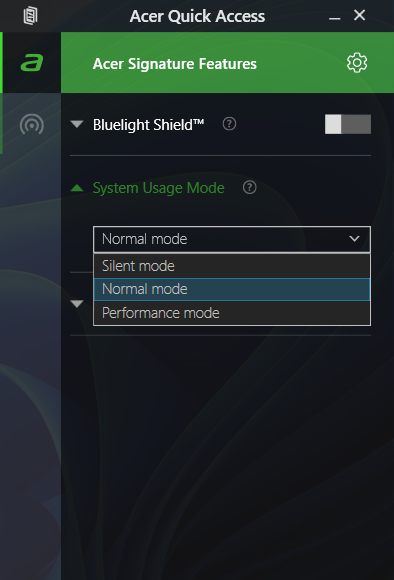
The Acer Quick Access software offers three power modes. The single fan is audible but not intrusively noisy even when the processor is stressed at maximum. In this case, the keyboard feels just a bit warm in the center. This is possible because the cooling is sucking air through the keyboard deck. So, you can use the laptop for writing even when the CPU is pushed to its limits. By the way, the “Silent” mode is all you need for daily tasks or normal office work. The power is just enough for Web browsing or editing MS Office documents and the fan remains near quiet.

Battery
Now, we conduct the battery tests with Windows Better performance setting turned on, screen brightness adjusted to 120 nits and all other programs turned off except for the one we are testing the notebook with. Our laptop is equipped with a 50Wh battery. It lasts for around 9 hours of Web browsing or 11 hours of video playback. To achieve that, you have to apply the “Balanced” preset in the Windows “Power & Battery” menu and select the “Normal” mode in the Acer Quick Access app.

Φωτεινότητα: 180 nits; Λειτουργία οθόνης: SDR
Χρόνος μέχρι την πλήρη εκφόρτιση: Υψηλότερο είναι καλύτερο

Για την προσομοίωση πραγματικών συνθηκών, χρησιμοποιήσαμε το δικό μας σενάριο για αυτόματη περιήγηση στο διαδίκτυο σε πάνω από 70 ιστότοπους.
 Author: Nikolay Palaozov
 Author: eng. Kroum NikolovHead of Engineering at LaptopMedia.com, inventor and innovator with 40+ years of experience in electronics and high technology.

![[Αύγουστος 2026] Παγκόσμια κατάταξη των πιο δημοφιλών GPU για φορητούς υπολογιστές στο Amazon – Η Apple κυριαρχεί, ενώ η RTX 5060 της NVIDIA βρίσκεται στην κορυφή της κατάταξης των ειδικών καρτών](https://laptopmedia.com/wp-content/uploads/2026/09/Best-Selling-GPUs-GLOBAL-Top-10-400x225.jpg)
![[Αύγουστος 2026] Παγκόσμια κατάταξη των πιο δημοφιλών επεξεργαστών φορητών υπολογιστών στο Amazon – Η Apple κυριαρχεί τόσο στην κατηγορία των οικονομικών όσο και στην κατηγορία των premium μοντέλων: Οι A18 Pro και M5 συντρίβουν την Intel και την AMD τον Αύγουστο του 2026](https://laptopmedia.com/wp-content/uploads/2026/09/Best-Selling-CPUs-GLOBAL-Top-10-400x225.jpg)
![[Αύγουστος 2026] Amazon Global: Οι 10 φορητοί υπολογιστές με τις μεγαλύτερες πωλήσεις – Το Apple MacBook Neo κυριαρχεί στις λίστες, ενώ οι οικονομικοί και μεσαίας κατηγορίας φορητοί υπολογιστές με Windows ανταγωνίζονται για τον όγκο πωλήσεων](https://laptopmedia.com/wp-content/uploads/2026/09/Best-Selling-Laptops-GLOBAL-Top-10-400x225.jpg)
![[Αύγουστος 2026] Οι μάρκες φορητών υπολογιστών με τις μεγαλύτερες πωλήσεις στο Amazon Global – Η Apple κυριαρχεί σε έσοδα, ενώ η HP πρωτοστατεί στην ποικιλία μοντέλων](https://laptopmedia.com/wp-content/uploads/2026/09/GLOBAL-Best-Brands-400x225.jpg)
![[Αύγουστος 2026] Amazon Global: Οι 10 πιο δημοφιλείς φορητοί υπολογιστές για παιχνίδια – Ο HP Victus 15 κατακτά την πρώτη θέση, ενώ τα οικονομικά μοντέλα κυριαρχούν στις λίστες](https://laptopmedia.com/wp-content/uploads/2026/09/Best-Selling-Gaming-Laptops-GLOBAL-Top-10-400x225.jpg)

Could you clarify on the RAM front? Your specs say up to 64GB, but the dismantling shows only soldered-in RAM. Some memory websites suggest a SODIMM slot, I’ve only ever seen 16GB versions sold with some indication they could be upgraded to 32GB, which I would like to do with mine – A517-58M-71A2 NX.KHMEK.001