Inside HP Elite Dragonfly G2 – disassembly and upgrade options
Unfortunately, the Dragonfly G2 is not the most friendly notebook when it comes to upgradability. However, it has its perks and features, which may make you consider it as your next portable device.
Check out all HP Elite Dragonfly G2 prices and configurations in our Specs System or read more in our In-Depth review.

1. Remove the bottom plate and battery
Getting inside of this notebook is fairly easy. You just need to undo all 5 Torx-head screws, and then pry the bottom panel, starting from the back. Then, just lift it away from the chassis.
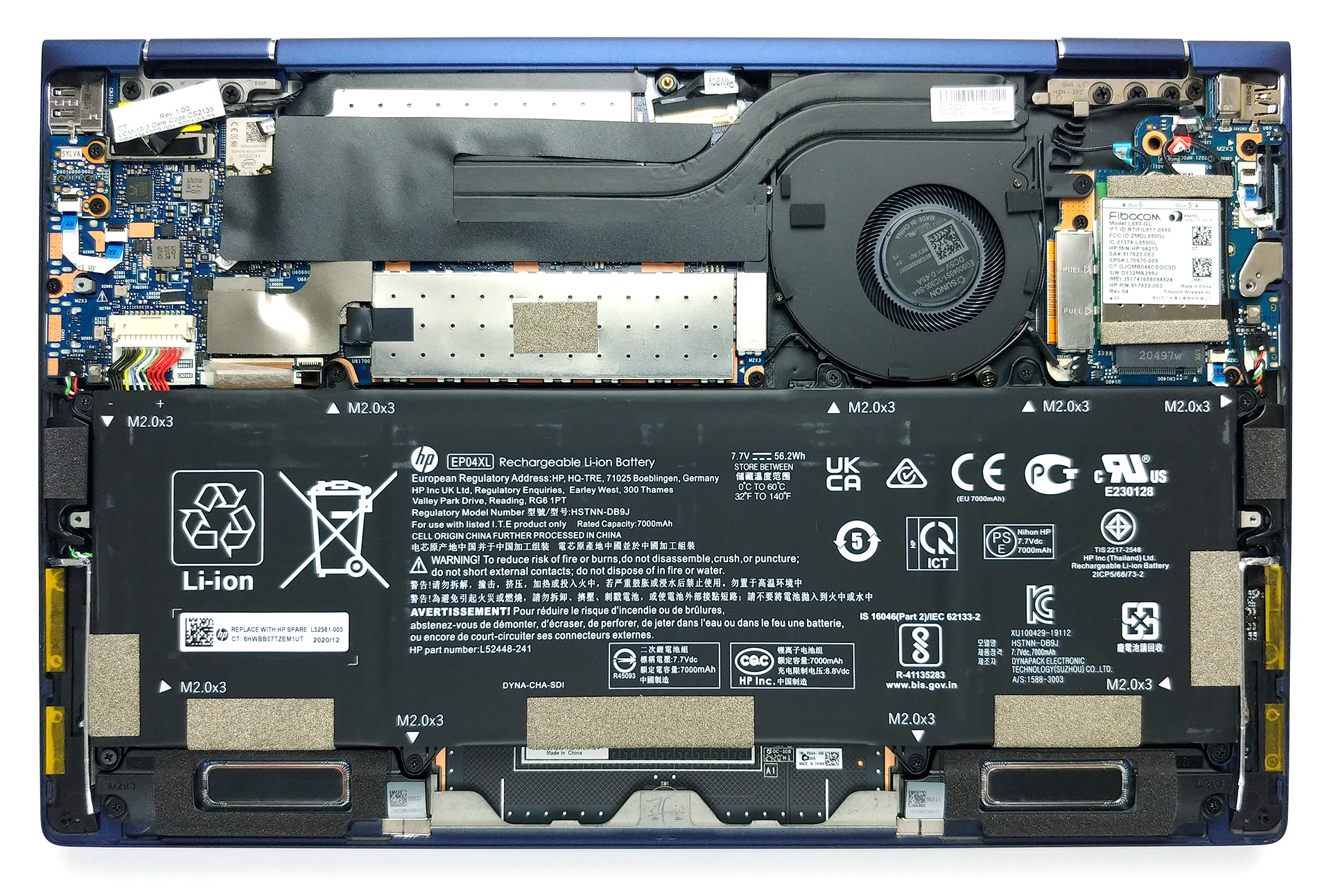
2. Battery
As you can see, the battery takes most of the space inside this device and has a capacity of 56Wh.

3. Мemory, storage, and cooling system
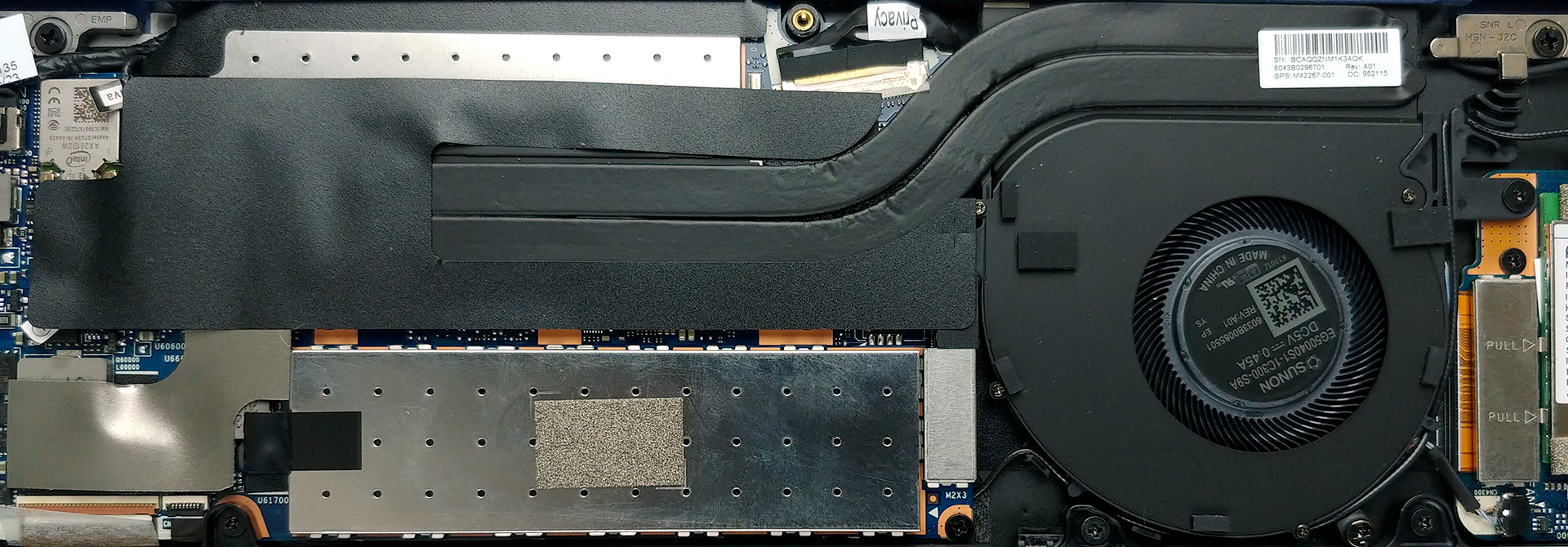
Expectedly, the memory here is soldered to the motherboard. On the bright side, HP offers configurations with up to 32GB of dual-channel memory. Storage-wise, there is one M.2 PCIe x4 slot.
In terms of cooling, you get two thin heat pipes, a small heat sink, and a tiny fan, which is surprisingly able to push a ton of air.
Check out all HP Elite Dragonfly G2 prices and configurations in our Specs System or read more in our In-Depth review.
HP Elite Dragonfly G2 részletes értékelés
The second-generation HP Elite Dragonfly is one of the most secure convertibles on the market. Yes, the price of security and privacy is high, but some scenarios just require such features. Yep, the Sure View system is back, and we really hope that HP has done some improvements to it.Another major feature of this device is actually its size. In fact, it is probably the lightest convertible on the market, weighing only 990 grams. This is tablet territory, guys.But if we have to be completely honest, the laptop doesn't look that much different from its predecessor. The body looks pretty[...]

Előnyök
- Sub 1kg magnesium chassis
- More than 10 hours of battery
- PCIe x4 support
- Two Thunderbolt 4 ports
- An HP Pen inside the box
- Input devices are on point
- Great speakers
- WiFi 6 and optional LTE support
- One of the brightest display we've tested (IVO X133NVFF R0)
- Covers 91% of sRGB (IVO X133NVFF R0)
- Sure View works as intended (IVO X133NVFF R0)
- Doesn't use PWM for brightness adjustment (IVO X133NVFF R0)
Hátrányok
- RAM is soldered to the motherboard
- Premium price tag
- CPU performance is unimpressive
- The image looks blurry in the middle of the screen on our unit (IVO X133NVFF R0)
 Author: Alex Iliev

![[2026. június] Az Amazon Global legkelendőbb laptopmárkái – az Apple páratlan dominanciája az eladott darabszám és a bevétel tekintetében](https://laptopmedia.com/wp-content/uploads/2026/07/GLOBAL-Best-Brands-400x225.jpg)
![[2026. június] Amazon Global: A 10 legkelendőbb laptop – Az Apple új MacBook Neo-ja az első helyre tör, és megfizethető árával újjáformálja a piacot](https://laptopmedia.com/wp-content/uploads/2026/07/Best-Selling-Laptops-GLOBAL-Top-10-400x225.jpg)
![[2026. június] Amazon Global: A 10 legkelendőbb játékos laptop – az Acer Nitro V 16S AI vezeti az eladási listát, míg az ASUS az összbevétel tekintetében áll az élen](https://laptopmedia.com/wp-content/uploads/2026/07/Best-Selling-Gaming-Laptops-GLOBAL-Top-10-400x225.jpg)
![[2026. június] Az Amazonon legkelendőbb laptop-grafikus kártyák globális ranglistája – az NVIDIA RTX 5060 a legkelendőbb dedikált grafikus kártya](https://laptopmedia.com/wp-content/uploads/2026/07/Best-Selling-GPUs-GLOBAL-Top-10-400x225.jpg)
![[2026. június] Az Amazonon legkelendőbb laptop-processzorok globális rangsora – az Apple M5 vezet, az AMD Ryzen 7 260 pedig jelentős részesedést szerez a prémium szegmensben](https://laptopmedia.com/wp-content/uploads/2026/07/Best-Selling-CPUs-GLOBAL-Top-10-400x225.jpg)
