Lenovo ThinkPad P16 Gen 1 – Top 5 Pros and Cons
 The market for mobile workstations is full of bulky laptops that try to appear as sleek and as professional as possible. The Lenovo ThinkPad P16 Gen 1 tries to spice things up a bit, with a refreshed design that reminds us of the Legion series. It doesn’t have RGB, but a red stripe and using a large part of the backside as exhaust will give you that gamer-y feel. The 55W Alder Lake HX-series processors and RTX A-series of GPUs make for a very potent combination that is seriously backed up by a serious cooling setup. You can also take advantage of all that power, thanks to a fantastic display selection, including the 4K UHD+ display that we have here.
Today we’re giving you a quick overview of the Lenovo ThinkPad P16 Gen 1.
Lenovo ThinkPad P16 Gen 1: Full Specs / In-depth Review
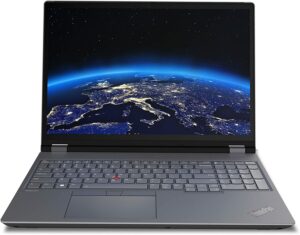
4 reasons to BUY the Lenovo ThinkPad P16 Gen 1
1. Upgradeability
The upgradeability of the laptop is very good, matching the ZBooks from HP. You get a service hatch on the bottom panel, which covers two SODIMM slots and one M.2 slot.

The keyboard is removable as well and below it, you get two more SODIMM slots, for up to 128GB of DDR5 RAM, along with a second SSD slot.
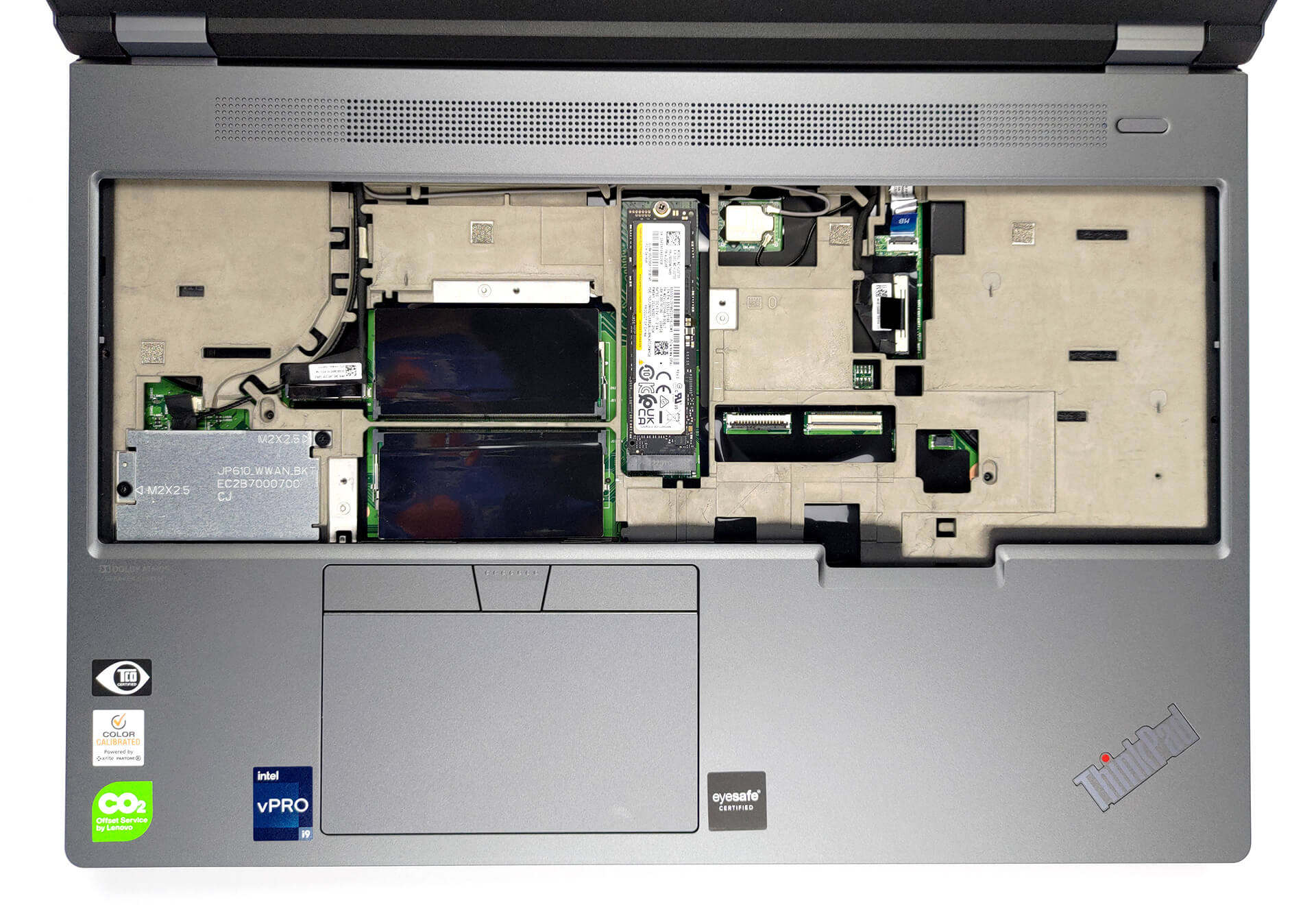
Here is our teardown video, which shows how to access all four RAM slots and the two storage slots.
2. Display quality
The 4K UHD+ IPS panel has amazing viewing angles and a pixel density of 283 PPI, which results in a very low Retina distance of 31 cm. It gets super bright, up to 740 nits, while covering 99% of the sRGB and 88% of the DCI-P3 color gamuts.
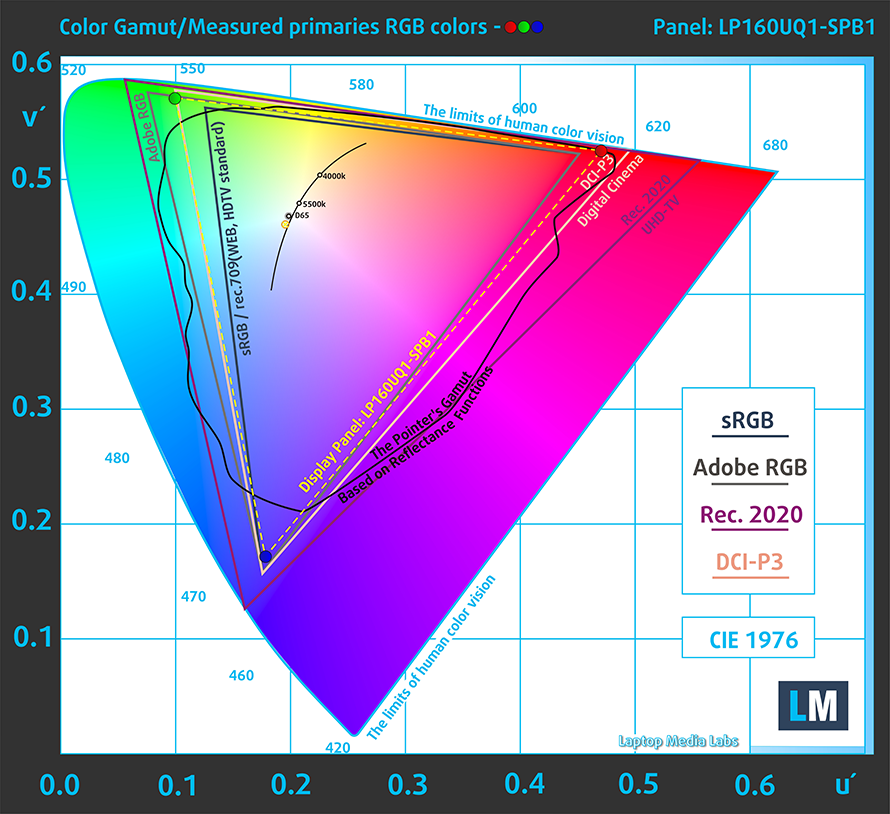 DCI-P3
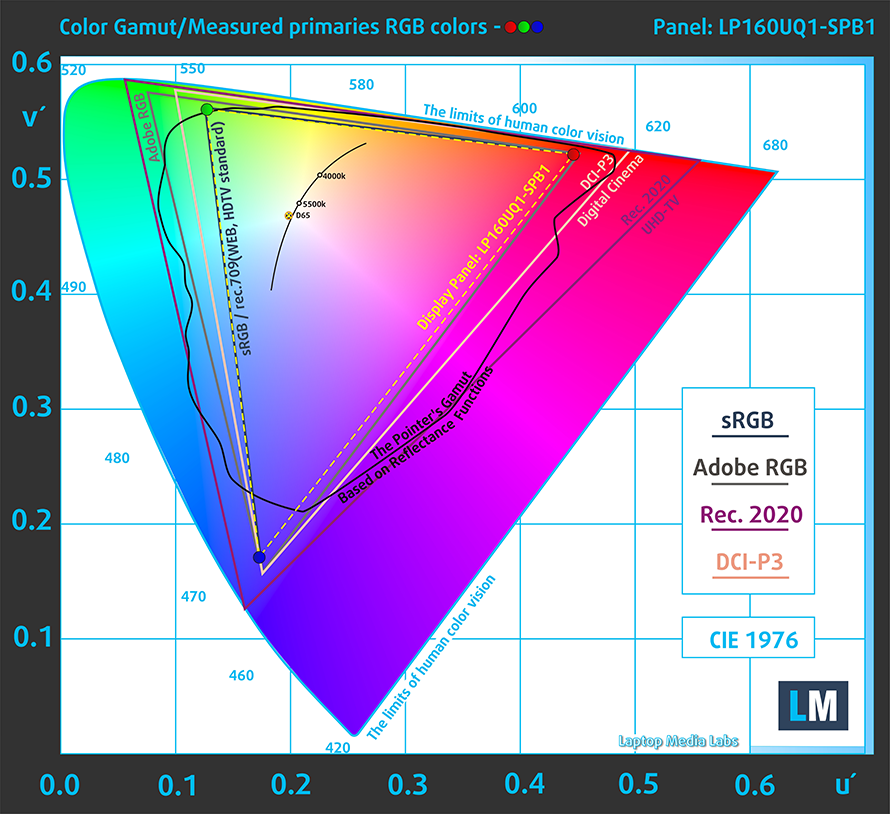 sRGB
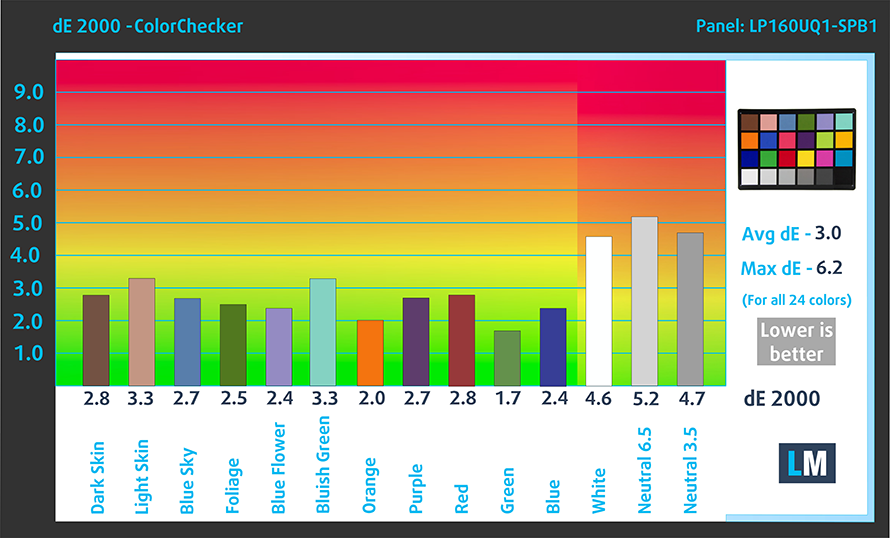
sRGBThe panel reaches the lowest possible accuracy inside the DCI-P3 gamut and with our Design and Gaming profile, which gives us a dE value of 2.6. Here are the results of our accuracy test with the stock settings (left) and with our profile applied (right).

Buy our profiles
Since our profiles are tailored for each individual display model, this article and its respective profile package are meant for Lenovo ThinkPad P16 Gen 1 configuration with 16.0″ LG LP160UQ1-SPB1 (LEN41B1) (3840×2400) IPS.
*Should you have problems with downloading the purchased file, try using a different browser to open the link you’ll receive via e-mail. If the download target is a .php file instead of an archive, change the file extension to .zip or contact us at [email protected].
Read more about the profiles HERE.
A hatékony és egészségbarát profilok mellett a LaptopMedia termékeinek megvásárlásával laboratóriumaink fejlesztését is támogatja, ahol eszközöket tesztelünk a lehető legobjektívebb értékelések elkészítése érdekében.

Irodai Munka
Az Irodai Munka profilt elsősorban azoknak a felhasználóknak ajánljuk, akik idejük nagy részét szövegek, táblázatok nézegetésével vagy böngészéssel töltik. Ez a profil jobb megkülönböztethetőséget és tisztaságot biztosít egyenletes gamma-görbe (2.20), natív színhőmérséklet és érzékelhetően pontos színek mellett.

Dizájn és Játék
Ez a profil a színekkel hivatásszerűen dolgozó tervezőknek, valamint játékokhoz és filmekhez készült. A Dizájn és Játék a kijelzőpaneleket a határaikra juttatja, a lehető legpontosabbá téve őket az sRGB IEC61966-2-1 szabvány szerint a webre és a HDTV-re, D65 fehérpont mellett.

Health-Guard
A Health-Guard kiküszöböli a káros impulzusszélesség-modulációt (PWM) és csökkenti a negatív kék fényt, amely hatással van a szemünkre és a testünkre. Mivel minden panelhez egyedileg van szabva, a színeket érzékelhetően pontosan tartja. A Health-Guard a papírt szimulálja, így a szemre nehezedő nyomás jelentősen csökken.
Szerezze meg mind a 3 profilt 33% kedvezménnyel

3. I/O
The port selection of the ThinkPad comes with two USB Type-A 3.2 (Gen. 1) ports, one USB Type-C 3.2 (Gen. 2) port, two Thunderbolt 4 ports, an HDMI port, an SD card reader, and a 3.5 mm audio jack. There is an optional SmartCard reader, as well as a Nano SIM slot.



4. Input devices
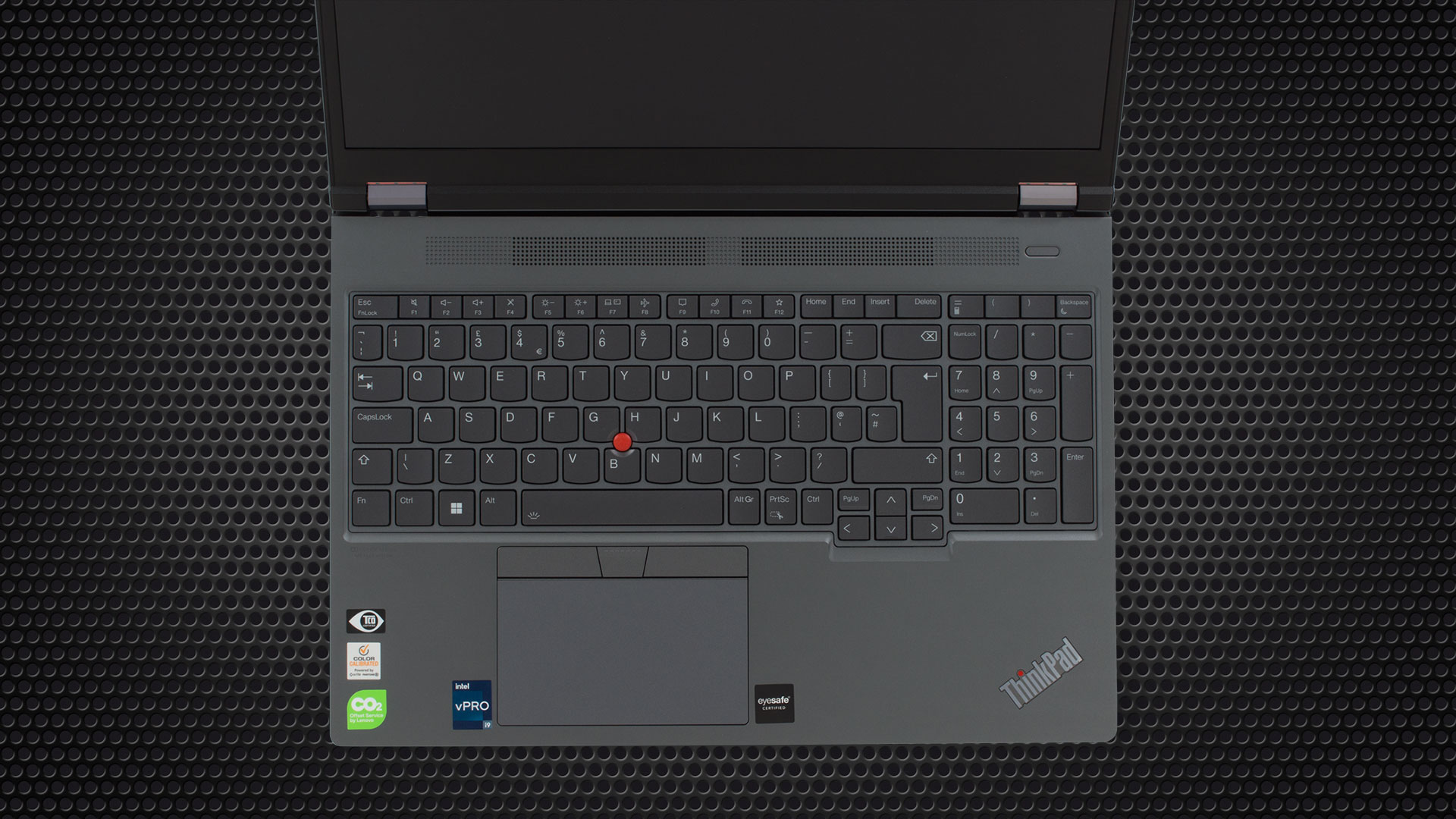
The keyboard, while removable, comes with spill resistance, a backlight, long key travel, and clicky feedback. It’s great for both typing and gaming. It houses a TrackPoint, which is a staple for ThinkPads. The touchpad also has a large size and is covered in Mylar, which is very smooth, while the physical buttons on top work very well with the TrackPoint.
1 reason NOT to buy the Lenovo ThinkPad P16 Gen 1
1. Heat and noise
While the cooling is capable, with four heat pipes and two fans, so are the CPU and GPU.

Max CPU load
| Intel Core i9-12950HX (55W TDP) | 0:02 – 0:10 sec | 0:15 – 0:30 sec | 10:00 – 15:00 min |
|---|---|---|---|
| Lenovo ThinkPad P16 Gen 1 | 3.26 GHz @ 2.63 GHz @ 82°C @ 119W | 3.09 GHz @ 2.46 GHz @ 84°C @ 104W | 2.84 GHz @ 2.21 GHz @ 89°C @ 86W |
The CPU maintains very high wattage, even after the 15-minute mark. However, it also runs a 89°C, which is reflected on the outside.
Real-life Gaming
| NVIDIA RTX A5500 | GPU frequency/ Core temp (after 2 min) | GPU frequency/ Core temp (after 30 min) | GPU frequency/ Core temp (Max Fan) |
|---|---|---|---|
| Lenovo ThinkPad P16 Gen 1 | 1236 MHz @ 69°C @ 130W | 1188 MHz @ 76°C @ 130W | – |
The GPU runs cooler and maxes out its 130W TGP both in short and long runs, however, the clock speeds dip to below 1200MHz.
Comfort during full load
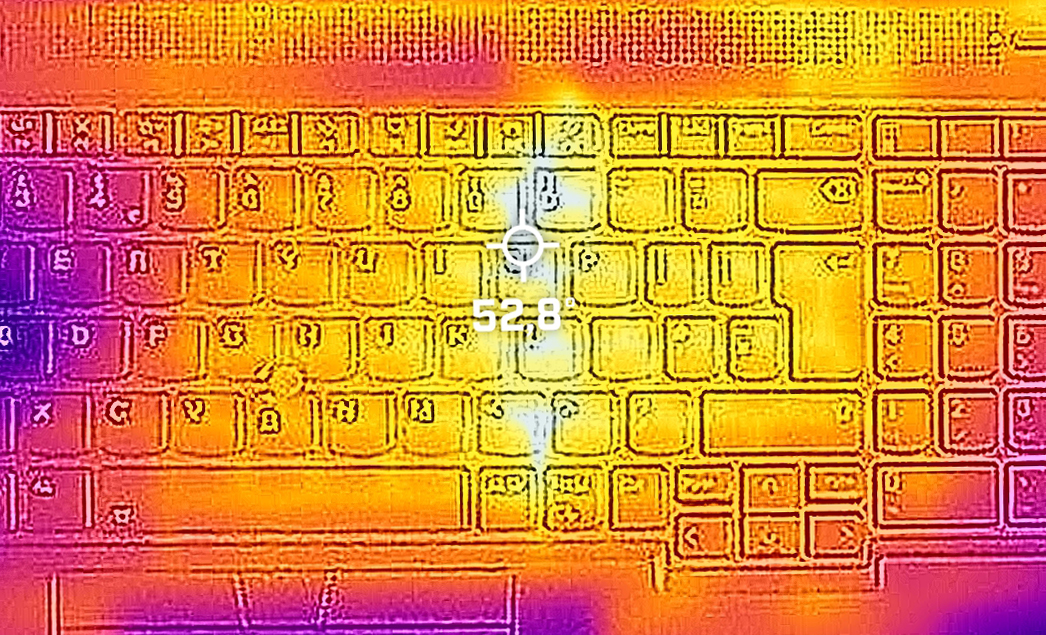
The keyboard gets toasty, reaching 53°C. The laptop is noisy as well, with the two fans being quite the screamers.
All Lenovo ThinkPad P16 Gen 1 configurations:
 Author: Severin Kolakov

![[2026. június] Az Amazon Global legkelendőbb laptopmárkái – az Apple páratlan dominanciája az eladott darabszám és a bevétel tekintetében](https://laptopmedia.com/wp-content/uploads/2026/07/GLOBAL-Best-Brands-400x225.jpg)
![[2026. június] Amazon Global: A 10 legkelendőbb laptop – Az Apple új MacBook Neo-ja az első helyre tör, és megfizethető árával újjáformálja a piacot](https://laptopmedia.com/wp-content/uploads/2026/07/Best-Selling-Laptops-GLOBAL-Top-10-400x225.jpg)
![[2026. június] Amazon Global: A 10 legkelendőbb játékos laptop – az Acer Nitro V 16S AI vezeti az eladási listát, míg az ASUS az összbevétel tekintetében áll az élen](https://laptopmedia.com/wp-content/uploads/2026/07/Best-Selling-Gaming-Laptops-GLOBAL-Top-10-400x225.jpg)
![[2026. június] Az Amazonon legkelendőbb laptop-grafikus kártyák globális ranglistája – az NVIDIA RTX 5060 a legkelendőbb dedikált grafikus kártya](https://laptopmedia.com/wp-content/uploads/2026/07/Best-Selling-GPUs-GLOBAL-Top-10-400x225.jpg)
![[2026. június] Az Amazonon legkelendőbb laptop-processzorok globális rangsora – az Apple M5 vezet, az AMD Ryzen 7 260 pedig jelentős részesedést szerez a prémium szegmensben](https://laptopmedia.com/wp-content/uploads/2026/07/Best-Selling-CPUs-GLOBAL-Top-10-400x225.jpg)
