Great color accuracy on the Dell Latitude 14 7420 with the help of our Gaming and Web design profile
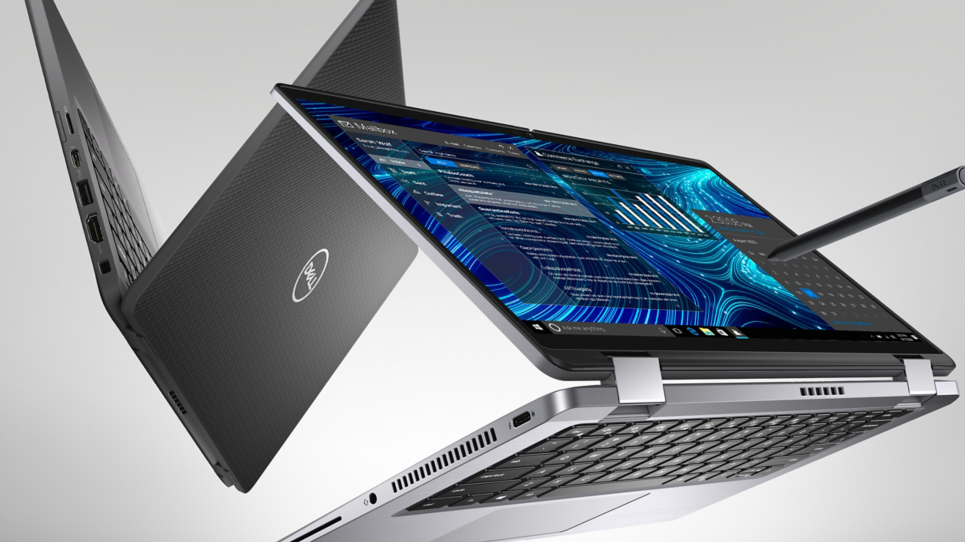 Business laptops aren’t usually known for their superb color reproduction. However, the premium segment is starting to catch up and with hardware getting more and more powerful, suddenly devices can get very versatile and serve different purposes with just the addition of a good display. The Dell Latitude 14 7420 is one such case. It comes with the new Tiger Lake CPUs which offer both decent performance and great power efficiency. To add even more it has a good enough display to handle some artistic work, or any color-sensitive work for that matter, especially when you use our Design and Gaming profile.
Dell Latitude 14 7420: Full Specs / In-depth Review
Display quality
The Dell Latitude 14 7420 comes with a 14-inch Full HD IPS panel with comfortable viewing angles, a great maximum brightness of 435 nits in the middle of the screen, and 414 nits on average across the entire area of the screen, which calculates to a deviation of 9%. The contrast ratio is also spectacular, sitting at 1800:1. The color coverage is also quite good, with the panel covering 90% of the sRGB color gamut.
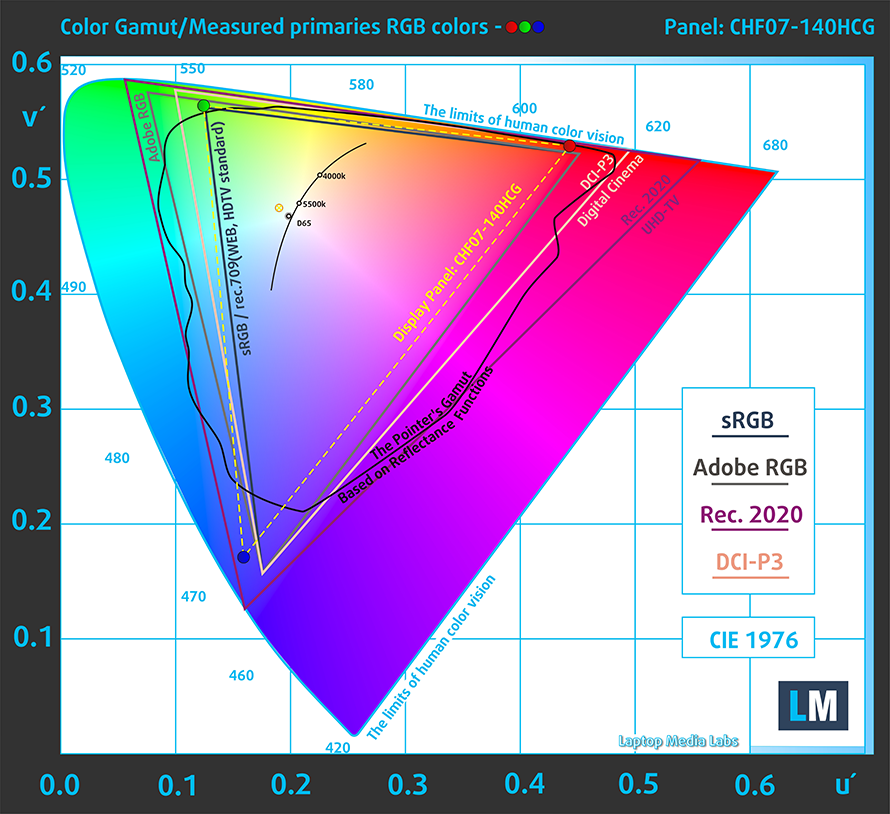
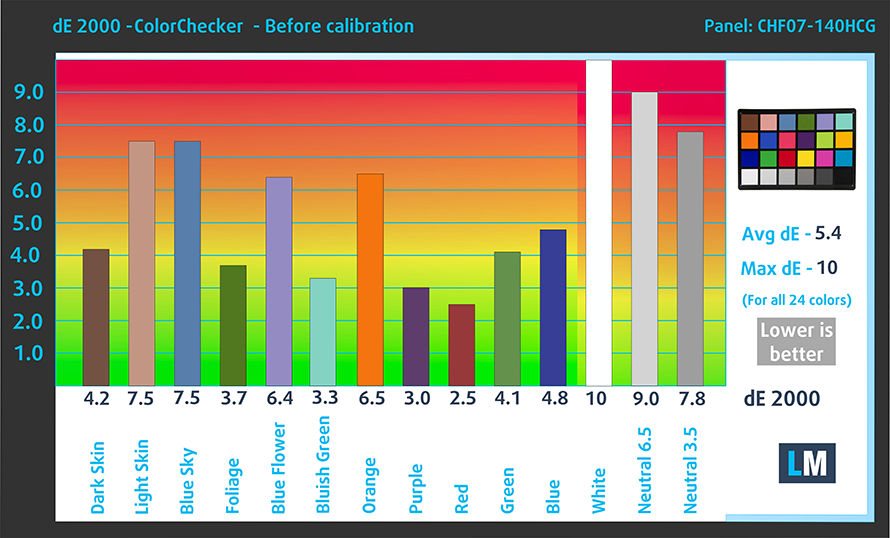
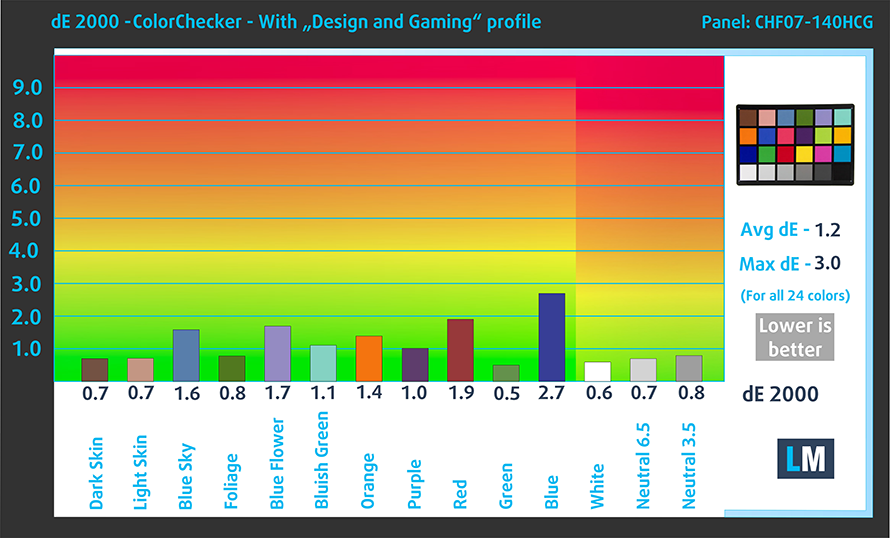
What is even better though is the color accuracy, which with the factory settings (left) has a dE value of 5.4, way off the standard. When you apply our Design and gaming profile (right), the dE value goes down significantly, down to 1.2.
Buy our profiles
Since our profiles are tailored for each display model, this article and its respective profile package are meant for Dell Latitude 14 7420 configurations with 14.0″ Innolux CHF07-140HCG (CMN1416) (FHD, 1920 × 1080) IPS panel.
*Should you have problems with downloading the purchased file, try using a different browser to open the link you’ll receive via e-mail. If the download target is a .php file instead of an archive, change the file extension to .zip or contact us at [email protected].
Read more about the profiles HERE.
A hatékony és egészségbarát profilok mellett a LaptopMedia termékeinek megvásárlásával laboratóriumaink fejlesztését is támogatja, ahol eszközöket tesztelünk a lehető legobjektívebb értékelések elkészítése érdekében.

Irodai Munka
Az Irodai Munka profilt elsősorban azoknak a felhasználóknak ajánljuk, akik idejük nagy részét szövegek, táblázatok nézegetésével vagy böngészéssel töltik. Ez a profil jobb megkülönböztethetőséget és tisztaságot biztosít egyenletes gamma-görbe (2.20), natív színhőmérséklet és érzékelhetően pontos színek mellett.

Dizájn és Játék
Ez a profil a színekkel hivatásszerűen dolgozó tervezőknek, valamint játékokhoz és filmekhez készült. A Dizájn és Játék a kijelzőpaneleket a határaikra juttatja, a lehető legpontosabbá téve őket az sRGB IEC61966-2-1 szabvány szerint a webre és a HDTV-re, D65 fehérpont mellett.

Health-Guard
A Health-Guard kiküszöböli a káros impulzusszélesség-modulációt (PWM) és csökkenti a negatív kék fényt, amely hatással van a szemünkre és a testünkre. Mivel minden panelhez egyedileg van szabva, a színeket érzékelhetően pontosan tartja. A Health-Guard a papírt szimulálja, így a szemre nehezedő nyomás jelentősen csökken.
Szerezze meg mind a 3 profilt 33% kedvezménnyel

All Dell Latitude 14 7420 configurations:
 Author: Severin Kolakov

![[2026. június] Az Amazon Global legkelendőbb laptopmárkái – az Apple páratlan dominanciája az eladott darabszám és a bevétel tekintetében](https://laptopmedia.com/wp-content/uploads/2026/07/GLOBAL-Best-Brands-400x225.jpg)
![[2026. június] Amazon Global: A 10 legkelendőbb laptop – Az Apple új MacBook Neo-ja az első helyre tör, és megfizethető árával újjáformálja a piacot](https://laptopmedia.com/wp-content/uploads/2026/07/Best-Selling-Laptops-GLOBAL-Top-10-400x225.jpg)
![[2026. június] Amazon Global: A 10 legkelendőbb játékos laptop – az Acer Nitro V 16S AI vezeti az eladási listát, míg az ASUS az összbevétel tekintetében áll az élen](https://laptopmedia.com/wp-content/uploads/2026/07/Best-Selling-Gaming-Laptops-GLOBAL-Top-10-400x225.jpg)
![[2026. június] Az Amazonon legkelendőbb laptop-grafikus kártyák globális ranglistája – az NVIDIA RTX 5060 a legkelendőbb dedikált grafikus kártya](https://laptopmedia.com/wp-content/uploads/2026/07/Best-Selling-GPUs-GLOBAL-Top-10-400x225.jpg)
![[2026. június] Az Amazonon legkelendőbb laptop-processzorok globális rangsora – az Apple M5 vezet, az AMD Ryzen 7 260 pedig jelentős részesedést szerez a prémium szegmensben](https://laptopmedia.com/wp-content/uploads/2026/07/Best-Selling-CPUs-GLOBAL-Top-10-400x225.jpg)

Hi, thanks for the thorough review. According to the specs provided by Dell, the 400 nits FHD screen has a contrast ratio of merely 600:1, which is really low for a premium line. So pleased to see a 1800:1 was measured here since I planned to purchase one recently. Could Dell make a mistake providing wrong numbers?