Acer Nitro XZ270U Pbmiiphx monitor – Specs, Pros / Cons: How Can A Gaming Monitor Be This Accurate?
 The Acer Nitro XZ270U Pbmiiphx is a more modern take on the classic gaming monitor formula. While it’s got the classic gaming monitor characteristics down to a T. It’s got a Quad HD VA panel, which fits inside a 27-inch frame, which means that you get a detailed image. On the other hand, the 165Hz refresh rate and the 1ms response time make sure you’re competitive against your opponents in any game.
There’s also Adaptive Sync support, which is a standardized Variable Refresh Rate technology governed by VESA. Even AMD’s FreeSync uses the same backbone and is built on top of Adaptive Sync, so you’re good to go for plenty of tear-free gaming at high FPS and high resolution.
However, the Nitro XZ270U Pbmiiphx is much more than a gaming monitor, as it manages to do amazingly well in our color coverage and accuracy tests, as you’ll see by reading on. We managed to achieve a massive increase in color accuracy of more than three times.
You can check the current price of the Acer Nitro XZ270U Pbmiiphx here: Buy from Flipkart.com
Contents
Specs sheet, Assembly, Drivers, OSD, Design, Connectivity
| Screen size | 27 inch (68.58 cm) |
|---|---|
| Refresh rate | 165Hz |
| Response time | 1ms |
| Panel type | VA |
| Backlight type | LED |
| Screen finish | Matte |
| Resolution | 2560 x 1440 (Quad HD) |
| Technologies |
|
| I/O |
|
Assembly
You can put together the monitor with just your two hands, as you don’t need any screws.

Drivers and Software
The monitor is very plug-and-play, with no drivers necessary to make it work. However, Acer really wants you to install their Display Widget, which gives you better control over the monitor’s settings, with the additional bonus of being able to use your mouse and keyboard.
Design and Connectivity
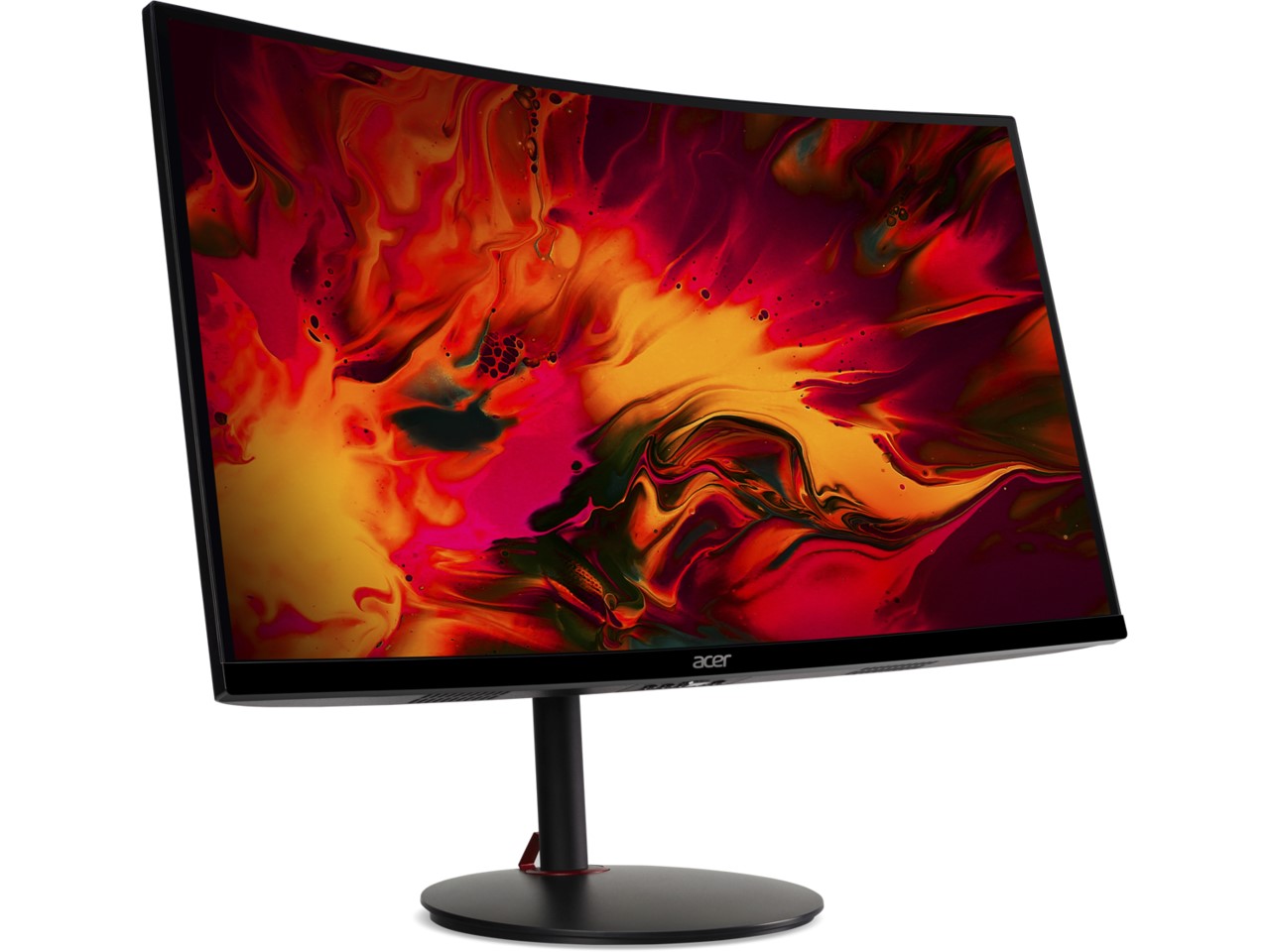
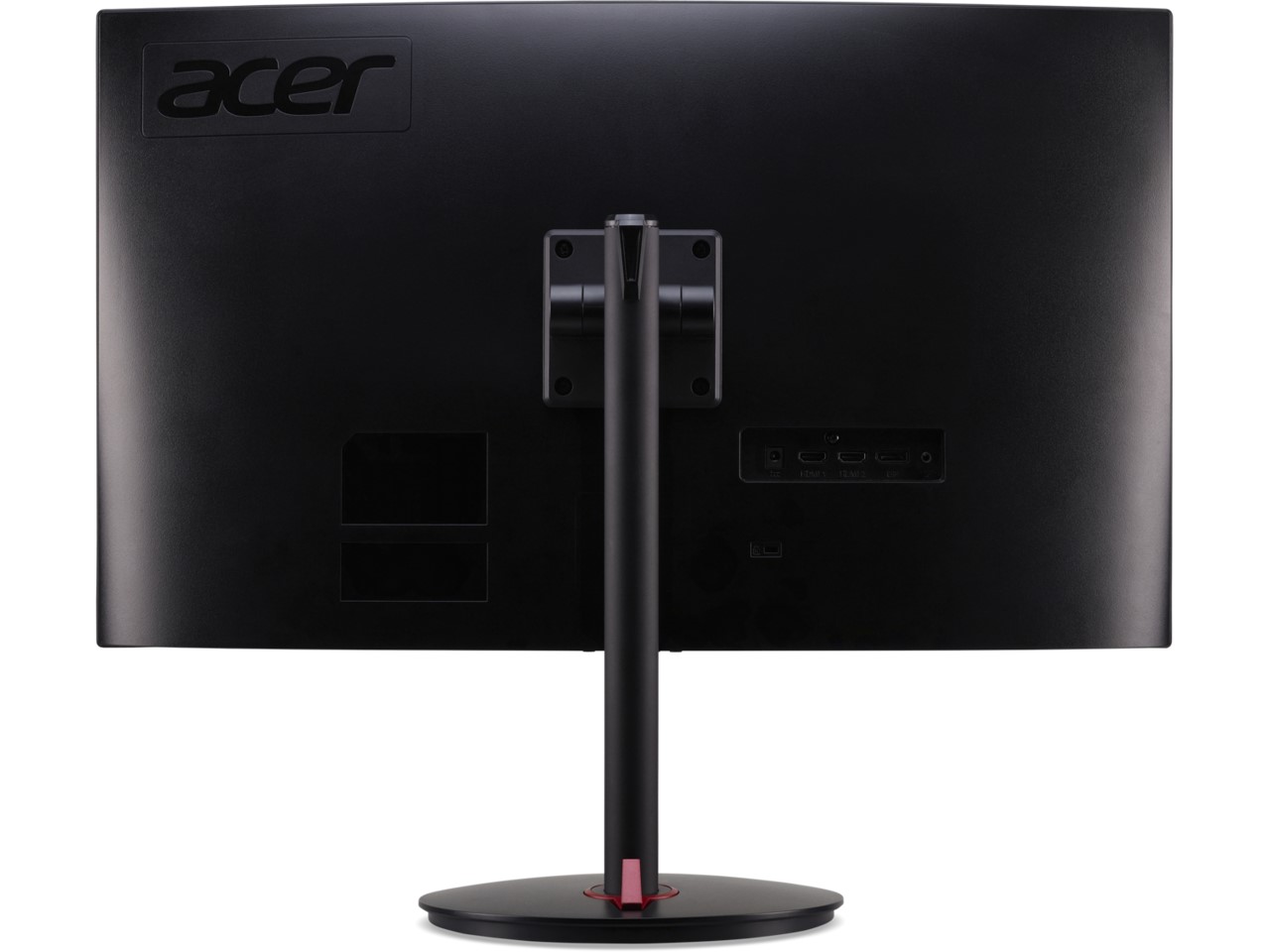
Usually, Acer’s Nitro gaming monitors were all super-angular, with crazier shapes and those red accents. In fact, this is the same design language as their laptops. Now, the Nitro laptops are sleeker than before and don’t use as much color, so this has trickled down into their monitor design too. It’s entirely black and honestly looks more like an office monitor. The stand on it is pretty good, offering good adjustment, with Tilt, Pivot, and Height adjustment. With it, you can customize the positioning to your liking (Have the monitor at eye level with your back upright and straight), which leads to better posture and better spine health. The buttons for controlling the OSD menu are at the bottom, just below the Acer logo on the chin.
In terms of ports, there are two HDMI ports, one DisplayPort, and an audio jack.
Display quality, Buy our profiles, Verdict
The monitor uses a VA panel, which, compared to IPS panels, brings higher contrast. However, the brightness is significantly lower, measuring at 250 nits. However, VA panels still offer pretty high color coverage and good accuracy as you can see from the tests. Before that, let’s get you up to speed with color gamuts and our testing methods.
The correlated color temperature on a white screen after a Factory Reset in sRGB mode is 7170 K (Luminance 150 cd/m2 at 20% Brightness). The average gamma value is 2.18.
Color coverage
Here’s an illustration (Fig. 1). The whole “sail-shaped” map below consists of all the colors we can see, while the black crooked line shows all the colors from real-world scenes and nature around us.
Then, we’ve drawn some of the most important and interesting color spaces, compared to the colors the panel of Acer Nitro XZ270U Pbmiiphx can show:
Standard/For Web: sRGB – widely used color space for most consumer devices, ideal for Web design and development
For Print: AdobeRGB – used in professional photo editing, graphic design, and print
For Photographers/Video Editors: DCI-P3 – used in high-end film production, post-production, and digital cinema
Premium HDR: Rec.2020 – the widest consumer ITU color standard, covering a massive 75.8% of the visible spectrum, a benchmark for premium HDR content
Acer Nitro XZ270U Pbmiiphx: the yellow dashed triangle (– – – – – –) represents the range of colors this monitor can display. In our tests, we calculated the total color coverage of the monitor at 96% of the sRGB color gamut.
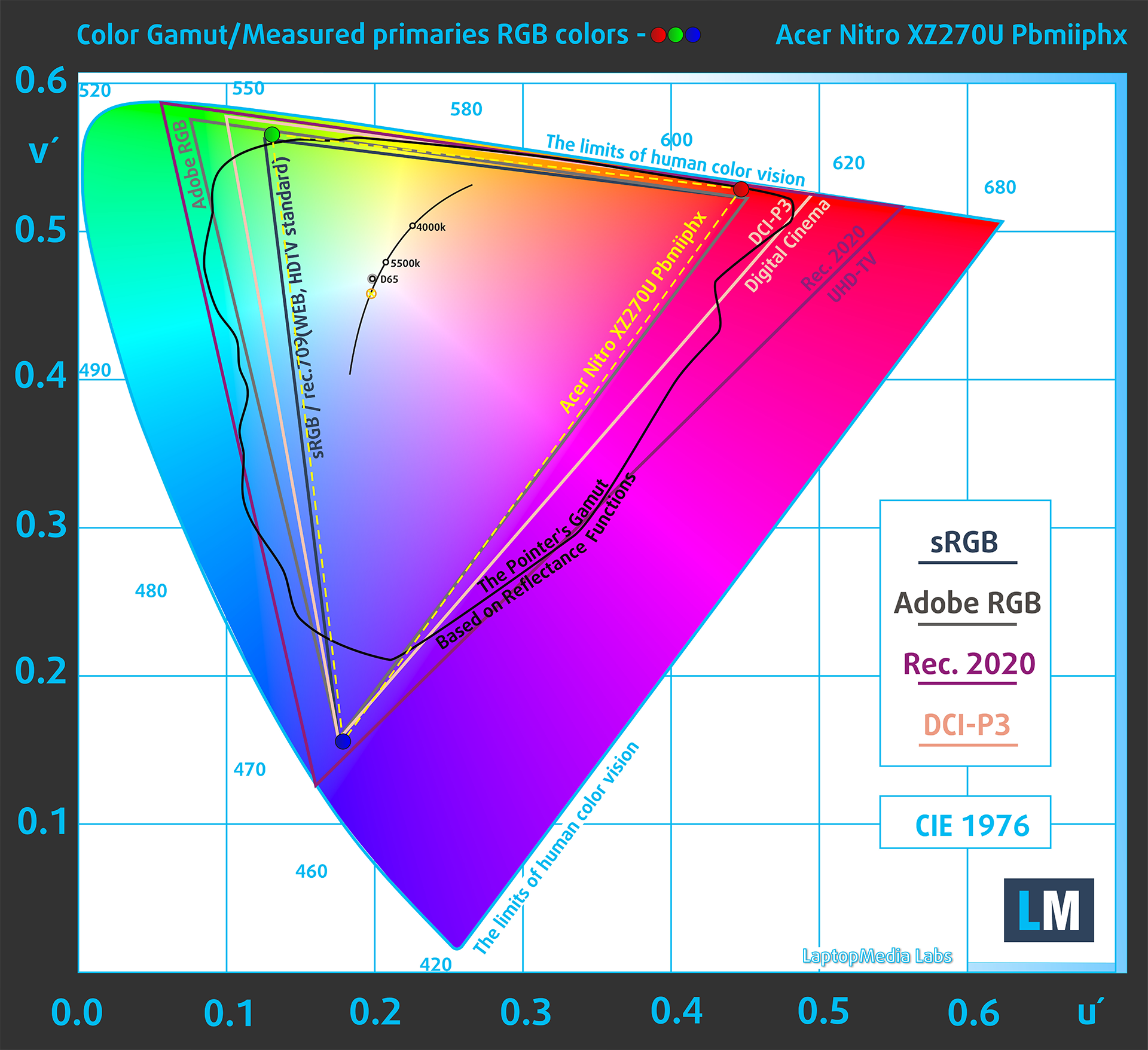
(Fig.1) Acer Nitro XZ270U Pbmiiphx covers 96% of the Web colors (sRGB)
This means that if the Acer Nitro XZ270U Pbmiiphx tries to show any color outside of its triangle, it will show the closest color to it that’s inside the triangle.
Color accuracy
Now let’s see how big is the difference between the real colors and the one you’ll see on the Acer Nitro XZ270U Pbmiiphx. We measure that distance in DeltaE – the bigger the number, the more different they look.
For the next illustration, we’ve chosen 24 common colors like dark and light skin, blue sky, green grass, etc.
Values below 2.0 are considered suitable for color-sensitive work. Before our calibration of the Acer Nitro XZ270U Pbmiiphx, the Average color accuracy was 4.7 dE (Fig. 2), and with our Web Design and Office Work profile, it lowered to 1.4 dE (Fig. 3). This is a massive accuracy increase of 3.35x, while the 1.4 dE is well off below the 2.0 mark, so the Nitro is more than ready for color-sensitive work.
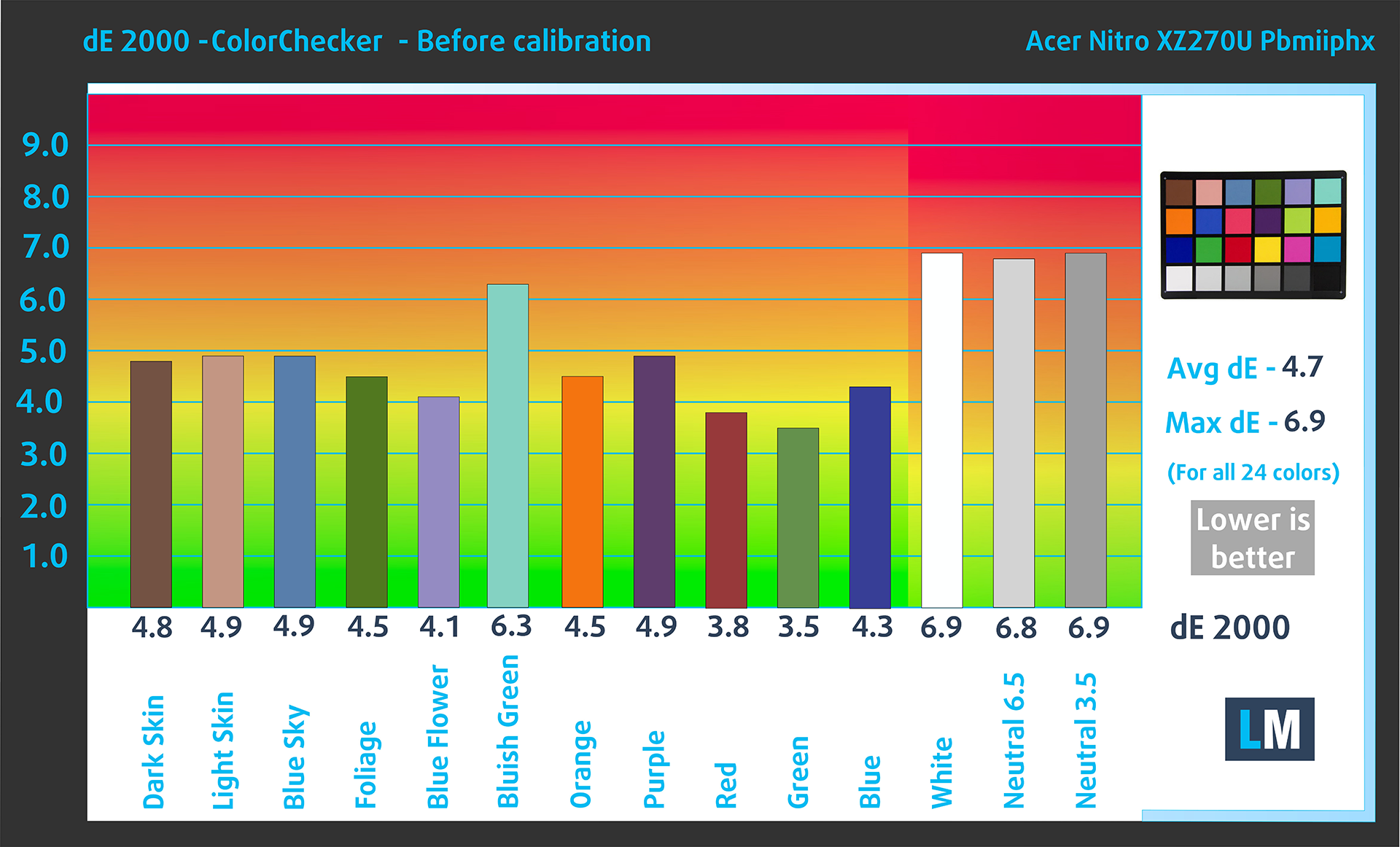 (Fig. 2) Acer Nitro XZ270U Pbmiiphx in its factory condition
 (Fig. 3) Acer Nitro XZ270U Pbmiiphx with our display profiles
Comparison in the sRGB color space (primaries and D65 white point specified in ITU-R BT.709, sRGB encoding curve).
Left: No Profile | Drag the slider to see the difference | Right: Design & Gaming Profile


Health-Guard eliminates the harmful Pulse-Width Modulation (PWM) and reduces the negative Blue Light which affects our eyes and body. Since it’s custom-tailored for every panel, it manages to keep the colors perceptually accurate (they may seem strange at first but after a few minutes our brain will start recognizing them as accurate ones – that’s how Health-Guard differs from alternatives like f.lux).
Pro Tip: As the Health-Guard profile simulates paper and has as accurate as possible colors, it could be a great tool for prepress designers!
Left: No Profile | Drag the slider to see the difference | Right: Health-Guard Profile


Gaming and Movies
We also have a third Gaming and Movies profile, which regulates the black colors, making dark areas in games and movies appear more visible, thus giving you a better viewing experience. Shooting at your opponent first can be a make-or-break moment, so make sure you’re best prepared with our profile.
Left: No Profile | Drag the slider to see the difference | Right: Design & Gaming Profile


BUY OUR DISPLAY PROFILES
Since our profiles are tailored for each individual display model, this article and its respective profile package are meant for the Acer Nitro XZ270U Pbmiiphx.
*Should you have problems with downloading the purchased file, try using a different browser to open the link you’ll receive via e-mail. If the download target is a .php file instead of an archive, change the file extension to .zip or contact us at [email protected].
Read more about the profiles HERE.
Here’s how to prepare thе monitor for our profiles:
1. Open the OSD menu (On-Screen Display)
2. Information: Go to the ‘Reset All Settings’ tab.
3. Brightness: Navigate to Image ➡️ Brightness and set it to 70% for optimal viewing.
कुशल और स्वास्थ्य के अनुकूल प्रोफाइल प्राप्त करने के अलावा, LaptopMedia के उत्पादों को खरीदकर आप हमारी प्रयोगशालाओं के विकास का भी समर्थन करते हैं, जहाँ हम सबसे वस्तुनिष्ठ समीक्षाएँ प्रस्तुत करने के लिए उपकरणों का परीक्षण करते हैं।

Office Work
Office Work का उपयोग ज्यादातर उन उपयोगकर्ताओं द्वारा किया जाना चाहिए जो अपना अधिकांश समय टेक्स्ट के टुकड़ों, तालिकाओं को देखने या सिर्फ सर्फिंग में बिताते हैं। इस प्रोफ़ाइल का उद्देश्य एक फ्लैट गामा वक्र (2.20), मूल रंग तापमान और अवधारणात्मक रूप से सटीक रंगों को रखकर बेहतर विशिष्टता और स्पष्टता प्रदान करना है।

Design and Gaming
यह प्रोफ़ाइल उन डिजाइनरों के लिए है जो पेशेवर रूप से रंगों के साथ काम करते हैं, और गेम और फिल्मों के लिए भी। Design and Gaming डिस्प्ले पैनल को उनकी सीमा तक ले जाता है, जिससे वे वेब और HDTV के लिए sRGB IEC61966-2-1 मानक में, व्हाइट पॉइंट D65 पर यथासंभव सटीक हो जाते हैं।

Health-Guard
Health-Guard हानिकारक पल्स-विड्थ मॉड्यूलेशन (PWM) को समाप्त करता है और नकारात्मक नीली रोशनी को कम करता है जो हमारी आँखों और शरीर को प्रभावित करती है। चूंकि यह प्रत्येक पैनल के लिए कस्टम अनुरूप है, यह रंगों को अवधारणात्मक रूप से सटीक रखने का प्रबंधन करता है। Health-Guard कागज का अनुकरण करता है जिससे आँखों पर दबाव बहुत कम हो जाता है।
33% छूट के साथ सभी 3 प्रोफाइल प्राप्त करें

Verdict
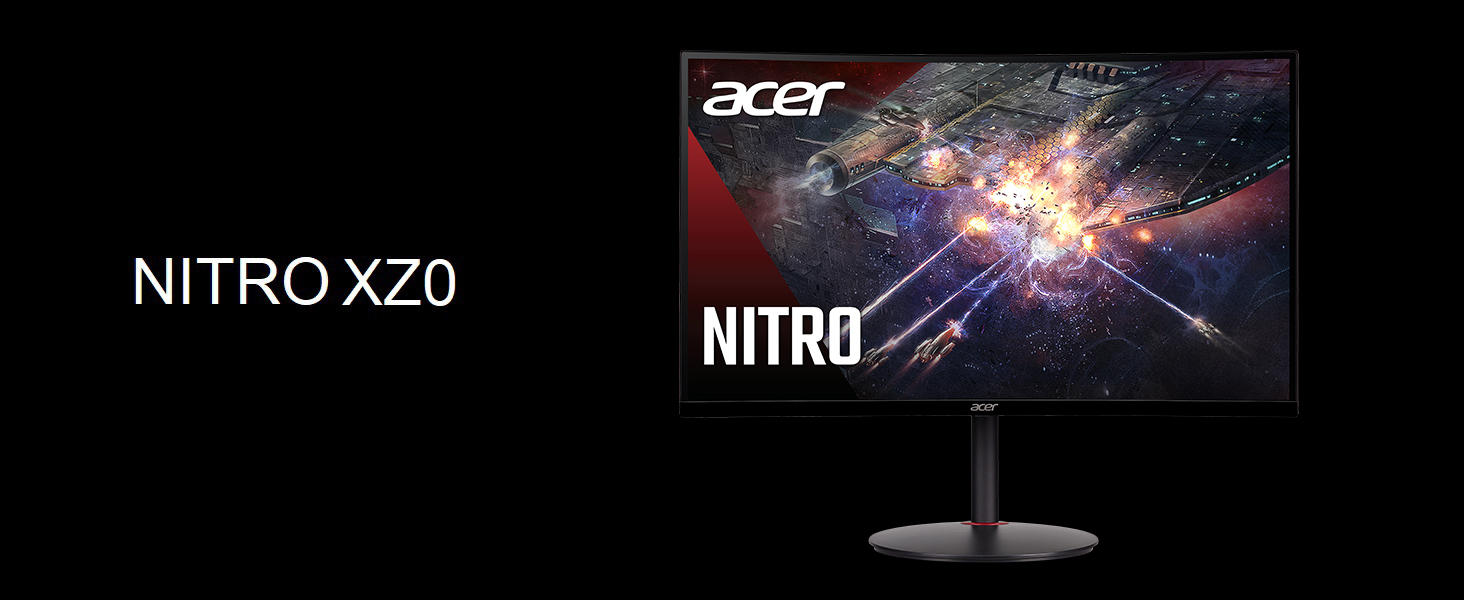 The Acer Nitro XZ270U Pbmiiphx performs much better than we originally expected and you’re getting a lot of value. Currently, the monitor retails for around $235 on Amazon, and for the money, this monitor is a steal.
The QHD resolution and the 165Hz refresh rate mean that you get a detailed gaming experience that’s smooth and tear-free, thanks to the 1ms response time and the Adaptive Sync support.
Now, getting into the monitor’s Creator capabilities, the 96% sRGB color coverage ensures that all of the 3686400 pixels deliver incredible and deep colors. Once we start playing with the Display Profiles, the monitor becomes even better.
With the Web Design and Office Work profile, we managed to lower the dE value of the monitor from 4.7 to 1.4, which means the monitor is more than three times more accurate. The rest of our profiles are for when you’re not at the office or at the studio. The Gaming and Movies profile spices up the colors and makes everything more visible, including a correction to the black colors, which means you’ll see what’s hiding in the shadows.
Lastly, the Health-Guard is there to get rid of the Blue Light and PWM (Flickering). The former can affect your sleep by suppressing the release of melatonin, while the latter tire your eyes, as the constant flickering might not be seen, but your eyes and brain can certainly feel it, causing headaches after prolonged exposure.
You can check the current price of the Acer Nitro XZ270U Pbmiiphx: Buy from Flipkart.com
Pros
- 96% sRGB coverage
- 3X increase in accuracy (from 4.7 to 1.3)
- Adjustable stand
- Pretty High resolution for incredible detail
- Great Price
Cons
- Not a lot of ports
 Author: Severin Kolakov

![[June 2026] Best-Selling Laptop Brands on Amazon Global – Apple’s Unrivaled Dominance in Units and Revenue](https://laptopmedia.com/wp-content/uploads/2026/07/GLOBAL-Best-Brands-400x225.jpg)
![[June 2026] Amazon Global: Top 10 Best-Selling Laptops – Apple’s New MacBook Neo Storms to #1, Reshaping the Market with Affordability](https://laptopmedia.com/wp-content/uploads/2026/07/Best-Selling-Laptops-GLOBAL-Top-10-400x225.jpg)
![[June 2026] Amazon Global: Top 10 Best-Selling Gaming Laptops – Acer’s Nitro V 16S AI Dominates Sales, While ASUS Leads Overall Revenue](https://laptopmedia.com/wp-content/uploads/2026/07/Best-Selling-Gaming-Laptops-GLOBAL-Top-10-400x225.jpg)
![[June 2026] Global Ranking of Best-Selling Laptop GPUs on Amazon – NVIDIA RTX 5060 is the Top-Selling Dedicated GPU](https://laptopmedia.com/wp-content/uploads/2026/07/Best-Selling-GPUs-GLOBAL-Top-10-400x225.jpg)
![[June 2026] Global Ranking of Best-Selling Laptop CPUs on Amazon – Apple M5 Dominates, AMD Ryzen 7 260 Gets Solid Premium Share](https://laptopmedia.com/wp-content/uploads/2026/07/Best-Selling-CPUs-GLOBAL-Top-10-400x225.jpg)
