Dell XPS 13 9305 – Top 5 Pros and Cons
 This is clearly one of the slimmest laptops on the market. It reeks of elegance and expansiveness. The laptops have used the same design language for some years now, which reinforces the premium image among consumers. The designs are also timeless and modern even after a couple of years have passed.
The most recent XPS 13 9305 uses Tiger Lake processors and integrated graphics, which are enough for a laptop of this size. We also have two fantastic displays which come with great color reproduction, allowing for Creator work to be done on the go.
Today we are presenting you with LaptopMedia’s top 5 picks about the Dell XPS 13 9305.
Dell XPS 13 9305: Full Specs / In-depth Review
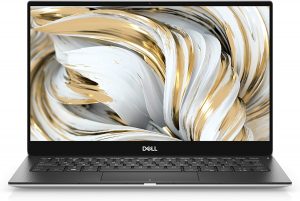
3 reasons to BUY the Dell XPS 13 9305
1. Design and build quality
Built from the ground up using aluminum and carbon fiber, this is a durable device that takes the best out of the materials that it is using. The Aluminum is visible on the outside, making the laptop appear luxurious and be smooth to hold when closed. The carbon fiber provides interesting contrast visually, while also offering a grippy surface for your hands to rest on. In terms of dimensions, the laptop weighs only 1.29 kg and has a profile of just 7.8 mm. With such a low weight and thin profile, the durability of the device is fantastic.

The lid opens easily with one hand, revealing a keyboard with decent key travel for the profile of the laptop, but the feedback was softer than we would have hoped. The touchpad has a decent size along with a clicking mechanism that is super loud, but very comfortable to use.

2. Display quality
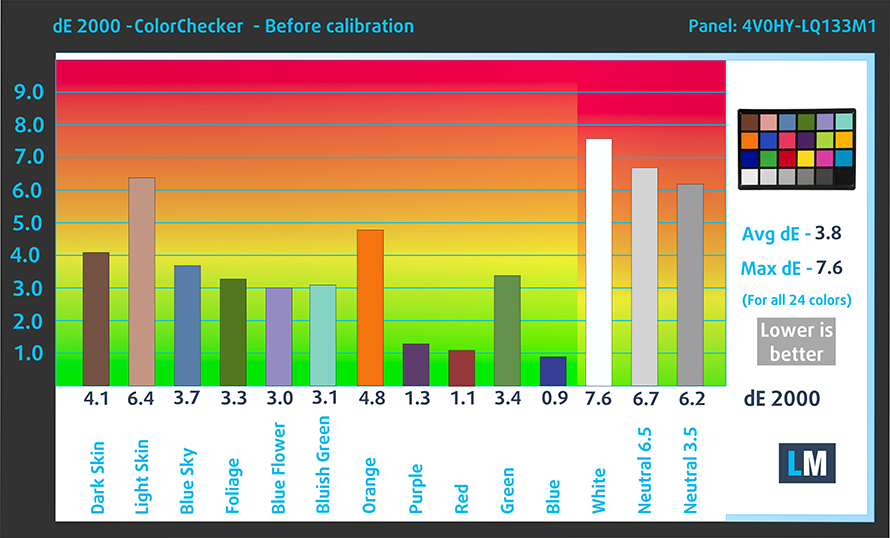
There are two display choices, with two 13.3-inch displays that come with either Full HD or 4K UHD resolution. We tested the former option, which has comfortable viewing angles, a max brightness of 465 nits in the middle of the screen, 426 nits average across the surface, a maximum deviation of 16% with poor uniformity in the bottom right corner. The contrast ratio is decent – 1320:1. In terms of color reproduction, the panel covers 99% of the sRGB color gamut. However, the panel is still not perfect, using high-frequency PWM up to 115 nits of brightness.
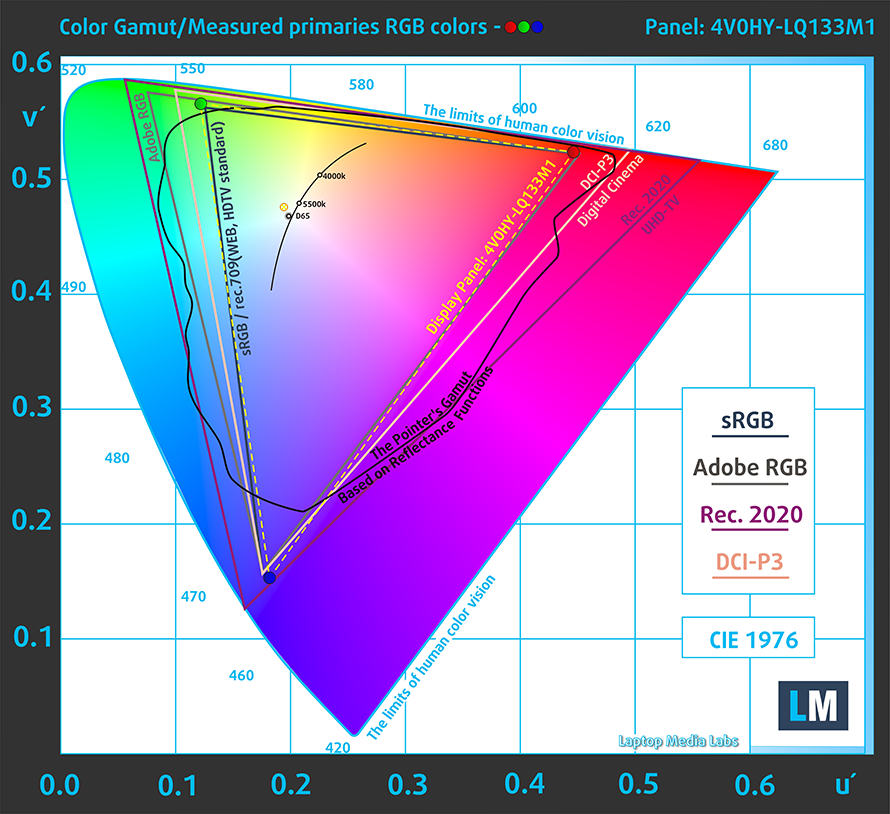
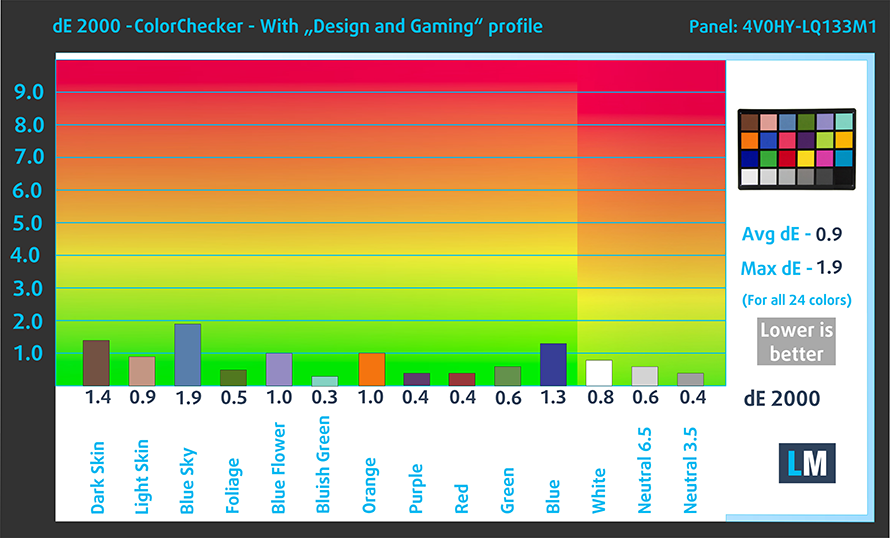
The stock color accuracy (left) is nowhere near being ready for professional work, but our Design and Gaming profile quickly fixes it, giving us a dE value of 0.9 (right).
Buy our profiles
Since our profiles are tailored for each individual display model, this article and its respective profile package are meant for Dell XPS 13 9305 configurations with 13.3″ Sharp 4V0HY-LQ133M1 (SHP14AE) (FHD, 1920 × 1080) IPS panel.
*Should you have problems with downloading the purchased file, try using a different browser to open the link you’ll receive via e-mail. If the download target is a .php file instead of an archive, change the file extension to .zip or contact us at [email protected].
Read more about the profiles HERE.
कुशल और स्वास्थ्य के अनुकूल प्रोफाइल प्राप्त करने के अलावा, LaptopMedia के उत्पादों को खरीदकर आप हमारी प्रयोगशालाओं के विकास का भी समर्थन करते हैं, जहाँ हम सबसे वस्तुनिष्ठ समीक्षाएँ प्रस्तुत करने के लिए उपकरणों का परीक्षण करते हैं।

Office Work
Office Work का उपयोग ज्यादातर उन उपयोगकर्ताओं द्वारा किया जाना चाहिए जो अपना अधिकांश समय टेक्स्ट के टुकड़ों, तालिकाओं को देखने या सिर्फ सर्फिंग में बिताते हैं। इस प्रोफ़ाइल का उद्देश्य एक फ्लैट गामा वक्र (2.20), मूल रंग तापमान और अवधारणात्मक रूप से सटीक रंगों को रखकर बेहतर विशिष्टता और स्पष्टता प्रदान करना है।

Design and Gaming
यह प्रोफ़ाइल उन डिजाइनरों के लिए है जो पेशेवर रूप से रंगों के साथ काम करते हैं, और गेम और फिल्मों के लिए भी। Design and Gaming डिस्प्ले पैनल को उनकी सीमा तक ले जाता है, जिससे वे वेब और HDTV के लिए sRGB IEC61966-2-1 मानक में, व्हाइट पॉइंट D65 पर यथासंभव सटीक हो जाते हैं।

Health-Guard
Health-Guard हानिकारक पल्स-विड्थ मॉड्यूलेशन (PWM) को समाप्त करता है और नकारात्मक नीली रोशनी को कम करता है जो हमारी आँखों और शरीर को प्रभावित करती है। चूंकि यह प्रत्येक पैनल के लिए कस्टम अनुरूप है, यह रंगों को अवधारणात्मक रूप से सटीक रखने का प्रबंधन करता है। Health-Guard कागज का अनुकरण करता है जिससे आँखों पर दबाव बहुत कम हो जाता है।
33% छूट के साथ सभी 3 प्रोफाइल प्राप्त करें

3. Battery life
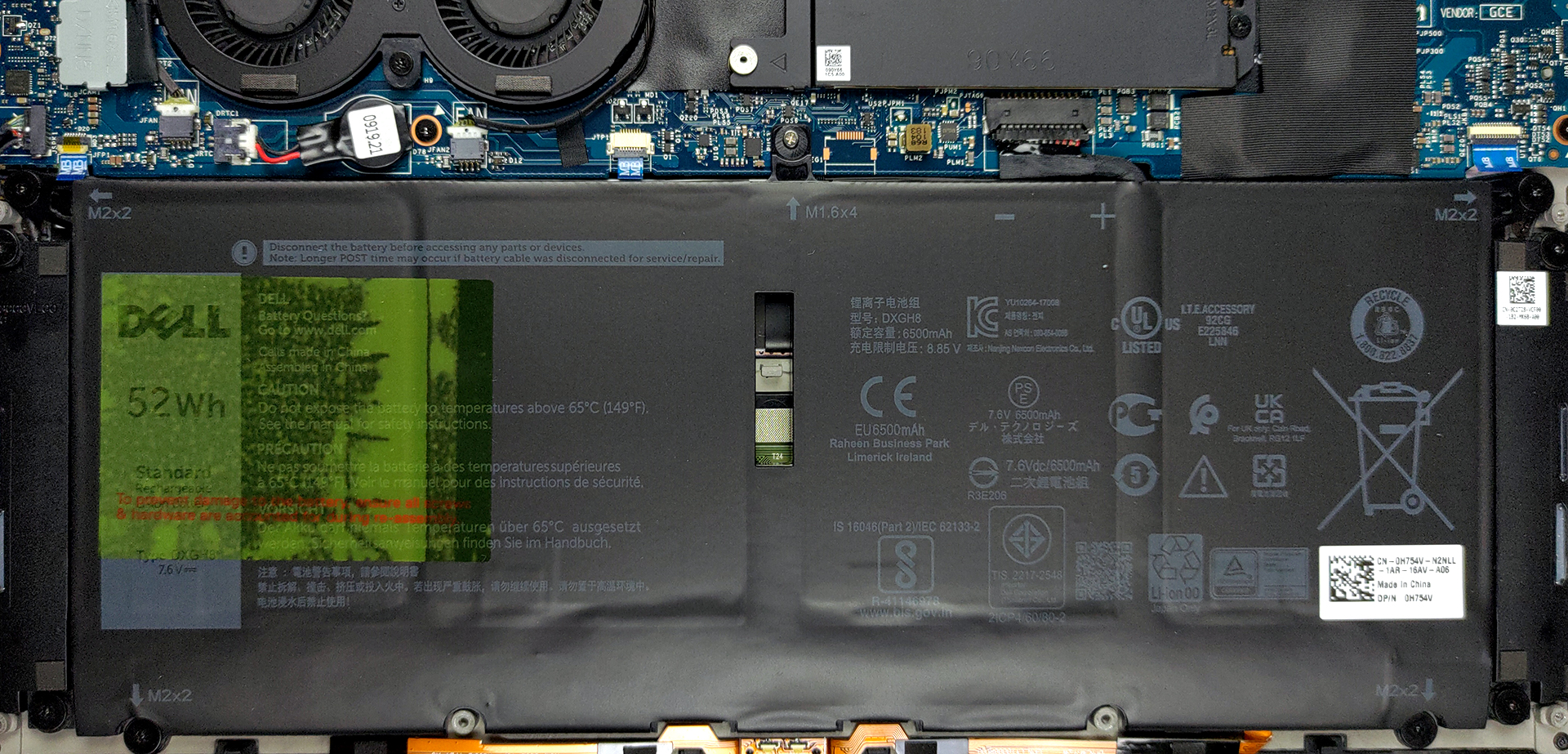
With the power-efficient Tiger Lake U-series processors and a decently large 52Wh battery pack, the device manages to last for 13 hours of either Web browsing or video playback. Now, we conduct the battery tests with Windows Better performance setting turned on, screen brightness adjusted to 120 nits, and all other programs turned off except for the one we are testing the notebook with.
2 reasons NOT to buy the Dell XPS 13 9305
1. I/O
The I/O features a total of five ports, with two Thunderbolt 4 ports, a single USB Type-C 3.2 (Gen. 2) port, a 3.5 mm audio jack, and a MicroSD card reader.


2. Upgradeability
The laptop comes with 8 or 16 GB of soldered LPDDR4 RAM, which works in quad-channel mode, which will be quite good for the iGPU, which performs especially well with faster RAM. Storage-wise, we have a single M.2 PCIe x4 slot for an 80mm drive.
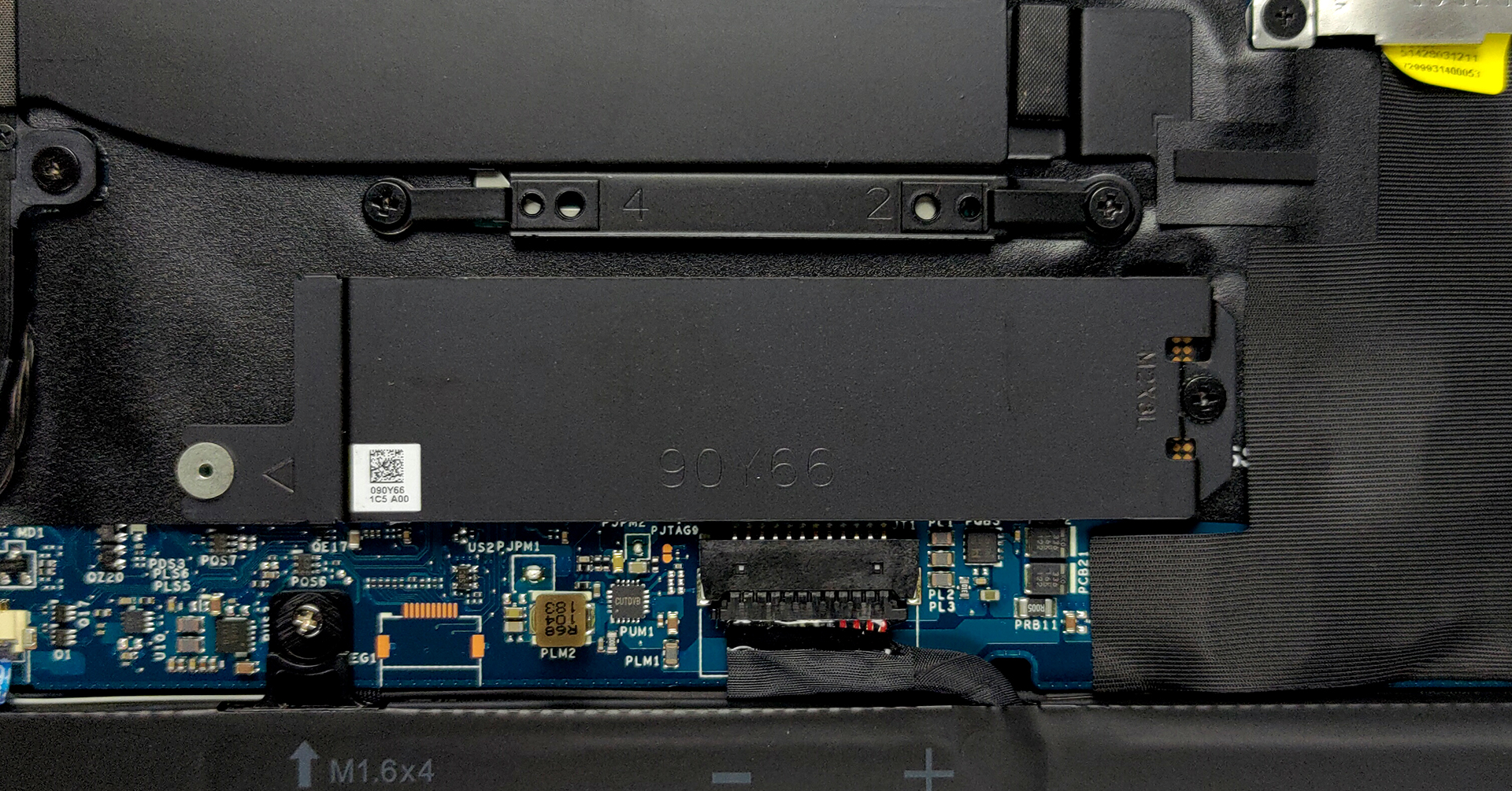
Here is our teardown video, which shows how to access the single SSD slot.
All Dell XPS 13 9305 configurations:
 Author: Severin Kolakov

![[June 2026] Best-Selling Laptop Brands on Amazon Global – Apple’s Unrivaled Dominance in Units and Revenue](https://laptopmedia.com/wp-content/uploads/2026/07/GLOBAL-Best-Brands-400x225.jpg)
![[June 2026] Amazon Global: Top 10 Best-Selling Laptops – Apple’s New MacBook Neo Storms to #1, Reshaping the Market with Affordability](https://laptopmedia.com/wp-content/uploads/2026/07/Best-Selling-Laptops-GLOBAL-Top-10-400x225.jpg)
![[June 2026] Amazon Global: Top 10 Best-Selling Gaming Laptops – Acer’s Nitro V 16S AI Dominates Sales, While ASUS Leads Overall Revenue](https://laptopmedia.com/wp-content/uploads/2026/07/Best-Selling-Gaming-Laptops-GLOBAL-Top-10-400x225.jpg)
![[June 2026] Global Ranking of Best-Selling Laptop GPUs on Amazon – NVIDIA RTX 5060 is the Top-Selling Dedicated GPU](https://laptopmedia.com/wp-content/uploads/2026/07/Best-Selling-GPUs-GLOBAL-Top-10-400x225.jpg)
![[June 2026] Global Ranking of Best-Selling Laptop CPUs on Amazon – Apple M5 Dominates, AMD Ryzen 7 260 Gets Solid Premium Share](https://laptopmedia.com/wp-content/uploads/2026/07/Best-Selling-CPUs-GLOBAL-Top-10-400x225.jpg)
