Top 5 reasons to BUY or NOT to buy the Dell Latitude 15 7520
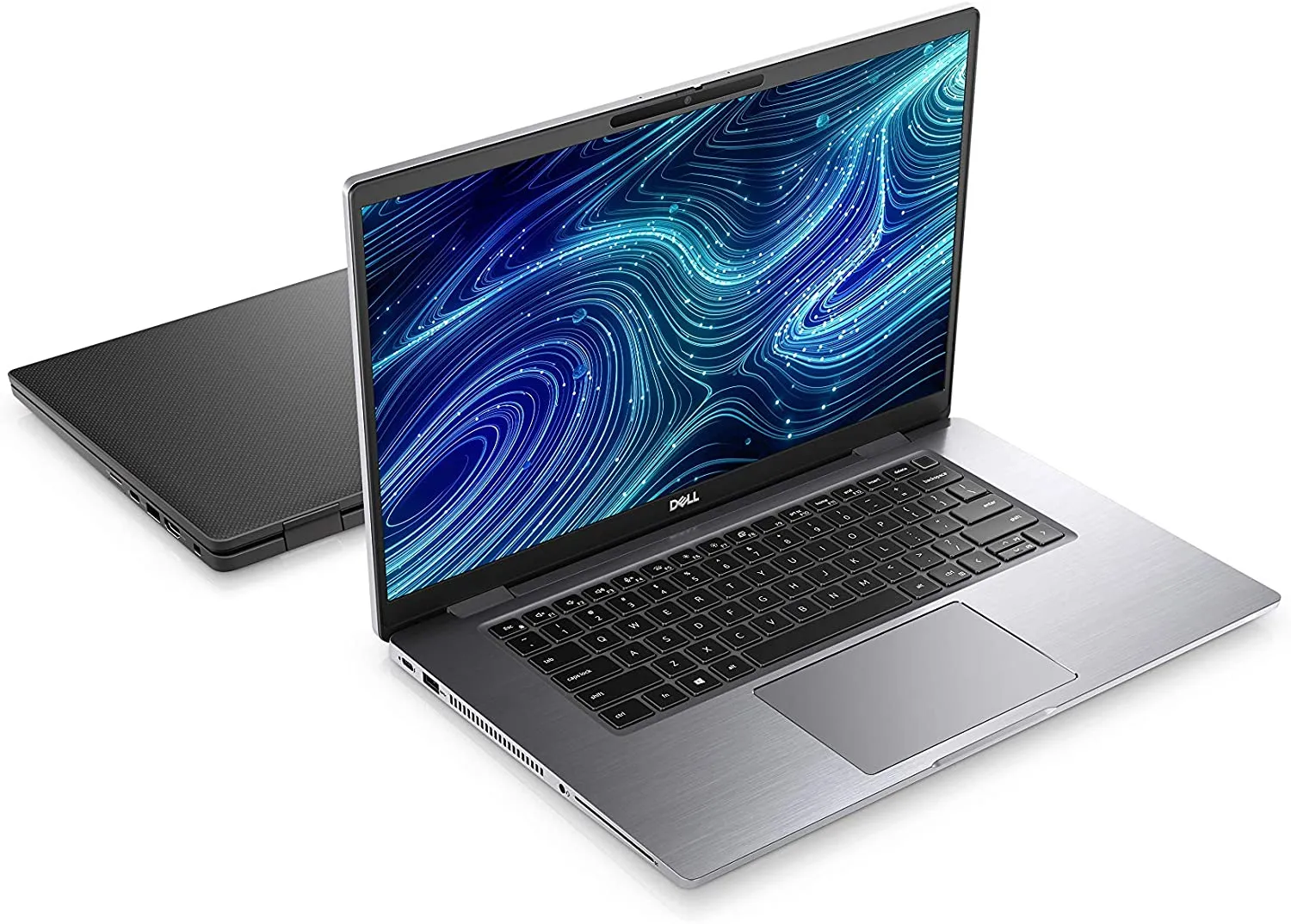 The Dell Latitude 15 7520 seems to be a really capable machine. It packs Tiger Lake performance, has tons of connectivity, and has some very decent display options that creators will appreciate dearly.
The device is also built quite well, with Dell going as far as to offer you two different build materials, either Carbon Fiber or aluminum. Our laptop featured the former we cant wait to test a laptop that is entirely built out of Carbon Fiber.
Today we are presenting you with LaptopMedia’s top 5 picks about the Dell Latitude 15 7520.
Dell Latitude 15 7520: Full Specs / In-depth Review
3 reasons to BUY the Dell Latitude 15 7520
1. Design and build quality
We were very excited to test the durability of this laptop since it’s rare you find one that is completely built out of carbon fiber. The laptop was remarkably sturdy and while there was some slight lex, it was nothing out of the ordinary. There are some differences between the aluminum and carbon fiber units, with the latter being significantly lighter and thicker, stopping the scales at 1.53 kg, while being 18.4 mm tall.

The lid opens easily with a single hand, up to 90 degrees, after which the hinges tend to stiffen up. The lid also has a mechanism similar to ASUS’s ErgoLift, which lifts the rear end of the laptop. However, the lid needs to be opened up quite a lot, for the base to get high enough to be comfortable.

2. Battery life
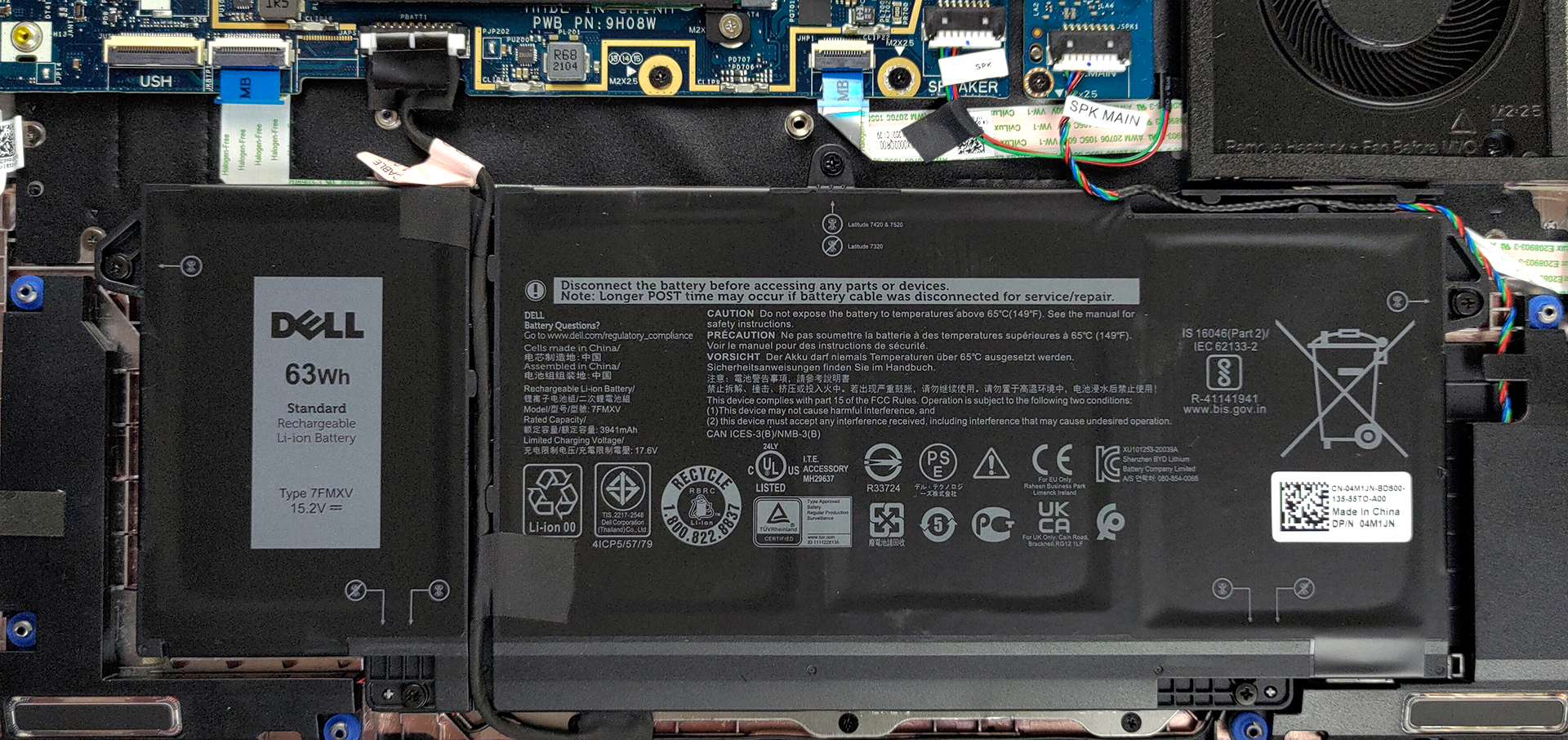
The laptop has a relatively large battery unit, with a size of 63Wh. It lasted for 10 hours and 18 minutes of Web browsing, and 9 hours and 17 minutes of video playback, which is decent. Now, we conduct the battery tests with Windows Better performance setting turned on, screen brightness adjusted to 120 nits, and all other programs turned off except for the one we are testing the notebook with.
3. I/O
We found the I/O to be quite wide, with the ports being split between the left and right sides. In total, you get two Thunderbolt 4 ports, two USB Type-A 3.2 (Gen. 1) ports, a 3.5mm audio jack, an HDMI 2.0 connector, a MicroSD card reader, a SIM card tray, and an optional Smart Card reader.


2 reasons NOT to buy the Dell Latitude 15 7520
1. Upgradeability
The laptop lacks RAM upgradeability, with all of the memory being soldered onto the motherboard. As for the storage, there is one M.2 PCIe x4 slot.
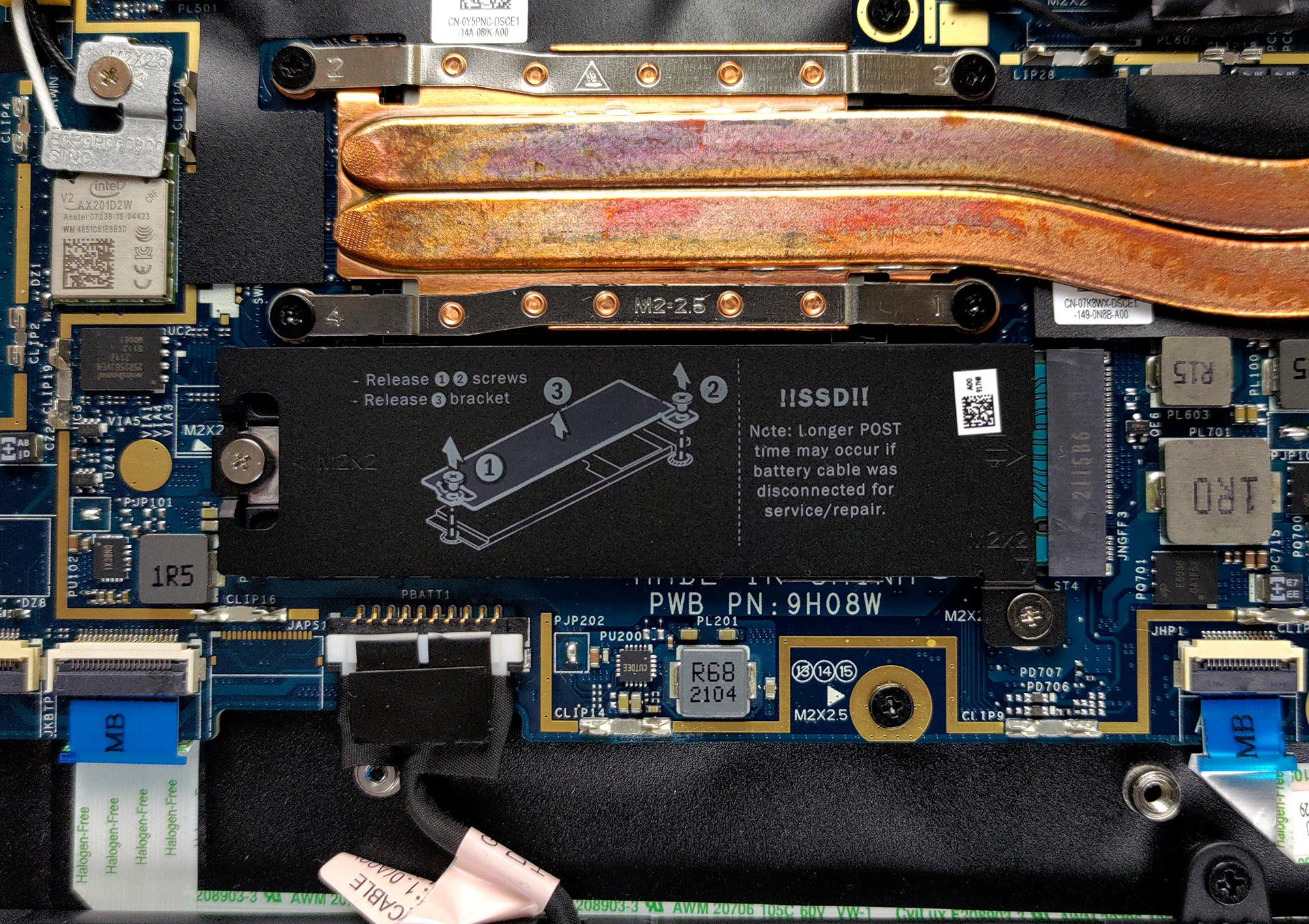
Here is our detailed teardown video, which shows how to access the single M.2 slot, along with how to generally maintain your notebook running well, including cooling maintenance.
2. Display quality
The laptop offers two IPS display options, both with a size of 15.6-inch diagonal and either Full HD or 4K resolution. Our laptop had the Full HD display, which showed generally good qualities, but lacks some vital stuff, especially for a notebook that costs north of two thousand dollars.
The display offers excellent viewing angles, a max brightness of 297 nits on the middle of the screen, 285 nits for the entire display area, and a maximum deviation of 9%. The contrast ratio is decent, at 960:1. Sadly, the color coverage wasn’t on par with the price of the laptop, with the panel only covering 53% of the sRGB color gamut.
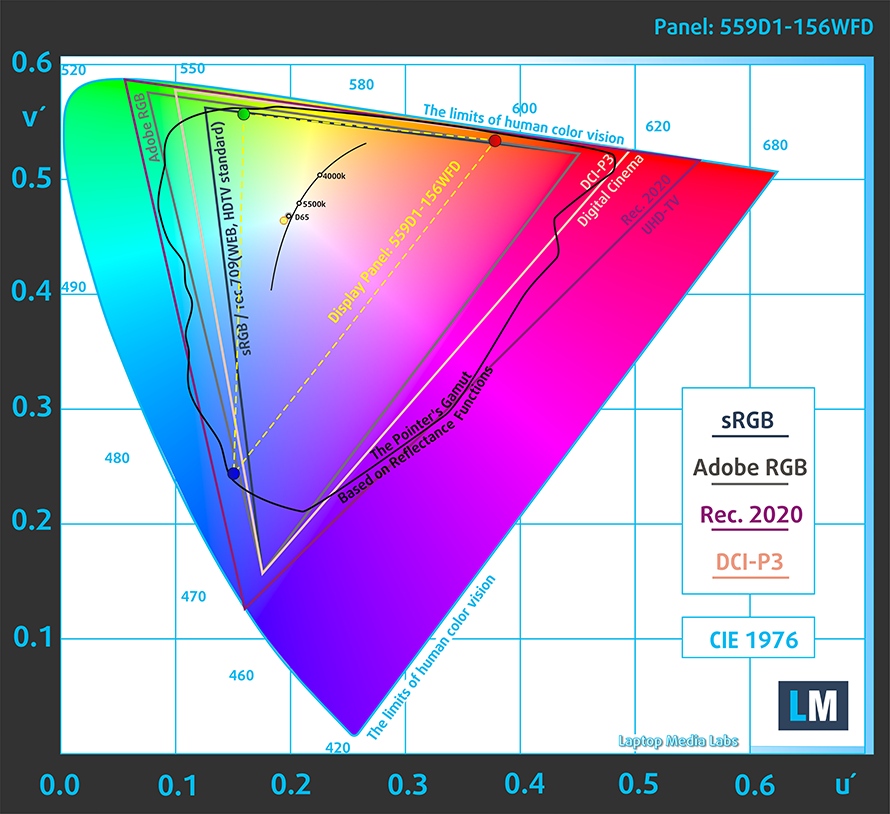
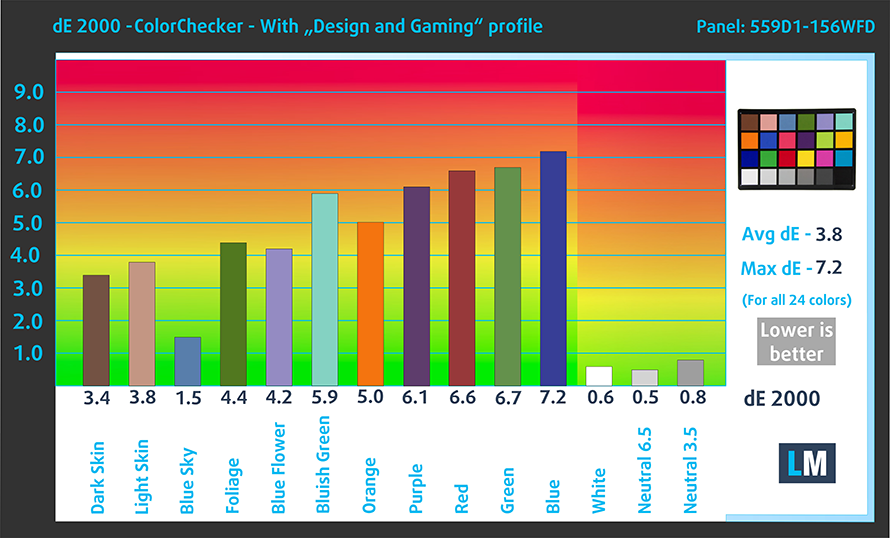
We tested the color accuracy with both the factory settings of the display (left) and with our Design and Gaming profile applied (right). Both times, the dE value didn’t reach a value that matches the standard.

Buy our profiles
Since our profiles are tailored for each display model, this article and its respective profile package are meant for Dell Latitude 15 7520 configurations with 15.6″ FHD IPS 559D1-156WFD (LGD0684).
*Should you have problems with downloading the purchased file, try using a different browser to open the link you’ll receive via e-mail. If the download target is a .php file instead of an archive, change the file extension to .zip or contact us at [email protected].
Read more about the profiles HERE.
कुशल और स्वास्थ्य के अनुकूल प्रोफाइल प्राप्त करने के अलावा, LaptopMedia के उत्पादों को खरीदकर आप हमारी प्रयोगशालाओं के विकास का भी समर्थन करते हैं, जहाँ हम सबसे वस्तुनिष्ठ समीक्षाएँ प्रस्तुत करने के लिए उपकरणों का परीक्षण करते हैं।

Office Work
Office Work का उपयोग ज्यादातर उन उपयोगकर्ताओं द्वारा किया जाना चाहिए जो अपना अधिकांश समय टेक्स्ट के टुकड़ों, तालिकाओं को देखने या सिर्फ सर्फिंग में बिताते हैं। इस प्रोफ़ाइल का उद्देश्य एक फ्लैट गामा वक्र (2.20), मूल रंग तापमान और अवधारणात्मक रूप से सटीक रंगों को रखकर बेहतर विशिष्टता और स्पष्टता प्रदान करना है।

Design and Gaming
यह प्रोफ़ाइल उन डिजाइनरों के लिए है जो पेशेवर रूप से रंगों के साथ काम करते हैं, और गेम और फिल्मों के लिए भी। Design and Gaming डिस्प्ले पैनल को उनकी सीमा तक ले जाता है, जिससे वे वेब और HDTV के लिए sRGB IEC61966-2-1 मानक में, व्हाइट पॉइंट D65 पर यथासंभव सटीक हो जाते हैं।

Health-Guard
Health-Guard हानिकारक पल्स-विड्थ मॉड्यूलेशन (PWM) को समाप्त करता है और नकारात्मक नीली रोशनी को कम करता है जो हमारी आँखों और शरीर को प्रभावित करती है। चूंकि यह प्रत्येक पैनल के लिए कस्टम अनुरूप है, यह रंगों को अवधारणात्मक रूप से सटीक रखने का प्रबंधन करता है। Health-Guard कागज का अनुकरण करता है जिससे आँखों पर दबाव बहुत कम हो जाता है।
33% छूट के साथ सभी 3 प्रोफाइल प्राप्त करें

All Dell Latitude 15 7520 configurations:
 Author: Severin Kolakov

![[August 2026] Amazon Italy: Top 10 Best-Selling Laptops – Apple MacBook Neo Claims the Crown as Budget and Mid-Range Windows Machines Dominate Volume](https://laptopmedia.com/wp-content/uploads/2026/09/Best-Selling-Laptops-IT-Top-10-400x225.jpg)
![[August 2026] Amazon Italy: Top 7 Best-Selling Gaming Laptops – ASUS V16 Claims the #1 Spot Amid Strong Mid-Range Demand](https://laptopmedia.com/wp-content/uploads/2026/09/Best-Selling-Gaming-Laptops-IT-Top-10-400x225.jpg)
![[August 2026] Best-Selling Laptop Brands on Amazon Italy – Lenovo Dominates Market Share and Revenue Leadership](https://laptopmedia.com/wp-content/uploads/2026/09/IT-Best-Brands-400x225.jpg)
![[August 2026] Amazon India: Top 10 Best-Selling Laptops – Apple MacBook Neo Dominates the Charts with Massive Sales Lead](https://laptopmedia.com/wp-content/uploads/2026/09/Best-Selling-Laptops-IN-Top-10-400x225.jpg)
![[August 2026] Amazon India: Top 10 Best-Selling Gaming Laptops – HP Victus 15 Dominates the Market with Massive Unit Lead](https://laptopmedia.com/wp-content/uploads/2026/09/Best-Selling-Gaming-Laptops-IN-Top-10-400x225.jpg)
