Top 5 reasons to BUY or NOT to buy the MSI Katana GF66
 The GF series from MSI has mostly been the entry-level gaming laptops in the brand’s portfolio. This makes it a hot property from the get-go, as budget and entry-level gaming notebooks are the most sold and the most coveted.
Of course, everyone wants a GS66 Stealth or a GP66 Leopard, but these machines can cost you an arm and a leg, if specced accordingly and don’t fit the budget of most consumers. This is where the Katana GF66 comes in. Along with the new name, which is amazing, you get a new design and new specs, which are the star of the show.
Today we are presenting you with LaptopMedia’s top 5 picks about the MSI Katana GF66.
MSI Katana GF66: Full Specs / In-depth Review
3 reasons to BUY the MSI Katana GF66
1. Design and build quality
The laptop is made entirely of plastic, unlike its predecessor, which had an aluminum lid. This laptop has a subdued design with rounded corners and edges, along with an angular lid and base. The base feels like it’s made from metal, as it hardly flexes and is really sturdy. On the contrary, the lid bends like crazy. Now, the MSI badge is also non-colored, which looks more minimalistic. In terms of weight and height, the laptop stops the scales at 2.25 kg, while being 24.9 mm tall.
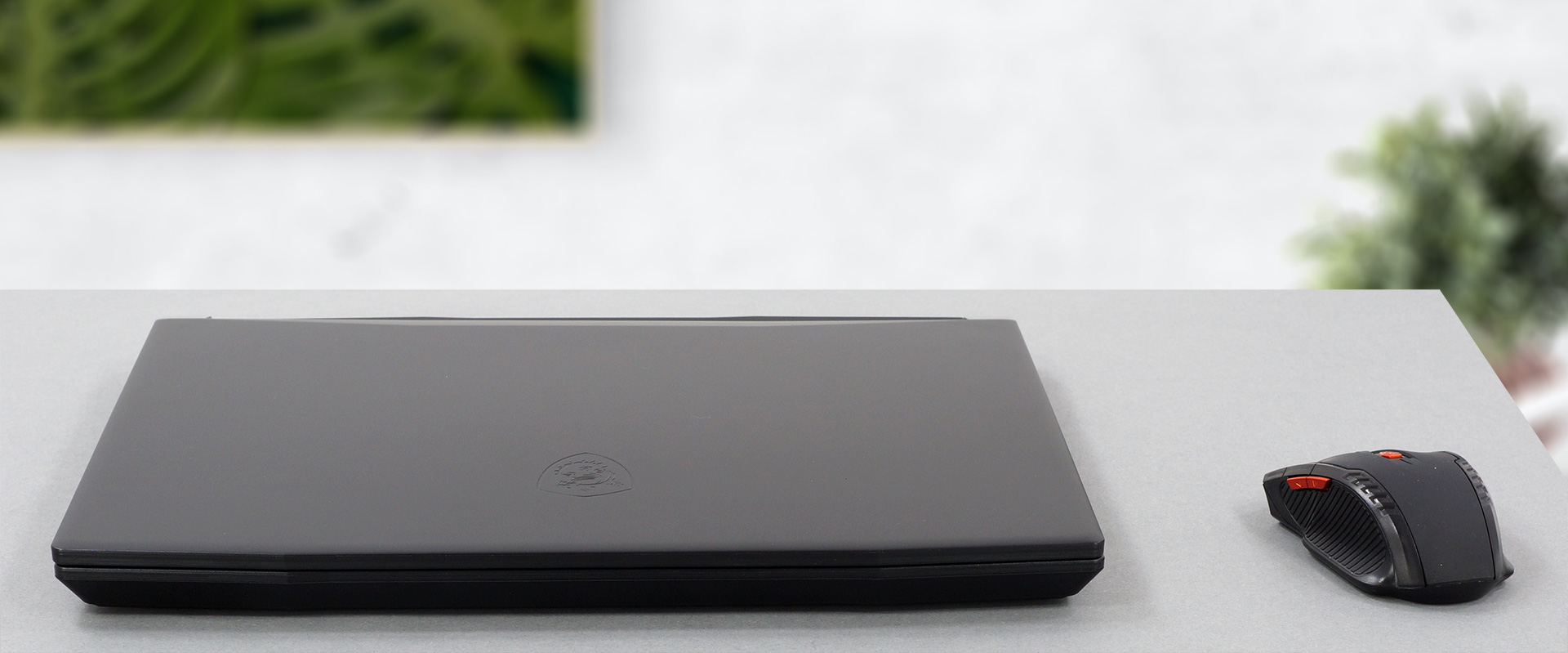
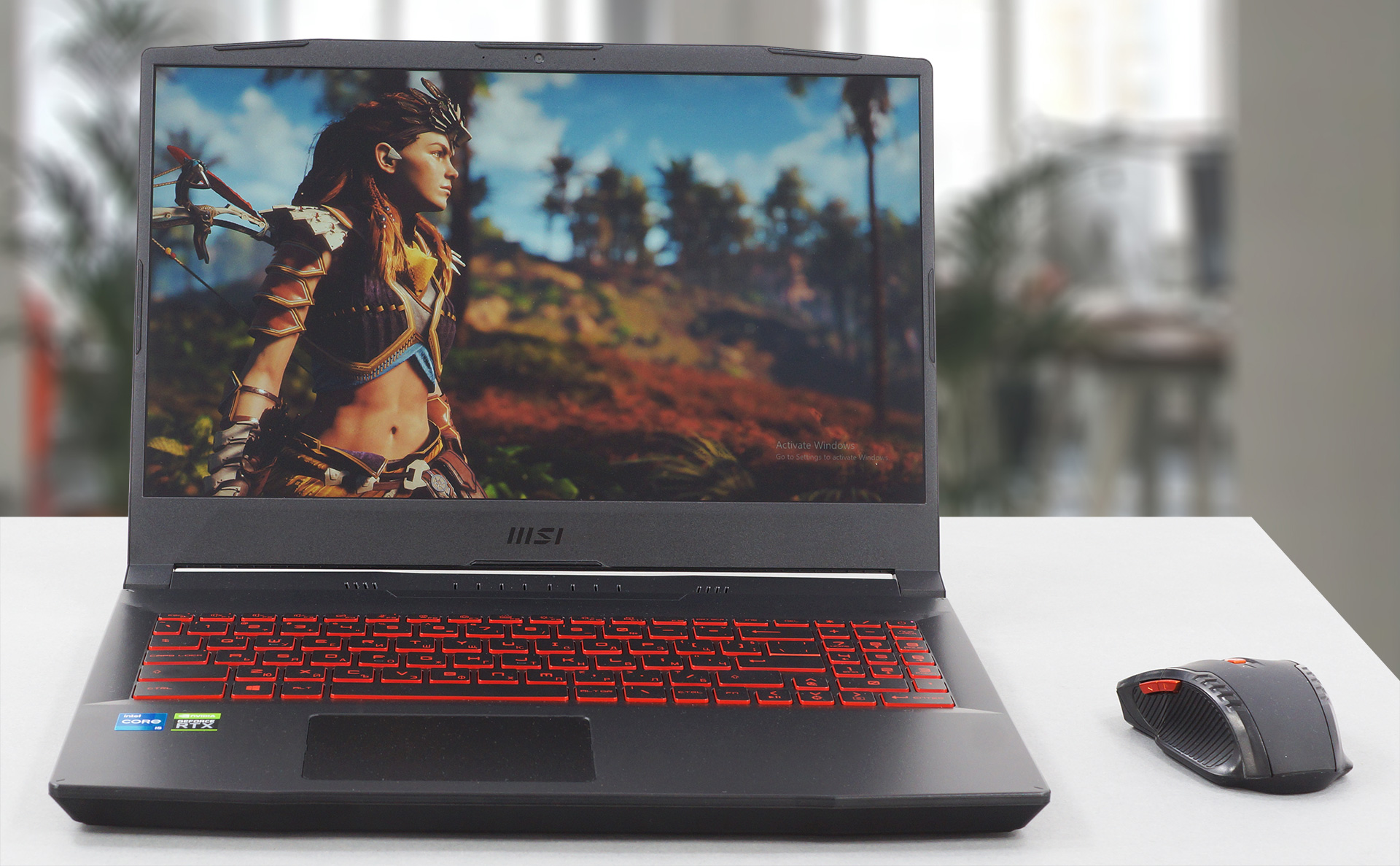
The lid opens easily with a single hand, which signifies quality hinges. The display also has thin bezels all around, with the top one housing the HD Webcam.
2. Display quality
The laptop comes with a 15.6-inch Full HD IPS screen with comfortable viewing angles, a 144Hz refresh rate, a 235 nits max brightness which is on the low side, 233 nits as an average for the entire area of the display, and a maximum deviation of 6%. The contrast ratio is pretty high, sitting at 1270:1 and the has 53% sRGB coverage.
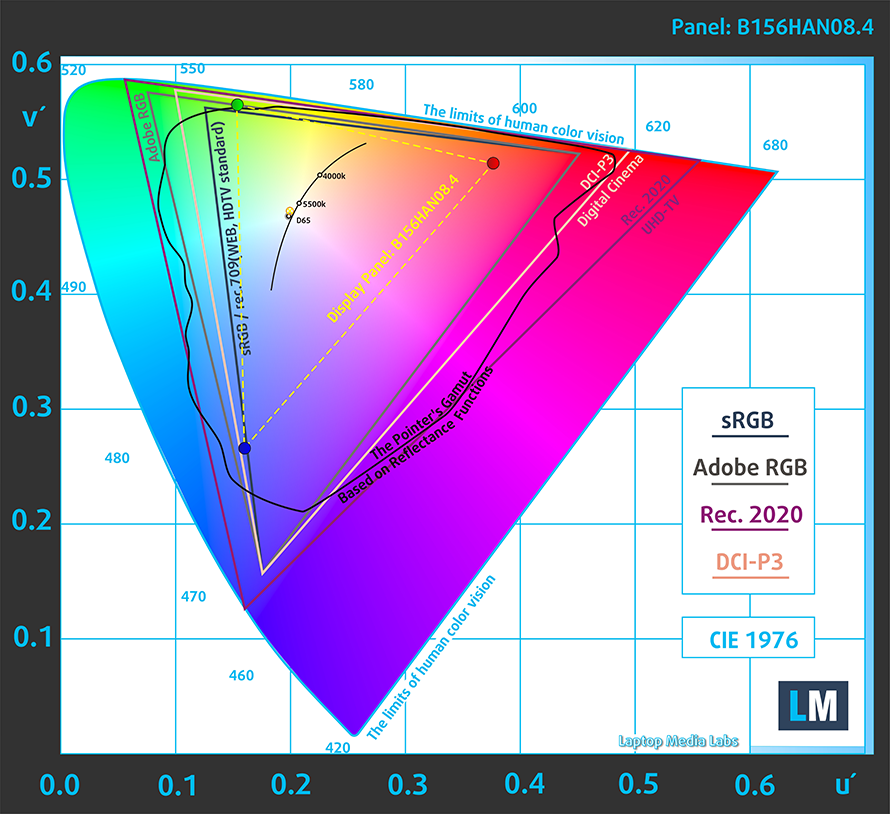
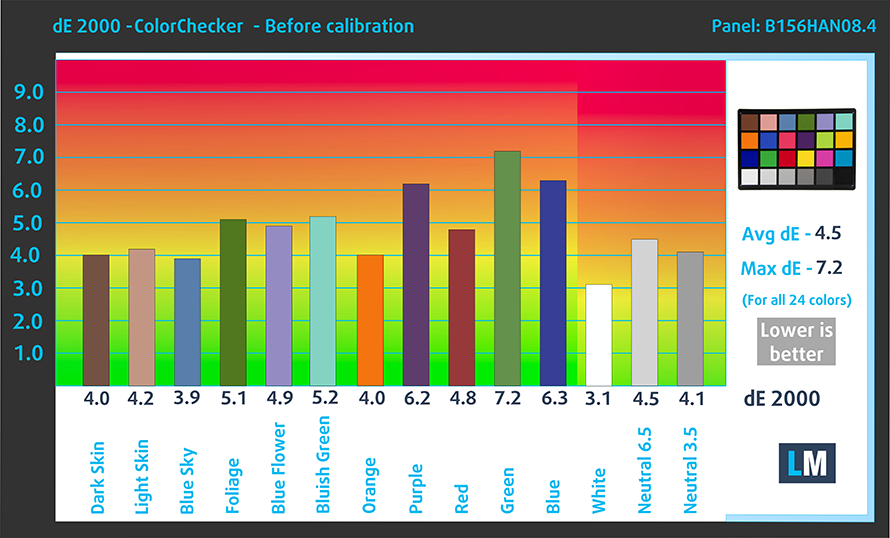
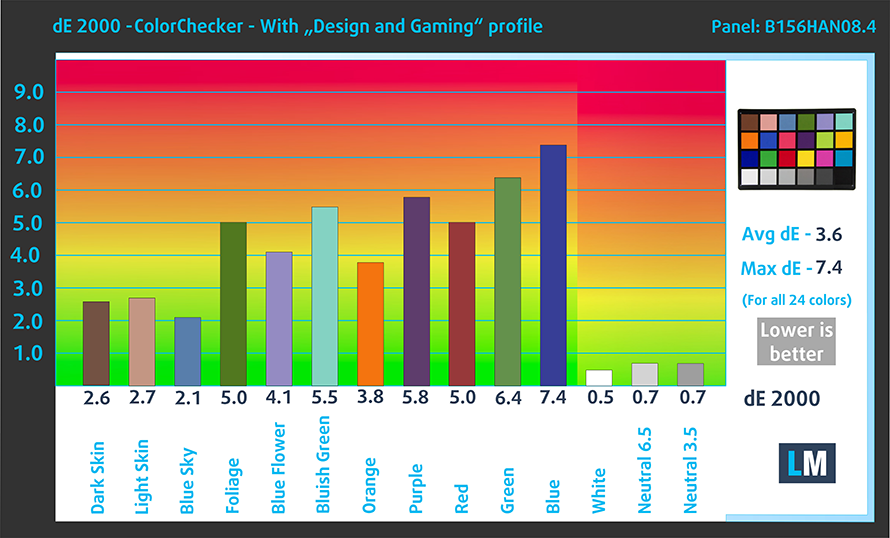
The color accuracy was average and improved slightly when we applied our Design and Gaming profile, bringing down the dE value to 3.6 from 4.5. Here you can see the results of the test with both the factory settings (left) and with our Design and Gaming profile applied (right).
Buy our profiles
Since our profiles are tailored for each individual display model, this article and its respective profile package are meant for MSI Katana GF66 configurations with 15.6″ FHD IPS AUO B156HAN08.4 (AUOAF90).
*Should you have problems with downloading the purchased file, try using a different browser to open the link you’ll receive via e-mail. If the download target is a .php file instead of an archive, change the file extension to .zip or contact us at [email protected].
Read more about the profiles HERE.
Oltre a ricevere profili efficienti e salutari, acquistando i prodotti di LaptopMedia sosterrai anche lo sviluppo dei nostri laboratori, dove testiamo i dispositivi per produrre le recensioni più oggettive possibili.

Office Work
Office Work dovrebbe essere usato principalmente da utenti che passano la maggior parte del tempo a guardare testi, tabelle o semplicemente a navigare. Questo profilo mira a fornire una migliore distinzione e chiarezza mantenendo una curva gamma piatta (2.20), una temperatura colore nativa e colori percettivamente accurati.

Design e Gaming
Questo profilo è rivolto ai designer che lavorano con i colori professionalmente, nonché per giochi e film. Design and Gaming porta i pannelli dei display ai loro limiti, rendendoli il più accurati possibile nello standard sRGB IEC61966-2-1 per Web e HDTV, con punto di bianco D65.

Health-Guard
Health-Guard elimina la dannosa Modulazione di Larghezza d'Impulso (PWM) e riduce la Luce Blu negativa che influisce sui nostri occhi e sul nostro corpo. Essendo personalizzato per ogni pannello, riesce a mantenere i colori percettivamente accurati. Health-Guard simula la carta, quindi la pressione sugli occhi è notevolmente ridotta.
Ottieni tutti e 3 i profili con il 33% di sconto

3. Upgradeability
According to the MSI spec sheet, which you can see here, the laptop offers two SODIMM RAM slots, which can house up to 64GB of DDR4 memory, and two M.2 PCIe x4 drives, but due to the factory sticker that is found on the outside, which acts as a warranty verification, we couldn’t access the internals of the laptop.
2 reasons NOT to buy the MSI Katana GF66
1. Battery life and I/O
The laptop comes with a relatively small, especially for a gaming notebook, 53.3 Wh battery unit, which lasted for 5 hours and 48 minutes of Web browsing, and 4 hours and 25 minutes of video playback. Now, we conduct the battery tests with Windows Better performance setting turned on, screen brightness adjusted to 120 nits, and all other programs turned off except for the one we are testing the notebook with.
Luminosità: 180 nit; Modalità Display: SDR
Tempo di Scarica Completa: Più Alto è Meglio

Per simulare condizioni reali, abbiamo usato il nostro script per la navigazione web automatica attraverso oltre 70 siti web.
Utilizziamo il benchmark integrato di F1 2017 in loop per simulare il gioco reale.
The I/O of the laptop is split between the left and right sides. Sadly, the I/O is pretty lacking, with only two USB Type-A, with one 3.2 (Gen. 1) port and one 2.0 port, which are found on the life. On the right side, you can find an RJ-45 connector, followed by an HDMI connector, a USB Type-C 3.2 (Gen. 1) port, a USB Type-A 3.2 (Gen. 1), and an audio jack. The lack of Thunderbolt 4 and an SD card slot is pretty surprising.


2. Cooling
Despite using the Cooler Boost 5 cooling setup, which consists of a total of six heat pipes and two fans, as well as narrowing the pipe wall, allowing for a wider channel for the wind to travel, the laptop didn’t do a good job of keeping the internals within reasonable temperatures.
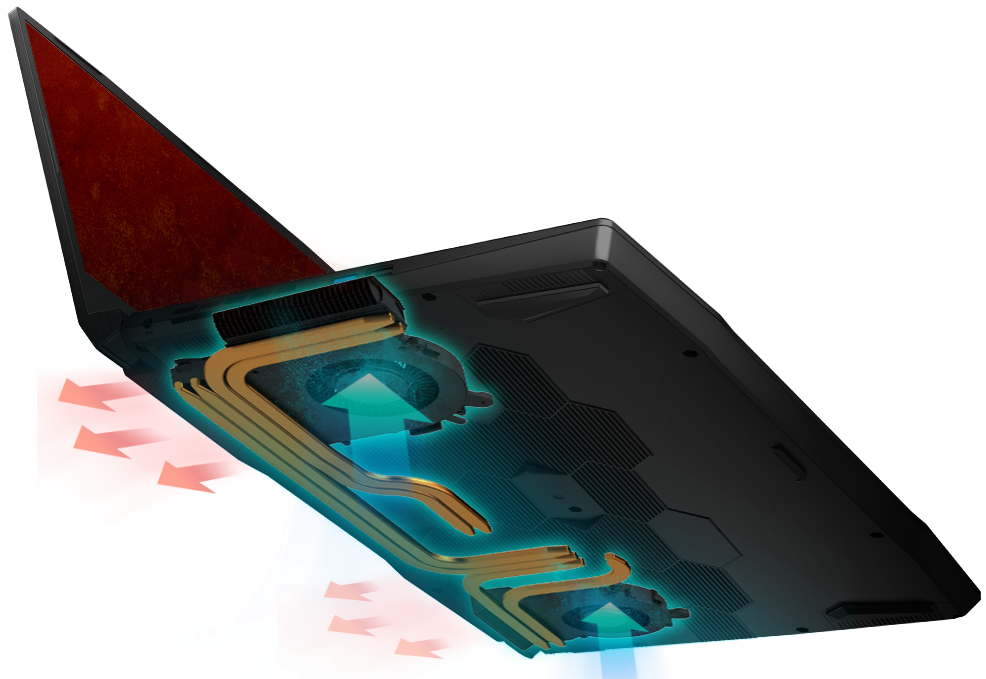
Max CPU load
| Intel Core i5-11400H (45W TDP) | 0:02 – 0:10 sec | 0:15 – 0:30 sec | 10:00 – 15:00 min |
|---|---|---|---|
| MSI Katana GF66 | 3.30 GHz (B+50%) @ 95°C @ 52W | 3.14 GHz (B+43%) @ 94°C @ 48W | 3.23 GHz (B+47%) @ 95°C @ 47W |
The Core i5-11400H reached and maintained a temperature of 95°C during the entire stress test. The clock speeds also stayed consistent at around 3.20GHz.
Max GPU load
| NVIDIA GeForce RTX 3050 | GPU frequency/ Core temp (after 2 min) | GPU frequency/ Core temp (after 30 min) | GPU frequency/ Core temp (Max Fan) |
|---|---|---|---|
| MSI Katana GF66 | 1675 MHz @ 73°C @ 60W | 1660 MHz @ 78°C @ 60W | 1699 MHz @ 67°C @ 60W |
The GPU cooling was quite a bit better, as after the whole test was done, the RTX 3050 was running at nearly 1.70GHz while maintaining a temperature of 67°C. The card is a bit underpowered, as it is running at 60W, which might attribute to the low temperatures and clock speed.
Gaming comfort
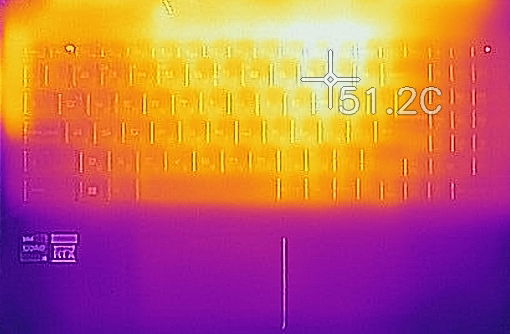
With such high CPU temperatures, most of the heat escapes from the heat vents and the body itself, warming up the base quite a lot. The maximum outside temperature that we recorded was 51.2°C, which is on the hotter side and will definitely result in sausage fingers.
All MSI Katana GF66 configurations:
 Author: Severin Kolakov

![[Giugno 2026] Le marche di laptop più vendute su Amazon Global – Il dominio incontrastato di Apple in termini di unità vendute e fatturato](https://laptopmedia.com/wp-content/uploads/2026/07/GLOBAL-Best-Brands-400x225.jpg)
![[Giugno 2026] Amazon Global: i 10 laptop più venduti – Il nuovo MacBook Neo di Apple conquista il primo posto, rivoluzionando il mercato grazie al suo prezzo accessibile](https://laptopmedia.com/wp-content/uploads/2026/07/Best-Selling-Laptops-GLOBAL-Top-10-400x225.jpg)
![[Giugno 2026] Amazon Global: i 10 laptop da gaming più venduti – Il Nitro V 16S AI di Acer domina le vendite, mentre ASUS è in testa per fatturato complessivo](https://laptopmedia.com/wp-content/uploads/2026/07/Best-Selling-Gaming-Laptops-GLOBAL-Top-10-400x225.jpg)
![[Giugno 2026] Classifica globale delle GPU per laptop più vendute su Amazon – La NVIDIA RTX 5060 è la GPU dedicata più venduta](https://laptopmedia.com/wp-content/uploads/2026/07/Best-Selling-GPUs-GLOBAL-Top-10-400x225.jpg)
![[Giugno 2026] Classifica globale delle CPU per laptop più vendute su Amazon: l’Apple M5 domina, mentre l’AMD Ryzen 7 260 conquista una quota significativa nel segmento premium](https://laptopmedia.com/wp-content/uploads/2026/07/Best-Selling-CPUs-GLOBAL-Top-10-400x225.jpg)

Cheap gaming laptops always filled with compromises. In fact, any cheaper laptop has got compromises. You have to weed through which compromises are acceptable and which ones are not. I bought a Modern 14 MSi notebook and it has many pluses but also areas where corners were cut. Mostly I can accept them as they are not really affecting how I use the notebook. It is interesting how MSI is ignored a lot by reviewers which may be because it is smaller than the bigger companies who have more clout with reviewers. It certainly wasn’t first on my list, but… Leggi di più »
I have been using my MSI GF66 Laptop for over 1 year now and I have the I7 and 3060 installed. It is a solid laptop for gaming and overall use, I also do a lot of online sales and having a good computer that can easily open applications quickly and easily browse the web makes it a nice laptop. The overheating computer was an issue but I bought a laptop cooler stand and it keeps it right in the optimal temperature when gaming. The only concern I can say is that the battery life sucks on mine. Estimated 3-3.5hrs… Leggi di più »
Hi, what cooler do you use? Thank you.