ASUS ZenBook 15 UX533 display profiles – Quality and Health impact results
 If you’re not familiar with the new ASUS ZenBook 15 UX533 yet, check out our in-depth review, you won’t be disappointed. It got our Editor’s choice award for overall quality but here we’re going to take a look at its screen only and how it passed our display tests.
Although we can’t recommend it for color sensitive work, the BOE NV156FHM-N63 (BOE07D8) panel in ZenBook 15 UX533 did pretty well in our tests. The contrast ratio is 1100:1, it covers 92% of the sRGB color gamut and has 290 nits mean maximum brightness. The DeltaE color deviation is 2.2 (with our Design & Gaming profile).
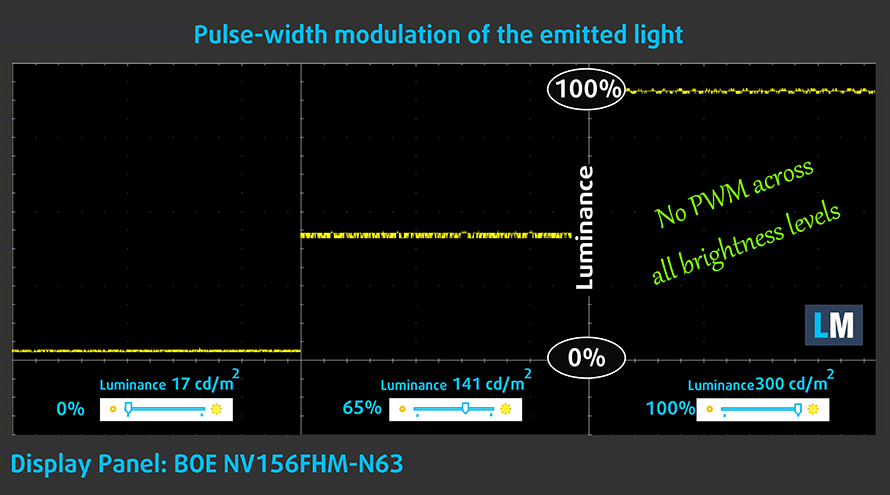
In terms of Health impact, BOE NV156FHM-N63 is not bad either – it doesn’t use PWM (learn more) for controlling the screen brightness. If you want to further protect your body, we recommend using our Health-Guard in the evenings.
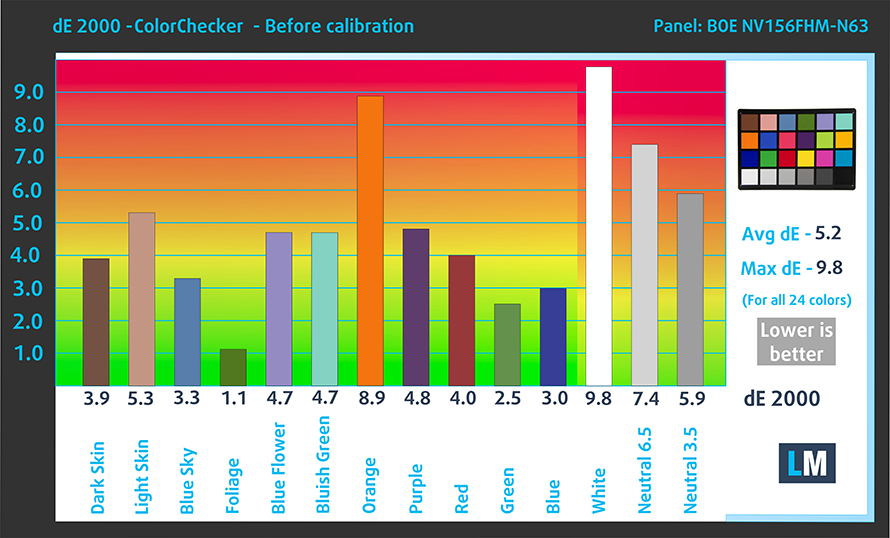
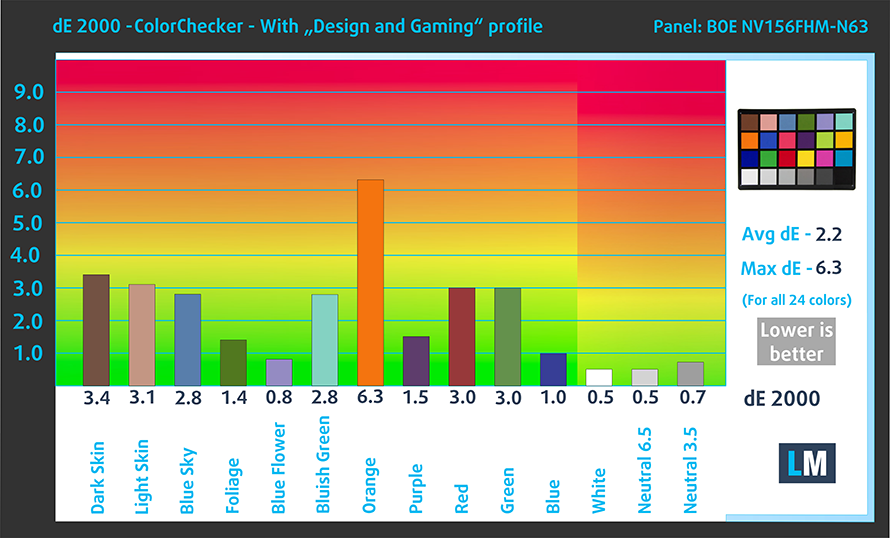
Since our profiles are tailored for each individual display model, this article and its respective profile package are meant for the ASUS ZenBook 15 UX533 with a 15.6″ BOE NV156FHM-N63 (BOE07D8) panel with Full HD (1920 x 1080) resolution. You can check out all configurations here:
https://laptopmedia.com/series/asus-zenbook-15-ux533/
*Should you have problems with downloading the purchased file, try using a different browser to open the link you’ll receive via e-mail. If the download target is a .php file instead of an archive, change the file extension to .zip or contact us at [email protected].
効率的で健康に優しいプロファイルを受け取ることに加え、LaptopMediaの製品を購入することで、可能な限り客観的なレビューを作成するためにデバイスをテストする私たちのラボの開発を支援することにもなります。

Office Work
Office Workは、テキストや表を見たり、ウェブサーフィンにほとんどの時間を費やすユーザーに主に使用されるべきです。このプロファイルは、フラットなガンマカーブ(2.20)、ネイティブな色温度、知覚的に正確な色を維持することで、より良い鮮明さと明瞭さを提供することを目指しています。

Design and Gaming
このプロファイルは、プロとして色を扱うデザイナーや、ゲームや映画向けです。Design and Gamingは、ディスプレイパネルの性能を最大限に引き出し、WebおよびHDTVのsRGB IEC61966-2-1規格(D65ホワイトポイント)で可能な限り正確な色を再現します。

3つのプロファイルをすべて33%割引で入手

Office Work
This profile aims to deliver better distinctness and clarity by keeping a flat gamma curve (2.20), native color temperature and perceptually accurate colors.
Left: No Profile | Drag the slider to see the difference | Right: Office Work Profile
Design and Gaming
Left: No Profile | Drag the slider to see the difference | Right: Design & Gaming Profile


This profile is aimed at designers who work with colors professionally, and for games and movies as well. “Design and Gaming” takes display panels to their limits, making them as accurate as possible in the sRGB IEC61966-2-1 standard for Web and HDTV, at white point D65.
It also regulates the first steps out of black so you can have even faster reflexes when playing in dark virtual environments… or just see everything in the darkest scenes in movies.
Left: No Profile | Drag the slider to see the difference | Right: Design & Gaming Profile


Health-Guard profile
Left: No Profile | Drag the slider to see the difference | Right: Health-Guard Profile


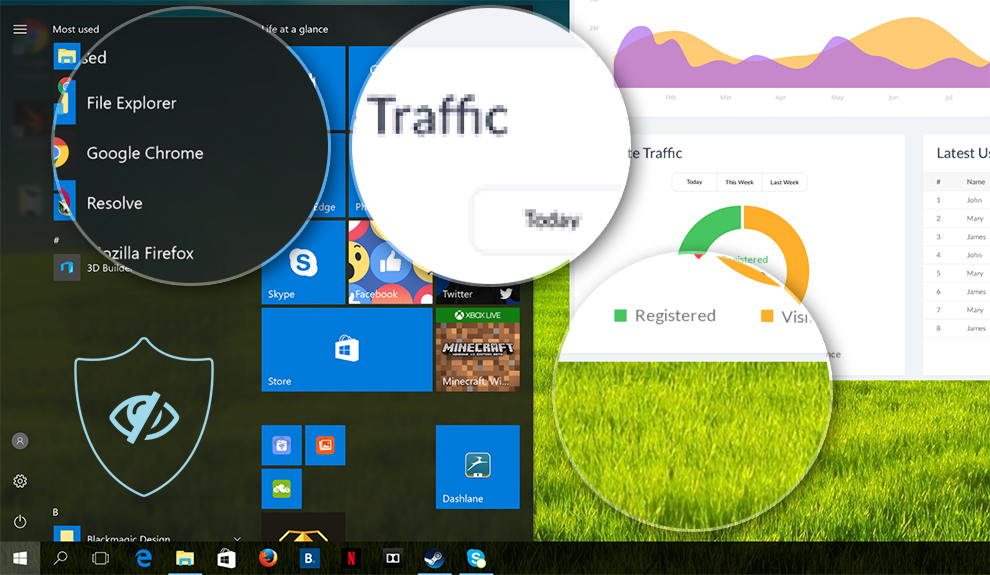
As for the Health-Guard profile, it reduces the blue light impact and eliminates PWM.
Pro Tip: As the Health-Guard profile simulates paper and has as accurate as possible colors, it could be a great tool for prepress designers!
Installing and using the profiles
You can find a guide for installing and using the profiles HERE.
ASUS ZenBook 15 UX533 configurations
 Author: Simeon NikolovEditor-in-Chief at LaptopMedia.com with 20+ years of experience in testing and analyzing laptops and mobile devices.

![[2026年8月] Amazon Global:ノートPC売上ランキングトップ10――Appleの「MacBook Neo」がチャートを席巻する一方、低価格帯および中価格帯のWindowsノートPCは販売台数をめぐって熾烈な争いを繰り広げている](https://laptopmedia.com/wp-content/uploads/2026/09/Best-Selling-Laptops-GLOBAL-Top-10-400x225.jpg)
![[2026年8月] Amazonグローバルにおけるノートパソコンのベストセラーブランド――売上高ではAppleが首位、機種の豊富さではHPがトップ](https://laptopmedia.com/wp-content/uploads/2026/09/GLOBAL-Best-Brands-400x225.jpg)
![[2026年8月] Amazon Global:ゲーム用ノートPC売上ランキングトップ10――HP Victus 15が首位を獲得、手頃な価格帯のモデルがランキングを席巻](https://laptopmedia.com/wp-content/uploads/2026/09/Best-Selling-Gaming-Laptops-GLOBAL-Top-10-400x225.jpg)
![[2026年8月] Amazon.co.jpで最も売れているノートパソコンブランド――Appleが販売台数の好調を背景に、市場シェアと売上高で首位を独占](https://laptopmedia.com/wp-content/uploads/2026/09/CO.JP-Best-Brands-1-400x225.jpg)
![[August 2026] Best-Selling Laptop Brands on Amazon USA – Apple Dominates Market Revenue and Volume Despite Lower Model Diversity](https://laptopmedia.com/wp-content/uploads/2026/09/COM-Best-Brands-1-400x225.jpg)
