レノボ IdeaPad Slim 3(16インチ、2023年)レビュー – 手頃な価格で超高性能
評価
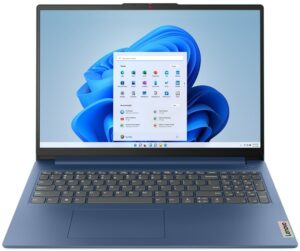
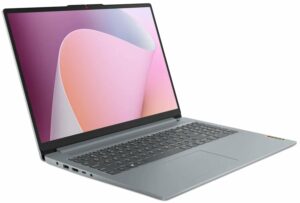
 手頃な価格の大型ノートパソコンは、今でも市場でベストセラーだ。最先端のテクノロジーを提供するわけではないが、日々のコンピューターに必要なものはすべて揃っている。これが、IdeaPad Slim 3(16インチ、2023年)が優れた製品である理由です。
ポートの選択には本当に感心させられます。高速USBのみを搭載し、USB Type-CポートはPower DeliveryとDisplayPort出力機能まで備えている。SDカードリーダは、契約を有利にするためにここにあるだけだ。
しかし、気に入らない点もいくつかある。例えば、メモリはマザーボードにはんだ付けされている。その上、8GBを選ぶとシングル・チャンネル・モードとなり、グラフィック性能が低下する。
そういえば、Ryzen 3 7330Uでも、どんな負荷がかかっても乗り切れるだけのパワーがある。もちろん、欲張りすぎて大規模な3Dプロジェクトを操作するように頼まなければの話だが。
Lenovo IdeaPad Slim 3(16インチ、2023年)のIPSパネルは、WUXGA解像度、快適な視野角、良好なコントラスト比を備えている。また、バックライトは輝度調整にPWMを使用していない。残念ながら、sRGB色域のカバー率は非常に低い(49%)。
これはコスト削減の表れだ。最も明白なものの1つは、ビルドクオリティだ。デバイスをひねろうとすると狂ったように曲がるので、放っておいた方がいい。
一方、入力デバイスはかなり優秀で、バッテリーの持ちも素晴らしい。47Whのパッケージで最大12時間のウェブ閲覧が可能だ。実際、これがこの製品を買う最も説得力のある理由だ。
さらに、16インチのスクリーンを考えると、本当に薄くて超軽量だ。結局のところ、価格タグが決め手となるだろうが、現在のところ、IdeaPad Slim 3(16インチ、2023年)のような完全なパッケージが必要な場合、選べるものはほとんどない。
価格と構成はスペック・システムで確認できる: https://laptopmedia.com/series/lenovo-ideapad-slim-3-16-2023/
Pros
- オプションの指紋リーダー
- 薄型軽量ボディ
- PWMなし(BOE NV160WUM-N48 (BOE0B76))
- SDカードスロットと良好なポート選択
- 驚くほど優れたパフォーマンス
- 非常に良好なバッテリー寿命
Cons
- プラスチック製の平凡な品質
- 半田付けメモリ
- sRGBカバー率49%(BOE NV160WUM-N48 (BOE0B76)
 Author: Alex Iliev
 Author: eng. Kroum NikolovHead of Engineering at LaptopMedia.com, inventor and innovator with 40+ years of experience in electronics and high technology.

![[2026年8月] AmazonにおけるノートPC用GPUの世界販売ランキング ― Appleが首位を独走、NVIDIAのRTX 5060が専用GPU部門で首位を獲得](https://laptopmedia.com/wp-content/uploads/2026/09/Best-Selling-GPUs-GLOBAL-Top-10-400x225.jpg)
![[2026年8月] AmazonにおけるノートPC用CPUの世界売上ランキング ― アップルが低価格帯とハイエンドの両分野を席巻:2026年8月、A18 ProとM5がインテルとAMDを圧倒](https://laptopmedia.com/wp-content/uploads/2026/09/Best-Selling-CPUs-GLOBAL-Top-10-400x225.jpg)
![[2026年8月] Amazon Global:ノートPC売上ランキングトップ10――Appleの「MacBook Neo」がチャートを席巻する一方、低価格帯および中価格帯のWindowsノートPCは販売台数をめぐって熾烈な争いを繰り広げている](https://laptopmedia.com/wp-content/uploads/2026/09/Best-Selling-Laptops-GLOBAL-Top-10-400x225.jpg)
![[2026年8月] Amazonグローバルにおけるノートパソコンのベストセラーブランド――売上高ではAppleが首位、機種の豊富さではHPがトップ](https://laptopmedia.com/wp-content/uploads/2026/09/GLOBAL-Best-Brands-400x225.jpg)
![[2026年8月] Amazon Global:ゲーム用ノートPC売上ランキングトップ10――HP Victus 15が首位を獲得、手頃な価格帯のモデルがランキングを席巻](https://laptopmedia.com/wp-content/uploads/2026/09/Best-Selling-Gaming-Laptops-GLOBAL-Top-10-400x225.jpg)

BUYER BEWARE. The touchpad is placed very far to the left of center and is VERY uncomfortable. I have also had too many times where the cursor scrolls over something and either opens or closes the page. I have adjusted the settings without any help. Very annoying when something you are working on closes or a website closes and you need to try to go back and figure out where you were. I have had this over 6 months and plan on looking for another brand during the after xmas sales. Too bad as this is my 3rd Lenovo laptop… 続きを読む »
If your work is important, turn on the radio mouse and don’t bother with touchpads. especially in the initial series of laptops, where all the components are entry-level. I basically don’t use them, except for rare cases when I find myself somewhere with a laptop without a radio mouse.
It’s much worse that there is no RJ45 here; it’s simply impossible to get a stable and fast network without buying an external usb2lan adapter (with which there are often various problems, unlike built-in rj45). And this is especially strange for a business/office series. And in reality, bringing this port outside costs a penny – +$5. The second significant problem is the poor video ports. Lenovo claims Display Port v1.2 Alt Mode in usb-c is outdated 15 years ago and HDMI 1.4b is 13 years outdated. You will not be able to display HDR images on TV/projectors/monitors from this laptop… 続きを読む »
The third, possible problem – in the review checked the screen panel from BOE, but Lenovo often imstall Innolux n160jce-ell in this series, which may have low-frequency PWM. And Lenovo does not indicate Flicker Free panels for this series in psref, as for other series. Therefore, you need to be careful with this, especially when buying a model without Windows, because if there is no OS included, you can check the flickering only by booting from a WinPE flash drive with pre-integrated video drivers for this series or from some Linux distribution that understands the SoC of this series and… 続きを読む »