Dell Precision 15 3580 review – een dun en licht werkstation dat voor verbetering vatbaar is
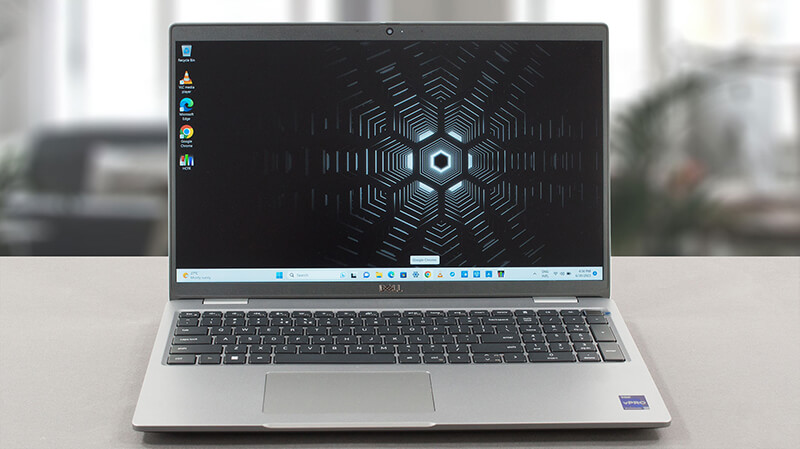 Hoewel het de meest betaalbare werkstationoptie is, is de Precision 35xx serie een van Dell’s best verkochte pro-grade laptops. Ondanks het feit dat het is gebouwd rond compromissen, doet het één ding beter dan elk ander werkstation van het bedrijf – het voldoet aan de verwachtingen.
Vandaag bespreken we de Dell Precision 15 3580. Er zijn een paar dingen die je meteen moet weten. Ten eerste is dit een lichtgewicht product, dat niet de krachtigste CPU’s op de markt bevat. De enige GPU-optie is de NVIDIA RTX A500.
Je krijgt echter wel het nieuwste en beste van Intel’s efficiency-class CPU’s, zoals de U-serie en de P-serie chips. Je hebt dus iets om naar uit te kijken. Hoewel je enige optie voor het beeldscherm een 1080p IPS unit is, kun je kiezen uit een nogal saaie unit of een met volledige sRGB dekking.
Uiteindelijk is er genoeg om uit te kiezen, maar eerst moet je zelfs maar overwegen om dit product te kopen. En wij zijn hier om je te laten weten of het de moeite waard is, of dat je moet wegrennen zoals een zekere Jamaicaanse kolos wanneer hij een pistool hoort afgaan.
Je kunt de prijzen en configuraties bekijken in ons Specs-systeem: https://laptopmedia.com/series/dell-precision-15-3580/
Contents
- Specificaties, stuurprogramma’s, wat zit er in de doos
- Ontwerp en constructie
- Beeldschermkwaliteit, Gezondheidseffecten (PWM), Geluid
- Koop onze profielen
- Prestaties: CPU, GPU, gamingtests
- [eBook Gids + Hulpmiddelen] Hoe je het MAXIMALE UIT je Laptop Haalt
- Temperaturen en comfort, batterijduur
- Demontage, upgrademogelijkheden en onderhoud
- Verdict
Specificaties, stuurprogramma’s, wat zit er in de doos
Dell Precision 15 3580 - Specs



- HDD/SSD
- tot 8000GB SSD
- M.2 Sleuf
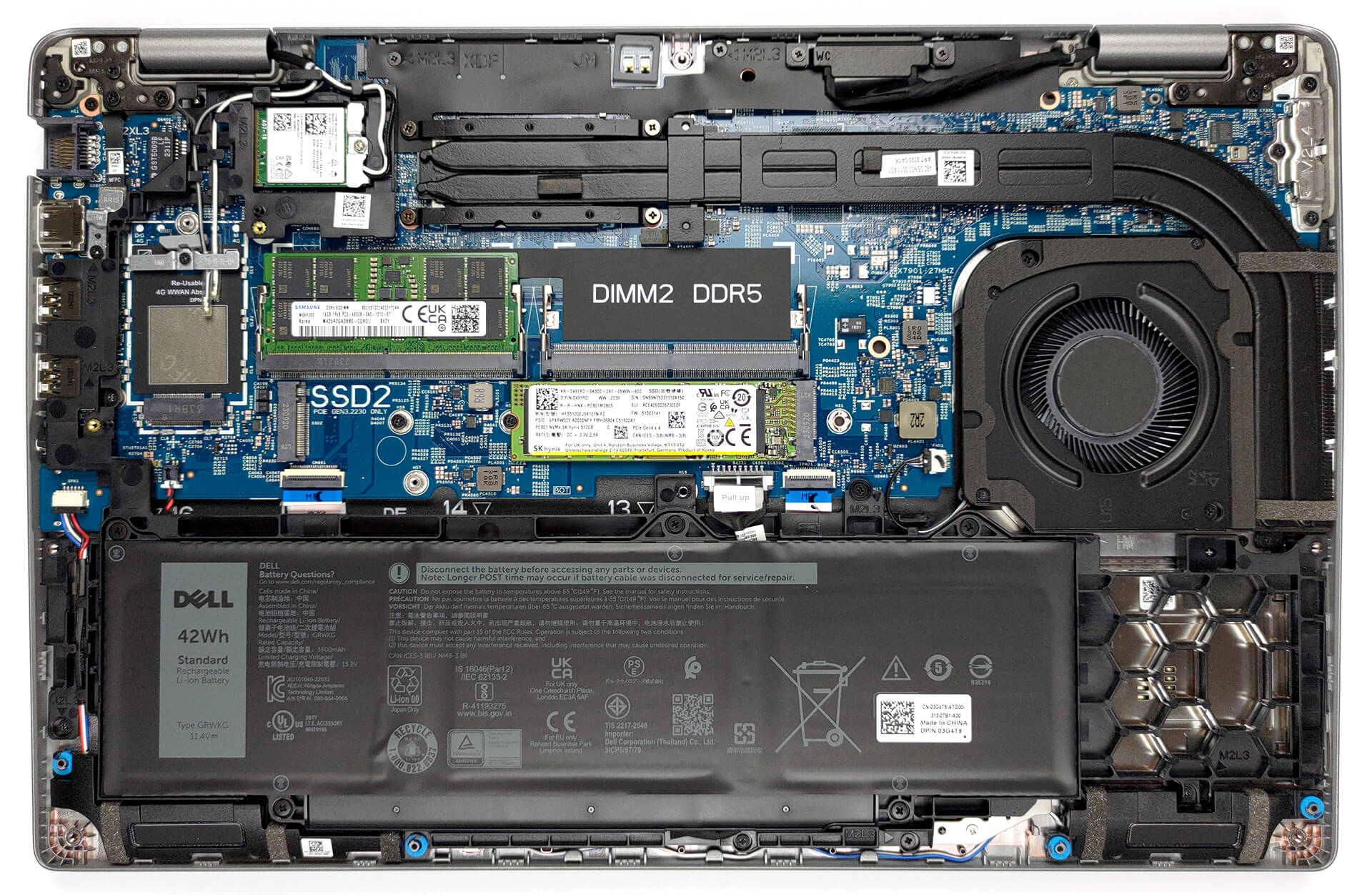
- 1x 2280 M.2 NVMe PCIe 4.0 x4 + 1x 2230 M.2 NVMe PCIe 4.0 x4 Zie foto
- RAM
- up to 64GB
- OS
- Windows 11 Pro, Windows 11 Home, Windows 10 Pro, No OS
- Accu
- 54Wh, 3-cell, 42Wh, 3-cell
- Materiaal behuizing
- Plastic / Polycarbonate
- Afmetingen
- 357.80 x 233.30 x 20.80 x 22.80 mm (14.09" x 9.19" x 0.82")
- Gewicht
- 1.61 kg (3.5 lbs)
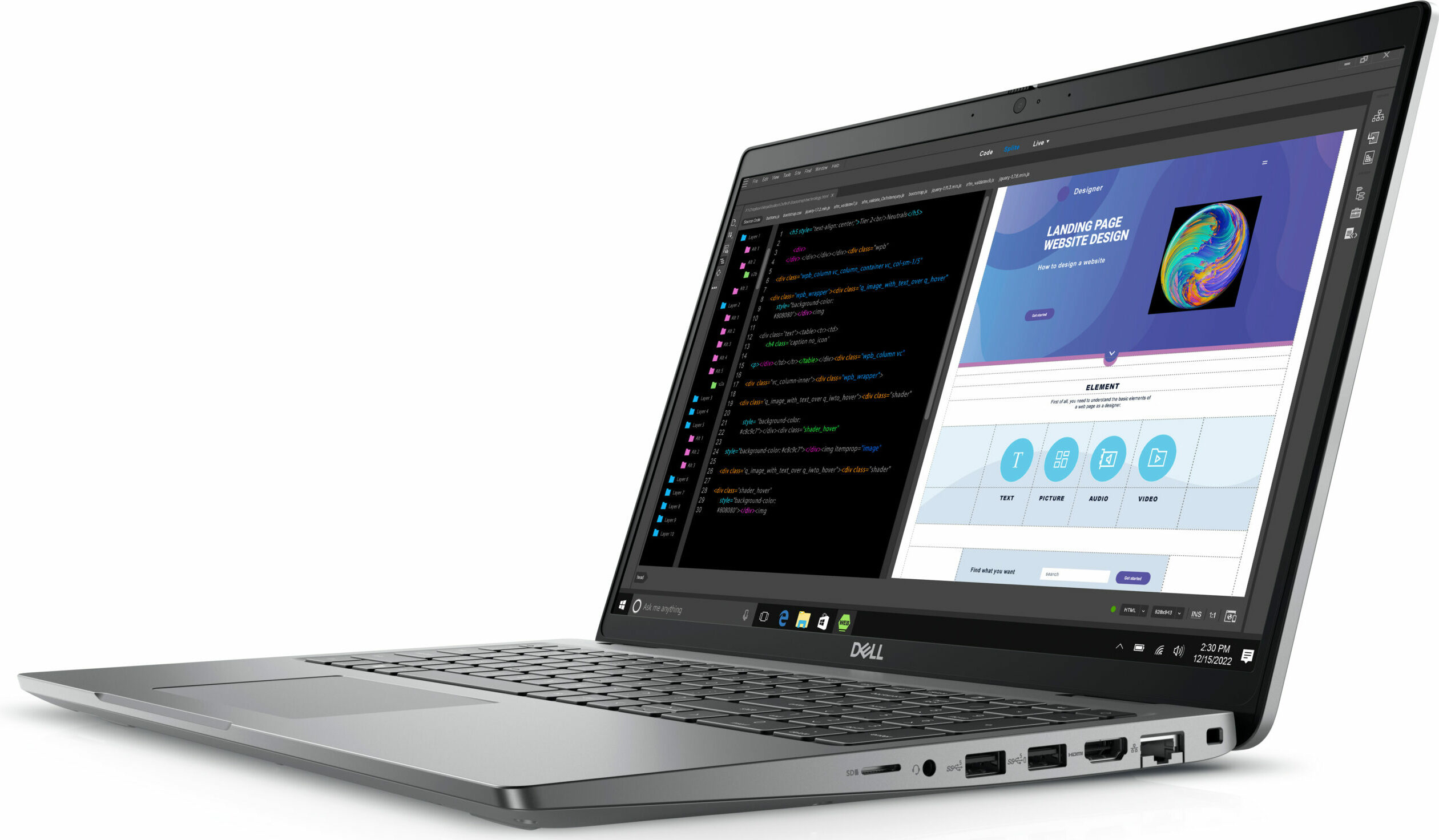
- Poorten en connectiviteit
- 1x USB Type-A
- 3.2 Gen 1 (5 Gbps)
- 1x USB Type-A
- 3.2 Gen 1 (5 Gbps), Sleep and Charge
- 2x USB Type-C
- 4.0, Thunderbolt 4, Power Delivery (PD), DisplayPort
- HDMI
- 2.0
- Kaartlezer
- MicroSD
- Ethernet LAN
- 10, 100, 1000 Mbit/s
- Wi-Fi
- 802.11ax
- Bluetooth
- 5.3
- Audio-aansluiting
- 3.5mm Combo Jack
- Functies
- Vingerafdruklezer
- optional
- Webcamera
- FHD IR
- Verlicht toetsenbord
- optional
- Microfoon
- Dual Array Microphones
- Luidsprekers
- 2x 2W Stereo Speakers, Waves MaxxAudio
- Optische drive
- Sleuf voor veiligheidsslot
- Wedge Lock
Alle Dell Precision 15 3580 configuraties
Stuurprogramma’s
Alle stuurprogramma’s en hulpprogramma’s voor deze notebook kunnen hier worden gevonden: https://www.dell.com/support/home/en-us/product-support/product/precision-15-3580-laptop/drivers
Wat zit er in de doos?
Naast de laptop zelf en wat papierwerk, krijg je een 65W, een 100W of een 130W oplader in de verpakking. Ze hebben allemaal een USB Type-C aansluiting.

 Author: Alex Iliev
 Author: eng. Kroum NikolovHead of Engineering at LaptopMedia.com, inventor and innovator with 40+ years of experience in electronics and high technology.

![[juli 2026] Wereldwijde ranglijst van best verkochte laptop-GPU’s op Amazon – RTX 5060 domineert het premiumsegment, Intel blijft de toon aangeven in het budgetsegment](https://laptopmedia.com/wp-content/uploads/2026/08/Best-Selling-GPUs-GLOBAL-Top-10-400x225.jpg)
![[juli 2026] Wereldwijde ranglijst van bestverkochte laptop-CPU’s op Amazon – Apple domineert het premiumsegment, Intel behoudt de algemene eerste plaats](https://laptopmedia.com/wp-content/uploads/2026/08/Best-Selling-CPUs-GLOBAL-Top-10-400x225.jpg)
![[July 2026] Amazon Canada: Top 10 Best-Selling Laptops – Apple MacBook Neo Dominates the Market to Claim the #1 Spot](https://laptopmedia.com/wp-content/uploads/2026/08/Best-Selling-Laptops-CA-Top-10-2-400x225.jpg)
![[July 2026] Best-Selling Laptop Brands on Amazon Japan – HP and Lenovo Dominate Units and Revenue Amid Fierce Competition](https://laptopmedia.com/wp-content/uploads/2026/08/CO.JP-Best-Brands-2-400x225.jpg)
![[July 2026] Amazon Italy: Top 10 Best-Selling Laptops – Apple MacBook Neo Claims the #1 Spot Amid Budget-Friendly Dominance](https://laptopmedia.com/wp-content/uploads/2026/08/Best-Selling-Laptops-IT-Top-10-400x225.jpg)

Very good, with the better battery and screen option it becomes very attractive, but the CPU tests have exactly the same results as the Yoga 9i with the same 1360P.
I think there is an error there..
Updating: after my message they updated the Cinebench results to exactly the same result obtained by the MSI Summit E14…
Do you actually test the laptops or do you try to approximate the expected results?
Hello! Yes, we do test them. The result is a strange bug, already reported, thank you!
The left side of the laptop also incorporates a battery status light which doesn’t appear to double as a hard disk activity light as on previous Dell laptops. The manual also makes no mention of a pause/break key combination which used to be Fn+B.
BTW Dell dropped the screen size from its model nomenclature a while back guys. This model is simply called the Precision 3580.
Can this be used for gaming