ASUS E410 – Top 5 Pros and Cons
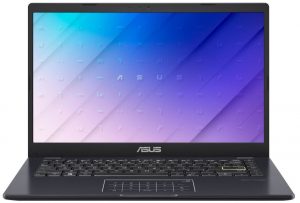
 Who said affordable laptops were boring? The ASUS E410 might be affordable, but it’s far from boring, thanks to its feature set that makes IdeaPads and Aspires to look a bit bland. Yeah, it comes with sacrifices, offering only Celeron and Pentium CPUs, but for the price that it’s charging, you really can’t be asking for more. The laptop is as stylish as a Vivobook and can get around web browsing and taking notes in class, which is perfect for a student that doesn’t want to break the bank. It’s also small and light enough to be carried around without you even noticing it being there.
Today we’re presenting you with LaptopMedia’s top 5 picks about the ASUS E410.
ASUS E410: Full Specs / In-depth Review
3 reasons to BUY the ASUS E410
1. Design and build quality
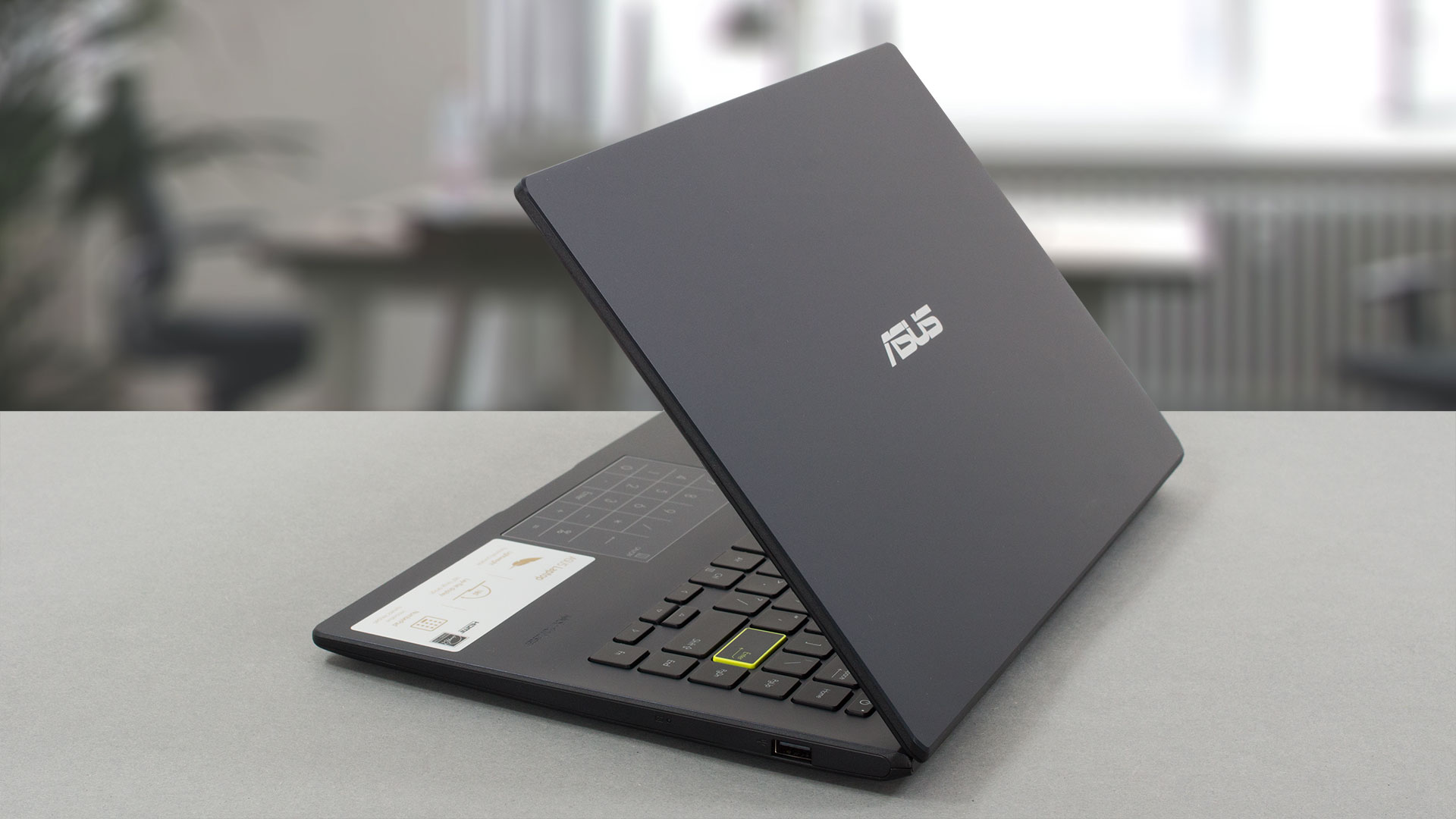
Understandably, the laptop has a plastic chassis that comes in 4 colors in total. There’s Black, Blue, Silver, Pink, and Gold, all of which look very fine. More importantly, it’s very portable, weighing just 1.30 kg and having a profile of 18.4 mm. The build quality isn’t the best, with flex from both the lid and the base, which is somewhat expected at this price point. Still, we believe that there should be some support on the inside.
2. Input devices
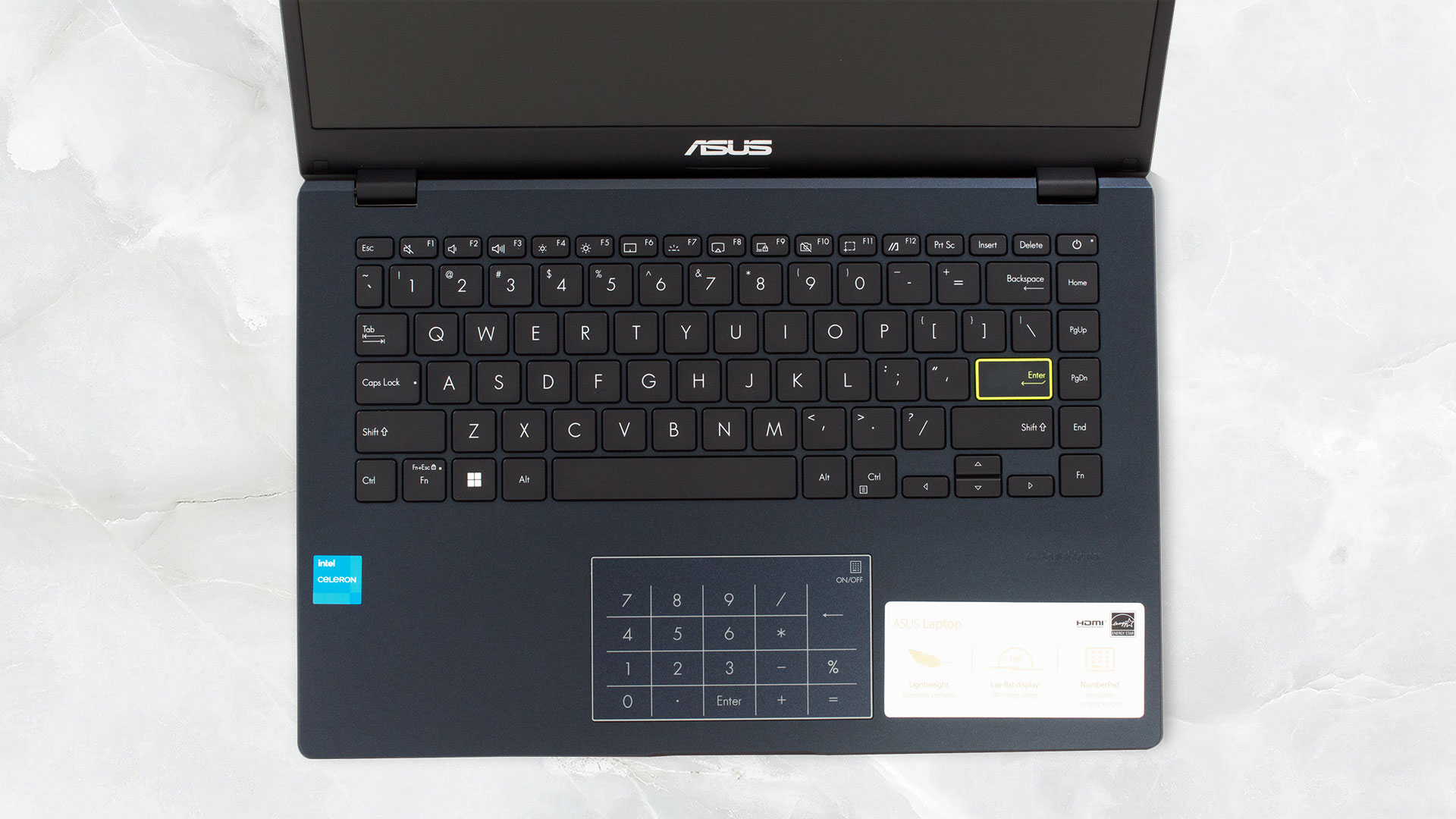
While the lid doesn’t open with one hand, the keyboard, and NumberPad are decent. The keyboard has a white backlight, while the key travel is averagely long and the feedback is somewhat clicky, however, it’s not very even. The touchpad is the star of the show, as its surface is smooth, while the NumberPad functionality is working just as well as it does on Vivobooks and Zenbooks. However, the symbols on the pad are printed, rather than backlit.
3. Battery life
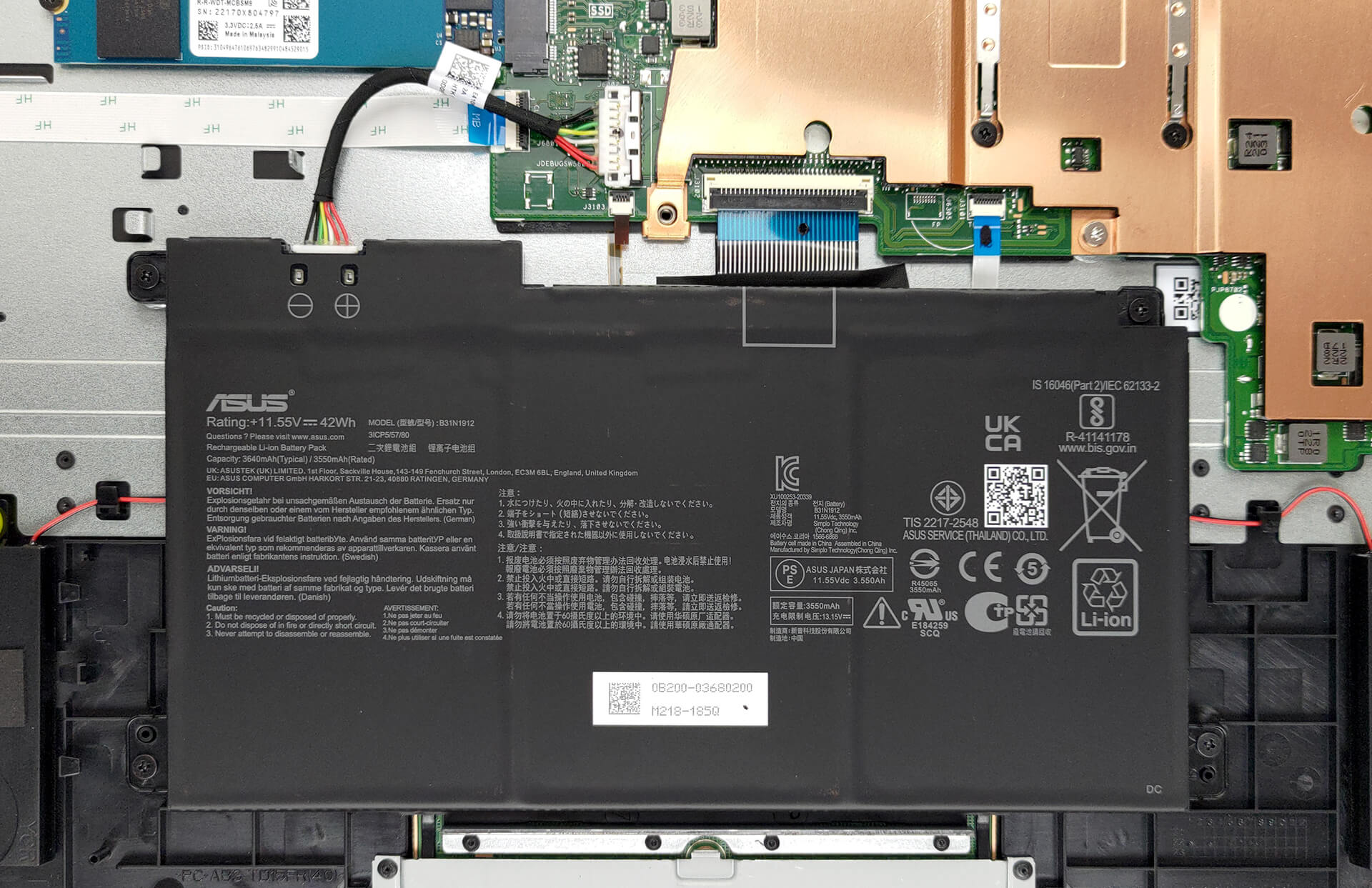
The 42Wh battery pack of the ASUS E410 lasts for 7 hours and 20 minutes of Web browsing, or 5 hours and 55 minutes of video playback. Now, we conduct the battery tests with the Windows Better performance setting turned on, screen brightness adjusted to 120 nits and all other programs turned off except for the one we are testing the notebook with.
2 reasons NOT to buy the ASUS E410
1. Display quality
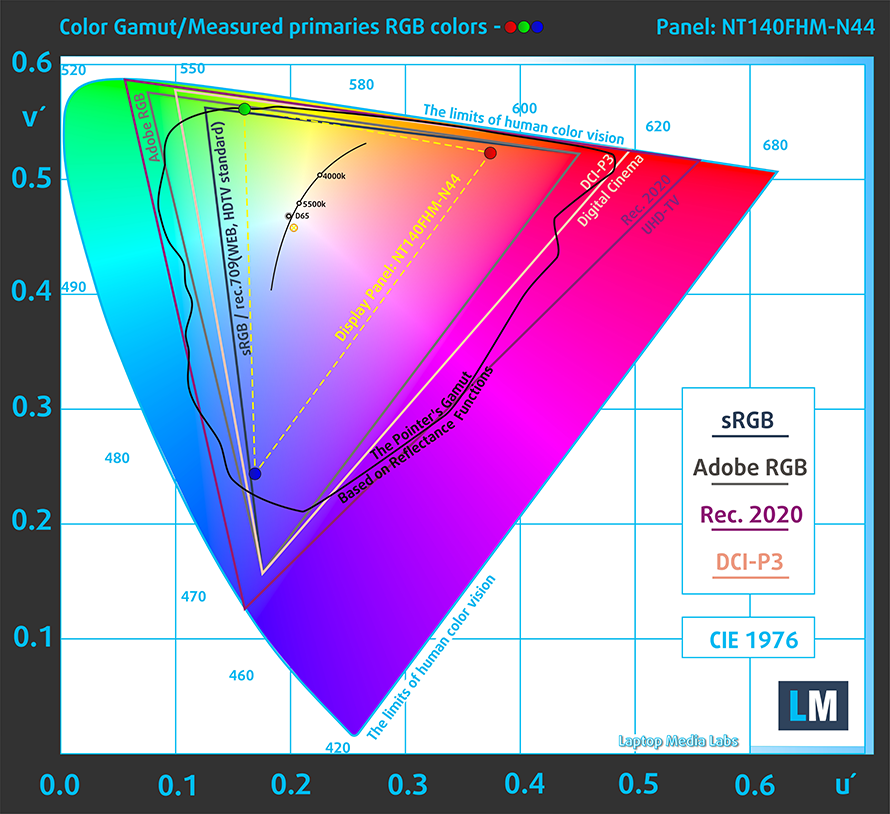
The laptop is offered with three display options: two TN displays, with either an HD or a Full HD resolution. Then we have an IPS panel with a Full HD resolution. We tested the Full HD TN display, which has a peak brightness of 251 nits, as well as poor viewing angles, and a very low contrast ratio of 260:1. It also covers only 53% of the sRGB color gamut.
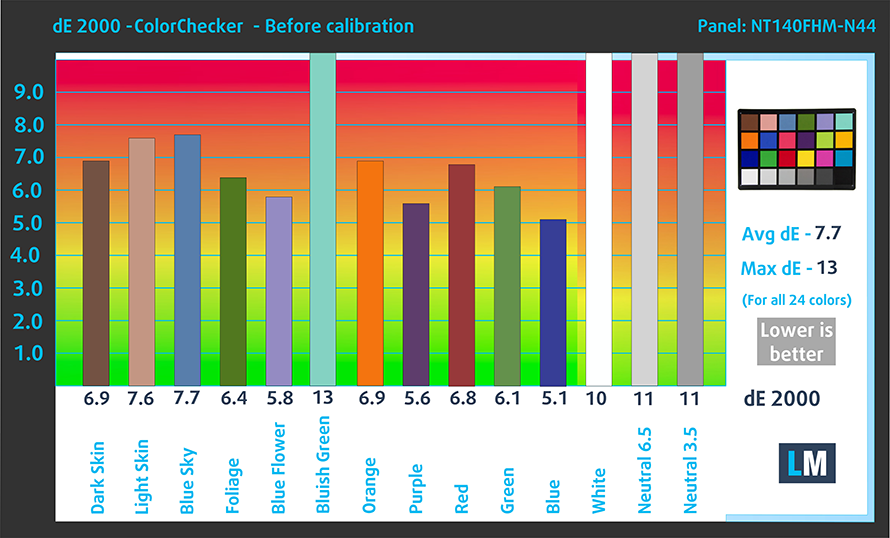
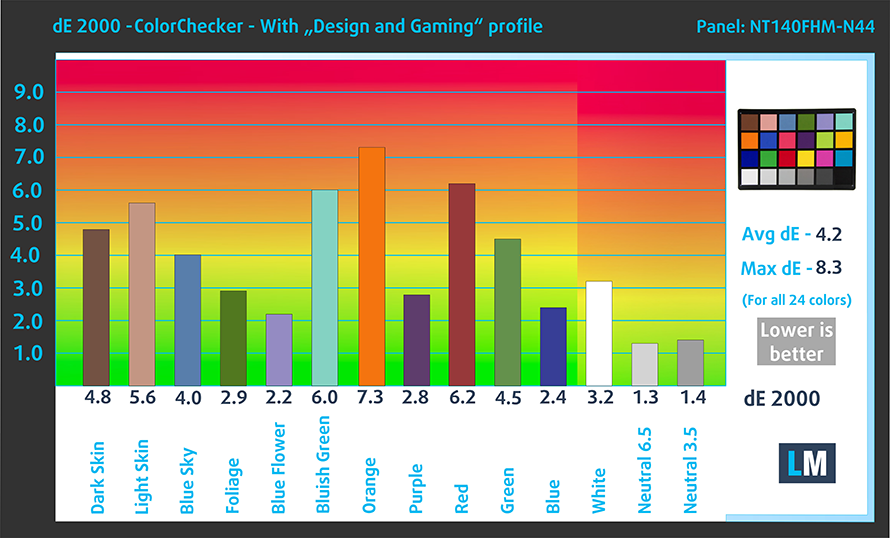
The color accuracy is all over the place, with a dE value of 7.7 with the stock settings, which goes down to 4.2 when we apply our Design and Gaming profile. It’s still far away from being suitable for professional work.
Buy our profiles
Since our profiles are tailored for each individual display model, this article and its respective profile package are meant for ASUS E410 configurations with 14.0″ BOE NT140FHM-N44 (BOE07F6) (1920 x 1080) TN.
*Should you have problems with downloading the purchased file, try using a different browser to open the link you’ll receive via e-mail. If the download target is a .php file instead of an archive, change the file extension to .zip or contact us at [email protected].
Read more about the profiles HERE.
Oprócz otrzymywania wydajnych i przyjaznych dla zdrowia profili, kupując produkty LaptopMedia, wspierasz również rozwój naszych laboratoriów, w których testujemy urządzenia w celu tworzenia jak najbardziej obiektywnych recenzji.

Office Work
Office Work powinien być używany głównie przez użytkowników, którzy spędzają większość czasu patrząc na teksty, tabele lub po prostu przeglądając internet. Ten profil ma na celu zapewnienie lepszej wyrazistości i klarowności poprzez utrzymanie płaskiej krzywej gamma (2.20), natywnej temperatury barwowej i percepcyjnie dokładnych kolorów.

Design and Gaming
Ten profil jest przeznaczony dla projektantów, którzy pracują z kolorami zawodowo, a także do gier i filmów. Design and Gaming wykorzystuje panele wyświetlaczy do granic ich możliwości, czyniąc je tak dokładnymi, jak to tylko możliwe w standardzie sRGB IEC61966-2-1 dla stron internetowych i telewizji HD, przy punkcie bieli D65.

Health-Guard
Health-Guard eliminuje szkodliwą modulację szerokości impulsu (PWM) i redukuje negatywne niebieskie światło, które wpływa na nasze oczy i ciało. Ponieważ jest on dostosowany do każdego panelu, udaje mu się utrzymać percepcyjnie dokładne kolory. Health-Guard symuluje papier, dzięki czemu nacisk na oczy jest znacznie zmniejszony.
Zdobądź wszystkie 3 profile z 33% zniżką

2. Upgradeability
The laptop comes with up to 8GB of soldered DDR4 memory, while the storage is accessible through one M.2 PCIe x4 slot for Gen 4 SSDs.

Here’s our teardown video, which shows how to access the single SSD slot.
All ASUS E410 configurations:
 Author: Severin Kolakov

![[September 2026] Amazon Italy: Top 10 Best-Selling Laptops – Affordable Innovation Wins as the Apple MacBook Neo Claims the #1 Spot](https://laptopmedia.com/wp-content/uploads/2026/10/Best-Selling-Laptops-IT-Top-10-400x225.jpg)
![[September 2026] Amazon Italy: Top 4 Best-Selling Gaming Laptops – Acer Nitro V 15 Claims the #1 Spot Through Unbeatable Budget Appeal](https://laptopmedia.com/wp-content/uploads/2026/10/Best-Selling-Gaming-Laptops-IT-Top-10-400x225.jpg)
![[September 2026] Best-Selling Laptop Brands on Amazon Italy – Lenovo Dominates Volume While Apple Leads in Revenue](https://laptopmedia.com/wp-content/uploads/2026/10/IT-Best-Brands-400x225.jpg)
![[September 2026] Amazon India: Top 10 Best-Selling Laptops – Apple MacBook Neo Dominates the Market with Massive Unit Sales](https://laptopmedia.com/wp-content/uploads/2026/10/Best-Selling-Laptops-IN-Top-10-400x225.jpg)
![[September 2026] Amazon India: Top 7 Best-Selling Gaming Laptops – HP OMEN 16 Dominates the Market with Massive Lead in Units Sold](https://laptopmedia.com/wp-content/uploads/2026/10/Best-Selling-Gaming-Laptops-IN-Top-10-400x225.jpg)
