Inside ASUS ROG Strix G15 G512 – disassembly and upgrade options
This device was the first one we tested, to reach 4.00 GHz in Prime95 torture testing. This will certainly help with extracting everything out of the GPU inside, but what is also very interesting, is the upgradability this notebook offers.
Check out all ASUS ROG Strix G15 G512 prices and configurations in our Specs System or read more in our In-Depth review.
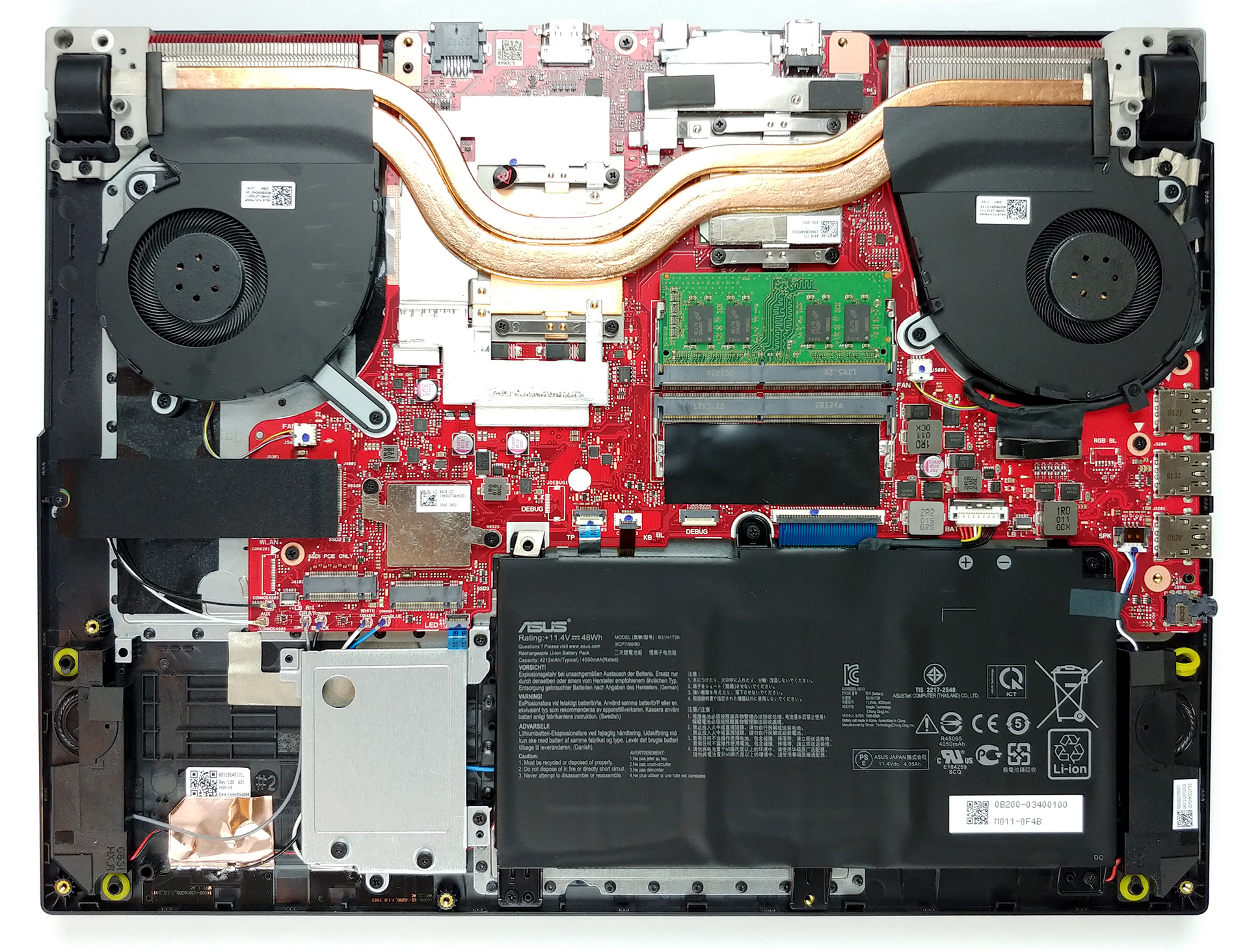
1. Remove the bottom plate
There are 11 Phillips-head screws that hold this notebook’s bottom plate in place. 10 of them can be removed, while one stays attached and lifts the panel upwards, so you can start the prying process from there. By the way, don’t forget the RGB strips, which are connected to the motherboard via two ribbon cables. So, lift gently, then unplug the connectors, and remove the bottom panel from the chassis.
2. Battery
First, there is the battery with its 48Wh capacity, which is definitely too small for that hardware, but it’s not something new in the gaming laptop world.

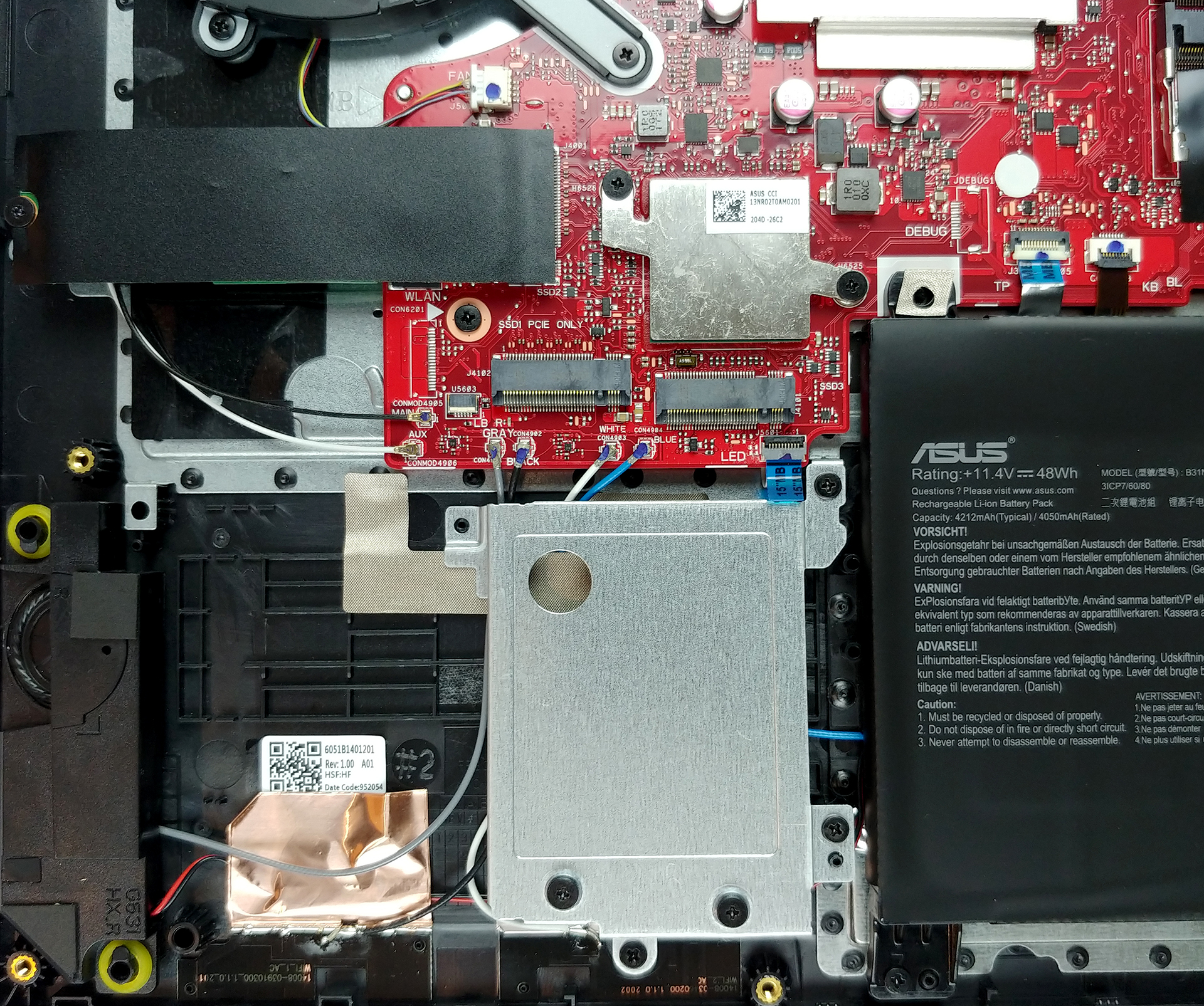
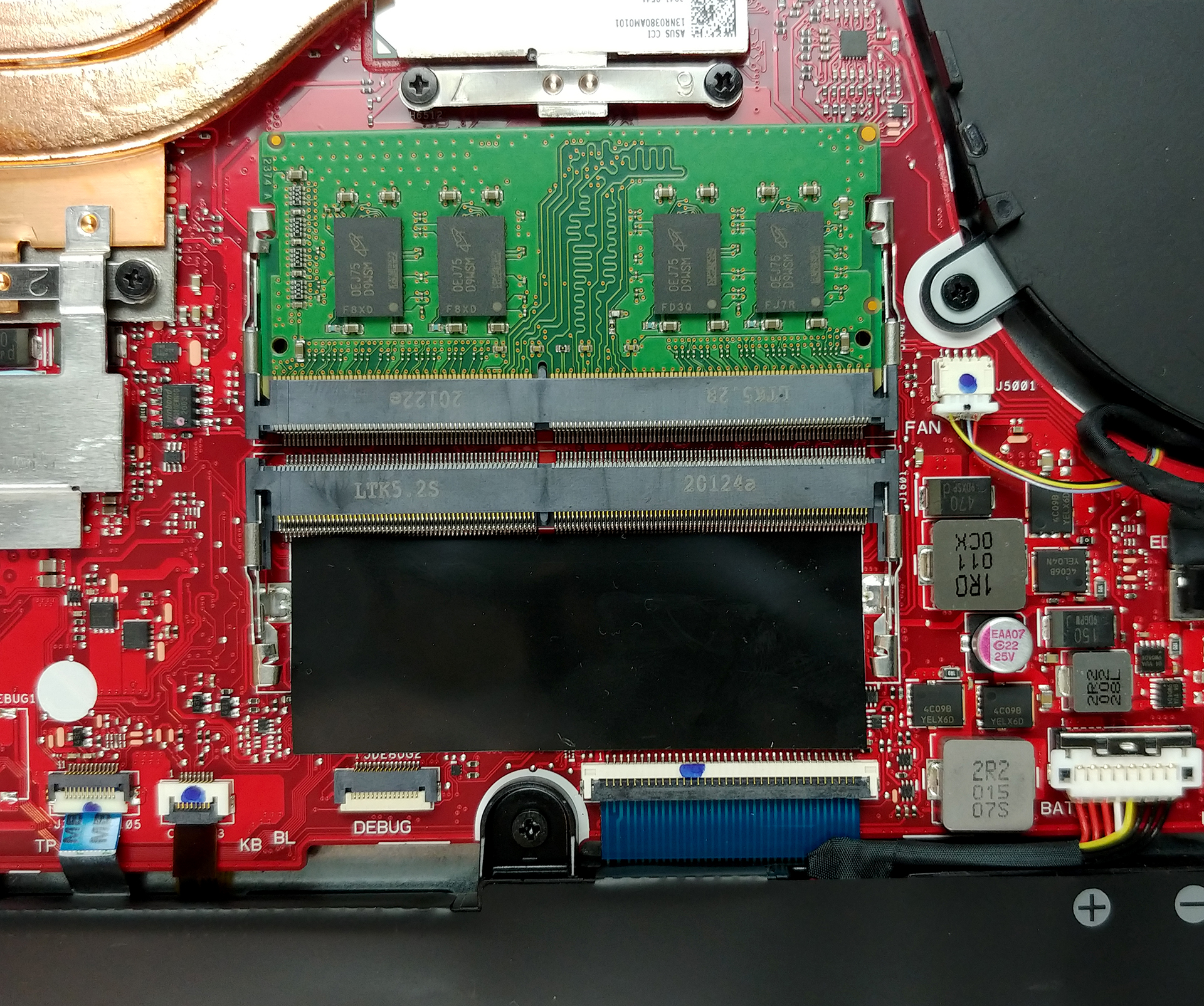
3. Memory and storage
How about memory? Well, there are two RAM SODIMM slots, and you can buy the laptop with up to 16GB of DDR4 memory. Probably you will be able to upgrade to 32GB but we can’t confirm that. What is more impressive, however, is that there are three M.2 NVMe slots, and you can configure your storage devices in RAID 0 mode.
4. Cooling system
Lastly, there is the battery with its 48Wh capacity, which is definitely too small for that hardware, but it’s not something new in the gaming laptop world.
Check out all ASUS ROG Strix G15 G512 prices and configurations in our Specs System or read more in our In-Depth review.
 Author: Alex Iliev

![[Czerwiec 2026 r.] Najlepiej sprzedające się marki laptopów w serwisie Amazon Global – bezkonkurencyjna dominacja firmy Apple pod względem liczby sprzedanych egzemplarzy i przychodów](https://laptopmedia.com/wp-content/uploads/2026/07/GLOBAL-Best-Brands-400x225.jpg)
![[Czerwiec 2026] Amazon Global: 10 najlepiej sprzedających się laptopów – nowy MacBook Neo firmy Apple szturmem zdobywa pierwsze miejsce, zmieniając oblicze rynku dzięki przystępnej cenie](https://laptopmedia.com/wp-content/uploads/2026/07/Best-Selling-Laptops-GLOBAL-Top-10-400x225.jpg)
![[Czerwiec 2026] Amazon Global: 10 najlepiej sprzedających się laptopów do gier – model Nitro V 16S AI firmy Acer dominuje pod względem sprzedaży, podczas gdy firma ASUS zajmuje pierwsze miejsce pod względem całkowitych przychodów](https://laptopmedia.com/wp-content/uploads/2026/07/Best-Selling-Gaming-Laptops-GLOBAL-Top-10-400x225.jpg)
![[Czerwiec 2026] Globalny ranking najlepiej sprzedających się kart graficznych do laptopów na Amazonie – NVIDIA RTX 5060 to najlepiej sprzedająca się dedykowana karta graficzna](https://laptopmedia.com/wp-content/uploads/2026/07/Best-Selling-GPUs-GLOBAL-Top-10-400x225.jpg)
![[Czerwiec 2026] Globalny ranking najlepiej sprzedających się procesorów do laptopów na Amazonie – Apple M5 dominuje, a AMD Ryzen 7 260 zdobywa solidny udział w segmencie premium](https://laptopmedia.com/wp-content/uploads/2026/07/Best-Selling-CPUs-GLOBAL-Top-10-400x225.jpg)

Hi Alex,
Thanks for the great review. I purchased it after reading your review.
I want to install 2x 1TB M.2 on this laptops. Can you please tell me if I should remove the metallic case where you should install the ssd? I don’t know if I should keep the metallic case where you install the ssd or remove it.
Thanks
I have the same question, I dunno if I have to remove that metallic case.
Also, I want to buy an aluminum heat sink for the ssd, but I don’t know if I would make a short circuit.
no do not remove it it holds your mvme in place as you will need to screw them in place with the said screws in metal plate
The 2 screws on top of the cover plate are very hard to remove. Any thoughts?
Compatible RAM Specs Please?
hi thanks for your useful website
how can i install a a hdd drive on this laptop?
is there any cable to connect stat3 to ssd sucket?
Hey hello, U can connect a 2.5″ drive (SSD or HDD) by using a ribbon cable adapter to a small socket on the motherboard near the Nvme m,2 ports. U will need smt like these for example: 1- ASUS ROG Strix SCAR II GL704GV GL704GW GL704GM SATA HDD Connector Cable | eBay 2- 2.5inch HDD/SSD Hard Drive Cable Connector for ASUS ROG Strix SCAR II GL504G | eBay 3- HDD Cable Hard Drive 14010-00680500 ASUS Rog Strix Scar III G531 G5 SATA Connect | eBay (Use these as a reference, I don’t confirm if they are compatible, but just so… Czytaj więcej »
i assume there is no sata port for a 2.5in ssd?
i need help how to confue raid 0 mode
Does anyone knows where can I buy a mother board for this laptop?
If you have a broken motherboard, I’m in need of the case! I have a working motherboard and no case.
Hi.
What kind of motherboard is it on this laptop?
Thanks.
Hey just want to know i have this laptop and was wondering if I get a gaming pc can I take out my laptop hard drive and put it into the pc and use what’s on it like games and other saved items.
Wondering if you can upgrade the cpu
tôi muốn mua marboard này bạn có biết chỗ nào bán không ,
Where is the CMOS battery?