Dell Precision 3560


- Data publikacji: 06 Jan 2021
- Intel Core i5-1145G7
- Intel Iris Xe Graphics G7 (96EU)
- 15.6”, Full HD (1920 x 1080), IPS
- 2000GB SSD
- 2x 32GB DDR4, 3200 MHz
- 1.59 kg (3.5 lbs)
Dell Precision 15 3560 dogłębna recenzja
The words mobile and workstation are so far from each other, that when someone mentions them in the same sentence, it provokes laughter. However, as time passed, mobile processors became more and more powerful. This could only mean one thing... mobile workstations might actually be something real. [...]
Przeczytaj pełną recenzję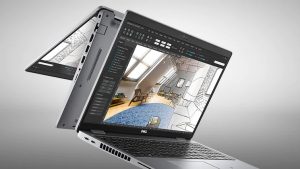

Recenzja
Dell Precision 3560 dogłębna recenzja
The words mobile and workstation are so far from each other, that when someone mentions them in the same sentence, it provokes laughter. However, as time passed, mobile processors became more and more powerful. This could only mean one thing... mobile workstations might actually be something real.And this is where the Dell Precision 15 3560 comes into place. It can be outfitted with up to the Core i7-1185G7 in a combination with the NVIDIA Quadro T500 - a professional-grade graphics card, based on the GeForce MX450. Also, there are configurations bundled with a 4K IPS panel, which should make work on the go a pleasant and productive experience.On the other hand, we've seen laptops with such hardware fail before, or not have enough performance to be considered as workstations. In t[...]
Przeczytaj pełną recenzjęPros
- Wide I/O, which includes a MicroSD card reader
- Two M.2 storage slots, one of which runs at 4.0 speeds + 2x RAM SODIMM slots
- Fingerprint reader embedded in the power button + optional IR face recognition
- Wi-Fi 6, PCIe x4, Thunderbolt 4
- Doesn't use PWM above 88 nits (40%) (VNCT2-156DL02 (NCP0057))
- Comfortable keyboard with a backlight
- Good battery life
Cons
- Covers only 53% of sRGB (VNCT2-156DL02 (NCP0057))
- Drops the dedicated touchpad buttons and the trackpoint + unsatisfactory touchpad experience
- High price
Demontaż, konserwacja i opcje modernizacji
As with every workstation, memory and storage expansion is crucial. Thankfully, this notebook offers a good amount of both, plus ease of access, because of the effortless removal of the bottom panel. Moreover, you get access to some of the latest tech out there in the face of PCIe Gen 4.Check out all Dell Precision 15 3560 prices and configurations in our Specs System or read more in our In-Depth review.1. Remove the bottom plate The procedure of getting inside this notebook requires the removal of the bottom panel. This means you need to undo 8 Phillips-head screws and pry the [...]
Czytaj więcej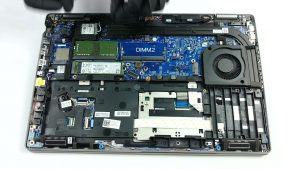
Wyświetlacz: 15.6-inch, 1920 x 1080, IPS
- Nazwa
- VNCT2-156DL02 (NCP0057)
- Przekątna
- 15.6"
- Gęstość pikseli
- 141.21 ppi
- Jasność
- 330 cd/m2
- sRGB
- 55%
- Typ Panelu
- IPS
- Rozdzielczość
- 1920 x 1080
- Staje się "Retina" od
- 24 inches (62 cm)
- Kontrast
- 1500:1
- dE Color Checker
- 4.9 3.6

Kup nasze profile dla VNCT2-156DL02 (NCP0057)
Oprócz otrzymywania wydajnych i przyjaznych dla zdrowia profili, kupując produkty LaptopMedia, wspierasz również rozwój naszych laboratoriów, w których testujemy urządzenia w celu tworzenia jak najbardziej obiektywnych recenzji.

Office Work
Office Work powinien być używany głównie przez użytkowników, którzy spędzają większość czasu patrząc na teksty, tabele lub po prostu przeglądając internet. Ten profil ma na celu zapewnienie lepszej wyrazistości i klarowności poprzez utrzymanie płaskiej krzywej gamma (2.20), natywnej temperatury barwowej i percepcyjnie dokładnych kolorów.

Design and Gaming
Ten profil jest przeznaczony dla projektantów, którzy pracują z kolorami zawodowo, a także do gier i filmów. Design and Gaming wykorzystuje panele wyświetlaczy do granic ich możliwości, czyniąc je tak dokładnymi, jak to tylko możliwe w standardzie sRGB IEC61966-2-1 dla stron internetowych i telewizji HD, przy punkcie bieli D65.

Health-Guard
Health-Guard eliminuje szkodliwą modulację szerokości impulsu (PWM) i redukuje negatywne niebieskie światło, które wpływa na nasze oczy i ciało. Ponieważ jest on dostosowany do każdego panelu, udaje mu się utrzymać percepcyjnie dokładne kolory. Health-Guard symuluje papier, dzięki czemu nacisk na oczy jest znacznie zmniejszony.





