MSI Optix G243 monitor – Specs, Pros / Cons: Superb Accuracy Usually Unexpected From A Gaming Monitor
 The MSI Optix G243 is a classic budget gaming monitor. So of course, it hides a lot of its fantastic features, some of which you need to run some tests in order to find out about them. On the surface, it’s a typical gamer, with a detailed and crisp 23.8-inch Full HD VA panel that ticks at 165Hz, while having a 1ms response time, and AMD FreeSync Premium support.
Once you dig deeper, you figure out that the monitor covers quite a lot of colors, both in the sRGB and the DCI-P3 gamuts, which means punchy and vibrant colors with good detail. The color accuracy gains that we were able to provide are excellent, as our Display Profiles make the screen 4 times more accurate (more on that below).
You can check the current price of the MSI Optix G243 here: Cumpărați de pe Amazon.com (#CommissionsEarned)
Contents
Specs sheet, Assembly, OSD, Drivers, Design, Connectivity
| Screen size | 23.8 inch (60.45 cm) |
|---|---|
| Refresh rate | 165Hz |
| Response time | 1ms |
| Panel type | VA |
| Backlight type | LED |
| Screen finish | Matte |
| Resolution | 1920 x 1080 (FHD) |
| Technologies |
|
| I/O |
|
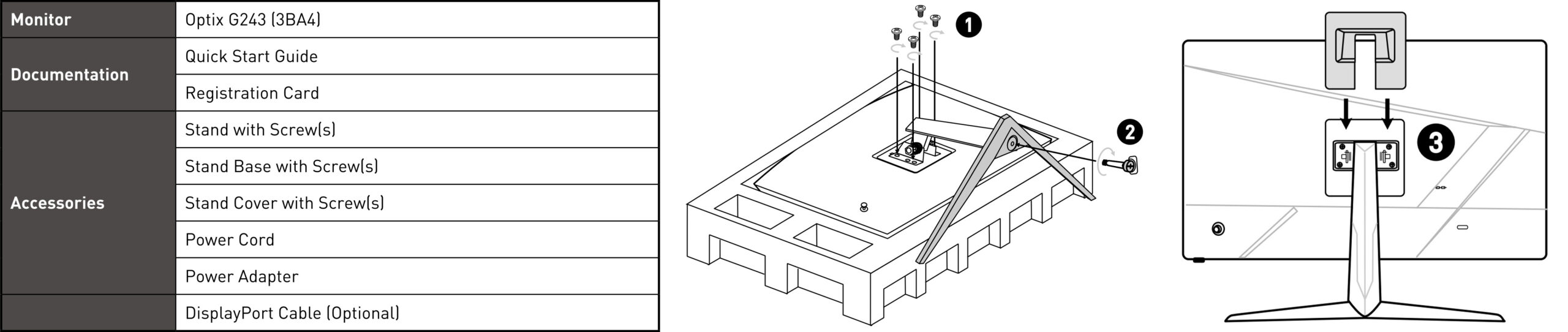
What’s in the box? Assembly
OSD Menu

Drivers and Software
MSI’s Support Website allows you to download the drivers as well as some utility software, like the MSI Display Kit, which gives you monitor control through the operating system, thus enabling mouse and keyboard support.
Design and Connectivity
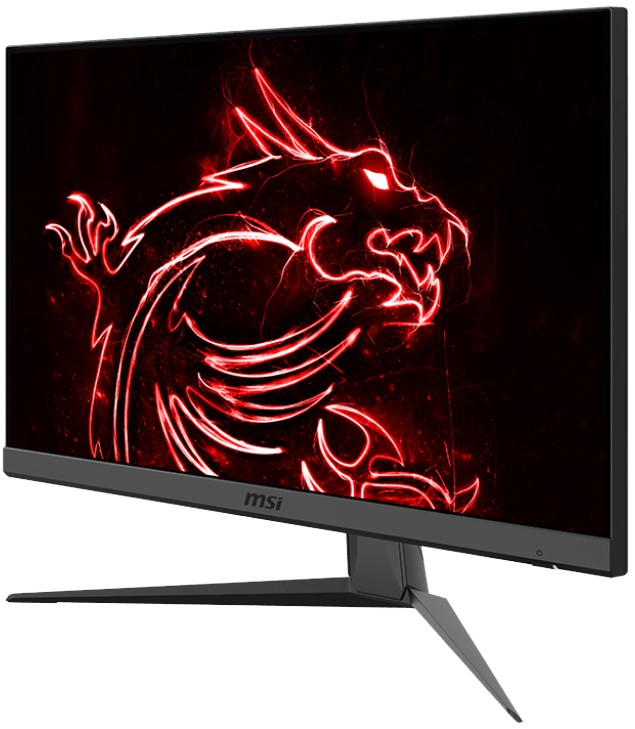
The design of the monitor looks and feels just a tad old, mainly thanks to the brushed plastic on the back, which screams 2016 like nothing else. From the front, you do get a more modern appearance. The bezels on the side are thin, with the chin being the thickest of the four sides. The built-in speakers are on the bottom, which further excuses the thicker bottom. In terms of adjustment, the Optix G243 doesn’t offer anything except Tilt, which isn’t really the most useful, but you can still adjust the angle so the monitor stays at eye level.
The port selection could use some USBs, but in general, it’s fine. You have two HDMI 1.4b ports, a single DisplayPort 1.2a, and an audio jack. Keep in mind that in order to access the full 165Hz of the monitor, you have to use the DisplayPort, as the HDMI 1.4b maxes out at 1080p/144Hz. On the other hand, the HDMIs are perfect for consoles, so you can keep it plugged in and just switch the source anytime you want to play.

Display quality, Buy our profiles, Verdict
The MSI Optix G243 brings a 23.8-inch Full HD screen (1920 x 1080), which calculates to a pixel density of 92.56 PPI, a pitch of 0.2744 x 0.2744 mm, and a Retina distance of 37.14 inches or 94.33 cm. From this distance, the human eye can’t distinguish individual pixels.
The correlated color temperature on a white screen after a Factory Reset in sRGB mode is 6260 K (Luminance 150 cd/m2 at 20% Brightness). The average gamma value is 2.18.
Color coverage
Here’s an illustration (Fig. 1). The whole “sail-shaped” map below consists of all the colors we can see, while the black crooked line shows all the colors from real-world scenes and nature around us.
Then, we’ve drawn some of the most important and interesting color spaces, compared to the colors the panel of MSI Optix G243 can show:
Standard/For Web: sRGB – widely used color space for most consumer devices, ideal for Web design and development
For Print: AdobeRGB – used in professional photo editing, graphic design, and print
For Photographers/Video Editors: DCI-P3 – used in high-end film production, post-production, and digital cinema
Premium HDR: Rec.2020 – the widest consumer ITU color standard, covering a massive 75.8% of the visible spectrum, a benchmark for premium HDR content
MSI Optix G243: the yellow dashed triangle (– – – – – –) represents the range of colors this monitor can display. In our tests, we calculated the total color coverage of the monitor at 98% of the sRGB color gamut and 88% of the DCI-P3 color gamut.

(Fig.1) MSI Optix G243 covers 98% of the Web colors (sRGB)
This means that if the MSI Optix G243 tries to show any color outside of its triangle, it will show the closest color to it that’s inside the triangle.
Color accuracy
Now let’s see how big is the difference between the real colors and the ones you’ll see on the MSI Optix G243. We measure that distance in DeltaE – the bigger the number, the more different they look.
For the next illustration, we’ve chosen 24 common colors like dark and light skin, blue sky, green grass, etc.
Values below 2.0 are considered suitable for color-sensitive work. Before our calibration of the MSI Optix G243, the Average color accuracy was 5.8 dE (Fig. 2), and with our Web Design and Office Work profile, it lowered to 1.4 dE (Fig. 3). The profile provides a 4X Increase in accuracy, making the monitor very suitable for Creator work.
 (Fig. 2) MSI Optix G243 in its factory condition
 (Fig. 3) MSI Optix G243 with our display profiles
Comparison in the sRGB color space (primaries and D65 white point specified in ITU-R BT.709, sRGB encoding curve).
Left: No Profile | Drag the slider to see the difference | Right: Design & Gaming Profile


Health-Guard eliminates the harmful Pulse-Width Modulation (PWM) and reduces the negative Blue Light which affects our eyes and body. Since it’s custom-tailored for every panel, it manages to keep the colors perceptually accurate (they may seem strange at first but after a few minutes our brain will start recognizing them as accurate ones – that’s how Health-Guard differs from alternatives like f.lux).
Pro Tip: As the Health-Guard profile simulates paper and has as accurate as possible colors, it could be a great tool for prepress designers!
Left: No Profile | Drag the slider to see the difference | Right: Health-Guard Profile


Gaming and Movies
We also have a third Gaming and Movies profile, which regulates the black colors, making dark areas in games and movies appear more visible, thus giving you a better viewing experience. Shooting at your opponent first can be a make-or-break moment, so make sure you’re best prepared with our profile.
Left: No Profile | Drag the slider to see the difference | Right: Design & Gaming Profile


BUY OUR DISPLAY PROFILES
Since our profiles are tailored for each individual display model, this article and its respective profile package are meant for the MSI Optix G243.
*Should you have problems with downloading the purchased file, try using a different browser to open the link you’ll receive via e-mail. If the download target is a .php file instead of an archive, change the file extension to .zip or contact us at [email protected].
Read more about the profiles HERE.
Here’s how to prepare thе monitor for our profiles:
1. Open the OSD menu (On-Screen Display)
2. Reset Settings: Go to Menu ➡️ Settings ➡️ Reset, and click ‘Yes’.
3. Brightness: Navigate to Image ➡️ Brightness and set it to 55% for optimal viewing.
Pe lângă primirea de profiluri eficiente și prietenoase cu sănătatea, prin cumpărarea produselor LaptopMedia sprijiniți și dezvoltarea laboratoarelor noastre, unde testăm dispozitive pentru a produce cele mai obiective recenzii posibile.

Design and Office
Profilul Design and Office face culorile afișajului cât mai apropiate de realitate.Ideal nu doar pentru profesioniști, ci și pentru utilizatorii de zi cu zi, acesta respectă standardele sRGB (punct de alb D65, gamma sRGB) cu un DeltaE minim pentru reproducerea precisă a culorilor pe panoul dumneavoastră.

Gaming and Movies
Ați vizionat vreodată un film în care, în scenele întunecate, abia se vede ceva? Multe ecrane nu reușesc să distingă corect tonurile întunecate. Profilul nostru Gaming and Movies îmbunătățește performanța în condiții de lumină slabă, similar tehnologiei HDR, folosind o curbă gamma adaptată percepției umane — ideal pentru gamerii care caută reacții mai rapide și imagini mai clare.

Health-Guard
Profilul nostru Health-Guard vă protejează ochii eliminând pâlpâirea PWM, reducând oboseala și efortul și minimizând expunerea dăunătoare la lumină albastră care poate afecta somnul și sănătatea. Utilizează atenuarea software și o curbă gamma adaptată percepției umane pentru confort și siguranță în timpul utilizării ecranului.
Obține Toate Profilele cu 33% Reducere!

Verdict
 The MSI Optix G243 is certainly the monitor that anyone would want, thanks to its crazy versatility. Optix monitors so far haven’t disappointed us, and the G243 continues the trend, covering a lot of colors (98% sRGB and 88% DCI-P3 gamuts) and becoming very accurate once we calibrate it using our Display Profiles.
To be more specific, the Web Design and Office Work profile makes the monitor four times more accurate, reducing the dE value from 5.8 to 1.4. While the design might feel a bit outdated, it brings a set of built-in speakers, giving you more versatility when it comes to audio.
Of course, this is a gaming monitor first and foremost, with a 165Hz refresh rate, a 1ms response time, and FreeSync Premium support, which essentially is all you need for a Full HD monitor.
The Gaming and Movies profile makes it so you get more visibility when the game environment is dark, so you can better appreciate the scenery. This helps a lot in movies with dark scenes too, as we really hate when we have to get all close and personal to the screen in order to see what’s going on.
Lastly, the Health-Guard profile is the most important of the bunch, as it concerns your health. You only get one pair of eyes for a lifetime, so keeping them safe from Blue Light and PWM (Flickering) should be a top priority.
You can check the current price of the MSI Optix G243: Cumpărați de pe Amazon.com (#CommissionsEarned)
Pros
- Affordable price
- Built-in speakers
- Great gaming features (165Hz refresh rate, 1ms response time, FreeSync Premium)
- Compact design
- 4X Accuracy Increase with our Display Profiles and High Color Coverage
Cons
- Global availability is scarce
 Author: Severin Kolakov

![[August 2026] Amazon Global: Top 10 cele mai vândute laptopuri – Apple MacBook Neo domină clasamentul, în timp ce laptopurile Windows din gama economică și de mijloc se luptă pentru volumul vânzărilor](https://laptopmedia.com/wp-content/uploads/2026/09/Best-Selling-Laptops-GLOBAL-Top-10-400x225.jpg)
![[August 2026] Cele mai vândute mărci de laptopuri pe Amazon Global – Apple domină în ceea ce privește veniturile, în timp ce HP se află pe primul loc în ceea ce privește varietatea de modele](https://laptopmedia.com/wp-content/uploads/2026/09/GLOBAL-Best-Brands-400x225.jpg)
![[August 2026] Amazon Global: Top 10 cele mai bine vândute laptopuri pentru jocuri – HP Victus 15 ocupă primul loc, în timp ce modelele accesibile domină clasamentul](https://laptopmedia.com/wp-content/uploads/2026/09/Best-Selling-Gaming-Laptops-GLOBAL-Top-10-400x225.jpg)
![[Iulie 2026] Amazon Global: Top 10 cele mai vândute laptopuri – Apple MacBook Neo domină clasamentul, în timp ce laptopurile din gama economică și cele din gama premium își împart piața](https://laptopmedia.com/wp-content/uploads/2026/08/Best-Selling-Laptops-GLOBAL-Top-10-400x225.jpg)
![[Iulie 2026] Amazon Global: Top 10 cele mai bine vândute laptopuri pentru jocuri – ASUS ROG Strix G16 domină piața mondială cu vânzări record](https://laptopmedia.com/wp-content/uploads/2026/08/Best-Selling-Gaming-Laptops-GLOBAL-Top-10-400x225.jpg)
