HP EliteBook 830 G9 – Top 5 Pros and Cons
 What HP does great is offer its business notebooks in all sizes, starting from the very portable 13-inch all the way to 16-inch and 17-inch laptops. Today we have a little premium machine, the EliteBook 830 G9.
While small, it still brings well-performing hardware, thanks to Intel and their 12th Gen U-series CPUs. You also get a 16:10 display, which even at a more modest 13.3 inches will allow you to tackle heavy work.
Today we’re presenting you with LaptopMedia’s top 5 picks about the HP EliteBook 830 G9.
HP EliteBook 830 G9: Full Specs / In-depth Review

4 reasons to BUY the HP EliteBook 830 G9
1. Design and build quality
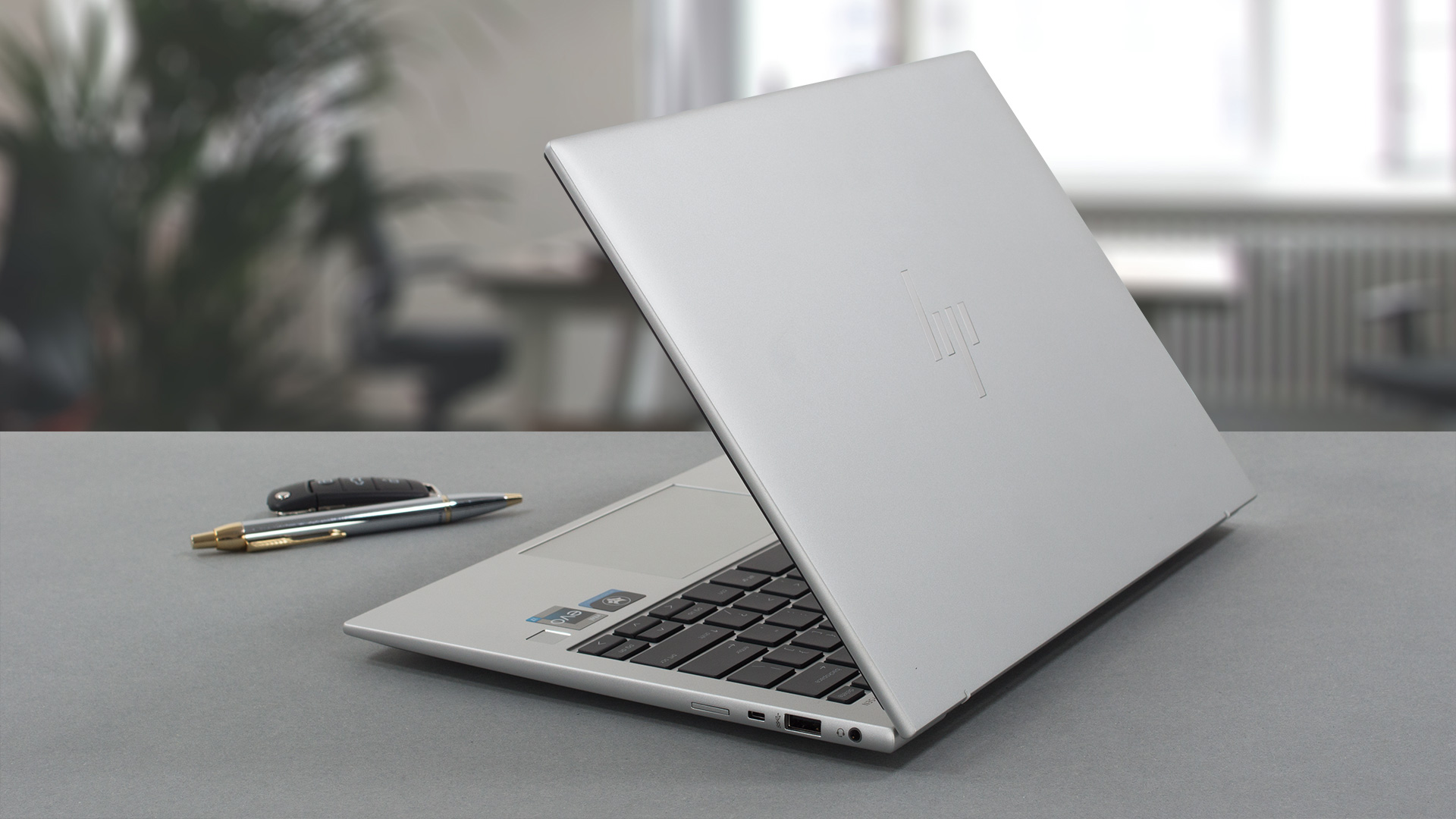
The small form factor paired with an aluminum unibody results in a pretty rigid laptop. It comes with a weight of only 1.27 kg and has a profile of 19.3 mm. The design contributes to the laptop feeling even thinner, as its got rounded edges. Branding is kept simple, as the lid carries the more modern HP logo. The lid opens easily with one hand, showing off the base and the thin bezels. The top one houses an HD webcam and an IR face recognition sensor.
2. Input devices
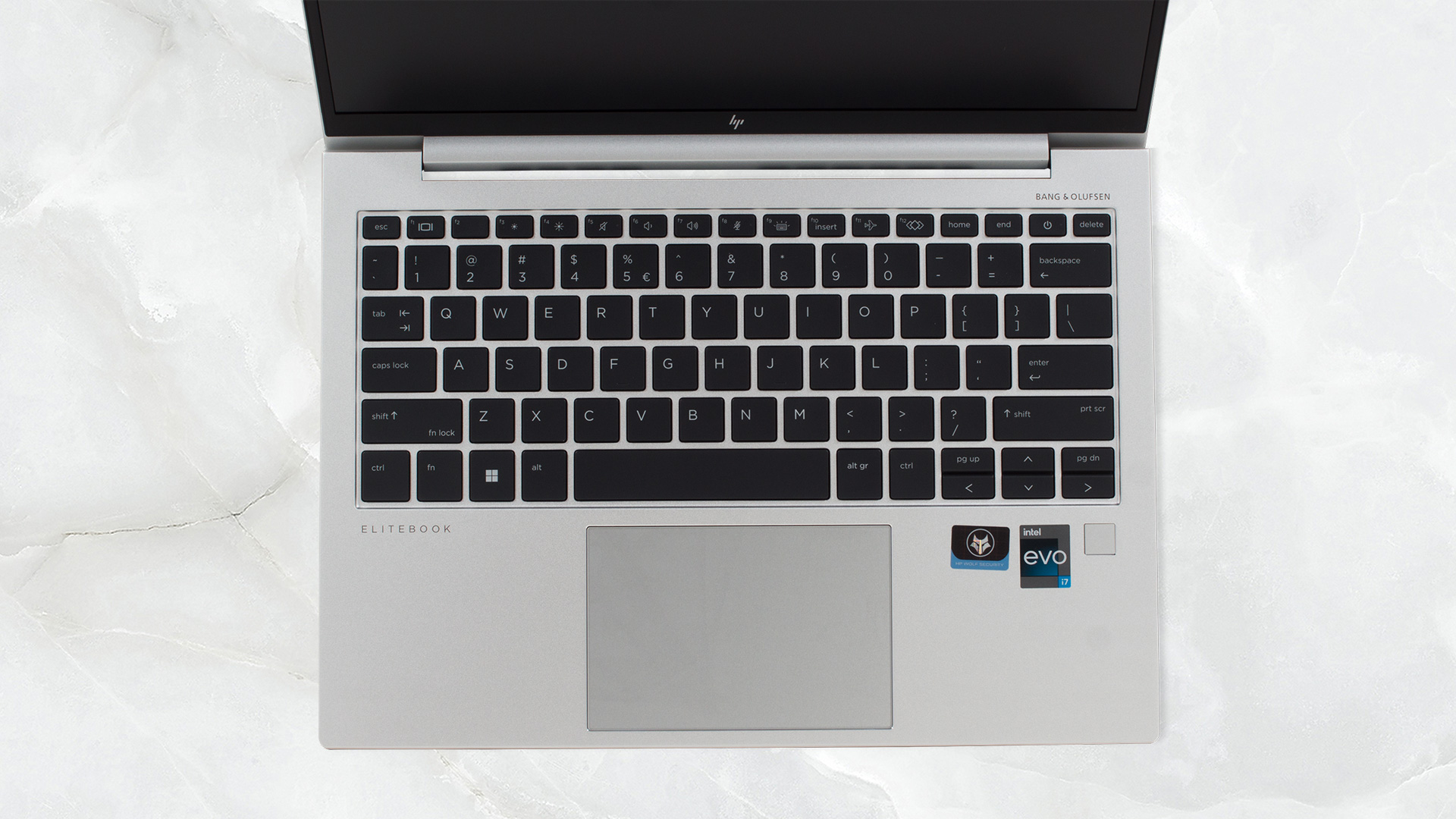
For the base, we have a pretty amazing keyboard, which takes as much key travel as possible out of the 19.3 mm profile. The feedback is also clicky and consistent, so typing feels great. HP also adds a backlight, so you can work and type even during the night, while the spill resistance is a blessing for the clumsier consumers. We can’t skip commenting on the touchpad, which has a glass surface. It’s super smooth. Our only issue with it is the clicking mechanism, which becomes harder to click the higher you go along the pad.
3. Display quality
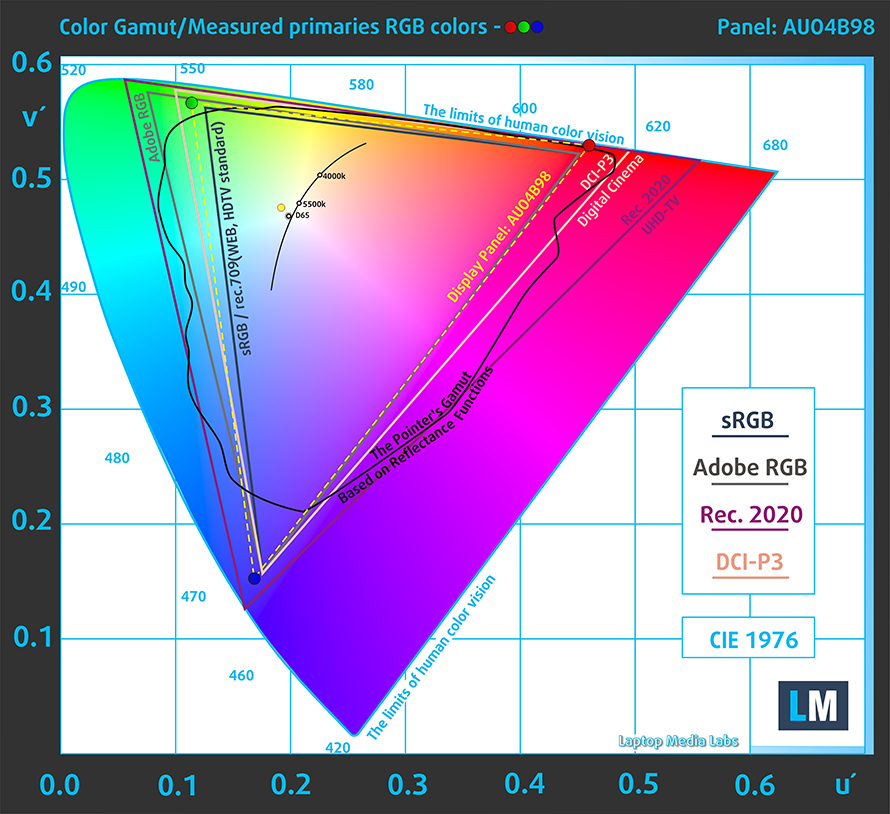
The Full HD+ IPS panel of the EliteBook gives you everything you need for all types of work. It gets, bright enough, maxing out at 473 nits, while having a very high contrast ratio, at 1760:1, which ensures deeper and darker blacks. For the inner artist in all of us or just the people who appreciate good colors, the display covers 100% of the sRGB color gamut.
Calibrating the panel with our Design and Gaming profile massively improves the accuracy. From a dE value of 4.9 with the factory settings, we get a dE value of 1.5 once we apply our profile. Here are the results of the test with the stock settings (left) and with our profile applied (right).
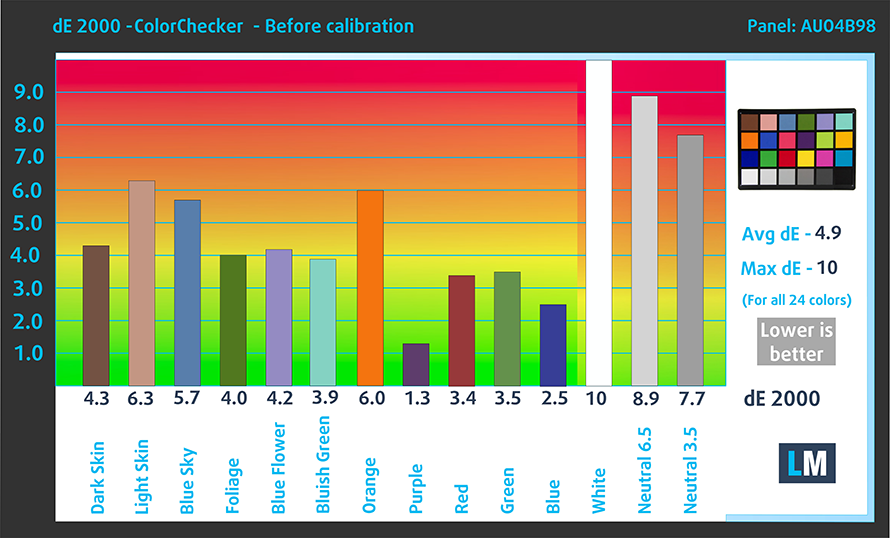
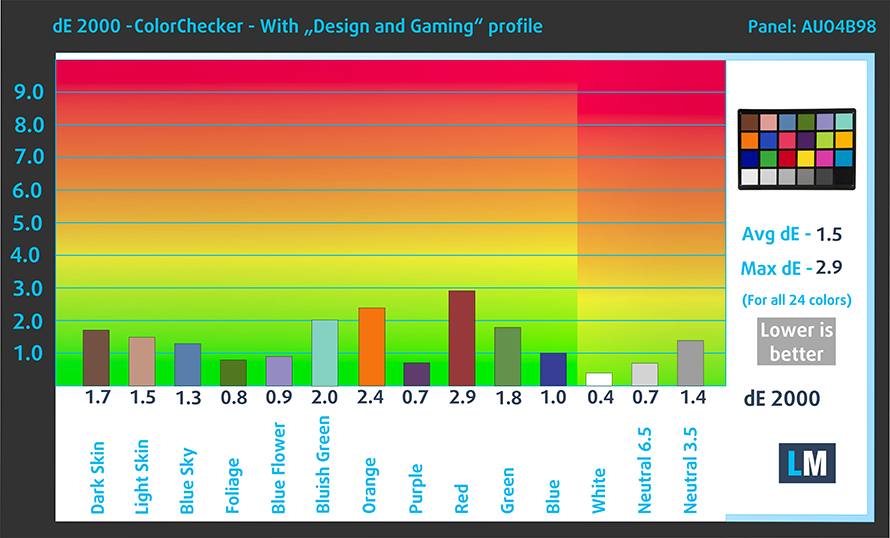
Buy our profile
Since our profiles are tailored for each individual display model, this article and its respective profile package are meant for HP EliteBook 830 G9 configurations with 13.3″ AUO AUO4B98 (WUXGA, 1920 x 1200) IPS.
*Should you have problems with downloading the purchased file, try using a different browser to open the link you’ll receive via e-mail. If the download target is a .php file instead of an archive, change the file extension to .zip or contact us at [email protected].
Read more about the profiles HERE.
Pe lângă primirea de profiluri eficiente și prietenoase cu sănătatea, prin cumpărarea produselor LaptopMedia sprijiniți și dezvoltarea laboratoarelor noastre, unde testăm dispozitive pentru a produce cele mai obiective recenzii posibile.

Office Work
Office Work ar trebui folosit în principal de utilizatorii care petrec cea mai mare parte a timpului uitându-se la texte, tabele sau pur și simplu navigând. Acest profil urmărește să ofere o distincție și o claritate mai bună prin menținerea unei curbe gamma plate (2.20), a temperaturii native a culorii și a culorilor perceptiv exacte.

Design and Gaming
Acest profil se adresează designerilor care lucrează profesional cu culorile, precum și pentru jocuri și filme. Design and Gaming duce panourile de afișaj la limitele lor, făcându-le cât mai precise posibil în standardul sRGB IEC61966-2-1 pentru Web și HDTV, la punctul de alb D65.

Health-Guard
Health-Guard elimină modulația dăunătoare a lățimii impulsului (PWM) și reduce lumina albastră negativă care ne afectează ochii și corpul. Deoarece este personalizat pentru fiecare panou, reușește să mențină culorile perceptiv exacte. Health-Guard simulează hârtia, astfel încât presiunea asupra ochilor este redusă considerabil.
Obține toate cele 3 profiluri cu 33% reducere

4. Battery life
The EliteBook offers a 51.3Wh battery pack that lasts for 13 hours and 20 minutes of web browsing and 10 hours and 45 minutes of video playback. Now, we conduct the battery tests with the Windows Better performance setting turned on, screen brightness adjusted to 120 nits, and all other programs turned off except for the one we are testing the notebook with.

1 reason NOT to buy the HP EliteBook 830 G9
1. Upgradeability
While all of the 16GB of DDR5 memory is soldered to the board, you can still access the storage, thanks to a single M.2 slot for Gen 4 SSDs.

Here is our teardown video, which shows how to upgrade or disassemble the EliteBook 830 G9.
All HP EliteBook 830 G9 configurations:
 Author: Severin Kolakov

![[Iunie 2026] Cele mai vândute mărci de laptopuri pe Amazon Global – Dominația de neegalat a Apple în ceea ce privește numărul de unități vândute și veniturile](https://laptopmedia.com/wp-content/uploads/2026/07/GLOBAL-Best-Brands-400x225.jpg)
![[Iunie 2026] Amazon Global: Top 10 cele mai vândute laptopuri – Noul MacBook Neo de la Apple se clasează pe locul 1, redefinind piața prin prețul accesibil](https://laptopmedia.com/wp-content/uploads/2026/07/Best-Selling-Laptops-GLOBAL-Top-10-400x225.jpg)
![[Iunie 2026] Amazon Global: Top 10 cele mai bine vândute laptopuri pentru jocuri – Modelul Nitro V 16S AI de la Acer domină vânzările, în timp ce ASUS conduce în ceea ce privește veniturile totale](https://laptopmedia.com/wp-content/uploads/2026/07/Best-Selling-Gaming-Laptops-GLOBAL-Top-10-400x225.jpg)
![[Iunie 2026] Clasamentul global al celor mai bine vândute plăci grafice pentru laptopuri pe Amazon – NVIDIA RTX 5060 este cea mai bine vândută placă grafică dedicată](https://laptopmedia.com/wp-content/uploads/2026/07/Best-Selling-GPUs-GLOBAL-Top-10-400x225.jpg)
![[Iunie 2026] Clasamentul global al celor mai bine vândute procesoare pentru laptopuri de pe Amazon – Apple M5 domină, iar AMD Ryzen 7 260 înregistrează o cotă solidă în segmentul premium](https://laptopmedia.com/wp-content/uploads/2026/07/Best-Selling-CPUs-GLOBAL-Top-10-400x225.jpg)
