Inside MSI Delta 15 (A5Ex) – disassembly and upgrade options
Even though AMD makes both CPUs and GPUs, all-AMD laptops are still very rare. The Delta 15 (A5Ex) is one member of the exquisite AMD club, and it offers quite the upgradability. Unfortunately, it is not too easy to access the ports.
Check out all MSI Delta 15 (A5Ex) prices and configurations in our Specs System or read more in our In-Depth review.

1. Remove the bottom plate
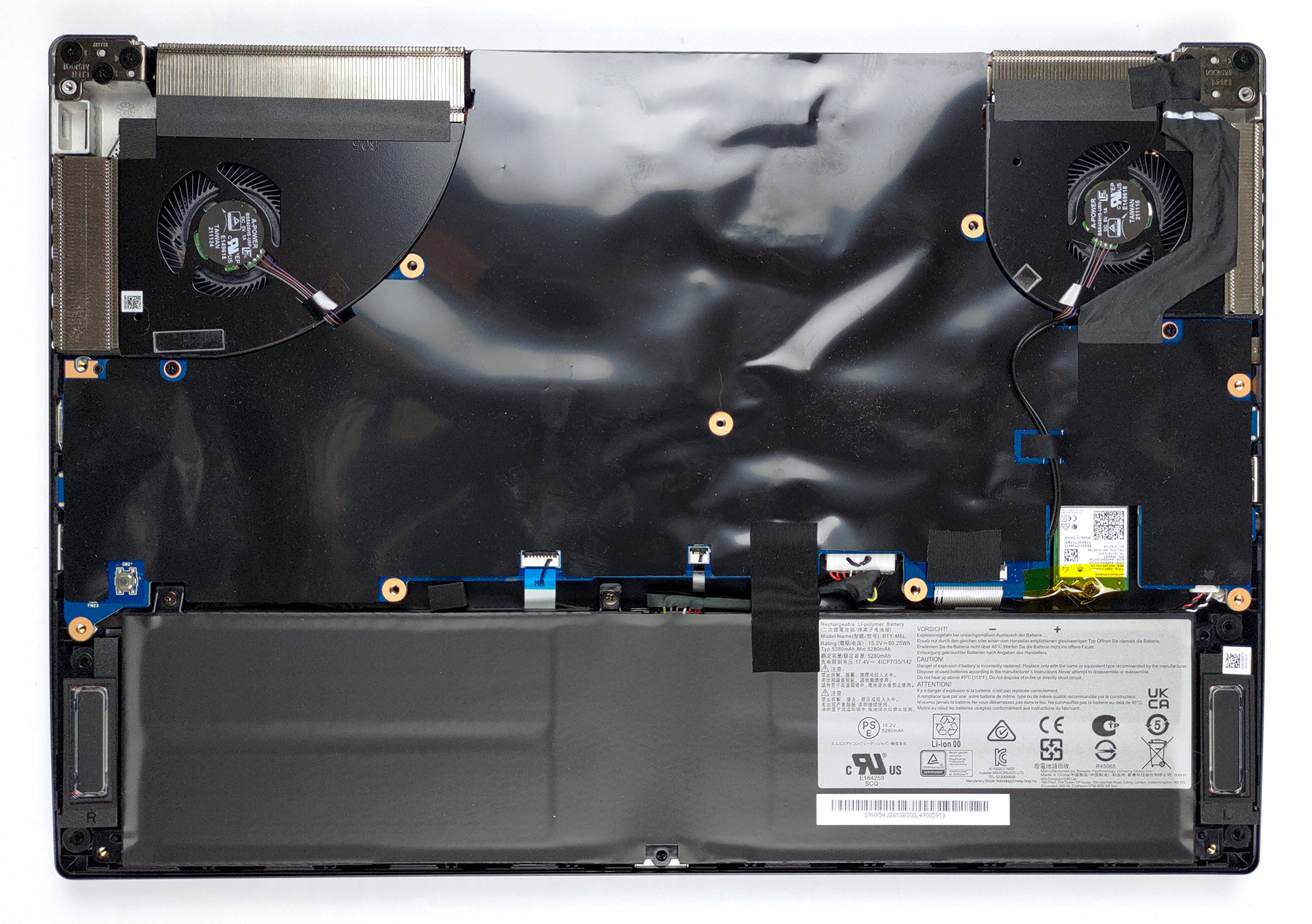
The first step here is to remove the bottom panel. To do that, undo all 13 Phillips-head screws, and pry it, starting from the front two corners.
2. Battery
Inside, we see an 82Wh battery pack. It lasts for 11 hours and 30 minutes of Web browsing, or 10 hours and 30 minutes of video playback. To remove it, you just need to undo two Pillips-head screws and unplug the battery connector from the motherboard.

3. Flip the motherboard
As you can see, the situation is not very simple, as the motherboard is upside down. First, peel the black sheet off it. Then, remove the Wi-Fi card, and unplug all connectors, you see attached to it. After that, you will need to pop off two Phillips-head screws. Only then, you will be able to turn the motherboard the right way around.
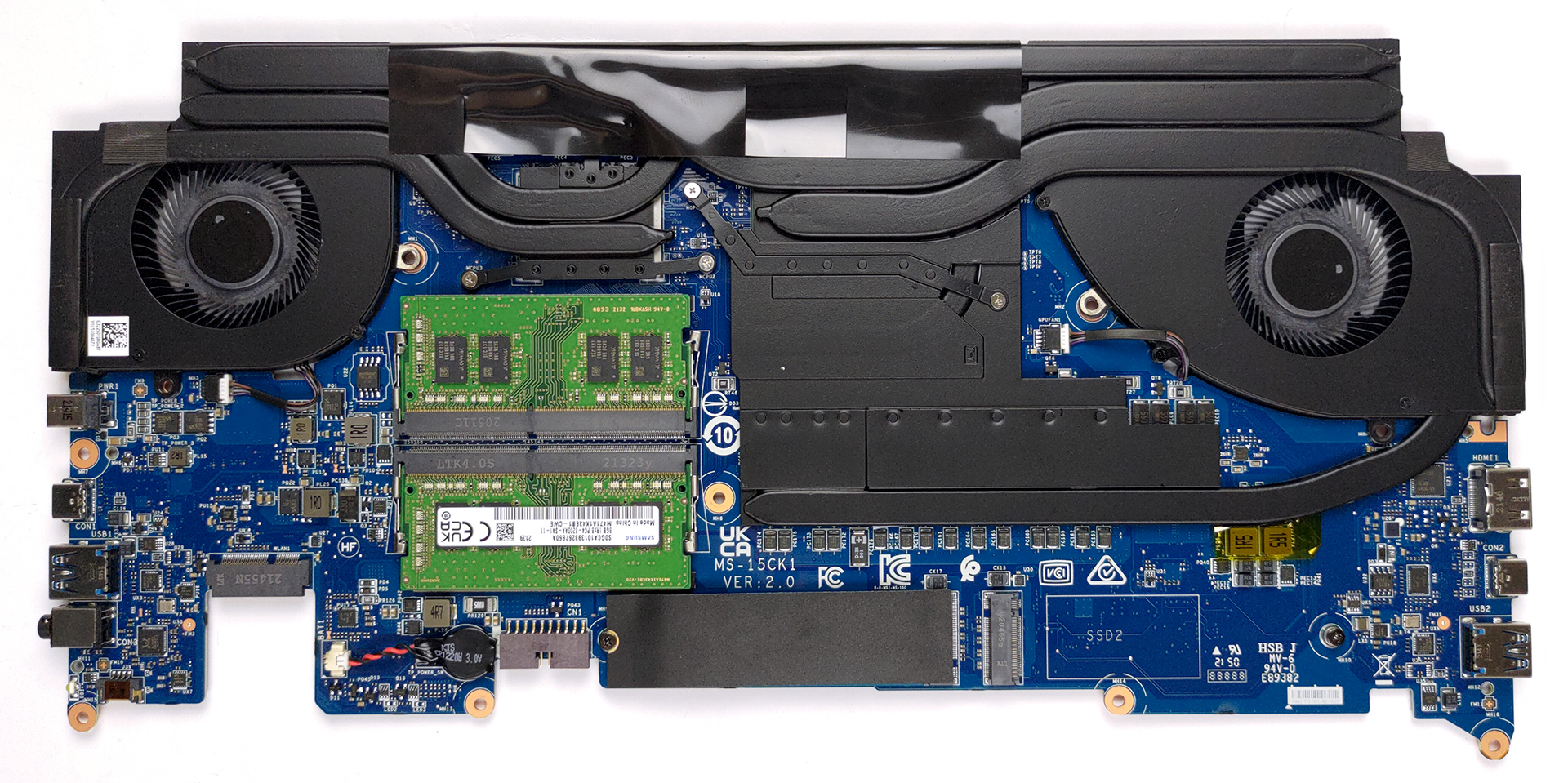
Now, you have access to the two RAM SODIMM slots, which fit up to 64GB of DDR4 memory. Storage-wise, there are two M.2 PCIe x4 slots.
Here, the two thin heat pipes are allocated to the CPU, while the two thicker ones are for the GPU. In addition, you get a heat pipe that takes care of the voltage control.
Check out all MSI Delta 15 (A5Ex) prices and configurations in our Specs System or read more in our In-Depth review.
MSI Delta 15 (A5Ex) recenzie detaliată
The MSI Delta 15 is a laptop that we've been wanting to get our hands on for quite some time. Finally, we managed to buy one. Why is it so special, you may ask? You know, the last year was pretty successful for AMD. They managed to dethrone Intel (at least briefly), while their RDNA2 architecture brought the battle with NVIDIA to a new level. This is why the company paired with some brands to make the so-called "AMD Advantage Edition" devices.One of the most popular units out there was the ASUS ROG Strix G15 G513 with this branding. However, the Delta 15 from MSI flew under the radar of a[...]
Avantaje
- Good battery life
- 2x SODIMM + 2x M.2 PCIe x4
- Fast display options
- No aggressive PWM (Sharp LQ156M1JW03 (SHP155D))
- 96% sRGB coverage and high color accuracy with our Gaming and Web design profile (Sharp LQ156M1JW03 (SHP155D))
Dezavantaje
- No SD card reader
- Difficult to upgrade
- Subpar cooling
- Gets very hot on the outside when gaming
 Author: Alex Iliev

![[August 2026] Clasamentul global al celor mai bine vândute plăci grafice pentru laptopuri de pe Amazon – Apple domină clasamentul, iar modelul RTX 5060 de la NVIDIA ocupă primul loc în clasamentul dedicat](https://laptopmedia.com/wp-content/uploads/2026/09/Best-Selling-GPUs-GLOBAL-Top-10-400x225.jpg)
![[August 2026] Clasamentul global al celor mai bine vândute procesoare pentru laptopuri de pe Amazon – Apple domină atât segmentul economic, cât și cel premium: A18 Pro și M5 surclasează Intel și AMD în august 2026](https://laptopmedia.com/wp-content/uploads/2026/09/Best-Selling-CPUs-GLOBAL-Top-10-400x225.jpg)
![[August 2026] Amazon Global: Top 10 cele mai vândute laptopuri – Apple MacBook Neo domină clasamentul, în timp ce laptopurile Windows din gama economică și de mijloc se luptă pentru volumul vânzărilor](https://laptopmedia.com/wp-content/uploads/2026/09/Best-Selling-Laptops-GLOBAL-Top-10-400x225.jpg)
![[August 2026] Cele mai vândute mărci de laptopuri pe Amazon Global – Apple domină în ceea ce privește veniturile, în timp ce HP se află pe primul loc în ceea ce privește varietatea de modele](https://laptopmedia.com/wp-content/uploads/2026/09/GLOBAL-Best-Brands-400x225.jpg)
![[August 2026] Amazon Global: Top 10 cele mai bine vândute laptopuri pentru jocuri – HP Victus 15 ocupă primul loc, în timp ce modelele accesibile domină clasamentul](https://laptopmedia.com/wp-content/uploads/2026/09/Best-Selling-Gaming-Laptops-GLOBAL-Top-10-400x225.jpg)
