Top 5 reasons to BUY or NOT to buy the Acer Aspire 3 (A315-22)
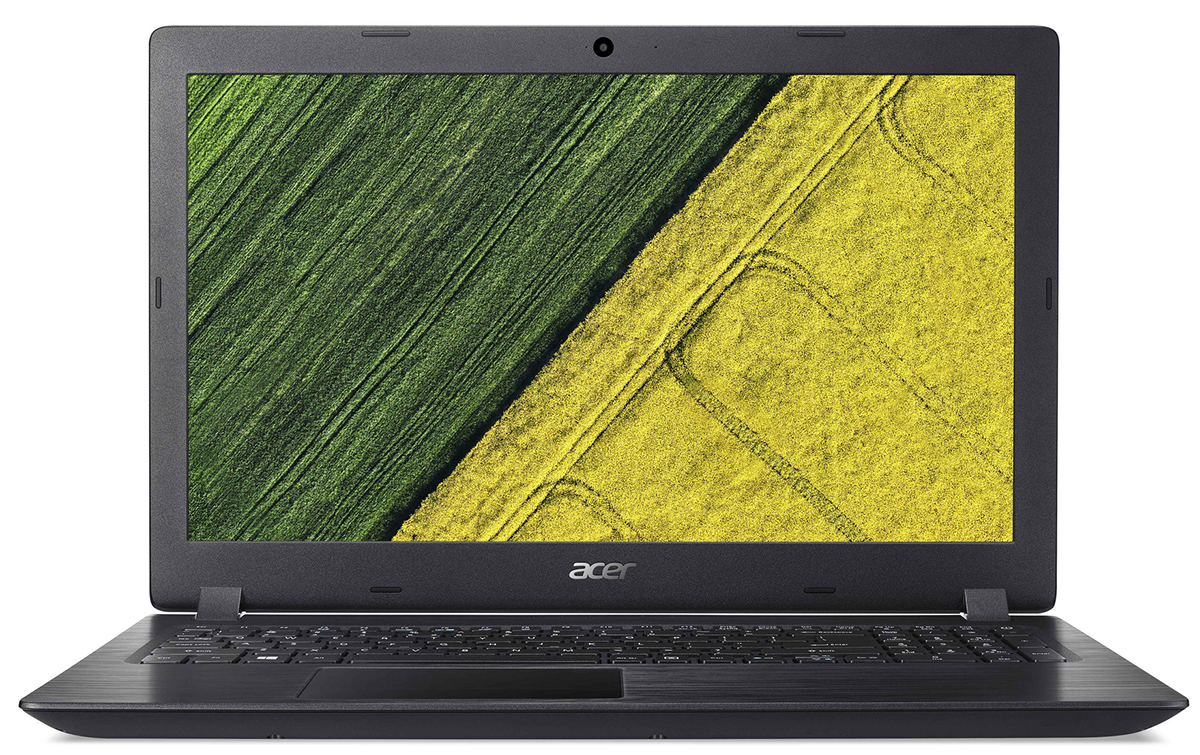 The device that you will read about today is a really budget one. It’s so budget, that it comes with AMD hardware that came out six years ago. You will ask why is that, and the answer is pretty straightforward.
With the current worldwide situation, budget laptops have been depleted and manufacturers are putting out what is left, and in the case of this laptop, a Stoney Ridge APU, which uses a 28nm architecture, and wasn’t even competitive when it came out. The Acer Aspire 3 (A315-22) is in the market for people who want a laptop just because they want to have one.
Today we are presenting you with LaptopMedia’s top 5 picks about the Acer Aspire 3 (A315-22).
Acer Aspire 3 (A315-22): Full Specs / In-depth Review
2 reasons to BUY the Acer Aspire 3 (A315-22)
1. The Affordability
Being a device that is literally made for the everyman out there, the price is pretty much nothing. For the price of an expensive 3-course dinner for Valentine’s day, you can get a laptop, albeit not a great one, but still a laptop. Currently, the price is somewhere around 300 dollars, which is very affordable.
2. The Upgradeability
Fortunately, both the RAM and the Storage can be expanded on the laptop, with there being one SODIMM slot, with 4GB of RAM soldered onto the motherboard. The storage upgradability is on par too, with one 2.5-inch SATA drive as well as an M.2 slot for NVMe drives.
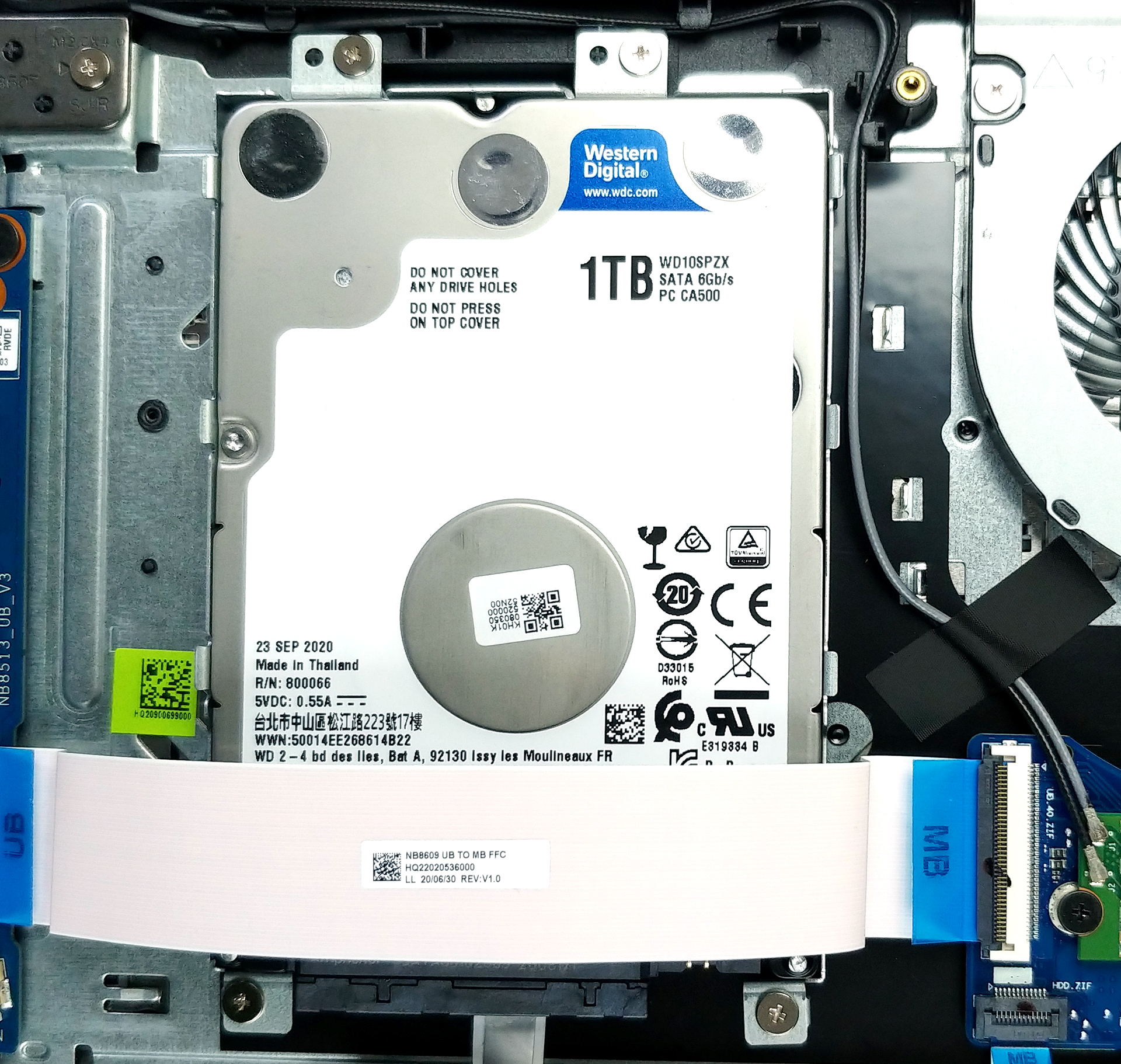
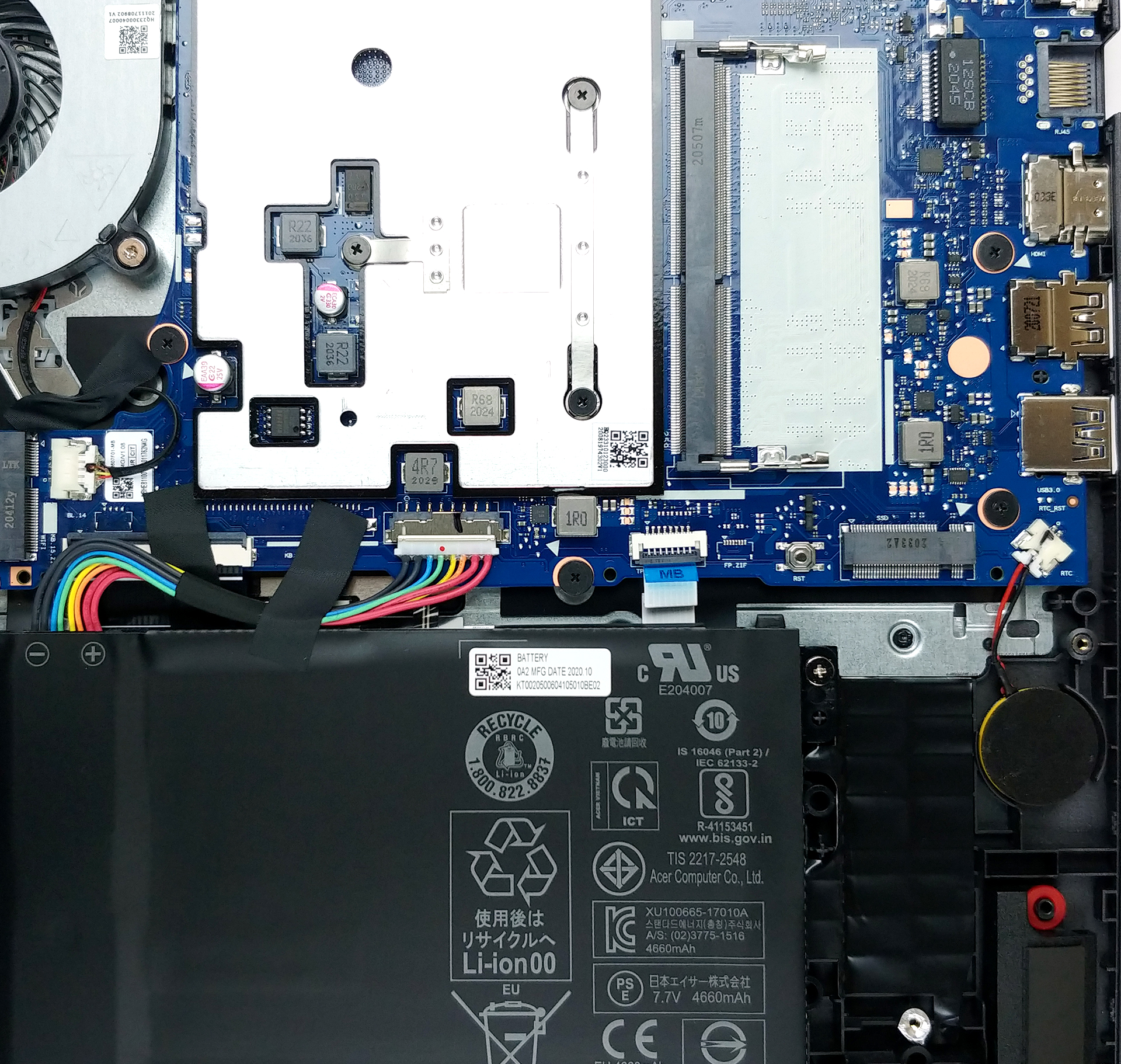
Here is our detailed teardown video, which shows you the steps of getting safe access to the SODIMM, SATA, and M.2 slots.
3 reasons NOT to buy the Acer Aspire 3 (A315-22)
1. The Build quality
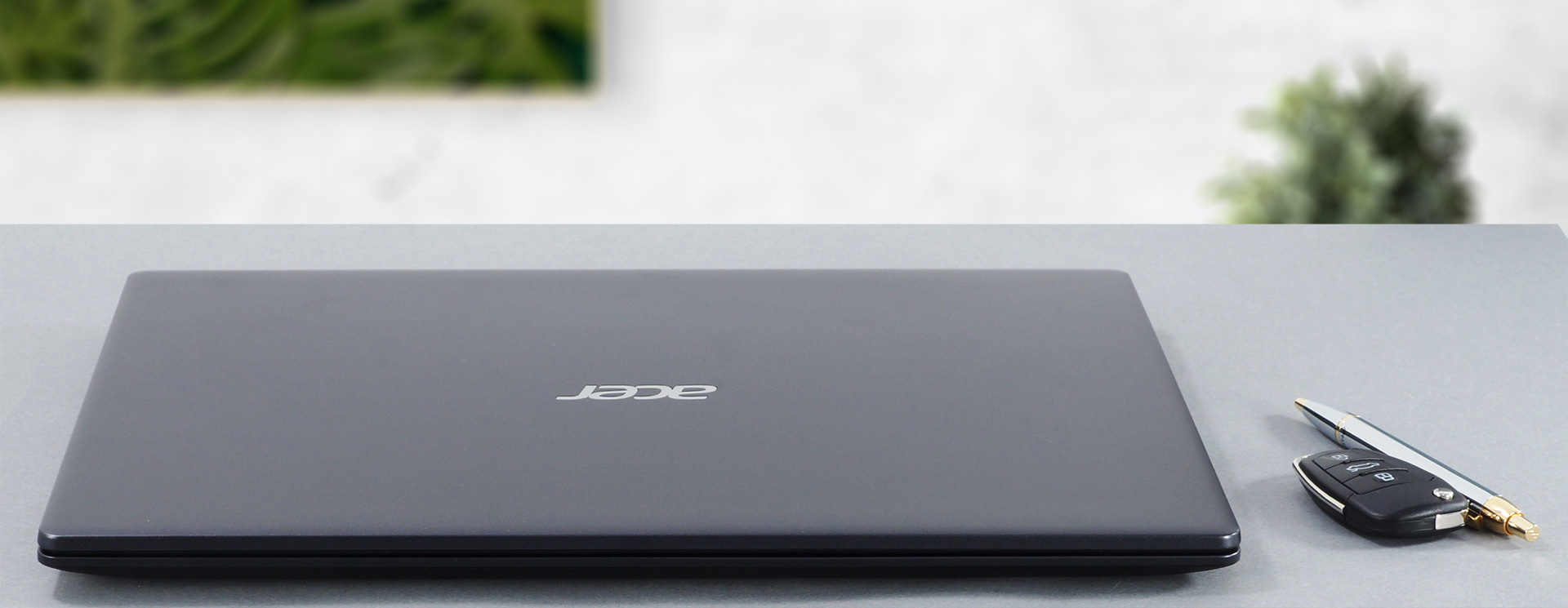
The entirely plastic body feels cheap, and to be fair – it is. However, the body has a honeycomb pattern on the inside, which makes it quite rigid and the size and weight are within the norm. Although the laptop looks modern, the lid cannot be opened with a single hand. Continuing on about the lid, it bends like crazy and you can instantly notice the color shift from the TN panel. However, the bezels are thin enough for 2021 standards, and on the top, you can see the webcam, although not a good one.
2. The Performance
Using hardware from the last decade, you can’t expect good performance. The laptop is fine for watching movies and videos, but any serious tasks will bring the AMD A4 CPU to its knees.
Rezultatele sunt de la testul CPU Cinebench R23 (scorul mai mare este mai bun)
Rezultatele sunt de la 3DMark Time Spy (Grafică). Un scor mai mare este mai bun.
Rezultatele sunt de la benchmark-ul 3DMark Fire Strike (Grafică) (un scor mai mare este mai bun)
3. The Display
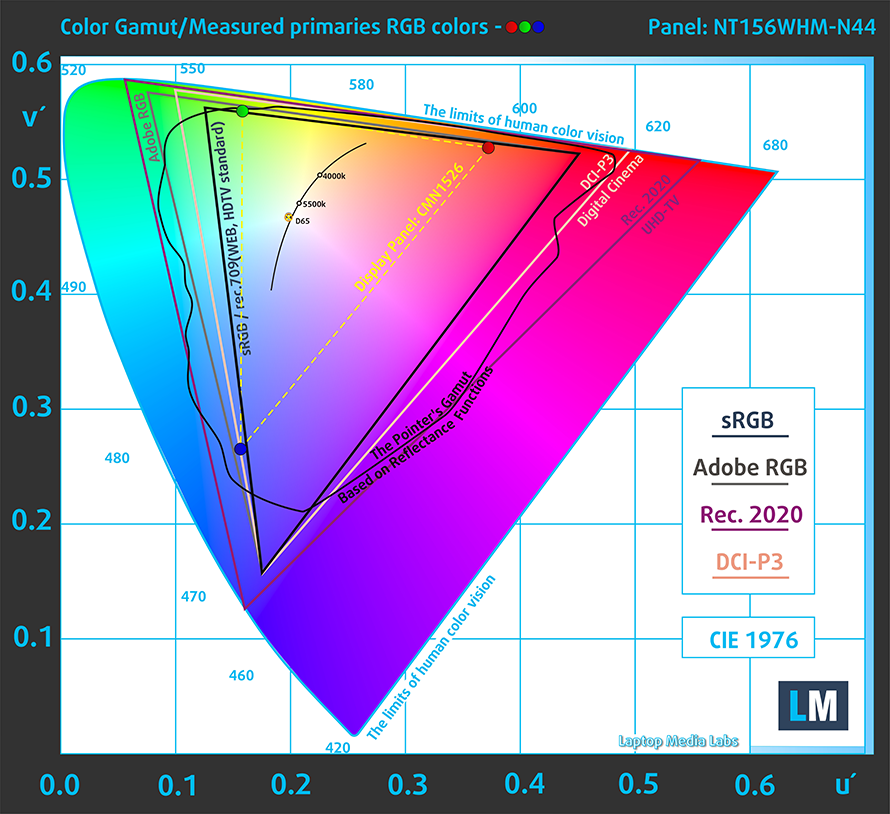
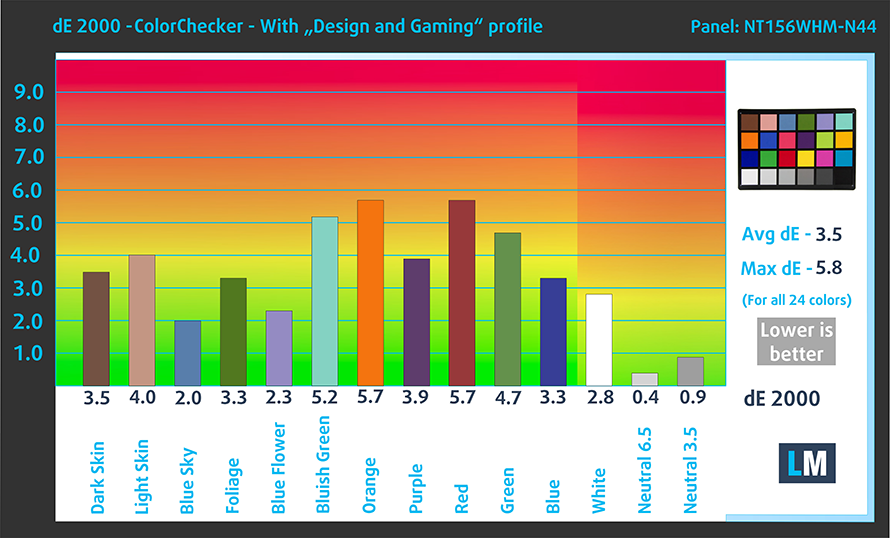
The laptop comes with two options for displays, both of them being TN panels. Our unit had the 15.6-inch 768p display, which had terrible viewing angles and a poor contrast ratio. Color coverage and color accuracy aren’t one of its strong suits, with the panel covering 50% of the sRGB color gamut.
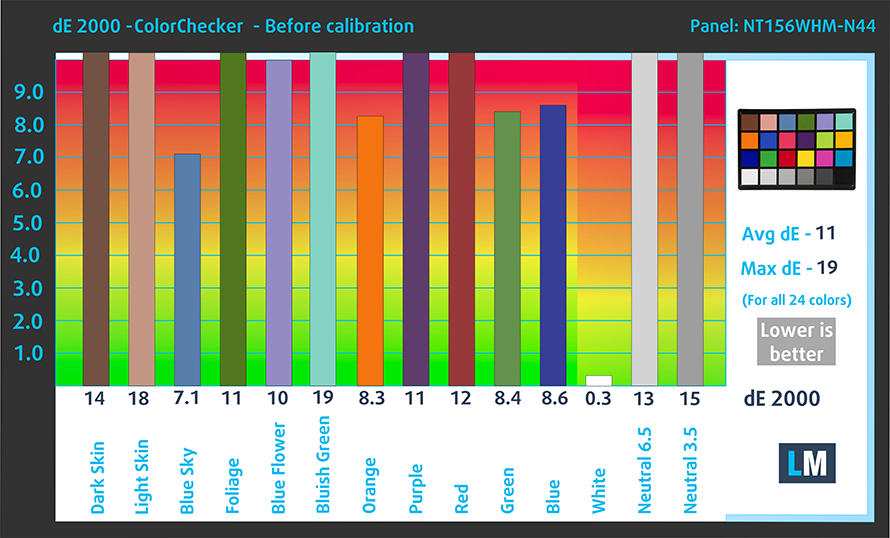
In the color accuracy test, the panel does a somewhat decent job when paired with our “Gaming and web design” profile. Below you can see the results with both the default settings (left), and with the “Gaming and Web design” profile applied (right).
Buy our profiles
Since our profiles are tailored for each individual display model, this article and its respective profile package are meant for Acer Aspire 3 (A315-22) configurations with 15.6″ BOE NT156WHM-N44 (BOE07CE) (WXGA, 1366 x 768) TN.
*Should you have problems with downloading the purchased file, try using a different browser to open the link you’ll receive via e-mail. If the download target is a .php file instead of an archive, change the file extension to .zip or contact us at [email protected].
Read more about the profiles HERE.
Pe lângă primirea de profiluri eficiente și prietenoase cu sănătatea, prin cumpărarea produselor LaptopMedia sprijiniți și dezvoltarea laboratoarelor noastre, unde testăm dispozitive pentru a produce cele mai obiective recenzii posibile.

Office Work
Office Work ar trebui folosit în principal de utilizatorii care petrec cea mai mare parte a timpului uitându-se la texte, tabele sau pur și simplu navigând. Acest profil urmărește să ofere o distincție și o claritate mai bună prin menținerea unei curbe gamma plate (2.20), a temperaturii native a culorii și a culorilor perceptiv exacte.

Design and Gaming
Acest profil se adresează designerilor care lucrează profesional cu culorile, precum și pentru jocuri și filme. Design and Gaming duce panourile de afișaj la limitele lor, făcându-le cât mai precise posibil în standardul sRGB IEC61966-2-1 pentru Web și HDTV, la punctul de alb D65.

Health-Guard
Health-Guard elimină modulația dăunătoare a lățimii impulsului (PWM) și reduce lumina albastră negativă care ne afectează ochii și corpul. Deoarece este personalizat pentru fiecare panou, reușește să mențină culorile perceptiv exacte. Health-Guard simulează hârtia, astfel încât presiunea asupra ochilor este redusă considerabil.
Obține toate cele 3 profiluri cu 33% reducere

All Acer Aspire 3 (A315-22) configurations:
 Author: Severin Kolakov

![[Iulie 2026] Clasamentul global al celor mai bine vândute plăci grafice pentru laptopuri de pe Amazon – RTX 5060 domină segmentul premium, iar Intel rămâne lider în segmentul economic](https://laptopmedia.com/wp-content/uploads/2026/08/Best-Selling-GPUs-GLOBAL-Top-10-400x225.jpg)
![[Iulie 2026] Clasamentul global al celor mai bine vândute procesoare pentru laptopuri de pe Amazon – Apple domină segmentul premium, iar Intel își păstrează primul loc în clasamentul general](https://laptopmedia.com/wp-content/uploads/2026/08/Best-Selling-CPUs-GLOBAL-Top-10-400x225.jpg)
![[July 2026] Amazon Canada: Top 10 Best-Selling Laptops – Apple MacBook Neo Dominates the Market to Claim the #1 Spot](https://laptopmedia.com/wp-content/uploads/2026/08/Best-Selling-Laptops-CA-Top-10-2-400x225.jpg)
![[July 2026] Best-Selling Laptop Brands on Amazon Japan – HP and Lenovo Dominate Units and Revenue Amid Fierce Competition](https://laptopmedia.com/wp-content/uploads/2026/08/CO.JP-Best-Brands-2-400x225.jpg)
![[July 2026] Amazon Italy: Top 10 Best-Selling Laptops – Apple MacBook Neo Claims the #1 Spot Amid Budget-Friendly Dominance](https://laptopmedia.com/wp-content/uploads/2026/08/Best-Selling-Laptops-IT-Top-10-400x225.jpg)
