ASUS TUF Gaming F16 FX607 (2024) Is a Hidden Creator King With a Lot of Potential! We Got a dE of 0.9 With Our Display Profiles!
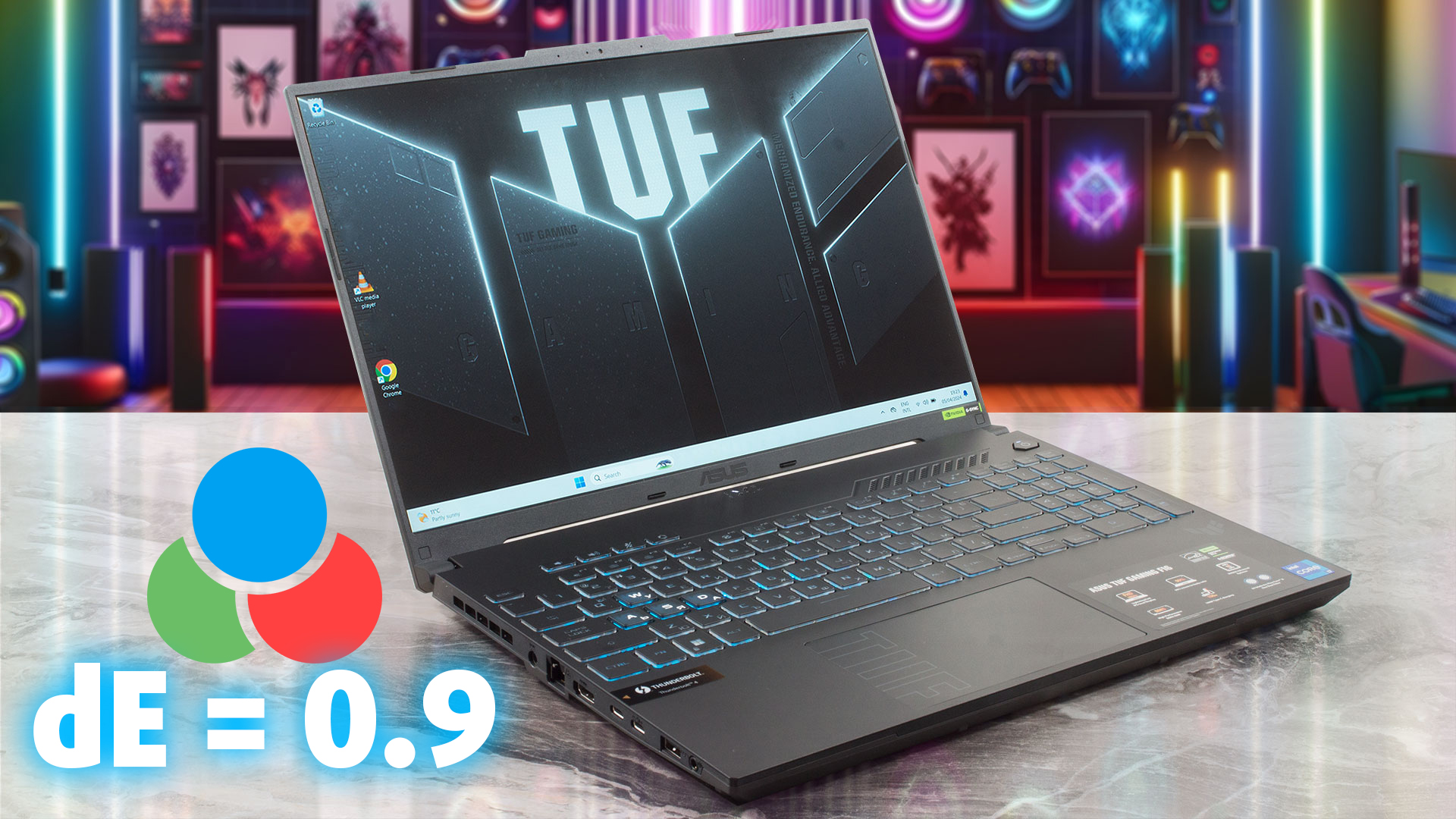 From the first appearance of the TUF Gaming A16 and F16, we knew that there was hidden potential for a gaming/content-creation machine. Now that we’ve had the notebook for a review, we’re here to say that we were totally correct. Not only is this a very powerful laptop, with a 14-core Core i7-13650HX and an RTX 4060, but you also get a productivity-oriented 16:10 display that gets super accurate thanks to our Display Profiles (a dE of 0.9).
This means that video editors, animators, and other creators can take this mobile powerhouse everywhere they go and do their thing.
DeltaE is the metric for the difference between the real colors and the ones you see on your display. Values below 2.0 are considered suitable for professional work with colors, and values below 1.0 are indistinguishable to the naked eye.
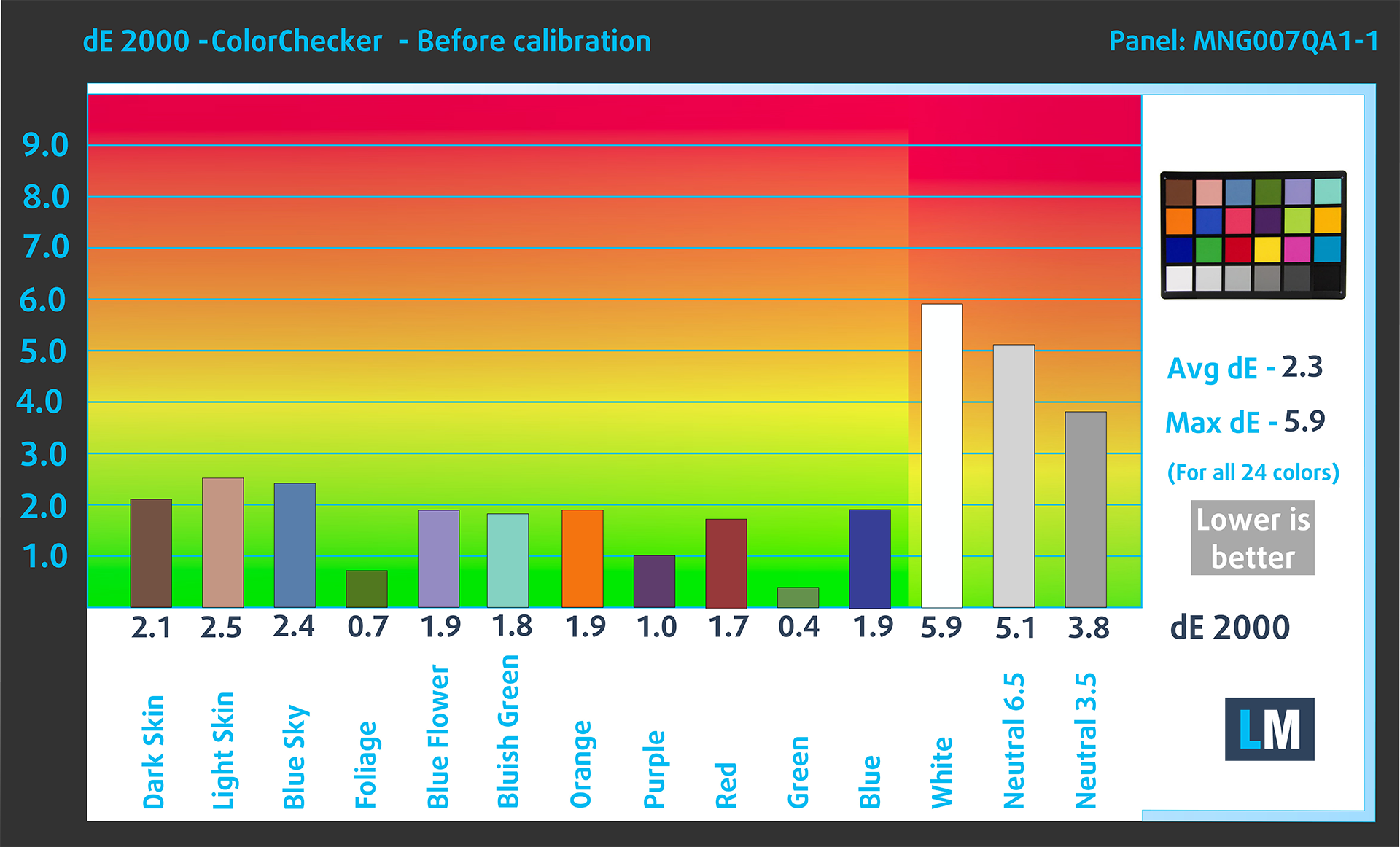
Our retail unit of ASUS TUF Gaming F16 FX607 (2024) arrived with a DeltaE score of 2.3. In other words – the display is close to being accurate, but there are still a few bits missing. Check the first graph below. The height of each bar shows the difference in its color from the real one (the White and Neutrals are today’s offenders).
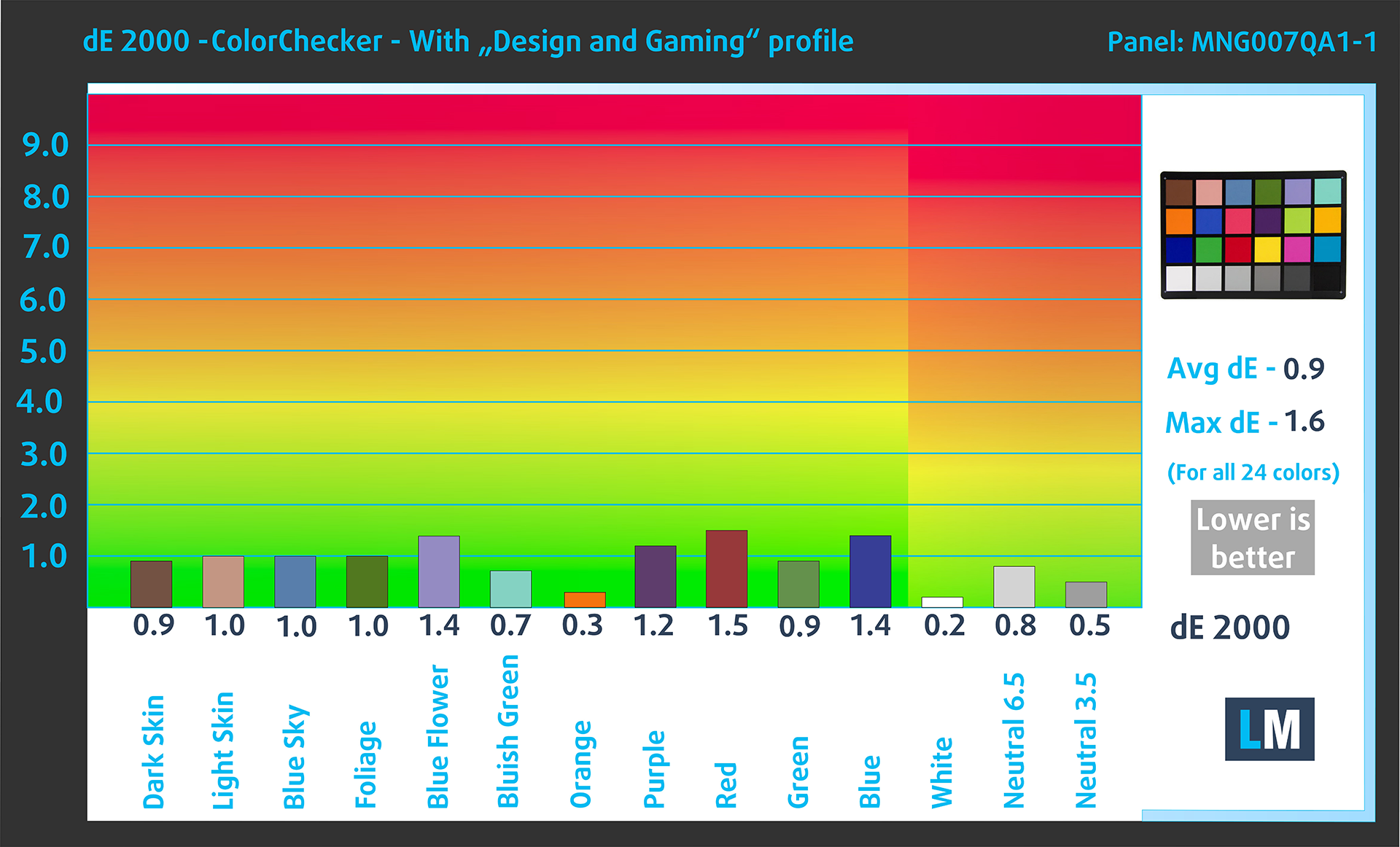
Now switch your attention to the second graph. That’s the result of our calibration. The DeltaE score goes below 1.0, 2.5 TIMES lower compared to the factory state!
Read the full display analysis of the ASUS TUF Gaming F16 here.
Get our Display Profiles
Since our profiles are tailored for each individual display model, this article and its respective profile package are meant for ASUS TUF Gaming F16 FX607 (2024) configuration with 16.0″ CSOT MNG007QA1-1 (CSW1639) (1920×1200) IPS panel.
*Should you have problems with downloading the purchased file, try using a different browser to open the link you’ll receive via e-mail. If the download target is a .php file instead of an archive, change the file extension to .zip or contact us at [email protected].
Read more about the profiles HERE.
Pe lângă primirea de profiluri eficiente și prietenoase cu sănătatea, prin cumpărarea produselor LaptopMedia sprijiniți și dezvoltarea laboratoarelor noastre, unde testăm dispozitive pentru a produce cele mai obiective recenzii posibile.

Office Work
Office Work ar trebui folosit în principal de utilizatorii care petrec cea mai mare parte a timpului uitându-se la texte, tabele sau pur și simplu navigând. Acest profil urmărește să ofere o distincție și o claritate mai bună prin menținerea unei curbe gamma plate (2.20), a temperaturii native a culorii și a culorilor perceptiv exacte.

Design and Gaming
Acest profil se adresează designerilor care lucrează profesional cu culorile, precum și pentru jocuri și filme. Design and Gaming duce panourile de afișaj la limitele lor, făcându-le cât mai precise posibil în standardul sRGB IEC61966-2-1 pentru Web și HDTV, la punctul de alb D65.

Health-Guard
Health-Guard elimină modulația dăunătoare a lățimii impulsului (PWM) și reduce lumina albastră negativă care ne afectează ochii și corpul. Deoarece este personalizat pentru fiecare panou, reușește să mențină culorile perceptiv exacte. Health-Guard simulează hârtia, astfel încât presiunea asupra ochilor este redusă considerabil.
Obține toate cele 3 profiluri cu 33% reducere

 Author: Severin Kolakov

![[Iunie 2026] Cele mai vândute mărci de laptopuri pe Amazon Global – Dominația de neegalat a Apple în ceea ce privește numărul de unități vândute și veniturile](https://laptopmedia.com/wp-content/uploads/2026/07/GLOBAL-Best-Brands-400x225.jpg)
![[Iunie 2026] Amazon Global: Top 10 cele mai vândute laptopuri – Noul MacBook Neo de la Apple se clasează pe locul 1, redefinind piața prin prețul accesibil](https://laptopmedia.com/wp-content/uploads/2026/07/Best-Selling-Laptops-GLOBAL-Top-10-400x225.jpg)
![[Iunie 2026] Amazon Global: Top 10 cele mai bine vândute laptopuri pentru jocuri – Modelul Nitro V 16S AI de la Acer domină vânzările, în timp ce ASUS conduce în ceea ce privește veniturile totale](https://laptopmedia.com/wp-content/uploads/2026/07/Best-Selling-Gaming-Laptops-GLOBAL-Top-10-400x225.jpg)
![[Iunie 2026] Clasamentul global al celor mai bine vândute plăci grafice pentru laptopuri pe Amazon – NVIDIA RTX 5060 este cea mai bine vândută placă grafică dedicată](https://laptopmedia.com/wp-content/uploads/2026/07/Best-Selling-GPUs-GLOBAL-Top-10-400x225.jpg)
![[Iunie 2026] Clasamentul global al celor mai bine vândute procesoare pentru laptopuri de pe Amazon – Apple M5 domină, iar AMD Ryzen 7 260 înregistrează o cotă solidă în segmentul premium](https://laptopmedia.com/wp-content/uploads/2026/07/Best-Selling-CPUs-GLOBAL-Top-10-400x225.jpg)

Wiadomo kiedy będą te laptopy na rok 2024 w sprzedaży?
Wciąż nie wypełniliśmy naszego Polskiego Systemu Specyfikacji ofertami, ale zrobimy to wkrótce i będziemy wiedzieć więcej o dostępności i promocjach 🙂
—
We still haven’t filled our Polish Specs System with offers, but we’ll do it soon, and we’ll know more about availability and promotions 🙂