ASUS Vivobook 16X (M1603) review – a product with a high value and low price
Temperatures and comfort, Battery Life
Max CPU load
In this test we use 100% on the CPU cores, monitoring their frequencies and chip temperature. The first column shows a computer’s reaction to a short load (2-10 seconds), the second column simulates a serious task (between 15 and 30 seconds), and the third column is a good indicator of how good the laptop is for long loads such as video rendering.

Average core frequency (base frequency + X); CPU temp.
| AMD Ryzen 7 5800H (45W TDP) | 0:02 – 0:10 sec | 0:15 – 0:30 sec | 10:00 – 15:00 min |
|---|---|---|---|
| ASUS Vivobook 16X (M1603) | 3.26 GHz @ 74°C | 3.22 GHz @ 86°C | 3.02 GHz @ 83°C |
| MSI Delta 15 (A5Ex) | 3.24 GHz @ 72°C | 3.16 GHz @ 78°C | 3.19 GHz @ 84°C |
| ASUS ZenBook Pro 15 OLED (UM535) | 3.36 GHz (B+5%) @ 74°C | 3.32 GHz (B+4%) @ 74°C | 3.23 GHz (B+1%) @ 82°C |
| Lenovo IdeaPad 5 Pro (16″) | 3.19 GHz @ 76°C | 3.07 GHz @ 79°C | 3.16 GHz @ 84°C |
| Dell G15 5515 | 3.29 GHz @ 74°C | 3.14 GHz @ 74°C | 3.21 GHz @ 82°C |
| HP Victus 16 (16-e0000) | 3.29 GHz @ 80°C | 3.20 GHz @ 80°C | 3.27 GHz @ 89°C |
| HP Omen 15 (2021, 15-en1000) | 3.33 GHz @ 78°C | 3.33 GHz @ 85°C | 3.42 GHz @ 88°C |
| ASUS ROG Strix SCAR 15 G533 | 3.43 GHz @ 76°C | 3.35 GHz @ 80°C | 3.47 GHz @ 82°C |
| ASUS ROG Zephyrus Duo 15 SE (GX551) | 3.93 GHz @ 81°C | 3.82 GHz @ 86°C | 3.78 GHz @ 93°C |
| ASUS TUF A17 (FA706) 2021 | 3.42 GHz @ 74°C | 3.34 GHz @ 78°C | 3.35 GHz @ 84°C |
Quite expectedly, the Vivobook 16X (M1603) sits in the shadow of proper gaming devices when it comes to cooling down the AMD Ryzen 7 5800H. On the bright side, it’s good to see that the performance is not too bad either, with the CPU being able to sustain 45W of TDP throughout the entirety of the test.
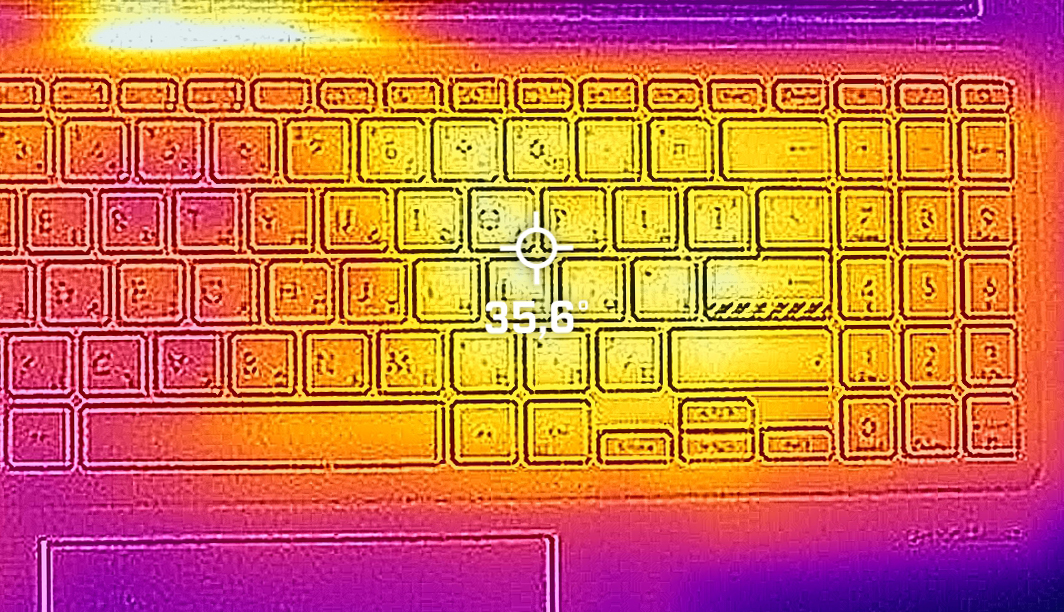
Comfort during full load
It is able to do that without producing too much noise from its single lonely fan. The heat is concentrated in the right part of the keyboard, right above the location of the CPU.
Battery
Now, we conduct the battery tests with the Windows Better performance setting turned on, screen brightness adjusted to 120 nits and all other programs turned off except for the one we are testing the notebook with. Here, you get a 50Wh battery pack. It lasts for 9 hours and 49 minutes of Web browsing, or 8 hours and 12 minutes of video playback.
Luminozitate: 180 nits; Mod Afișaj: SDR
Timp până la Descărcare Completă: Mai mare este mai bun
Pentru a simula condiții reale, am folosit propriul nostru script pentru navigarea automată pe web prin peste 70 de site-uri.
 Author: Alex Iliev
 Author: eng. Kroum NikolovHead of Engineering at LaptopMedia.com, inventor and innovator with 40+ years of experience in electronics and high technology.

![[August 2026] Clasamentul global al celor mai bine vândute plăci grafice pentru laptopuri de pe Amazon – Apple domină clasamentul, iar modelul RTX 5060 de la NVIDIA ocupă primul loc în clasamentul dedicat](https://laptopmedia.com/wp-content/uploads/2026/09/Best-Selling-GPUs-GLOBAL-Top-10-400x225.jpg)
![[August 2026] Clasamentul global al celor mai bine vândute procesoare pentru laptopuri de pe Amazon – Apple domină atât segmentul economic, cât și cel premium: A18 Pro și M5 surclasează Intel și AMD în august 2026](https://laptopmedia.com/wp-content/uploads/2026/09/Best-Selling-CPUs-GLOBAL-Top-10-400x225.jpg)
![[August 2026] Amazon Global: Top 10 cele mai vândute laptopuri – Apple MacBook Neo domină clasamentul, în timp ce laptopurile Windows din gama economică și de mijloc se luptă pentru volumul vânzărilor](https://laptopmedia.com/wp-content/uploads/2026/09/Best-Selling-Laptops-GLOBAL-Top-10-400x225.jpg)
![[August 2026] Cele mai vândute mărci de laptopuri pe Amazon Global – Apple domină în ceea ce privește veniturile, în timp ce HP se află pe primul loc în ceea ce privește varietatea de modele](https://laptopmedia.com/wp-content/uploads/2026/09/GLOBAL-Best-Brands-400x225.jpg)
![[August 2026] Amazon Global: Top 10 cele mai bine vândute laptopuri pentru jocuri – HP Victus 15 ocupă primul loc, în timp ce modelele accesibile domină clasamentul](https://laptopmedia.com/wp-content/uploads/2026/09/Best-Selling-Gaming-Laptops-GLOBAL-Top-10-400x225.jpg)

Driver from the Asus website does not fix the issue with WLAN! Wi-Fi still not working after installing Win 11 and official drivers
I put a new SSD and when formatting with Windows 10 the wifi did not work, so I put a USB to Ethernet adapter and with Windows updates the correct driver was installed, maybe with Win11 it is the same.
Cool review guys 🙂
With the display profiles you are selling. Do they expand the coverage of SRGB at all? As it doesn’t say exactly how they differ except the de
sRGB coverage is a limitation of the hardware. The only thing calibration can do is balance the display if it is skewed towards a certain colour.
why???
“Prepaid cards are not a valid payment method. Please try again with a new payment method.”
why doesnt it has tuv flicker free certification