Lenovo ThinkPad X13 Gen 3 – Top 5 Pros and Cons
 How did Lenovo manage to put an Alder Lake P-series CPU inside a 13-inch machine, while keeping all of its other features intact? The Thinkpad X13 Gen 3 will be a valuable lesson to all other manufacturers, showing that small laptops can be incredibly powerful and keep their rich set of features that keep them on top of the business world. It’s seriously interesting to see how Lenovo manages to keep the chip cool and performing. If it manages to do so, expect the X13 to be a suitable mobile workstation for you to do all types of work.
Today we’re presenting you with LaptopMedia’s top 5 picks about the Lenovo ThinkPad X13 Gen 3.
Lenovo ThinkPad X13 Gen 3: Full Specs / In-depth Review

3 reasons to BUY the Lenovo ThinkPad X13 Gen 3
1. Design and build quality
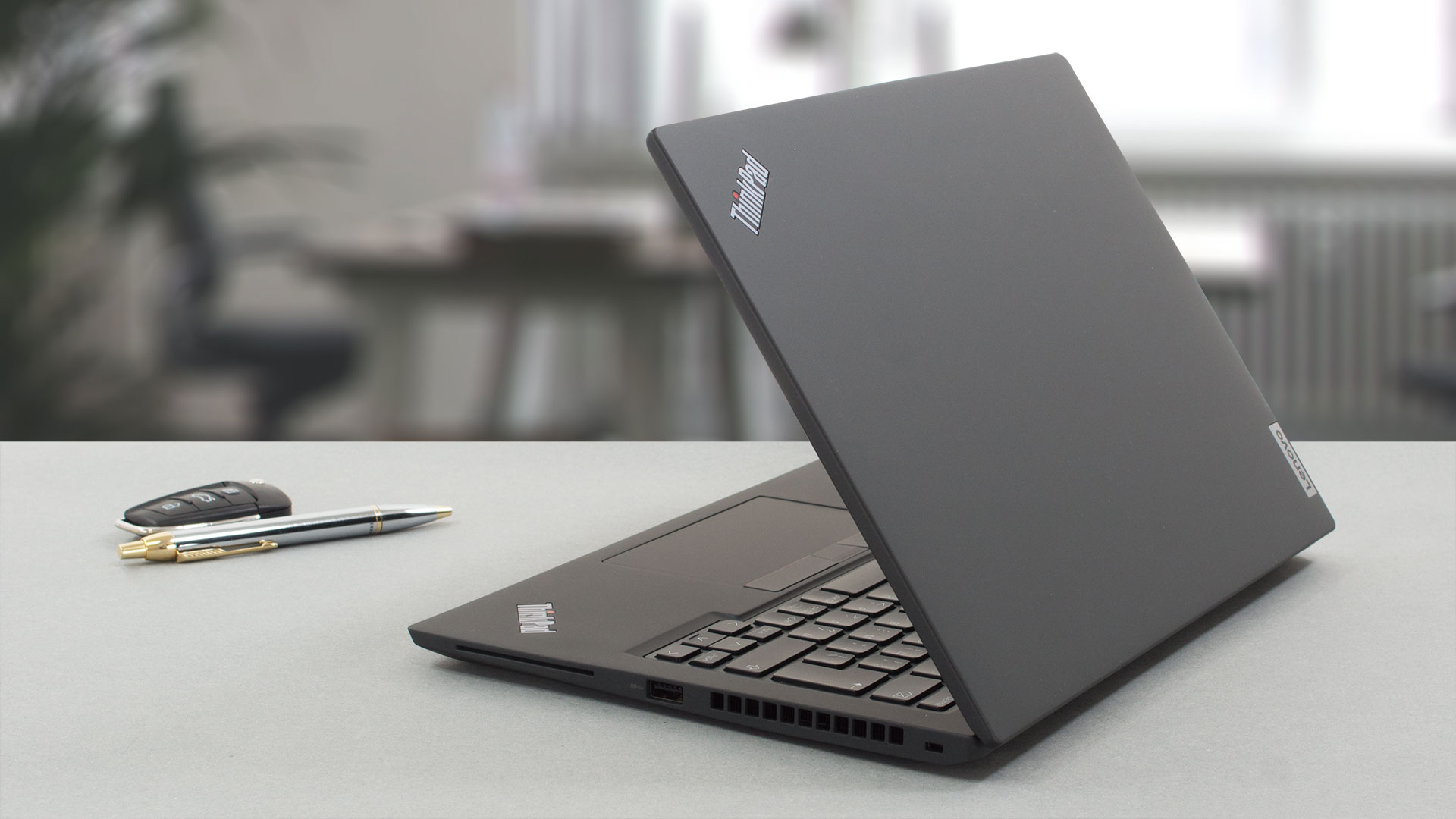
While keeping the design language intact, Lenovo has been making ThinkPads that aren’t pitch black, which really gives the brand a different look and feel. While we still tested the black variant, which consists of aluminum, plastic, carbon fibers, and glass fibers. The Grey variants has an all-aluminum construction, which is kept light and durable. Depending on what model you pick, the weight can fluctuate between 1.20 kg and 1.32 kg. The thickness remains similar in all variants, staying between 18.1 and 18.25 mm.
2. Display quality
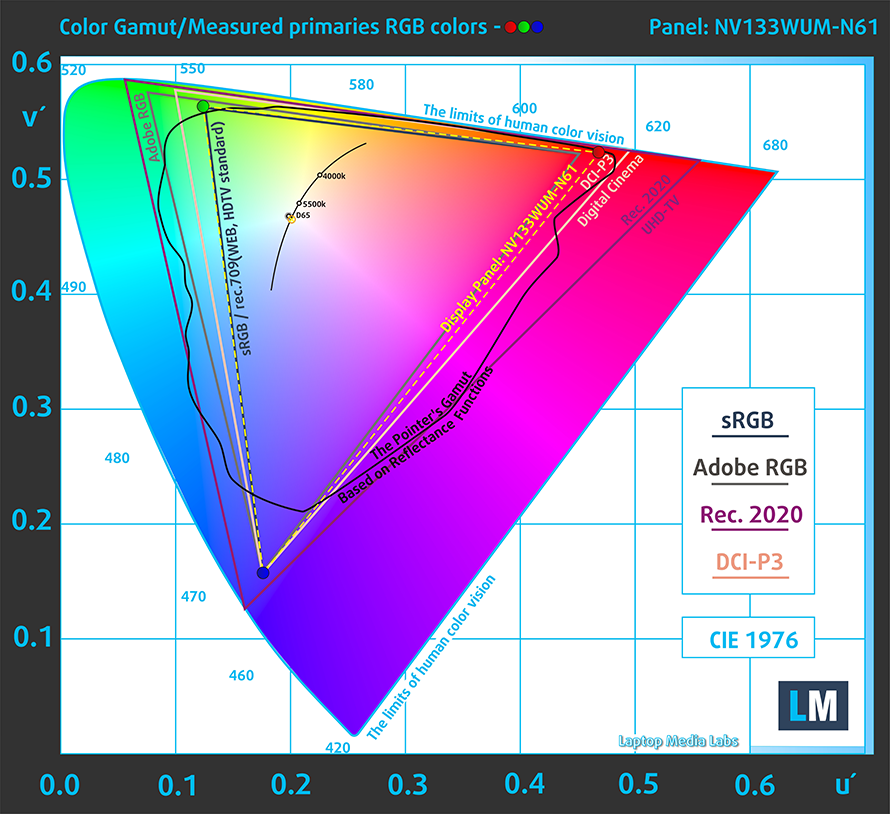
The laptop brings a 16:10 display with a FHD+ resolution. It’s excellent for Creator work, with great viewing angles, a peak brightness of 290 nits, and a constant ratio of 1090:1, which is on the lower side, but blacks will still look good. The panel covers 100% of the sRGB color gamut, providing a punchy and vibrant image.
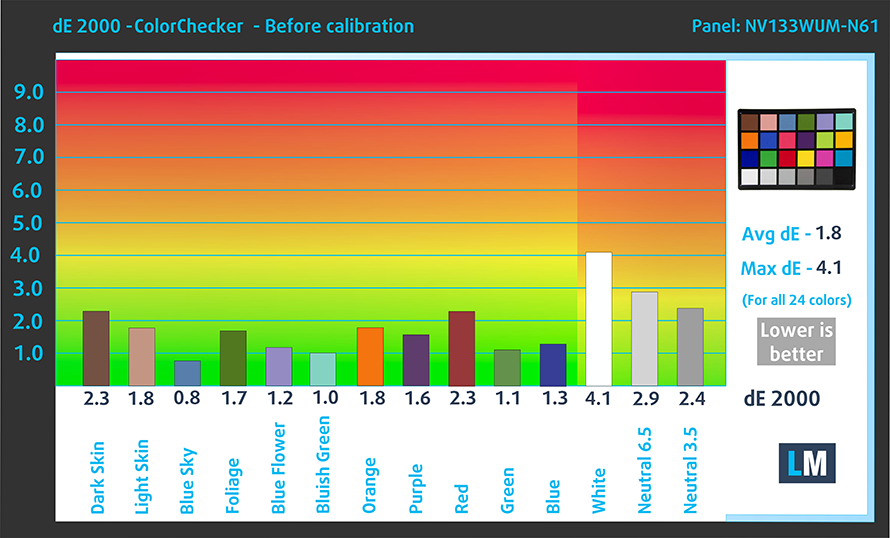
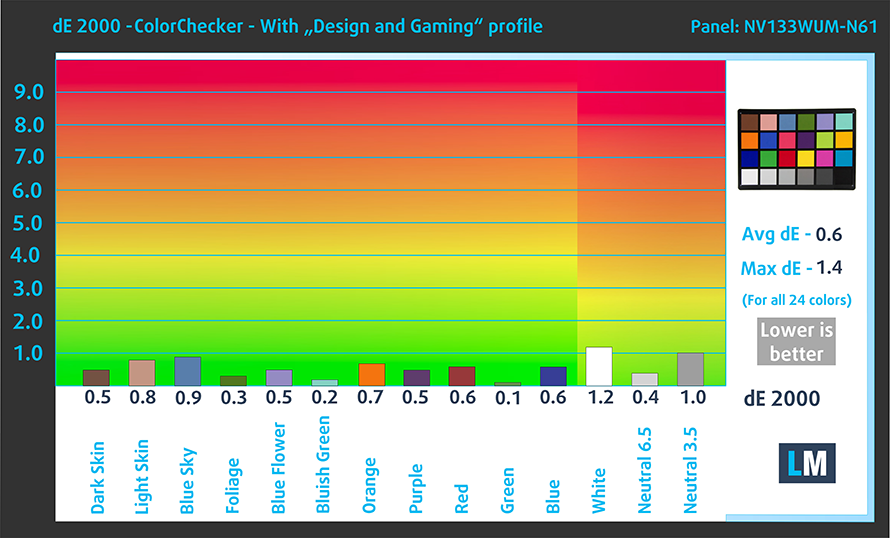
The panel has great color accuracy even with the stock settings, delivering a dE value of 1.8. When we apply our Design and Gaming profile, the dE value drops to 0.6, which is just fantastic. Here are the results of our test with the stock settings (left) and with our profile applied (right).
Buy our profiles
Since our profiles are tailored for each individual display model, this article and its respective profile package are meant for HP EliteBook 830 G9 configurations with 13.3″ BOE NV133WUM-N61 (LEN41A0) (WUXGA, 1920 x 1200) IPS.
*Should you have problems with downloading the purchased file, try using a different browser to open the link you’ll receive via e-mail. If the download target is a .php file instead of an archive, change the file extension to .zip or contact us at [email protected].
Read more about the profiles HERE.
Förutom att du får effektiva och hälsovänliga profiler, stöder du genom att köpa LaptopMedias produkter även utvecklingen av våra labb, där vi testar enheter för att kunna producera så objektiva recensioner som möjligt.

Kontorsarbete
Office Work bör främst användas av användare som tillbringar större delen av tiden med att titta på text, tabeller eller bara surfar. Denna profil syftar till att ge bättre tydlighet och skärpa genom att bibehålla en platt gammakurva (2.20), native färgtemperatur och perceptuellt korrekta färger.

Design och Spel
Denna profil riktar sig till designers som arbetar professionellt med färger, samt för spel och filmer. Design and Gaming tar skärmpanelerna till sina gränser och gör dem så exakta som möjligt i sRGB IEC61966-2-1-standarden för webb och HDTV, vid vitpunkt D65.

Health-Guard
Health-Guard eliminerar den skadliga pulsbreddsmoduleringen (PWM) och minskar det negativa blå ljuset som påverkar våra ögon och vår kropp. Eftersom den är skräddarsydd för varje panel lyckas den hålla färgerna perceptuellt korrekta. Health-Guard simulerar papper så att trycket på ögonen minskar avsevärt.
Få alla 3 profiler med 33% rabatt

3. I/O
The port selection is pretty stacked for a 13-inch device, with two USB Type-A 3.2 (Gen. 1) ports, two Thunderbolt 4 ports, an HDMI 2.0 port, and a 3.5 mm audio jack. There are some optional ports, including a NanoSIM slot and a SmartCard reader.



2 reasons NOT to buy Lenovo ThinkPad X13 Gen 3
1. Upgradeability
The LPDDR5 RAM is soldered on the motherboard, but at least you can get up to 32GB of it, running at 4800MHz. The storage is accessible, thanks to one M.2 PCIe slot for Gen 4 drives.
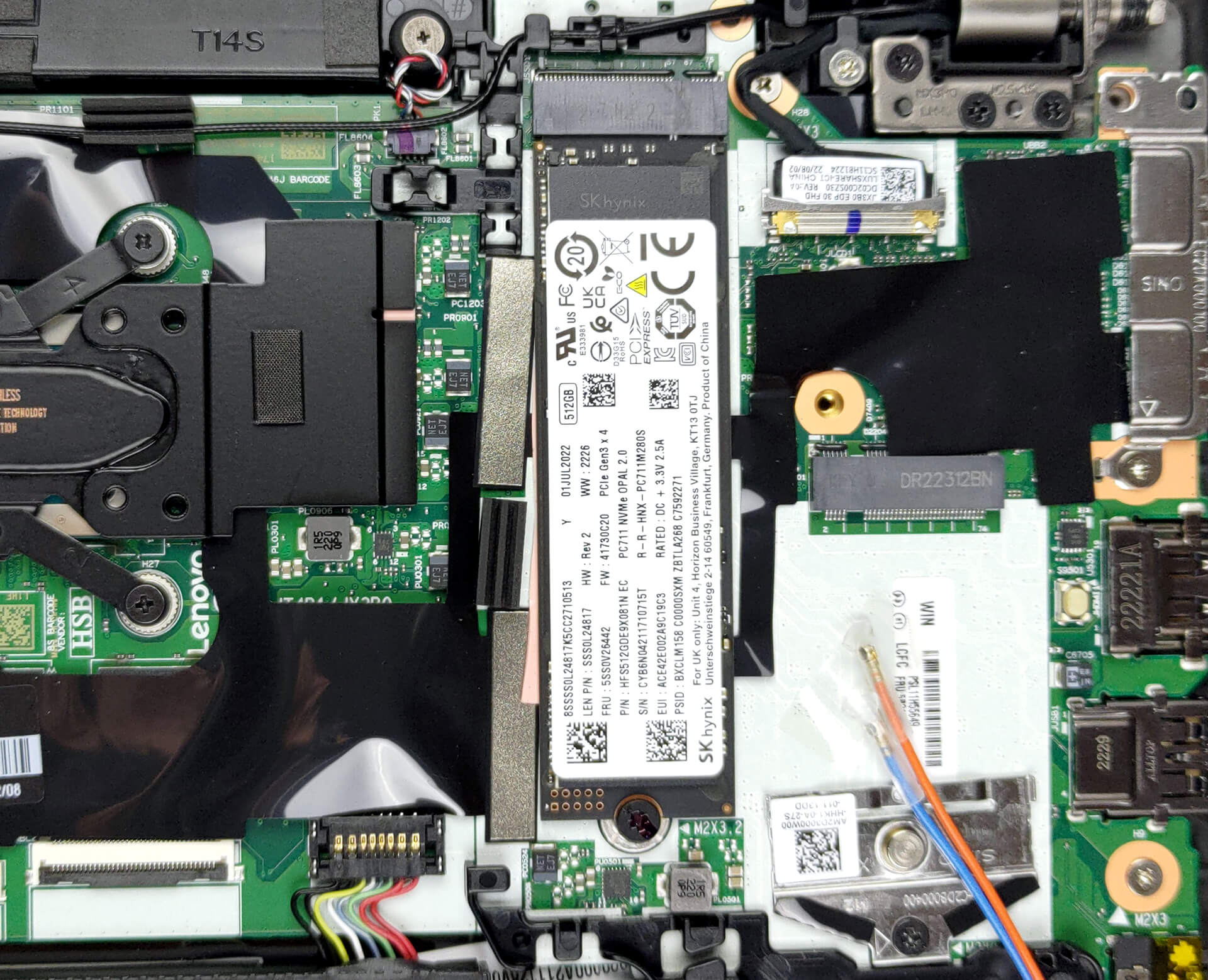
Here is our teardown video, which shows how to access the single M.2 slot for upgrades.
2. Cooling
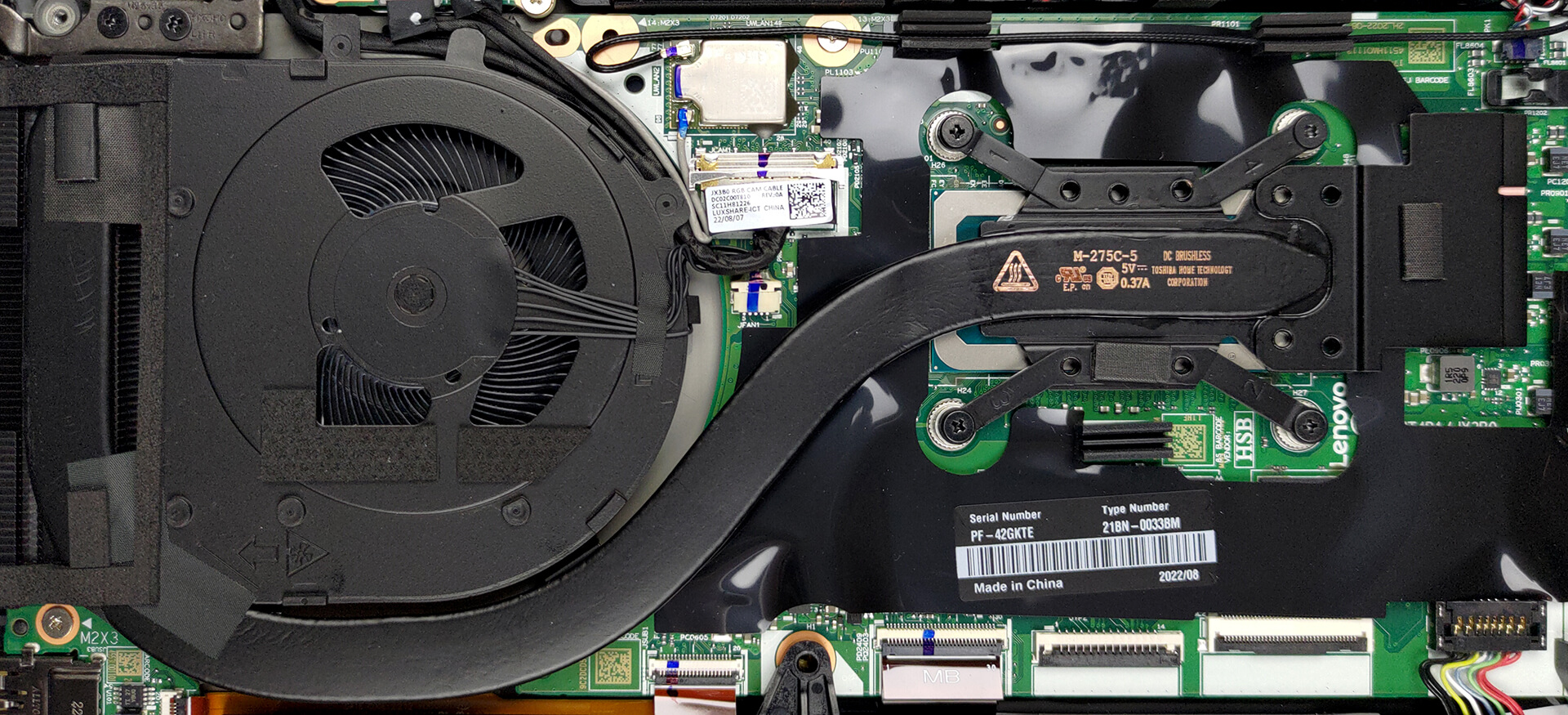
The cooling setup is quite simple, consisting of one heat pipe and one fan. The heat spreader on top of the CPU stretches out to the VRMs and memory.
Max CPU load
| Intel Core i7-1260P (28W TDP) | 0:02 – 0:10 sec | 0:15 – 0:30 sec | 10:00 – 15:00 min |
|---|---|---|---|
| Lenovo ThinkPad X13 Gen 3 | 2.92 GHz @ 2.40 GHz @ 69°C @ 49W | 2.84 GHz @ 2.36 GHz @ 87°C @ 47W | 1.69 GHz @ 1.52 GHz @ 69°C @ 22W |
| Acer Swift 5 (SF514-56T) | 3.23 GHz @ 2.58 GHz @ 82°C @ 61W | 2.35 GHz @ 1.90 GHz @ 86°C @ 42W | 2.27 GHz @ 1.73 GHz @ 72°C @ 30W |
| Dell XPS 13 Plus 9320 | 2.88 GHz @ 2.39 GHz @ 78°C @ 47W | 2.76 GHz @ 2.33 GHz @ 94°C @ 44W | 2.08 GHz @ 1.67 GHz @ 82°C @ 28W |
| Dell Vostro 16 5620 | 2.55 GHz @ 2.14 GHz @ 73°C @ 41W | 2.54 GHz @ 2.12 GHz @ 82°C @ 40W | 1.97 GHz @ 1.61 GHz @ 74°C @ 28W |
| Lenovo ThinkPad T16 Gen 1 | 2.66 GHz @ 2.29 GHz @ 72°C @ 47W | 1.21 GHz @ 1.53 GHz @ 63°C @ 20W | 1.26 GHz @ 1.54 GHz @ 64°C @ 20W |
In short loads, the Core i7-1260P presents high clock speeds. That’s good, as this is most of the work that you’d be doing on the laptop. In continuous high loads, the clock speeds drop, but so does the temperature. Still, the CPU can’t maintain its base wattage for long loads, so with the availability of the U-series processors, you should consider them as well.
Comfort during full load
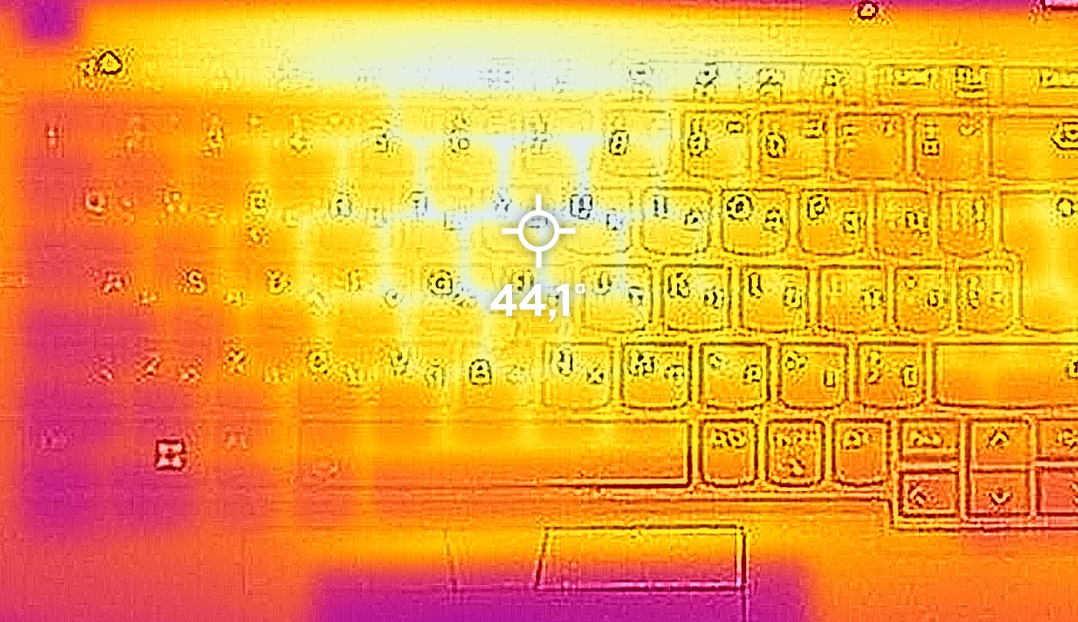
The laptop remains comfortable under full load, with a base hotspot of 44°C, which is a tad warmer than we’d like, however, the lack of noise is what can really sell you on buying the ThinkPad X13.
All Lenovo ThinkPad X13 Gen 3 configurations:
 Author: Severin Kolakov

![[Juni 2026] De mest sålda bärbara datormärkena på Amazon Global – Apples oöverträffade dominans i antal enheter och omsättning](https://laptopmedia.com/wp-content/uploads/2026/07/GLOBAL-Best-Brands-400x225.jpg)
![[Juni 2026] Amazon Global: De 10 mest sålda bärbara datorerna – Apples nya MacBook Neo stormar in på första plats och omformar marknaden med sitt överkomliga pris](https://laptopmedia.com/wp-content/uploads/2026/07/Best-Selling-Laptops-GLOBAL-Top-10-400x225.jpg)
![[Juni 2026] Amazon Global: De 10 mest sålda spelbärbara datorerna – Acers Nitro V 16S AI dominerar försäljningen, medan ASUS ligger i topp när det gäller den totala omsättningen](https://laptopmedia.com/wp-content/uploads/2026/07/Best-Selling-Gaming-Laptops-GLOBAL-Top-10-400x225.jpg)
![[Juni 2026] Global ranking över de mest sålda bärbara grafikkorten på Amazon – NVIDIA RTX 5060 är det mest sålda dedikerade grafikkortet](https://laptopmedia.com/wp-content/uploads/2026/07/Best-Selling-GPUs-GLOBAL-Top-10-400x225.jpg)
![[Juni 2026] Global ranking över de mest sålda bärbara datorprocessorerna på Amazon – Apple M5 dominerar, AMD Ryzen 7 260 tar en betydande andel i premiumsegmentet](https://laptopmedia.com/wp-content/uploads/2026/07/Best-Selling-CPUs-GLOBAL-Top-10-400x225.jpg)
