HP Pavilion x360 15 (15-cr0000) display profiles – Quality and Health impact results
 The new HP Pavilion x360 15 (in-depth review) is one of the most popular laptops on the market. Its price is great, it covers all the essentials you may need and it’s 2-in-1 convertible which is handy in many situations.
So is there a catch? Yes, it turned out that it has many catches and one of them is the screen quality. HP used the AUO B156HAN02.2 (AUO22ED) panel which barely covers half of the sRGB color gamut – just 53% (CIE1976). The color deviations are literally off the charts (see below), even our Design & Gaming profile didn’t lower the average DeltaE below 4.0 (values below 1.0 are recommended for color-sensitive work).
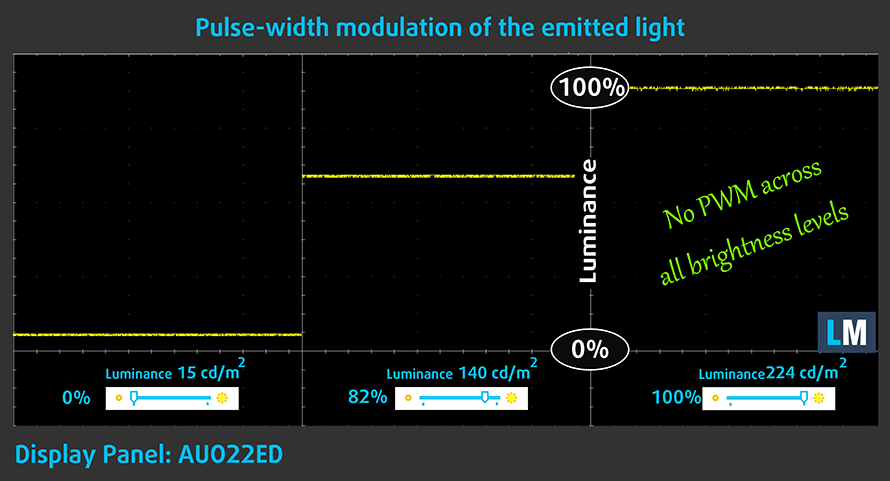
However, if you don’t care for the color accuracy, there are some good news here – the display doesn’t use harmful PWM for controlling the brightness and the contrast ratio is good (1200:1) which makes the screen comfortable for your eyes. If you want to protect your body further, check out our Health-Guard profile.
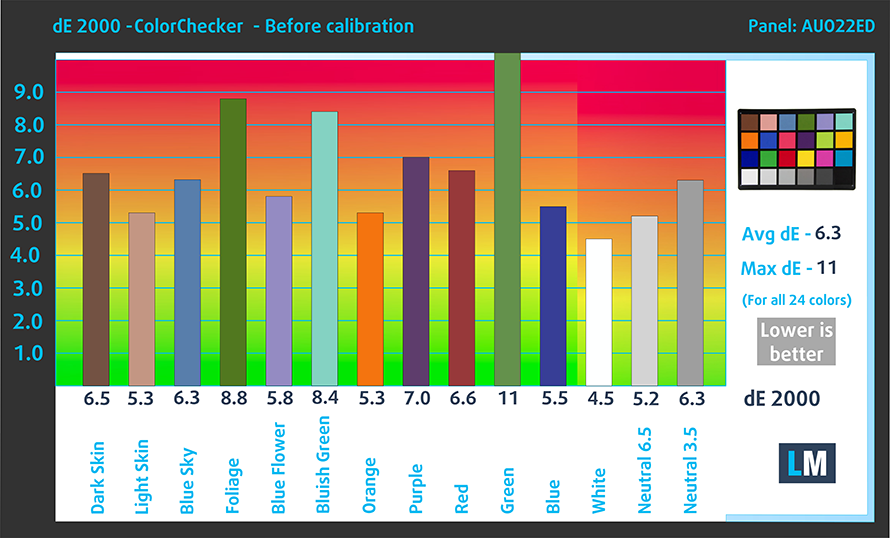
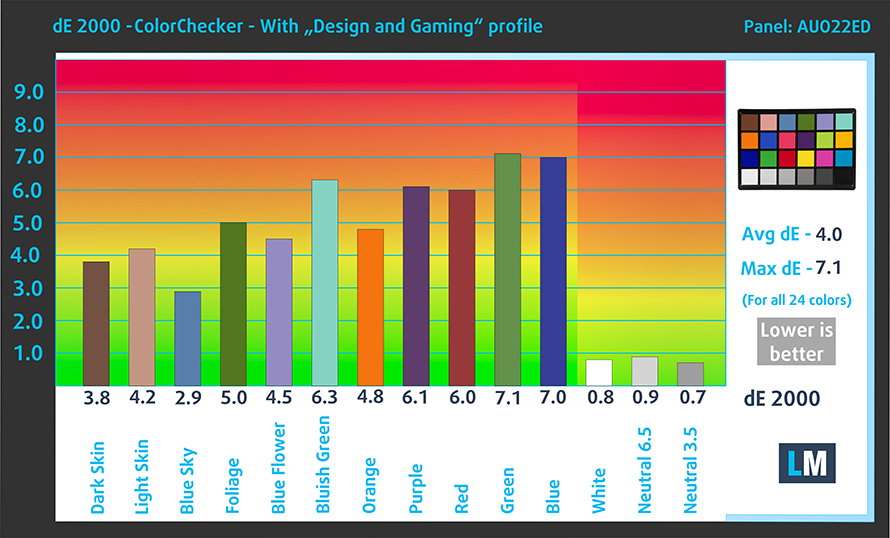
Since our profiles are tailored for each individual display model, this article and its respective profile package are meant for the HP Pavilion x360 15 (15-cr0000) with a 15.6″ AUO B156HAN02.2 (AUO22ED) panel with Full HD (1920 x 1080) resolution. You can check out all configurations here:
https://laptopmedia.com/series/hp-pavillion-x360-15-15-cr0000/
*Should you have problems with downloading the purchased file, try using a different browser to open the link you’ll receive via e-mail. If the download target is a .php file instead of an archive, change the file extension to .zip or contact us at [email protected].
En plus de recevoir des profils efficaces et respectueux de la santé, en achetant les produits de LaptopMedia, vous soutenez également le développement de nos laboratoires, où nous testons des appareils afin de produire les critiques les plus objectives possibles.

Travail de bureau
Office Work devrait être utilisé principalement par les utilisateurs qui passent la plupart de leur temps à regarder des textes, des tableaux ou simplement à naviguer. Ce profil vise à offrir une meilleure distinction et clarté en maintenant une courbe gamma plate (2.20), une température de couleur native et des couleurs fidèles à la perception.

Design et Gaming
Ce profil s'adresse aux designers qui travaillent avec les couleurs de manière professionnelle, ainsi qu'aux jeux et aux films. Design and Gaming pousse les dalles d'affichage à leurs limites, les rendant aussi précises que possible dans la norme sRGB IEC61966-2-1 pour le Web et la TVHD, au point blanc D65.

Health-Guard
Health-Guard élimine la Modulation de Largeur d'Impulsion (PWM) nocive et réduit la lumière bleue négative qui affecte nos yeux et notre corps. Comme il est adapté à chaque dalle, il parvient à conserver des couleurs fidèles à la perception. Health-Guard simule le papier, ce qui réduit considérablement la pression sur les yeux.
Obtenez les 3 profils avec 33% de réduction

Office Work
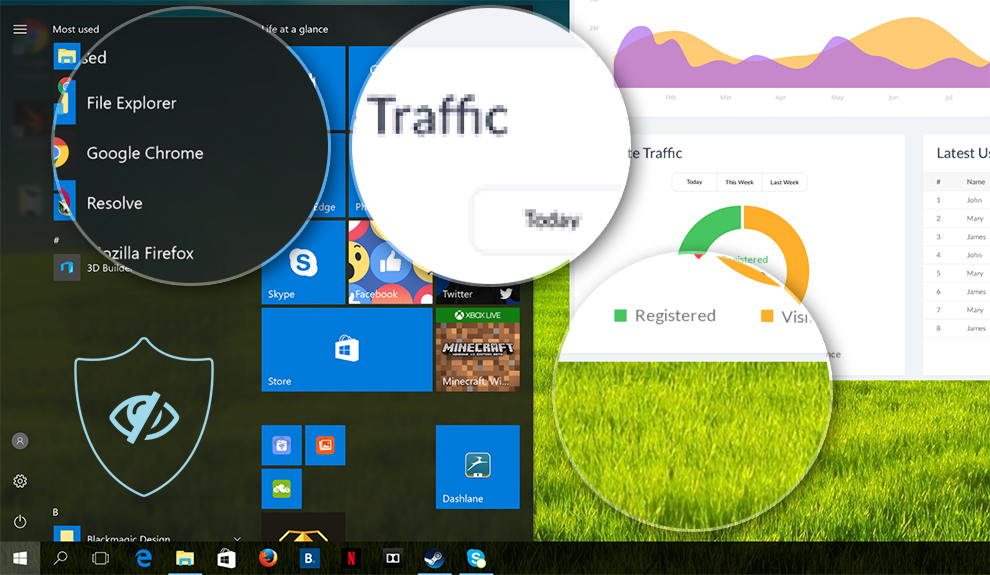
This profile aims to deliver better distinctness and clarity by keeping a flat gamma curve (2.20), native color temperature and perceptually accurate colors.
Left: No Profile | Drag the slider to see the difference | Right: Office Work Profile
Design and Gaming
Left: No Profile | Drag the slider to see the difference | Right: Design & Gaming Profile


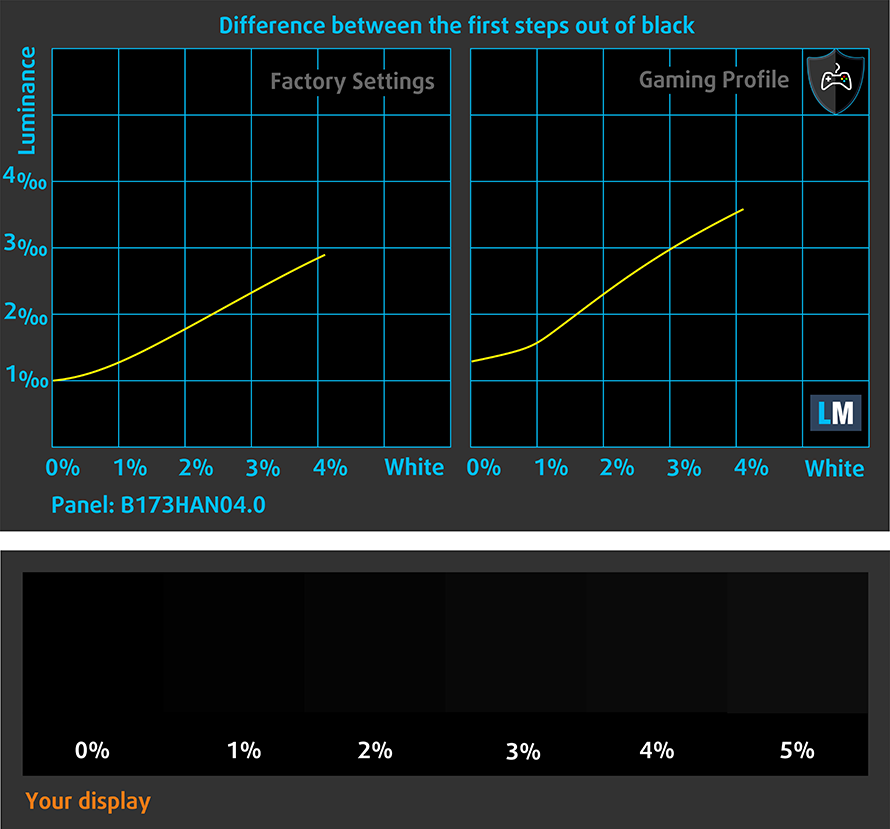
This profile is aimed at designers who work with colors professionally, and for games and movies as well. “Design and Gaming” takes display panels to their limits, making them as accurate as possible in the sRGB IEC61966-2-1 standard for Web and HDTV, at white point D65.
It also regulates the first steps out of black so you can have even faster reflexes when playing in dark virtual environments… or just see everything in the darkest scenes in movies.
Left: No Profile | Drag the slider to see the difference | Right: Design & Gaming Profile


Health-Guard profile
Left: No Profile | Drag the slider to see the difference | Right: Health-Guard Profile


As for the Health-Guard profile, it reduces the blue light impact and eliminates PWM.
Pro Tip: As the Health-Guard profile simulates paper and has as accurate as possible colors, it could be a great tool for prepress designers!
Installing and using the profiles
You can find a guide for installing and using the profiles HERE.
HP Pavilion x360 15 (15-cr0000) configurations
 Author: Simeon NikolovEditor-in-Chief at LaptopMedia.com with 20+ years of experience in testing and analyzing laptops and mobile devices.

![[Août 2026] Amazon Global : le top 10 des ordinateurs portables les plus vendus – L’Apple MacBook Neo domine le classement tandis que les portables Windows d’entrée et de milieu de gamme se disputent les parts de marché](https://laptopmedia.com/wp-content/uploads/2026/09/Best-Selling-Laptops-GLOBAL-Top-10-400x225.jpg)
![[Août 2026] Les marques d’ordinateurs portables les plus vendues sur Amazon Global : Apple domine en termes de chiffre d’affaires tandis que HP se distingue par la diversité de ses modèles](https://laptopmedia.com/wp-content/uploads/2026/09/GLOBAL-Best-Brands-400x225.jpg)
![[Août 2026] Amazon Global : le top 10 des ordinateurs portables de jeu les plus vendus – Le HP Victus 15 s’empare de la première place alors que les modèles abordables dominent le classement](https://laptopmedia.com/wp-content/uploads/2026/09/Best-Selling-Gaming-Laptops-GLOBAL-Top-10-400x225.jpg)
![[August 2026] Best-Selling Laptop Brands on Amazon Japan – Apple Dominates Market Share and Revenue Led by Strong Unit Sales](https://laptopmedia.com/wp-content/uploads/2026/09/CO.JP-Best-Brands-1-400x225.jpg)
![[August 2026] Best-Selling Laptop Brands on Amazon USA – Apple Dominates Market Revenue and Volume Despite Lower Model Diversity](https://laptopmedia.com/wp-content/uploads/2026/09/COM-Best-Brands-1-400x225.jpg)
