ASUS N552VX review – not the update we’ve expected but adds some essential features
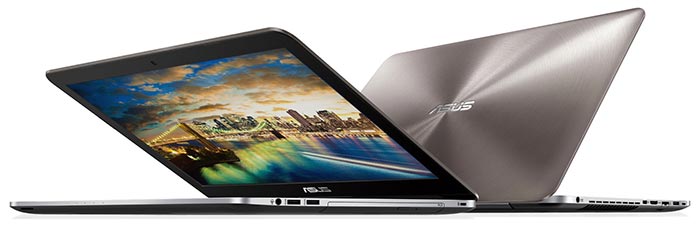
We really doubt that the N series multimedia notebooks from ASUS need any introduction as they have become one of the best value solutions on the market for the past several years. Subject our review, this time, is the newly released ASUS N552VX – a direct successor to the well-known N551VW. We see some decent updates on the new machine but also a lot of room for improvement as well.
We are left with somehow mixed feelings about the new laptop because the gorgeous design language and sturdy chassis remain roughly the same but fails to meet our previous expectations from the N551VW in terms of price/performance ratio. The new N552VX costs the same as its older sibling but offers a slower GPU while adding a few notable upgrades. For example, the mSATA slot is swapped for a super-fast M.2 PCIe NVMe-capable connector and the USB-C 3.1 makes an appearance as well. What else? Find out in our detailed review below.
Keep in mind, though, that there are some configurations on the market featuring GTX 960M GPU but prepare to pay a few extra bucks for the more powerful graphics chip.
You can find some of the available configurations here: http://amzn.to/2coQZjh
Contents
Retail package
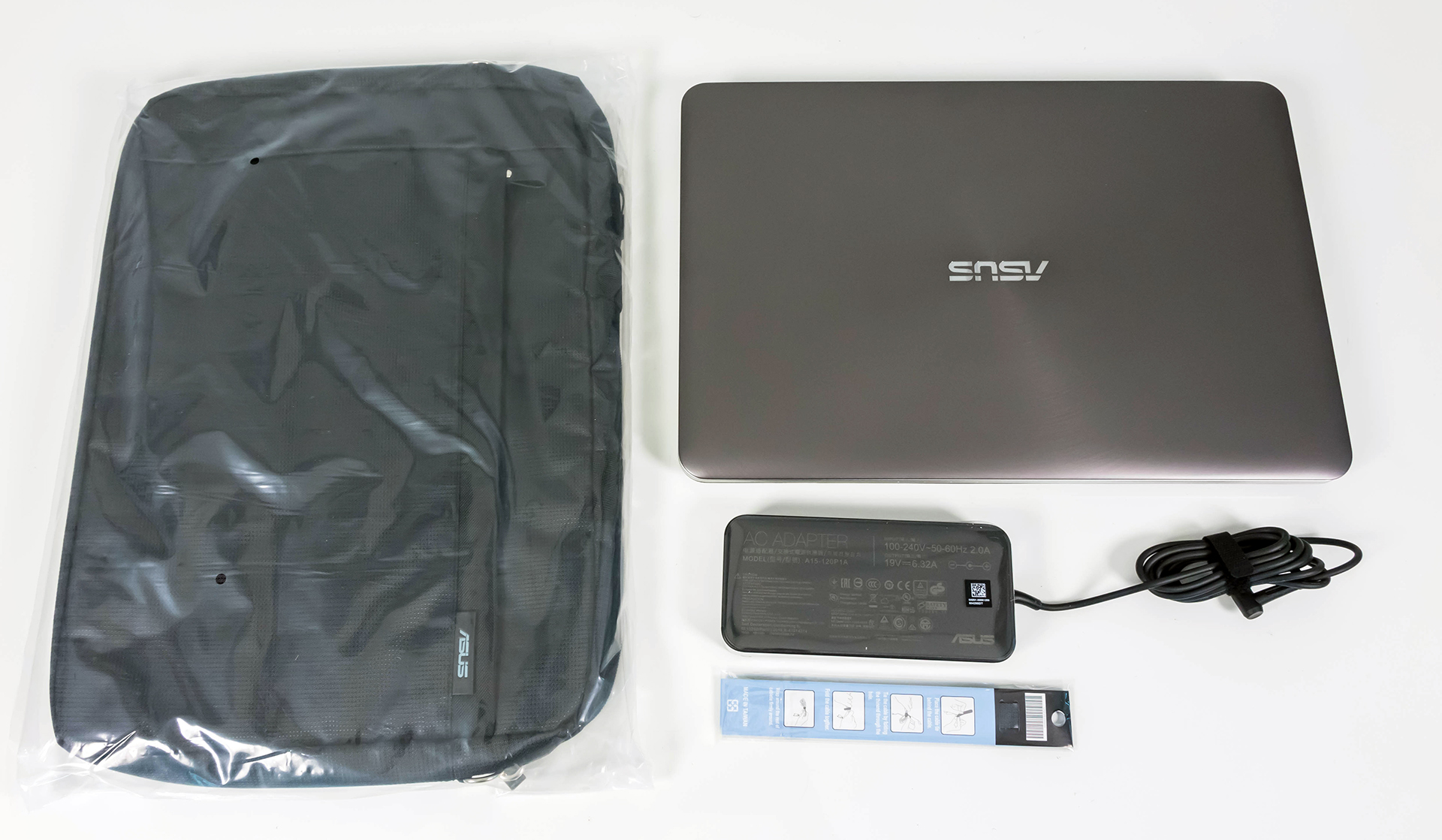
Unlike last year’s model, the N552VX doesn’t ship with the external subwoofer but instead offers a carrying bag in the big black box. There are also the usual user manuals, cable tie, AC charger, power cord DVD with drivers and the laptop itself.
Design and construction
While the design remains roughly the same, which is a good thing in our opinion, there are a few changes worth mentioning. For starters, the notebook is much lighter than before (from 2.7 kg to 2.53 kg) and slightly slimmer (from 31 mm to 29.9 mm), although the latter is barely noticeable. Also, the N552VX is just a downsized version of the previously reviewed N752VX.
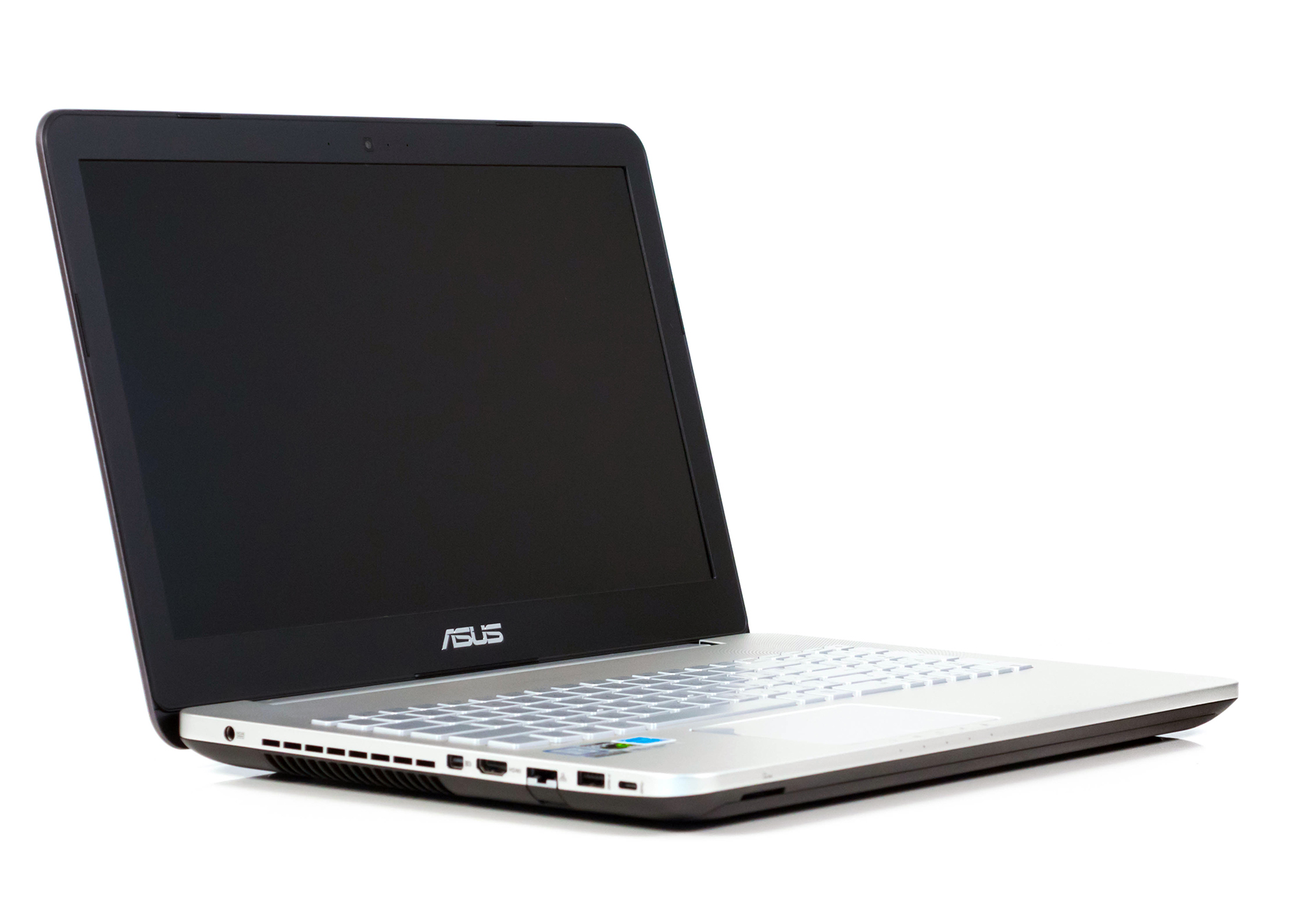

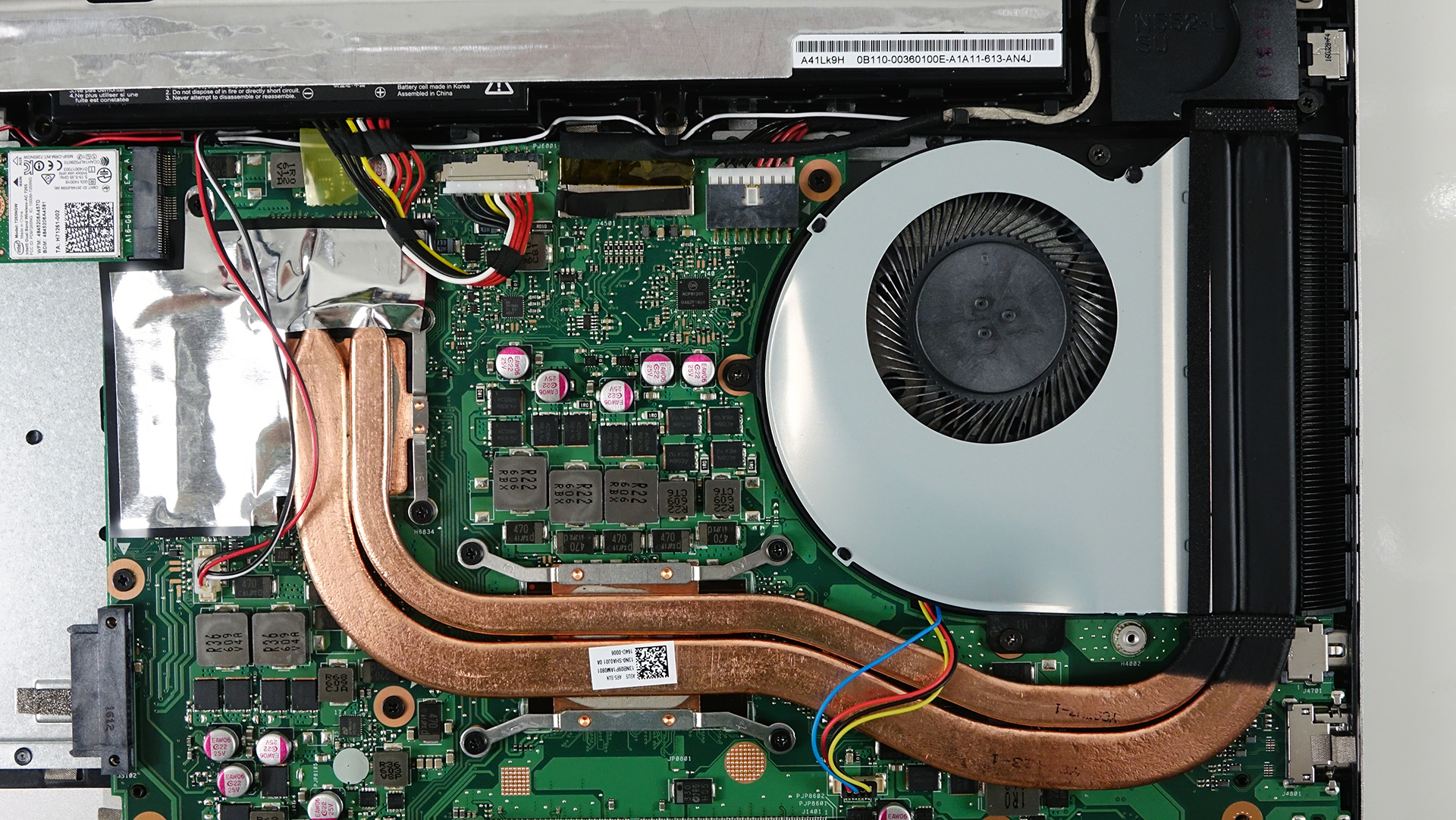
Let’s start with the lid. It’s again made of brushed aluminum and ASUS’ LED-illuminated logo in the middle and feels a bit flexible at the same time. Still, it’s not enough to pose any problem. When opening the lid, we felt the tightly pulled hinge, which, by the way, replaces the double hinge design from the previous version. Even though the hinge feels pretty tight, it’s loose enough to offer smooth opening with one hand. As for the bottom part of the notebook, it’s again made of black plastic giving that notion of a slimmer design but when you hold it in your hand, that notion fades away. We would also like to note that the M.2 SSD slot isn’t accessible via the provided service lid and the battery isn’t user-replaceable anymore. A teardown is required to access both components.
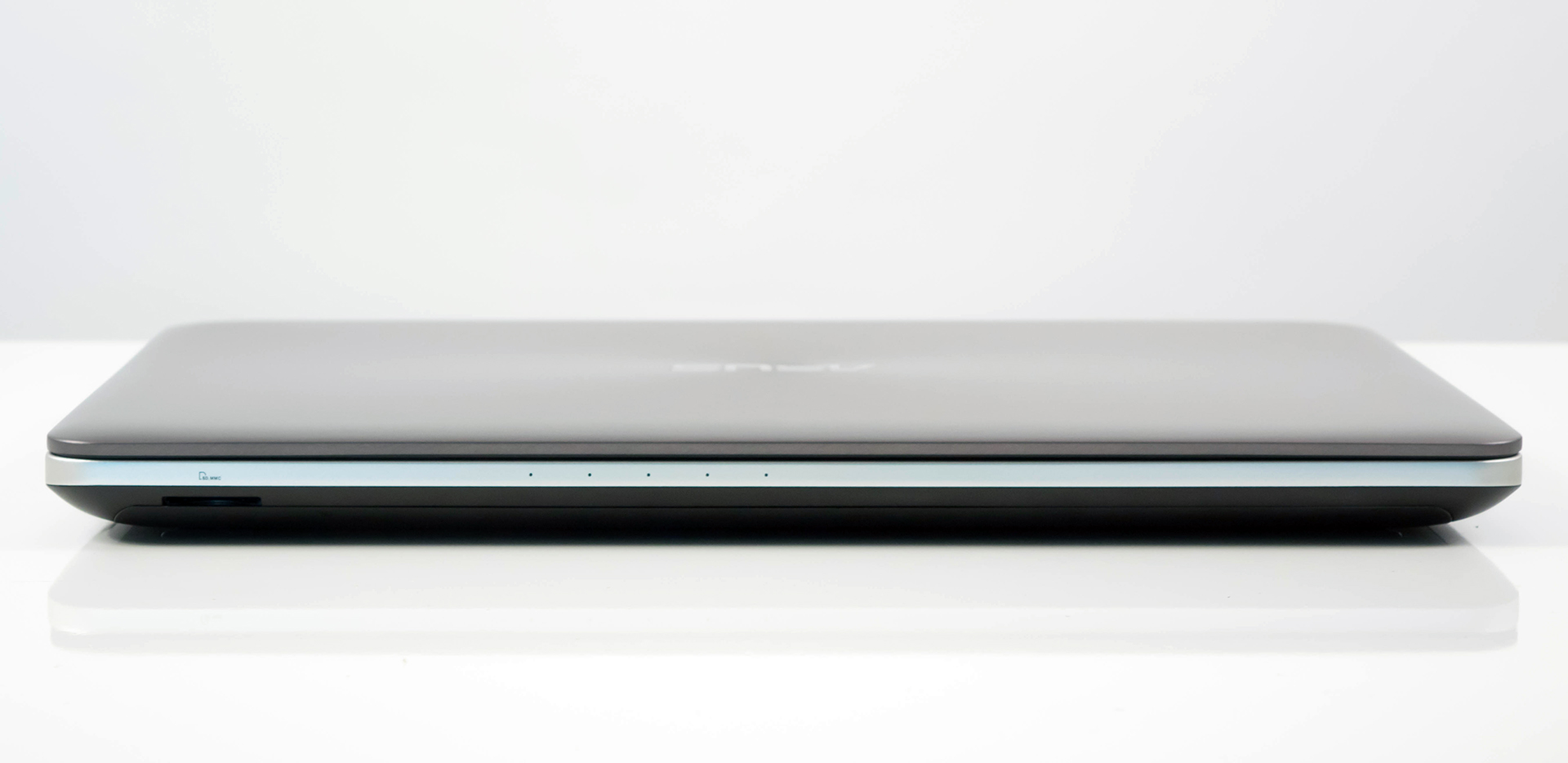

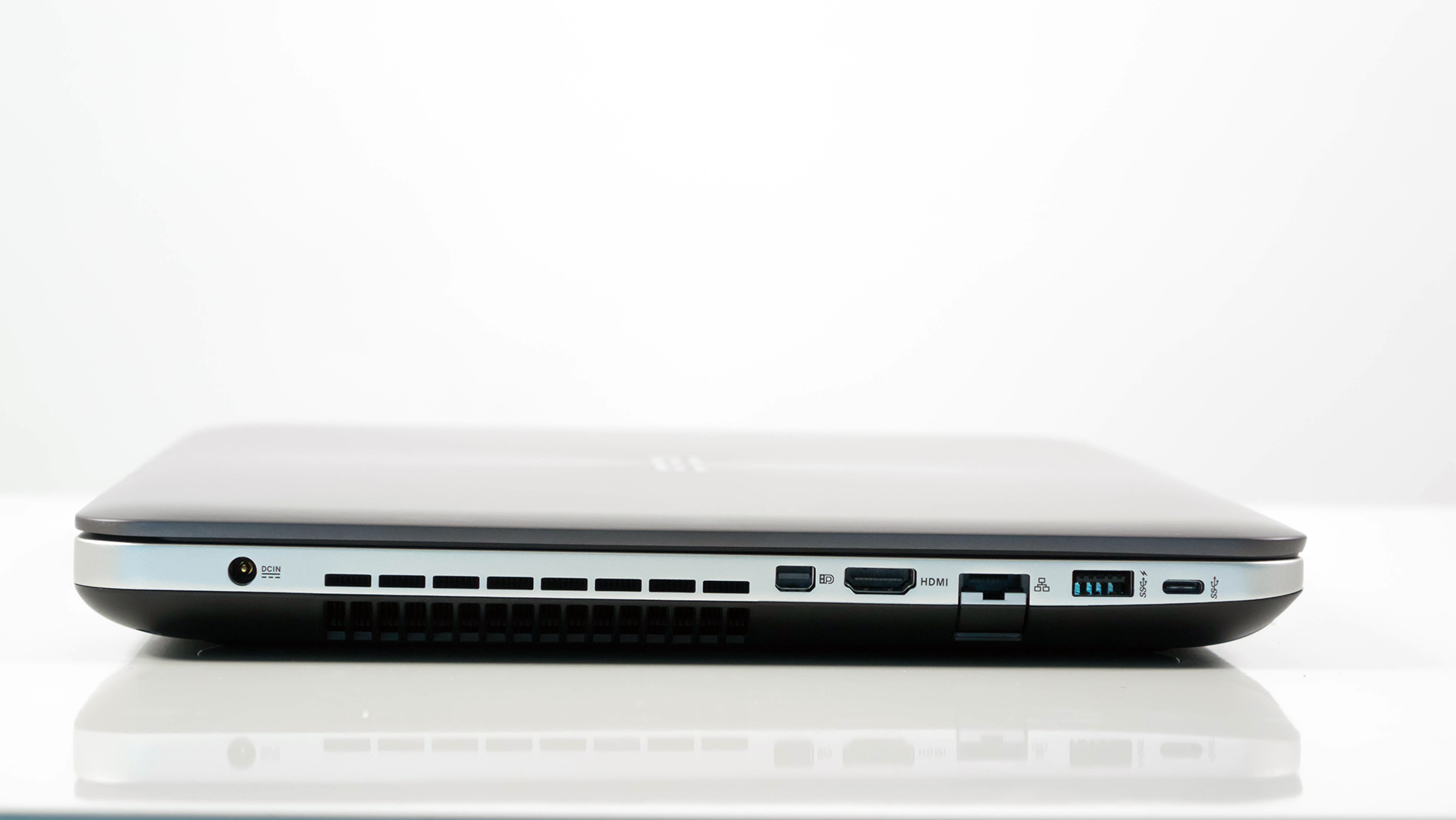
The sides are now flat with no curves and you can clearly see where the bottom piece and interior plate meet. We are happy with the port distribution and all the variety of ports the notebook has to offer. The left side accommodates the DC charging port, the main exhaust vent, mini DisplayPort, HDMi, LAN, USB 3.0 and USB-C 3.1 connector. As for the right side, it holds the other two USB 3.0 ports, the 3.5 mm audio jack and the optical drive. So if you have a lot of peripherals attached to the machine, they won’t probably get in the way because most of them will be connected on the left side while keeping the right side clear for your mouse. And if you are wondering where the SD card reader is, it’s located at the front near the left edge.
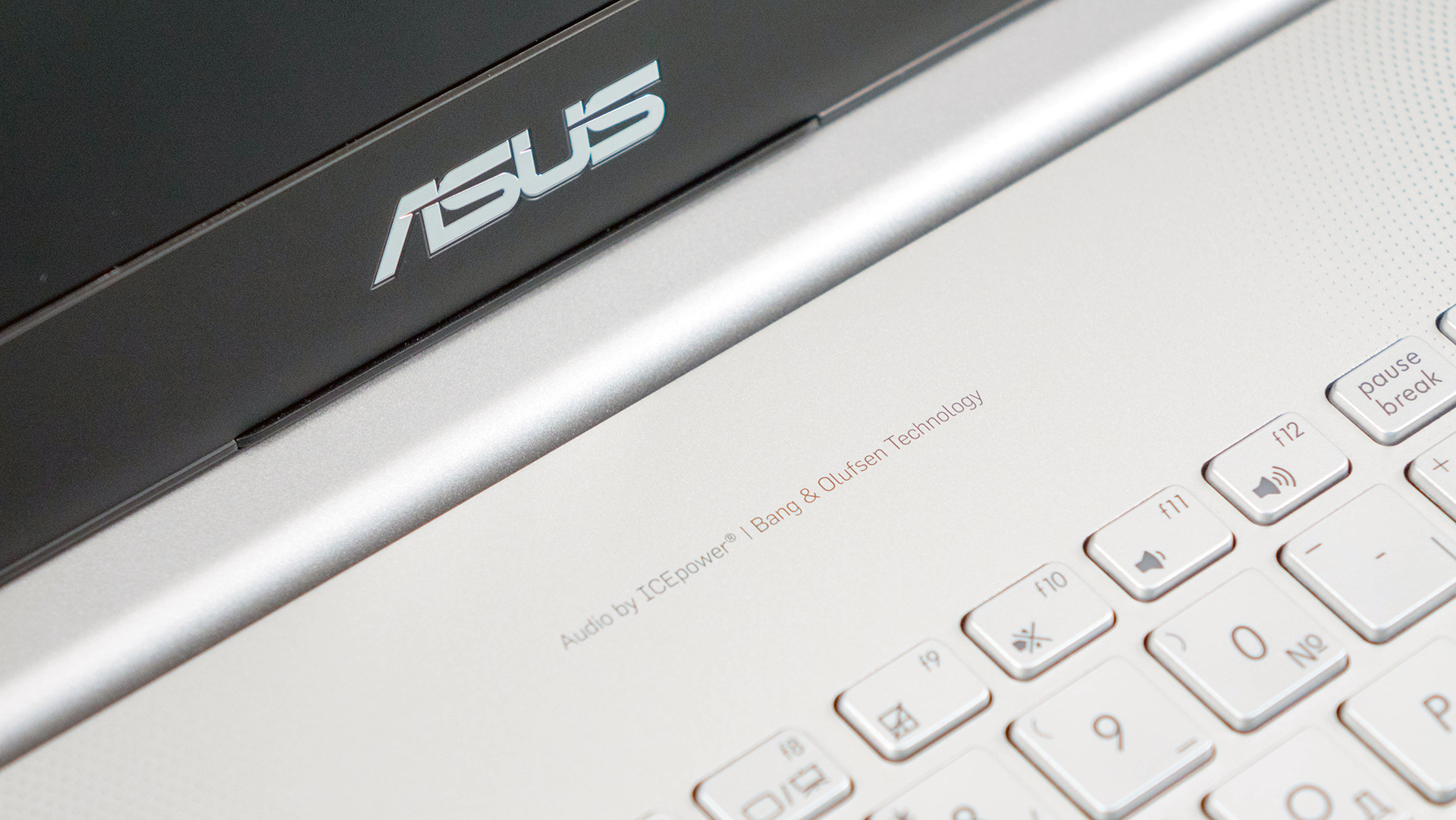

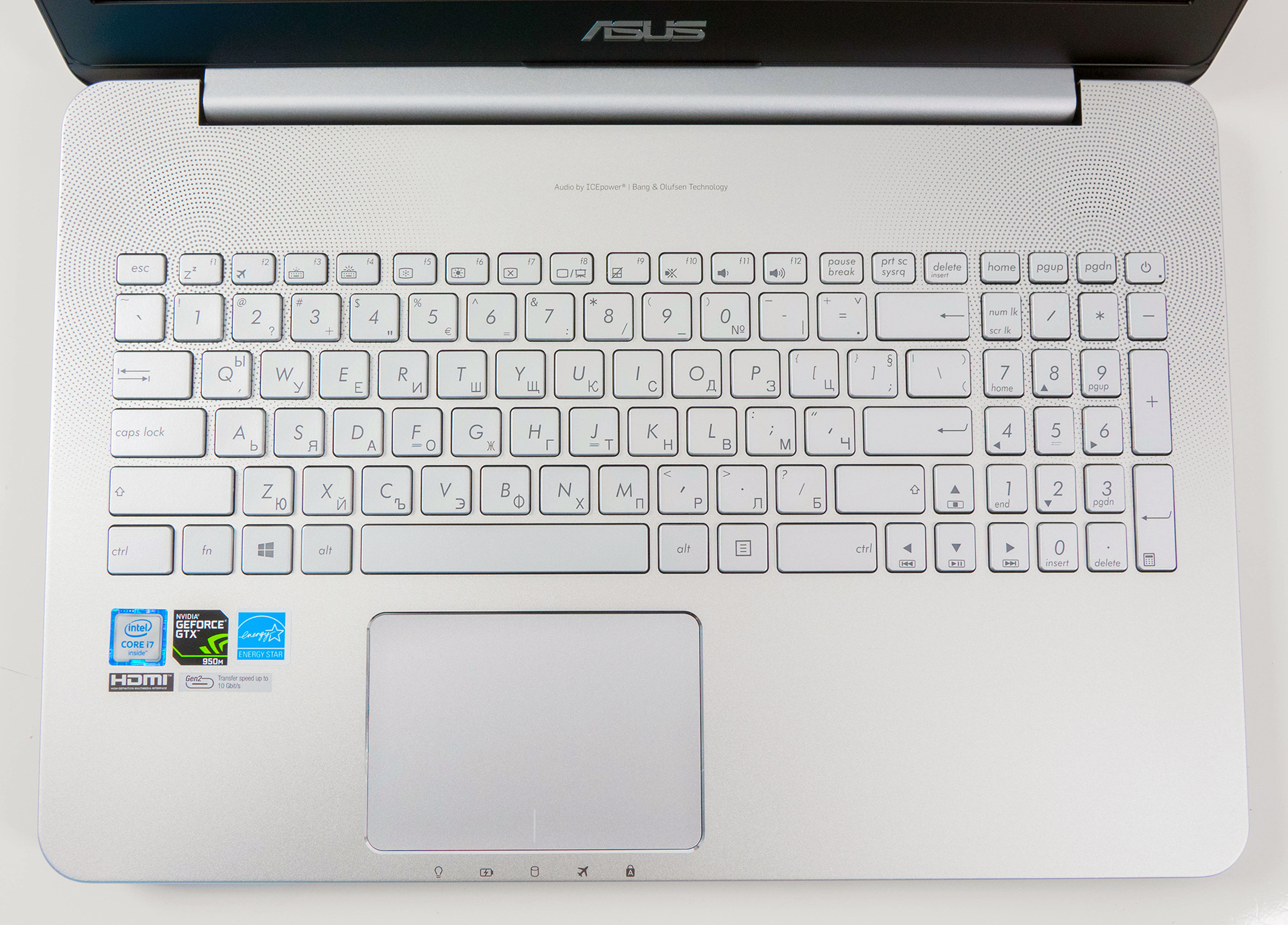
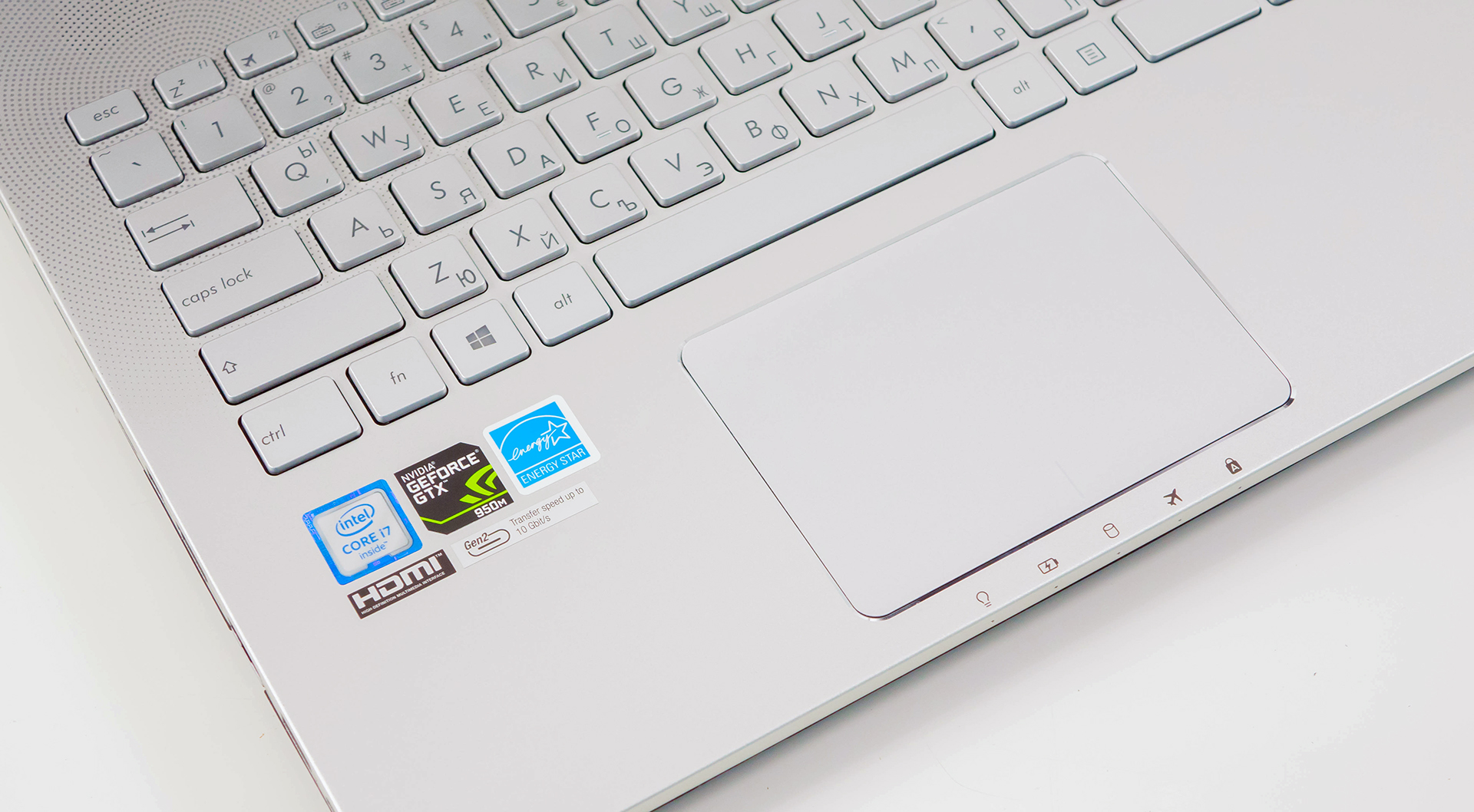
The interior makes it a bit tricky to describe. The feel of the keyboard tray is metallic, it’s cold to touch but we aren’t quite convinced. It feels like anodized aluminum, although we can’t really put our finger on it. Anyway, it sure does feel nice, sturdy and doesn’t attract fingerprints and smudges easily. The Bang & Olufsen stereo loudspeakers are located near the hinge perfectly blending with the interior design. As far as the keyboard goes, it’s just as we remembered it – decent key travel, nice feedback and feel, reasonable key spacing, comfortable to use. We felt that the keys are a bit stiff at the beginning of the travel but it’s something you actually get use to it and doesn’t get in the way. And, of course, the touchpad is just flawless. It feels clicky, responsive and accurate.
All in all, there are just minor improvements over the last generation with the most notable one being the weight reduction, but why change something that’s clearly working? Still, the notebook will have a hard time competing against other multimedia alternatives on the market with the same hardware but better dimensions and weight. The Lenovo Ideapad 700 comes to mind at first with almost identical specs but considerably lighter and way thinner than the N552VX. We do appreciate that the new N552VX is slightly more portable than before but can still be considered as a bit too hefty. At least the laptop compensates in terms of rigidness.
Disassembly, maintenance and upgrade options
The full disassembly of the notebook may take some time but the service lid provides access to the most commonly upgraded hardware like RAM and storage. However, if you want to upgrade or simply install an M.2 SSD stick, you will have to go through the whole trouble of disassembling the machine to reach the slot.
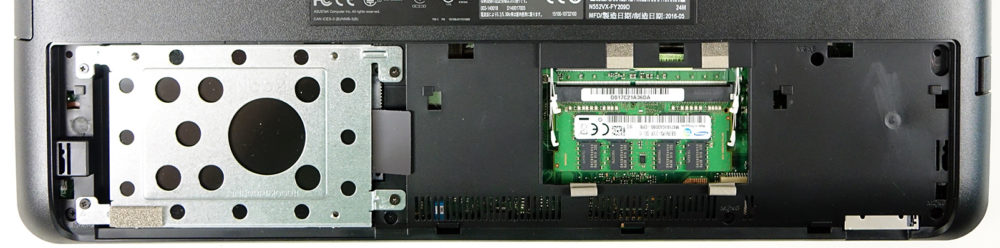
Storage upgrade options – 2.5-inch HDD, M.2 slot
The notebook comes with one 2.5-inch 1TB HDD and a free (depending on your configuration, of course) M.2 SSD slot that supports 2280 drives from SATA to PCIe NVMe. This is a rather big upgrade over its predecessor, which offered the outdated mSATA connectivity.
| Slot | Unit | Upgrade price |
|---|---|---|
| M.2 slot | Free | Upgrade options |
| 2.5-inch HDD/SSD | Toshiba 1TB HDD | Upgrade options |
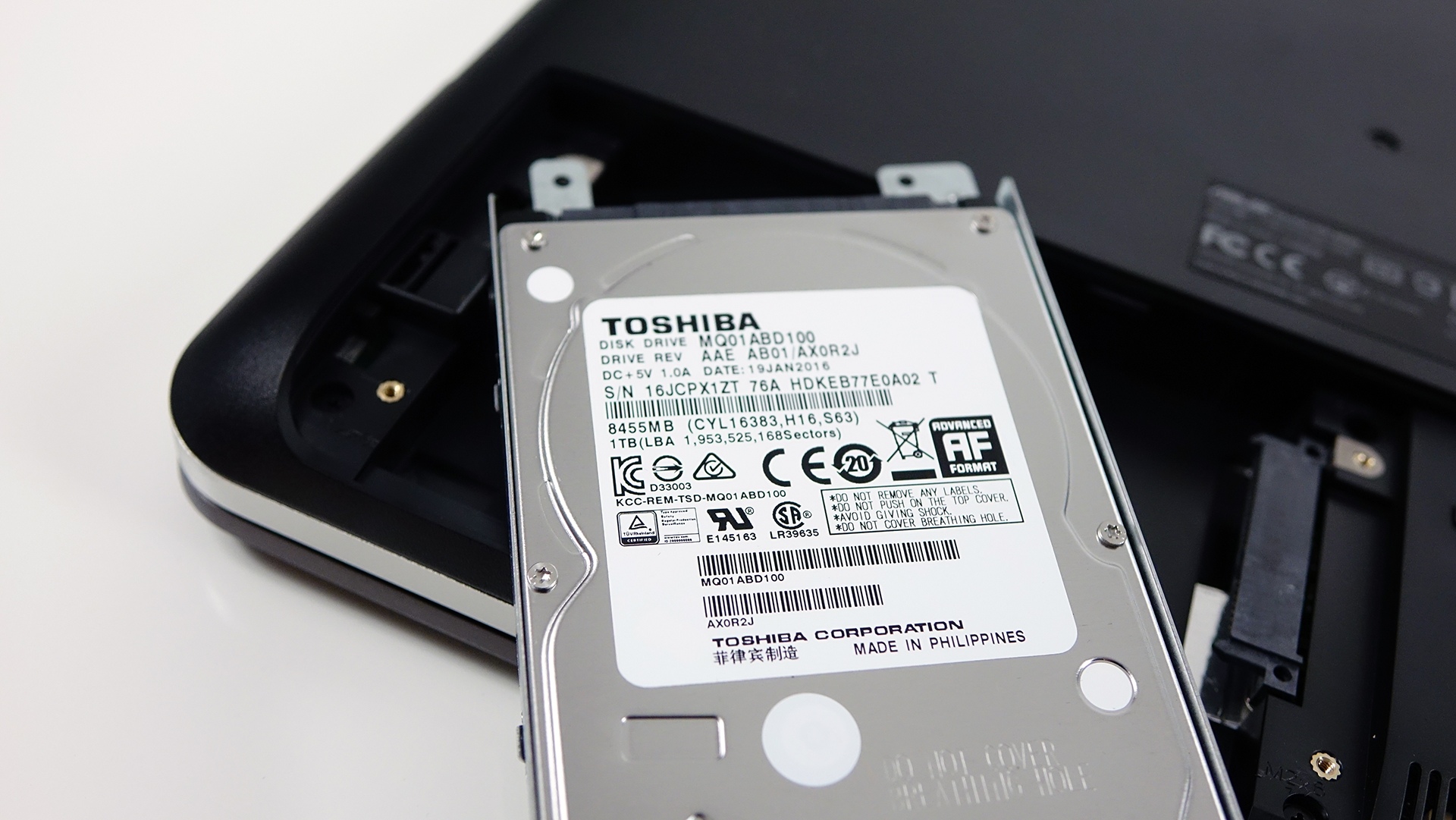
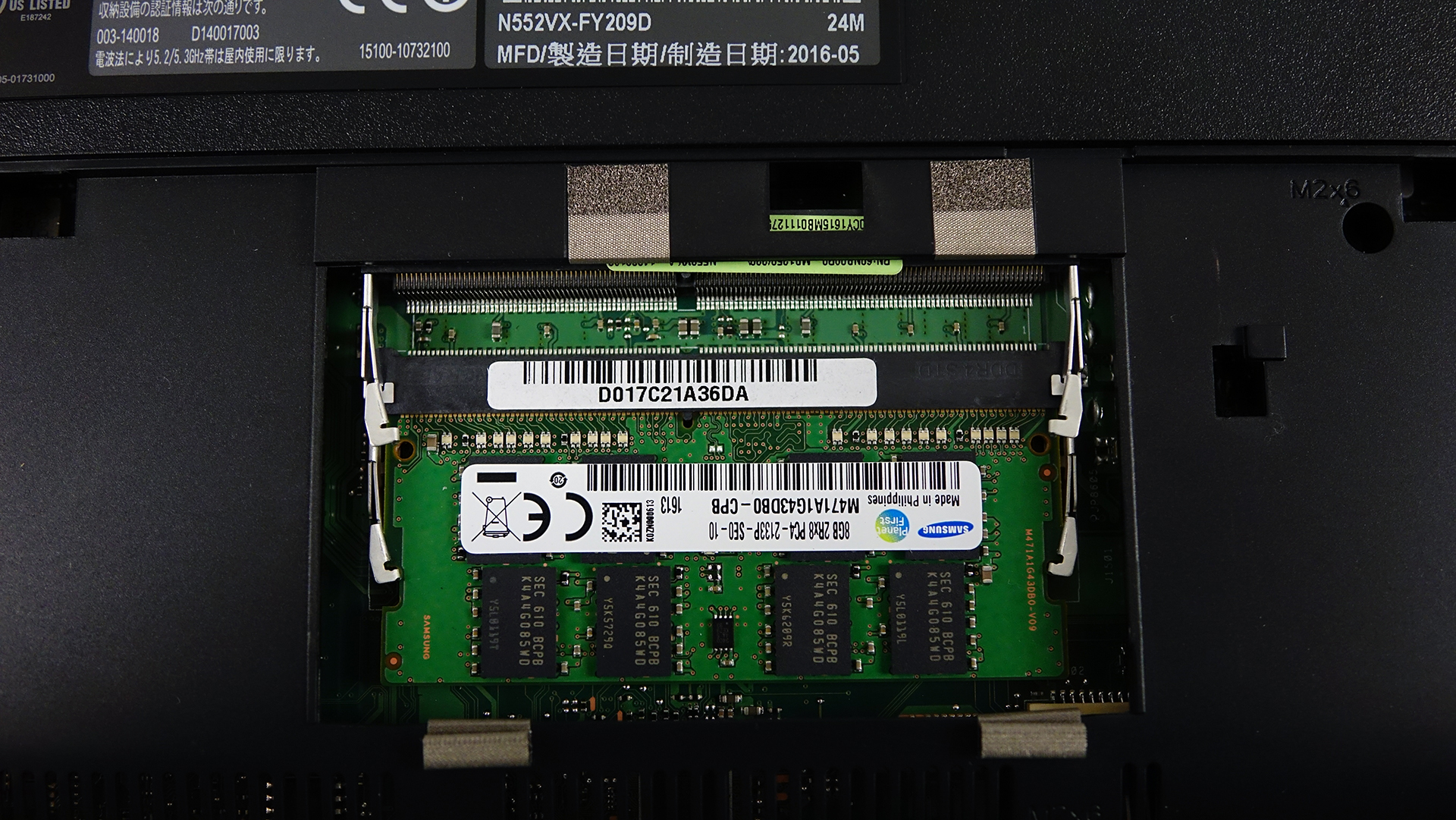

RAM
The notebook supports two RAM slots with up to 32GB of DDR4 memory but our unit came with two 4GB DDR4-2133 chips installed manufactured by Samsung.
| Slot | Unit | Upgrade price |
|---|---|---|
| Slot 1 | 4GB DDR4-2133 RAM | Upgrade options |
| Slot 2 | 4GB DDR4-2133 RAM | Upgrade options |
Other components
The rest of the hardware that’s replaceable is the Wi-Fi card – Intel Dual Band Wireless-AC 7265 and the 44Wh battery, which is greatly reduced from 56Wh on the previous N551VW model. And it’s not user-replaceable anymore.

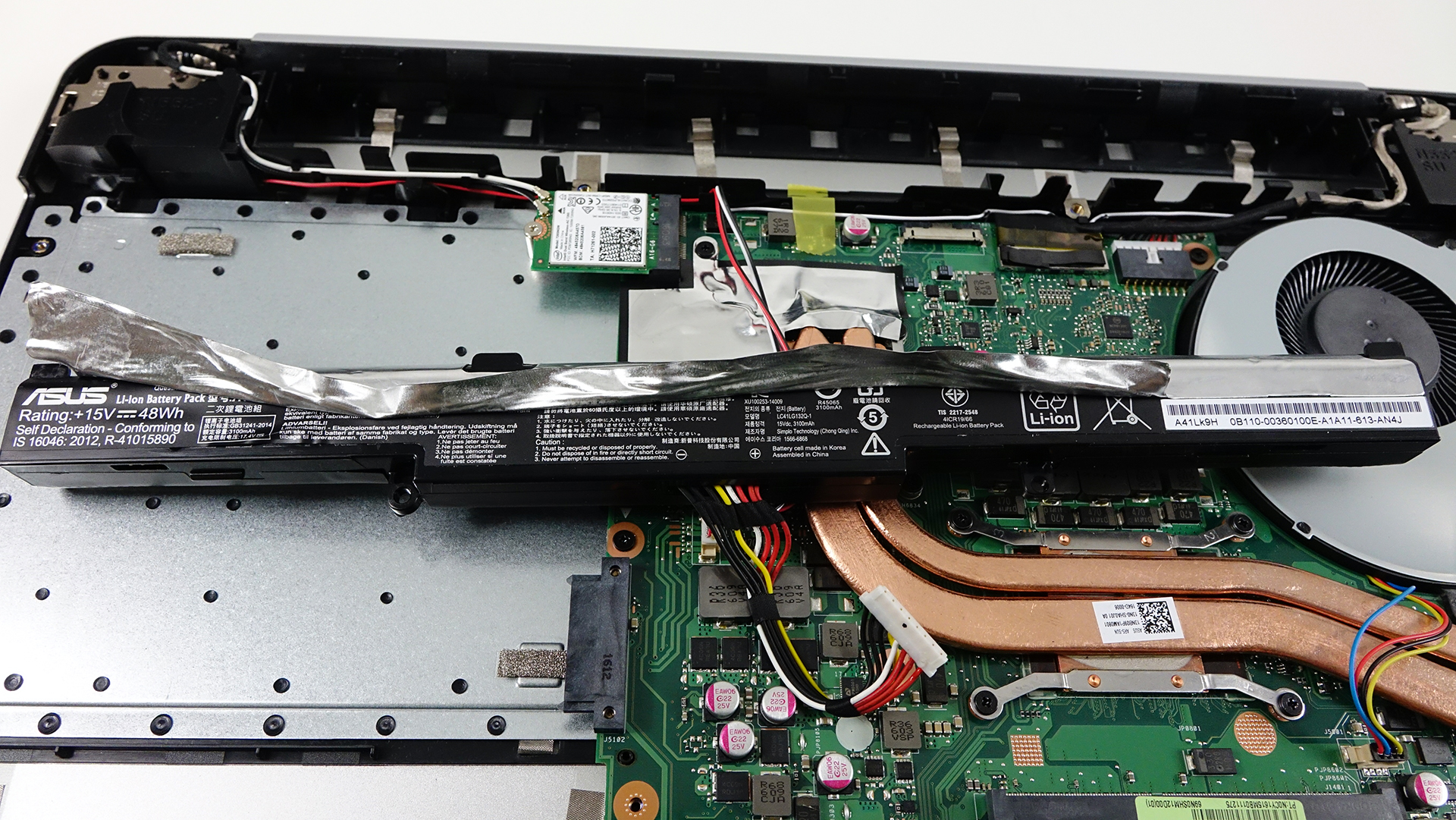
Cooling system
The cooling system remains untouched from the last generation and will probably keep up with the powerful hardware without breaking a sweat. It consists of two heat pipes connecting two heat sinks on the CPU and GPU and a big cooling fan placed on the side of the machine. The only drawback we can see here is the M.2 SSD slot placement going across the heat pipes. We hope the higher temperatures won’t affect the SSD’s performance during load.
Display quality
The panel used for this computer is a well-known unit, which is also found in the ASUS ROG GL552VW (LG LP156WF6-SPB5) gaming laptop, so the same results from our tests are true for the N552VX’s display as well.
So back to the tech specs of the panel – Full HD (1920×1080), 15.6-inch diagonal, 141 ppi pixel density and 0.18 x 0.18 mm pixel pitch. It can be considered as “Retina” when viewed from a distance equal or greater than 61 cm.
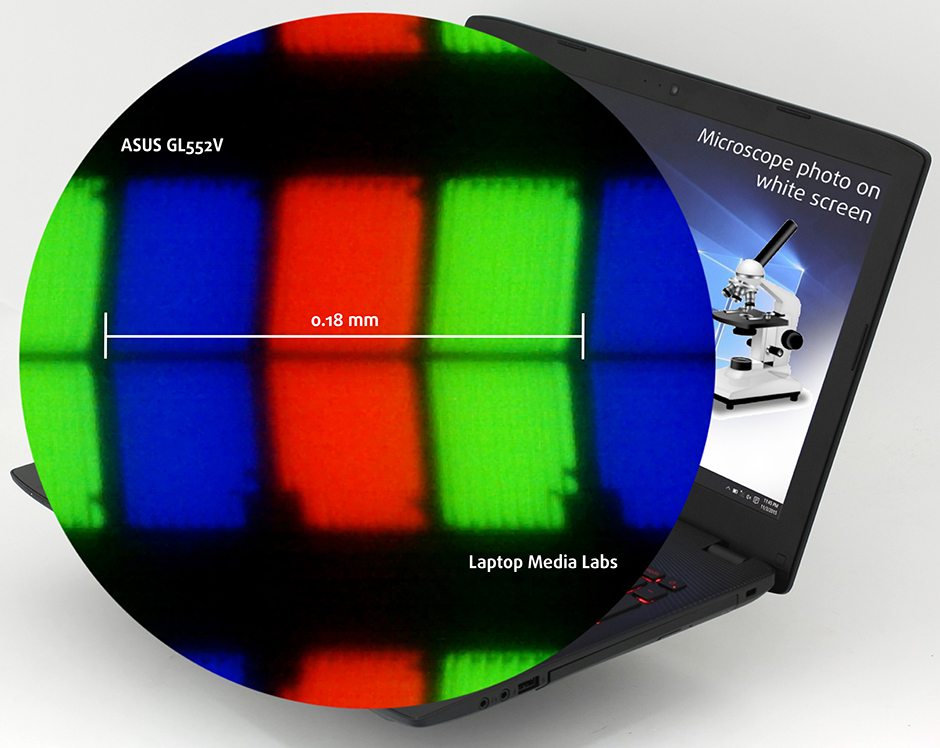
The display has excellent viewing angles as you can see from the image below.

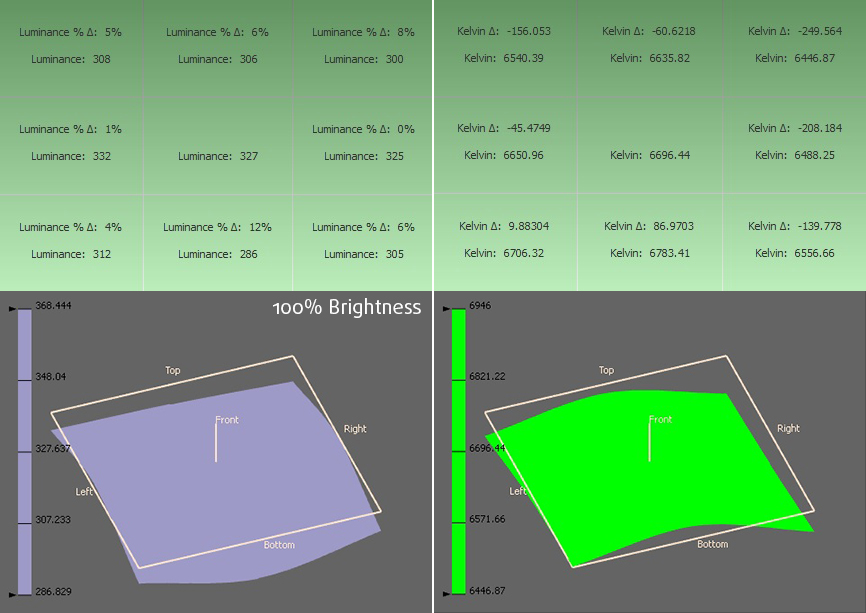
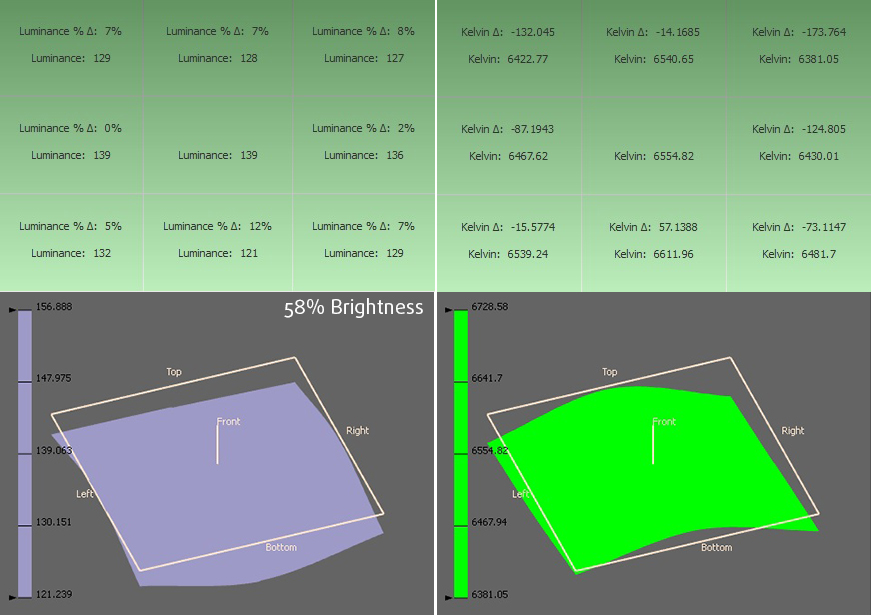
We measured the maximum brightness of the display – 311 cd/m2 with a maximum deviation of only 8%. With brightness set to maximum, the display scored 6600K average color temperature, which aligns almost perfectly to the 6500K standard.
Color reproduction
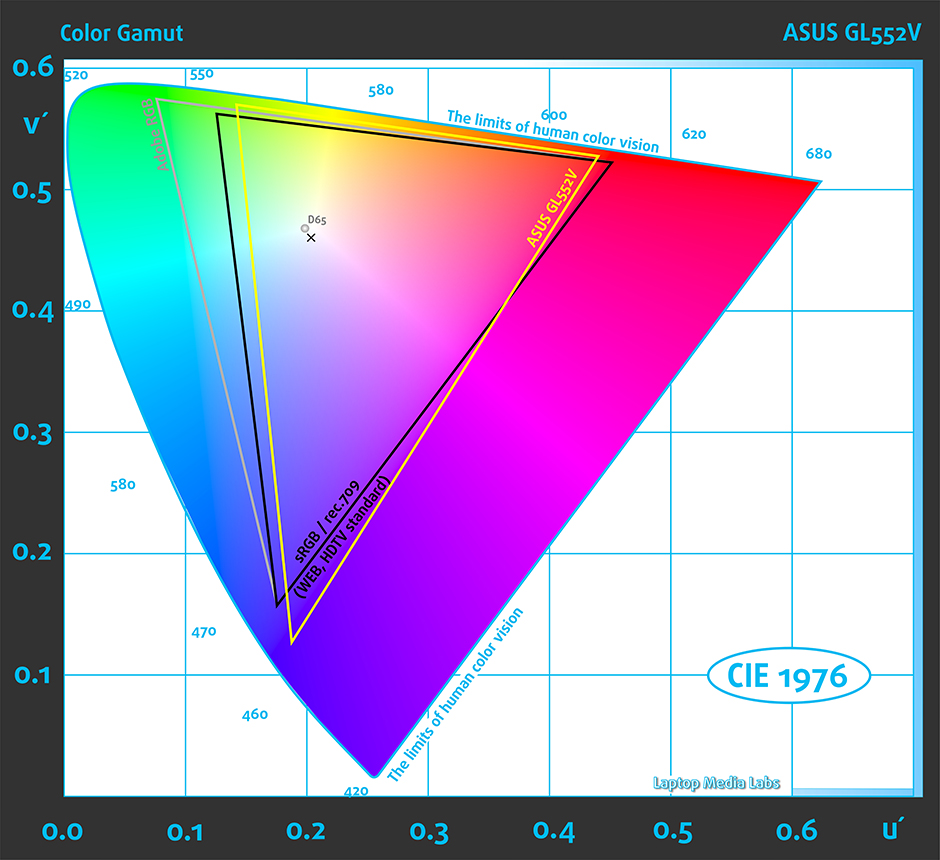
To make sure we are on the same page, we would like to give you a little introduction of the sRGB color gamut and the Adobe RGB. Starting with the CIE 1976 Uniform Chromaticity Diagram that represents the visible specter of colors by the human eye giving you a better perception of the color gamut coverage and the color accuracy. Inside the black triangle, you will see the standard color gamut (sRGB) that has been used by millions of people in HDTV and on the web. As for the Adobe RGB, this is used by professional cameras, monitors and etc. for printing. Basically, colors inside the black triangle are used by everyone and this is the essential part of the color quality and color accuracy of a mainstream notebook. Still, we’ve included other color spaces like the famous DCI-P3 standard used by movie studios and the digital UHD Rec.2020 standard. Rec.2020, however, is still a thing of the future and it’s hard to be covered by today’s displays. We’ve also included the so-called Michael Pointer gamut, or Pointer’s gamut, which represents the colors that naturally occur around us every day.
You can see the yellow triangle below representing the sRGB gamut coverage which in this case is 91%.
The graph below is the same but with recorded results – the one on the left is pre-calibration while the one on the right is after. The colored circles represent the reference colors, the white circles being the result. You can see the main and additional colors with 100% and 50% saturation inside the sRGB gamut.
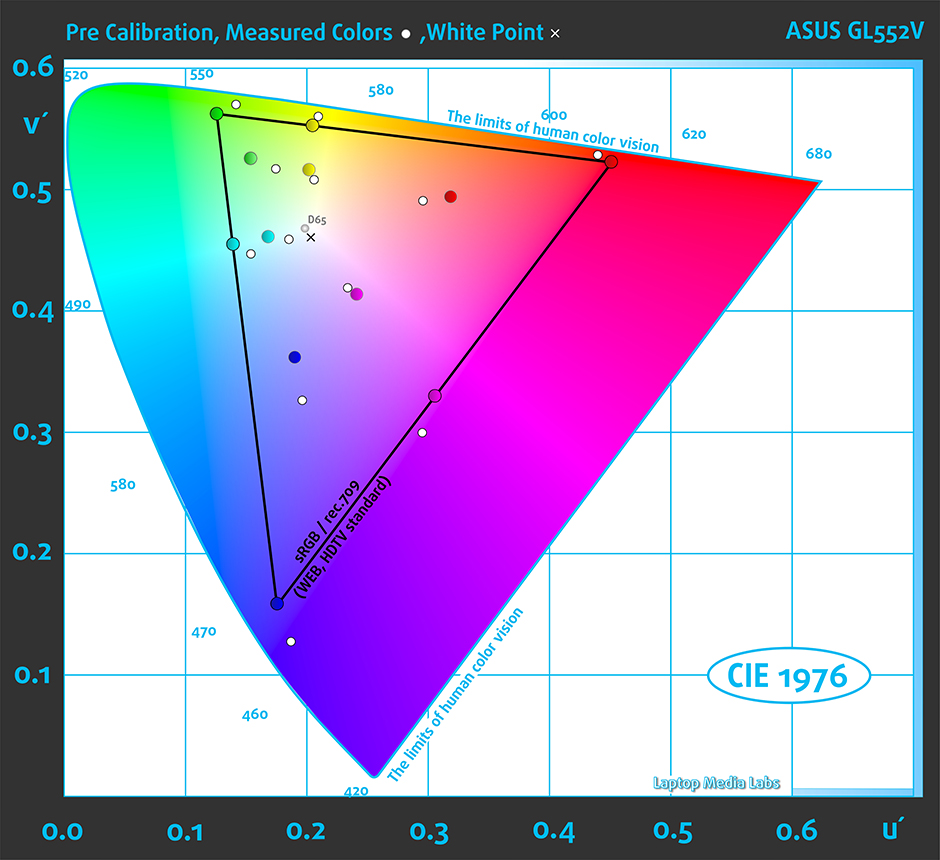
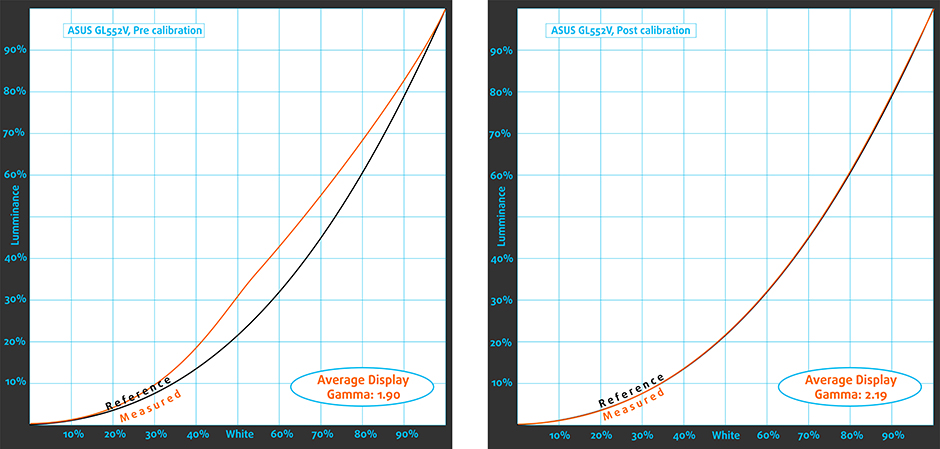
Below you can see the gamma curve aligning with the 2.2 standard.
We calibrated the display at 140 cd/m2 brightness and 6500K color temperature.
X-Rite i1Display Pro was used for the calibration.
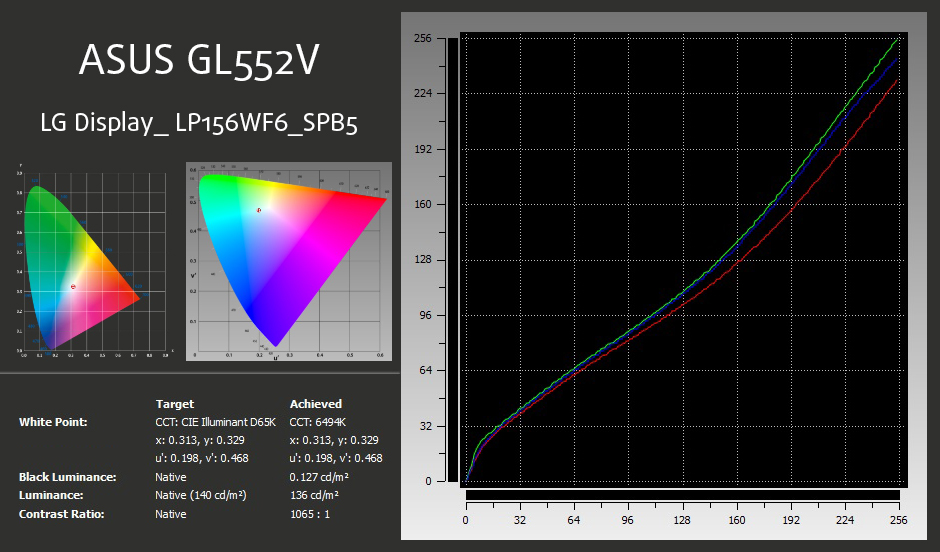
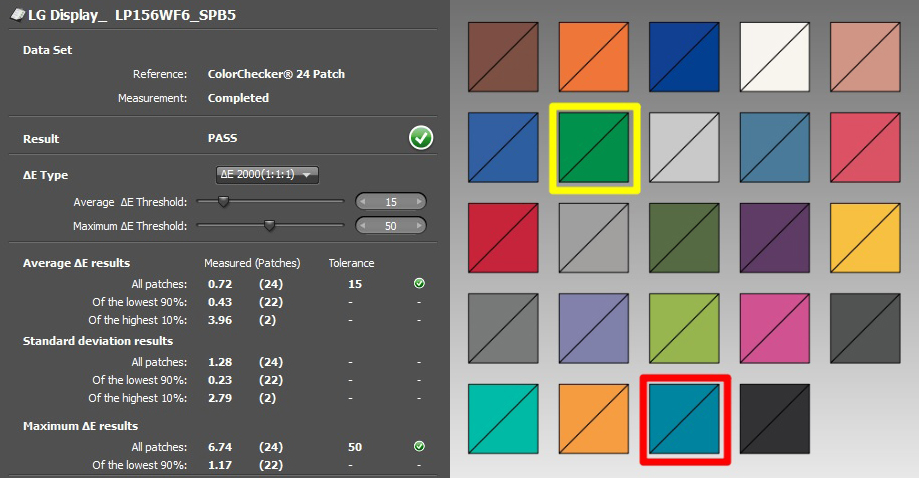
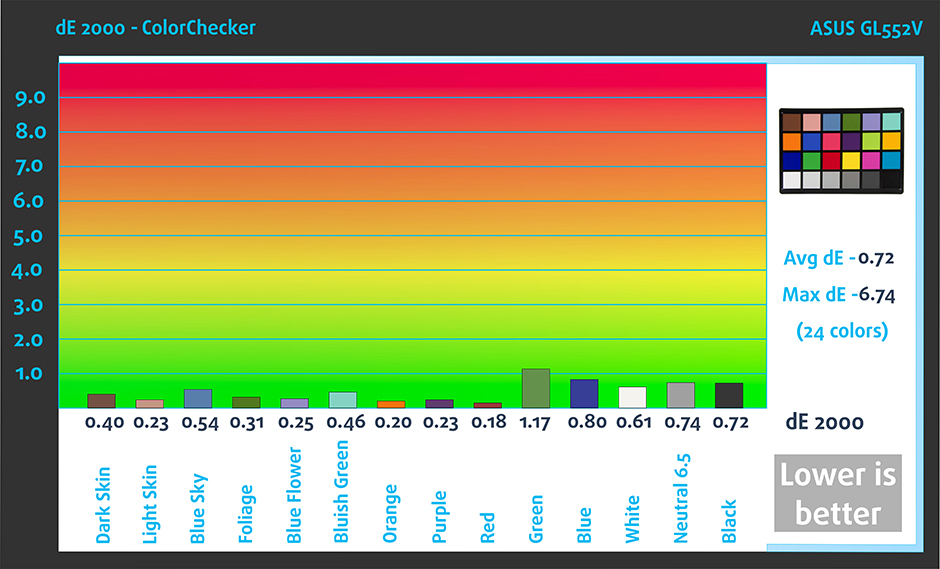
We tested the display using 24 commonly used sample colors like skin tones, grass, blue sky, orange etc. After profiling the display had an average DeltaE 2000 deviation of only 0.72, while the contrast was 1100:1 before calibration and 1060:1 after. Pretty good results.
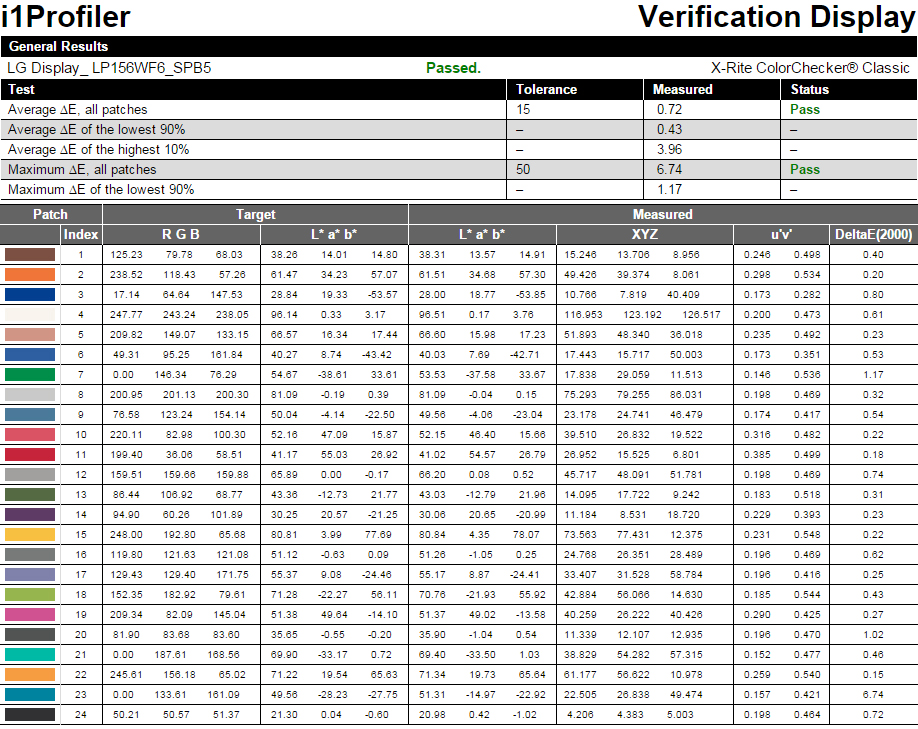
Another representation of the colors we’ve tested.
PWM (Screen flickering)
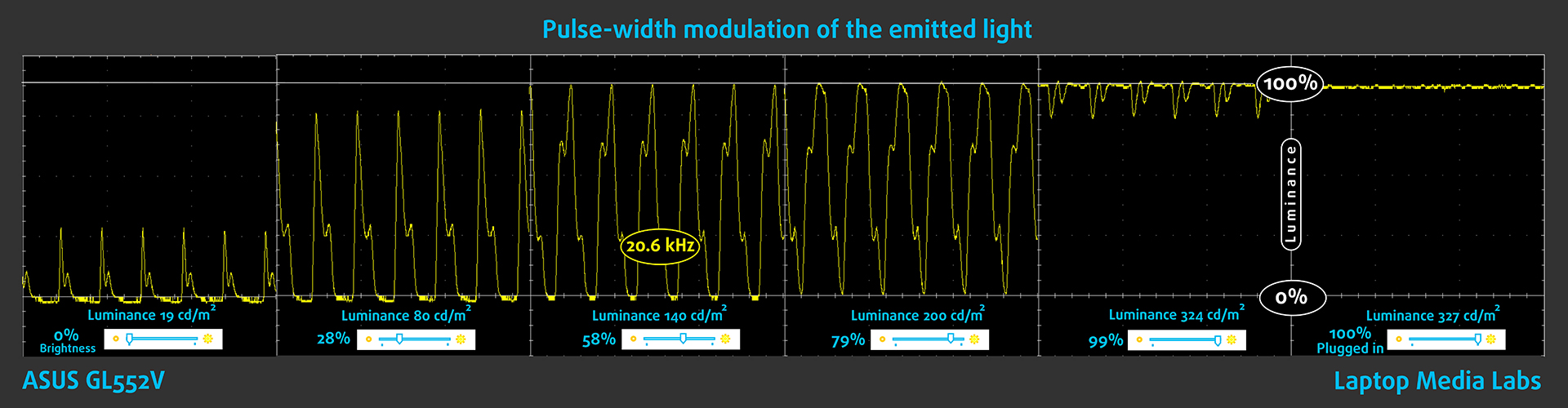
Of course, since both laptops – the ROG GL552VW and N552VX – use the same display, they inherit the same drawbacks with the biggest one being the use of PWM for regulating screen brightness. In this case the frequency of the emitted light is high (20.6 kHz) and the negative impact is greatly reduced. Still, some users with extra sensitive eyes might feel the aftermath of using such display after long periods of time.
Conclusion
And again we can say that the N552VX’s panel is one of the best in its class and price range. It allows you to see 91% of the sRGB colors, it has high contrast ratio, high maximum brightness and fairly accurate color reproduction. However, our custom profiles will elevate the image quality to a new level by making it more user-friendly (eliminating the PWM to some extent and limiting the blue light emissions), improve the visibility in the dark areas of an image and bring the average dE2000 down to the whopping 0.72 for exceptionally accurate color reproduction.
Still, the display is an excellent addition to the already fulfilling multimedia and gaming experience and will be an excellent choice for most users looking for good picture quality on a 15-inch laptop.
Buy our display profiles
Since our profiles are tailored for each individual display model, this article and its respective profile package is meant for ASUS ROG GL552VW but since the ASUS N552VX configurations share the same 15.6″ LP156WF6-SPB5 (FHD, 1920 x 1080) IPS screens, these profiles will fit both machines. And as for the N552, it can be found at Amazon.com: ASUS N552
*Should you have problems with downloading the purchased file, try using a different browser to open the link you’ll receive via e-mail. If the download target is a .php file instead of an archive, change the file extension to .zip or contact us at [email protected].
[edd_item edd_id_1=’62936′ edd_id_2=’62939′ edd_id_3=’62933′ edd_id_4=’62942′]
You can read more about the profiles here: http://laptopmedia.com/reviews/how-to-take-advantage-of-laptopmedia-office-web-design-gaming-and-health-guard-profiles
Specs sheet
The current specs sheet refers to this particular model – configurations may differ depending on your region.

| Processor | Intel Core i7-6700HQ (4-core, 2.60 – 3.50 GHz, 6MB cache) |
|---|---|
| RAM | 8GB (1x 8192MB + one free) – DDR4, 2133 MHz |
| Graphics card | NVIDIA GeForce GTX 950M (4GB DDR3) |
| HDD/SSD | 1TB HDD (7200 rpm) + optional M.2 PCIe NVMe 2280 SSD |
| Display | 15.6-inch – Full HD (1920×1080) IPS, matte |
| Optical drive | DVD burner |
| Connectivity | LAN 10/100/1000 Mbps, Wi-Fi 802.11ac, Bluetooth 4.0 |
| Other features |
|
| Battery | 4-cell, 44Wh |
| Thickness | 29.9 mm (1.18″) |
| Weight | 2.53 kg (5.58 lbs) |
Software
We’ve tested the notebook using a freshly installed Windows 10 (64-bit) and if you wish to perform a clean install yourself, we suggest downloading the latest drivers from ASUS’ official support page.
Battery
One of the biggest disappointments in the newer model is the greatly reduced battery capacity. Compared to the older generation, the ASUS N552 offers 22% smaller battery (56Wh vs 44Wh in favor of the N551) resulting in about 42% decreased web browsing runtimes and 29% less video playback. This was expected especially given the high-performance 45W Intel Core i7-6700HQ CPU and 15.6-inch Full HD IPS panel on board. Of course, all tests were run under the same conditions as always – Wi-Fi turned on, Windows battery saving feature turned on and screen brightness set to 120 cd/m2.
Web browsing
In order to simulate real-life conditions, we used our own script for to automatically browse through over 70 websites.
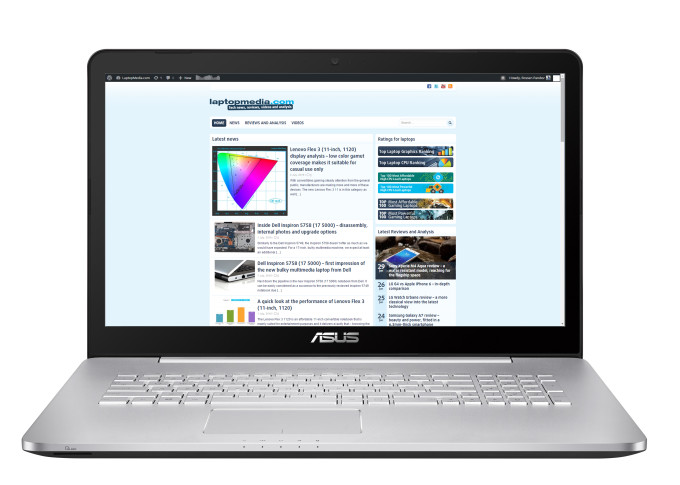
Subpar web browsing score, even lower than its 17-inch variant, wich by default should offer shorter battery life – 202 minutes (3 hours and 22 minutes).
Video playback
For every test like this, we use the same video in HD.
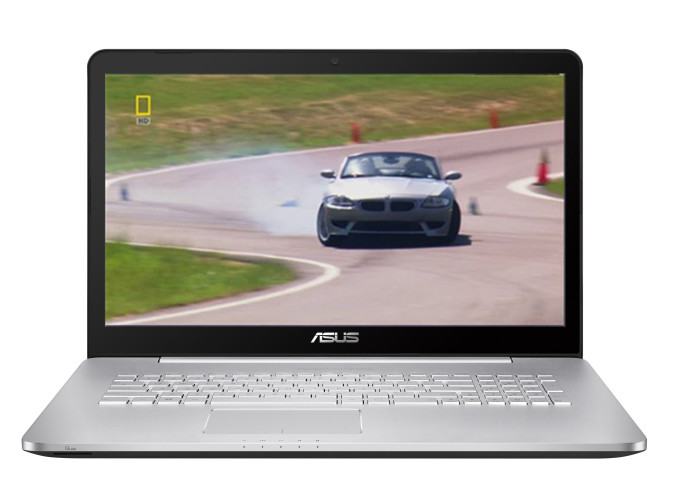
Slightly lower but similar result – 195 minutes (3 hours and 15 minutes).
Gaming
We recently started using F1 2015’s built-in benchmark on loop in order to simulate real-life gaming.

As expected, the gaming test took a toll on the battery with only 97 minutes (1 hour and 37 minutes) of play time.
CPU – Intel Core i7-6700HQ
 Intel Core i7-6700HQ represents the Skylake H family and is considered a high-performance chip with high voltage – 45W TDP. This is a step down from its direct predecessor – Core i7-4700HQ, but matches its short-lived predecessor, Core i7-5700HQ. The Core i7-6700HQ has four cores ticking at 2.6GHz and can go up to 3.5 GHz for one active core and 3.1 GHz for four active cores. The silicon supports the so-called Hyper-Threading technology that emulates one virtual core for each physical, thus establishing a total of 8 threads.
Furthermore, the chip is manufactured using a 14nm FinFET process and integrates Intel HD Graphics 530 GPU with 24 EU (Executable Units) clocked at 350 – 1050 MHz. The memory controller supports up to 64GB of DDR3 or DDR4 RAM at 1600 or 2133 MHz, respectively. The CPU is suitable for heavy applications and gaming.
You can browse through our top CPUs ranking: http://laptopmedia.com/top-laptop-cpu-ranking/
Here you will find other useful information and every notebook we’ve tested with this processor: http://laptopmedia.com/processor/intel-core-i7-6700hq/
Fritz
Fritz is a chess benchmark that tests the computing capabilities of the CPU with various chess moves. The Intel Core i7-6700HQ managed 12.371 million moves per second. By comparison, one of the most powerful PCs, Deep(er) Blue, was able to squeeze out 200 million moves per second. In 1997 Deep(er) Blue even beat the famous Garry Kasparov with 3.5 to 2.5.
GPU – NVIDIA GeForce GTX 950M (4GB DDR3)
 The GeForce GTX 950M is a direct successor to last year’s GTX 850M and it’s placed in the upper-mid range class. It is commonly used as a multimedia GPU and light gaming as its properties can handle some more demanding applications. The GPU core is the GM107, similar to most Maxwell NVIDIA graphics card and it’s clocked at 914MHz and can go up to 1124MHz. It has 2GB DDR3 memory and the effective clock speed of the memory is 2000MHz, while there are other variants of the GPU with GDDR5 memory.
However, the memory width is 128 bit with 16 ROPs, 40 texture units and 640 CUDA cores (or shading units). It also features increased L2 cache size, which is now 2MB. Supports features like Battery Boost, GameStream, ShadowPlay, GPU Boost 2.0, Optimus, PhysX, CUDA, SLI and GeForce Experience.
You can browse through our top GPUs ranking: http://laptopmedia.com/top-laptop-graphics-ranking/
Here you will find other useful information and every notebook we’ve tested with this GPU: http://laptopmedia.com/video-card/nvidia-geforce-gtx-950m-2gb-ddr3/
Gaming tests
All gaming tests were performed using NVIDIA’s latest drivers at the time of this review – 359.00 WHQL.

| Tomb Raider (1080p, Low) | Tomb Raider (1080p, Medium) | Tomb Raider (1080p, Max) |
|---|---|---|
| 107 fps | 42 fps | 23 fps |

| F1 2015 (1080p, Low) | F1 2015 (1080p, Medium) | F1 2015 (1080p, Max) |
|---|---|---|
| 46 fps | 35 fps | 26 fps |

| Thief (1080p, Low) | Thief (1080p, Medium) | Thief (1080p, Max) |
|---|---|---|
| 48 fps | 42 fps | 23 fps |

| GTA 5 (1080p, Low) | GTA 5 (1080p, Medium) | GTA 5 (1080p, Max) |
|---|---|---|
| 78 fps | 27 fps | 8 fps |

| Middle-Earth: Shadow of Mordor (1080p, Low) | Middle-Earth: Shadow of Mordor (1080p, Medium) | Middle-Earth: Shadow of Mordor (1080p, Max) |
|---|---|---|
| 47 fps | 33 fps | 22 fps |

| Counter-Strike: Global Offensive (1080p, Low) | Counter-Strike: Global Offensive (1080p, Medium) | Counter-Strike: Global Offensive (1080p, Max) |
|---|---|---|
| 121 fps | 103 fps | 75 fps |
Temperatures
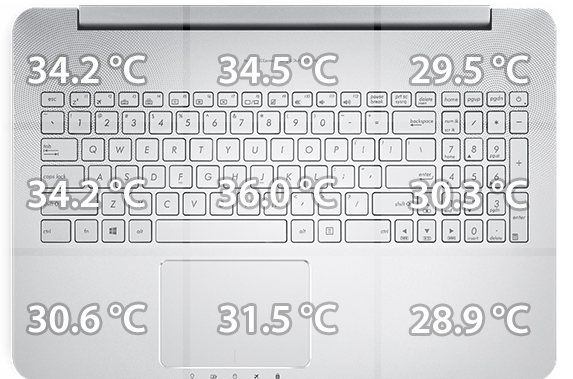
This two-staged stress test doesn’t represent real-life use but it’s a good way to assess the overall stability of the cooling system and how the hardware will be preserved in the long run.
We start off with 100% CPU load for an hour but the cooling system didn’t break a sweat in order to utilize the full performance of the Core i7-6700HQ. It ran at around 80 °C and at 3.1 GHz, which is the maximum operating Turbo Boost frequency with four active cores.

After we turned on the GPU stress test as well, things changed a little bit but nothing too serious. The CPU’s temperatures rose to around 90 °C while the GPU was running rock-solid at 76 °C. Both are good results given the nature of the test. The CPU’s frequency dropped to 2.9 GHz but that’s still in the Turbo Boost range.

We didn’t expect anything less from the cooling system since it hasn’t been overhauled compared to the N551. The cooling design is sufficient to support the powerful hardware even under extreme conditions and doesn’t allow for the chassis to overheat.
Verdict
Once again ASUS has made an excellent multimedia laptop out of the N-series. The N552VX is all that we hoped it would be but with some considerable drawbacks compared to the good old N551. The chassis is updated with lower profile and lighter clamshell while keeping the already excellent keyboard and touchpad design. Another similarity between the N551 and N552 is the good IPS display. It features way above average properties for a good multimedia and gaming experience with the only drawback being the existence of PWM across all brightness levels. However, our Health-Guard profile can be used to limit the PWM to some extent and also improve the visibility in dark areas of an image.
As far as the hardware upgrade goes, the N552 keeps the Intel Core i7-6700HQ CPU on board but swaps the GTX 960M for the less powerful GTX 950M while retaining the price. This means worse price/performance ratio than before. Luckily this doesn’t hold true for the storage upgrade. The N551VW had an outdated mSATA SSD slot while the N552VW takes it to a whole new level of supporting up to PCIe NVMe sticks. Another great miss is the battery performance. Due to the lowered battery capacity, the N552VX offers subpar runtimes compared to most of its competitors and its predecessor. At least, the cooling system remains unchanged and that’s a good thing because just like before, it’s able to keep the system running at high load for long periods of time.
The bottom line is that the ASUS N552VX is still one of the best multimedia/high-performance laptop in its class. Still, we suggest you consider the much lower priced models from HP and Lenovo – the HP Pavilion 15 and Lenovo Ideapad 700 – both of which offer the same hardware/performance, same storage options and much better battery life and portability. Nevertheless, the N552VX still holds an edge over them when it comes to build quality and display quality. So in the end, it really depends on your type of work, usage, and priorities.
You can find some of the available configurations here: http://amzn.to/2coQZjh
Pros
- Good build quality
- Keeps the excellent keyboard and touchpad
- Slightly lighter and thinner than its predecessor
- Supports M.2 PCIe NVMe SSDs
- Excellent cooling solution
- Good display quality
Cons
- The screen uses PWM from 0 to 99% brightness
- Subpar battery life due to the smaller battery unit
- Worse price/performance ratio compared to the N551VW
 Author: Rossen Pandev
 Author: eng. Kroum NikolovHead of Engineering at LaptopMedia.com, inventor and innovator with 40+ years of experience in electronics and high technology.

![[Μάιος 2026] Παγκόσμια κατάταξη των GPU για φορητούς υπολογιστές με τις καλύτερες πωλήσεις στο Amazon – Η Apple κυριαρχεί με μερίδιο 45% και κατακτά τις 3 πρώτες θέσεις- η RTX 5060 της NVIDIA ηγείται της ομάδας των GPU για εξειδικευμένους υπολογιστές](https://laptopmedia.com/wp-content/uploads/2026/06/Best-Selling-GPUs-GLOBAL-Top-10-400x225.jpg)
![[Μάιος 2026] Παγκόσμια κατάταξη των επεξεργαστών laptop με τις καλύτερες πωλήσεις στο Amazon – Η Apple συντρίβει τον ανταγωνισμό με μερίδιο αγοράς 45,2%, η M5 κυριαρχεί](https://laptopmedia.com/wp-content/uploads/2026/06/Best-Selling-CPUs-GLOBAL-Top-10-400x225.jpg)
![[May 2026] Amazon Germany: Top 7 Best-Selling Gaming Laptops – Lenovo Legion 5i Crowned Champion Amidst Fierce Mid-Range Competition](https://laptopmedia.com/wp-content/uploads/2026/06/Best-Selling-Gaming-Laptops-DE-Top-10-1-400x225.jpg)
![[May 2026] Amazon Italy: Top 10 Best-Selling Laptops – Apple MacBook Neo Reigns Supreme, Premium Models Capture Dominant Revenue Share](https://laptopmedia.com/wp-content/uploads/2026/06/Best-Selling-Laptops-IT-Top-10-400x225.jpg)
![[May 2026] Best-Selling Laptop Brands on Amazon Italy – Apple Dominates Across All Metrics](https://laptopmedia.com/wp-content/uploads/2026/06/IT-Best-Brands-400x225.jpg)

In the process of researching this laptop to use for photography and video editing while on location. In this review the photos displayed are of the GL552VX 1920×1080 yet the specs of the N552VX is a 4K/UHD IPS 3840×2160 screen. On their website they advertise the colour as being 100% SRGB and 74% AdobeRGB and I was hoping for some actual tests results in showing how these figures are. reference: https://www.asus.com/au/Notebooks/VivoBook-Pro-N552VX/
Any chance of an update?
As I stated in the review above, the notebook uses the same panel found in the GL552VW so results from the tests will be nearly identical. Any difference that may occur is negligible. However, we won’t be reviewing the UHD version so we can’t really answer your question regarding this model.
nice review…does Asus N552 vw display has same contrast ratio? disply is 4k.
Nice review.
Does ASUS N552VX-FY024D variant has m.2 slot?
My local vendor doesn’t mentioned in specs if exists this port or not.
Thanks
I BOUGHT THIS LAPTOP 8 MONTHS AGO AND MY GAME CRASHING/FREEZING SINCE 1ST DAY I USED IT. I CAN ONLY PLAY GAMES LIKE DOTA 2 AND GTA V IF MY NVIDIA IS DISABLE. WHAT’S HAPPENING? EVEN THE ASUS SERVICE CENTER CANT DO ANYTHING ABOUT IT. MAYBE FACTORY DEFECT.
The power button!
The placement of the power button!
Browsing a file or a web page and suddenly BAM! Shut down the laptop.
They have changed it since the N551 (2013).
Hi what is the difference between this and the N552VW ? Thank you
Hi, directly from the asus website
https://www.asus.com/support/FAQ/1031591
it seems that what you stated about the thunderbolt connection it’s not true, this device could only support usb 3.1 gen2 which is only for data transfer.