How to open ASUS ROG Ally (2023) – disassembly and upgrade options


Step 1: Accessing the Internal Components
- Ensure the ASUS ROG Ally (2023) is powered off and placed on a soft, clean surface to prevent scratches or damage.
- Remove the six Phillips-head screws from the bottom of the laptop. Note that some screws are captive, and the bottom middle screw will slightly raise the bottom panel to aid in starting the prying process.
- Begin prying the bottom panel from the front, then work your way around the sides and the backside.
Hint: Proceed with caution to avoid damaging the internal clips or the laptop casing.
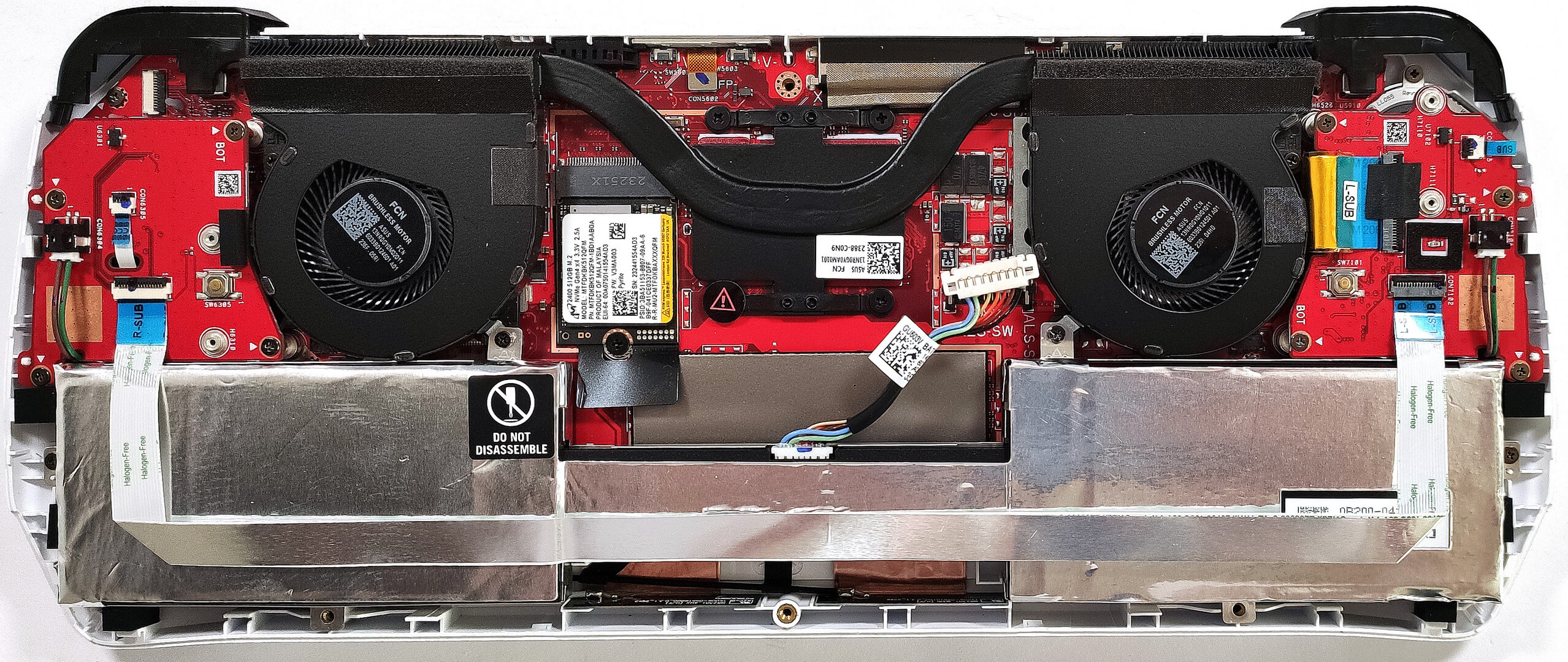
Step 2: Removing the Battery
- Disconnect the battery by unplugging its connector from the motherboard.
- Remove the four Phillips-head screws securing the battery to the laptop’s chassis, then lift the 40Wh battery away from the device.
Caution: Handle the battery and its connector with care to avoid any damage.
More info: The 40Wh battery provides up to 10 hours of web browsing or video playback, a respectable performance especially considering the laptop’s high refresh rate display.

Memory
The ASUS ROG Ally comes with 16GB of soldered LPDDR5-6400MHz RAM, operating in dual-channel mode for efficient multitasking and high-speed performance.

Storage Upgrade
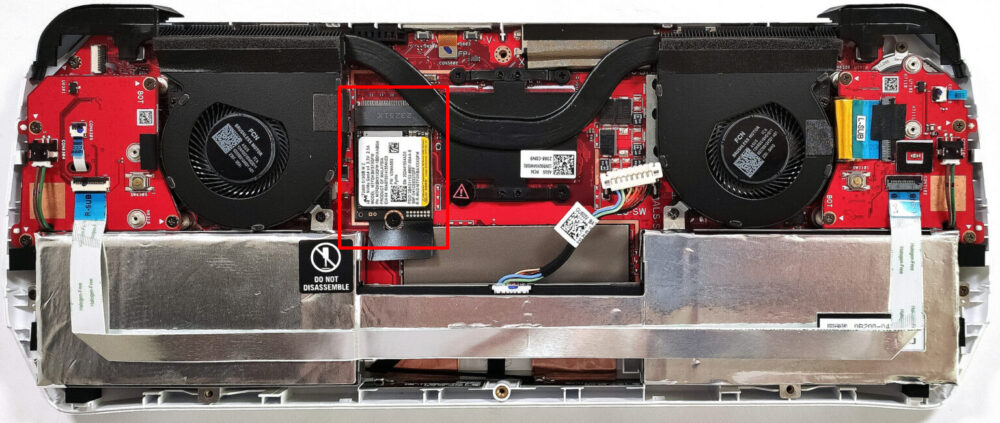
- Identify the M.2 slot compatible with 2230 Gen 4 SSDs for storage upgrades.
- Upgrade the storage by installing a new Gen 4 NVMe SSD to enhance the laptop’s storage capacity or improve overall system responsiveness.
- Choose and purchase a new drive when needed. Don’t forget to check out our Top M.2 SSDs Performance Rankings.
You can buy Gen 4 M.2 SSD modules here: Αγοράστε από το Amazon.com (#CommissionsEarned)


Step 3: Servicing the Cooling System
- Inspect the cooling system, which includes two fans, one heat pipe, two heat sinks, and a heat spreader, designed to efficiently manage the thermal output of the device.
- If necessary, you can remove the cooling system to change the thermal paste by undoing the six Phillips-head screws. Two screws are for the fans, and four screws secure the heat spreader above the APU chip.
More info: Regular maintenance of the cooling system, including changing the thermal paste, can help maintain optimal thermal performance and prolong the lifespan of the device.

 Author: Anna Iorgova

![[Αύγουστος 2026] Amazon Global: Οι 10 φορητοί υπολογιστές με τις μεγαλύτερες πωλήσεις – Το Apple MacBook Neo κυριαρχεί στις λίστες, ενώ οι οικονομικοί και μεσαίας κατηγορίας φορητοί υπολογιστές με Windows ανταγωνίζονται για τον όγκο πωλήσεων](https://laptopmedia.com/wp-content/uploads/2026/09/Best-Selling-Laptops-GLOBAL-Top-10-400x225.jpg)
![[Αύγουστος 2026] Οι μάρκες φορητών υπολογιστών με τις μεγαλύτερες πωλήσεις στο Amazon Global – Η Apple κυριαρχεί σε έσοδα, ενώ η HP πρωτοστατεί στην ποικιλία μοντέλων](https://laptopmedia.com/wp-content/uploads/2026/09/GLOBAL-Best-Brands-400x225.jpg)
![[Αύγουστος 2026] Amazon Global: Οι 10 πιο δημοφιλείς φορητοί υπολογιστές για παιχνίδια – Ο HP Victus 15 κατακτά την πρώτη θέση, ενώ τα οικονομικά μοντέλα κυριαρχούν στις λίστες](https://laptopmedia.com/wp-content/uploads/2026/09/Best-Selling-Gaming-Laptops-GLOBAL-Top-10-400x225.jpg)
![[August 2026] Best-Selling Laptop Brands on Amazon Japan – Apple Dominates Market Share and Revenue Led by Strong Unit Sales](https://laptopmedia.com/wp-content/uploads/2026/09/CO.JP-Best-Brands-1-400x225.jpg)
![[August 2026] Best-Selling Laptop Brands on Amazon USA – Apple Dominates Market Revenue and Volume Despite Lower Model Diversity](https://laptopmedia.com/wp-content/uploads/2026/09/COM-Best-Brands-1-400x225.jpg)
