MSI Stealth 16 Studio (A13V)’s display is vibrant and accurate
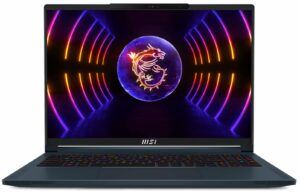
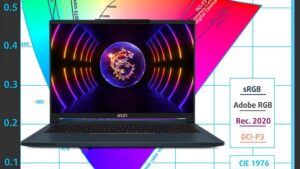 While it’s no shock that a laptop named Studio would have a brilliant display, we still have to appreciate what we’ve got in front of us. The Stealth 16 Studio from MSI is a thin and light laptop with a great screen that captures the essence of both Gaming and Creator laptops. Today we’re here to focus on the display, as both the Full HD+, Quad HD+, and 4K displays have a high refresh rate that makes them more than suitable for gaming.
For a more complete look at the MSI Stealth 16 Studio (A13V), we urge you to check out our In-depth Review, which covers the notebook from head to toe.
The laptop in the configuration that we’ve reviewed it, comes with a Quad HD+ IPS panel with a 240Hz refresh rate. It’s got excellent viewing angles, while reaching brightness of up to 557 nits. The contrast ratio could be higher, at 1260:1, however, it’s not that big of a deal. Not only that, but the panel covers both the sRGB and DCI-P3 color gamuts, which is plenty for all of your Creator needs.
 sRGB gamut
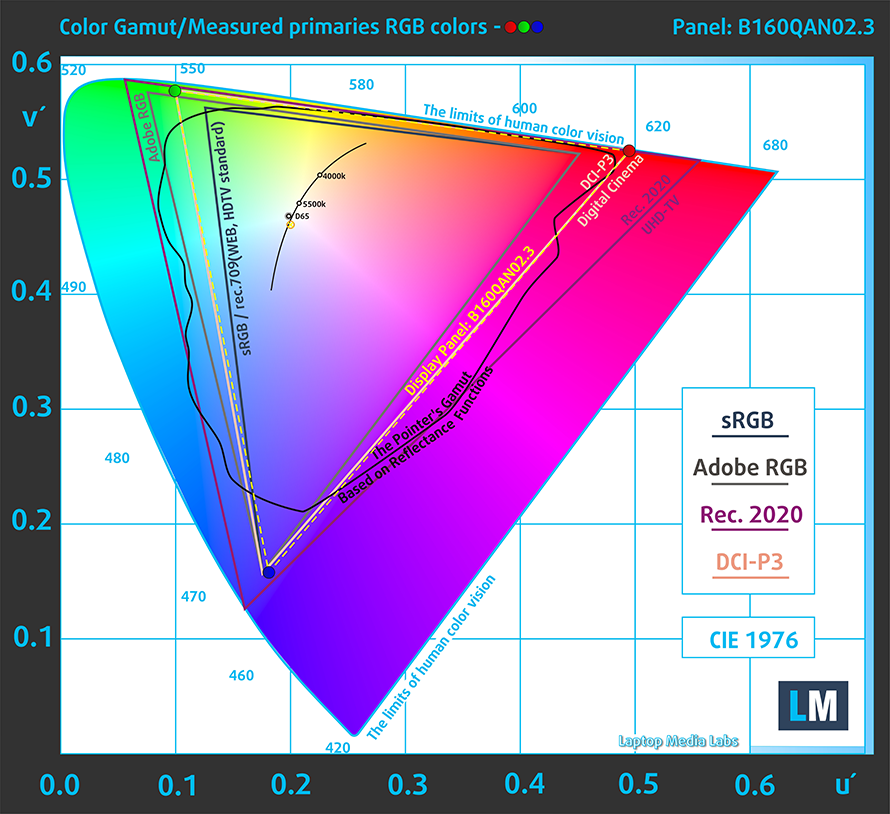 DCI-P3 gamut
Not only that but through the MSI Control Center, you can switch between them and emulate both gamuts, depending on what type of Design work you need to do. For example, if you’re working on a web-based design, like a User Interface or a Front End for a website, you can switch to the sRGB gamut, which is used for everything web-based. On the other hand, the DCI-P3 gamut is used for digital cinema and theatres, so it has richer and wider colors.
You can also go a step further to ensure better color accuracy, despite the True Color calibration that comes with the device from the factory. You see, with the standard DCI-P3 gamut, the white point is still a bit warmer so that bluish-white is missing. Our Design and Gaming profile adjusts the white point to a colder D65, which makes the white more neutral. With the profile, we get a dE value of 0.6, which is perfect and makes colors very accurate.
We tested the accuracy of the display with 24 commonly used colors like light and dark human skin, blue sky, green grass, orange, etc.
Below you can compare the scores of the MSI Stealth 16 Studio (A13V) (Display P3 in MSI True Color) with the P3-D65 (Display) color space.
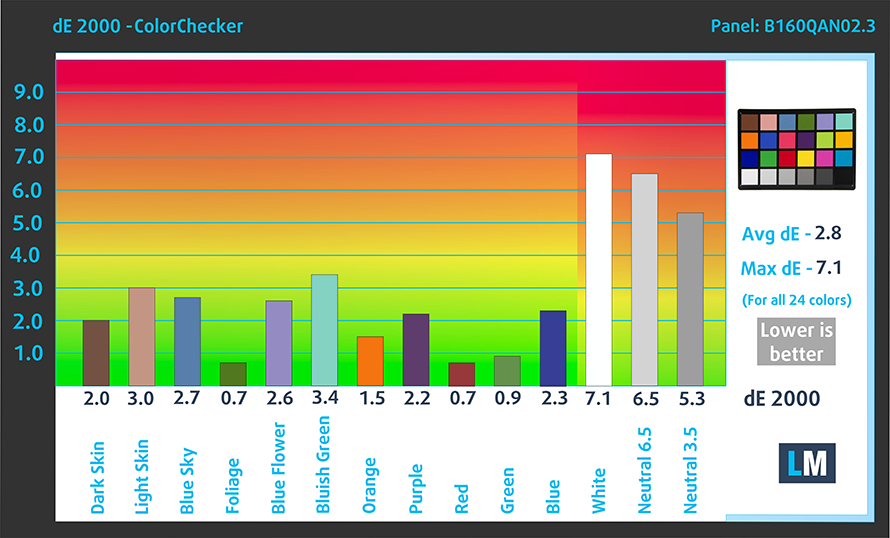
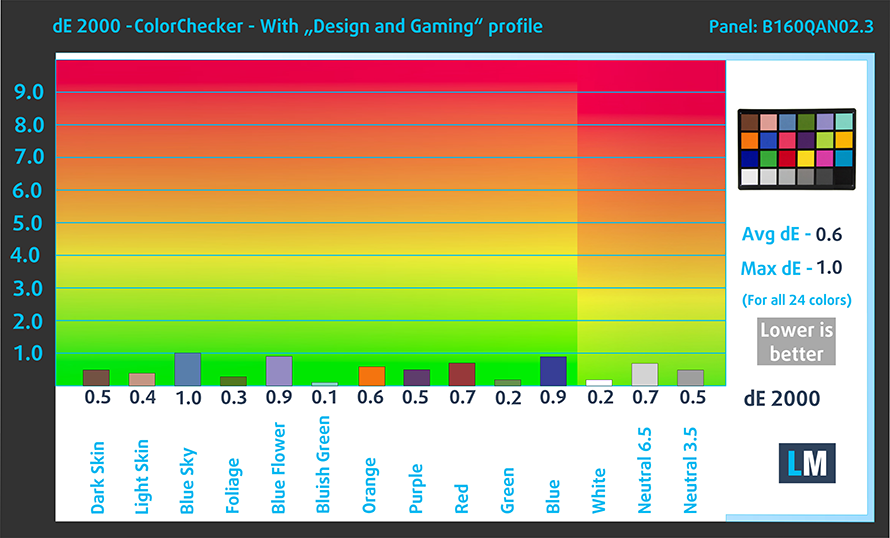
These colors also make games pop, so you can have a better visual experience when enjoying single-player Triple-A titles with breathtaking scenery. Just look at the difference between the colors with the standard settings and the colors once we apply our profile. While these are not images from the MSI Stealth 16 Studio, they are an estimate of how things look with it.


Buy our profiles
Since our profiles are tailored for each individual display model, this article and its respective profile package are meant for MSI Stealth 16 Studio (A13V) configuration with 16.0″ AUO B160QAN02.3 (AUO26A9) (2560×1600) IPS.
*Should you have problems with downloading the purchased file, try using a different browser to open the link you’ll receive via e-mail. If the download target is a .php file instead of an archive, change the file extension to .zip or contact us at [email protected].
Read more about the profiles HERE.
Εκτός από τη λήψη αποδοτικών και φιλικών προς την υγεία προφίλ, αγοράζοντας τα προϊόντα της LaptopMedia υποστηρίζετε επίσης την ανάπτυξη των εργαστηρίων μας, όπου δοκιμάζουμε συσκευές για να παράγουμε τις πιο αντικειμενικές δυνατές αξιολογήσεις.

Office Work
Το Office Work πρέπει να χρησιμοποιείται κυρίως από χρήστες που περνούν τον περισσότερο χρόνο τους κοιτάζοντας κείμενα, πίνακες ή απλώς σερφάροντας. Αυτό το προφίλ στοχεύει στην παροχή καλύτερης ευκρίνειας και σαφήνειας διατηρώντας μια επίπεδη καμπύλη γάμμα (2.20), εγγενή θερμοκρασία χρώματος και αντιληπτικά ακριβή χρώματα.

Design and Gaming
Αυτό το προφίλ απευθύνεται σε σχεδιαστές που εργάζονται επαγγελματικά με χρώματα, καθώς και για παιχνίδια και ταινίες. Το Design and Gaming ωθεί τα πάνελ οθόνης στα όριά τους, καθιστώντας τα όσο το δυνατόν πιο ακριβή στο πρότυπο sRGB IEC61966-2-1 για Web και HDTV, σε λευκό σημείο D65.

Health-Guard
Το Health-Guard εξαλείφει την επιβλαβή διαμόρφωση πλάτους παλμού (PWM) και μειώνει το αρνητικό Μπλε Φως που επηρεάζει τα μάτια και το σώμα μας. Δεδομένου ότι είναι ειδικά προσαρμοσμένο για κάθε πάνελ, καταφέρνει να διατηρεί τα χρώματα αντιληπτικά ακριβή. Το Health-Guard προσομοιώνει το χαρτί, οπότε η πίεση στα μάτια μειώνεται σημαντικά.
Αποκτήστε και τα 3 προφίλ με 33% έκπτωση


 Author: Severin Kolakov

![[Ιούλιος 2026] Παγκόσμια κατάταξη των πιο δημοφιλών GPU για φορητούς υπολογιστές στο Amazon – Η RTX 5060 κυριαρχεί στην κατηγορία premium, ενώ η Intel εξακολουθεί να κυριαρχεί στην κατηγορία των οικονομικών μοντέλων](https://laptopmedia.com/wp-content/uploads/2026/08/Best-Selling-GPUs-GLOBAL-Top-10-400x225.jpg)
![[Ιούλιος 2026] Παγκόσμια κατάταξη των πιο πωλημένων επεξεργαστών φορητών υπολογιστών στο Amazon – Η Apple κυριαρχεί στην κατηγορία premium, ενώ η Intel διατηρεί την πρώτη θέση συνολικά](https://laptopmedia.com/wp-content/uploads/2026/08/Best-Selling-CPUs-GLOBAL-Top-10-400x225.jpg)
![[July 2026] Amazon Canada: Top 10 Best-Selling Laptops – Apple MacBook Neo Dominates the Market to Claim the #1 Spot](https://laptopmedia.com/wp-content/uploads/2026/08/Best-Selling-Laptops-CA-Top-10-2-400x225.jpg)
![[July 2026] Best-Selling Laptop Brands on Amazon Japan – HP and Lenovo Dominate Units and Revenue Amid Fierce Competition](https://laptopmedia.com/wp-content/uploads/2026/08/CO.JP-Best-Brands-2-400x225.jpg)
![[July 2026] Amazon Italy: Top 10 Best-Selling Laptops – Apple MacBook Neo Claims the #1 Spot Amid Budget-Friendly Dominance](https://laptopmedia.com/wp-content/uploads/2026/08/Best-Selling-Laptops-IT-Top-10-400x225.jpg)
