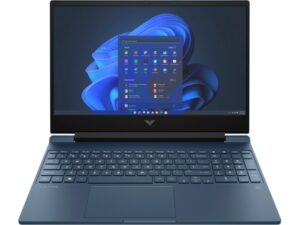
HP Victus 15 (15-bf0000) – Top 5 Pros and Cons
 The HP Victus series started off strong in 2021, with the 16.1-inch version delivering decent performance along with a great display and a low-key design that was close to perfect for Creators who want an affordable device with nearly all the bells and whistles.
Now, it’s time to see how the 2022 models will do, and if HP has learned some valuable lessons from last year. The Victus 15 (15-fb0000) offers both the 12th Gen Alder Lake processors, next to the Ryzen 5000H-series, so you have options and can choose between maximum performance (Intel), or a mix between power and efficiency (AMD).
Today we’re presenting you with LaptopMedia’s top 5 picks about the HP Victus 15 (15-bf0000).
HP Victus 15 (15-bf0000): Full Specs / In-depth Review
reasons to BUY the HP Victus 15 (15-bf0000)
1. Upgradeability
As with most modern gaming laptops, the Victus 15 offers two SODIMM slots for DDR4 memory, which can fit up to 64GB of dual-channel RAM, while storage is accessible through one M.2 slot for Gen 3 SSDs.

Here is our detailed teardown video, which shows how to access both the RAM and SSD slots of the Victus 15.
2. Battery
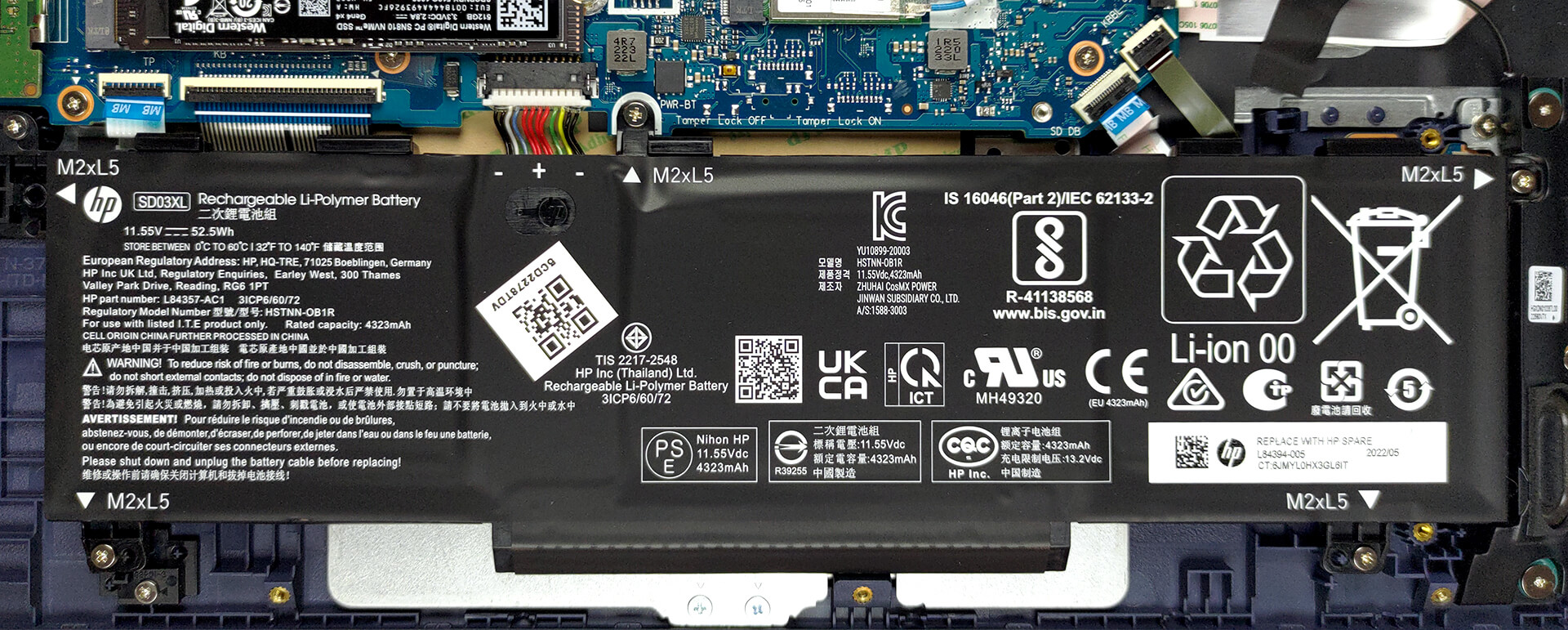
The base configuration of the device offers a 52.5Wh battery pack, while there are models with a larger 70Wh unit. We stuck with the smaller one and when paired with a power-efficient CPU like the Ryzen 5 5600H, it lasts for 11 hours and 24 minutes of Web browsing, or 8 hours and 50 minutes of video playback. Now, we conduct the battery tests with the Windows Better performance setting turned on, screen brightness adjusted to 120 nits, and all other programs turned off except for the one we are testing the notebook with.
3. Cooling
As for cooling, the setup we have here seems small, considering that this is a gaming device. There are two heat pipes and two fans, mounted next to each other.

Max CPU load
| AMD Ryzen 5 5600H (45W TDP) | 0:02 – 0:10 sec | 0:15 – 0:30 sec | 10:00 – 15:00 min |
|---|---|---|---|
| HP Victus 15 (15-fb0000) | 3.72 GHz (B+13%) @ 70°C | 3.66 GHz (B+11%) @ 86°C | 3.66 GHz (B+11%) @ 91°C |
The Ryzen 5 is known to be cooled relatively easily, and despite the higher temperatures at the end, we love to see a stable speed of 3.66 GHz.
Real-life Gaming
| NVIDIA GeForce GTX 1650 | GPU frequency/ Core temp (after 2 min) | GPU frequency/ Core temp (after 30 min) |
|---|---|---|
| HP Victus 15 (15-fb0000) | 1667 MHz @ 64°C @ 50W | 1670 MHz @ 65°C @ 50W |
Next is the GPU, and the GTX 1650 with a 50W power limit doesn’t give the setup any trouble, running at 65°C. The wattage is a bit low for our liking, but HP wants to play it safe.
Gaming comfort
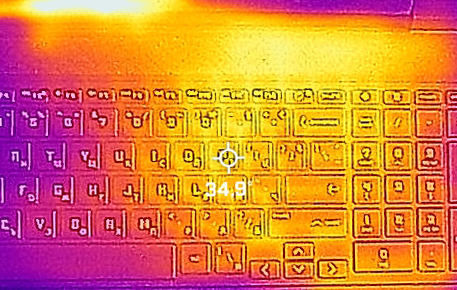
The chassis of the device seems to be pretty well insulated against heat, as the base doesn’t get hot at all, with a maximum temperature of only 35°C. It’s also very quiet, akin to an office machine.
reasons NOT to buy the HP Victus 15 (15-bf0000)
1. Display quality
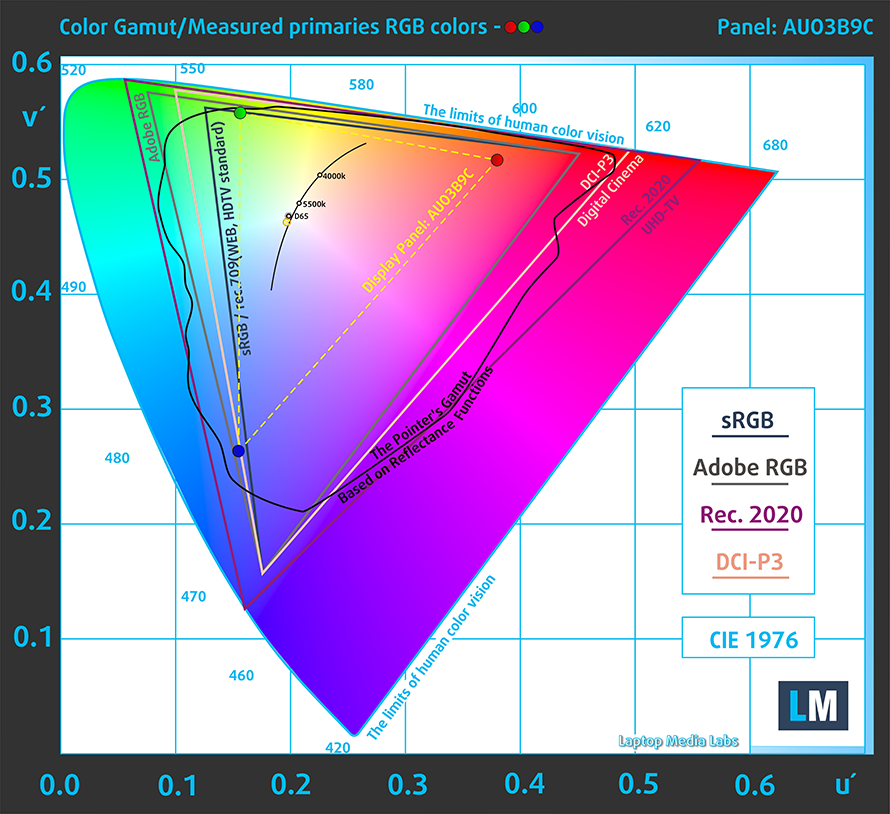
Where HP’s dropped the ball is with the displays. We see a Full HD TN panel with poor viewing angles, a peak brightness of 264 nits and a low contrast ratio of 400:1. It also covers only 52% of the sRGB color gamut, while its accuracy gets relatively low.
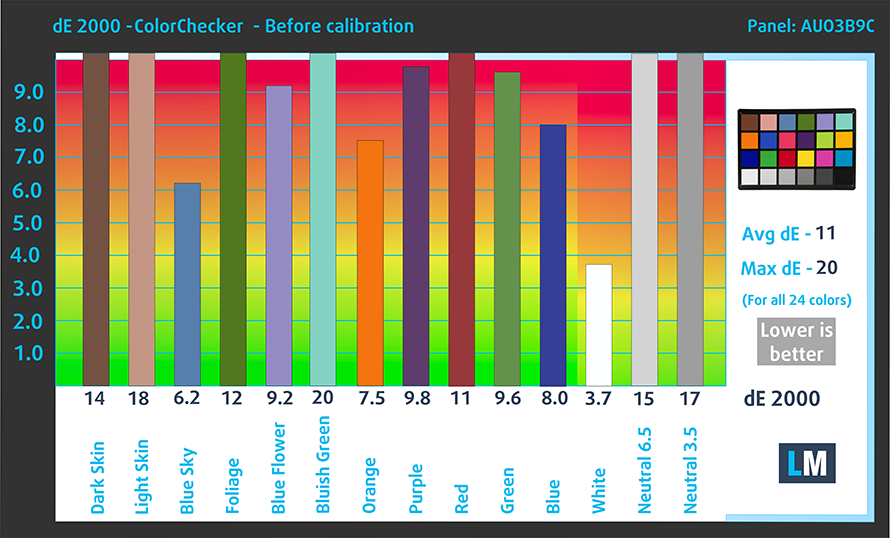
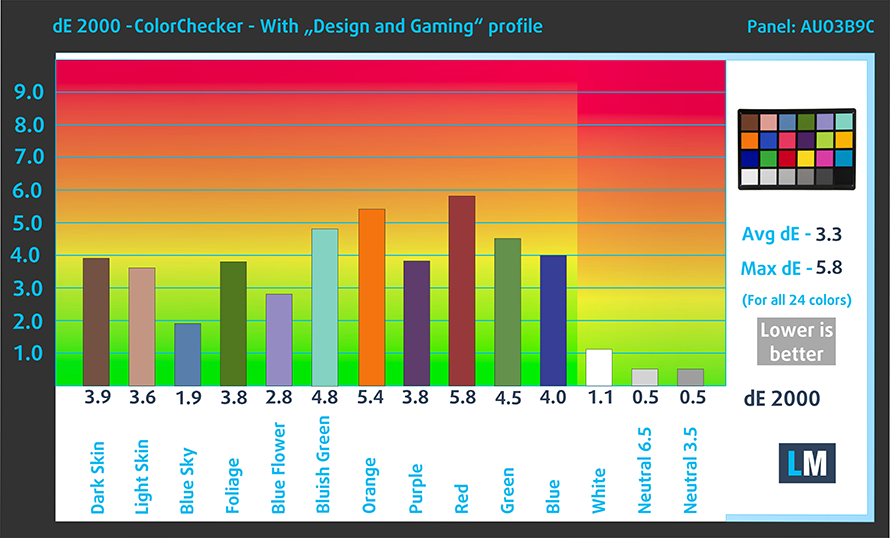
What starts off as a dE value of 11, goes down to 3.3 once we applied our Design and Gaming profile. Here are the results of our test with the stock settings (left) and with our profile applied (right).
Buy our profiles
Since our profiles are tailored for each individual display model, this article and its respective profile package are meant for HP Victus 15 (15-fb0000) configurations with 15.6″ FHD TN AUO AUO3B9C.
*Should you have problems with downloading the purchased file, try using a different browser to open the link you’ll receive via e-mail. If the download target is a .php file instead of an archive, change the file extension to .zip or contact us at [email protected].
Read more about the profiles HERE.
A hatékony és egészségbarát profilok mellett a LaptopMedia termékeinek megvásárlásával laboratóriumaink fejlesztését is támogatja, ahol eszközöket tesztelünk a lehető legobjektívebb értékelések elkészítése érdekében.

Irodai Munka
Az Irodai Munka profilt elsősorban azoknak a felhasználóknak ajánljuk, akik idejük nagy részét szövegek, táblázatok nézegetésével vagy böngészéssel töltik. Ez a profil jobb megkülönböztethetőséget és tisztaságot biztosít egyenletes gamma-görbe (2.20), natív színhőmérséklet és érzékelhetően pontos színek mellett.

Dizájn és Játék
Ez a profil a színekkel hivatásszerűen dolgozó tervezőknek, valamint játékokhoz és filmekhez készült. A Dizájn és Játék a kijelzőpaneleket a határaikra juttatja, a lehető legpontosabbá téve őket az sRGB IEC61966-2-1 szabvány szerint a webre és a HDTV-re, D65 fehérpont mellett.

Health-Guard
A Health-Guard kiküszöböli a káros impulzusszélesség-modulációt (PWM) és csökkenti a negatív kék fényt, amely hatással van a szemünkre és a testünkre. Mivel minden panelhez egyedileg van szabva, a színeket érzékelhetően pontosan tartja. A Health-Guard a papírt szimulálja, így a szemre nehezedő nyomás jelentősen csökken.
Szerezze meg mind a 3 profilt 33% kedvezménnyel

2. Build quality
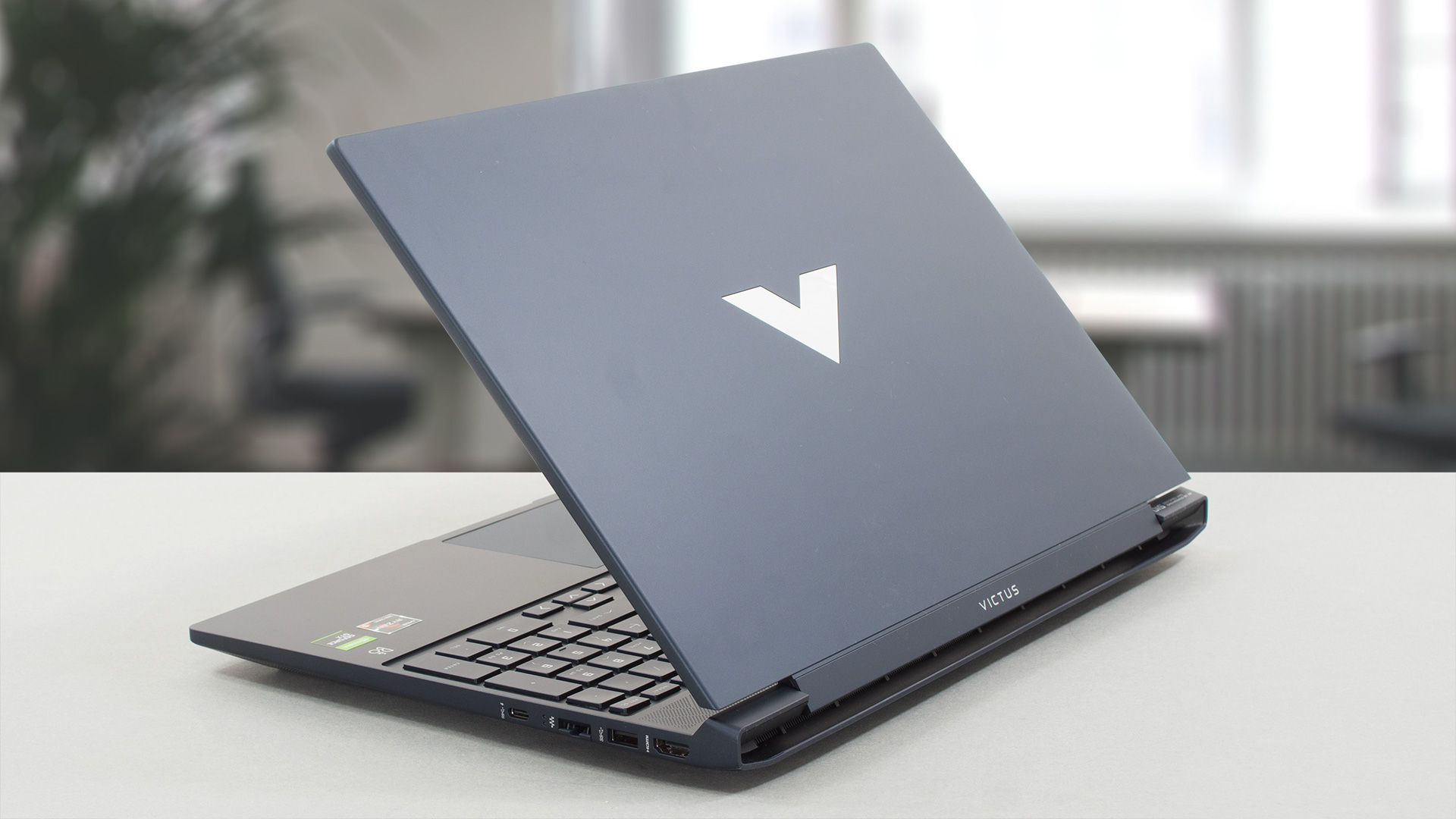
HP also keeps reusing older construction practices, as the Victus 15 feels very similar to the older Pavilion Gaming laptops, which the Victus is trying to replace. The plastic chassis looks to be of quality, as the material itself has a nice feel-t0-the-touch. However, durability isn’t as good, as both the base and lid show some flex. The lid also doesn’t open with one hand, and is prone to wobbles and bouncing.
All HP Victus 15 (15-bf0000) configurations:
 Author: Severin Kolakov

![[August 2026] Amazon Italy: Top 10 Best-Selling Laptops – Apple MacBook Neo Claims the Crown as Budget and Mid-Range Windows Machines Dominate Volume](https://laptopmedia.com/wp-content/uploads/2026/09/Best-Selling-Laptops-IT-Top-10-400x225.jpg)
![[August 2026] Amazon Italy: Top 7 Best-Selling Gaming Laptops – ASUS V16 Claims the #1 Spot Amid Strong Mid-Range Demand](https://laptopmedia.com/wp-content/uploads/2026/09/Best-Selling-Gaming-Laptops-IT-Top-10-400x225.jpg)
![[August 2026] Best-Selling Laptop Brands on Amazon Italy – Lenovo Dominates Market Share and Revenue Leadership](https://laptopmedia.com/wp-content/uploads/2026/09/IT-Best-Brands-400x225.jpg)
![[August 2026] Amazon India: Top 10 Best-Selling Laptops – Apple MacBook Neo Dominates the Charts with Massive Sales Lead](https://laptopmedia.com/wp-content/uploads/2026/09/Best-Selling-Laptops-IN-Top-10-400x225.jpg)
![[August 2026] Amazon India: Top 10 Best-Selling Gaming Laptops – HP Victus 15 Dominates the Market with Massive Unit Lead](https://laptopmedia.com/wp-content/uploads/2026/09/Best-Selling-Gaming-Laptops-IN-Top-10-400x225.jpg)
