[Video] Top 5 reasons to BUY or NOT to buy the ASUS ROG Zephyrus G15 GA503
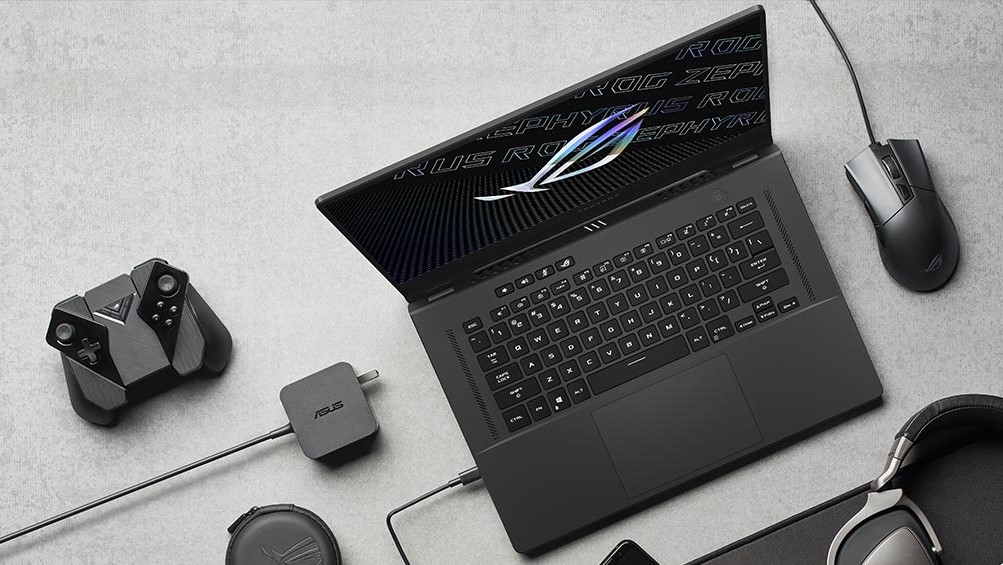 The previous generations of the ROG Zephyrus paved the way for ASUS and AMD’s relationship. From it, we got some amazing devices, such as the Strix SCAR 15 G533, the Zephyrus Duo 15 SE (GX551), and more. Now they have released a new Zephyrus device, in the face of the ASUS ROG G15 GA503. It is powered by the Ryzen 5000-series processors (not the U-series, but the regular H-series) and the RTX 3000-series Ampere GPUs which are just insane when it comes to performance.
Today we are presenting you with LaptopMedia’s top 5 picks about the ASUS ROG Zephyrus G15 GA503.
ASUS ROG Zephyrus G15 GA503: Full Specs / In-depth Review
4 reasons to BUY the ASUS ROG Zephyrus G15 GA503
1. Design and build quality
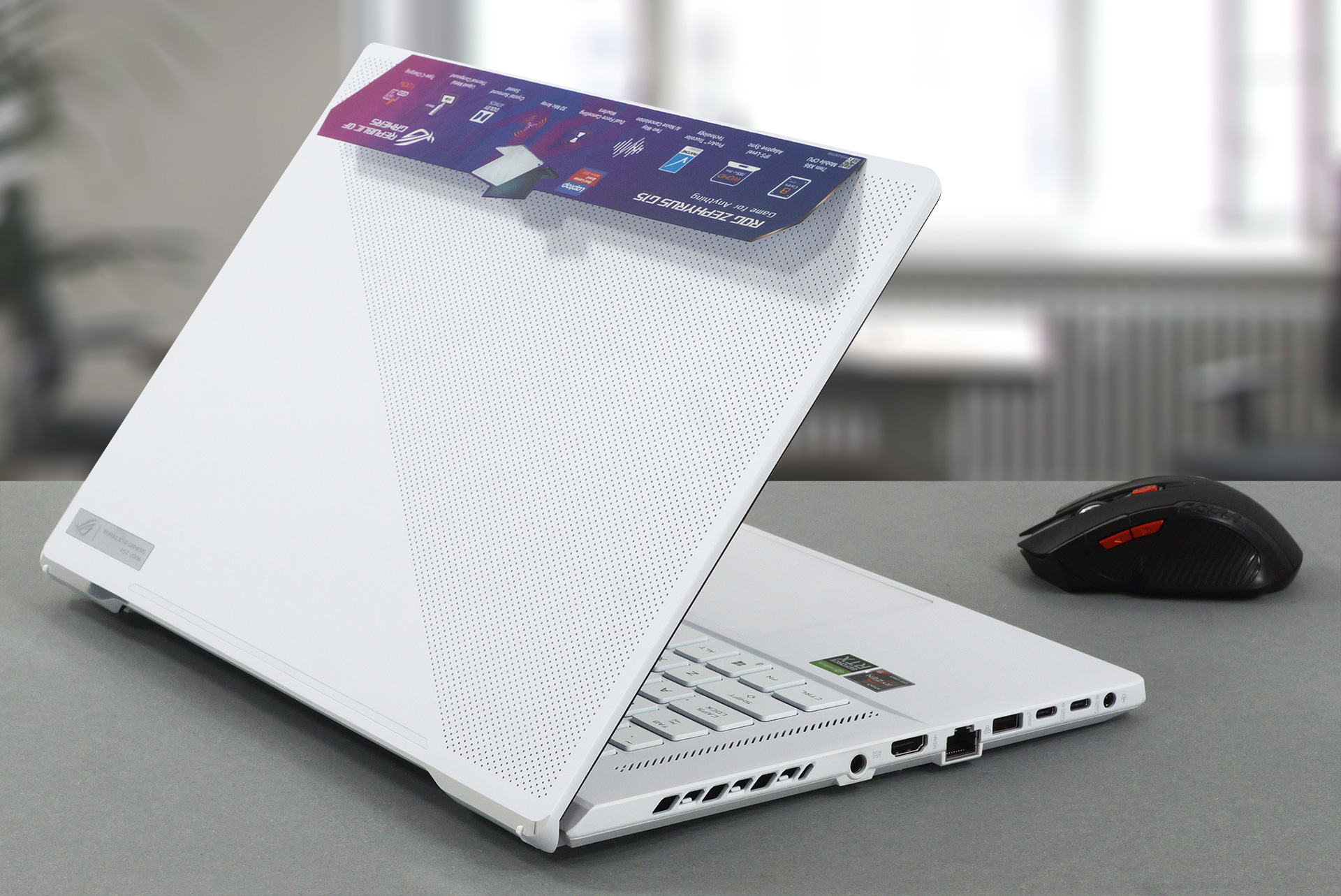
Being a part of the ROG lineup, you should expect an amazingly built laptop, and we weren’t disappointed at all. The body is built from a magnesium-aluminum alloy, which makes the laptop both sturdy and thin, because metal sheets don’t need to be as thick as plastic ones, in order to provide the necessary durability. There was a bit of flex in the lid, but nothing out of the ordinary. The base, on the other hand, is super stable thanks to the honeycomb pattern on the inside. The weight and height are okay considering the dimensions of the device, sitting at 1.90 kg, 200 grams lighter than last year’s device, and 19.9mm.
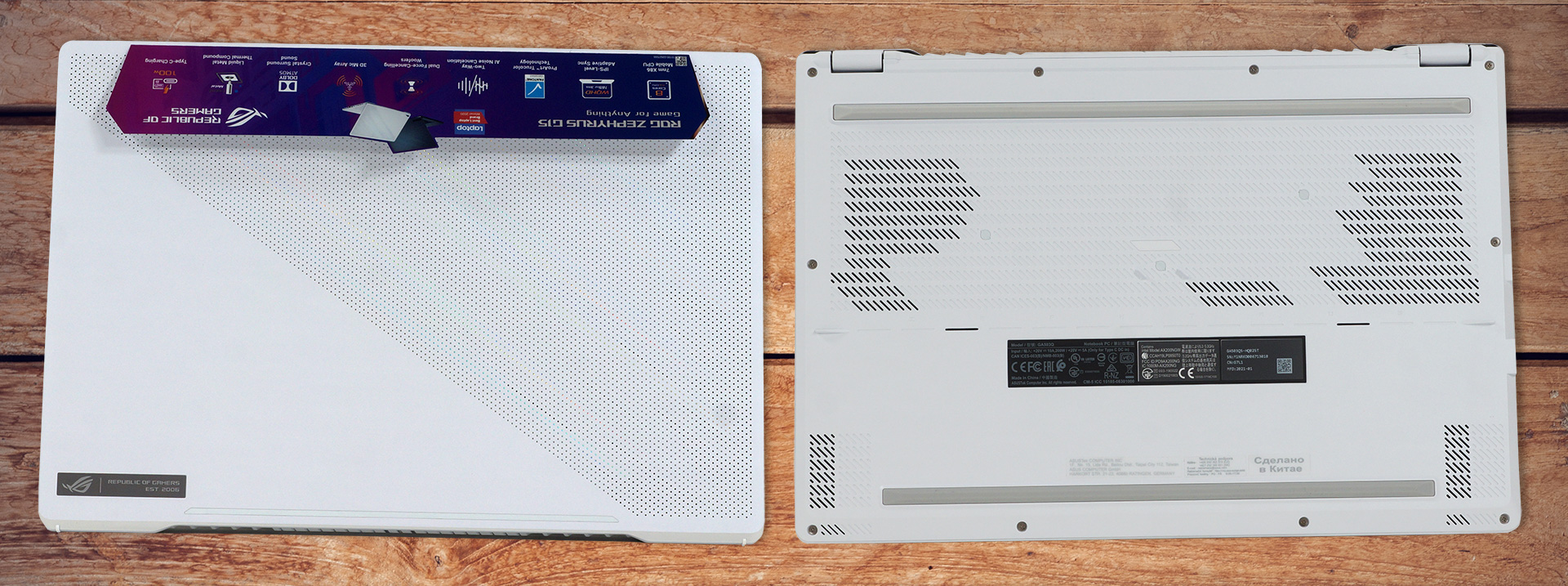
The lid opens easily with a single hand, which signals the premium build quality of the laptop. The lid also has the ErgoLift technology, if we can even call it that. What it does, is prop up the base of the device, so that the fans have more from to breathe. The design is also on point, with the lid having a dotted matrix design, that shines in different colors thanks to the prismatic film underneath. The branding isn’t overdone, with only a small glossy ROG logo on the lid.
2. Upgradeability
While half of the RAM is soldered onto the motherboard, the rest is upgradeable via one SODIMM slot. The RAM works in dual channel, so make sure you pick appropriate frequencies so that you can take full advantage of the performance of the laptop. As for the storage, there are two M.2 PCIe x4 drives, which make storage upgradability super easy readily available.

If you need help in accessing the SODIMM or the M.2 slots, feel free to check out our detailed teardown video. It shows everything that you need to do in order to access the slots without damaging any of the components.
3. Display
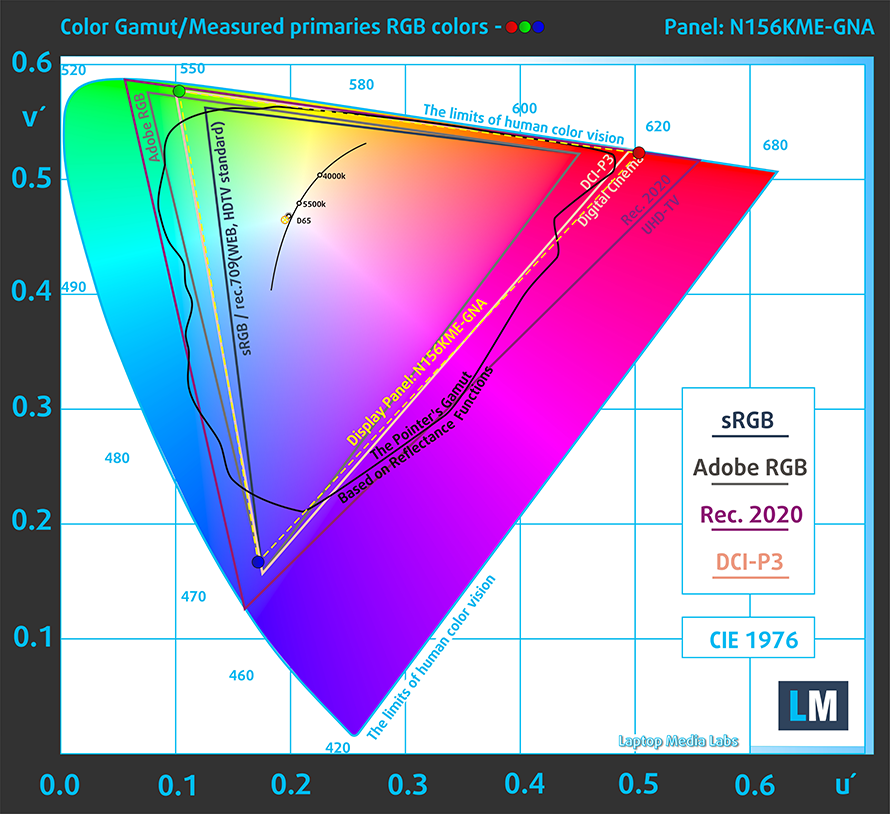
The display of the ROG Zephyrus G15 has a diagonal of 15.6 inches, a Full HD resolution, and an IPS panel. It has excellent viewing angles, and a maximum brightness of 340 nits, with a deviation of 13%. The contrast ratio is great, sitting at 1350:1. Furthermore, the display covers 100% of the sRGB color gamut and almost matches the DCI-P3 gamut, resulting in an amazing image with vibrant colors. You also shouldn’t be worried about your eyes, as the panel doesn’t use PWM to adjust its brightness across all brightness levels.
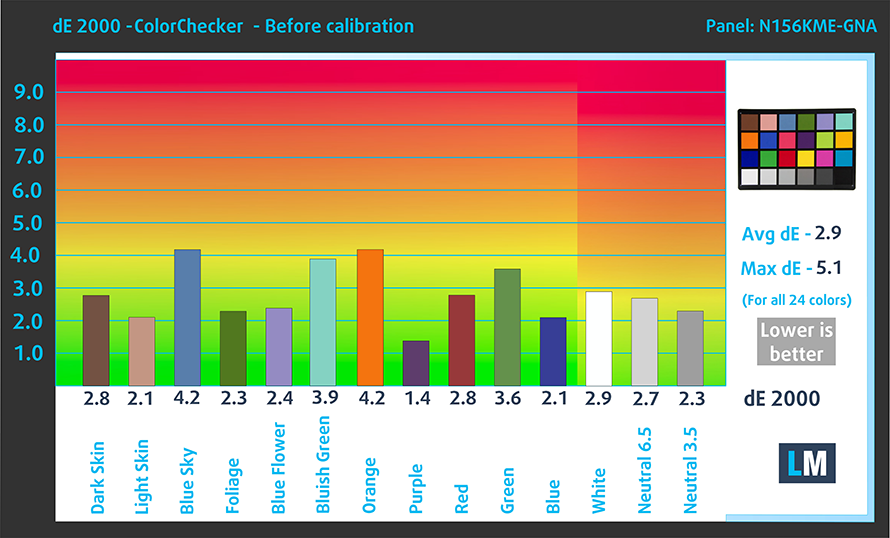
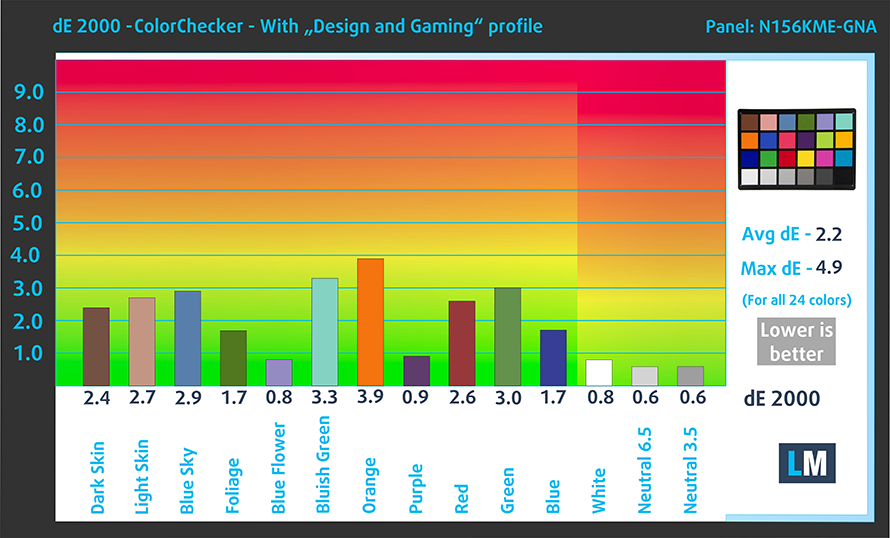
As for the color accuracy, we tested it both with the factory settings (left) and with our Design and Gaming profile applied (right). We got a dE value of 2.2 when using our profile.
Buy our profiles
Since our profiles are tailored for each individual display model, this article and its respective profile package are meant for ASUS ROG Zephyrus G15 GA503 configurations with 15.6″ QHD IPS Innolux N156KME-GNA (CMN152A).
*Should you have problems with downloading the purchased file, try using a different browser to open the link you’ll receive via e-mail. If the download target is a .php file instead of an archive, change the file extension to .zip or contact us at [email protected].
Read more about the profiles HERE.
A hatékony és egészségbarát profilok mellett a LaptopMedia termékeinek megvásárlásával laboratóriumaink fejlesztését is támogatja, ahol eszközöket tesztelünk a lehető legobjektívebb értékelések elkészítése érdekében.

Irodai Munka
Az Irodai Munka profilt elsősorban azoknak a felhasználóknak ajánljuk, akik idejük nagy részét szövegek, táblázatok nézegetésével vagy böngészéssel töltik. Ez a profil jobb megkülönböztethetőséget és tisztaságot biztosít egyenletes gamma-görbe (2.20), natív színhőmérséklet és érzékelhetően pontos színek mellett.

Dizájn és Játék
Ez a profil a színekkel hivatásszerűen dolgozó tervezőknek, valamint játékokhoz és filmekhez készült. A Dizájn és Játék a kijelzőpaneleket a határaikra juttatja, a lehető legpontosabbá téve őket az sRGB IEC61966-2-1 szabvány szerint a webre és a HDTV-re, D65 fehérpont mellett.

Health-Guard
A Health-Guard kiküszöböli a káros impulzusszélesség-modulációt (PWM) és csökkenti a negatív kék fényt, amely hatással van a szemünkre és a testünkre. Mivel minden panelhez egyedileg van szabva, a színeket érzékelhetően pontosan tartja. A Health-Guard a papírt szimulálja, így a szemre nehezedő nyomás jelentősen csökken.
Szerezze meg mind a 3 profilt 33% kedvezménnyel

4. Speakers
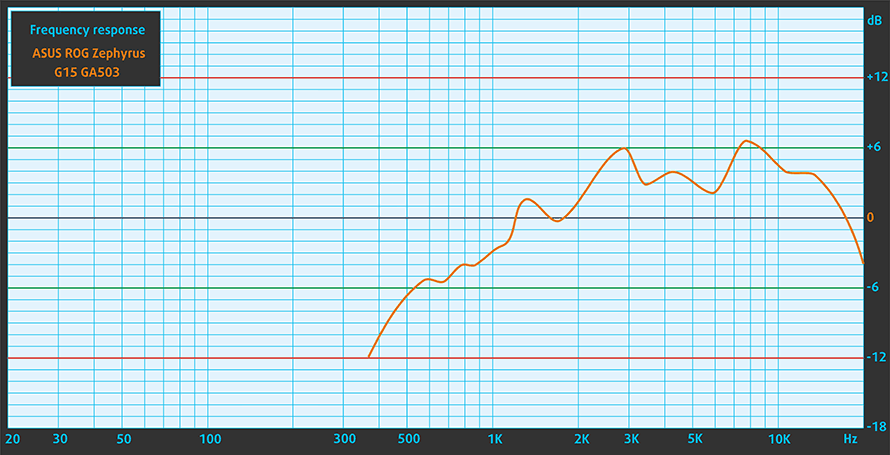
The speaker setup is very well implemented on this device. There are a total of six speakers which are surrounding the device. There are two tweeters on the side of the keyboard, which are front-firing, and the rest, which are 4W woofers are put in couples firing in different directions in order to minimize case vibrations. Overall the setup is pretty well engineered.
In our audio test, the speakers delivered clear and high-quality audio with no deviations across the entire frequency range.
1 reason NOT to buy the ASUS ROG Zephyrus G15 GA503
1. Keyboard
Overall the keyboard unit here is pretty good, but there are a few tiny things that keep it from becoming top tier, some of which are negligible for most people. The unit has a long key travel and nice clicky feedback. It lacks a Numpad but has a backlight, so you win some you lose some. Furthermore, the arrow keys are pretty tiny, which might be a deal-breaker for some people. Fortunately, there are some dedicated keys for mic and audio control as well as the ROG Armory Crate. The power button also doubles as a fingerprint reader, upping the security of your device.

All ASUS ROG Zephyrus G15 GA503 configurations:
 Author: Severin Kolakov

![[2026. június] Az Amazon Global legkelendőbb laptopmárkái – az Apple páratlan dominanciája az eladott darabszám és a bevétel tekintetében](https://laptopmedia.com/wp-content/uploads/2026/07/GLOBAL-Best-Brands-400x225.jpg)
![[2026. június] Amazon Global: A 10 legkelendőbb laptop – Az Apple új MacBook Neo-ja az első helyre tör, és megfizethető árával újjáformálja a piacot](https://laptopmedia.com/wp-content/uploads/2026/07/Best-Selling-Laptops-GLOBAL-Top-10-400x225.jpg)
![[2026. június] Amazon Global: A 10 legkelendőbb játékos laptop – az Acer Nitro V 16S AI vezeti az eladási listát, míg az ASUS az összbevétel tekintetében áll az élen](https://laptopmedia.com/wp-content/uploads/2026/07/Best-Selling-Gaming-Laptops-GLOBAL-Top-10-400x225.jpg)
![[2026. június] Az Amazonon legkelendőbb laptop-grafikus kártyák globális ranglistája – az NVIDIA RTX 5060 a legkelendőbb dedikált grafikus kártya](https://laptopmedia.com/wp-content/uploads/2026/07/Best-Selling-GPUs-GLOBAL-Top-10-400x225.jpg)
![[2026. június] Az Amazonon legkelendőbb laptop-processzorok globális rangsora – az Apple M5 vezet, az AMD Ryzen 7 260 pedig jelentős részesedést szerez a prémium szegmensben](https://laptopmedia.com/wp-content/uploads/2026/07/Best-Selling-CPUs-GLOBAL-Top-10-400x225.jpg)

Say – is there any chance you could reduce spreading the idea that PWM free display is OK and does not cause any eye strain? I¨ve tested now 5 laptops without PWM and the Temporal Dithering / FRC flicker is almost as bad as PWM. Flicker is flicker, the optic nerve does not care if it is PWM or Temporal dithering. I’m also not the only one who has noted this, there are quite a few people in the forums discussing the temporal dithering flicker.