Top 5 reasons to BUY or NOT to buy the ASUS TUF Dash F15 (FX516)
 ASUS was among the first manufacturers to trust and adopt AMD’s Ryzen processors for their laptops and so far, it has been an amazing choice. It’s no secret that AMD offers the best CPUs right now and that they have the bigger part of the market.
So it was a bit weird to see them go back to team Blue with their latest ASUS TUF Dash F15 (FX516) which has the Core i7-11370H, the first high-performance quad-core Tiger Lake chip, which has only one purpose – to deliver the best gaming performance. Upgrades come in the GPU field, as well, with the newest RTX Ampere cards.
Today we are presenting you with LaptopMedia’s top 5 picks about the ASUS TUF Dash F15 (FX516).
ASUS TUF Dash F15 (FX516): Full Specs / In-depth Review
4 reasons to BUY the ASUS TUF Dash F15 (FX516)
1. The Design and build quality
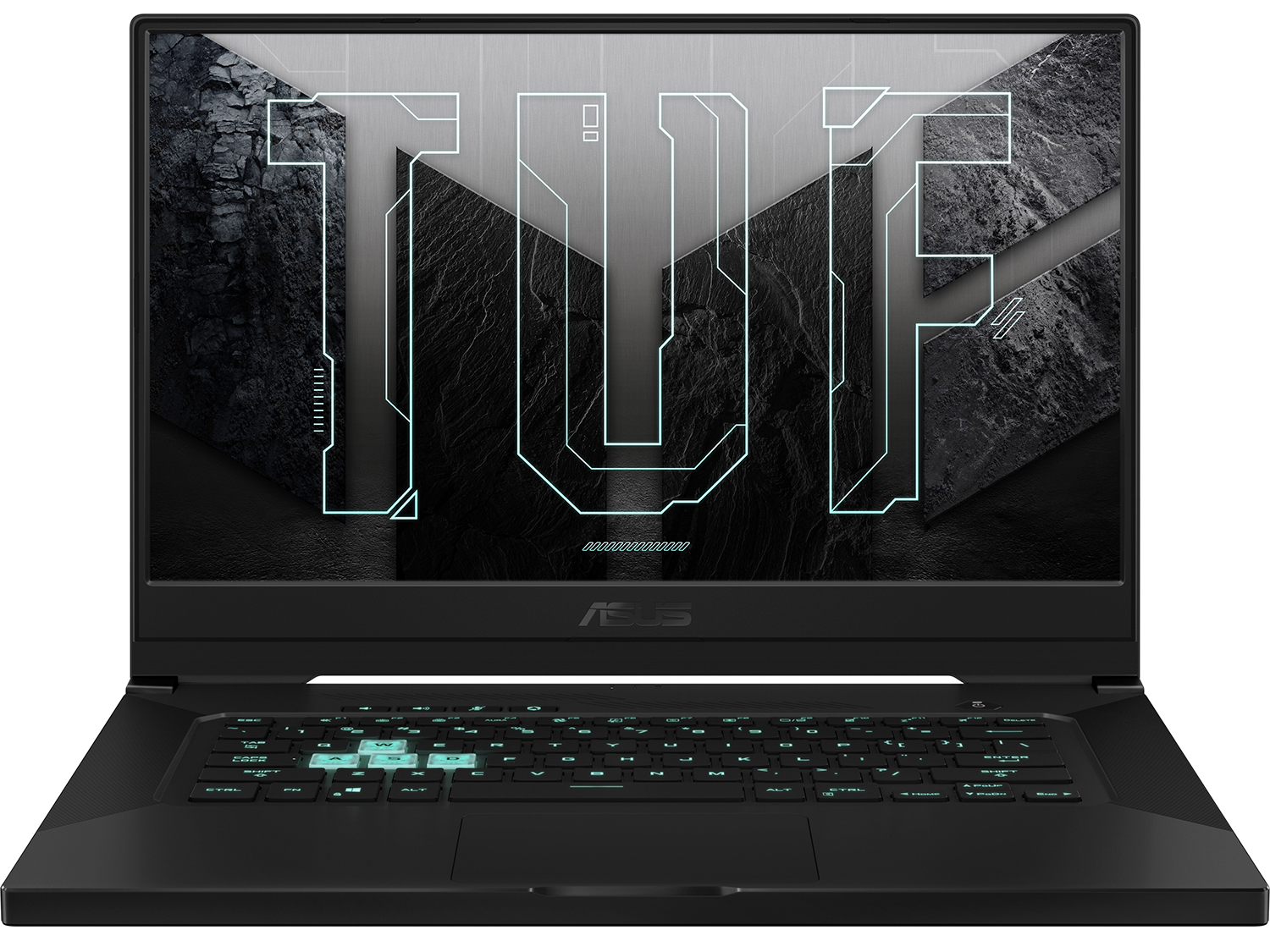
While the body materials arent specified by ASUS, we presume that the laptop is made from plastic. However, the body is very sturdy and we didn’t notice any significant twisting and flexing. It is also relatively portable with a profile of 19.9 mm and a weight of no more than 2 kilos. The laptop is very good-looking with chamfered edges all around the base.
One area where the laptop excels is with its keyboard. While it doesn’t have a Numpad, it does feature transparent WASD keys, which reveal the mechanism below. It has clicky feedback and long enough key travel, making for a pleasant typing and gaming experience.
2. The Upgradeability
The RAM and storage are upgradeable here, but with a caveat. Depending on your configuration, you get either 8GB or 16GB of soldered RAM and one SODIMM slot that supports up to 16GB of DDR4 memory, for up to 32GB of total RAM in dual-channel mode. For the storage, there are two M.2 PCIe x4 drives.
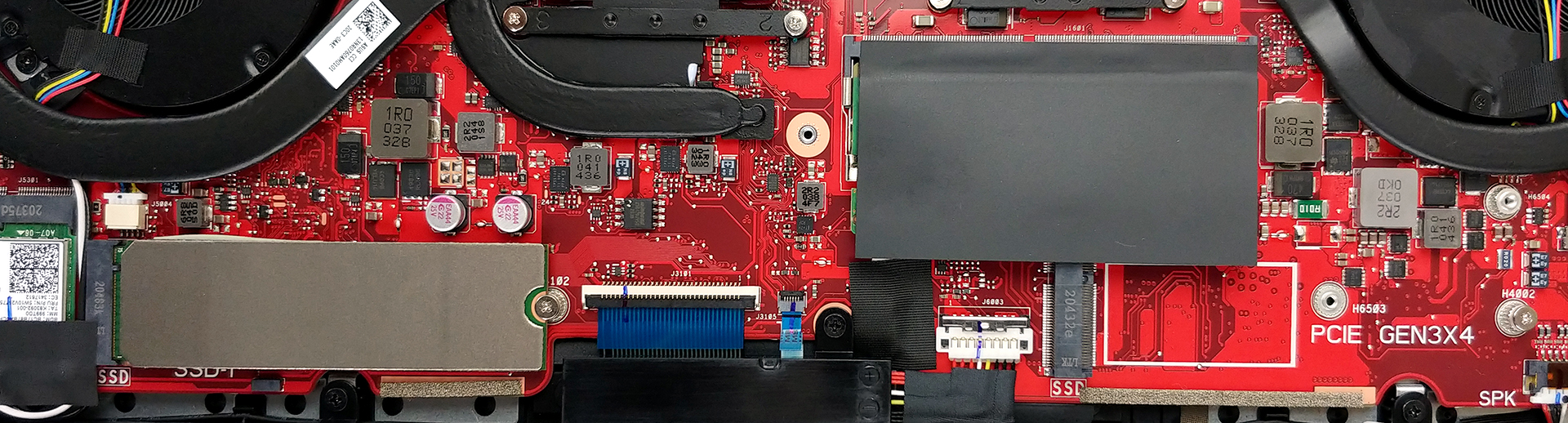
Here we will leave our teardown video, in case you need some assistance in getting access to the RAM and SSD storage.
3. The Cooling
The cooling solution on the ASUS TUF Dash F15 (FX516) is really good on paper, with a total of two fans and five heat pipes (two that are shared between the CPU and GPU plus one separate for each of them). The last heat pipe is there to cool the VRMs and the graphics memory.
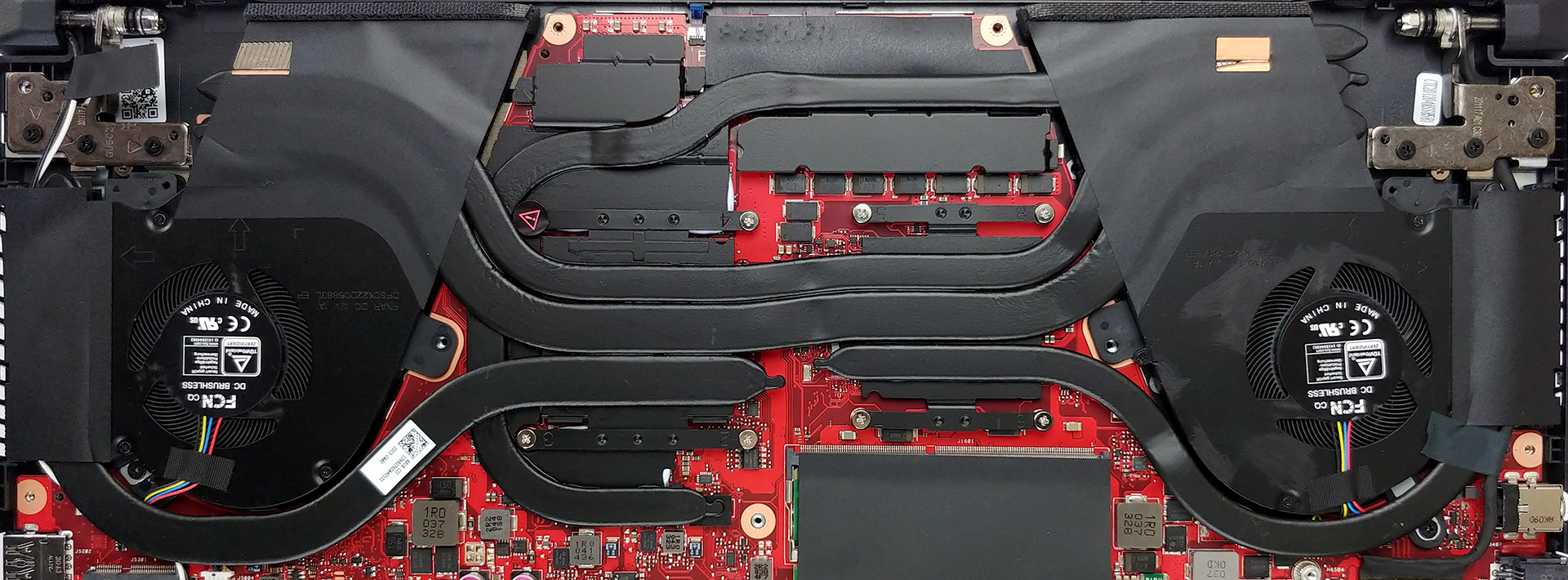
When it came to our CPU and GPU stress tests, the Core i7-11730H managed to maintain a frequency of around 4.00GHz throughout the whole test, which is exceptional. While the temps did get quite high (90°C), the cooling did a great job.
| Intel Core i7-11370H (35W TDP) | 0:02 – 0:10 sec | 0:15 – 0:30 sec | 10:00 – 15:00 min |
|---|---|---|---|
| ASUS TUF Dash F15 (FX516) | 4.01 GHz (B+22%) @ 78°C @ 64W | 4.00 GHz (B+21%) @ 82°C @ 64W | 3.96 GHz (B+20%) @ 90°C @ 60W |
For the GPU tests, the RTX 3070 remained within reasonable temperatures even after 30 minutes of heavy load. That was with the Turbo Mode turned on, which made the laptop quite noisy.
| NVIDIA GeForce RTX 3070 | GPU frequency/ Core temp (after 2 min) | GPU frequency/ Core temp (after 30 min) |
|---|---|---|
| ASUS TUF Dash F15 (FX516) | 1389 MHz @ 69°C @ 84W | 1377 MHz @ 74°C @ 84W |
4. The Battery life
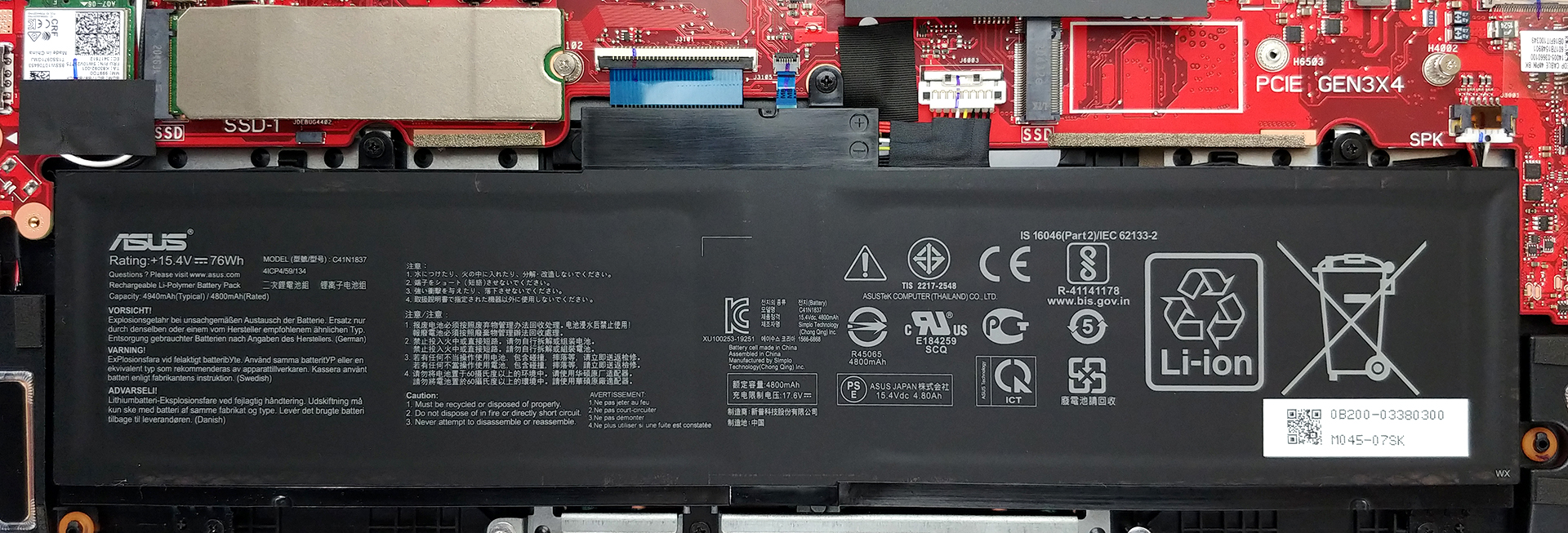
The battery life here is just amazing, especially considering that this a gaming device we are talking about. The laptop has a unit of 76Wh, which delivers 14 hours and 46 minutes of Web browsing and 11 hours and 11 minutes of video playback.
1 reason NOT to buy the ASUS TUF Dash F15 (FX516)
1. The Display
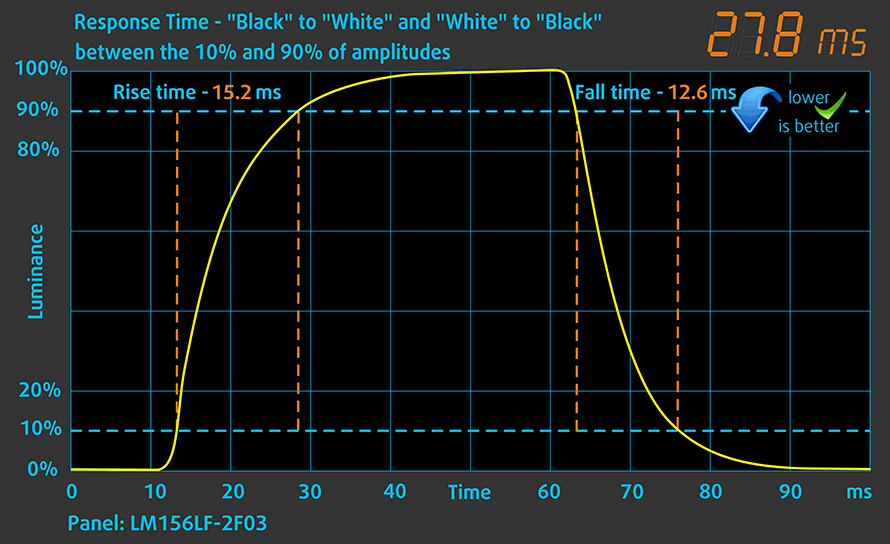
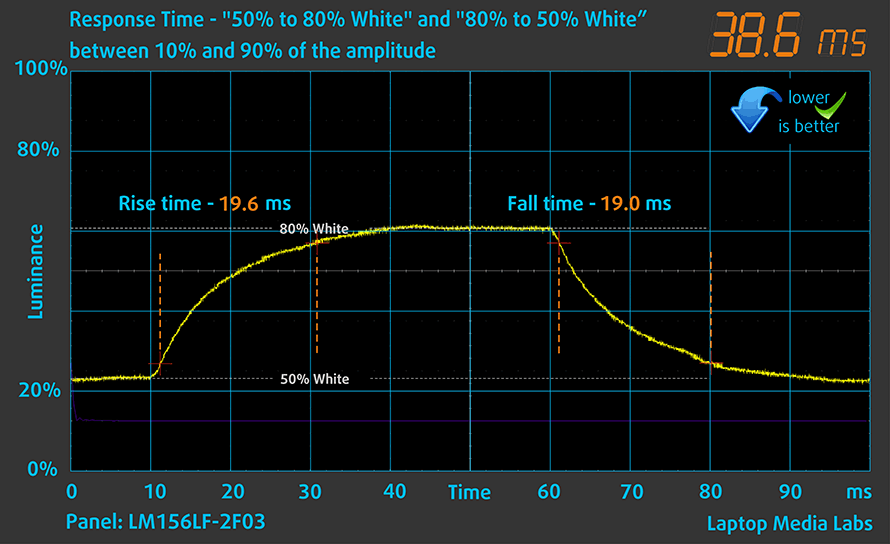
Our configuration of the ASUS TUF Dash F15 (FX516) came with a 15.6-inch Full HD IPS screen with a 16:9 aspect ratio and a refresh rate of 144Hz. In addition to that, it has comfortable viewing angles, a good contrast ratio, and a non-flickering backlight. Where it falls short, is in its color coverage, where it only covers 55% of the sRGB color gamut, and its pixel response time, which is slow for a gaming laptop.
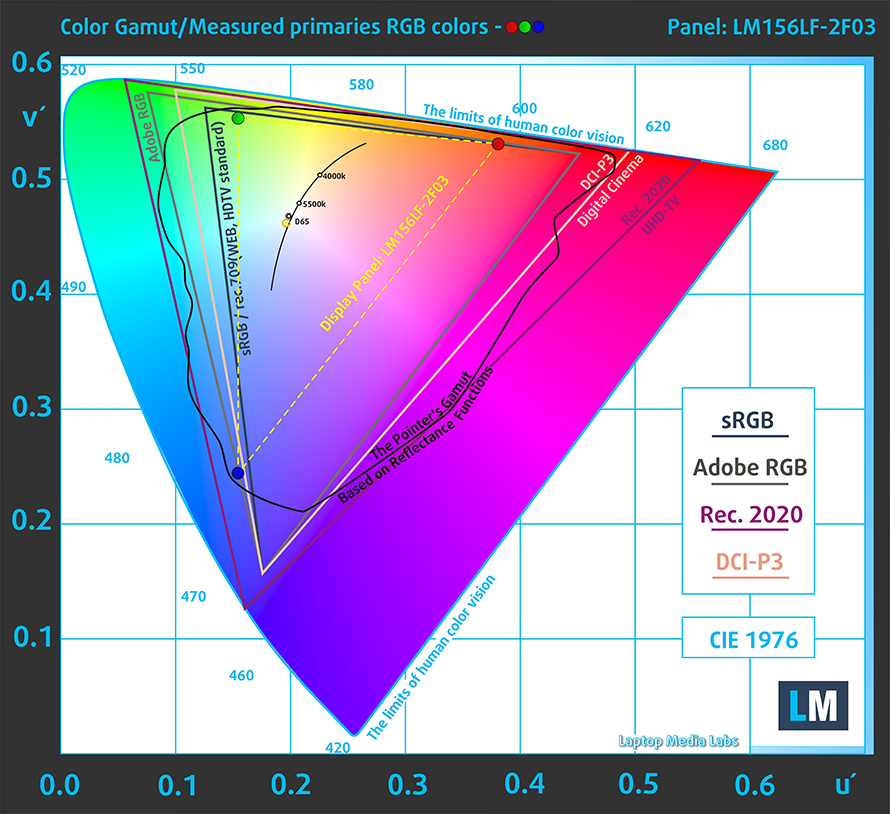
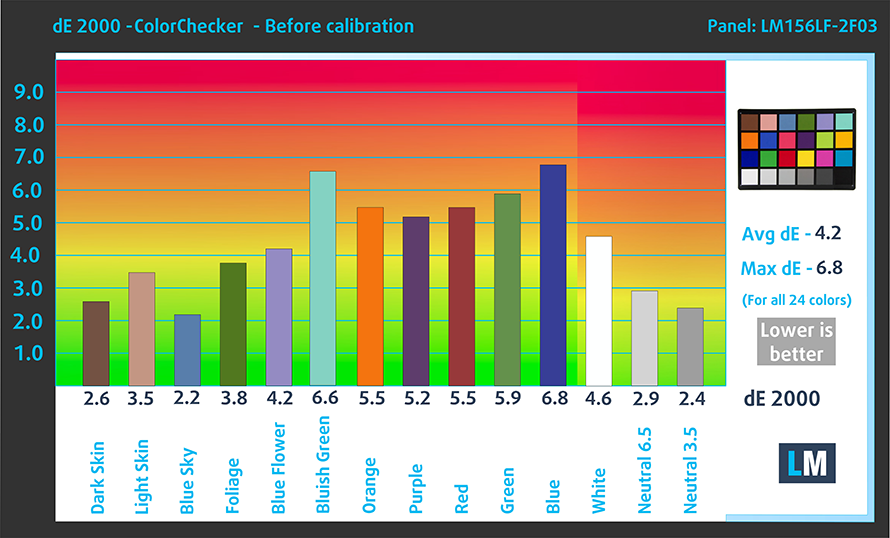
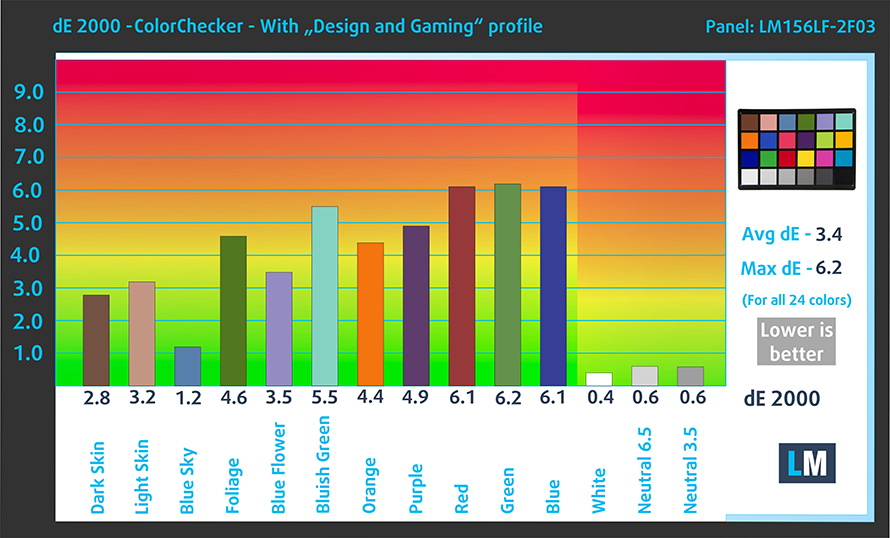
As for the color accuracy, both with the factory setting and with our “Gaming and web design” profile, we couldn’t get it very close to the standard
Buy our profiles
Since our profiles are tailored for each individual display model, this article and its respective profile package are meant for ASUS TUF Dash F15 (FX516) configurations with 15.6″ Panda LM156LF-2F03 (NCP004D) (FHD, 1920 × 1080) IPS.
*Should you have problems with downloading the purchased file, try using a different browser to open the link you’ll receive via e-mail. If the download target is a .php file instead of an archive, change the file extension to .zip or contact us at [email protected].
Read more about the profiles HERE.
A hatékony és egészségbarát profilok mellett a LaptopMedia termékeinek megvásárlásával laboratóriumaink fejlesztését is támogatja, ahol eszközöket tesztelünk a lehető legobjektívebb értékelések elkészítése érdekében.

Irodai Munka
Az Irodai Munka profilt elsősorban azoknak a felhasználóknak ajánljuk, akik idejük nagy részét szövegek, táblázatok nézegetésével vagy böngészéssel töltik. Ez a profil jobb megkülönböztethetőséget és tisztaságot biztosít egyenletes gamma-görbe (2.20), natív színhőmérséklet és érzékelhetően pontos színek mellett.

Dizájn és Játék
Ez a profil a színekkel hivatásszerűen dolgozó tervezőknek, valamint játékokhoz és filmekhez készült. A Dizájn és Játék a kijelzőpaneleket a határaikra juttatja, a lehető legpontosabbá téve őket az sRGB IEC61966-2-1 szabvány szerint a webre és a HDTV-re, D65 fehérpont mellett.

Health-Guard
A Health-Guard kiküszöböli a káros impulzusszélesség-modulációt (PWM) és csökkenti a negatív kék fényt, amely hatással van a szemünkre és a testünkre. Mivel minden panelhez egyedileg van szabva, a színeket érzékelhetően pontosan tartja. A Health-Guard a papírt szimulálja, így a szemre nehezedő nyomás jelentősen csökken.
Szerezze meg mind a 3 profilt 33% kedvezménnyel

All ASUS TUF Dash F15 (FX516) configurations:

 Author: Severin Kolakov

![[2026. július] Az Amazonon legkelendőbb laptop-grafikus kártyák globális ranglistája – Az RTX 5060 uralja a prémium szegmenst, az Intel továbbra is vezet a kedvező árú kategóriában](https://laptopmedia.com/wp-content/uploads/2026/08/Best-Selling-GPUs-GLOBAL-Top-10-400x225.jpg)
![[2026. július] Az Amazonon legkelendőbb laptop-processzorok globális ranglistája – az Apple uralja a prémium szegmenst, az Intel pedig az összesített ranglistát](https://laptopmedia.com/wp-content/uploads/2026/08/Best-Selling-CPUs-GLOBAL-Top-10-400x225.jpg)
![[July 2026] Amazon Canada: Top 10 Best-Selling Laptops – Apple MacBook Neo Dominates the Market to Claim the #1 Spot](https://laptopmedia.com/wp-content/uploads/2026/08/Best-Selling-Laptops-CA-Top-10-2-400x225.jpg)
![[July 2026] Best-Selling Laptop Brands on Amazon Japan – HP and Lenovo Dominate Units and Revenue Amid Fierce Competition](https://laptopmedia.com/wp-content/uploads/2026/08/CO.JP-Best-Brands-2-400x225.jpg)
![[July 2026] Amazon Italy: Top 10 Best-Selling Laptops – Apple MacBook Neo Claims the #1 Spot Amid Budget-Friendly Dominance](https://laptopmedia.com/wp-content/uploads/2026/08/Best-Selling-Laptops-IT-Top-10-400x225.jpg)
