Top 5 reasons to BUY or NOT to buy the MSI Modern 14 (B11)
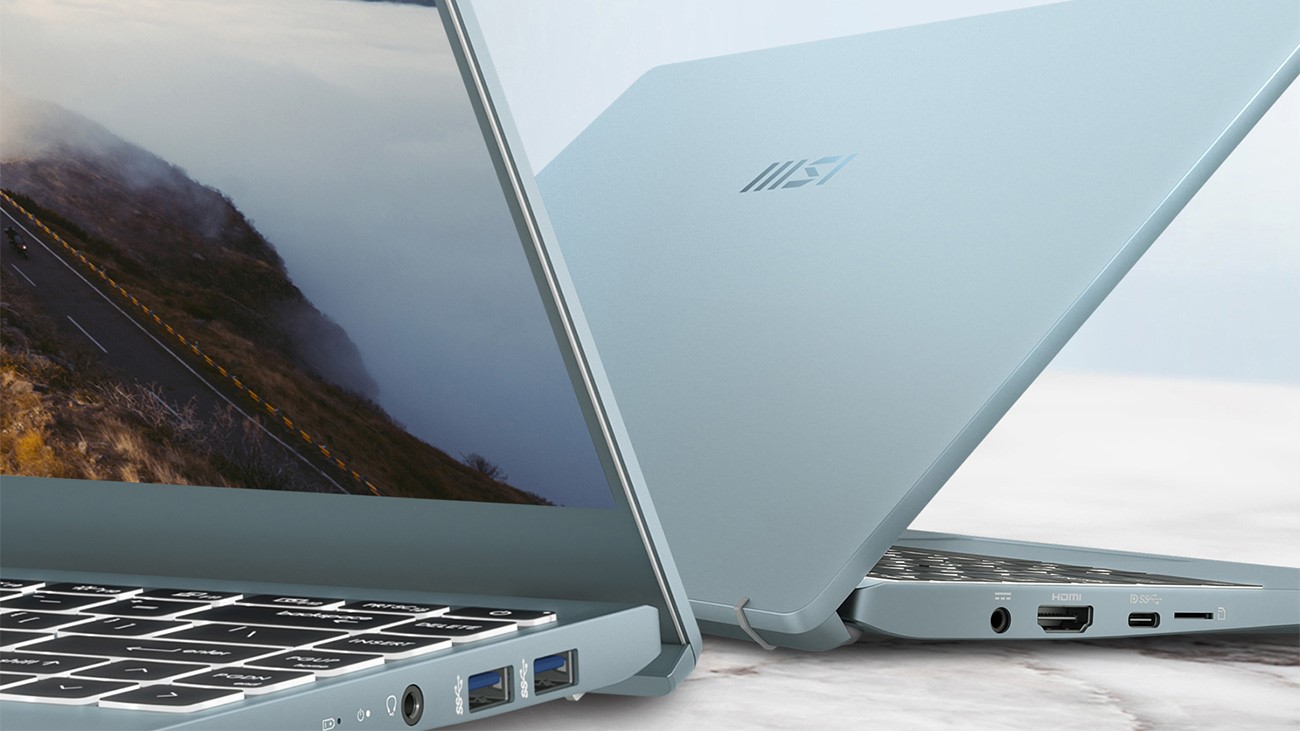 What a time are we living in. MSI is getting deeper and deeper in the thin notebook market, which focuses on productivity and portability. While that may be a far cry for the Taiwanese company’s usual market of monstrous gaming hardware, it can be good for a manufacturer to enter a relatively new space, as it introduces you to new difficulties which sometimes actually open your eyes to engineering ideas that you might have never thought of before.
Now, to go back to the device that is in the spotlight today, here is the MSI Modern 14 (B11). It has more than enough performance, due to Tiger Lake, which has a caveat, in the way that it needs a proper cooling setup and RAM configuration, in order to truly succeed.
Today we are presenting you our Top 5 picks about the MSI Modern 14 (B11).
MSI Modern 14 (B11): Full Specs / In-depth Review
4 reasons to BUY the MSI Modern 14 (B11)
1. Design and build quality
MSI introduced its new logo at CES 2021 (don’t worry, it’s just the wordmark that they replaced, the dragon is safe for now) and we feel like it’s quite tasteful. It resembles the old one, while still feeling fresh, which is mandatory for a good rebrand. The design of the laptop itself is quite good, with the new logo able to be seen on the center of the lid as well as the bezel below the display. Build materials are on point, with the whole laptop being made entirely out of aluminum, resulting in a weight of 1.30 kg and a height of just 16.9 mm. The body is sturdy, with little to no flex to be seen from both the lid and the base.
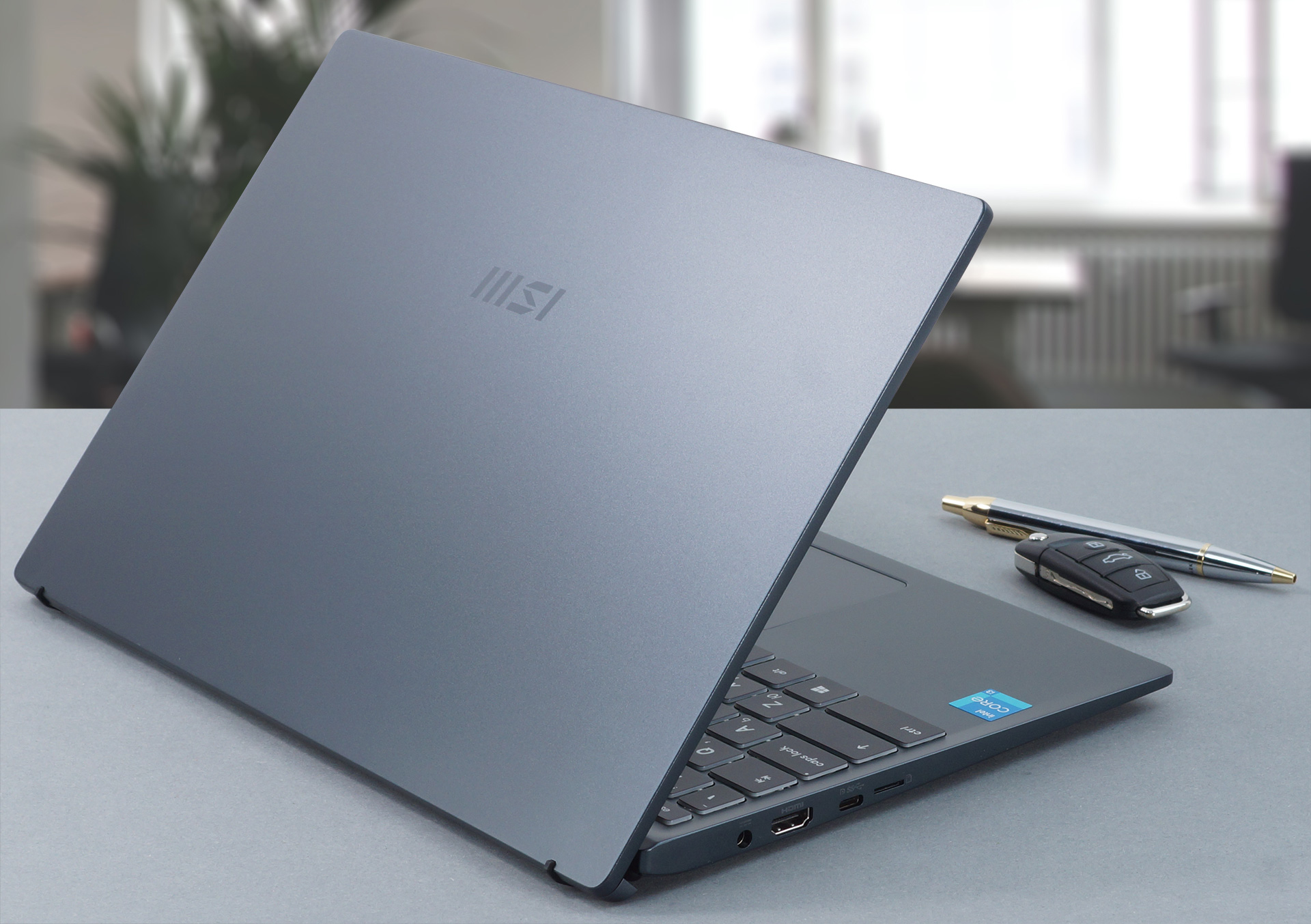
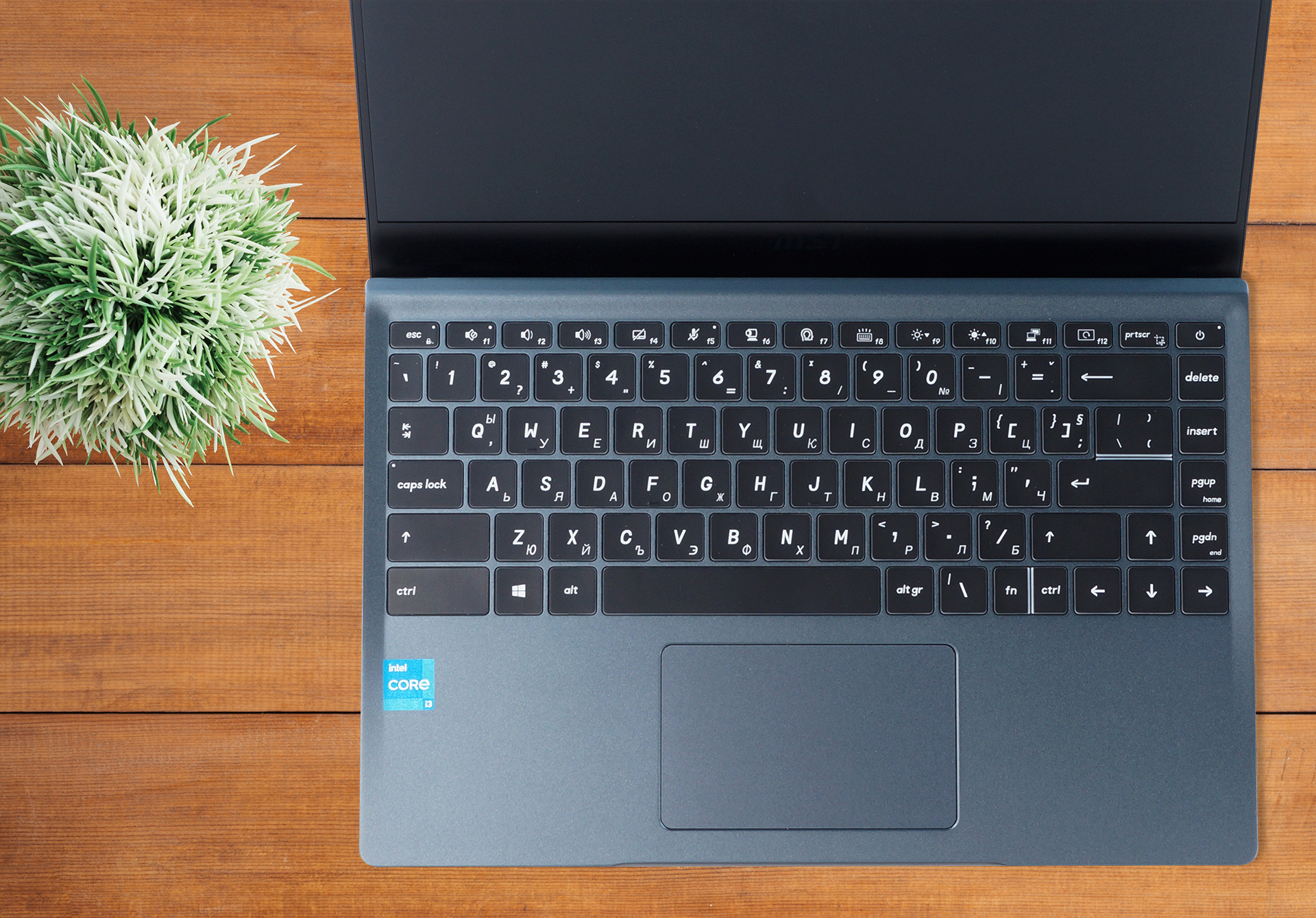
The lid easily opens with a single hand, which reveals another feature of the laptop. The display lifts up the base, which gives a better angle for typing on the backlit keyboard, while at the same time allowing for more air to enter the device through the bottom vents. The keyboard and touchpad combo is 50/50 as while the keycaps are well-sized, the feedback is a bit mushy and the key travel isn’t as long as we would like. The touchpad is the same, as it is accurate and smooth, while the inputs sometimes fail to register.
2. Upgradeability and I/O
As with many MSI laptops, there’s a factory sticker on the bottom, placed over one of the screws. Tearing it will void your warranty in some regions, and that’s why we dont give you a photo of the internal components. However, we do know for a fact that the MSI Modern 14 (B11) has one SODIMM RAM slot for future expansion, which supports up to 32GB of DDR4 memory, as well as one M.2 PCIe slot for SSD upgrades down the line.
One more positive about the Modern 14 is the relatively wide I/O selection, which includes the power plug, an HDMI connector, one Thunderbolt 4 port, and a MicroSD card slot, which are all placed on the left side. On the right side, you have two USB Type-A 3.2 (Gen 1) ports and the mandatory 3.5 mm audio jack.


3. Battery
Considering the 52Wh and the power-efficient Core i3 processor we think that the battery life should have been better than this. However, it is still enough to last you through a whole day of work, and in general, the battery life is quite balanced, as there is not that big of a difference between Web browsing and Video playback scores. The laptop lasted for 8 hours and 40 minutes of Web browsing and 8 minutes and 4 minutes of video playback.
Fényerő: 180 nit; Megjelenítési mód: SDR
Teljes lemerülési idő: A magasabb érték a jobb
A valós körülmények szimulálása érdekében saját szkriptünket használtuk több mint 70 webhely automatikus böngészéséhez.
4. Performance
Due to an excellent combination of processor, RAM configuration, and cooling setup, this laptop achieves a great amount of performance even though our unit only had a Core i3-1115G4. If that is not enough for you, there are other Tiger Lake CPUs such as the Core i5-1135G7 and the Core i7-1165G7, which when paired with the potent cooling solution, will be an unrivaled combination at this price point.
CPU benchmarks
Az eredmények a Cinebench R23 CPU tesztből származnak (minél magasabb a pontszám, annál jobb)
GPU benchmarks
Az eredmények a 3DMark Time Spy (Graphics) tesztből származnak. A magasabb érték a jobb.
Az eredmények a 3DMark Fire Strike (Graphics) benchmarkból származnak (minél magasabb a pontszám, annál jobb).
Az eredmények az Unigine Superposition benchmarkból származnak (minél magasabb a pontszám, annál jobb).
1 reason NOT to buy the MSI Modern 14 (B11)
1. Display
Imagine a world where this laptop gets a better display than the one that it has. It would honestly make it a contender for one of the best-selling notebooks on the market. However, MSI has decided to go the cheaper route and put a 14-inch Full HD IPS panel which generally has decent qualities such as comfortable viewing angles, adequate maximum brightness, and a good contrast ratio of 1200:1. Furthermore, it doesn’t use PWM across any brightness levels. Sadly the color coverage is just a measly 49% of the sRGB color gamut.
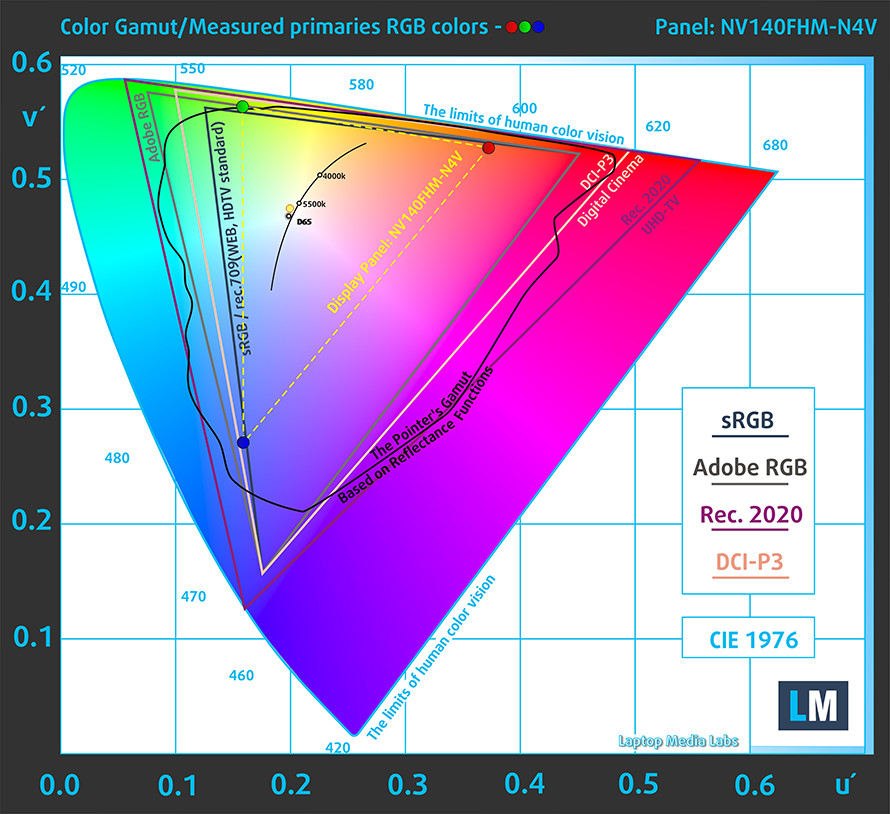
Due to the bad color coverage, the color accuracy isn’t anything to write home about, as even our Design and Gaming profile couldn’t bring it down to a professional standard. Here you can see the results of our test with both the factory settings (left) and with our Design and Gaming profile (right).


Buy our profiles
Since our profiles are tailored for each individual display model, this article and its respective profile package are meant for MSI Modern 14 (B11) configurations with 14.0″ BOE NV140FHM-N4V (FHD, 1920 × 1080) IPS.
*Should you have problems with downloading the purchased file, try using a different browser to open the link you’ll receive via e-mail. If the download target is a .php file instead of an archive, change the file extension to .zip or contact us at [email protected].
Read more about the profiles HERE.
A hatékony és egészségbarát profilok mellett a LaptopMedia termékeinek megvásárlásával laboratóriumaink fejlesztését is támogatja, ahol eszközöket tesztelünk a lehető legobjektívebb értékelések elkészítése érdekében.

Irodai Munka
Az Irodai Munka profilt elsősorban azoknak a felhasználóknak ajánljuk, akik idejük nagy részét szövegek, táblázatok nézegetésével vagy böngészéssel töltik. Ez a profil jobb megkülönböztethetőséget és tisztaságot biztosít egyenletes gamma-görbe (2.20), natív színhőmérséklet és érzékelhetően pontos színek mellett.

Dizájn és Játék
Ez a profil a színekkel hivatásszerűen dolgozó tervezőknek, valamint játékokhoz és filmekhez készült. A Dizájn és Játék a kijelzőpaneleket a határaikra juttatja, a lehető legpontosabbá téve őket az sRGB IEC61966-2-1 szabvány szerint a webre és a HDTV-re, D65 fehérpont mellett.

Health-Guard
A Health-Guard kiküszöböli a káros impulzusszélesség-modulációt (PWM) és csökkenti a negatív kék fényt, amely hatással van a szemünkre és a testünkre. Mivel minden panelhez egyedileg van szabva, a színeket érzékelhetően pontosan tartja. A Health-Guard a papírt szimulálja, így a szemre nehezedő nyomás jelentősen csökken.
Szerezze meg mind a 3 profilt 33% kedvezménnyel

All MSI Modern 14 (B11) configurations:
 Author: Severin Kolakov

![[2026. augusztus] Amazon Global: A 10 legkelendőbb laptop – az Apple MacBook Neo vezeti a ranglistát, miközben az olcsóbb és középkategóriás Windows-alapú hordozható számítógépek az eladási mennyiségért küzdenek](https://laptopmedia.com/wp-content/uploads/2026/09/Best-Selling-Laptops-GLOBAL-Top-10-400x225.jpg)
![[2026. augusztus] Az Amazon Global legkelendőbb laptopmárkái – Az Apple vezeti a bevételi rangsort, míg a HP a modellválaszték terén áll az élen](https://laptopmedia.com/wp-content/uploads/2026/09/GLOBAL-Best-Brands-400x225.jpg)
![[2026. augusztus] Amazon Global: A 10 legkelendőbb játékos laptop – Az HP Victus 15 szerezte meg az első helyet, miközben a kedvező árú modellek uralják a ranglistát](https://laptopmedia.com/wp-content/uploads/2026/09/Best-Selling-Gaming-Laptops-GLOBAL-Top-10-400x225.jpg)
![[August 2026] Best-Selling Laptop Brands on Amazon Japan – Apple Dominates Market Share and Revenue Led by Strong Unit Sales](https://laptopmedia.com/wp-content/uploads/2026/09/CO.JP-Best-Brands-1-400x225.jpg)
![[August 2026] Best-Selling Laptop Brands on Amazon USA – Apple Dominates Market Revenue and Volume Despite Lower Model Diversity](https://laptopmedia.com/wp-content/uploads/2026/09/COM-Best-Brands-1-400x225.jpg)

I have a Modern 14 with a 10th gen i3 8Gb RAM single slot, 128Gb SSD Kingston. If I am honest, I wasn’t looking for big performance but the i3 left me feeling like it was much closer to a Pentium Gold then anything. The single slot RAM means slower performance as well. The OEM Kingston SSD was king of slow too. Also, the two USB A ports are only 2.0 not 3.0. The aluminum chassis seems to be the attraction but when even a core i3 throttles at 70c and single channel RAM, it makes for a hard sell.… Tovább olvasom »