HDMI 2.2 vs HDMI 2.1: Learn the Key Differences in 10 Seconds
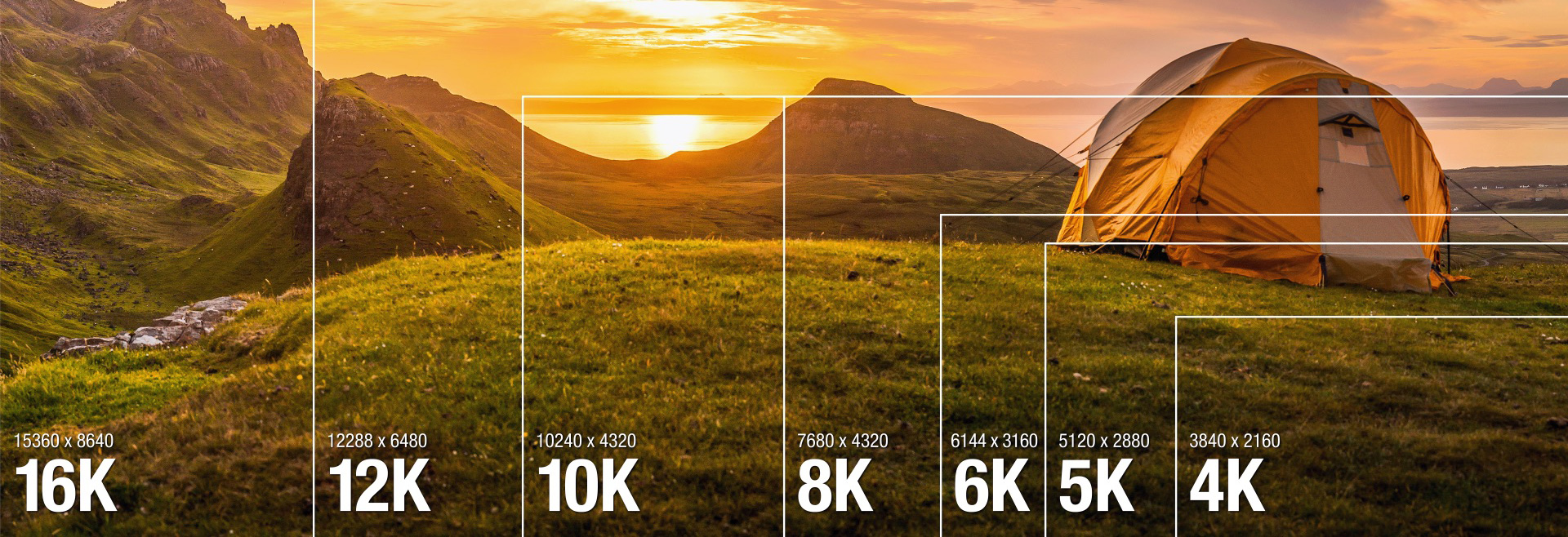
Now that the HDMI 2.2 spec is official, many enthusiasts wonder how it improves on the already-impressive HDMI 2.1 ports found on today’s GPUs, laptops, TVs, and monitors. Spoiler: the new version doubles raw bandwidth, stretches resolution ceilings to sci-fi heights, and adds a clever latency-tracking trick.
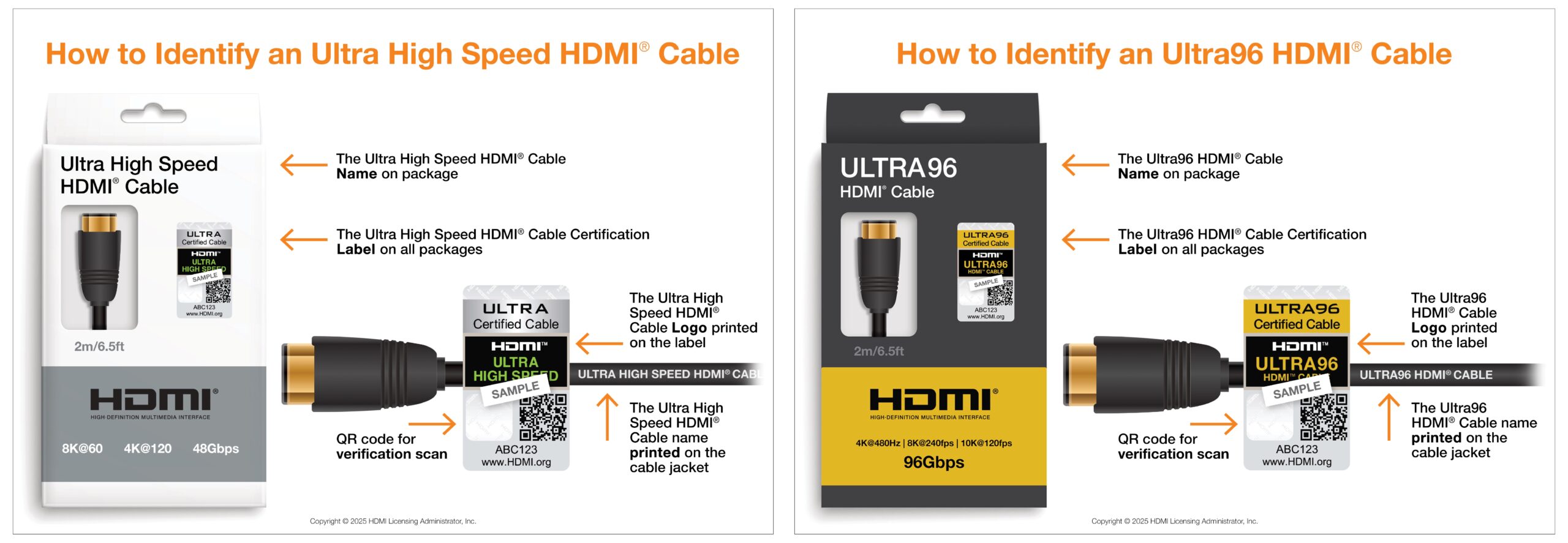
In practical terms, HDMI 2.2 introduces the Ultra96 cable certification. These new, thicker-gauge cables push 96 Gbps – exactly twice HDMI 2.1’s 48 Gbps, and maintain the same plug shape you already know. The bandwidth leap alone unlocks headroom for ultra-high-refresh 4K esports panels and cinema-grade 16K displays down the line.
Quick Rundown of the Differences
| HDMI 2.2 | HDMI 2.1 | |
|---|---|---|
| Bandwidth | 96 Gbps (Ultra96) | 48 Gbps (Ultra High Speed) |
| Top Uncompressed Modes | 4K 240 Hz 4:4:4, 8K 60 Hz 4:4:4, 10-/12-bit color | 4K 120 Hz 4:4:4, 8K 60 Hz 4:2:0 |
| Theoretical Max (with DSC) | 4K 480 Hz, 8K 240 Hz, 10K 120 Hz, 16K 60 Hz | 4K 240 Hz, 8K 120 Hz |
| Cable Type & Label | Ultra96 (mandatory logo + QR) | Ultra High Speed |
| New Tricks | Latency Indication Protocol (LIP), updated FRL, HDMI Cable Power+ | eARC, VRR, ALLM, QMS, QFT |
| Back-compatibility | Yes | Yes |
❓ Should You Upgrade?
🖥 If you already have HDMI 2.1
Step 1: Are you actually maxing out 4K 120 Hz (or 8K 60 Hz) today?
— Yes → HDMI 2.2 gives headroom for 4K 240 Hz esports or 8K 120 Hz filmmaking.
— No → Go to Step 2.
Step 2: Planning to buy a monitor or TV that lists ≥8K or ≥240 Hz in the next 2 years?
— Yes → Future-proof with HDMI 2.2 + Ultra96 cables.
— No → HDMI 2.1 remains plenty for gaming, streaming, and HDR movies.
🖥 If you’re on HDMI 2.0 or older
Step 1: Do you feel limited by 4K 60 Hz—or even 1080p 120 Hz?
— Yes → Get HDMI 2.1 gear with FRL now: HDMI 2.2 devices aren’t expected before 2027.
— No → HDMI 2.1 gear is now cheaper and still a massive leap over 2.0.
Step 2: Investing in VR/AR, pro 12-bit colour grading, or multi-display signage?
— Yes → The extra bandwidth and LIP features of HDMI 2.2 will matter.
— No → Save your budget for now.
For most current laptops, a full HDMI 2.1 port already drives external 4K 144 Hz or 8K 60 Hz panels, but check that your laptop’s port supports FRL: many “HDMI 2.1” ports stop at 4K 60 Hz. No laptop has HDMI 2.2 yet, and the HDMI Licensing Administrator expects the first devices with up to 96 Gbps in 2027.
For everything else, from cables to which HDMI you need for your TV or monitor, see our guide: HDMI Explained: 2.2 vs 2.1 vs 2.0 — Which One You Need?
 Author: Simeon NikolovEditor-in-Chief at LaptopMedia.com with 20+ years of experience in testing and analyzing laptops and mobile devices.




An impressive jump from 48 Gbps with HDMI 2.1 to 96 Gbps with HDMI 2.2!
But this raises a practical question: what exactly do we need to take advantage of that speed?
Besides an HDMI 2.2 port on the computer or graphics card, what kind of cable should we look for, and how can we tell if a TV or monitor really supports 96 Gbps?
Is it enough for all the devices to be labeled HDMI 2.2, or should we check specific technical specs and certifications?
It would be really useful if you could put together a short, practical guide for users on how to set up the complete connection and get the most out of the new standard.
Show original
Впечатляващ скок от 48 Gbps при HDMI 2.1 до 96 Gbps при HDMI 2.2!
Но възниква един практически въпрос: какво точно трябва да имаме, за да се възползваме от тази скорост?
Освен HDMI 2.2 порт на компютъра или видеокартата, какъв кабел трябва да търсим и как да разпознаем телевизор или монитор, който действително поддържа 96 Gbps?
Достатъчно ли е всички устройства да са обозначени като HDMI 2.2, или трябва да проверяваме конкретни технически характеристики и сертификации?
Би било много полезно да направите кратко практическо ръководство за потребителите – как да изградим цялата връзка, така че да използваме максималните възможности на новия стандарт.
To get 96 Gbps, all three parts need to support the full speed: the source (laptop, graphics card, or console), the cable, and the TV or monitor.
The cable is the easiest part: look for a certified Ultra96 cable. It has a required label with a QR code that you can scan to verify the certification. These cables are already on sale.
For devices, the “HDMI 2.2” label alone isn’t enough. The first devices with this label may only add the new audio and video sync feature (LIP) while still using HDMI 2.1 speeds. The Ultra96 name also covers devices with 64 or 80 Gbps. So look for “96 Gbps” in the specs or display modes such as uncompressed 4K at 240 Hz.
No HDMI 2.2 devices are on sale yet. The first devices supporting up to 96 Gbps are expected in 2027. Our guide explains which version and cable you need for a TV, monitor, or console: https://laptopmedia.com/highlights/do-you-need-a-phd-to-understand-the-new-hdmi-specifications/
Show original
За 96 Gbps трябват и трите части: източник (лаптоп, видеокарта или конзола), кабел и телевизор или монитор, всичките с пълните 96 Gbps.
Кабелът е най-лесен: търси сертифициран Ultra96. Той има задължителен етикет с QR код, по който се проверява дали сертификатът е истински. Такива кабели вече се продават.
При устройствата надписът „HDMI 2.2“ не е достатъчен. Първите устройства с това име може да добавят само новата функция за синхрон на звука и картината (LIP) и да си останат със скоростите на HDMI 2.1. А името Ultra96 покрива и устройства с 64 или 80 Gbps. Затова търси „96 Gbps“ в спецификациите или режими като 4K 240 Hz без компресия.
Засега в продажба няма устройство с HDMI 2.2. Първите с до 96 Gbps се очакват през 2027 г. Коя версия и кой кабел ти трябват за телевизор, монитор или конзола, обясняваме в нашето ръководство: https://laptopmedia.com/highlights/do-you-need-a-phd-to-understand-the-new-hdmi-specifications/