Lenovo Ideapad L340 Gaming (15″) vs MSI GL63 8RC – a mid-range fight
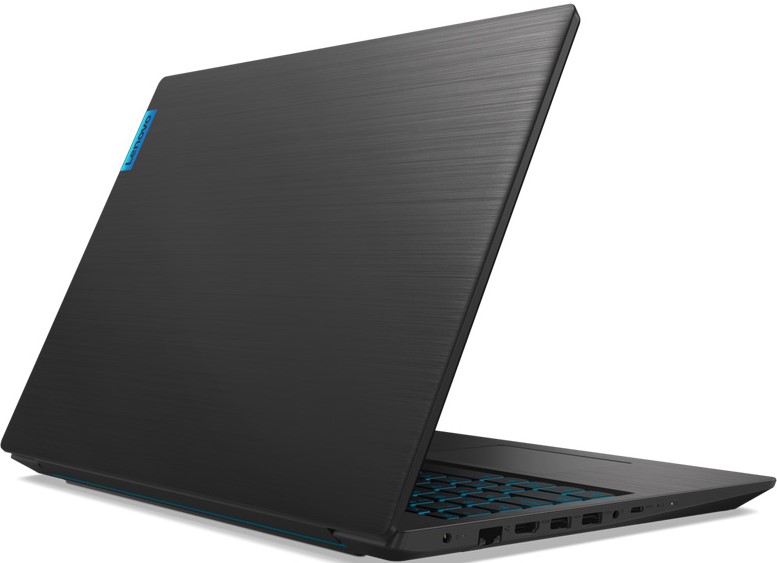 It’s time for a mid-range battle again.
 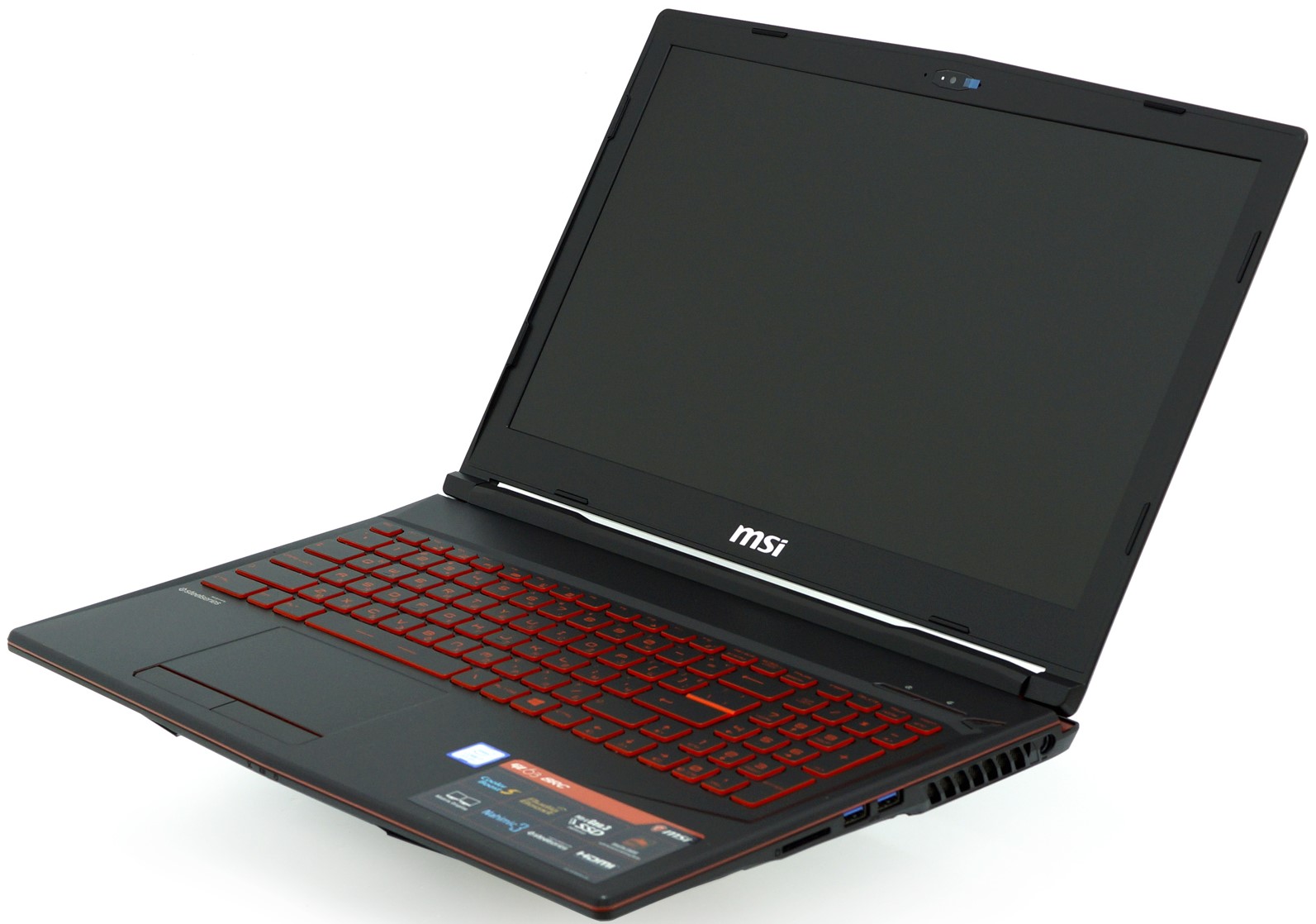 Lenovo Ideapad L340 Gaming (15″) and MSI GL63 8RC are here to show us their key-selling points. At this price point, buyers are always looking for the best bang for their buck. We’ll make a close-up dissection of every part of the innards of those notebooks. Maybe this will ease your choice. Let’s see which one is the superior.
Lenovo Ideapad L340 Gaming (15″): Detailed review
MSI GL63 8RC: Detailed review
Lenovo Ideapad L340 Gaming (15″) configurations:
MSI GL63 8RC configurations:
Contents
Design and construction
 Lenovo Ideapad L340 Gaming (15″)
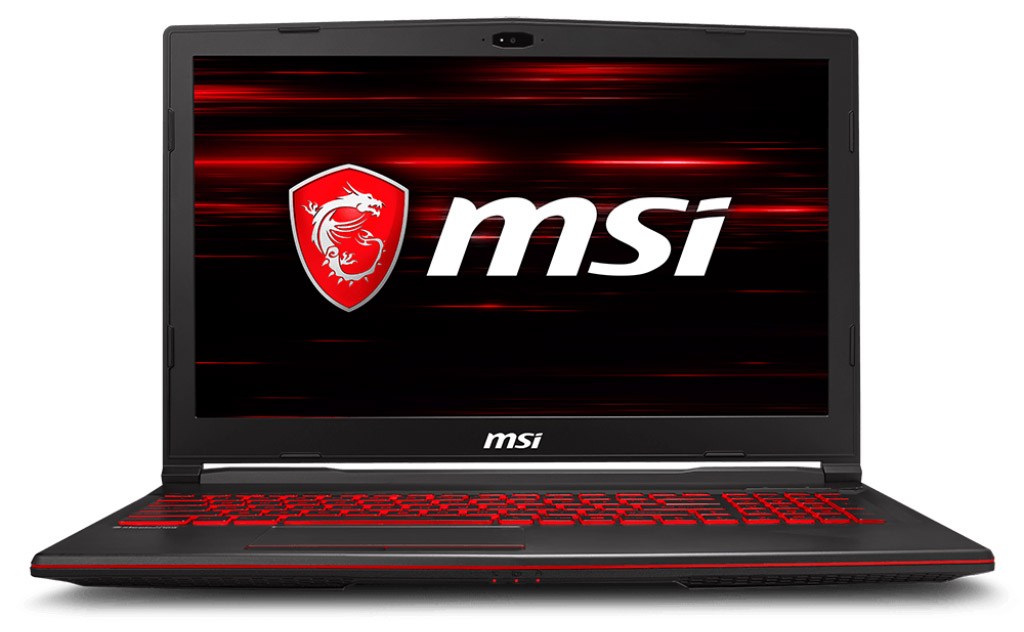 MSI GL63 8RC
MSI GL63 8RC is a bit thick with its 29.5 mm profile. In the meantime, Lenovo Ideapad L340 Gaming is much thinner with a 23.9 mm profile.
Both laptops are made out of plastic but you can’t ask for more in this price range. The paint of the Ideapad L340 Gaming is easy to scratch so you have to be careful with it.
Unlike the Legion series, the camera of the Ideapad L340 Gaming is normally placed (such a relief).
Two hands are required for opening the lid no matter the device. Keep in mind that the Lenovo’s lid is flexing too much and there isn’t such a problem with MSI GL63 8RC.
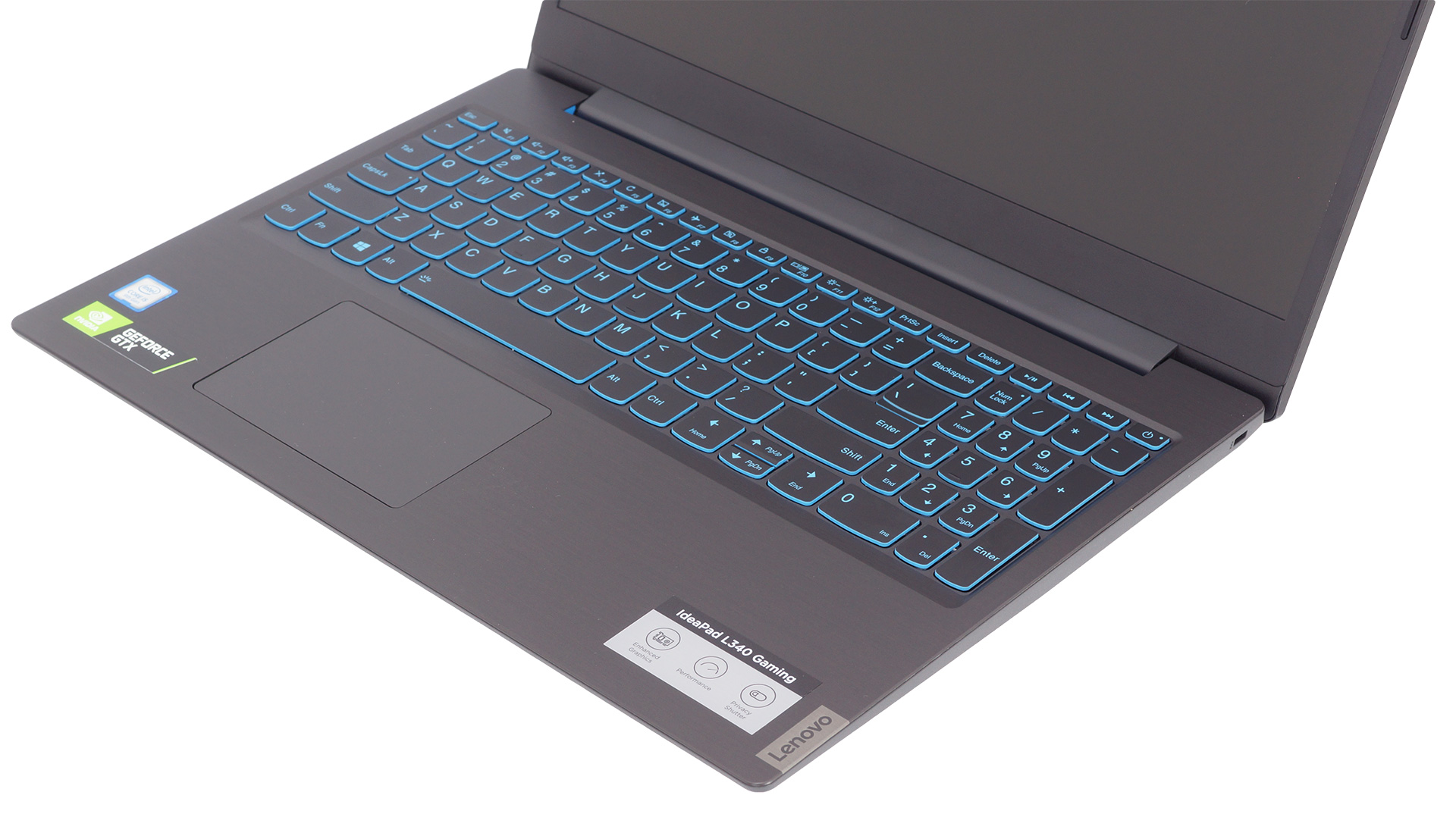 Lenovo Ideapad L340 Gaming (15″)
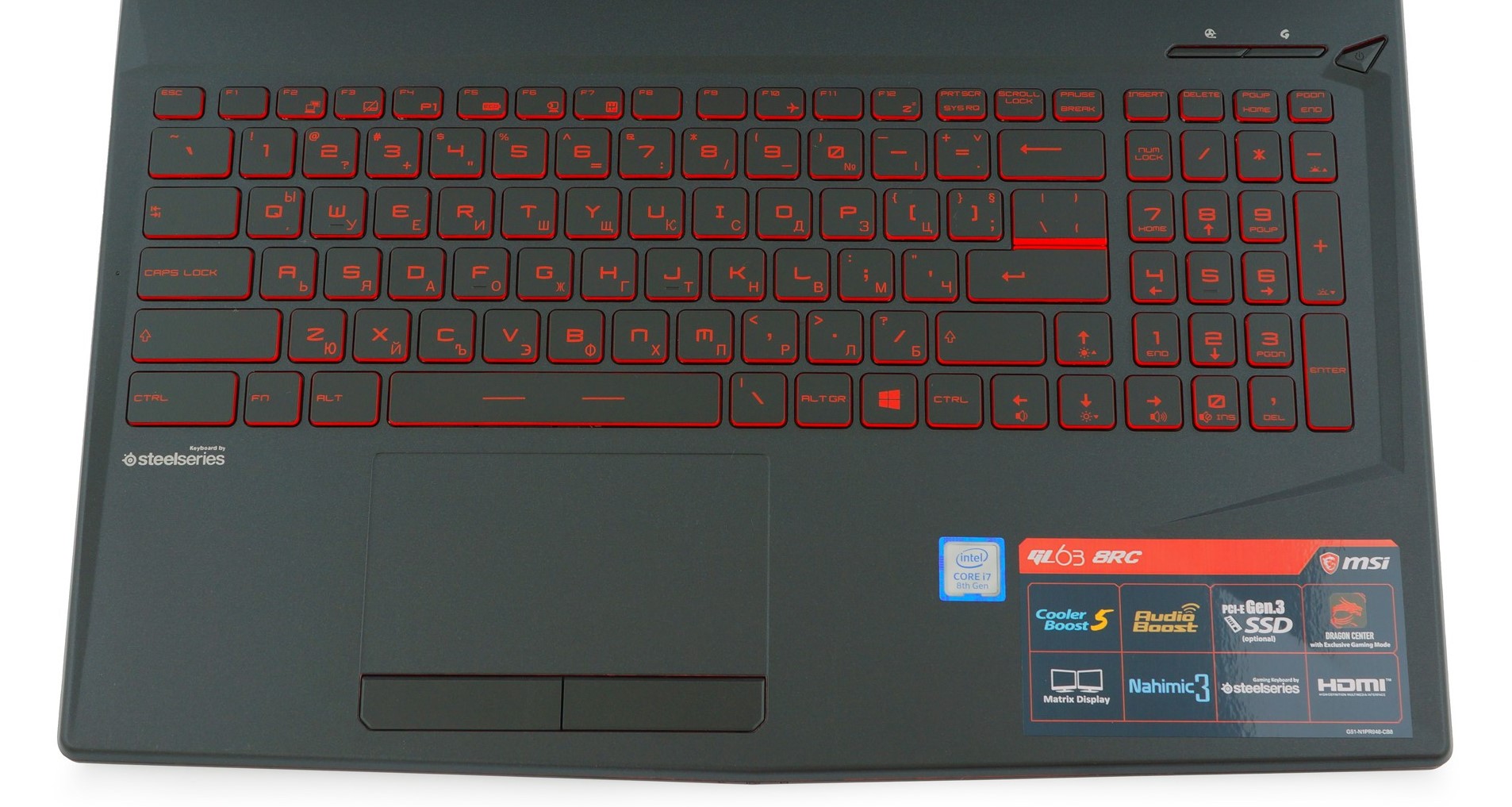 MSI GL63 8RC
The backlit keyboard in the Ideapad L340 Gaming has nice feedback and good key travel but it’s somehow more suitable for typing than gaming. While in the GL63 8RC we are finding once again the SteelSeries backlit keyboard – only red color for it but it’s not a big deal because its biggest advantage is the better gaming experience. Nice one, MSI.
The touchpad in the Lenovo is too sensitive and isn’t very comfortable to use. The MSI one is just a normal touchpad, no bonuses here.
| Height | Weight | |
|---|---|---|
| Lenovo Ideapad L340 Gaming (15″) | 23.9 mm (0.94″) | 2.19 kg (4.8 lbs) |
| MSI GL63 8RC | 29.5 mm (1.16″) | 2.20 kg (4.9 lbs) |
Interesting idea, all the ports of the Lenovo Ideapad L340 Gaming are placed on its left side – dedicated Lenovo charging port, an RJ-45 connector, an HDMI 2.0 port, then two USB Type-A 3.1 (Gen. 1) ports, an audio jack, and a USB Type-C 3.1 (Gen. 1) port.


Lenovo Ideapad L340 Gaming (15″)>


MSI GL63 8RC
MSI GL63 8RC ports are placed more “conservatively” on both sides of the machine. The left side is equipped with a lock slot, Gigabit Ethernet port, an HDMI, a Mini DisplayPort, a USB 3.1 Type-A port, a USB Type-C port, and two 3.5 mm jacks for a microphone and headphones. For the right side, we have a DC jack, another two USB 3.1 Type-A ports, and the SD card reader.
So, the MSI device has some extra ports like Gigabit Ethernet, Mini DisplayPort, one extra USB 3.1 Type-A port, and one more audio jack, as opposed to Lenovo’s ports.
Display
For the beginning, we have some common specs for both panels – 15.6″, 16:9 ratio, 1920 x 1080 resolution (142 ppi) and the pixel pitch is 0.18 х 0.18 mm.
We got TN panels for both contenders but if you look closely at the pictures down below you will notice that the MSI panel got better viewing angles. The Lenovo panel is a BOE NT156FHM-N61, and for MSI is an N156HGA-EAL.
 Lenovo Ideapad L340 Gaming (15″)
 MSI GL63 8RC
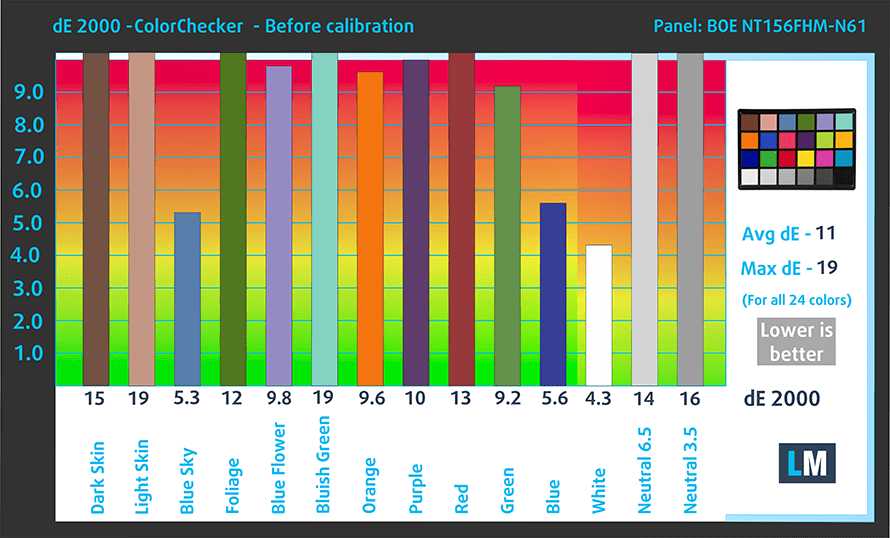
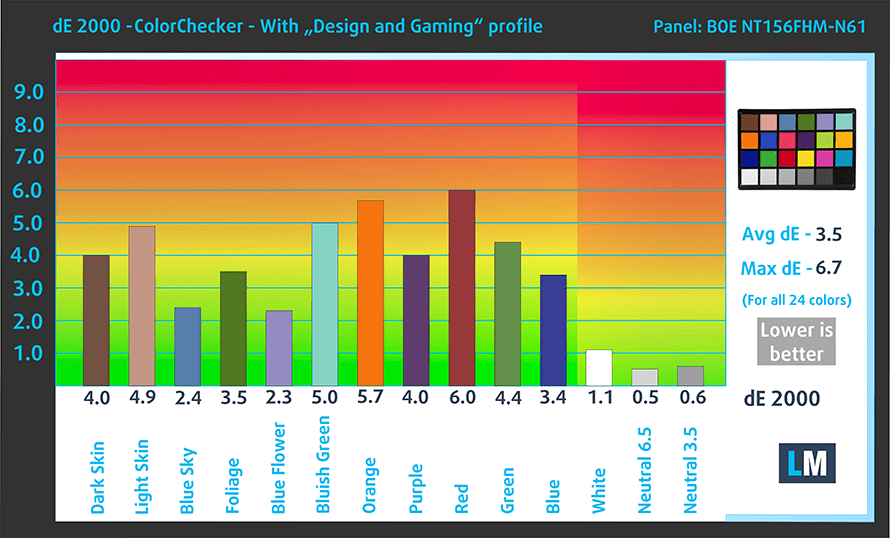
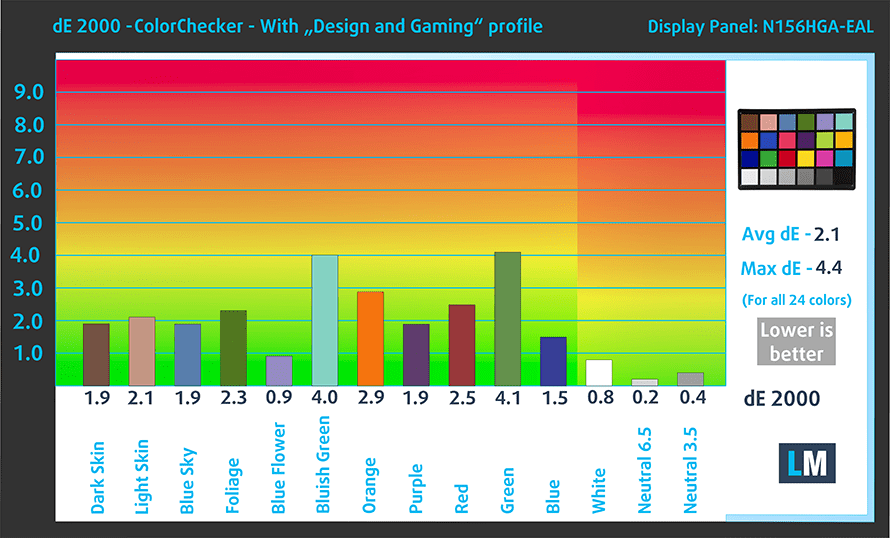
Values of dE2000 over 4.0 should not occur, and this parameter is one of the first you should check if you intend to use the laptop for color-sensitive work.
The BOE NT156FHM-N61 can show a better color temperature (7060K) next to the N156HGA-EAL (7820K).
Despite that, the contrast ratio of the MSI panel is better – 330:1 (290:1 after profiling). Sadly, a sub-par contrast ratio for our MSI contender – 230:1.
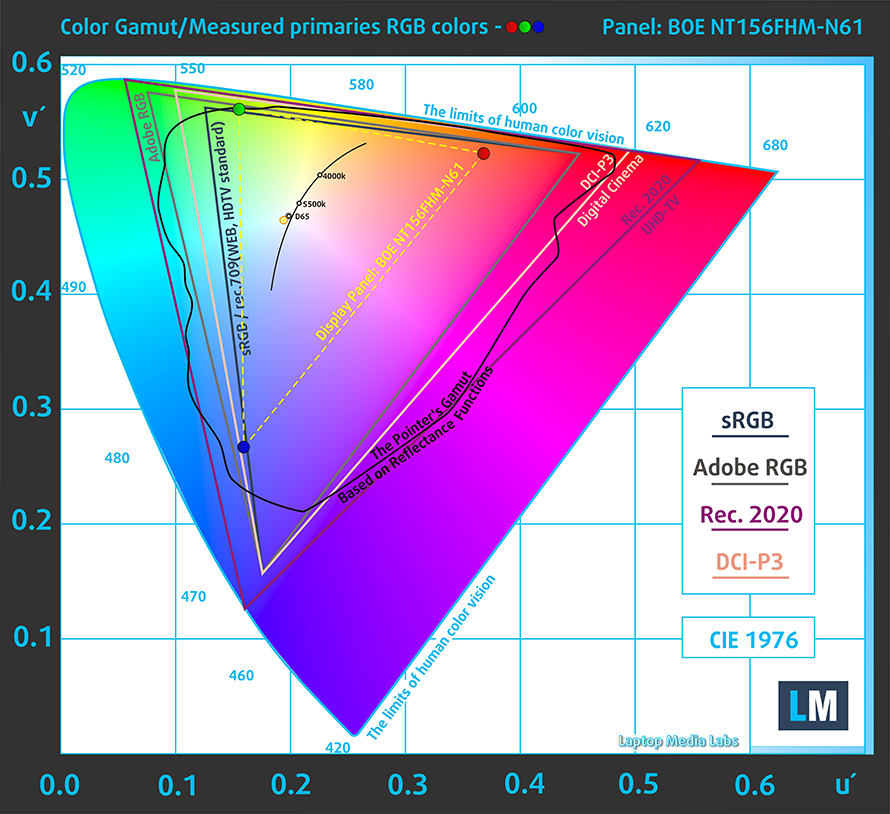 Lenovo Ideapad L340 Gaming (15″)
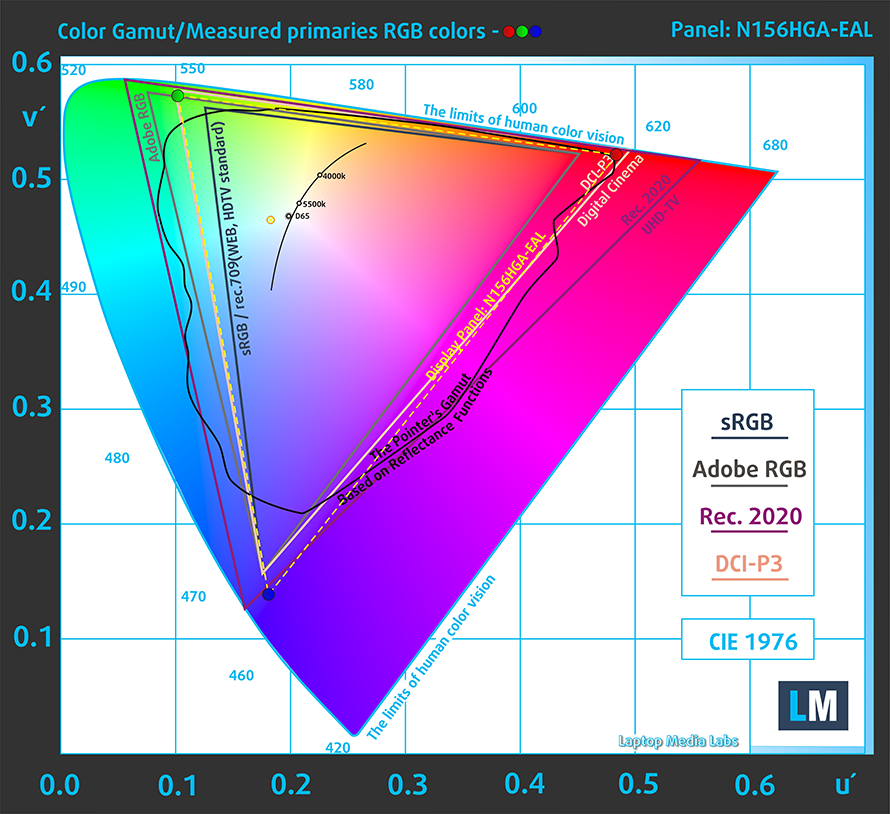 Lenovo Ideapad L340 Gaming (15″)MSI GL63 8RC
Only 50% of the sRGB for the Lenovo panel, such a disappointing result but don’t forget that it’s only a TN display. MSI is showing us that they can squeeze more from their panel – 100% of the sRGB color space and 96% of DCI-P3 in CIE1976. Hats down, please.
We were not very impressed by the stock dE values of the two panels (sky-high levels for each one of them) but it is what it is. Lenovo is a bit better before profiling 11/19 vs 12/21 for MSI, but after profiling MSI is turning the tables with a decent result – 2.1/4.4 (there is a big improvement for Lenovo too – 3.5/6.7)
 Lenovo Ideapad L340 Gaming (15″)
 MSI GL63 8RC
 Lenovo Ideapad L340 Gaming (15″)
 MSI GL63 8RC
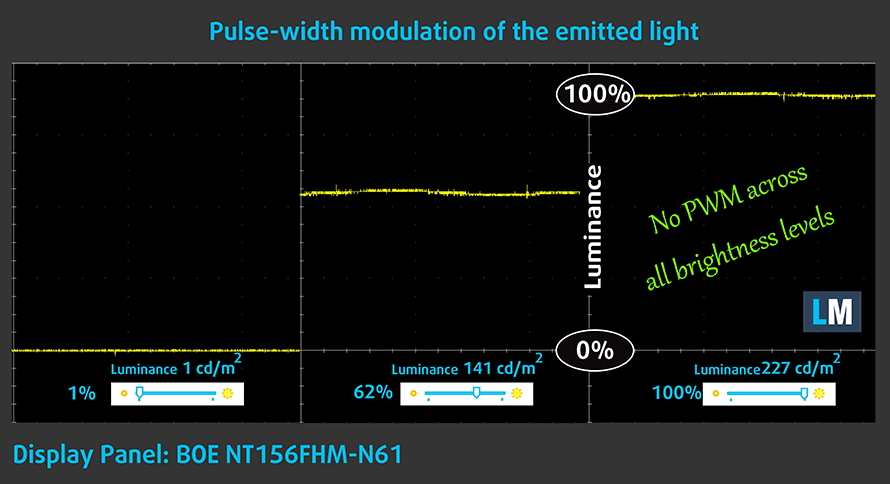
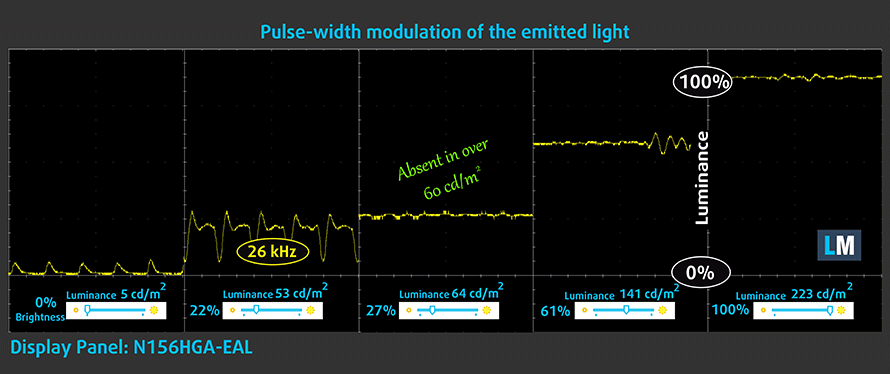
One of the most important things about a display is its safety towards the user. Here, we are happy to see that both of the laptops don’t use PWM to regulate the brightness of its screens.
Lenovo Ideapad L340 Gaming (15) is PWM-free at any brightness level. For the MSI display, PWM is used only below 60 nits and the frequency is very high so it is safe too.
 Lenovo Ideapad L340 Gaming (15″)
 MSI GL63 8RC
Our display profiles
Here at LaptopMedia, we create a set of custom-tailored profiles for every notebook we review. They boost the productivity of display and reduce negative effects such as blue light emissions and PWM. You can read more about them here.
Buy our profiles from here:
Lenovo Ideapad L340 Gaming (15″): Profiles
MSI GL63 8RC: Profiles
Specs sheet comparison
More information about Intel Core i5-9300H and its position in our Top CPU Ranking you can find HERE.
More information about Intel Core i7-8750H and its position in our Top CPU Ranking you can find HERE.
More information about the GTX 1050 (3GB GDDR5) and its place in our Top GPU Ranking you can find HERE.
More information about the GTX 1050 (4GB GDDR5) and its place in our Top GPU Ranking you can find HERE.
Lenovo IdeaPad L340 (15") Gaming Serie
- Dimensioni
- 363 x 254.6 x 23.9 mm (14.29" x 10.02" x 0.94")
- Peso
- 2.19 kg (4.8 lbs)
- Prezzo
- A partire da €1036.69
MSI GL63 8Rx / 8Sx / 9Sx Serie
- GPU
- NVIDIA GeForce RTX 2070 (Laptop)NVIDIA GeForce RTX 2060 (Laptop, 90W) #149 in Top GPUsNVIDIA GeForce RTX 2060 (Laptop)NVIDIA GeForce GTX 1660 Ti (Laptop) #163 in Top GPUsNVIDIA GeForce GTX 1660 (Laptop)NVIDIA GeForce GTX 1650 (Laptop) #213 in Top GPUsNVIDIA GeForce GTX 1060 (6GB GDDR5) #205 in Top GPUsNVIDIA GeForce GTX 1050 Ti (4GB GDDR5) #245 in Top GPUsNVIDIA GeForce GTX 1050 (4GB GDDR5) #265 in Top GPUsNVIDIA GeForce GTX 1050 (2GB GDDR5) #261 in Top GPUsIntel UHD Graphics 630 #343 in Top GPUs
- Dimensioni
- 383 x 260 x 29.5 mm (15.08" x 10.24" x 1.16")
- Peso
- 2.20 kg (4.9 lbs)
- Prezzo
- Not Available
Battery
Lenovo Ideapad L340 Gaming got a decent score here – 7 hours of web browsing and 5 hours and 45 minutes of video playback.
Unfortunately, MSI GL63 8RC is on the other side of the coin – 3:30 min web browsing and 2:53 for video. Now, that’s disappointing battery life. We consider the following facts, its battery unit is 4Wh smaller compared to the Lenovo one (45Wh vs 41Wh), and the CPU is more powerful but no matter what, the battery life is still on the low side.
Luminosità: 180 nit; Modalità Display: SDR
Tempo di Scarica Completa: Più Alto è Meglio
Per simulare condizioni reali, abbiamo usato il nostro script per la navigazione web automatica attraverso oltre 70 siti web.
Gaming tests
Nothing spectacular here, it is very clear the MSI GL63 8RC is faster in our benchmarks because of its “heart” – the GTX 1050 4GB GDDR5. Lenovo L340 is equipped with GTX 1050 3GB GDDR5.

| Grand Theft Auto V (GTA 5) | Full HD, High (Check settings) | Full HD, Very High (Check settings) |
|---|---|---|
| Lenovo Ideapad L340 Gaming (15″) | 61 fps | 35 fps |
| MSI GL63 8RC | 62 fps | 33 fps |

| Rise of the Tomb Raider (2016) | Full HD, Medium (Check settings) | Full HD, Very High (Check settings) | Full HD, MAX (Check settings) |
|---|---|---|---|
| Lenovo Ideapad L340 Gaming (15″) | 82 fps | 58 fps | 27 fps |
| MSI GL63 8RC | 80 fps | 52 fps | 25 fps |

| Tom Clancy’s Ghost Recon Wildlands | Full HD, High (Check settings) | Full HD, Very High (Check settings) | Full HD, Ultra (Check settings) |
|---|---|---|---|
| Lenovo Ideapad L340 Gaming (15″) | 42 fps | 38 fps | 33 fps |
| MSI GL63 8RC | 39 fps | 36 fps | 31 fps |
Temperatures
In this test, we load the CPU cores to 100%, while monitoring the fluctuations in their frequencies and chip temperature. The first column is indicative of the computer’s response under a short load (between 2 and 10 seconds), the second column simulates a serious task (between 15 and 30 seconds), and the third column is a good indicator of whether the laptop is suitable for heavy and continuous loads such as video rendering.
Average core frequency (base frequency + X); CPU temp.
| Core i5-9300H (45W TDP) | 0:02 – 0:10 sec | 0:15 – 0:30 sec | 10:00 – 15:00 min |
|---|---|---|---|
| Lenovo Ideapad L340 Gaming (15″) i5-9300H | 2.39 GHz @ 52°C | 3.72 GHz (B+55%)@ 87°C | 2.92 GHz (B+22%)@ 78°C |
Average core frequency (base frequency + X); CPU temp.
| Core i7-8750H (45W TDP) | 0:02 – 0:10 sec | 0:15 – 0:30 sec | 10:00 – 15:00 min |
|---|---|---|---|
| MSI GL63 8RC i7-8750H | 2.16 GHz (B-2%)@ 56° | 2.40 GHz (B+9%)@ 62.5° | 2.47 GHz (B+12%)@ 79°C |
Real-life gaming
| NVIDIA GeForce GTX 1050 | GPU frequency/ Core temp (after 2 min) | GPU frequency/ Core temp (after 30 min) |
|---|---|---|
| Lenovo Ideapad L340 Gaming (15″) | 1691 MHz @ 74°C | 1620 MHz @ 74°C |
| MSI GL63 8RC (GTX 1050) | 1658 MHz @ 65°C | 1645 MHz @ 69°C |
GTX 1050 is available for both sides but the one in the MSI GL63 8RC is the 4GB version (3GB VGA memory for Lenovo).
MSI GL63 8RC is doing a better job here keeping the temperatures of its GTX 1050 4GB lower (69°C) compared to Ideapad L340 Gaming (74°C) in the continuous load test.
Gaming comfort
Not much to say here but temperature-wise the two notebooks are comfortable for long gaming sessions. MSI GL63 8RC shell is 2°C cooler.
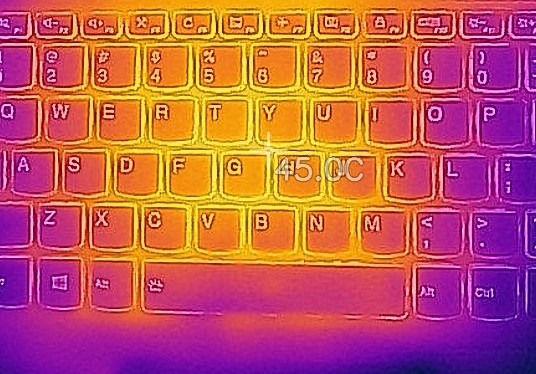 Lenovo Ideapad L340 Gaming (15″)
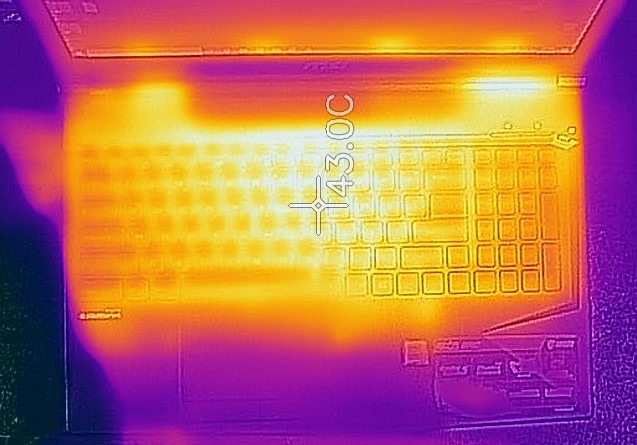 MSI GL63 8RC
Verdict
The Ideapad L340 Gaming and GL63 8RC are decent devices. They both have their strengths and weaknesses but at the end of the day, either of the two is a good choice.
The Lenovo machine is more suitable for outdoor use because of the much better battery life and its display is PWM-free (reminder – the MSI one is safe too because the screen is using PWM only below 60 nits).
The GL63 8RC is keeping the temperatures of the CPU/GPU combo under control in every situation and the gamers will like that. Speaking of gaming, the SteelSeries keyboard is a nice feature to have. The touchpad of the MSI model is better too so if you forget your mouse somewhere you can rely on its touchpad.
The GTX 1050 is doing a great job in both notebooks, delivering acceptable framerates in our benchmarks.
Why choose Lenovo Ideapad L340 Gaming (15″)?
- PWM-free display
- Good battery life
Why choose MSI GL63 8RC?
- Better display
- SteelSeries keyboard
- Better touchpad
- SD card reader
Lenovo Ideapad L340 Gaming (15″): Detailed review
MSI GL63 8RC: Detailed review
Lenovo Ideapad L340 Gaming (15″) configurations:
MSI GL63 8RC configurations:
 Author: Nikolay Palaozov

![[Giugno 2026] Le marche di laptop più vendute su Amazon Global – Il dominio incontrastato di Apple in termini di unità vendute e fatturato](https://laptopmedia.com/wp-content/uploads/2026/07/GLOBAL-Best-Brands-400x225.jpg)
![[Giugno 2026] Amazon Global: i 10 laptop più venduti – Il nuovo MacBook Neo di Apple conquista il primo posto, rivoluzionando il mercato grazie al suo prezzo accessibile](https://laptopmedia.com/wp-content/uploads/2026/07/Best-Selling-Laptops-GLOBAL-Top-10-400x225.jpg)
![[Giugno 2026] Amazon Global: i 10 laptop da gaming più venduti – Il Nitro V 16S AI di Acer domina le vendite, mentre ASUS è in testa per fatturato complessivo](https://laptopmedia.com/wp-content/uploads/2026/07/Best-Selling-Gaming-Laptops-GLOBAL-Top-10-400x225.jpg)
![[Giugno 2026] Classifica globale delle GPU per laptop più vendute su Amazon – La NVIDIA RTX 5060 è la GPU dedicata più venduta](https://laptopmedia.com/wp-content/uploads/2026/07/Best-Selling-GPUs-GLOBAL-Top-10-400x225.jpg)
![[Giugno 2026] Classifica globale delle CPU per laptop più vendute su Amazon: l’Apple M5 domina, mentre l’AMD Ryzen 7 260 conquista una quota significativa nel segmento premium](https://laptopmedia.com/wp-content/uploads/2026/07/Best-Selling-CPUs-GLOBAL-Top-10-400x225.jpg)



