Recensione di ASUS Vivobook 16X (M1603) – un prodotto di alto valore e dal prezzo contenuto
Temperature e comfort, durata della batteria
Carico massimo della CPU
In questo test utilizziamo il 100% dei core della CPU, monitorando le frequenze e la temperatura del chip. La prima colonna mostra la reazione del computer a un carico breve (2-10 secondi), la seconda colonna simula un’attività seria (tra 15 e 30 secondi) e la terza colonna è un buon indicatore di quanto il portatile sia adatto a carichi lunghi, come il rendering video.

Frequenza media dei core (frequenza di base + X); temperatura della CPU.
| AMD Ryzen 7 5800H (45W TDP) | 0:02 – 0:10 sec | 0:15 – 0:30 sec | 10:00 – 15:00 min |
|---|---|---|---|
| ASUS Vivobook 16X (M1603) | 3,26 GHz a 74°C | 3,22 GHz a 86°C | 3,02 GHz @ 83°C |
| MSI Delta 15 (A5Ex) | 3,24 GHz a 72°C | 3,16 GHz a 78°C | 3,19 GHz @ 84°C |
| ASUS ZenBook Pro 15 OLED (UM535) | 3,36 GHz (B+5%) @ 74°C | 3,32 GHz (B+4%) @ 74°C | 3,23 GHz (B+1%) @ 82°C |
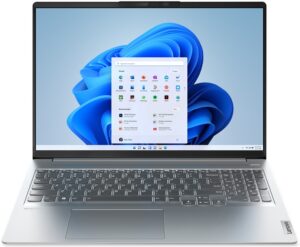
| Lenovo IdeaPad 5 Pro (16″) | 3,19 GHz a 76°C | 3,07 GHz a 79°C | 3,16 GHz @ 84°C |
| Dell G15 5515 | 3,29 GHz @ 74°C | 3,14 GHz @ 74°C | 3,21 GHz @ 82°C |
| HP Victus 16 (16-e0000) | 3,29 GHz a 80°C | 3,20 GHz @ 80°C | 3,27 GHz @ 89°C |
| HP Omen 15 (2021, 15-en1000) | 3,33 GHz a 78°C | 3,33 GHz @ 85°C | 3,42 GHz @ 88°C |
| ASUS ROG Strix SCAR 15 G533 | 3,43 GHz a 76°C | 3,35 GHz @ 80°C | 3,47 GHz @ 82°C |
| ASUS ROG Zephyrus Duo 15 SE (GX551) | 3,93 GHz a 81°C | 3,82 GHz a 86°C | 3,78 GHz @ 93°C |
| ASUS TUF A17 (FA706) 2021 | 3,42 GHz a 74°C | 3,34 GHz @ 78°C | 3,35 GHz @ 84°C |
Come prevedibile, il Vivobook 16X (M1603) si trova all’ombra dei dispositivi da gioco veri e propri quando si tratta di raffreddare l’AMD Ryzen 7 5800H. Il lato positivo è che anche le prestazioni non sono male, con la CPU in grado di sostenere 45W di TDP per tutta la durata del test.
Comfort a pieno carico
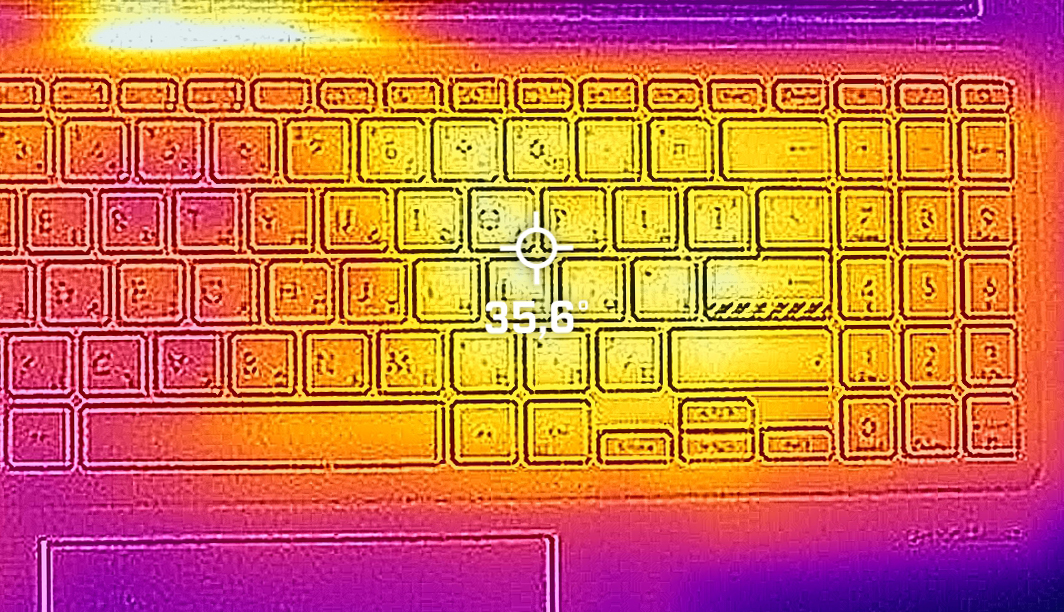
La CPU è in grado di farlo senza produrre troppo rumore dalla sua unica ventola. Il calore si concentra nella parte destra della tastiera, proprio sopra la posizione della CPU.
Batteria
Ora conduciamo i test della batteria con l’impostazione Windows Better performance attivata, la luminosità dello schermo regolata a 120 nits e tutti gli altri programmi disattivati, tranne quello con cui stiamo testando il notebook. La batteria è da 50Wh. La batteria dura 9 ore e 49 minuti di navigazione sul Web o 8 ore e 12 minuti di riproduzione video.
Luminosità: 180 nit; Modalità Display: SDR
Tempo di Scarica Completa: Più Alto è Meglio
Per simulare condizioni reali, abbiamo usato il nostro script per la navigazione web automatica attraverso oltre 70 siti web.
 Author: Alex Iliev
 Author: eng. Kroum NikolovHead of Engineering at LaptopMedia.com, inventor and innovator with 40+ years of experience in electronics and high technology.

![[Agosto 2026] Classifica globale delle GPU per laptop più vendute su Amazon: Apple domina la scena, mentre la RTX 5060 di NVIDIA è in testa alla classifica delle schede dedicate](https://laptopmedia.com/wp-content/uploads/2026/09/Best-Selling-GPUs-GLOBAL-Top-10-400x225.jpg)
![[Agosto 2026] Classifica globale delle CPU per laptop più vendute su Amazon: Apple domina sia nella fascia economica che in quella premium; A18 Pro e M5 sbaragliano Intel e AMD nell’agosto 2026](https://laptopmedia.com/wp-content/uploads/2026/09/Best-Selling-CPUs-GLOBAL-Top-10-400x225.jpg)
![[Agosto 2026] Amazon Global: i 10 laptop più venduti – L’Apple MacBook Neo domina le classifiche mentre i portatili Windows economici e di fascia media si contendono i volumi di vendita](https://laptopmedia.com/wp-content/uploads/2026/09/Best-Selling-Laptops-GLOBAL-Top-10-400x225.jpg)
![[Agosto 2026] Le marche di laptop più vendute su Amazon Global: Apple domina in termini di fatturato, mentre HP è in testa per varietà di modelli](https://laptopmedia.com/wp-content/uploads/2026/09/GLOBAL-Best-Brands-400x225.jpg)
![[Agosto 2026] Amazon Global: i 10 laptop da gaming più venduti – L’HP Victus 15 conquista il primo posto mentre i modelli economici dominano la classifica](https://laptopmedia.com/wp-content/uploads/2026/09/Best-Selling-Gaming-Laptops-GLOBAL-Top-10-400x225.jpg)

Driver from the Asus website does not fix the issue with WLAN! Wi-Fi still not working after installing Win 11 and official drivers
I put a new SSD and when formatting with Windows 10 the wifi did not work, so I put a USB to Ethernet adapter and with Windows updates the correct driver was installed, maybe with Win11 it is the same.
Cool review guys 🙂
With the display profiles you are selling. Do they expand the coverage of SRGB at all? As it doesn’t say exactly how they differ except the de
sRGB coverage is a limitation of the hardware. The only thing calibration can do is balance the display if it is skewed towards a certain colour.
why???
“Prepaid cards are not a valid payment method. Please try again with a new payment method.”
why doesnt it has tuv flicker free certification